key LINCOLN NAVIGATOR 2017 Owner's Manual
[x] Cancel search | Manufacturer: LINCOLN, Model Year: 2017, Model line: NAVIGATOR, Model: LINCOLN NAVIGATOR 2017Pages: 532, PDF Size: 3.9 MB
Page 72 of 532
Recalling Memory Positions (If Equipped)
The programmed entry codes will recall
driver memory positions as follows:
•
Entry code 1 will recall driver 1 memory
positions.
• Entry code 2 will recall driver 2 memory
positions.
Note: Personal entry codes 3, 4 and 5 will
not recall memory positions.
Erasing a Personal Code
1. Enter the factory-set 5-digit code.
2. Press and release 1·2 on the keypad
within five seconds.
3. Press and hold
1·2 for two seconds. You
must do this within five seconds of
completing Step 2.
All personal codes will erase and only the
factory-set 5-digit code will work. Anti-Scan Feature
The keypad will go into an anti-scan mode
if you enter the wrong code seven times (35
consecutive button presses). This mode
disables the keypad for one minute and the
keypad lamp will flash.
The anti-scan feature will turn off after:
•
one minute of keypad inactivity
• pressing the unlock button on the remote
control
• switching the ignition on.
Unlocking and Locking the Doors
Note: You must have an intelligent access
key within 3 ft (1 m) of your vehicle.
To Unlock All Doors
Press any button on keyless entry keypad
once to unlock all doors.
To Lock All Doors
Press and hold 7·8 and 9·0 at the same time
(with the driver door closed). You do not
need to enter the keypad code first.
69
Navigator (TB5) Canada/United States of America, enUSA, First Printing Doors and Locks
Page 73 of 532
PASSIVE ANTI-THEFT SYSTEM
Note:
The system is not compatible with
non-Ford aftermarket remote start systems.
Use of these systems may result in vehicle
starting problems and a loss of security
protection.
Note: Metallic objects, electronic devices or
a second coded key on the same key chain
may cause vehicle starting problems if they
are too close to the key when starting the
engine. Prevent these objects from touching
the coded key while starting the engine.
Switch the ignition off, move all objects on
the key chain away from the coded key and
restart the engine if a problem occurs.
Note: Do not leave a duplicate coded key
in the vehicle. Always take your keys and
lock all doors when leaving the vehicle. SecuriLock™
The system is an engine immobilization
system. The intended design is to help
prevent the engine from starting unless a
coded key programmed to your vehicle is
used. Using the wrong key may prevent the
engine from starting. A message may appear
in the information display.
If you are unable to start the engine with a
correctly coded key, a malfunction has
happened and a message may appear in the
information display.
Automatic Arming
The vehicle arms immediately after you
switch the ignition off.
Automatic Disarming
If you switch the ignition on with a coded key
you disarm the vehicle. If you unlock the
doors with the touch handle you disarm the
alarm.Replacement Keys
Note:
Your vehicle comes equipped with two
intelligent access keys.
The intelligent access key functions as a
programmed key that operates the driver
door lock and activates the intelligent access
with push button start system, as well as a
remote control.
If your programmed transmitters are lost or
stolen and you do not have an extra coded
key, you will need to have your vehicle
towed to an authorized dealer. You need to
erase the key codes from your vehicle and
program new coded keys.
Store an extra programmed key away from
the vehicle in a safe place to help prevent
any inconveniences. See your authorized
dealer to purchase additional spare or
replacement keys.
Programming a Spare Intelligent Access
Key
See your authorized dealer to have
additional keys programmed to your vehicle.
70
Navigator (TB5) Canada/United States of America, enUSA, First Printing Security
Page 74 of 532
ANTI-THEFT ALARM
The system will warn you of an unauthorized
entry to your vehicle. It will be triggered if
any door, the luggage compartment or the
hood is opened without using the key,
remote control or keyless entry keypad.
The direction indicators will flash and the
horn will sound if unauthorized entry is
attempted while the alarm is armed.
Take all remote controls to an authorized
dealer if there is any potential alarm problem
with your vehicle.
Arming the Alarm
The alarm is ready to arm when there is not
a key in your vehicle. Electronically lock your
vehicle to arm the alarm.
Disarming the Alarm
Disarm the alarm by any of the following
actions:
•
Unlock the doors or luggage
compartment with the remote control or
keyless entry keypad.
• Switch your vehicle on or start your
vehicle.
• Use a key in the driver door to unlock
your vehicle, then switch your vehicle on
within 12 seconds.
Note: Pressing the panic button on the
remote control will stop the horn and signal
indicators, but will not disarm the system.
71
Navigator (TB5) Canada/United States of America, enUSA, First Printing Security
Page 104 of 532
Transmission Tow/Haul (If Equipped)
Illuminates when you activate the
tow/haul feature. If the light flashes
steadily, have the system serviced
immediately. Damage to the transmission
could occur.
See Automatic Transmission
(page 169).
4X2 Illuminates momentarily when you
engage two-wheel drive high. If the
light fails to display or remains on
when the ignition is on, have the system
serviced immediately by an authorized
dealer.
4X4 Auto Illuminates when you engage the
four-wheel drive system. If the light
fails to display or remains on when
the ignition is on, have the system serviced
immediately by an authorized dealer. 4X4 HIGH Illuminates when you engage
four-wheel drive high. If the light
fails to display or remains on when
the ignition is on, have the system serviced
immediately by an authorized dealer.
AUDIBLE WARNINGS AND
INDICATORS
Key in Ignition Warning Chime
Sounds when you leave the key in the
ignition and the driver door open.
Headlamps On Warning Chime
Sounds when the headlamps or parking
lamps are on, the ignition is off (the key is
not in the ignition) and the driver door is
open. Parking Brake On Warning Chime
Sounds when you have left the parking brake
on and drive your vehicle. If the warning
chime remains on after you have released
the parking brake, have the system checked
by an authorized dealer immediately.
Direction Indicator Chime
Sounds when you leave the direction
indicator on after signaling a turn and driving
the vehicle more than 1.5 miles (2.4 km).
101
Navigator (TB5) Canada/United States of America, enUSA, First Printing Instrument ClusterE161509 E163173 E181781 E207351
Page 105 of 532
GENERAL INFORMATION
WARNING
Driving while distracted can result in
loss of vehicle control, crash and injury.
We strongly recommend that you use
extreme caution when using any device that
may take your focus off the road. Your
primary responsibility is the safe operation
of your vehicle. We recommend against the
use of any handheld device while driving and
encourage the use of voice-operated
systems when possible. Make sure you are
aware of all applicable local laws that may
affect the use of electronic devices while
driving. You can control various systems on your
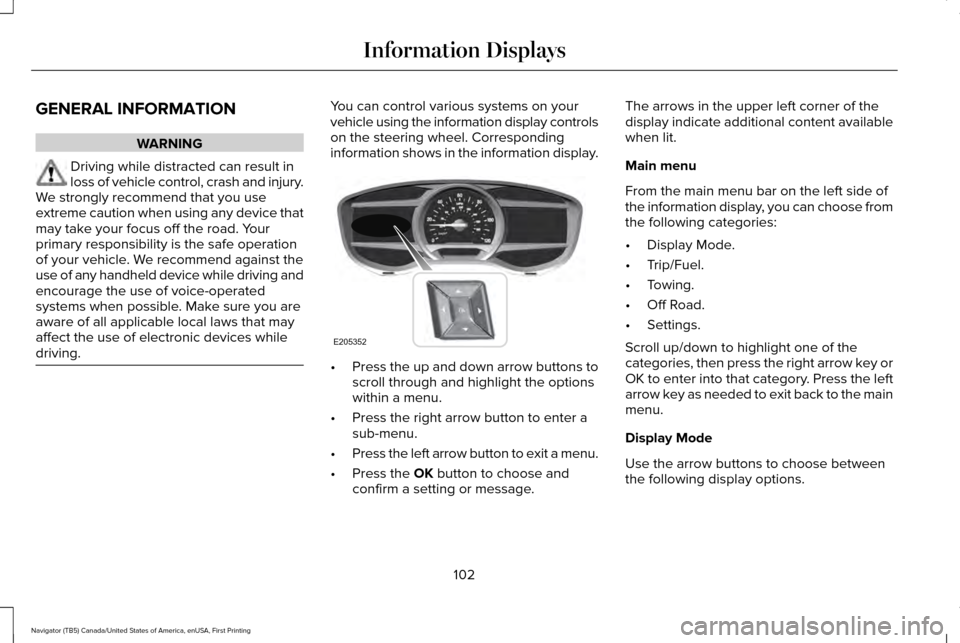
vehicle using the information display controls
on the steering wheel. Corresponding
information shows in the information display.
•
Press the up and down arrow buttons to
scroll through and highlight the options
within a menu.
• Press the right arrow button to enter a
sub-menu.
• Press the left arrow button to exit a menu.
• Press the OK button to choose and
confirm a setting or message. The arrows in the upper left corner of the
display indicate additional content available
when lit.
Main menu
From the main menu bar on the left side of
the information display, you can choose from
the following categories:
•
Display Mode.
• Trip/Fuel.
• Towing.
• Off Road.
• Settings.
Scroll up/down to highlight one of the
categories, then press the right arrow key or
OK to enter into that category. Press the left
arrow key as needed to exit back to the main
menu.
Display Mode
Use the arrow buttons to choose between
the following display options.
102
Navigator (TB5) Canada/United States of America, enUSA, First Printing Information DisplaysE205352
Page 110 of 532
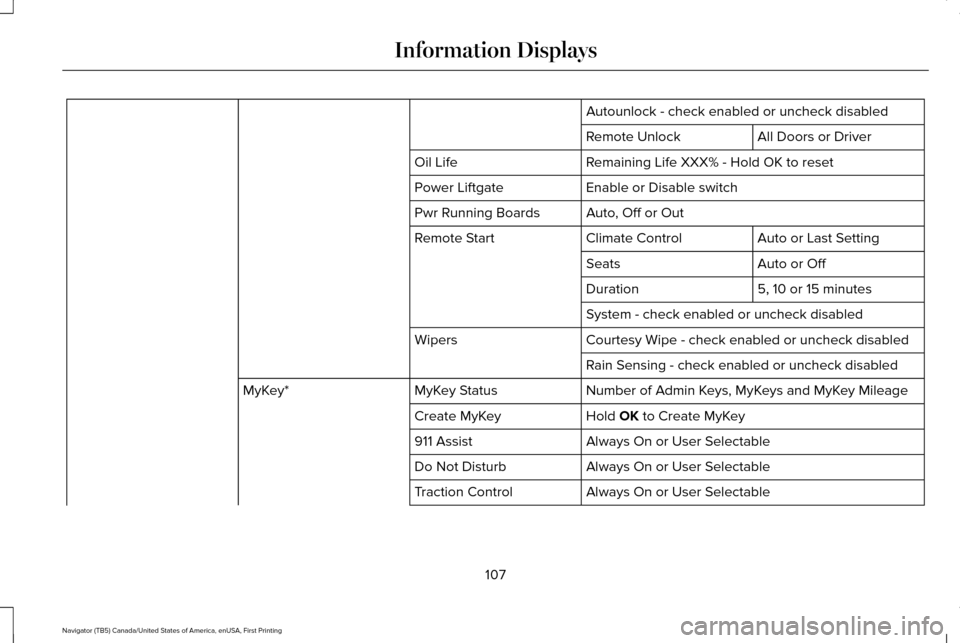
Autounlock - check enabled or uncheck disabled
All Doors or Driver
Remote Unlock
Remaining Life XXX% - Hold OK to reset
Oil Life
Enable or Disable switch
Power Liftgate
Auto, Off or Out
Pwr Running Boards
Auto or Last Setting
Climate Control
Remote Start
Auto or Off
Seats
5, 10 or 15 minutes
Duration
System - check enabled or uncheck disabled
Courtesy Wipe - check enabled or uncheck disabled
Wipers
Rain Sensing - check enabled or uncheck disabled
Number of Admin Keys, MyKeys and MyKey Mileage
MyKey Status
MyKey*
Hold OK to Create MyKey
Create MyKey
Always On or User Selectable
911 Assist
Always On or User Selectable
Do Not Disturb
Always On or User Selectable
Traction Control
107
Navigator (TB5) Canada/United States of America, enUSA, First Printing Information Displays
Page 111 of 532
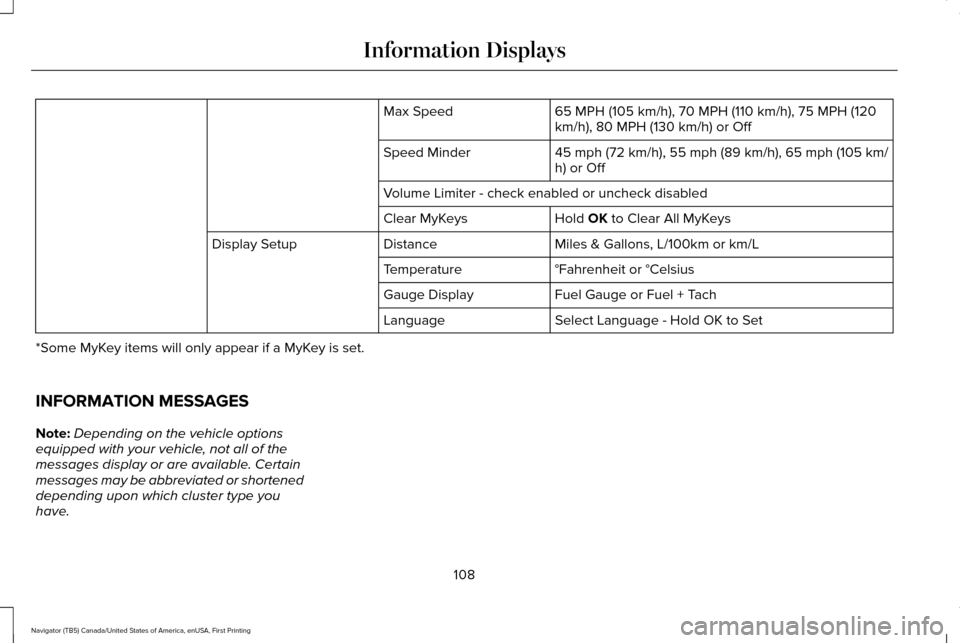
65 MPH (105 km/h), 70 MPH (110 km/h), 75 MPH (120
km/h), 80 MPH (130 km/h) or Off
Max Speed
45 mph (72 km/h), 55 mph (89 km/h), 65 mph (105 km/
h) or Off
Speed Minder
Volume Limiter - check enabled or uncheck disabled
Hold OK to Clear All MyKeys
Clear MyKeys
Miles & Gallons, L/100km or km/L
Distance
Display Setup
°Fahrenheit or °Celsius
Temperature
Fuel Gauge or Fuel + Tach
Gauge Display
Select Language - Hold OK to Set
Language
*Some MyKey items will only appear if a MyKey is set.
INFORMATION MESSAGES
Note: Depending on the vehicle options
equipped with your vehicle, not all of the
messages display or are available. Certain
messages may be abbreviated or shortened
depending upon which cluster type you
have.
108
Navigator (TB5) Canada/United States of America, enUSA, First Printing Information Displays
Page 115 of 532
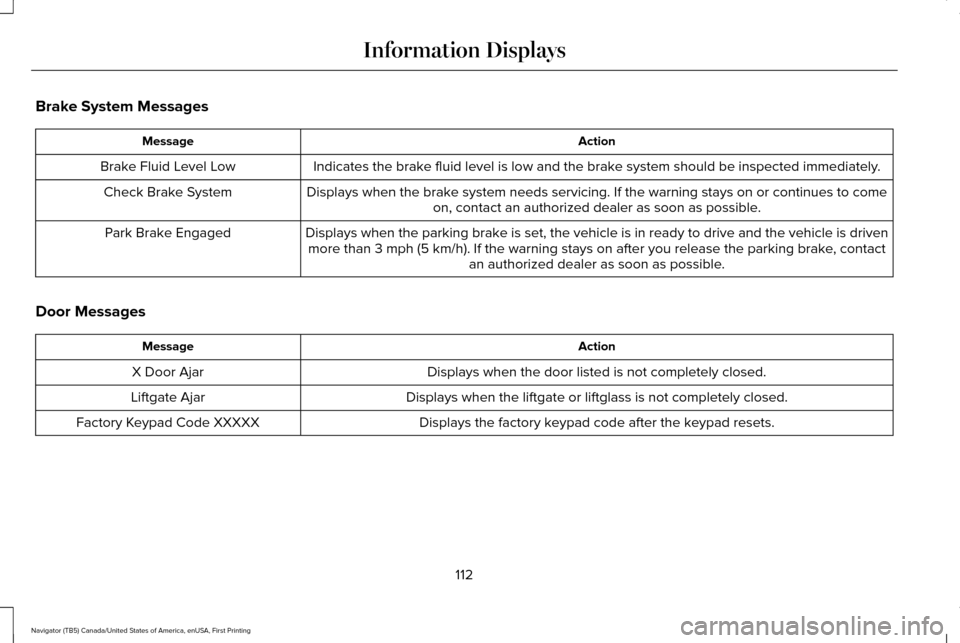
Brake System Messages
Action
Message
Indicates the brake fluid level is low and the brake system should be inspected immediately.
Brake Fluid Level Low
Displays when the brake system needs servicing. If the warning stays on or continues to comeon, contact an authorized dealer as soon as possible.
Check Brake System
Displays when the parking brake is set, the vehicle is in ready to drive and the vehicle is drivenmore than 3 mph (5 km/h). If the warning stays on after you release th\
e parking brake, contact an authorized dealer as soon as possible.
Park Brake Engaged
Door Messages Action
Message
Displays when the door listed is not completely closed.
X Door Ajar
Displays when the liftgate or liftglass is not completely closed.
Liftgate Ajar
Displays the factory keypad code after the keypad resets.
Factory Keypad Code XXXXX
112
Navigator (TB5) Canada/United States of America, enUSA, First Printing Information Displays
Page 117 of 532
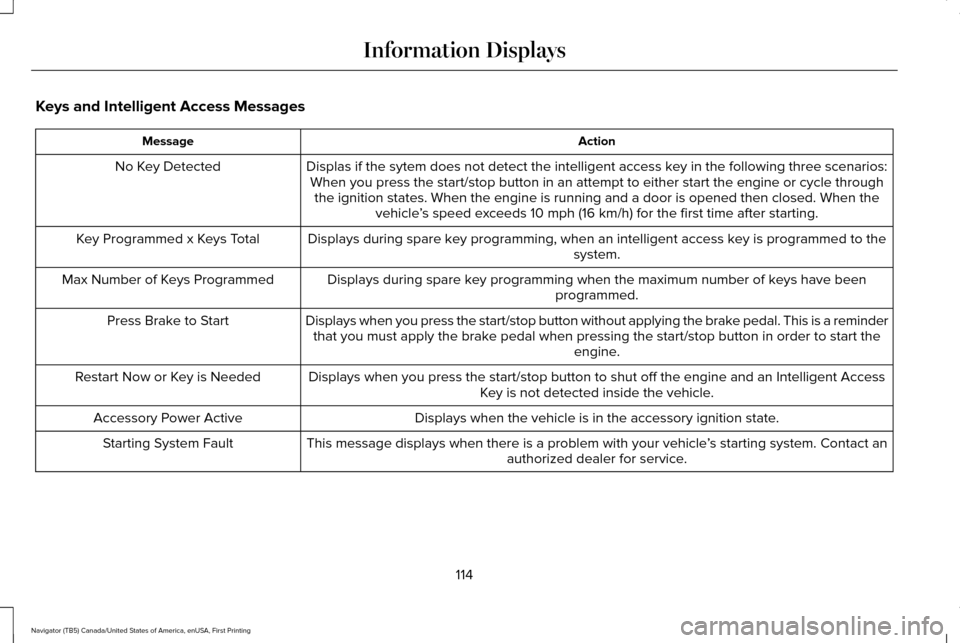
Keys and Intelligent Access Messages
Action
Message
Displas if the sytem does not detect the intelligent access key in the following three scenarios:When you press the start/stop button in an attempt to either start the e\
ngine or cycle through the ignition states. When the engine is running and a door is opened the\
n closed. When the vehicle’s speed exceeds 10 mph (16 km/h) for the first time after starting.
No Key Detected
Displays during spare key programming, when an intelligent access key is programmed to the system.
Key Programmed x Keys Total
Displays during spare key programming when the maximum number of keys have beenprogrammed.
Max Number of Keys Programmed
Displays when you press the start/stop button without applying the brake pedal. This is a reminderthat you must apply the brake pedal when pressing the start/stop button in order to start the engine.
Press Brake to Start
Displays when you press the start/stop button to shut off the engine and\
an Intelligent AccessKey is not detected inside the vehicle.
Restart Now or Key is Needed
Displays when the vehicle is in the accessory ignition state.
Accessory Power Active
This message displays when there is a problem with your vehicle ’s starting system. Contact an
authorized dealer for service.
Starting System Fault
114
Navigator (TB5) Canada/United States of America, enUSA, First Printing Information Displays
Page 119 of 532
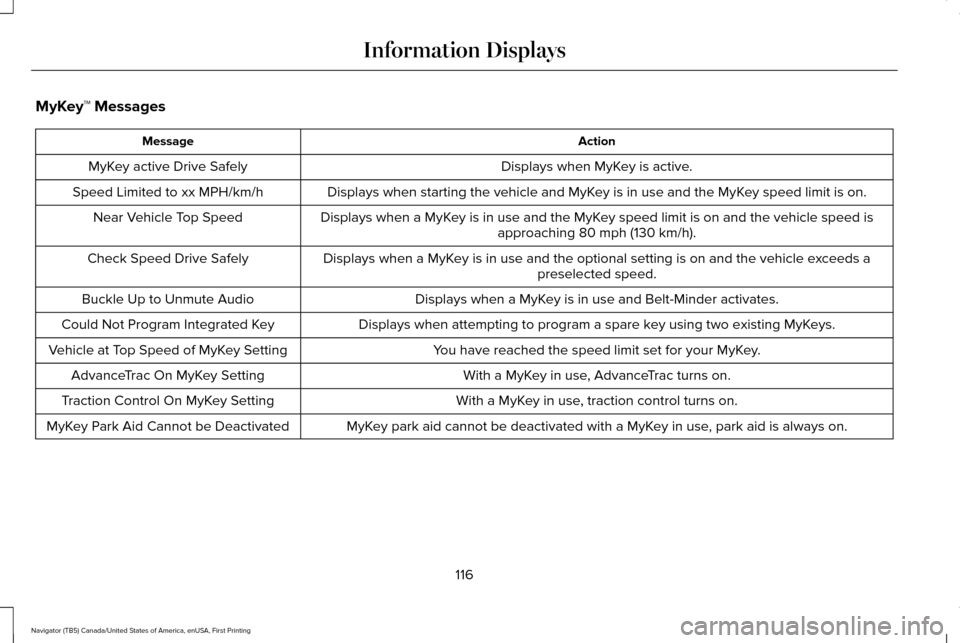
MyKey™ Messages
Action
Message
Displays when MyKey is active.
MyKey active Drive Safely
Displays when starting the vehicle and MyKey is in use and the MyKey speed limit is on.
Speed Limited to xx MPH/km/h
Displays when a MyKey is in use and the MyKey speed limit is on and the vehicle speed isapproaching 80 mph (130 km/h).
Near Vehicle Top Speed
Displays when a MyKey is in use and the optional setting is on and the vehicle exceeds apreselected speed.
Check Speed Drive Safely
Displays when a MyKey is in use and Belt-Minder activates.
Buckle Up to Unmute Audio
Displays when attempting to program a spare key using two existing MyKeys.
Could Not Program Integrated Key
You have reached the speed limit set for your MyKey.
Vehicle at Top Speed of MyKey Setting
With a MyKey in use, AdvanceTrac turns on.
AdvanceTrac On MyKey Setting
With a MyKey in use, traction control turns on.
Traction Control On MyKey Setting
MyKey park aid cannot be deactivated with a MyKey in use, park aid is always on.
MyKey Park Aid Cannot be Deactivated
116
Navigator (TB5) Canada/United States of America, enUSA, First Printing Information Displays