sat nav LINCOLN NAVIGATOR 2017 Owner's Manual
[x] Cancel search | Manufacturer: LINCOLN, Model Year: 2017, Model line: NAVIGATOR, Model: LINCOLN NAVIGATOR 2017Pages: 532, PDF Size: 3.9 MB
Page 383 of 532
AM/FM Radio
Tuning a Station
You can use the tune or seek controls on the
radio bezel to select a station.
To tune a station using the touchscreen,
select:
Menu item
Direct Tune
A pop up appears, allowing you to type in
the frequency of a station. You can only enter
a valid station for the source you are
currently listening to.
You can press the backspace button to
delete the previously entered number. Once you have entered the station's call
numbers, you can select: Action and description
Menu item
Press to begin
playing the station
you have entered.
Enter
Press to exit without
changing the station.
Cancel
Presets
To set a new preset, tune to the station and
then press and hold one of the memory
preset buttons. The audio mutes briefly while
the system saves the station and then
returns.
There are two preset banks available for AM
and three banks for FM. To access additional
presets, tap the preset button. The indicator
on the preset button shows which bank of
presets you are currently viewing. SIRIUS® Satellite Radio (If Activated)
Note:
This feature may not be available in
all markets and requires an active
subscription. SIRIUS satellite radio is a subscription-based
satellite radio service that broadcasts a
variety of music, sports, news, weather, traffic
and entertainment programming. Your
factory-installed SIRIUS satellite radio system
includes hardware and a limited subscription
term that begins on the date of sale or lease
of your vehicle. See an authorized dealer for
availability.
380
Navigator (TB5) Canada/United States of America, enUSA, First Printing SYNC™ 3E234451
Page 384 of 532
For more information on extended
subscription terms (a service fee is required),
the online media player and a list of SIRIUS
satellite radio channels, and other features,
please visit www.siriusxm.com in the United
States, www.siriusxm.ca in Canada, or call
SIRIUS at 1-888-539-7474.
Note:
SIRIUS reserves the unrestricted right
to change, rearrange, add or delete
programming. This includes canceling,
moving or adding particular channels, and
its prices, at any time, with or without notice
to you. Ford Motor Company shall not be
responsible for any such programming
changes. Note:
This receiver includes the eCos
real-time operating system. eCos is
published under the eCos License.
The following buttons are available for Sirius: Action and description
Menu item
Touch this button to see a list of available stations.
Browse
A pop-up appears, allowing you to type in the call numbers of a station.\
Direct Tune
Once you enter the stations call numbers, you can select:
The system tunes to the station you select.
Enter
You exit the pop-up and the current station continues to play.
Cancel
You can press the backspace button to delete the previous number.
381
Navigator (TB5) Canada/United States of America, enUSA, First Printing SYNC™ 3
Page 385 of 532
Action and description
Menu item
Replay audio on the current channel. You can replay approximately 45 minutes of audio as long as
you remain tuned to the current station. Changing stations erases the pr\
evious audio.
Replay
When you are in replay mode, you are not able to select a different
preset until you return to live audio. Pressing this button returns you
to the live broadcast.
Live
Save the current song, artist, or team as a favorite. The system alerts you when it plays again on
any channel.
ALERT
Selecting this button allows you to enable and edit alerts. See Settings (page 417).
Memory Presets
To set a preset, tune to the station then press
and hold one of the memory preset buttons.
The audio mutes briefly while the system
saves the station and returns once the
station is stored. There are three preset banks available for
SIRIUS. To access additional presets, tap the
preset button. The indicator on the preset
button shows which bank of presets you are
currently viewing.
Satellite Radio Electronic Serial Number
(ESN)
You need your ESN to activate, modify or
track your satellite radio account.
See
Settings (page 417).
382
Navigator (TB5) Canada/United States of America, enUSA, First Printing SYNC™ 3
Page 386 of 532
SIRIUS Satellite Radio Reception Factors and Troubleshooting
Potential reception issues
For optimal reception performance, keep the antenna clear of snow and ice build-up and keep
luggage and other materials as far away from the antenna as possible.
Antenna obstructions
Hills, mountains, tall buildings, bridges, tunnels, freeway overpasses, \
parking garages, dense tree
foliage and thunderstorms can interfere with your reception.
Terrain
When you pass a ground-based broadcast-repeating tower, a stronger signal may overtake a
weaker one and the audio system may mute.
Station overload
Your display may show ACQUIRING... to indicate the interference and the a\
udio system may mute.
Satellite radio signal interference Troubleshooting tips
Action
Cause
Message
No action required. This message should disap-
pear shortly.
Radio requires more than two seconds to produce
audio for the selected channel.
Acquiring Signal
If this message does not clear shortly, or with an
ignition key cycle, your receiver may have a fault.
See an authorized dealer for service.
There is an internal module or system failure
present.
Satellite antenna fault
SIRIUS system failure
Tune to another channel or choose another preset.
The channel is no longer available.
Invalid Channel
383
Navigator (TB5) Canada/United States of America, enUSA, First Printing SYNC™ 3
Page 387 of 532
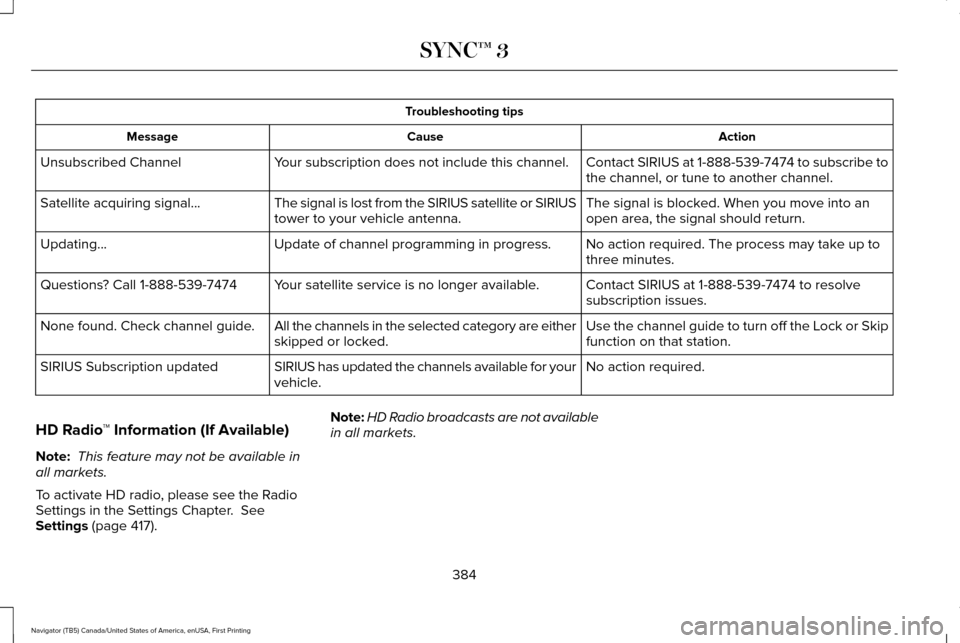
Troubleshooting tips
Action
Cause
Message
Contact SIRIUS at 1-888-539-7474 to subscribe to
the channel, or tune to another channel.
Your subscription does not include this channel.
Unsubscribed Channel
The signal is blocked. When you move into an
open area, the signal should return.
The signal is lost from the SIRIUS satellite or SIRIUS
tower to your vehicle antenna.
Satellite acquiring signal…
No action required. The process may take up to
three minutes.
Update of channel programming in progress.
Updating…
Contact SIRIUS at 1-888-539-7474 to resolve
subscription issues.
Your satellite service is no longer available.
Questions? Call 1-888-539-7474
Use the channel guide to turn off the Lock or Skip
function on that station.
All the channels in the selected category are either
skipped or locked.
None found. Check channel guide.
No action required.
SIRIUS has updated the channels available for your
vehicle.
SIRIUS Subscription updated
HD Radio ™ Information (If Available)
Note: This feature may not be available in
all markets.
To activate HD radio, please see the Radio
Settings in the Settings Chapter. See
Settings (page 417). Note:
HD Radio broadcasts are not available
in all markets.
384
Navigator (TB5) Canada/United States of America, enUSA, First Printing SYNC™ 3
Page 423 of 532
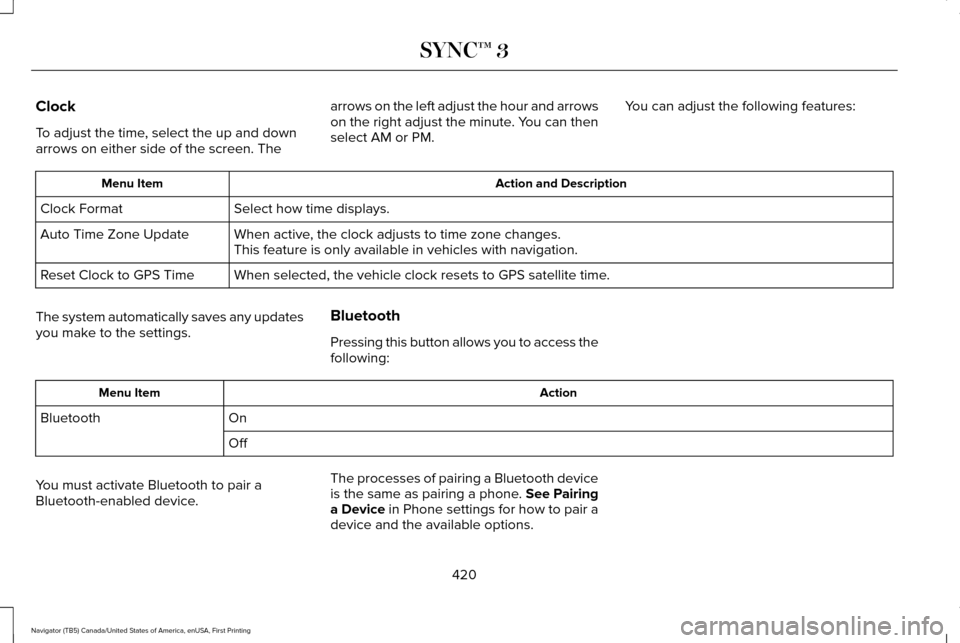
Clock
To adjust the time, select the up and down
arrows on either side of the screen. The
arrows on the left adjust the hour and arrows
on the right adjust the minute. You can then
select AM or PM.
You can adjust the following features: Action and Description
Menu Item
Select how time displays.
Clock Format
When active, the clock adjusts to time zone changes.
Auto Time Zone Update
This feature is only available in vehicles with navigation.
When selected, the vehicle clock resets to GPS satellite time.
Reset Clock to GPS Time
The system automatically saves any updates
you make to the settings. Bluetooth
Pressing this button allows you to access the
following: Action
Menu Item
On
Bluetooth
Off
You must activate Bluetooth to pair a
Bluetooth-enabled device. The processes of pairing a Bluetooth device
is the same as pairing a phone. See Pairing
a Device in Phone settings for how to pair a
device and the available options.
420
Navigator (TB5) Canada/United States of America, enUSA, First Printing SYNC™ 3
Page 436 of 532
Onboard Modem Serial Number (ESN)
Selecting this button on the settings menu
shows you the ESN number for your system.
You need this number for certain
registrations such as Satellite Radio.
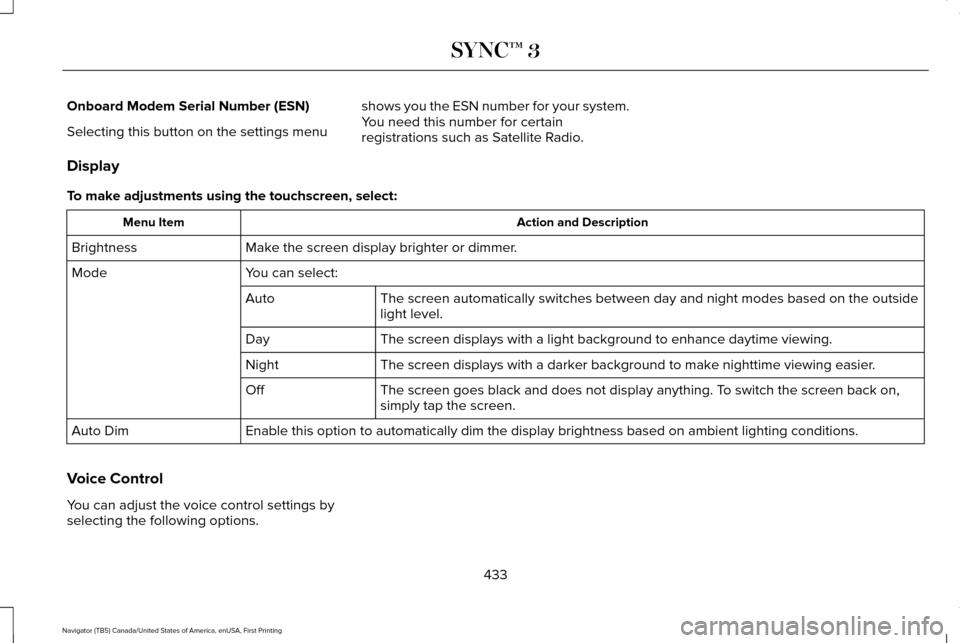
Display
To make adjustments using the touchscreen, select: Action and Description
Menu Item
Make the screen display brighter or dimmer.
Brightness
You can select:
Mode
The screen automatically switches between day and night modes based on t\
he outside
light level.
Auto
The screen displays with a light background to enhance daytime viewing.
Day
The screen displays with a darker background to make nighttime viewing easier.
Night
The screen goes black and does not display anything. To switch the screen back on,
simply tap the screen.
Off
Enable this option to automatically dim the display brightness based on \
ambient lighting conditions.
Auto Dim
Voice Control
You can adjust the voice control settings by
selecting the following options.
433
Navigator (TB5) Canada/United States of America, enUSA, First Printing SYNC™ 3
Page 459 of 532
GENERAL MAINTENANCE
INFORMATION
Why Maintain Your Vehicle?
Carefully following the maintenance
schedule helps protect against major repair
expenses resulting from neglect or
inadequate maintenance and may help to
increase the value of your vehicle when you
sell or trade it. Keep all receipts for
completed maintenance with your vehicle.
We have established regular maintenance
intervals for your vehicle based upon
rigorous testing. It is important that you have
your vehicle serviced at the proper times.
These intervals serve two purposes; one is
to maintain the reliability of your vehicle and
the second is to keep your cost of owning
your vehicle down.
It is your responsibility to have all scheduled
maintenance performed and to make sure
that the materials used meet the
specifications identified in this owner's
manual. See Capacities and Specifications
(page 328).
Failure to perform scheduled maintenance
invalidates warranty coverage on parts
affected by the lack of maintenance.
Why Maintain Your Vehicle at Your
Dealership?
Factory-Trained Technicians
Service technicians participate in extensive
factory-sponsored certification training to
help them become experts on the operation
of your vehicle. Ask your dealership about
the training and certification their technicians
have received.
Genuine Ford and Motorcraft® Replacement
Parts
Dealerships stock Ford, Motorcraft and
Ford-authorized branded re-manufactured
replacement parts. These parts meet or
exceed our specifications. Parts installed at
your dealership carry a nationwide 24-month
or unlimited mile (kilometer) parts and labor
limited warranty.
If you do not use Ford authorized parts they
may not meet our specifications and
depending on the part, it could affect
emissions compliance.
Convenience
Many dealerships have extended evening
and Saturday hours to make your service
visit more convenient and they offer one stop
shopping. They can perform any services
that are required on your vehicle, from
general maintenance to collision repairs.
Note:
Not all dealers have extended hours
or body shops. Please contact your dealer
for details.
Protecting Your Investment
Maintenance is an investment that pays
dividends in the form of improved reliability,
durability and resale value. To maintain the
proper performance of your vehicle and its
emission control systems, make sure you
have scheduled maintenance performed at
the designated intervals.
456
Navigator (TB5) Canada/United States of America, enUSA, First Printing Scheduled Maintenance
Page 498 of 532
•
You agree to each of the following:(a)
Any use of the SOFTWARE while driving
an automobile or other vehicle in
violation of applicable law or otherwise
driving in an unsafe manner presents a
significant risk of distracted driving and
should not be attempted under any
circumstances;(b) Use of the SOFTWARE
at excessive volume poses a significant
risk of hearing damage and should not
be attempted under any
circumstances;(c) The SOFTWARE may
not be compatible with new or different
versions of an operating system, third
party software, or third party services,
and the SOFTWARE may potentially
cause a critical failure of an operating
system, third party software, or third party
service.(d) Any third party service
accessed by or third party software used
with the SOFTWARE (I) may charge an
additional fee for access, (ii) may not
work correctly, on an uninterrupted basis,
or error free, (iii) may change streaming
formats or discontinue operation, (iv) may
contain adult, profane or offensive
content; and (v) may contain inaccurate,
false or misleading traffic, weather, financial or safety information or other
content; and (e) Use of the SOFTWARE
may cause you to incur additional
charges from your wireless service
provider (WSP) and any data or minute
calculators that may be included in the
software program are for reference only,
are not warranted in any way and should
not be relied upon in anyway.
• When using the SOFTWARE, you agree
to be responsible for and assume the
entire risk to the items set forth in Section
(a) – (e) above.
Disclaimer of Warranty
YOU EXPRESSLY ACKNOWLEDGE AND
AGREE THAT USE OF THE DEVICES AND
SOFTWARE IS AT YOUR SOLE RISK AND
THAT THE ENTIRE RISK AS TO
SATISFACTORY QUALITY, PERFORMANCE,
COMPATIBILITY, ACCURACY AND EFFORT
IS WITH YOU. TO THE MAXIMUM EXTENT
PERMITTED BY APPLICABLE LAW, THE
SOFTWARE AND ANY THIRD PARTY
SOFTWARE OR THIRD-PARTY SERVICES
ARE PROVIDED "AS IS" AND “ AS
AVAILABLE” , WITH ALL FAULTS AND WITHOUT WARRANTY OF ANY KIND, AND
FORD MOTOR COMPANY HEREBY
DISCLAIMS ALL WARRANTIES AND
CONDITIONS WITH RESPECT TO THE
SOFTWARE, THIRD PARTY SOFTWARE, AND
THIRD-PARTY SERVICES, EITHER EXPRESS,
IMPLIED OR STATUTORY, INCLUDING, BUT
NOT LIMITED TO, THE IMPLIED
WARRANTIES AND/OR CONDITIONS OF
MERCHANTABILITY, OF SATISFACTORY
QUALITY, OF FITNESS FOR AN ARTICULAR
PURPOSE, OF ACCURACY, OF QUIET
ENJOYMENT, AND NON-INFRINGEMENT
OF THIRD-PARTY RIGHTS. FORD MOTOR
COMPANY DOES NOT WARRANT (a)
AGAINST INTERFERENCE WITH YOUR
ENJOYMENT OF THE SOFTWARE, THIRD
PARTY SOFTWARE, OR THIRD-PARTY
SERVICES, (b) THAT THE SOFTWARE, THIRD
PARTY SOFTWARE, OR THIRD-PARTY
SERVICES WILL MEET YOUR
REQUIREMENTS, (c) THAT THE OPERATION
OF THE SOFTWARE, THIRD PARTY
SOFTWARE, OR THIRD-PARTY SERVICES
WILL BE UNINTERRUPTED OR ERROR-FREE,
(d) OR THAT DEFECTS IN THE SOFTWARE,
THIRD PARTY SOFTWARE, OR THIRD-PARTY
SERVICES WILL BE CORRECTED. NO ORAL
495
Navigator (TB5) Canada/United States of America, enUSA, First Printing Appendices
Page 500 of 532
(c) Small claims court. You may also litigate
any dispute in small claims court in your
county of residence or FORD MOTOR
COMPANY’S principal place of business, if
the dispute meets all requirements to be
heard in the small claims court. You may
litigate in small claims court whether or not
You negotiated informally first.
(d) Binding arbitration. If You and FORD
MOTOR COMPANY, do not resolve any
dispute by informal negotiation or in small
claims court, any other effort to resolve the
dispute will be conducted exclusively by
binding arbitration. You are giving up the
right to litigate (or participate in as a party or
class member) all disputes in court before a
judge or jury. Instead, all disputes will be
resolved before a neutral arbitrator, whose
decision will be final except for a limited right
of appeal under the Federal Arbitration Act.
Any court with jurisdiction over the parties
may enforce the arbitrator’ s award.(e) Class action waiver.
Any proceedings to
resolve or litigate any dispute in any forum
will be conducted solely on an individual
basis. Neither you nor FORD MOTOR
COMPANY, will seek to have any dispute
heard as a class action, as a private attorney
general action, or in any other proceeding
in which any party acts or proposes to act in
a representative capacity. No arbitration or
proceeding will be combined with another
without the prior written consent of all parties
to all affected arbitrations or proceedings.
(f ) Arbitration procedure.
Any arbitration
will be conducted by the American
Arbitration Association (the “ AAA”), under its
Commercial Arbitration Rules. If You are an
individual and use the SOFTWARE for
personal or vehicle use, or if the value of the
dispute is $75,000 or less whether or not
You are an individual or how You use the
SOFTWARE, the AAA Supplementary
Procedures for Consumer-Related Disputes
will also apply. To commence arbitration,
submit a Commercial Arbitration Rules
Demand for Arbitration form to the AAA. You
may request a telephonic or in-person
hearing by following the AAA rules. In a dispute involving $10,000 or less, any
hearing will be telephonic unless the
arbitrator finds good cause to hold an
in-person hearing instead. For more
information, see adr.org or call
1-800-778-7879. You agree to commence
arbitration only in your county of residence
or FORD MOTOR COMPANY’S principal
place of business. The arbitrator may award
the same damages to You individually as a
court could. The arbitrator may award
declaratory or injunctive relief only to You
individually, and only to the extent required
to satisfy Your individual claim.
(g) Arbitration fees and incentives.
•
I. Disputes involving $75,000 or less.
FORD MOTOR COMPANY will promptly
reimburse your filing fees and pay the
AAA’ s and arbitrator’ s fees and
expenses. If you reject FORD MOTOR
COMPANY’S last written settlement offer
made before the arbitrator was appointed
(“last written offer”), your dispute goes
all the way to an arbitrator’ s decision
(called an “award”), and the arbitrator
awards you more than the last written
offer, FORD MOTOR COMPANY will give
497
Navigator (TB5) Canada/United States of America, enUSA, First Printing Appendices