sensor LINCOLN NAVIGATOR 2017 Owner's Manual
[x] Cancel search | Manufacturer: LINCOLN, Model Year: 2017, Model line: NAVIGATOR, Model: LINCOLN NAVIGATOR 2017Pages: 532, PDF Size: 3.9 MB
Page 205 of 532
WARNING
Never use the Cross Traffic Alert
system as a replacement for using the
interior and exterior mirrors and looking over
your shoulder before backing out of a
parking space. Cross Traffic Alert is not a
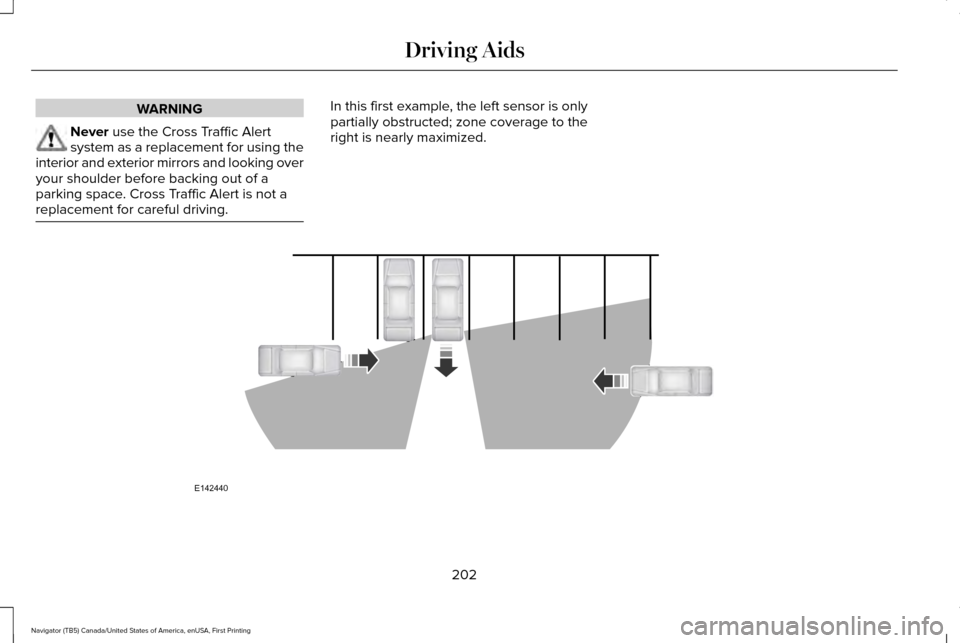
replacement for careful driving. In this first example, the left sensor is only
partially obstructed; zone coverage to the
right is nearly maximized.
202
Navigator (TB5) Canada/United States of America, enUSA, First Printing Driving AidsE142440
Page 206 of 532
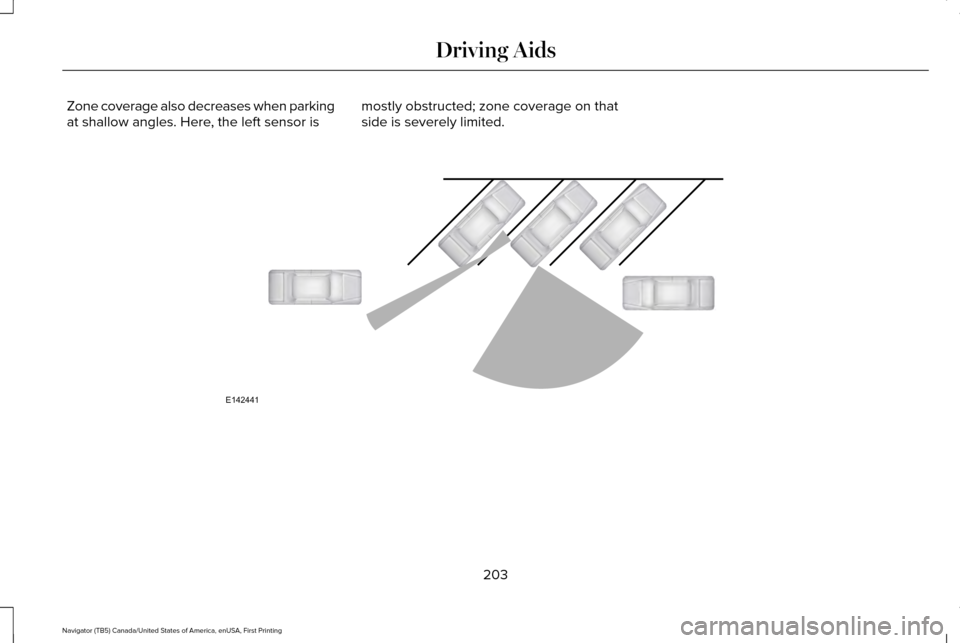
Zone coverage also decreases when parking
at shallow angles. Here, the left sensor is
mostly obstructed; zone coverage on that
side is severely limited. 203
Navigator (TB5) Canada/United States of America, enUSA, First Printing Driving AidsE142441
Page 207 of 532
System Lights and Messages
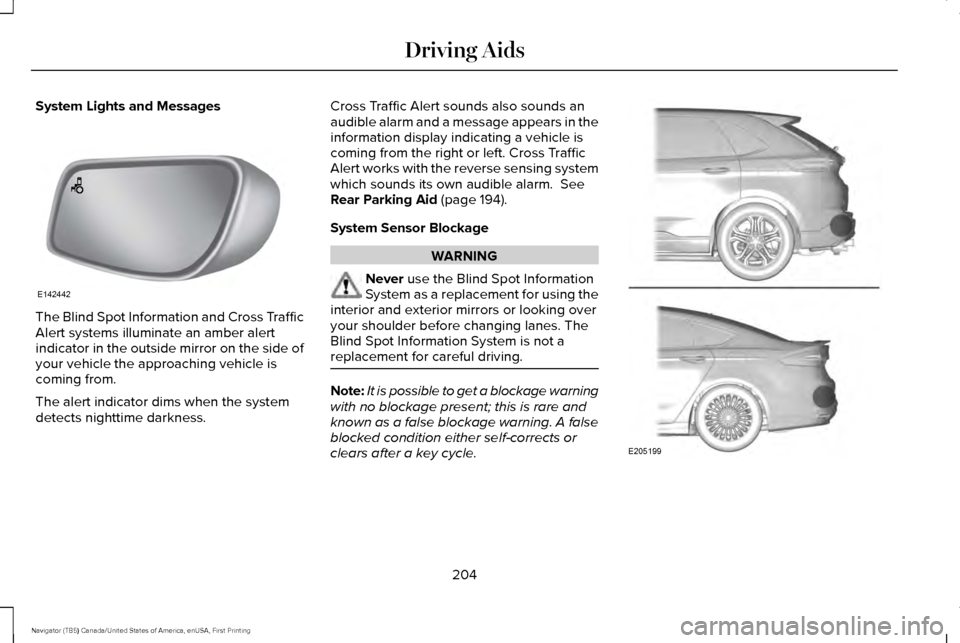
The Blind Spot Information and Cross Traffic
Alert systems illuminate an amber alert
indicator in the outside mirror on the side of
your vehicle the approaching vehicle is
coming from.
The alert indicator dims when the system
detects nighttime darkness. Cross Traffic Alert sounds also sounds an
audible alarm and a message appears in the
information display indicating a vehicle is
coming from the right or left. Cross Traffic
Alert works with the reverse sensing system
which sounds its own audible alarm. See
Rear Parking Aid (page 194).
System Sensor Blockage WARNING
Never
use the Blind Spot Information
System as a replacement for using the
interior and exterior mirrors or looking over
your shoulder before changing lanes. The
Blind Spot Information System is not a
replacement for careful driving. Note:
It is possible to get a blockage warning
with no blockage present; this is rare and
known as a false blockage warning. A false
blocked condition either self-corrects or
clears after a key cycle. 204
Navigator (TB5) Canada/United States of America, enUSA, First Printing Driving AidsE142442 E205199
Page 208 of 532
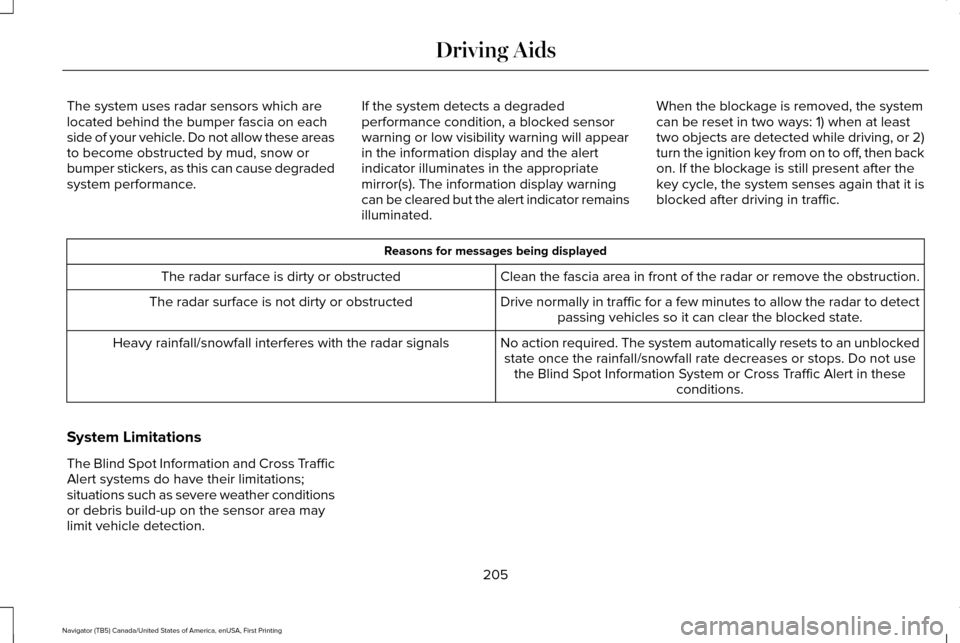
The system uses radar sensors which are
located behind the bumper fascia on each
side of your vehicle. Do not allow these areas
to become obstructed by mud, snow or
bumper stickers, as this can cause degraded
system performance.
If the system detects a degraded
performance condition, a blocked sensor
warning or low visibility warning will appear
in the information display and the alert
indicator illuminates in the appropriate
mirror(s). The information display warning
can be cleared but the alert indicator remains
illuminated.When the blockage is removed, the system
can be reset in two ways: 1) when at least
two objects are detected while driving, or 2)
turn the ignition key from on to off, then back
on. If the blockage is still present after the
key cycle, the system senses again that it is
blocked after driving in traffic. Reasons for messages being displayed
Clean the fascia area in front of the radar or remove the obstruction.
The radar surface is dirty or obstructed
Drive normally in traffic for a few minutes to allow the radar to detect\
passing vehicles so it can clear the blocked state.
The radar surface is not dirty or obstructed
No action required. The system automatically resets to an unblockedstate once the rainfall/snowfall rate decreases or stops. Do not use the Blind Spot Information System or Cross Traffic Alert in these conditions.
Heavy rainfall/snowfall interferes with the radar signals
System Limitations
The Blind Spot Information and Cross Traffic
Alert systems do have their limitations;
situations such as severe weather conditions
or debris build-up on the sensor area may
limit vehicle detection. 205
Navigator (TB5) Canada/United States of America, enUSA, First Printing Driving Aids
Page 209 of 532
The following are other situations that may
limit the Blind Spot Information System:
•
Certain maneuvering of vehicles entering
and exiting the blind zone.
• Vehicles passing through the blind zone
at very fast rates.
• When several vehicles forming a convoy
pass through the blind zone.
The following are other situations that may
limit the Cross Traffic Alert:
• Adjacently parked vehicles or objects
obstructing the sensors.
• Approaching vehicles passing at speeds
greater than 15 mph (24 km/h).
• Driving in reverse faster than
3 mph
(5 km/h).
• Backing out of an angled parking spot.
False Alerts
Note: If you connected a trailer to your
vehicle, the Blind Spot Information System
may detect the trailer causing a false alert.
To avoid false alerts you may want to turn
the system off manually. There may be certain instances when either
the Blind Spot Information or Cross Traffic
Alert systems illuminate the alert indicator
with no vehicle in the coverage zone; this is
known as a false alert. Some amount of false
alerts are normal; they are temporary and
self-correct.
System Errors
If the system senses a problem with the left
or right sensor, the telltale will illuminate and
a message will appear in the information
display.
See Information Messages (page
108).
Switching the System Off and On
One or both systems can be switched off
temporarily by using the information display
control; See Information Displays (page 102).
. When you switch off the Blind Spot
Information System, you will not receive
alerts and the information display will display
a system off message. The yellow alert
indicator in the outside mirror will also flash
twice. The system switches back on
whenever you switch the ignition on. You can also have the Blind Spot Information
System switched off permanently at an
authorized dealer. Once switched off
permanently, the system can only be
switched back on at an authorized dealer.
STEERING
Electric Power Steering
WARNINGS
The electric power steering system has
diagnostic checks that continuously
monitor the system. If a fault is detected, a
message displays in the information display.
Stop your vehicle as soon as it is safe to do
so. Switch the ignition off. After at least 10
seconds, switch the ignition on and watch
the information display for a steering system
warning message. If a steering system
warning message returns, have the system
checked by an authorized dealer.
206
Navigator (TB5) Canada/United States of America, enUSA, First Printing Driving Aids
Page 251 of 532
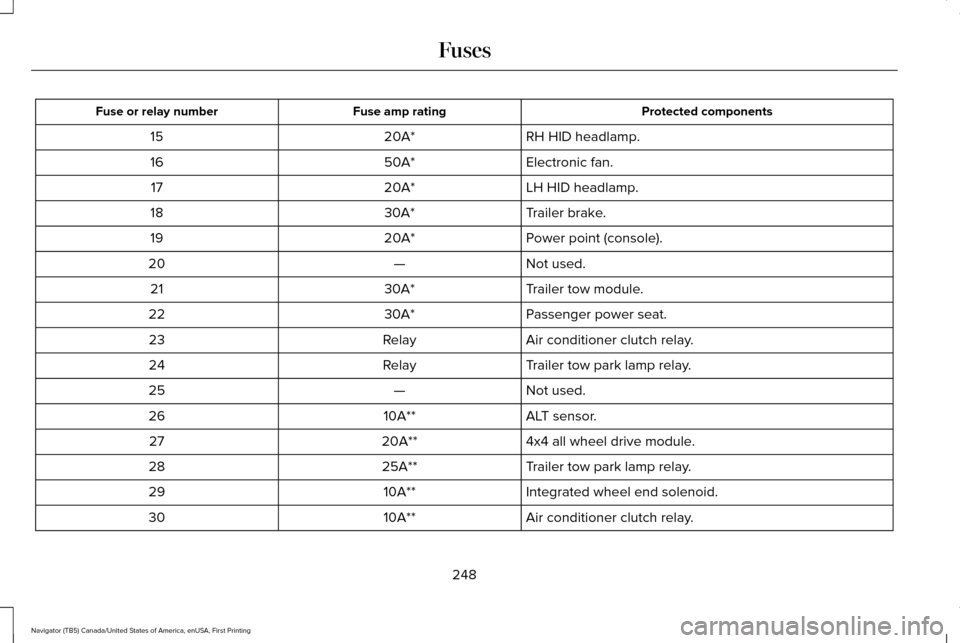
Protected components
Fuse amp rating
Fuse or relay number
RH HID headlamp.
20A*
15
Electronic fan.
50A*
16
LH HID headlamp.
20A*
17
Trailer brake.
30A*
18
Power point (console).
20A*
19
Not used.
—
20
Trailer tow module.
30A*
21
Passenger power seat.
30A*
22
Air conditioner clutch relay.
Relay
23
Trailer tow park lamp relay.
Relay
24
Not used.
—
25
ALT sensor.
10A**
26
4x4 all wheel drive module.
20A**
27
Trailer tow park lamp relay.
25A**
28
Integrated wheel end solenoid.
10A**
29
Air conditioner clutch relay.
10A**
30
248
Navigator (TB5) Canada/United States of America, enUSA, First Printing Fuses
Page 255 of 532
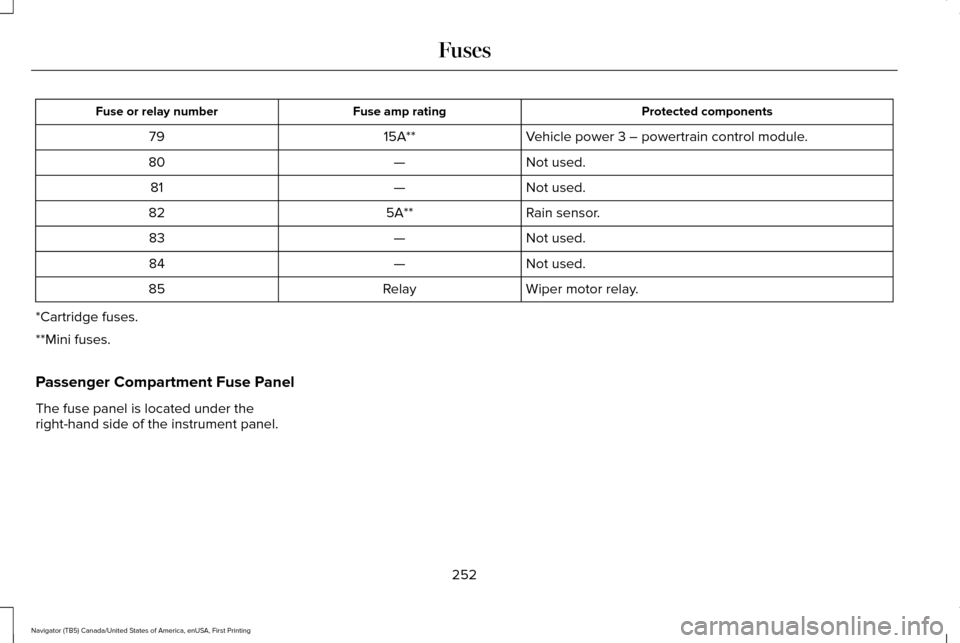
Protected components
Fuse amp rating
Fuse or relay number
Vehicle power 3 – powertrain control module.
15A**
79
Not used.
—
80
Not used.
—
81
Rain sensor.
5A**
82
Not used.
—
83
Not used.
—
84
Wiper motor relay.
Relay
85
*Cartridge fuses.
**Mini fuses.
Passenger Compartment Fuse Panel
The fuse panel is located under the
right-hand side of the instrument panel.
252
Navigator (TB5) Canada/United States of America, enUSA, First Printing Fuses
Page 286 of 532
CHANGING THE ENGINE AIR
FILTER
WARNING
To reduce the risk of vehicle damage
and personal burn injuries, do not start
your engine with the air cleaner removed
and do not remove it while the engine is
running. Note:
Failure to use the correct air filter
element may result in severe engine
damage. Resulting component damage may
not be covered by the vehicle Warranty.
When changing the air filter element, use
only the air filter element listed. See
Motorcraft Parts (page 329).
Change the air filter element at the correct
interval. See Scheduled Maintenance (page
456
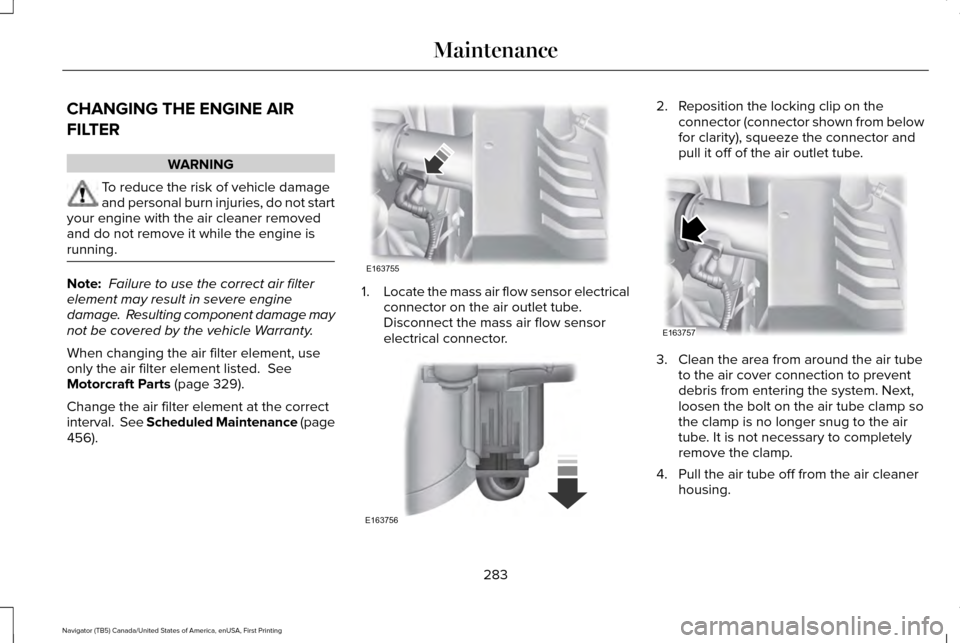
). 1.
Locate the mass air flow sensor electrical
connector on the air outlet tube.
Disconnect the mass air flow sensor
electrical connector. 2. Reposition the locking clip on the
connector (connector shown from below
for clarity), squeeze the connector and
pull it off of the air outlet tube. 3. Clean the area from around the air tube
to the air cover connection to prevent
debris from entering the system. Next,
loosen the bolt on the air tube clamp so
the clamp is no longer snug to the air
tube. It is not necessary to completely
remove the clamp.
4. Pull the air tube off from the air cleaner housing.
283
Navigator (TB5) Canada/United States of America, enUSA, First Printing MaintenanceE163755 E163756 E163757
Page 287 of 532
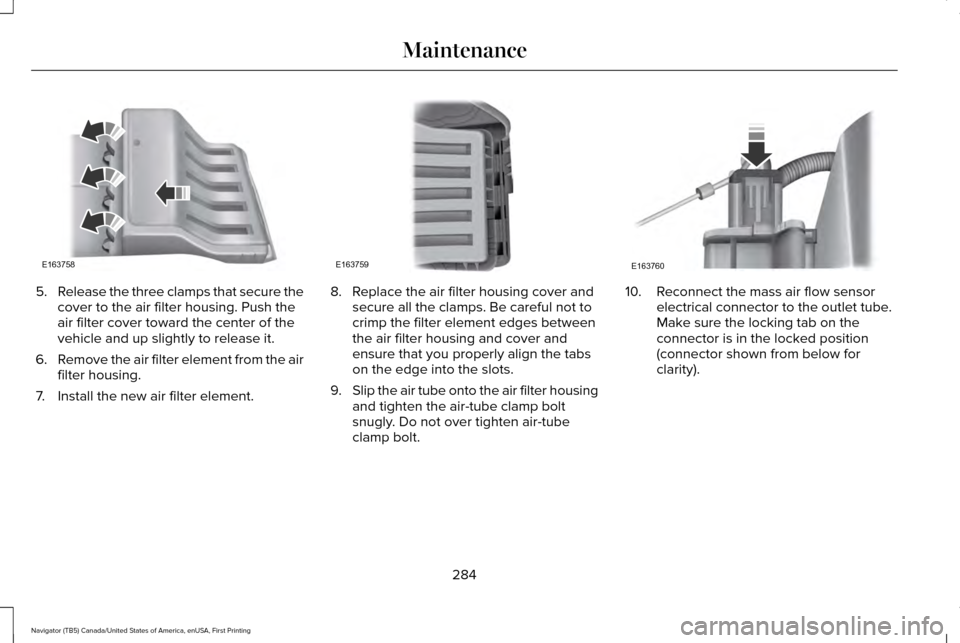
5.
Release the three clamps that secure the
cover to the air filter housing. Push the
air filter cover toward the center of the
vehicle and up slightly to release it.
6. Remove the air filter element from the air
filter housing.
7. Install the new air filter element. 8. Replace the air filter housing cover and
secure all the clamps. Be careful not to
crimp the filter element edges between
the air filter housing and cover and
ensure that you properly align the tabs
on the edge into the slots.
9. Slip the air tube onto the air filter housing
and tighten the air-tube clamp bolt
snugly. Do not over tighten air-tube
clamp bolt. 10. Reconnect the mass air flow sensor
electrical connector to the outlet tube.
Make sure the locking tab on the
connector is in the locked position
(connector shown from below for
clarity).
284
Navigator (TB5) Canada/United States of America, enUSA, First Printing MaintenanceE163758 E163759 E163760
Page 313 of 532
WARNINGS
2. Lubricate the tire bead and
wheel bead seat area again.
3. Stand at a minimum of 12 ft
(3.66 m) away from the wheel and
tire assembly. 4. Use both eye and ear protection.
For a mounting pressure more than
20 psi (1.38 bar)
greater than the
maximum pressure, a Ford dealer or
other tire service professional should do
the mounting. Always inflate steel carcass tires
with a remote air fill with the person
inflating standing at a minimum of
12 ft
(3.66 m) away from the wheel and tire
assembly. Important:
Remember to replace the
wheel valve stems when the road tires
are replaced on your vehicle.
The two front tires or two rear tires
should generally be replaced as a pair. The tire pressure sensors mounted in
the wheels are not designed to be used
in aftermarket wheels.
The use of wheels or tires not
recommended by Ford Motor Company
may affect the operation of your tire
pressure monitoring system.
If the tire pressure monitoring system
indicator is flashing, the system is
malfunctioning. Your replacement tire
might be incompatible with your tire
pressure monitoring system, or some
component of the system may be
damaged.
Safety Practices
WARNINGS
If your vehicle is stuck in snow,
mud or sand, do not rapidly spin
the tires; spinning the tires can tear the
tire and cause an explosion. A tire can
explode in as little as three to five
seconds. WARNINGS
Do not spin the wheels at over
34 mph (55 km/h)
. The tires may
fail and injure a passenger or bystander. Driving habits have a great deal to do
with your tire mileage and safety.
*Observe posted speed limits
*Avoid fast starts, stops and turns
*Avoid potholes and objects on the road
*Do not run over curbs or hit the tire
against a curb when parking
Highway Hazards
No matter how carefully you drive
there
’s always the possibility that you
may eventually have a flat tire on the
highway. Drive slowly to the closest safe
area out of traffic. This may further
damage the flat tire, but your safety is
more important.
310
Navigator (TB5) Canada/United States of America, enUSA, First Printing Wheels and Tires