display LINCOLN NAVIGATOR 2017 Repair Manual
[x] Cancel search | Manufacturer: LINCOLN, Model Year: 2017, Model line: NAVIGATOR, Model: LINCOLN NAVIGATOR 2017Pages: 532, PDF Size: 3.9 MB
Page 202 of 532
PRINCIPLE OF OPERATION
Cruise control lets you maintain a set speed
without keeping your foot on the accelerator
pedal. You can use cruise control when your
vehicle speed is greater than 20 mph
(30 km/h).
USING CRUISE CONTROL WARNINGS
Do not use cruise control on winding
roads, in heavy traffic or when the road
surface is slippery. This could result in loss
of vehicle control, serious injury or death. When you are going downhill, your
vehicle speed may increase above the
set speed. The system will not apply the
brakes but a warning displays. Failure to
follow this warning could result in serious
personal injury or death. Note:
Cruise control will disengage if the
vehicle speed decreases more than 10 mph
(16 km/h)
below the set speed while driving
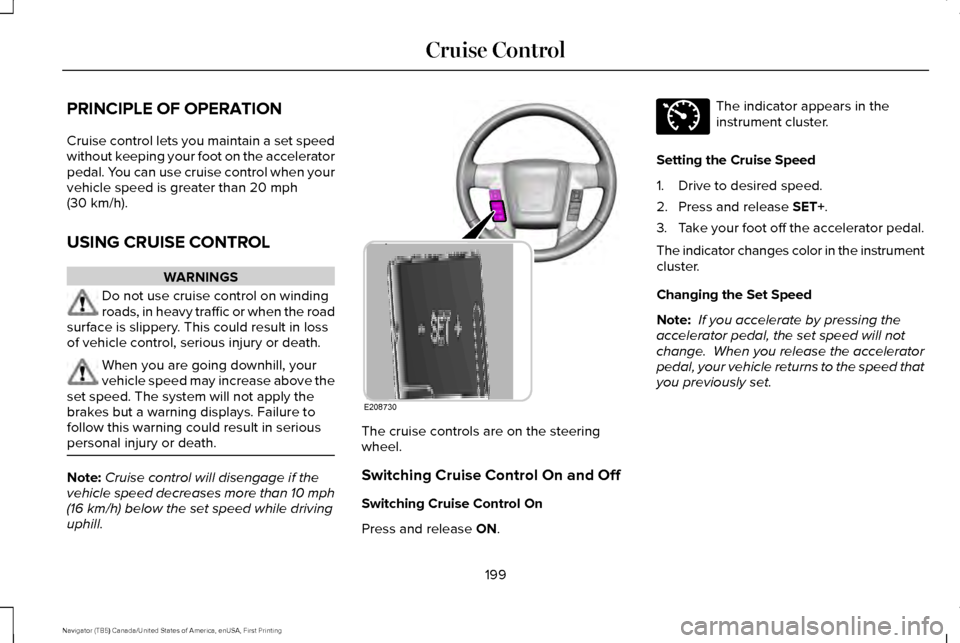
uphill. The cruise controls are on the steering
wheel.
Switching Cruise Control On and Off
Switching Cruise Control On
Press and release
ON. The indicator appears in the
instrument cluster.
Setting the Cruise Speed
1. Drive to desired speed.
2. Press and release
SET+.
3. Take your foot off the accelerator pedal.
The indicator changes color in the instrument
cluster.
Changing the Set Speed
Note: If you accelerate by pressing the
accelerator pedal, the set speed will not
change. When you release the accelerator
pedal, your vehicle returns to the speed that
you previously set.
199
Navigator (TB5) Canada/United States of America, enUSA, First Printing Cruise ControlE208730 E71340
Page 203 of 532
•
Press and release SET+ or SET-. When
you select km/h as the display
measurement in the Information display
the set speed changes in approximately
2 km/h increments. When you select mph
as the display measurement in the
information display the set speed
changes in approximately 1 mph
increments.
• Press the accelerator or brake pedal until
you reach the desired speed. Press and
release
SET +.
• Press and hold
SET+ or SET-. Release
the control when you reach the desired
speed.
Canceling the Set Speed
Press and release
CNCL or tap the brake
pedal. The set speed does not erase.
Resuming the Set Speed
Press and release
RSM.
Switching Cruise Control Off
Press and release
OFF when the system is
in stand by mode or switch the ignition off. Note:
You erase the set speed when you
switch the system off.
200
Navigator (TB5) Canada/United States of America, enUSA, First Printing Cruise Control
Page 207 of 532
System Lights and Messages
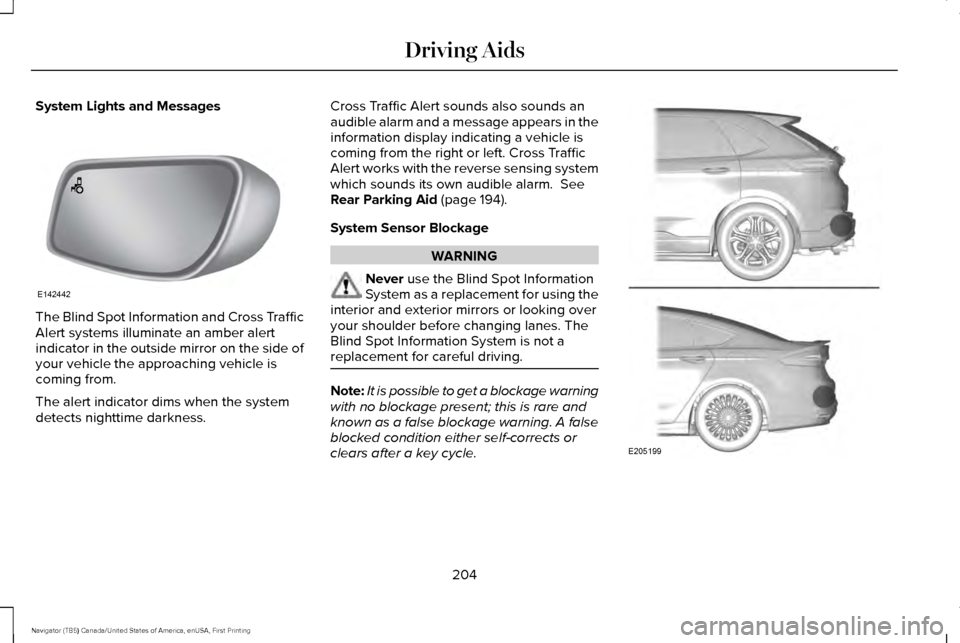
The Blind Spot Information and Cross Traffic
Alert systems illuminate an amber alert
indicator in the outside mirror on the side of
your vehicle the approaching vehicle is
coming from.
The alert indicator dims when the system
detects nighttime darkness. Cross Traffic Alert sounds also sounds an
audible alarm and a message appears in the
information display indicating a vehicle is
coming from the right or left. Cross Traffic
Alert works with the reverse sensing system
which sounds its own audible alarm. See
Rear Parking Aid (page 194).
System Sensor Blockage WARNING
Never
use the Blind Spot Information
System as a replacement for using the
interior and exterior mirrors or looking over
your shoulder before changing lanes. The
Blind Spot Information System is not a
replacement for careful driving. Note:
It is possible to get a blockage warning
with no blockage present; this is rare and
known as a false blockage warning. A false
blocked condition either self-corrects or
clears after a key cycle. 204
Navigator (TB5) Canada/United States of America, enUSA, First Printing Driving AidsE142442 E205199
Page 208 of 532
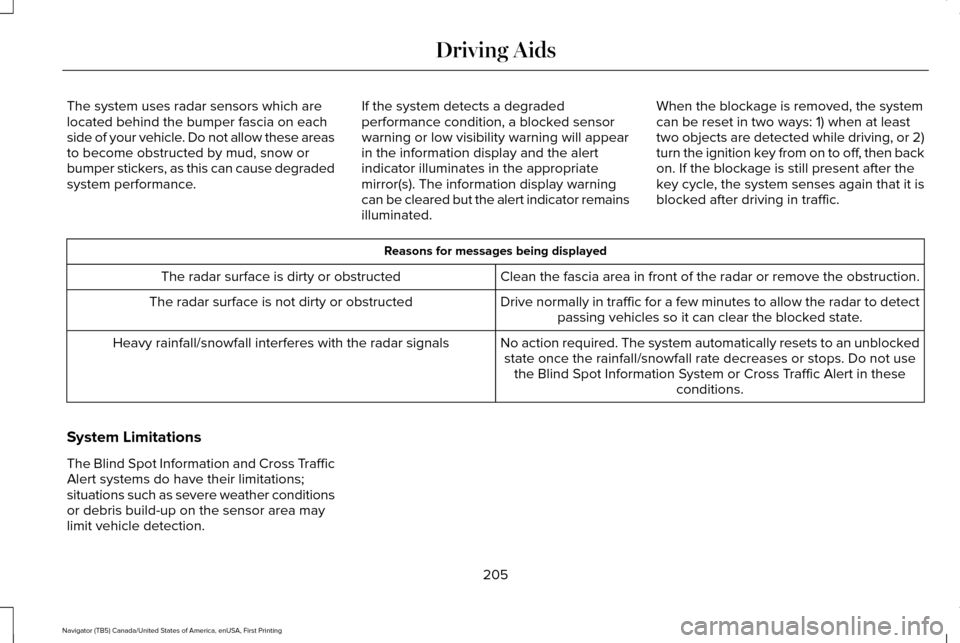
The system uses radar sensors which are
located behind the bumper fascia on each
side of your vehicle. Do not allow these areas
to become obstructed by mud, snow or
bumper stickers, as this can cause degraded
system performance.
If the system detects a degraded
performance condition, a blocked sensor
warning or low visibility warning will appear
in the information display and the alert
indicator illuminates in the appropriate
mirror(s). The information display warning
can be cleared but the alert indicator remains
illuminated.When the blockage is removed, the system
can be reset in two ways: 1) when at least
two objects are detected while driving, or 2)
turn the ignition key from on to off, then back
on. If the blockage is still present after the
key cycle, the system senses again that it is
blocked after driving in traffic. Reasons for messages being displayed
Clean the fascia area in front of the radar or remove the obstruction.
The radar surface is dirty or obstructed
Drive normally in traffic for a few minutes to allow the radar to detect\
passing vehicles so it can clear the blocked state.
The radar surface is not dirty or obstructed
No action required. The system automatically resets to an unblockedstate once the rainfall/snowfall rate decreases or stops. Do not use the Blind Spot Information System or Cross Traffic Alert in these conditions.
Heavy rainfall/snowfall interferes with the radar signals
System Limitations
The Blind Spot Information and Cross Traffic
Alert systems do have their limitations;
situations such as severe weather conditions
or debris build-up on the sensor area may
limit vehicle detection. 205
Navigator (TB5) Canada/United States of America, enUSA, First Printing Driving Aids
Page 209 of 532
The following are other situations that may
limit the Blind Spot Information System:
•
Certain maneuvering of vehicles entering
and exiting the blind zone.
• Vehicles passing through the blind zone
at very fast rates.
• When several vehicles forming a convoy
pass through the blind zone.
The following are other situations that may
limit the Cross Traffic Alert:
• Adjacently parked vehicles or objects
obstructing the sensors.
• Approaching vehicles passing at speeds
greater than 15 mph (24 km/h).
• Driving in reverse faster than
3 mph
(5 km/h).
• Backing out of an angled parking spot.
False Alerts
Note: If you connected a trailer to your
vehicle, the Blind Spot Information System
may detect the trailer causing a false alert.
To avoid false alerts you may want to turn
the system off manually. There may be certain instances when either
the Blind Spot Information or Cross Traffic
Alert systems illuminate the alert indicator
with no vehicle in the coverage zone; this is
known as a false alert. Some amount of false
alerts are normal; they are temporary and
self-correct.
System Errors
If the system senses a problem with the left
or right sensor, the telltale will illuminate and
a message will appear in the information
display.
See Information Messages (page
108).
Switching the System Off and On
One or both systems can be switched off
temporarily by using the information display
control; See Information Displays (page 102).
. When you switch off the Blind Spot
Information System, you will not receive
alerts and the information display will display
a system off message. The yellow alert
indicator in the outside mirror will also flash
twice. The system switches back on
whenever you switch the ignition on. You can also have the Blind Spot Information
System switched off permanently at an
authorized dealer. Once switched off
permanently, the system can only be
switched back on at an authorized dealer.
STEERING
Electric Power Steering
WARNINGS
The electric power steering system has
diagnostic checks that continuously
monitor the system. If a fault is detected, a
message displays in the information display.
Stop your vehicle as soon as it is safe to do
so. Switch the ignition off. After at least 10
seconds, switch the ignition on and watch
the information display for a steering system
warning message. If a steering system
warning message returns, have the system
checked by an authorized dealer.
206
Navigator (TB5) Canada/United States of America, enUSA, First Printing Driving Aids
Page 211 of 532
The configuration remains active until
modified from the main menu on the
information display. See General
Information (page 102).
Modes:
• Comfort – Provides a more relaxed
driving experience, maximizing comfort.
Your steering effort decreases and the
suspension movement is more fluid.
Comfort mode is ideal when you desire
enhanced traveling comfort.
• Normal – Delivers a balanced
combination of comfortable, controlled
ride and confident handling. This mode
provides an engaging drive experience
and a direct connection to the road
without sacrificing any of the composure
demanded from your vehicle.
• Sport – Provides a sportier driving
experience. The suspension stiffens, with
an emphasis on handling and control.
The engine responds more directly to
your inputs. Sport mode is ideal for use
during more spirited driving. SELF-LEVELING SUSPENSION
The self-leveling suspension system is
designed to improve ride, handling and
general vehicle performance during:
•
Certain road conditions
• Steering maneuvers
• Braking
• Acceleration
• Towing
This system keeps the rear of your vehicle
at a constant level through a hydraulic pump
inside each rear shock. Depending on the
payload or road surface conditions it will take
approximately
2 mi (3.2 km) for the leveling
to complete.
If the loaded vehicle is not moved for
approximately 12 hours, the leveling system
may bleed down to a lower height. This can
be especially apparent if a trailer is left
attached to the parked vehicle for long
periods of time. You must drive your vehicle
in order to re-level the suspension. If a self-equalizing hitch is used, your vehicle
should be driven approximately 2 mi (3.2 km)
with the trailer prior to adjusting (leveling)
the hitch.
208
Navigator (TB5) Canada/United States of America, enUSA, First Printing Driving Aids
Page 220 of 532
RV & Trailer Towing Guide Online
http://www.fleet.ford.com/towing-guides/
Website
TRAILER SWAY CONTROL WARNING
Turning off trailer sway control
increases the risk of loss of vehicle
control, serious injury or death. Ford does
not recommend disabling this feature except
in situations where speed reduction may be
detrimental (such as hill climbing), the driver
has significant trailer towing experience, and
can control trailer sway and maintain safe
operation. Note:
This feature does not prevent trailer
sway, but reduces it once it begins.
Note: This feature cannot stop all trailers
from swaying. Note:
In some cases, if vehicle speed is too
high, the system may activate multiple times,
gradually reducing vehicle speed.
This feature applies your vehicle brakes at
individual wheels and, if necessary, reduces
engine power. If the trailer begins to sway,
the stability control light flashes and the
message TRAILER SWAY REDUCE SPEED
appears in the information display. The first
thing to do is slow your vehicle down, then
pull safely to the side of the road and check
for proper tongue load and trailer load
distribution.
See Load Carrying (page 209).
RECOMMENDED TOWING
WEIGHTS
Note: Do not exceed the trailer weight
for your vehicle configuration listed in
the chart below. Note:
Make sure to take into
consideration trailer frontal area. Do not
exceed 36.5 feet² (3.39 meters²) if your
vehicle is equipped with the standard
towing package, or 60 feet² (5.57
meters²) if your vehicle is equipped with
the optional heavy duty package.
Note: Exceeding this limitation may
significantly reduce the performance of
your towing vehicle. Selecting a trailer
with a low aerodynamic drag and
rounded front design helps optimize
performance and fuel economy.
Note: For high altitude operation,
reduce the gross combined weight by
2% per 1000 feet (300 meters) starting
at the 1000 foot (300 meter) elevation
point.
217
Navigator (TB5) Canada/United States of America, enUSA, First Printing Towing
Page 228 of 532
Before Towing a Trailer
Practice turning, stopping and backing up to
get the feel of your vehicle-trailer
combination before starting on a trip. When
turning, make wider turns so the trailer
wheels clear curbs and other obstacles.
When Towing a Trailer
•
Do not drive faster than 70 mph (113
km/h) during the first 500 miles (800
kilometers).
• Do not make full-throttle starts.
• Check your hitch, electrical connections
and trailer wheel lug nuts thoroughly after
you have traveled 50 miles (80
kilometers).
• When stopped in congested or heavy
traffic during hot weather, place the
gearshift in position P to aid engine and
transmission cooling and to help A/C
performance.
• Turn off the speed control with heavy
loads or in hilly terrain. The speed control
may turn off automatically when you are
towing on long, steep grades. •
Shift to a lower gear when driving down
a long or steep hill. Do not apply the
brakes continuously, as they may
overheat and become less effective.
• If your transmission is equipped with a
Grade Assist or Tow/Haul feature, use
this feature when towing. This provides
engine braking and helps eliminate
excessive transmission shifting for
optimum fuel economy and transmission
cooling.
• If your vehicle is equipped with
AdvanceTrac with RSC, this system may
turn on during typical cornering
maneuvers with a heavily loaded trailer.
This is normal. Turning the corner at a
slower speed while towing may reduce
this tendency.
• If your vehicle is equipped with
Continuous Controlled Damping
Suspension (CCD Suspension), you can
select NORMAL or SPORT drive control
modes for better experience while towing
a trailer. See Information Displays (page
102
). •
If you are towing a trailer frequently in
hot weather, hilly conditions, at the gross
combined weight rating (or any
combination of these factors), consider
refilling your rear axle with synthetic gear
lubricant (if the axle is not already filled
with it).
See Capacities and
Specifications (page 328).
• Allow more distance for stopping with a
trailer attached. Anticipate stops and
brake gradually.
• Avoid parking on a grade. However, if
you must park on a grade:
1. Turn the steering wheel to point your vehicle tires away from traffic flow.
2. Set your vehicle parking brake.
3. Place the automatic transmission in position
P.
4. Place wheel chocks in front and back of the trailer wheels. (Chocks not included
with vehicle.)
225
Navigator (TB5) Canada/United States of America, enUSA, First Printing Towing
Page 258 of 532
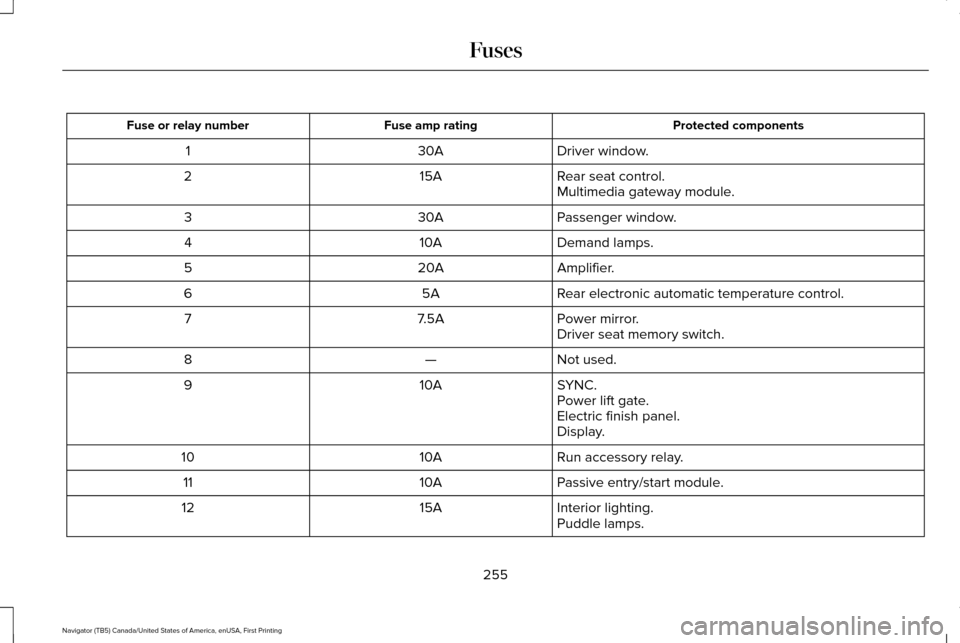
Protected components
Fuse amp rating
Fuse or relay number
Driver window.
30A
1
Rear seat control.
15A
2
Multimedia gateway module.
Passenger window.
30A
3
Demand lamps.
10A
4
Amplifier.
20A
5
Rear electronic automatic temperature control.
5A
6
Power mirror.
7.5A
7
Driver seat memory switch.
Not used.
—
8
SYNC.
10A
9
Power lift gate.
Electric finish panel.
Display.
Run accessory relay.
10A
10
Passive entry/start module.
10A
11
Interior lighting.
15A
12
Puddle lamps.
255
Navigator (TB5) Canada/United States of America, enUSA, First Printing Fuses
Page 270 of 532
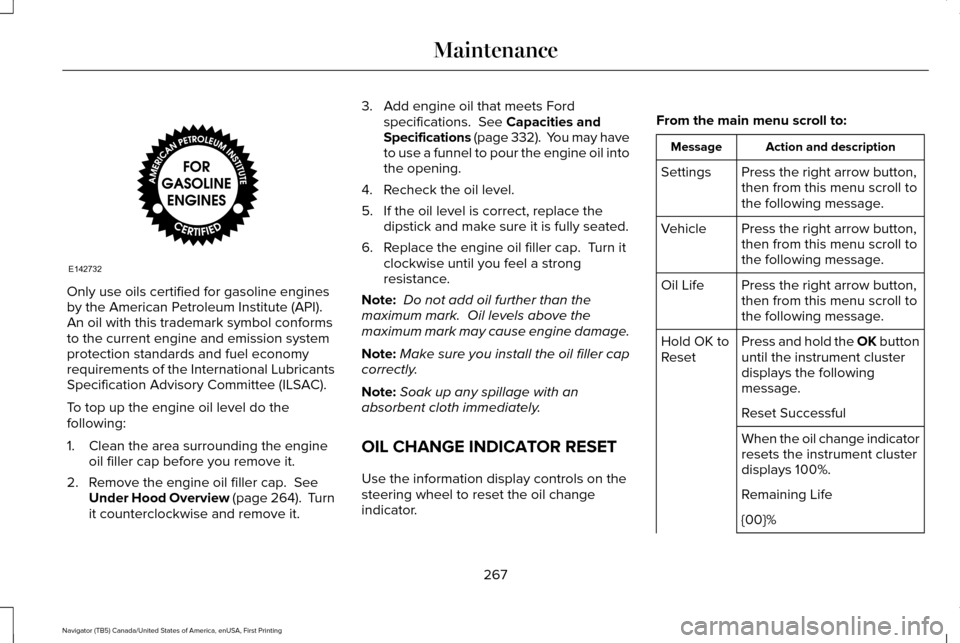
Only use oils certified for gasoline engines
by the American Petroleum Institute (API).
An oil with this trademark symbol conforms
to the current engine and emission system
protection standards and fuel economy
requirements of the International Lubricants
Specification Advisory Committee (ILSAC).
To top up the engine oil level do the
following:
1. Clean the area surrounding the engine
oil filler cap before you remove it.
2. Remove the engine oil filler cap. See
Under Hood Overview (page 264). Turn
it counterclockwise and remove it. 3. Add engine oil that meets Ford
specifications.
See Capacities and
Specifications (page 332). You may have
to use a funnel to pour the engine oil into
the opening.
4. Recheck the oil level.
5. If the oil level is correct, replace the dipstick and make sure it is fully seated.
6. Replace the engine oil filler cap. Turn it clockwise until you feel a strong
resistance.
Note: Do not add oil further than the
maximum mark. Oil levels above the
maximum mark may cause engine damage.
Note: Make sure you install the oil filler cap
correctly.
Note: Soak up any spillage with an
absorbent cloth immediately.
OIL CHANGE INDICATOR RESET
Use the information display controls on the
steering wheel to reset the oil change
indicator. From the main menu scroll to: Action and description
Message
Press the right arrow button,
then from this menu scroll to
the following message.
Settings
Press the right arrow button,
then from this menu scroll to
the following message.
Vehicle
Press the right arrow button,
then from this menu scroll to
the following message.
Oil Life
Press and hold the OK button
until the instrument cluster
displays the following
message.
Hold OK to
Reset
Reset Successful
When the oil change indicator
resets the instrument cluster
displays 100%.
Remaining Life
{00}%
267
Navigator (TB5) Canada/United States of America, enUSA, First Printing MaintenanceE142732