lock LINCOLN NAVIGATOR 2017 Repair Manual
[x] Cancel search | Manufacturer: LINCOLN, Model Year: 2017, Model line: NAVIGATOR, Model: LINCOLN NAVIGATOR 2017Pages: 532, PDF Size: 3.9 MB
Page 204 of 532
BLIND SPOT INFORMATION
SYSTEM
WARNING
Never use the Blind Spot Information
System as a replacement for using the
interior and exterior mirrors or looking over
your shoulder before changing lanes. The
Blind Spot Information System is not a
replacement for careful driving. The Blind Spot Information System is
designed to aid you in detecting vehicles
that may have entered the blind spot zone
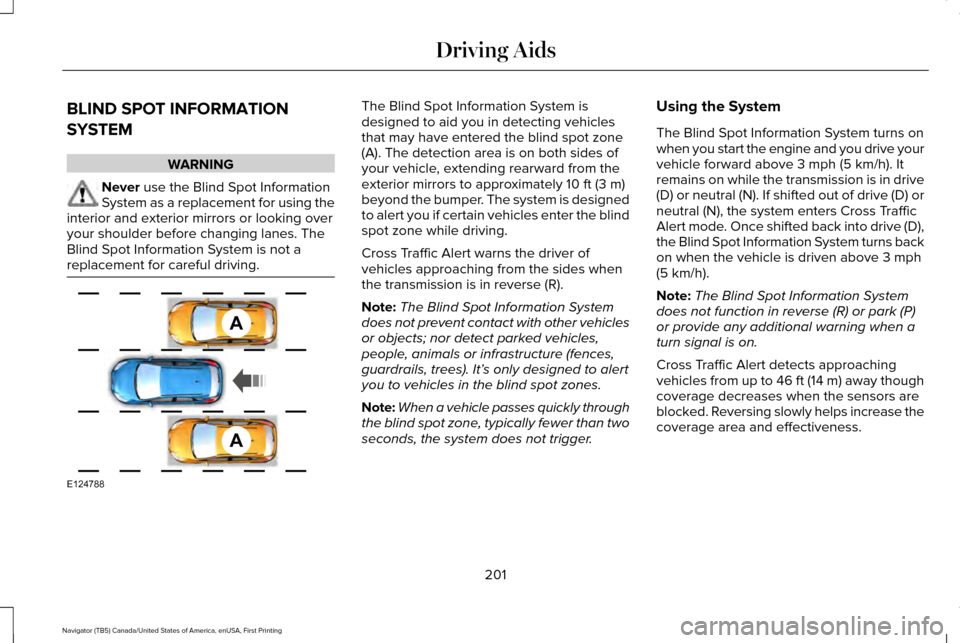
(A). The detection area is on both sides of
your vehicle, extending rearward from the
exterior mirrors to approximately 10 ft (3 m)
beyond the bumper. The system is designed
to alert you if certain vehicles enter the blind
spot zone while driving.
Cross Traffic Alert warns the driver of
vehicles approaching from the sides when
the transmission is in reverse (R).
Note: The Blind Spot Information System
does not prevent contact with other vehicles
or objects; nor detect parked vehicles,
people, animals or infrastructure (fences,
guardrails, trees). It’ s only designed to alert
you to vehicles in the blind spot zones.
Note: When a vehicle passes quickly through
the blind spot zone, typically fewer than two
seconds, the system does not trigger. Using the System
The Blind Spot Information System turns on
when you start the engine and you drive your
vehicle forward above
3 mph (5 km/h). It
remains on while the transmission is in drive
(D) or neutral (N). If shifted out of drive (D) or
neutral (N), the system enters Cross Traffic
Alert mode. Once shifted back into drive (D),
the Blind Spot Information System turns back
on when the vehicle is driven above
3 mph
(5 km/h).
Note: The Blind Spot Information System
does not function in reverse (R) or park (P)
or provide any additional warning when a
turn signal is on.
Cross Traffic Alert detects approaching
vehicles from up to 46 ft (14 m) away though
coverage decreases when the sensors are
blocked. Reversing slowly helps increase the
coverage area and effectiveness.
201
Navigator (TB5) Canada/United States of America, enUSA, First Printing Driving AidsA
A
E124788
Page 207 of 532
System Lights and Messages
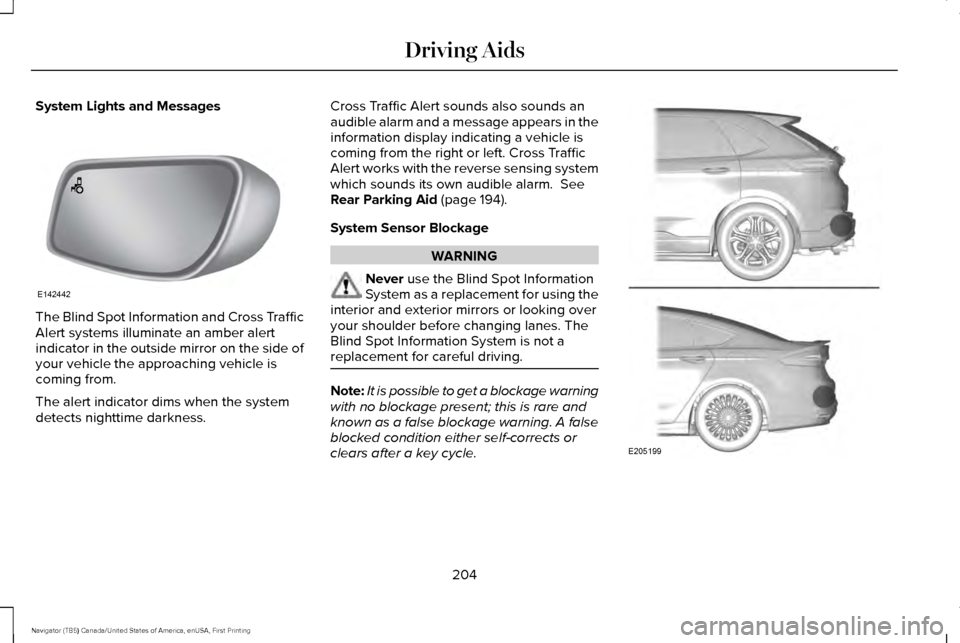
The Blind Spot Information and Cross Traffic
Alert systems illuminate an amber alert
indicator in the outside mirror on the side of
your vehicle the approaching vehicle is
coming from.
The alert indicator dims when the system
detects nighttime darkness. Cross Traffic Alert sounds also sounds an
audible alarm and a message appears in the
information display indicating a vehicle is
coming from the right or left. Cross Traffic
Alert works with the reverse sensing system
which sounds its own audible alarm. See
Rear Parking Aid (page 194).
System Sensor Blockage WARNING
Never
use the Blind Spot Information
System as a replacement for using the
interior and exterior mirrors or looking over
your shoulder before changing lanes. The
Blind Spot Information System is not a
replacement for careful driving. Note:
It is possible to get a blockage warning
with no blockage present; this is rare and
known as a false blockage warning. A false
blocked condition either self-corrects or
clears after a key cycle. 204
Navigator (TB5) Canada/United States of America, enUSA, First Printing Driving AidsE142442 E205199
Page 208 of 532
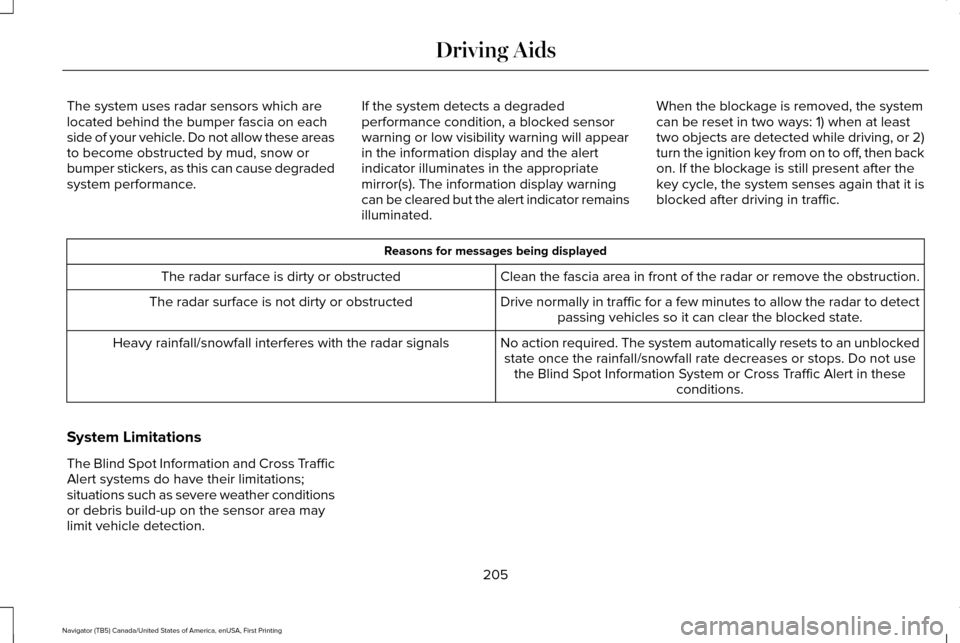
The system uses radar sensors which are
located behind the bumper fascia on each
side of your vehicle. Do not allow these areas
to become obstructed by mud, snow or
bumper stickers, as this can cause degraded
system performance.
If the system detects a degraded
performance condition, a blocked sensor
warning or low visibility warning will appear
in the information display and the alert
indicator illuminates in the appropriate
mirror(s). The information display warning
can be cleared but the alert indicator remains
illuminated.When the blockage is removed, the system
can be reset in two ways: 1) when at least
two objects are detected while driving, or 2)
turn the ignition key from on to off, then back
on. If the blockage is still present after the
key cycle, the system senses again that it is
blocked after driving in traffic. Reasons for messages being displayed
Clean the fascia area in front of the radar or remove the obstruction.
The radar surface is dirty or obstructed
Drive normally in traffic for a few minutes to allow the radar to detect\
passing vehicles so it can clear the blocked state.
The radar surface is not dirty or obstructed
No action required. The system automatically resets to an unblockedstate once the rainfall/snowfall rate decreases or stops. Do not use the Blind Spot Information System or Cross Traffic Alert in these conditions.
Heavy rainfall/snowfall interferes with the radar signals
System Limitations
The Blind Spot Information and Cross Traffic
Alert systems do have their limitations;
situations such as severe weather conditions
or debris build-up on the sensor area may
limit vehicle detection. 205
Navigator (TB5) Canada/United States of America, enUSA, First Printing Driving Aids
Page 213 of 532
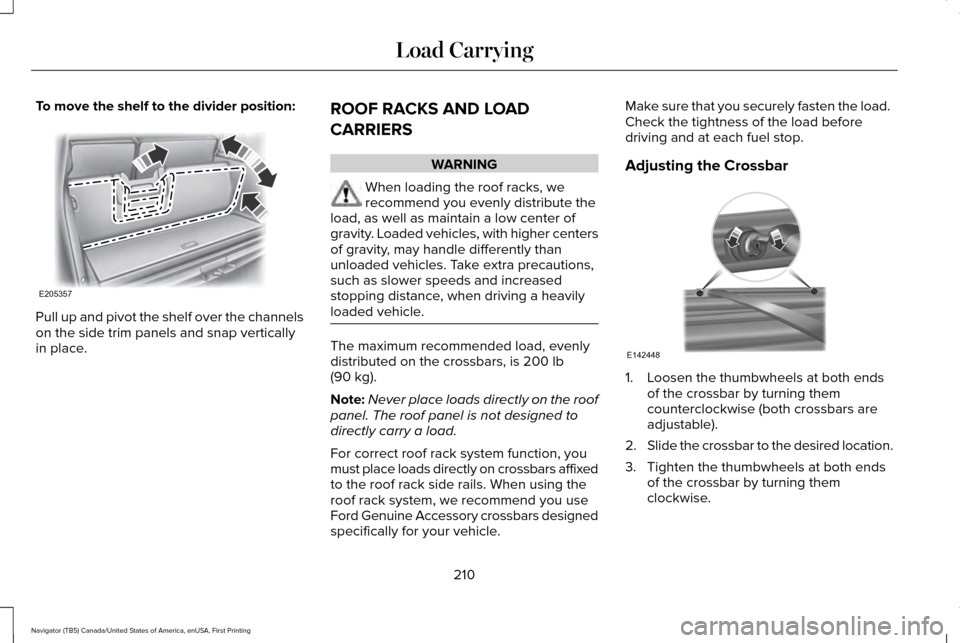
To move the shelf to the divider position:
Pull up and pivot the shelf over the channels
on the side trim panels and snap vertically
in place.
ROOF RACKS AND LOAD
CARRIERS WARNING
When loading the roof racks, we
recommend you evenly distribute the
load, as well as maintain a low center of
gravity. Loaded vehicles, with higher centers
of gravity, may handle differently than
unloaded vehicles. Take extra precautions,
such as slower speeds and increased
stopping distance, when driving a heavily
loaded vehicle. The maximum recommended load, evenly
distributed on the crossbars, is 200 lb
(90 kg).
Note: Never place loads directly on the roof
panel. The roof panel is not designed to
directly carry a load.
For correct roof rack system function, you
must place loads directly on crossbars affixed
to the roof rack side rails. When using the
roof rack system, we recommend you use
Ford Genuine Accessory crossbars designed
specifically for your vehicle. Make sure that you securely fasten the load.
Check the tightness of the load before
driving and at each fuel stop.
Adjusting the Crossbar
1. Loosen the thumbwheels at both ends
of the crossbar by turning them
counterclockwise (both crossbars are
adjustable).
2. Slide the crossbar to the desired location.
3. Tighten the thumbwheels at both ends of the crossbar by turning them
clockwise.
210
Navigator (TB5) Canada/United States of America, enUSA, First Printing Load CarryingE205357 E142448
Page 221 of 532
Note:
Certain states require electric
trailer brakes for trailers over a specified
weight. Be sure to check state
regulations for this specified weight. The
maximum trailer weights listed may be
limited to this specified weight, as the
vehicle ’s electrical system may not
include the wiring connector needed to
activate electric trailer brakes.
Your vehicle may tow a trailer provided
the maximum trailer weight is less than
or equal to the maximum trailer weight
listed for your vehicle configuration on
the following chart. To calculate the maximum loaded trailer
weight for your vehicle:
1.
Start with the gross combined weight
rating for your vehicle model and
axle ratio. See the following chart.
2. Subtract all of the following that
apply to your vehicle:
•Vehicle curb weight
• Hitch hardware weight, such as a
draw bar, ball, locks or weight
distributing
• Driver weight
• Passenger(s) weight
• Payload, cargo and luggage
weight
• Aftermarket equipment weight.
3. This equals the maximum loaded trailer weight for this combination. Note:
The trailer tongue load figures
into the payload for your vehicle.
Reduce the total payload by the final
trailer tongue weight.
Consult an authorized dealer to
determine the maximum trailer weight
allowed for your vehicle if you are not
sure.
218
Navigator (TB5) Canada/United States of America, enUSA, First Printing Towing
Page 224 of 532
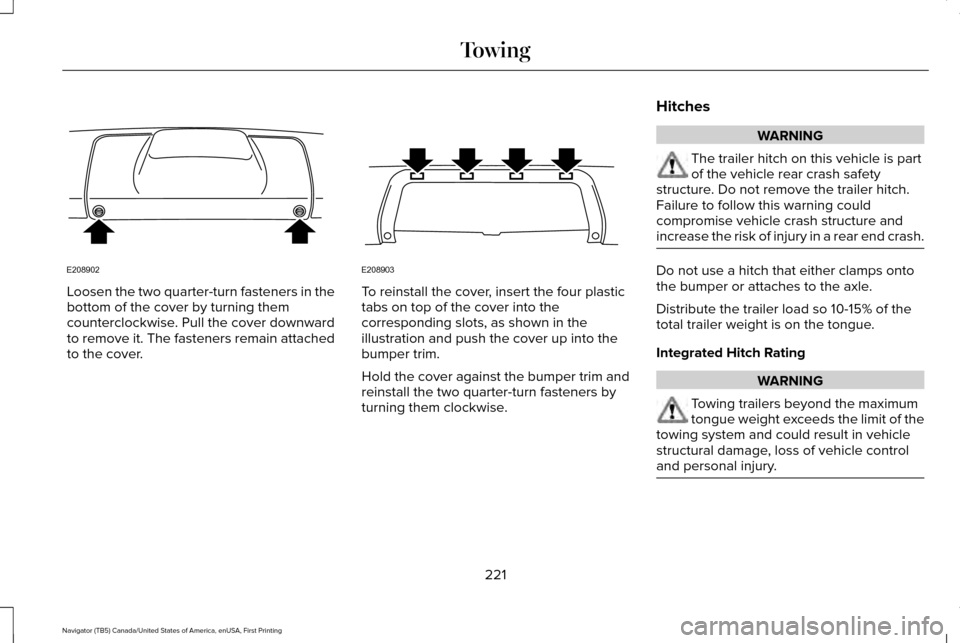
Loosen the two quarter-turn fasteners in the
bottom of the cover by turning them
counterclockwise. Pull the cover downward
to remove it. The fasteners remain attached
to the cover. To reinstall the cover, insert the four plastic
tabs on top of the cover into the
corresponding slots, as shown in the
illustration and push the cover up into the
bumper trim.
Hold the cover against the bumper trim and
reinstall the two quarter-turn fasteners by
turning them clockwise.
Hitches WARNING
The trailer hitch on this vehicle is part
of the vehicle rear crash safety
structure. Do not remove the trailer hitch.
Failure to follow this warning could
compromise vehicle crash structure and
increase the risk of injury in a rear end crash. Do not use a hitch that either clamps onto
the bumper or attaches to the axle.
Distribute the trailer load so 10-15% of the
total trailer weight is on the tongue.
Integrated Hitch Rating
WARNING
Towing trailers beyond the maximum
tongue weight exceeds the limit of the
towing system and could result in vehicle
structural damage, loss of vehicle control
and personal injury. 221
Navigator (TB5) Canada/United States of America, enUSA, First Printing TowingE208902 E208903
Page 226 of 532
5. Install and adjust the tension in the
weight-distributing bars so that the height
of your vehicle's front wheel opening on
the fender is approximately half the way
down from H2, toward H1.
6. Check that the trailer is level or slightly nose down toward your vehicle. If not,
adjust the ball height accordingly and
repeat Steps 2-6.
When the trailer is level or slightly nose down
toward the vehicle:
• Lock the bar tension adjuster in place.
• Check that the trailer tongue securely
attaches and locks onto the hitch.
• Install safety chains, lighting, and trailer
brake controls as required by law or the
trailer manufacturer. Weight-distributing Hitch - Vehicles with
Automatic Leveling Suspension WARNING
Do not adjust a weight-distributing
hitch to any position where the rear
bumper of the vehicle is higher than it was
before attaching the trailer. Doing so will
defeat the function of the weight-distributing
hitch, which may cause unpredictable
handling, and could result in serious personal
injury. Note:
If you do not move the loaded vehicle
for approximately 12 hours, the leveling
system may bleed down to a lower height.
This can be especially apparent if you leave
a trailer attached to the parked vehicle for
long periods. You must drive your vehicle in
order to re-level the suspension.
When hooking-up a trailer using a
weight-distributing hitch, always use the
following procedure: 1. Load the interior of the vehicle to a
weight similar to that which you intend
to carry when towing. This includes
things such as passenger weight and
cargo.
2. Drive the vehicle for approximately 2 miles (3 kilometers) to re-level the
suspension.
3. Park the loaded vehicle, without the trailer, on a level surface.
4. Measure the height to the top of your vehicle's front wheel opening on the
fender. This is H1.
5. Attach the loaded trailer to your vehicle without the weight-distributing bars
connected.
6. Make sure you securely attach and lock the trailer tongue to the hitch.
7. Install safety chains, lighting, and trailer brake controls as required by law or the
trailer manufacturer.
8. Drive the vehicle and trailer at 20–25 mph (32–40 km/h) for approximately 2
miles (3 kilometers) to re-level the
suspension.
223
Navigator (TB5) Canada/United States of America, enUSA, First Printing Towing
Page 227 of 532
9. Park your vehicle and trailer on a level
surface.
10. Measure the height to the top of your vehicle's front wheel opening on the
fender a second time. This is H2.
11. Install and adjust the tension in the weight-distributing bars so that the
height of your vehicle's front wheel
opening on the fender is approximately
half the way down from H2, toward H1.
12. Check that the trailer is level or slightly
nose down toward your vehicle. If not,
remove the trailer, adjust the ball height
accordingly and repeat Steps 5-11.
When the trailer is level or slightly nose down
toward the vehicle:
• Lock the bar tension adjuster in place.
• Check that the trailer tongue securely
attaches and locks onto the hitch.
• Install safety chains, lighting, and trailer
brake controls as required by law or the
trailer manufacturer. Safety Chains
Note:
Never attach safety chains to the
bumper.
Always connect the safety chains to the hook
retainers of your vehicle hitch.
To connect the trailer’ s safety chains, cross
them under the trailer tongue and allow
enough slack for turning tight corners. Do
not allow the chains to drag on the ground.
Trailer Brakes (If Equipped) WARNING
Do not connect a trailer's hydraulic
brake system directly to your vehicle's
brake system. Your vehicle may not have
enough braking power and your chances of
having a collision greatly increase. Electric brakes and manual, automatic or
surge-type trailer brakes are safe if you install
them properly and adjust them to the
manufacturer's specifications. The trailer
brakes must meet local and federal
regulations.The rating for the tow vehicle's braking
system operation is at the gross vehicle
weight rating, not the gross combined
weight rating.
Separate functioning brake systems are
required for safe control of towed vehicles
and trailers weighing more than 1500
pounds (680 kilograms) when loaded.
Trailer Lamps
WARNING
Never connect any trailer lamp wiring
to the vehicle's tail lamp wiring; this
may damage the electrical system resulting
in fire. Contact your authorized dealer as
soon as possible for assistance in proper
trailer tow wiring installation. Additional
electrical equipment may be required. Trailer lamps are required on most towed
vehicles. Make sure all running lights, brake
lights, turn signals and hazard lights are
working.
224
Navigator (TB5) Canada/United States of America, enUSA, First Printing Towing
Page 230 of 532
•
Only use recovery straps that have a
minimum breaking strength two to three
times the gross vehicle weight of the
stuck vehicle.
• Make sure the recovery strap is in good
condition and free of visible cuts, tears
or damage.
• Use a damper device such as a tarp,
heavy blanket or piece of carpet draped
over the recovery strap to help absorb
the energy in the event the strap breaks.
• Make sure the stuck vehicle is not loaded
heavier than its gross vehicle weight
rating specified on the certification label.
• Always align the tow vehicle and stuck
vehicle in a straight line (within 10
degrees).
• Keep bystanders to the sides of the
vehicle, at a distance of at least twice the
length of the recovery strap. This helps
avoid injury from the hazard of a recovery
hook or strap breaking, or a vehicle
lurching into their path. TOWING THE VEHICLE ON FOUR
WHEELS WARNING
If your vehicle has a steering wheel
lock make sure the ignition is in the
accessory or on position when being towed. Emergency Towing
If your vehicle becomes inoperable (without
access to wheel dollies, car-hauling trailer,
or flatbed transport vehicle), it can be
flat-towed (all wheels on the ground,
regardless of the powertrain and
transmission configuration) under the
following conditions:
•
Your vehicle is facing forward for towing
in a forward direction.
• Place the transmission in position
N. If
you cannot move the transmission into
N
, you may need to override it. See
Transmission (page 169).
• Maximum speed is
35 mph (56 km/h).
• Maximum distance is
50 mi (80 km).
227
Navigator (TB5) Canada/United States of America, enUSA, First Printing Towing
Page 233 of 532
WARNINGS
Pedals that cannot move freely can
cause loss of vehicle control and
increase the risk of serious personal injury. Always make sure that the floor mats
are properly attached to the retention
posts in the carpet that are supplied with
your vehicle. Floor mats must be properly
secured to both retention posts to make sure
mats do not shift out of position. Never place floor mats or any other
covering in the vehicle foot well that
cannot be properly secured to prevent them
from moving and interfering with the pedals
or the ability to control the vehicle. Never place floor mats or any other
covering on top of already installed
floor mats. Floor mats should always rest on
top of vehicle carpeting surface and not
another floor mat or other covering.
Additional floor mats or any other covering
will reduce the pedal clearance and
potentially interfere with pedal operation. WARNINGS
Check attachment of floor mats on a
regular basis. Always properly reinstall
and secure floor mats that have been
removed for cleaning or replacement. Always make sure that objects cannot
fall into the driver foot well while the
vehicle is moving. Objects that are loose can
become trapped under the pedals causing
a loss of vehicle control. Failure to properly follow floor mat
installation or attachment instructions
can potentially cause interference with pedal
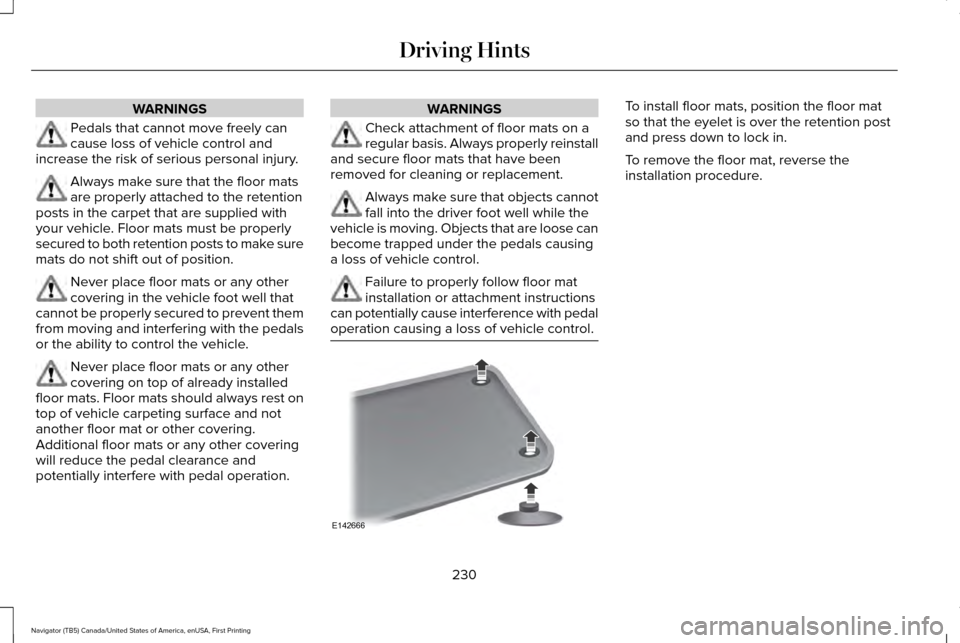
operation causing a loss of vehicle control. To install floor mats, position the floor mat
so that the eyelet is over the retention post
and press down to lock in.
To remove the floor mat, reverse the
installation procedure.
230
Navigator (TB5) Canada/United States of America, enUSA, First Printing Driving HintsE142666