ignition LINCOLN NAVIGATOR 2018 User Guide
[x] Cancel search | Manufacturer: LINCOLN, Model Year: 2018, Model line: NAVIGATOR, Model: LINCOLN NAVIGATOR 2018Pages: 649, PDF Size: 4.96 MB
Page 73 of 649
CLEARING ALL MYKEYS
When you clear your MyKeys, you removeall restrictions and return all MyKeys to theiroriginal admin key status at once. To clearall MyKeys of all MyKey settings, use theinformation display.
1. Switch the ignition on using an adminkey.
2.Access the main menu in the informationdisplay and then scroll through themenus to begin clearing your MyKeyprogramming. See Information Displays(page 119).
3. Follow the instructions in the display.
4. A confirmation message appears in thedisplay after you finish clearing yourMyKeys.
Note:When you clear your MyKeys, youremove all restrictions and return all MyKeysto their original admin key status. You cannotremove the MyKey restrictions individually.
CHECKING MYKEY SYSTEM
STATUS
You can find information about yourprogrammed MyKeys by using theinformation display. See InformationDisplays (page 119).
MyKey Distance
Tracks the distance when drivers use aMyKey. The only way to delete theaccumulated distance is by using an adminkey to clear all MyKeys. If the distance doesnot accumulate as expected, then theintended user is not using the MyKey, or anadmin key user recently cleared and thenrecreated a MyKey.
Number of MyKeys
Indicates the number of MyKeysprogrammed to your vehicle. Use this featureto detect how many MyKeys you have foryour vehicle and determine when all MyKeyshave been deleted.
Number of Admin Keys
Indicates how many admin keys areprogrammed to your vehicle. Use this featureto determine how many admin keys you havefor your vehicle, and detect if an additionalMyKey has been programmed.
USING MYKEY WITH REMOTE
START SYSTEMS
MyKey is not compatible with nonLincoln-approved, aftermarket remote startsystems. If you choose to install a remotestart system, see an authorized dealer for aLincoln-approved remote start system.
MYKEY — TROUBLESHOOTING
70
Navigator (TB9) Canada/United States of America, enUSA, Edition date: 201708, Third-Printing-
MyKey™
Page 75 of 649
LOCKING AND UNLOCKING
You can use the power door lock control orthe remote control to lock and unlock yourvehicle.
Power Door Locks
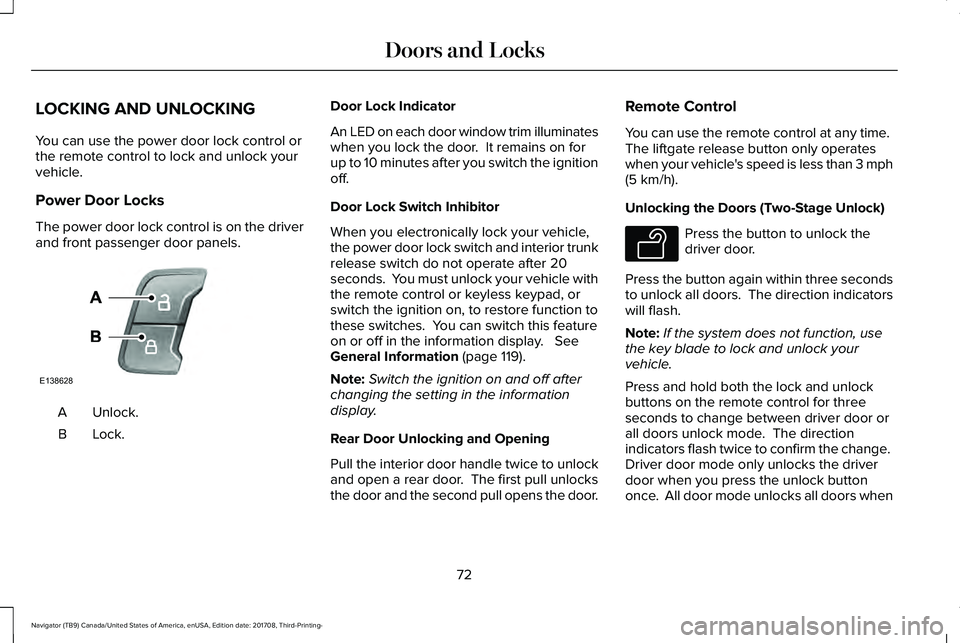
The power door lock control is on the driverand front passenger door panels.
Unlock.A
Lock.B
Door Lock Indicator
An LED on each door window trim illuminateswhen you lock the door. It remains on forup to 10 minutes after you switch the ignitionoff.
Door Lock Switch Inhibitor
When you electronically lock your vehicle,the power door lock switch and interior trunkrelease switch do not operate after 20seconds. You must unlock your vehicle withthe remote control or keyless keypad, orswitch the ignition on, to restore function tothese switches. You can switch this featureon or off in the information display. SeeGeneral Information (page 119).
Note:Switch the ignition on and off afterchanging the setting in the informationdisplay.
Rear Door Unlocking and Opening
Pull the interior door handle twice to unlockand open a rear door. The first pull unlocksthe door and the second pull opens the door.
Remote Control
You can use the remote control at any time. The liftgate release button only operateswhen your vehicle's speed is less than 3 mph(5 km/h).
Unlocking the Doors (Two-Stage Unlock)
Press the button to unlock thedriver door.
Press the button again within three secondsto unlock all doors. The direction indicatorswill flash.
Note:If the system does not function, usethe key blade to lock and unlock yourvehicle.
Press and hold both the lock and unlockbuttons on the remote control for threeseconds to change between driver door orall doors unlock mode. The directionindicators flash twice to confirm the change. Driver door mode only unlocks the driverdoor when you press the unlock buttononce. All door mode unlocks all doors when
72
Navigator (TB9) Canada/United States of America, enUSA, Edition date: 201708, Third-Printing-
Doors and LocksE138628 E138629
Page 76 of 649
you press the unlock button once. Theunlocking mode applies to the remotecontrol, keyless entry keypad and intelligentaccess. You can also change between theunlocking modes using the informationdisplay. See General Information (page 119).
Reprogramming the Unlocking Function
Note: When you press the unlock button,either all the doors are unlocked or only thedriver door is unlocked. Pressing the unlockbutton again unlocks all the doors.
Press and hold the unlock and lock buttonson the remote control simultaneously for atleast four seconds with the ignition off. Thedirection indicators flash twice to confirm thechange.
To return to the original unlocking function,repeat the process.
Locking the Doors
Press the button to lock all doors. The direction indicators will flash.
Press the button again within three secondsto confirm that all the doors are closed. Thedoor lock again, the horn sounds and thedirection indicators flash if all the doors andthe liftgate are closed.
Note:If the system does not function, usethe key blade to lock and unlock yourvehicle.
Mislock
If any door or the liftgate is open, or if
the hood is open on vehicles with an
anti-theft alarm or remote start, the horn
sounds twice and the direction
indicators do not flash. You can switch
this feature on or off in the information
display. See General Information (page
119).
Opening the Liftgate
Press twice within three secondsto open the liftgate.
Activating Intelligent Access
General Information
You can unlock and lock the vehicle withouttaking the keys out of your pocket or pursewhen your intelligent access key is within3 ft (1 m) of your vehicle. Intelligent accessuses a sensor on the back of the door handlefor unlocking and a separate sensor on theface of each door handle for locking.
The system does not function if:
•Your vehicle battery has no charge.
•The key battery has no charge.
•The key frequencies are jammed.
Note:The system may not function if the keyis close to metal objects or electronicdevices, for example keys or a cell phone.
Note:If the system does not function, usethe key blade to lock and unlock yourvehicle. See Remote Control (page 63).
73
Navigator (TB9) Canada/United States of America, enUSA, Edition date: 201708, Third-Printing-
Doors and LocksE138623 E267940
Page 78 of 649
Locking and Unlocking the Doors withthe Key Blade
A key cylinder is located under the driverside door handle. You can use your keyblade to manually lock and unlock the driverside door. See Remote Control (page 63).
Smart Unlocks for Intelligent AccessKeys
This helps to prevent you from locking yourkey inside the passenger compartment orrear cargo area.
When you electronically lock your vehiclewith any door open, the transmission is inpark (P) and the ignition is off, the systemsearches for an intelligent access key insideyour vehicle after you close the last door. Ifthe system finds a key, all the doorsimmediately unlock and the horn soundstwice, indicating that a key is inside.
You can override the smart unlock featureand intentionally lock the intelligent accesskey inside your vehicle.
To do this, lock your vehicle after you haveclosed all the doors by:
•Using the keyless entry keypad.
•Pressing the lock button on anotherintelligent access key.
When you open one of the front doors andlock your vehicle using the power door lockcontrol, all doors will lock then unlock if:
•The ignition is on.
•The ignition is off and the transmissionis not in park (P).
Autolock (If Equipped)
Autolock locks all the doors when:
•All doors are closed.
•The ignition is on.
•You shift into any gear putting yourvehicle in motion.
•Your vehicle reaches a speed greaterthan 12 mph (20 km/h).
Autolock repeats when:
•You open then close any door while theignition is on and your vehicle speed is9 mph (15 km/h) or lower.
•Your vehicle reaches a speed greaterthan 12 mph (20 km/h).
Autounlock
Autounlock unlocks all the doors when:
•The ignition is on, all the doors areclosed, and your vehicle has beenmoving at a speed greater than 12 mph(20 km/h).
•Your vehicle comes to a stop and youswitch the ignition off, or to the accessoryposition.
•You open the driver door within 10minutes of switching the ignition off or toaccessory.
Note:The doors do not autounlock if youelectronically lock your vehicle after youswitch the ignition off and before you openthe driver door.
75
Navigator (TB9) Canada/United States of America, enUSA, Edition date: 201708, Third-Printing-
Doors and Locks
Page 79 of 649
Enabling or Disabling Autounlock
You can enable or disable the autounlockfeature in the information display or anauthorized dealer can do it for you. SeeGeneral Information (page 119).
Illuminated Entry
The interior lamps and some exterior lampsilluminate when you unlock the doors withthe remote control.
The lamps turn off if:
•The ignition is on.
•You press the remote control lock button.
•25 seconds have elapsed.
The lamps do not turn off if:
•You turn them on with the lamp control.
•Any door is open.
Illuminated Exit
The interior lamps and some exterior lampsilluminate when all doors are closed and youswitch the ignition off.
The lamps turn off if all the doors remainclosed and:
•25 seconds have elapsed.
•You press the push button ignitionswitch.
Approach Detection Illumination
When you approach your vehicle and a validkey is detected, the exterior door handlesand some exterior lamps illuminate.
Battery Saver
If you leave the courtesy lamps, interiorlamps or headlamps on, the battery savershuts them off 10 minutes after you switchthe ignition off.
Battery Saver for Intelligent Access Keys
If you leave the ignition switched on, it shutsoff when it detects a certain amount ofbattery drain, or after 45 minutes.
KEYLESS ENTRY
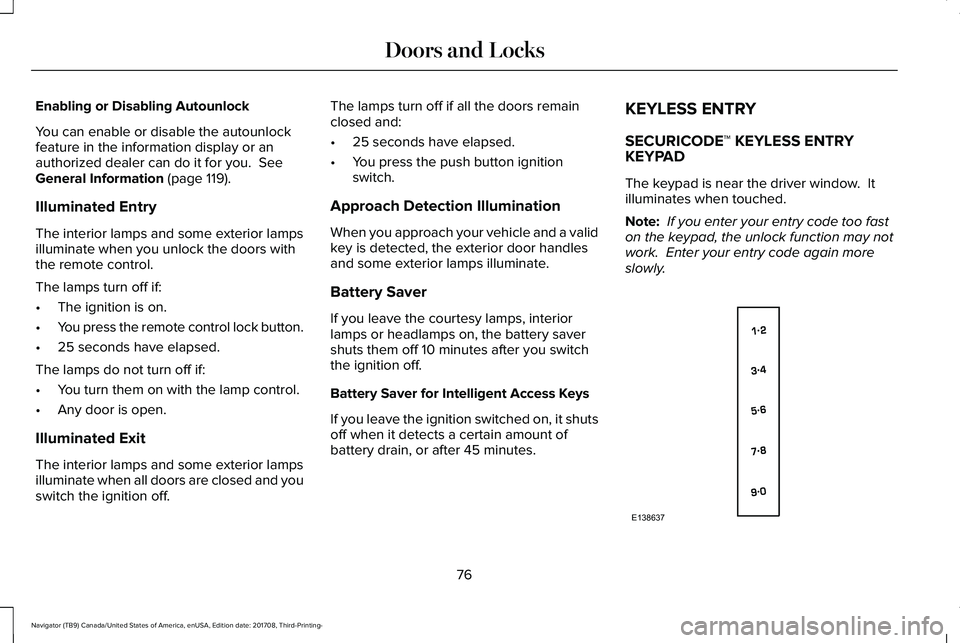
SECURICODE™ KEYLESS ENTRYKEYPAD
The keypad is near the driver window. Itilluminates when touched.
Note: If you enter your entry code too faston the keypad, the unlock function may notwork. Enter your entry code again moreslowly.
76
Navigator (TB9) Canada/United States of America, enUSA, Edition date: 201708, Third-Printing-
Doors and LocksE138637
Page 80 of 649
You can use the keypad to:
•Lock or unlock the doors.
•Unlock the liftgate glass.
•Program and erase user codes.
•Arm and disarm the anti-theft alarm.
You can operate the keypad with thefactory-set five-digit entry code. The codeis on the owner's wallet card in the glove boxand is available from an authorized dealer. You can also program up to five of your ownfive-digit personal entry codes.
Programming a Personal Entry Code
To create your own personal entry code:
1. Enter the factory-set five-digit code.
2. Press 1·2 on the keypad within fiveseconds.
3.Enter your personal five-digit code. Youmust press each number within fiveseconds of each other.
4.Press 1·2 on the keypad to save personalcode 1.
The doors lock then unlock to confirm thatprogramming was successful.
To program additional personal entry codes,repeat Steps 1-3, then for Step 4:
•Press 3·4 to save personal code 2
•Press 5·6 to save personal code 3
•Press 7·8 to save personal code 4
•Press 9·0 to save personal code 5.
You may also program a personal entry codethrough the information display.
Tips:
•Do not set a code that uses five of thesame number.
•Do not use five numbers in sequentialorder.
•The factory-set code works even if youhave set your own personal code.
Erasing a Personal Code
1. Enter the factory-set 5-digit code.
2. Press and release 1·2 on the keypadwithin five seconds.
3. Press and hold 1·2 for two seconds. Youmust do this within five seconds ofcompleting Step 2.
All personal codes erase and only thefactory-set 5-digit code works.
Anti-Scan Feature
The keypad goes into an anti-scan mode ifyou enter the wrong code seven times. Thismode turns off the keypad for one minuteand the keypad lamp flashes.
The anti-scan feature turns off after:
•One minute of keypad inactivity.
•Pressing the unlock button on the remotecontrol.
•Switching the ignition on.
Locking and Unlocking
To Unlock All Doors
Enter the factory-set 5-digit code or yourpersonal code to unlock all doors.
To Lock All Doors
Press and hold 7·8 and 9·0 at the same timewith the driver door closed to lock all doors.You do not need to enter the keypad codefirst.
77
Navigator (TB9) Canada/United States of America, enUSA, Edition date: 201708, Third-Printing-
Doors and Locks
Page 81 of 649
To Unlock the Liftgate Glass
Enter the factory-set 5-digit code or yourpersonal code, then press 5·6 to unlock theliftgate glass.
Displaying the Factory-Set Code
Note:Two programmed intelligent accesskeys are required for this procedure.
1. Open the floor console storagecompartment lid.
2. With the buttons facing the rear of yourvehicle and the key ring facing upward,place the first intelligent access key intothe backup slot inside the center console.
3. Press the push button ignition switchonce and wait for a few seconds.
4. Press the push button ignition switchagain and remove the intelligent accesskey from the center console.
5. Insert the second programmed key intothe backup slot in the center console,then press the push button ignitionswitch.
The factory-set code appears in theinformation display for a few seconds.
Note:The code may not display until afterany other warning messages first display.
78
Navigator (TB9) Canada/United States of America, enUSA, Edition date: 201708, Third-Printing-
Doors and Locks
Page 82 of 649
POWER LIFTGATE
WARNING: It is extremely dangerousto ride in a cargo area, inside or outside ofa vehicle. In a crash, people riding in theseareas are more likely to be seriouslyinjured or killed. Do not allow people toride in any area of your vehicle that is notequipped with seats and seatbelts. Makesure everyone in your vehicle is in a seatand properly using a seatbelt. Failure tofollow this warning could result in seriouspersonal injury or death.
WARNING: Make sure that you fullyclose the liftgate to prevent exhaust fumesfrom entering your vehicle. If you areunable to fully close the tailgate, open theair vents or the windows to allow fresh airto enter your vehicle. Failure to follow thisinstruction could result in personal injuryor death.
WARNING: Make sure that you fullyclose the liftgate to prevent passengersand cargo from falling out. Failure to followthis instruction could result in personalinjury or death.
WARNING: Keep keys out of reachof children. Do not allow children tooperate or play near an open or movingpower liftgate. You should supervise theoperation of the power liftgate at all times.
Note: Make sure that you close the liftgatebefore operating or moving your vehicle,especially in an enclosure, like a garage ora parking structure. This could damage theliftgate and its components.
Note: Do not hang anything, for example abike rack, from the glass or liftgate. Thiscould damage the liftgate and itscomponents.
The liftgate only operates with thetransmission in park (P).
Three warning tones sound as the liftgatebegins to power close. If there is a problemwith the open or close request, one of thefollowing may occur:
•One tone sounds if the ignition is on andthe transmission is not in park (P).
•Three tones sound if the battery voltageis below the minimum operating voltage.
•One tone sounds if the vehicle speed isat or above 3 mph (5 km/h)
If the liftgate starts to close after it has fullyopened, this indicates there may beexcessive weight on the liftgate or a possiblestrut failure. A repetitive tone sounds andthe liftgate closes under control. Removeany excessive weight from the liftgate. If theliftgate continues to close after opening,have the system checked as soon aspossible.
Opening and Closing the Liftgate
WARNING: Make sure all personsare clear of the power liftgate area beforeusing the power liftgate control.
79
Navigator (TB9) Canada/United States of America, enUSA, Edition date: 201708, Third-Printing-
Liftgate
Page 86 of 649
PASSIVE ANTI-THEFT SYSTEM
Note: The system is not compatible withaftermarket remote start systems. Use ofthese systems may result in vehicle startingproblems and a loss of security protection.
Note:Metallic objects, electronic devices ora second coded key on the same key chainmay cause vehicle starting problems if theyare too close to the key when starting theengine. Prevent these objects from touchingthe coded key while starting the engine.Switch the ignition off, move all objects onthe key chain away from the coded key andrestart the engine if a problem occurs.
Note:Do not leave a duplicate coded keyin the vehicle. Always take your keys andlock all doors when leaving the vehicle.
SecuriLock™
The system is an engine immobilizationsystem. The intended design is to helpprevent the engine from starting unless acoded key programmed to your vehicle isused. Using the wrong key may prevent theengine from starting. A message may appearin the information display.
If you are unable to start the engine with acorrectly coded key, a malfunction hashappened and a message may appear in theinformation display.
Automatic Arming
The vehicle arms immediately after youswitch the ignition off.
Automatic Disarming
If you switch the ignition on with a coded keyyou disarm the vehicle. If you unlock thedoors with the touch handle you disarm thealarm.
Replacement Keys
Note:Your vehicle comes equipped with twointelligent access keys.
The intelligent access key functions as aprogrammed key that operates the driverdoor lock and activates the intelligent accesswith push button start system, as well as aremote control.
If your programmed transmitters are lost orstolen and you do not have an extra codedkey, you will need to have your vehicletowed to an authorized dealer. You need toerase the key codes from your vehicle andprogram new coded keys.
Store an extra programmed key away fromthe vehicle in a safe place to help preventany inconveniences. See your authorizeddealer to purchase additional spare orreplacement keys.
Programming a Spare Intelligent AccessKey
Note:Do not place the device on thewireless accessory charging area whenprogramming intelligent access keys.
83
Navigator (TB9) Canada/United States of America, enUSA, Edition date: 201708, Third-Printing-
Security
Page 87 of 649
Note:You can program a maximum of fourkeys to your vehicle.
You must have two previously programmedintelligent access keys inside your vehicleand the new unprogrammed intelligentaccess key readily accessible. You canpurchase replacement keys or remotecontrols from an authorized dealer.
Make sure that the ignition is switched offbefore beginning this procedure. Make surethat you close all the doors before beginningand that they remain closed throughout theprocedure. Carry out all steps within 30seconds of starting the sequence. Stop andwait for at least one minute before startingagain if you carry out any steps out ofsequence.
Read and understand the entire procedurebefore you begin.
1. Remove the key blade from thetransmitter.
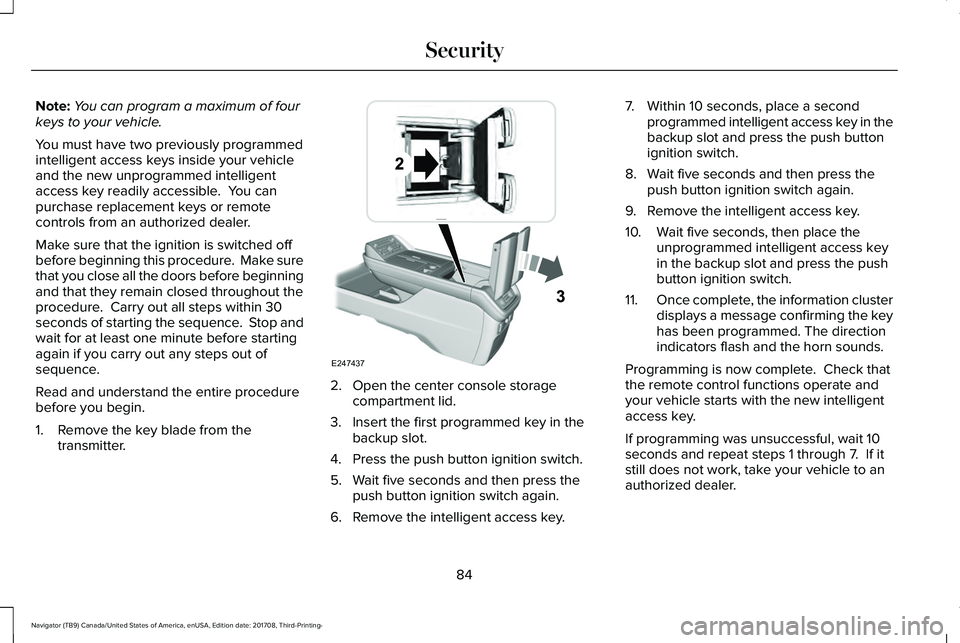
2. Open the center console storagecompartment lid.
3. Insert the first programmed key in thebackup slot.
4. Press the push button ignition switch.
5. Wait five seconds and then press thepush button ignition switch again.
6. Remove the intelligent access key.
7. Within 10 seconds, place a secondprogrammed intelligent access key in thebackup slot and press the push buttonignition switch.
8. Wait five seconds and then press thepush button ignition switch again.
9. Remove the intelligent access key.
10. Wait five seconds, then place theunprogrammed intelligent access keyin the backup slot and press the pushbutton ignition switch.
11.Once complete, the information clusterdisplays a message confirming the keyhas been programmed. The directionindicators flash and the horn sounds.
Programming is now complete. Check thatthe remote control functions operate andyour vehicle starts with the new intelligentaccess key.
If programming was unsuccessful, wait 10seconds and repeat steps 1 through 7. If itstill does not work, take your vehicle to anauthorized dealer.
84
Navigator (TB9) Canada/United States of America, enUSA, Edition date: 201708, Third-Printing-
SecurityE247437