mirror LINCOLN NAVIGATOR 2018 User Guide
[x] Cancel search | Manufacturer: LINCOLN, Model Year: 2018, Model line: NAVIGATOR, Model: LINCOLN NAVIGATOR 2018Pages: 649, PDF Size: 4.96 MB
Page 112 of 649
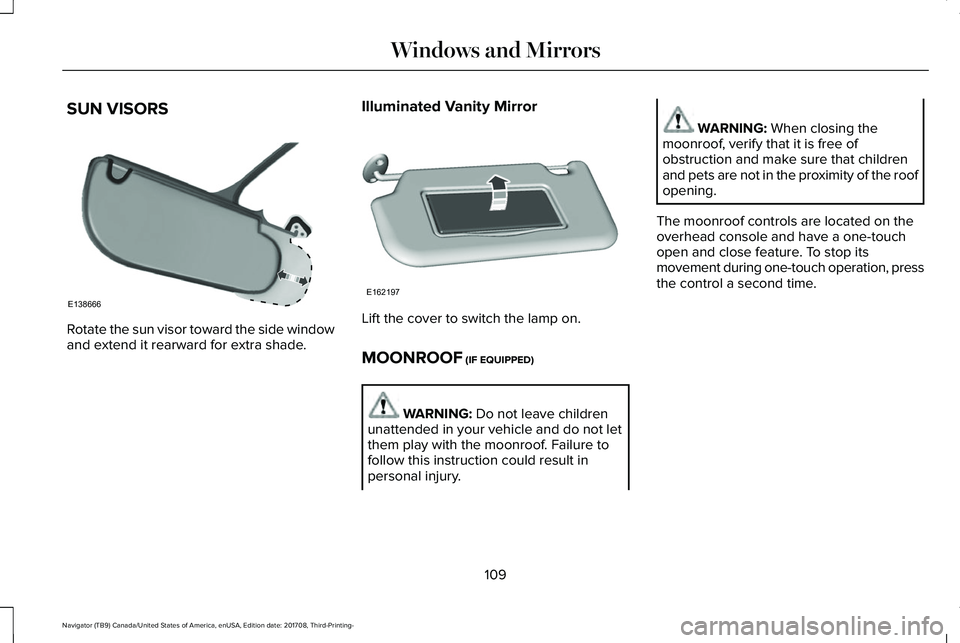
SUN VISORS
Rotate the sun visor toward the side windowand extend it rearward for extra shade.
Illuminated Vanity Mirror
Lift the cover to switch the lamp on.
MOONROOF (IF EQUIPPED)
WARNING: Do not leave childrenunattended in your vehicle and do not letthem play with the moonroof. Failure tofollow this instruction could result inpersonal injury.
WARNING: When closing themoonroof, verify that it is free ofobstruction and make sure that childrenand pets are not in the proximity of the roofopening.
The moonroof controls are located on theoverhead console and have a one-touchopen and close feature. To stop itsmovement during one-touch operation, pressthe control a second time.
109
Navigator (TB9) Canada/United States of America, enUSA, Edition date: 201708, Third-Printing-
Windows and MirrorsE138666 E162197
Page 113 of 649
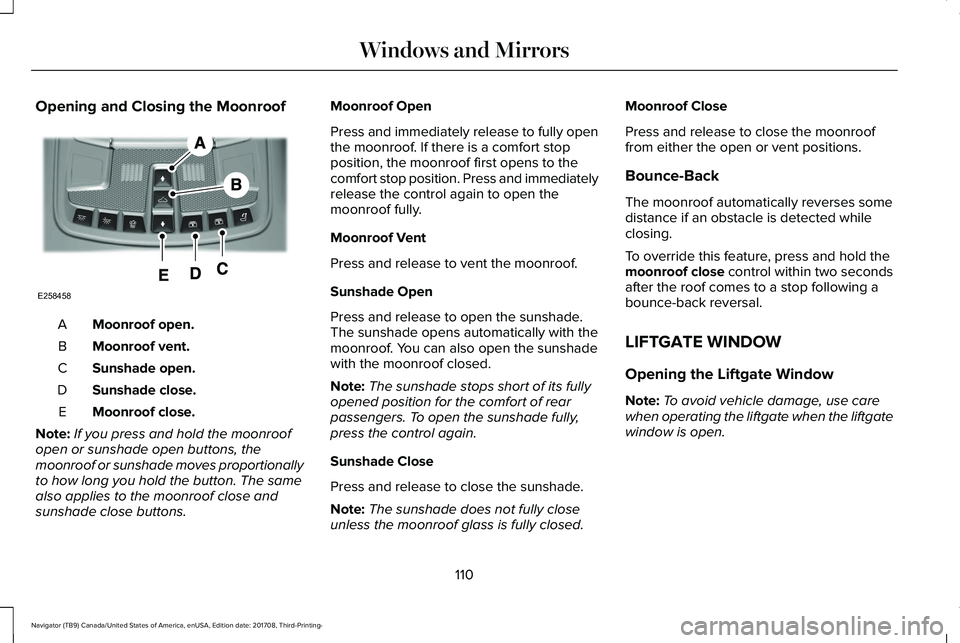
Opening and Closing the Moonroof
Moonroof open.A
Moonroof vent.B
Sunshade open.C
Sunshade close.D
Moonroof close.E
Note:If you press and hold the moonroofopen or sunshade open buttons, themoonroof or sunshade moves proportionallyto how long you hold the button. The samealso applies to the moonroof close andsunshade close buttons.
Moonroof Open
Press and immediately release to fully openthe moonroof. If there is a comfort stopposition, the moonroof first opens to thecomfort stop position. Press and immediatelyrelease the control again to open themoonroof fully.
Moonroof Vent
Press and release to vent the moonroof.
Sunshade Open
Press and release to open the sunshade.The sunshade opens automatically with themoonroof. You can also open the sunshadewith the moonroof closed.
Note:The sunshade stops short of its fullyopened position for the comfort of rearpassengers. To open the sunshade fully,press the control again.
Sunshade Close
Press and release to close the sunshade.
Note:The sunshade does not fully closeunless the moonroof glass is fully closed.
Moonroof Close
Press and release to close the moonrooffrom either the open or vent positions.
Bounce-Back
The moonroof automatically reverses somedistance if an obstacle is detected whileclosing.
To override this feature, press and hold themoonroof close control within two secondsafter the roof comes to a stop following abounce-back reversal.
LIFTGATE WINDOW
Opening the Liftgate Window
Note:To avoid vehicle damage, use carewhen operating the liftgate when the liftgatewindow is open.
110
Navigator (TB9) Canada/United States of America, enUSA, Edition date: 201708, Third-Printing-
Windows and MirrorsE258458
Page 114 of 649
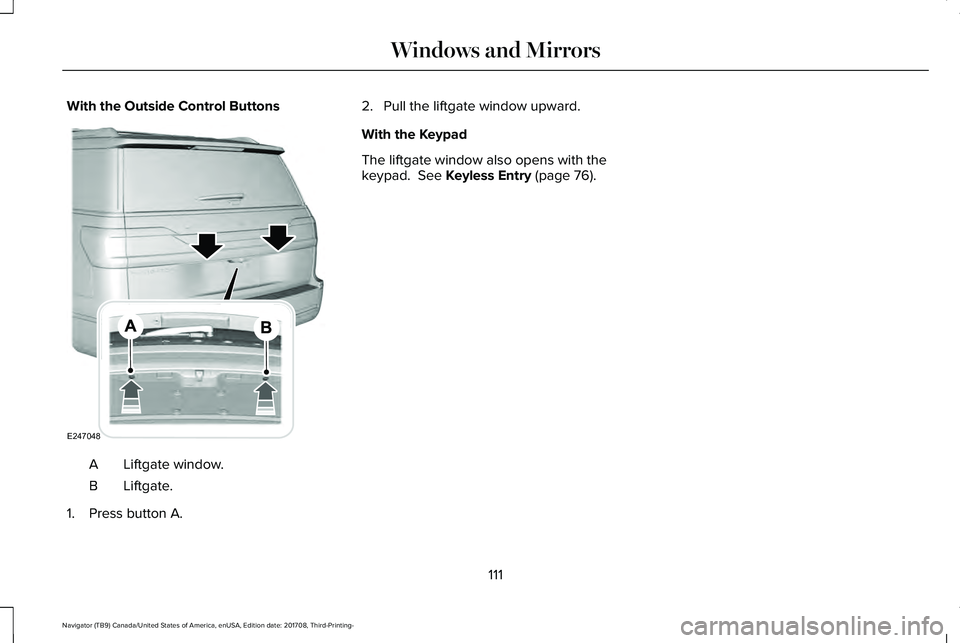
With the Outside Control Buttons
Liftgate window.A
Liftgate.B
1. Press button A.
2. Pull the liftgate window upward.
With the Keypad
The liftgate window also opens with thekeypad. See Keyless Entry (page 76).
111
Navigator (TB9) Canada/United States of America, enUSA, Edition date: 201708, Third-Printing-
Windows and MirrorsE247048
Page 125 of 649
SETTINGS
DRIVER ALERT
Enter the submenu and select your settingLANE KEEPING SYSTEM
PRE-COLLISION
Enter the submenu and select your settingTRAILER STATUSTOWING
TRAILER OPTIONS
CONNECTION CHECKLIST
ALARMVEHICLEADVANCEDSETTINGSAUTO ENGINE OFF
EASY ENTRY/EXIT
LIGHTING
LOCKS
MIRRORS
NEUTRAL TOW
OIL LIFE RESET
POWER LIFTGATE
REMOTE START
122
Navigator (TB9) Canada/United States of America, enUSA, Edition date: 201708, Third-Printing-
Information Displays
Page 155 of 649
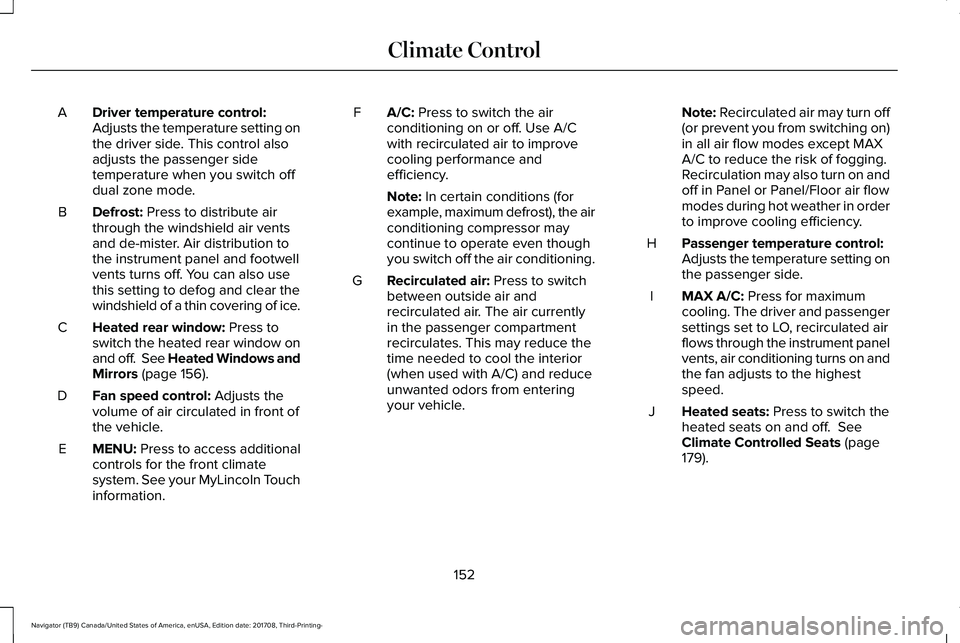
Driver temperature control:Adjusts the temperature setting onthe driver side. This control alsoadjusts the passenger sidetemperature when you switch offdual zone mode.
A
Defrost: Press to distribute airthrough the windshield air ventsand de-mister. Air distribution tothe instrument panel and footwellvents turns off. You can also usethis setting to defog and clear thewindshield of a thin covering of ice.
B
Heated rear window: Press toswitch the heated rear window onand off. See Heated Windows andMirrors (page 156).
C
Fan speed control: Adjusts thevolume of air circulated in front ofthe vehicle.
D
MENU: Press to access additionalcontrols for the front climatesystem. See your MyLincoln Touchinformation.
E
A/C: Press to switch the airconditioning on or off. Use A/Cwith recirculated air to improvecooling performance andefficiency.
F
Note: In certain conditions (forexample, maximum defrost), the airconditioning compressor maycontinue to operate even thoughyou switch off the air conditioning.
Recirculated air: Press to switchbetween outside air andrecirculated air. The air currentlyin the passenger compartmentrecirculates. This may reduce thetime needed to cool the interior(when used with A/C) and reduceunwanted odors from enteringyour vehicle.
G
Note: Recirculated air may turn off(or prevent you from switching on)in all air flow modes except MAXA/C to reduce the risk of fogging.Recirculation may also turn on andoff in Panel or Panel/Floor air flowmodes during hot weather in orderto improve cooling efficiency.
Passenger temperature control:Adjusts the temperature setting onthe passenger side.
H
MAX A/C: Press for maximumcooling. The driver and passengersettings set to LO, recirculated airflows through the instrument panelvents, air conditioning turns on andthe fan adjusts to the highestspeed.
I
Heated seats: Press to switch theheated seats on and off. SeeClimate Controlled Seats (page179).
J
152
Navigator (TB9) Canada/United States of America, enUSA, Edition date: 201708, Third-Printing-
Climate Control
Page 159 of 649
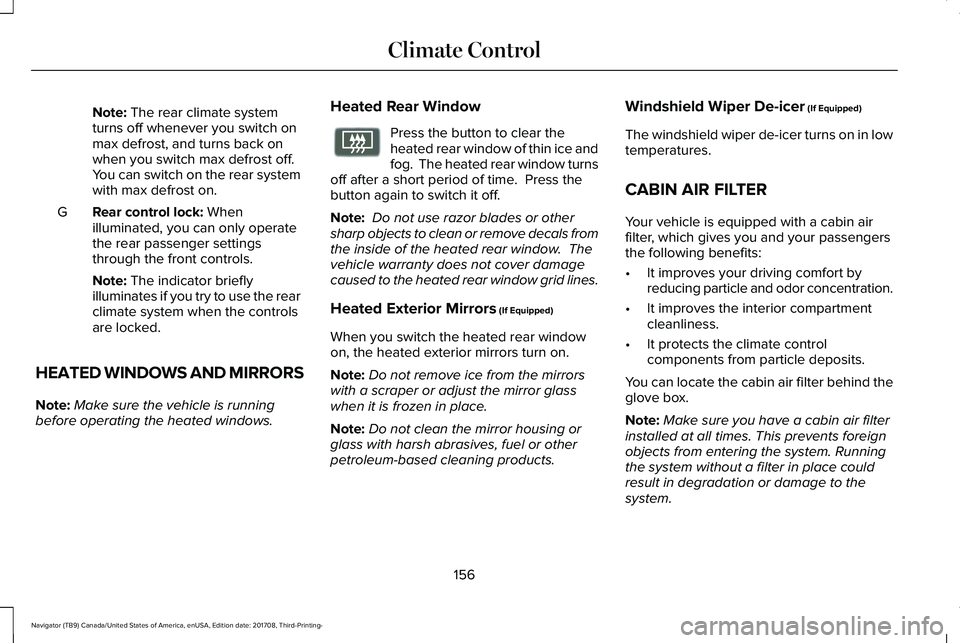
Note: The rear climate systemturns off whenever you switch onmax defrost, and turns back onwhen you switch max defrost off.You can switch on the rear systemwith max defrost on.
Rear control lock: Whenilluminated, you can only operatethe rear passenger settingsthrough the front controls.
G
Note: The indicator brieflyilluminates if you try to use the rearclimate system when the controlsare locked.
HEATED WINDOWS AND MIRRORS
Note:Make sure the vehicle is runningbefore operating the heated windows.
Heated Rear Window
Press the button to clear theheated rear window of thin ice andfog. The heated rear window turnsoff after a short period of time. Press thebutton again to switch it off.
Note: Do not use razor blades or othersharp objects to clean or remove decals fromthe inside of the heated rear window. Thevehicle warranty does not cover damagecaused to the heated rear window grid lines.
Heated Exterior Mirrors (If Equipped)
When you switch the heated rear windowon, the heated exterior mirrors turn on.
Note:Do not remove ice from the mirrorswith a scraper or adjust the mirror glasswhen it is frozen in place.
Note:Do not clean the mirror housing orglass with harsh abrasives, fuel or otherpetroleum-based cleaning products.
Windshield Wiper De-icer (If Equipped)
The windshield wiper de-icer turns on in lowtemperatures.
CABIN AIR FILTER
Your vehicle is equipped with a cabin airfilter, which gives you and your passengersthe following benefits:
•It improves your driving comfort byreducing particle and odor concentration.
•It improves the interior compartmentcleanliness.
•It protects the climate controlcomponents from particle deposits.
You can locate the cabin air filter behind theglove box.
Note:Make sure you have a cabin air filterinstalled at all times. This prevents foreignobjects from entering the system. Runningthe system without a filter in place couldresult in degradation or damage to thesystem.
156
Navigator (TB9) Canada/United States of America, enUSA, Edition date: 201708, Third-Printing-
Climate ControlE72507
Page 160 of 649
Replace the filter at regular intervals. SeeScheduled Maintenance (page 552).
For additional cabin air filter information, orto replace the filter, see a qualifiedtechnician.
REMOTE START
The system adjusts the interior temperaturedepending on your chosen settings duringremote start.
You cannot adjust the climate control settingduring remote start operation. When youswitch the ignition on, the climate controlsystem returns to the previous settings. Youcan now make adjustments.
Some features may remain on if they turn onduring remote start:
•Driver heated seat.
•Driver ventilated seat.
•Heated steering wheel.
•Heated mirrors.
•Heated rear window.
•Windshield wiper de-icer.
Note:If the passenger heated or ventilatedseats are on when you switch the vehicleoff, they default to the driver setting whenyou switch the vehicle on.
You can adjust the default remote startsettings using the information displaycontrols. See Information Displays (page119).
Automatic Settings
In hot weather, the system sets to 72°F(22°C). The ventilated seats set to high (ifavailable, and if you select AUTO in theinformation display).
In moderate weather, the system heats orcools (based on pre-selected settings). Therear defroster, heated mirrors and heated orventilated seats do not turn on.
In cold weather, the system sets to 72°F(22°C). The heated seats and heated steeringwheel set to high (if available, and if youselect AUTO in the information display). Therear defroster and heated mirrors turn on.
157
Navigator (TB9) Canada/United States of America, enUSA, Edition date: 201708, Third-Printing-
Climate Control
Page 170 of 649
You can also adjust this feature through thetouchscreen.
Press the Menu Settings icon, thenVehicle. Choose Multi-ContourSeats.
When switched on, the system displaysdirections for you to adjust the lumbarsettings in your seat or to set the massagefunction.
To access and make adjustments to thelumbar setting:
1.Choose the seat you would like to adjust.
2. Press the + or - to adjust the lumbarintensity.
To access and make adjustments to themassage setting:
1. Press the Menu Settings icon, thenVehicle. Choose Multi-Contour Seats.
2.Choose the seat you would like to adjust.
3. Press OFF, Low or High.
MEMORY FUNCTION
WARNING: Before activating thememory seat, make sure that the areaimmediately surrounding the seat is clearof obstructions and that all occupants areclear of moving parts.
WARNING: Do not use the memoryfunction when your vehicle is moving.
Driver Seat Memory
This feature automatically recalls the positionof the following:
•Driver seat.
•Power mirrors.
•Power adjustable foot pedals.
•Power steering column.
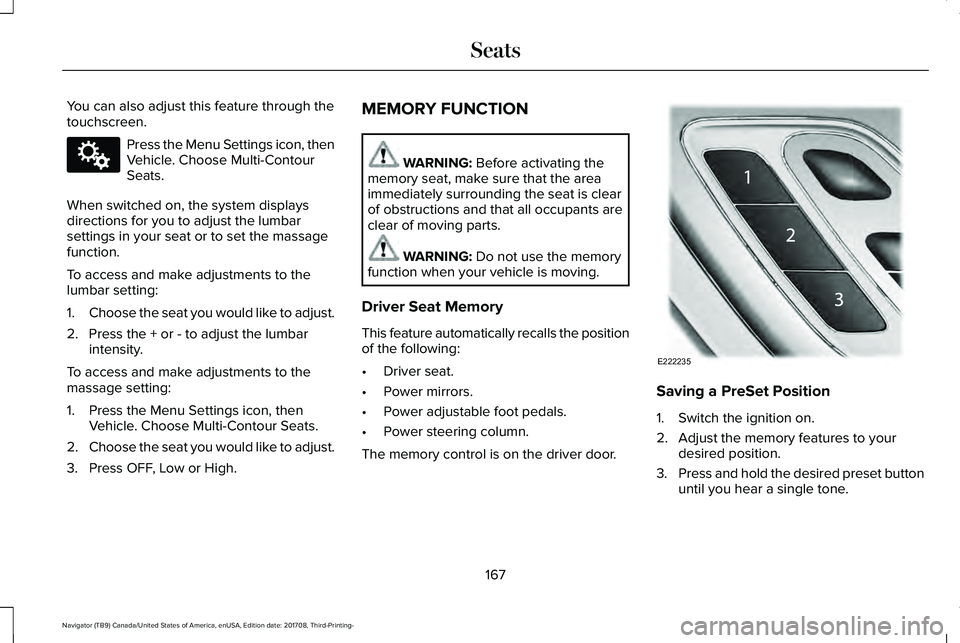
The memory control is on the driver door.
Saving a PreSet Position
1. Switch the ignition on.
2. Adjust the memory features to yourdesired position.
3.Press and hold the desired preset buttonuntil you hear a single tone.
167
Navigator (TB9) Canada/United States of America, enUSA, Edition date: 201708, Third-Printing-
SeatsE142607 E222235
Page 172 of 649
Personal Profiles
This feature allows you to create multiplepersonal profiles enabling users topersonalize vehicle’s settings. You cancreate one profile for each preset memoryseat button along with a guest profile. Youcan recall a profile using SYNC 3 or thepreset button you selected when you createdyour profile. You can also link a keyfob toyour profile, which is used to recall it.
Creating a Personal Profile
Use the SYNC display to create a personalprofile.
1. Switch the ignition on and leave thevehicle in park (P).
2.Select the Personal Profiles button underSettings.
3. Follow the instructions on the display.
Linking a Personal Profile to your RemoteControl or Intelligent Access Keyfob
You can save preset memory positions forup to three remote controls or intelligentaccess (IA) keys, by assigning a keyfob to apersonal profile in your SYNC 3.
Use the SYNC display to link a keyfob to apersonal profile.
1. Switch the ignition on and leave thevehicle in park (P).
2.Select the Personal Profiles button underSettings.
3. Touch the arrow for the profile you wishto link a keyfob to.
4. Select the Link Keyfob button.
5. Follow the instructions on the display.
Note:If more than one linked remote controlor intelligent access key is in range, thememory function moves to the settings ofthe first key to initiate a memory recall.
Note:The guest profile consists of existingsettings when there is no driver profilecreated. After you create a driver profile, theguest profile serves as an additional driverprofile.
Note:You cannot link a personalized name,a memory seat button or a keyfob to a guestprofile.
Personal Settings
Personal profiles allow you to personalizepositional settings such as seats and mirrors,as well as non-positional settings such asradio, navigation, driver assist and systemsettings. See SYNC™ 3 (page 446). Youcannot change the menu locations andsettings of those personalized features withpersonal profiles.
Note:Non-positional settings are saved tothe active driver profile whenever youchange a setting.
Note:You can save positional settings if youpress and hold a memory seat button. SeeSettings (page 510).
169
Navigator (TB9) Canada/United States of America, enUSA, Edition date: 201708, Third-Printing-
Seats
Page 253 of 649
REAR VIEW CAMERA
WARNING: The rear view camerasystem is a reverse aid supplement devicethat still requires the driver to use it inconjunction with the interior and exteriormirrors for maximum coverage.
WARNING: Objects that are close toeither corner of the bumper or under thebumper, might not be seen on the screendue to the limited coverage of the camerasystem.
WARNING: Reverse your vehicleslowly. Failure to follow this instructioncould result in the loss of control of yourvehicle, personal injury or death.
WARNING: Use caution when therear cargo door is ajar. If the rear cargodoor is ajar, the camera will be out ofposition and the video image may beincorrect. All guidelines disappear whenthe rear cargo door is ajar. Failure to followthis instruction could result in personalinjury.
WARNING: Use caution when turningcamera features on or off when thetransmission is not in park (P). Make sureyour vehicle is not moving.
The rear view camera system provides avideo image of the area behind your vehicle.
During operation, lines appear in the displaywhich represent your vehicle’s path andproximity to objects behind your vehicle.
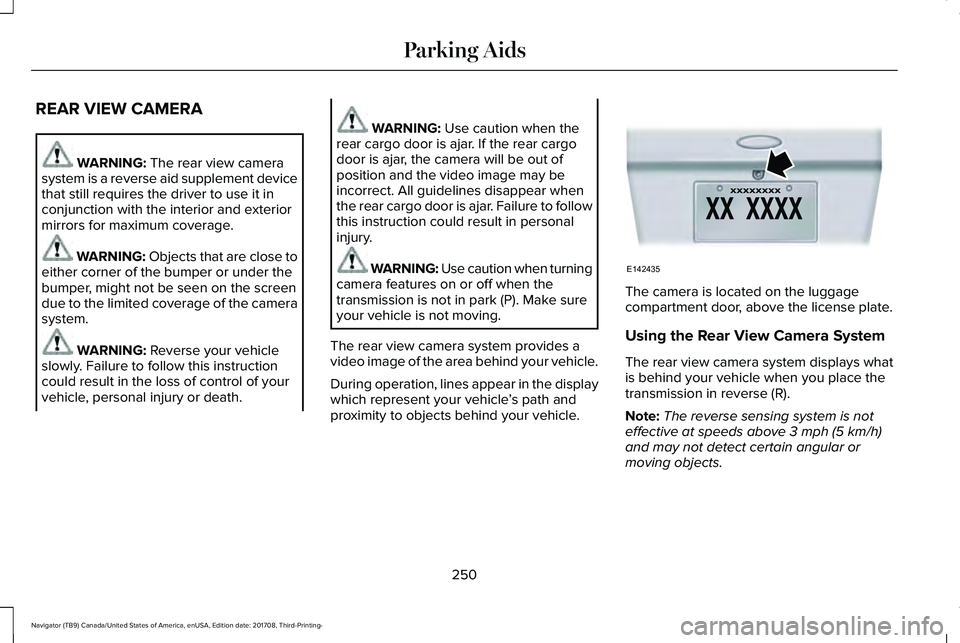
The camera is located on the luggagecompartment door, above the license plate.
Using the Rear View Camera System
The rear view camera system displays whatis behind your vehicle when you place thetransmission in reverse (R).
Note:The reverse sensing system is noteffective at speeds above 3 mph (5 km/h)and may not detect certain angular ormoving objects.
250
Navigator (TB9) Canada/United States of America, enUSA, Edition date: 201708, Third-Printing-
Parking AidsE142435