mirror LINCOLN NAVIGATOR 2018 Owner's Guide
[x] Cancel search | Manufacturer: LINCOLN, Model Year: 2018, Model line: NAVIGATOR, Model: LINCOLN NAVIGATOR 2018Pages: 649, PDF Size: 4.96 MB
Page 347 of 649
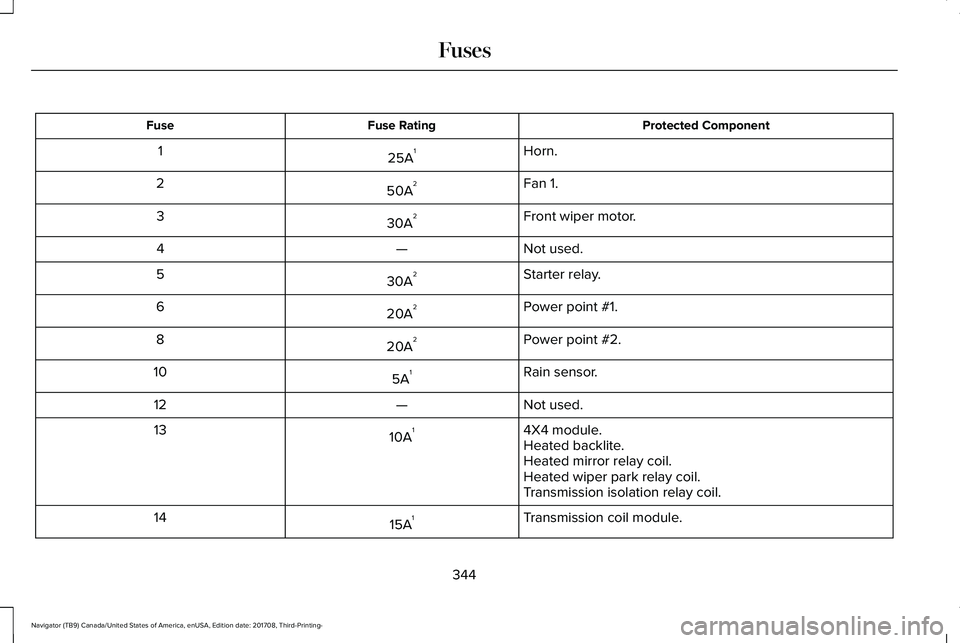
Protected ComponentFuse RatingFuse
Horn.25A11
Fan 1.50A22
Front wiper motor.30A23
Not used.—4
Starter relay.30A25
Power point #1.20A26
Power point #2.20A28
Rain sensor.5A110
Not used.—12
4X4 module.10A113Heated backlite.Heated mirror relay coil.Heated wiper park relay coil.Transmission isolation relay coil.
Transmission coil module.15A114
344
Navigator (TB9) Canada/United States of America, enUSA, Edition date: 201708, Third-Printing-
Fuses
Page 353 of 649
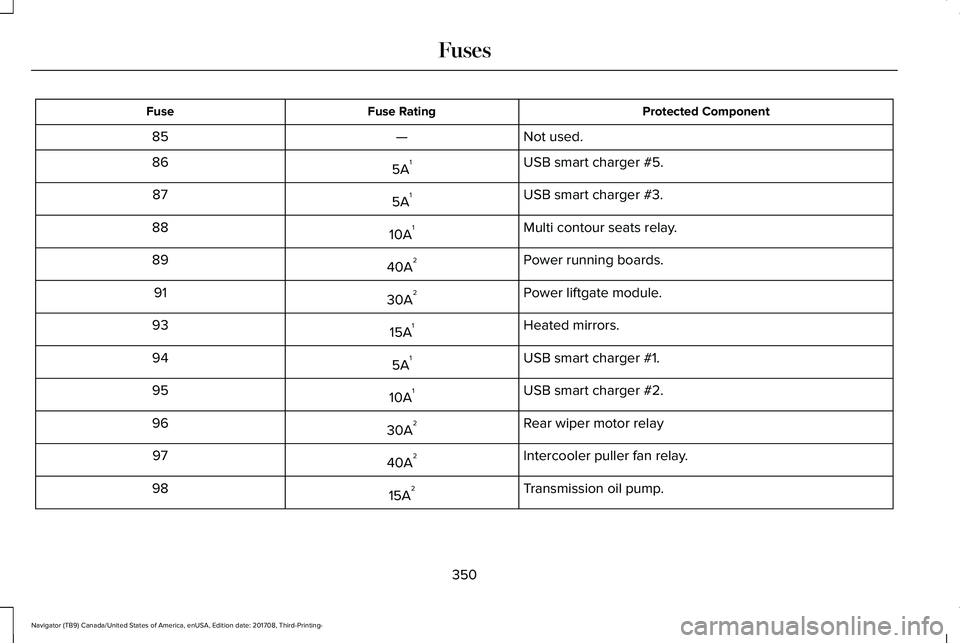
Protected ComponentFuse RatingFuse
Not used.—85
USB smart charger #5.5A186
USB smart charger #3.5A187
Multi contour seats relay.10A188
Power running boards.40A289
Power liftgate module.30A291
Heated mirrors.15A193
USB smart charger #1.5A194
USB smart charger #2.10A195
Rear wiper motor relay30A296
Intercooler puller fan relay.40A297
Transmission oil pump.15A298
350
Navigator (TB9) Canada/United States of America, enUSA, Edition date: 201708, Third-Printing-
Fuses
Page 358 of 649
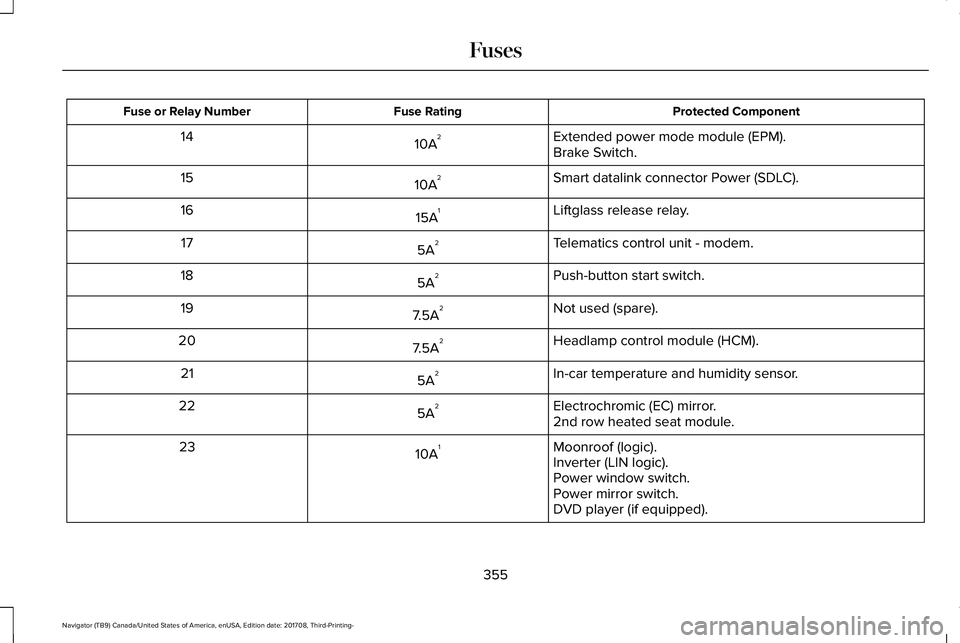
Protected ComponentFuse RatingFuse or Relay Number
Extended power mode module (EPM).10A214Brake Switch.
Smart datalink connector Power (SDLC).10A215
Liftglass release relay.15A116
Telematics control unit - modem.5A217
Push-button start switch.5A218
Not used (spare).7.5A219
Headlamp control module (HCM).7.5A220
In-car temperature and humidity sensor.5A221
Electrochromic (EC) mirror.5A2222nd row heated seat module.
Moonroof (logic).10A123Inverter (LIN logic).Power window switch.Power mirror switch.DVD player (if equipped).
355
Navigator (TB9) Canada/United States of America, enUSA, Edition date: 201708, Third-Printing-
Fuses
Page 377 of 649
WARNING: This vehicle may havemore than one battery. Removing thebattery cables from only one battery doesnot disconnect your vehicle electricalsystem. Make sure you disconnect thebattery cables from all batteries whendisconnecting power. Failure to do so maycause serious personal injury or propertydamage.
Your vehicle is fitted with a Motorcraftmaintenance-free battery which normallydoes not require additional water.
When a battery replacement is required, youmust use a recommended replacementbattery that matches the electricalrequirements of the vehicle.
Note:After cleaning or replacing the battery,make sure you reinstall the battery cover orshield.
Note:If you add electrical accessories orcomponents to the vehicle, it may adverselyaffect the low voltage battery performanceand durability. This may also affect theperformance of other electrical systems inthe vehicle.
For longer, trouble-free operation, keep thetop of the battery clean and dry.
If you see any corrosion on the battery orterminals, remove the cables from theterminals and clean with a wire brush. Youcan neutralize the acid with a solution ofbaking soda and water.
Because your vehicle’s engine iselectronically controlled by a computer, somecontrol conditions are maintained by powerfrom the battery. When the battery isdisconnected or a new battery is installed,the engine must relearn its idle and fuel trimstrategy for optimum driveability andperformance. Flexible fuel vehicles (FFV)must also relearn the ethanol content of thefuel for optimum driveability andperformance.
To restore the settings, do the following:
1. Apply the parking brake.
2. Shift into park (P) or neutral (N).
3. Switch off all accessories.
4. Press the brake pedal and start yourvehicle.
5. Run the engine until it reaches normaloperating temperature. While the engineis warming up, complete the following:Reset the clock. Reset the powerwindows bounce-back feature. SeeWindows and Mirrors (page 104). Resetthe radio station presets. See AudioSystem (page 434).
6. Allow the engine to idle for at least oneminute.
7.Drive the vehicle at least 10 mi (16 km) tocompletely relearn the idle trim and fueltrim strategy.
Note:If you do not allow the engine torelearn the idle and fuel trim strategy, theidle quality of your vehicle may be adverselyaffected until the engine computereventually relearns the idle trim and fuel trimstrategy.
374
Navigator (TB9) Canada/United States of America, enUSA, Edition date: 201708, Third-Printing-
Maintenance
Page 382 of 649
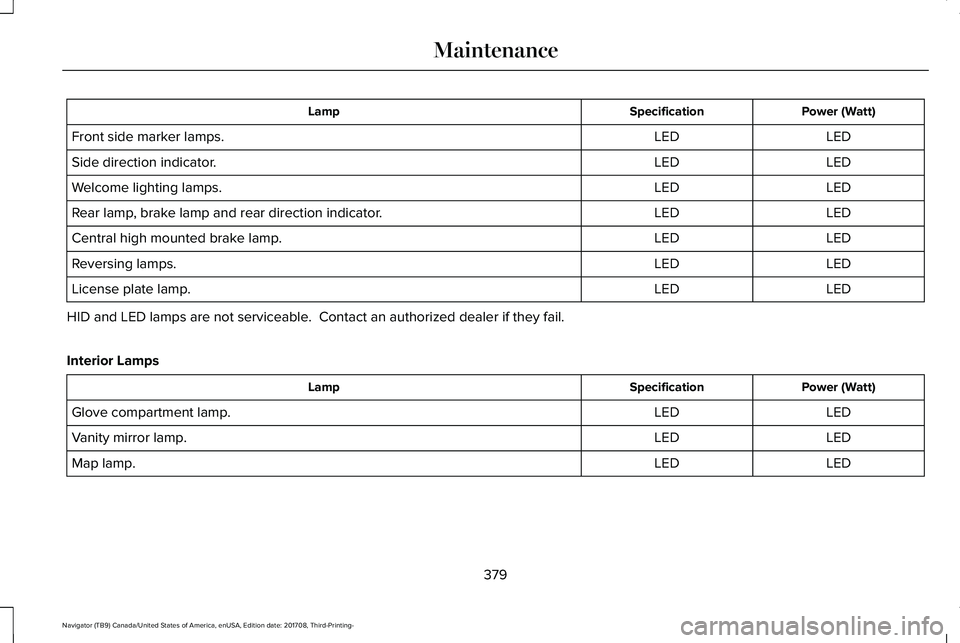
Power (Watt)SpecificationLamp
LEDLEDFront side marker lamps.
LEDLEDSide direction indicator.
LEDLEDWelcome lighting lamps.
LEDLEDRear lamp, brake lamp and rear direction indicator.
LEDLEDCentral high mounted brake lamp.
LEDLEDReversing lamps.
LEDLEDLicense plate lamp.
HID and LED lamps are not serviceable. Contact an authorized dealer if they fail.
Interior Lamps
Power (Watt)SpecificationLamp
LEDLEDGlove compartment lamp.
LEDLEDVanity mirror lamp.
LEDLEDMap lamp.
379
Navigator (TB9) Canada/United States of America, enUSA, Edition date: 201708, Third-Printing-
Maintenance
Page 388 of 649
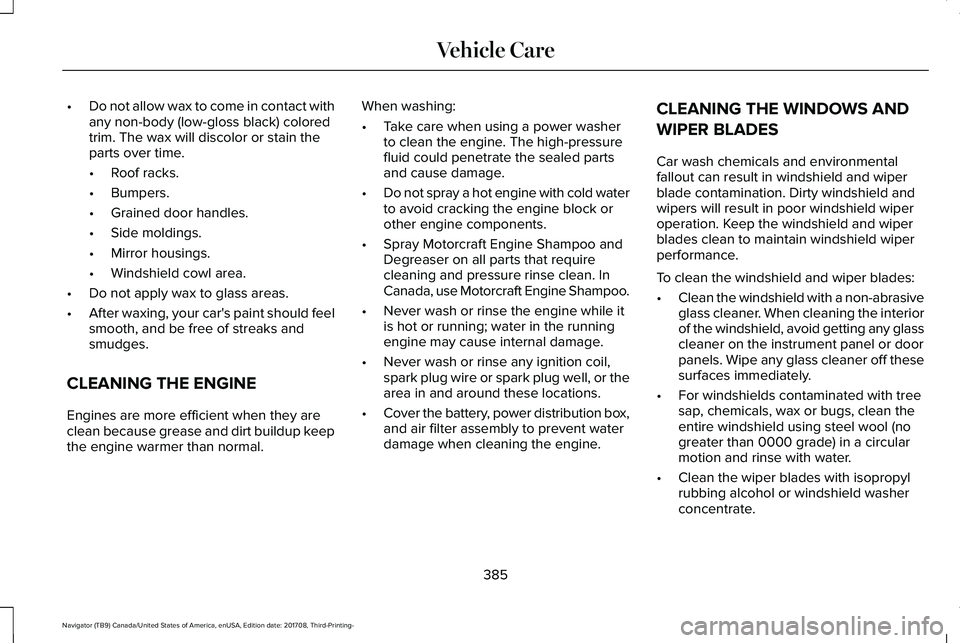
•Do not allow wax to come in contact withany non-body (low-gloss black) coloredtrim. The wax will discolor or stain theparts over time.
•Roof racks.
•Bumpers.
•Grained door handles.
•Side moldings.
•Mirror housings.
•Windshield cowl area.
•Do not apply wax to glass areas.
•After waxing, your car's paint should feelsmooth, and be free of streaks andsmudges.
CLEANING THE ENGINE
Engines are more efficient when they areclean because grease and dirt buildup keepthe engine warmer than normal.
When washing:
•Take care when using a power washerto clean the engine. The high-pressurefluid could penetrate the sealed partsand cause damage.
•Do not spray a hot engine with cold waterto avoid cracking the engine block orother engine components.
•Spray Motorcraft Engine Shampoo andDegreaser on all parts that requirecleaning and pressure rinse clean. InCanada, use Motorcraft Engine Shampoo.
•Never wash or rinse the engine while itis hot or running; water in the runningengine may cause internal damage.
•Never wash or rinse any ignition coil,spark plug wire or spark plug well, or thearea in and around these locations.
•Cover the battery, power distribution box,and air filter assembly to prevent waterdamage when cleaning the engine.
CLEANING THE WINDOWS AND
WIPER BLADES
Car wash chemicals and environmentalfallout can result in windshield and wiperblade contamination. Dirty windshield andwipers will result in poor windshield wiperoperation. Keep the windshield and wiperblades clean to maintain windshield wiperperformance.
To clean the windshield and wiper blades:
•Clean the windshield with a non-abrasiveglass cleaner. When cleaning the interiorof the windshield, avoid getting any glasscleaner on the instrument panel or doorpanels. Wipe any glass cleaner off thesesurfaces immediately.
•For windshields contaminated with treesap, chemicals, wax or bugs, clean theentire windshield using steel wool (nogreater than 0000 grade) in a circularmotion and rinse with water.
•Clean the wiper blades with isopropylrubbing alcohol or windshield washerconcentrate.
385
Navigator (TB9) Canada/United States of America, enUSA, Edition date: 201708, Third-Printing-
Vehicle Care
Page 532 of 649
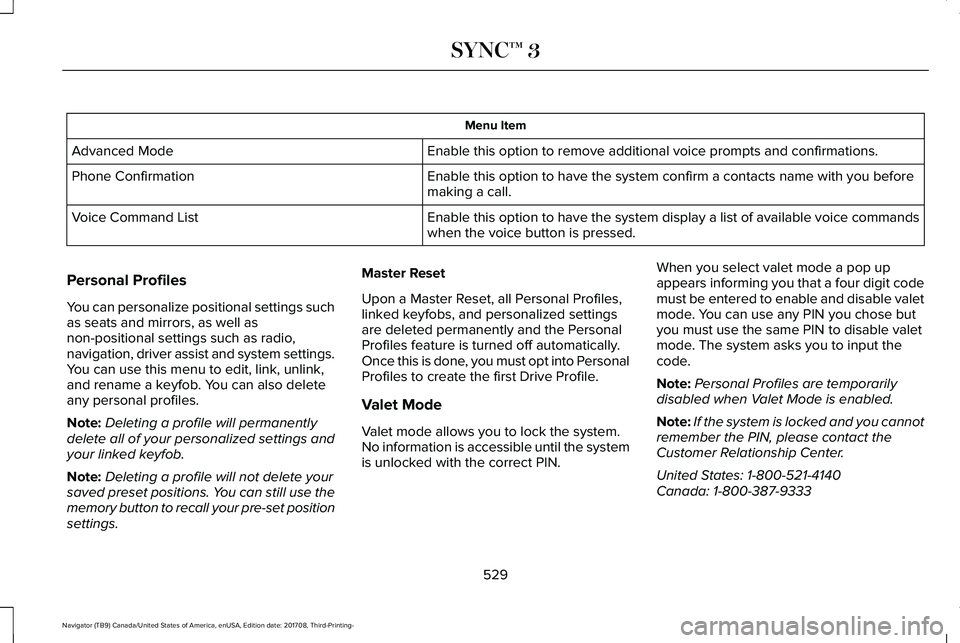
Menu Item
Enable this option to remove additional voice prompts and confirmations.Advanced Mode
Enable this option to have the system confirm a contacts name with you beforemaking a call.Phone Confirmation
Enable this option to have the system display a list of available voice commandswhen the voice button is pressed.Voice Command List
Personal Profiles
You can personalize positional settings suchas seats and mirrors, as well asnon-positional settings such as radio,navigation, driver assist and system settings.You can use this menu to edit, link, unlink,and rename a keyfob. You can also deleteany personal profiles.
Note:Deleting a profile will permanentlydelete all of your personalized settings andyour linked keyfob.
Note:Deleting a profile will not delete yoursaved preset positions. You can still use thememory button to recall your pre-set positionsettings.
Master Reset
Upon a Master Reset, all Personal Profiles,linked keyfobs, and personalized settingsare deleted permanently and the PersonalProfiles feature is turned off automatically.Once this is done, you must opt into PersonalProfiles to create the first Drive Profile.
Valet Mode
Valet mode allows you to lock the system.No information is accessible until the systemis unlocked with the correct PIN.
When you select valet mode a pop upappears informing you that a four digit codemust be entered to enable and disable valetmode. You can use any PIN you chose butyou must use the same PIN to disable valetmode. The system asks you to input thecode.
Note:Personal Profiles are temporarilydisabled when Valet Mode is enabled.
Note:If the system is locked and you cannotremember the PIN, please contact theCustomer Relationship Center.
United States: 1-800-521-4140Canada: 1-800-387-9333
529
Navigator (TB9) Canada/United States of America, enUSA, Edition date: 201708, Third-Printing-
SYNC™ 3
Page 638 of 649
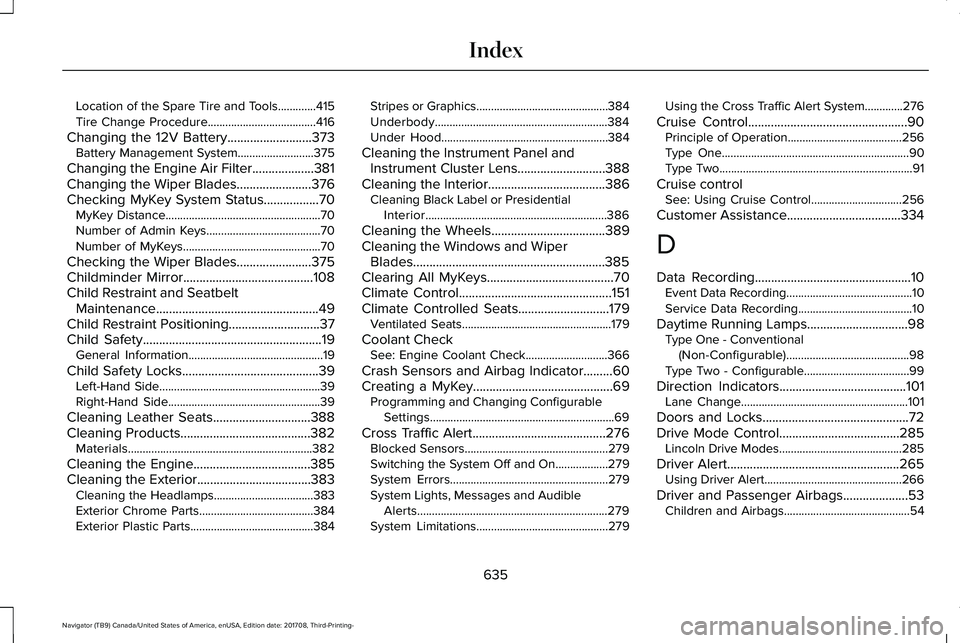
Location of the Spare Tire and Tools.............415Tire Change Procedure.....................................416
Changing the 12V Battery..........................373Battery Management System..........................375
Changing the Engine Air Filter...................381Changing the Wiper Blades.......................376Checking MyKey System Status.................70MyKey Distance.....................................................70Number of Admin Keys.......................................70Number of MyKeys...............................................70
Checking the Wiper Blades.......................375Childminder Mirror........................................108Child Restraint and SeatbeltMaintenance..................................................49Child Restraint Positioning............................37Child Safety.......................................................19General Information..............................................19
Child Safety Locks..........................................39Left-Hand Side.......................................................39Right-Hand Side....................................................39
Cleaning Leather Seats..............................388Cleaning Products........................................382Materials...............................................................382
Cleaning the Engine....................................385Cleaning the Exterior...................................383Cleaning the Headlamps..................................383Exterior Chrome Parts.......................................384Exterior Plastic Parts..........................................384
Stripes or Graphics.............................................384Underbody...........................................................384Under Hood.........................................................384
Cleaning the Instrument Panel andInstrument Cluster Lens...........................388Cleaning the Interior....................................386Cleaning Black Label or PresidentialInterior..............................................................386
Cleaning the Wheels...................................389Cleaning the Windows and WiperBlades...........................................................385Clearing All MyKeys.......................................70Climate Control...............................................151Climate Controlled Seats............................179Ventilated Seats...................................................179
Coolant CheckSee: Engine Coolant Check............................366
Crash Sensors and Airbag Indicator.........60Creating a MyKey...........................................69Programming and Changing ConfigurableSettings...............................................................69
Cross Traffic Alert.........................................276Blocked Sensors.................................................279Switching the System Off and On..................279System Errors......................................................279System Lights, Messages and AudibleAlerts.................................................................279System Limitations.............................................279
Using the Cross Traffic Alert System.............276
Cruise Control.................................................90Principle of Operation.......................................256Type One................................................................90Type Two..................................................................91
Cruise controlSee: Using Cruise Control...............................256
Customer Assistance...................................334
D
Data Recording................................................10Event Data Recording...........................................10Service Data Recording.......................................10
Daytime Running Lamps...............................98Type One - Conventional(Non-Configurable)..........................................98Type Two - Configurable....................................99
Direction Indicators.......................................101Lane Change.........................................................101
Doors and Locks.............................................72Drive Mode Control.....................................285Lincoln Drive Modes..........................................285
Driver Alert.....................................................265Using Driver Alert...............................................266
Driver and Passenger Airbags....................53Children and Airbags...........................................54
635
Navigator (TB9) Canada/United States of America, enUSA, Edition date: 201708, Third-Printing-
Index
Page 639 of 649
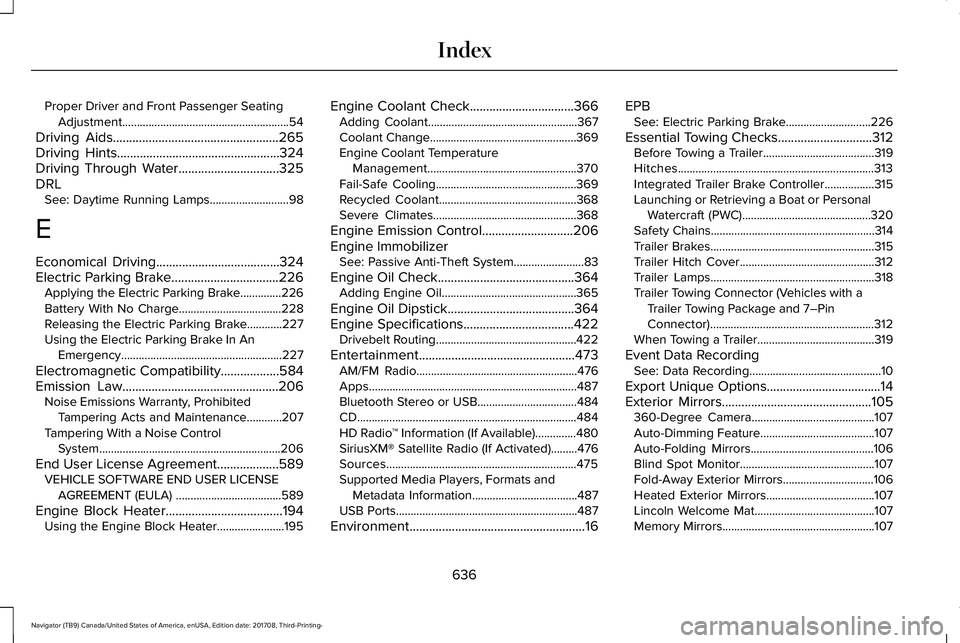
Proper Driver and Front Passenger SeatingAdjustment.........................................................54
Driving Aids...................................................265Driving Hints..................................................324Driving Through Water...............................325DRLSee: Daytime Running Lamps...........................98
E
Economical Driving......................................324Electric Parking Brake.................................226Applying the Electric Parking Brake..............226Battery With No Charge...................................228Releasing the Electric Parking Brake............227Using the Electric Parking Brake In AnEmergency.......................................................227
Electromagnetic Compatibility..................584Emission Law................................................206Noise Emissions Warranty, ProhibitedTampering Acts and Maintenance............207Tampering With a Noise ControlSystem..............................................................206
End User License Agreement...................589VEHICLE SOFTWARE END USER LICENSEAGREEMENT (EULA) ....................................589
Engine Block Heater....................................194Using the Engine Block Heater.......................195
Engine Coolant Check................................366Adding Coolant...................................................367Coolant Change..................................................369Engine Coolant TemperatureManagement...................................................370Fail-Safe Cooling................................................369Recycled Coolant...............................................368Severe Climates.................................................368
Engine Emission Control............................206Engine ImmobilizerSee: Passive Anti-Theft System........................83
Engine Oil Check..........................................364Adding Engine Oil..............................................365
Engine Oil Dipstick.......................................364Engine Specifications..................................422Drivebelt Routing................................................422
Entertainment................................................473AM/FM Radio.......................................................476Apps.......................................................................487Bluetooth Stereo or USB..................................484CD...........................................................................484HD Radio™ Information (If Available)..............480SiriusXM® Satellite Radio (If Activated).........476Sources.................................................................475Supported Media Players, Formats andMetadata Information....................................487USB Ports..............................................................487
Environment......................................................16
EPBSee: Electric Parking Brake.............................226
Essential Towing Checks.............................312Before Towing a Trailer......................................319Hitches...................................................................313Integrated Trailer Brake Controller.................315Launching or Retrieving a Boat or PersonalWatercraft (PWC)............................................320Safety Chains........................................................314Trailer Brakes........................................................315Trailer Hitch Cover..............................................312Trailer Lamps........................................................318Trailer Towing Connector (Vehicles with aTrailer Towing Package and 7–PinConnector)........................................................312When Towing a Trailer........................................319
Event Data RecordingSee: Data Recording.............................................10
Export Unique Options...................................14Exterior Mirrors..............................................105360-Degree Camera..........................................107Auto-Dimming Feature.......................................107Auto-Folding Mirrors..........................................106Blind Spot Monitor..............................................107Fold-Away Exterior Mirrors...............................106Heated Exterior Mirrors.....................................107Lincoln Welcome Mat.........................................107Memory Mirrors....................................................107
636
Navigator (TB9) Canada/United States of America, enUSA, Edition date: 201708, Third-Printing-
Index
Page 640 of 649
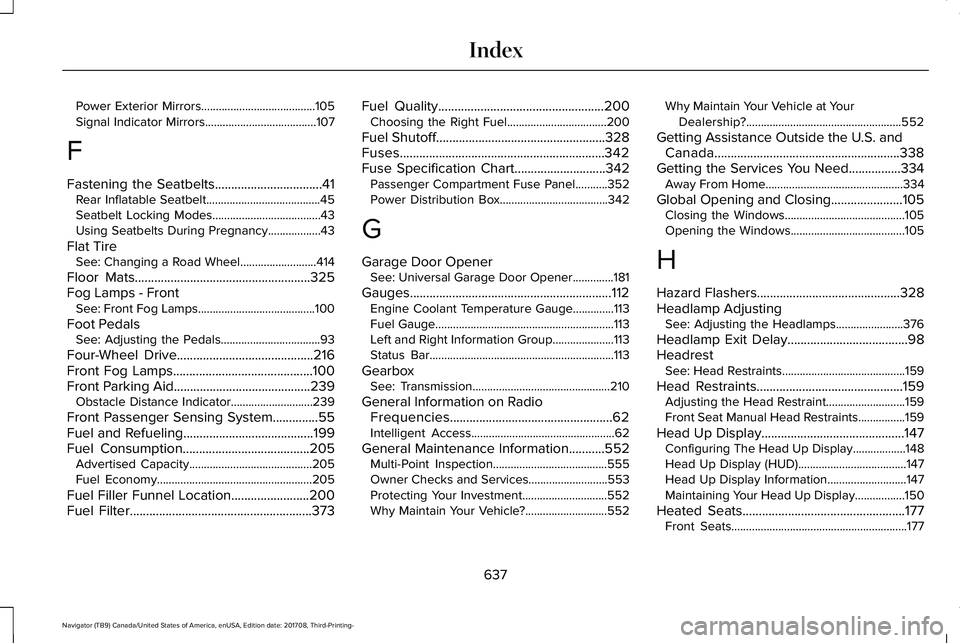
Power Exterior Mirrors.......................................105Signal Indicator Mirrors......................................107
F
Fastening the Seatbelts.................................41Rear Inflatable Seatbelt.......................................45Seatbelt Locking Modes.....................................43Using Seatbelts During Pregnancy..................43
Flat TireSee: Changing a Road Wheel..........................414
Floor Mats......................................................325Fog Lamps - FrontSee: Front Fog Lamps........................................100
Foot PedalsSee: Adjusting the Pedals..................................93
Four-Wheel Drive..........................................216Front Fog Lamps...........................................100Front Parking Aid..........................................239Obstacle Distance Indicator............................239
Front Passenger Sensing System..............55Fuel and Refueling........................................199Fuel Consumption.......................................205Advertised Capacity..........................................205Fuel Economy.....................................................205
Fuel Filler Funnel Location........................200Fuel Filter........................................................373
Fuel Quality...................................................200Choosing the Right Fuel..................................200
Fuel Shutoff....................................................328Fuses...............................................................342Fuse Specification Chart............................342Passenger Compartment Fuse Panel...........352Power Distribution Box.....................................342
G
Garage Door OpenerSee: Universal Garage Door Opener..............181
Gauges..............................................................112Engine Coolant Temperature Gauge..............113Fuel Gauge.............................................................113Left and Right Information Group.....................113Status Bar...............................................................113
GearboxSee: Transmission...............................................210
General Information on RadioFrequencies..................................................62Intelligent Access.................................................62
General Maintenance Information...........552Multi-Point Inspection.......................................555Owner Checks and Services...........................553Protecting Your Investment.............................552Why Maintain Your Vehicle?............................552
Why Maintain Your Vehicle at YourDealership?.....................................................552
Getting Assistance Outside the U.S. andCanada.........................................................338Getting the Services You Need................334Away From Home...............................................334
Global Opening and Closing......................105Closing the Windows.........................................105Opening the Windows.......................................105
H
Hazard Flashers............................................328Headlamp AdjustingSee: Adjusting the Headlamps.......................376
Headlamp Exit Delay.....................................98HeadrestSee: Head Restraints..........................................159
Head Restraints.............................................159Adjusting the Head Restraint...........................159Front Seat Manual Head Restraints................159
Head Up Display............................................147Configuring The Head Up Display..................148Head Up Display (HUD).....................................147Head Up Display Information...........................147Maintaining Your Head Up Display.................150
Heated Seats..................................................177Front Seats............................................................177
637
Navigator (TB9) Canada/United States of America, enUSA, Edition date: 201708, Third-Printing-
Index