warning light LINCOLN NAVIGATOR 2018 User Guide
[x] Cancel search | Manufacturer: LINCOLN, Model Year: 2018, Model line: NAVIGATOR, Model: LINCOLN NAVIGATOR 2018Pages: 649, PDF Size: 4.96 MB
Page 57 of 649
The driver and passenger front airbag systemconsists of:
•Driver and passenger airbag modules.
•Front passenger sensing system.
· Crash sensors and monitoringsystem with readiness indicator.See Crash Sensors and AirbagIndicator (page 60).
Proper Driver and Front PassengerSeating Adjustment
WARNING: National Highway TrafficSafety Administration (NHTSA)recommends a minimum distance of atleast 10 in (25 cm) between an occupant'schest and the driver airbag module.
To properly position yourself away from theairbag:
•Move your seat to the rear as far as youcan while still reaching the pedalscomfortably.
•Recline the seat slightly (one or twodegrees) from the upright position.
After all occupants have adjusted their seatsand put on seatbelts, it is very important thatthey continue to sit properly. Properly seatedoccupants sit upright, lean against the seatback, and center themselves on the seatcushion, with their feet comfortably extendedon the floor. Sitting improperly can increasethe chance of injury in a crash event. Forexample, if an occupant slouches, lies down,turns sideways, sits forward, leans forwardor sideways, or puts one or both feet up, thechance of injury during a crash greatlyincreases.
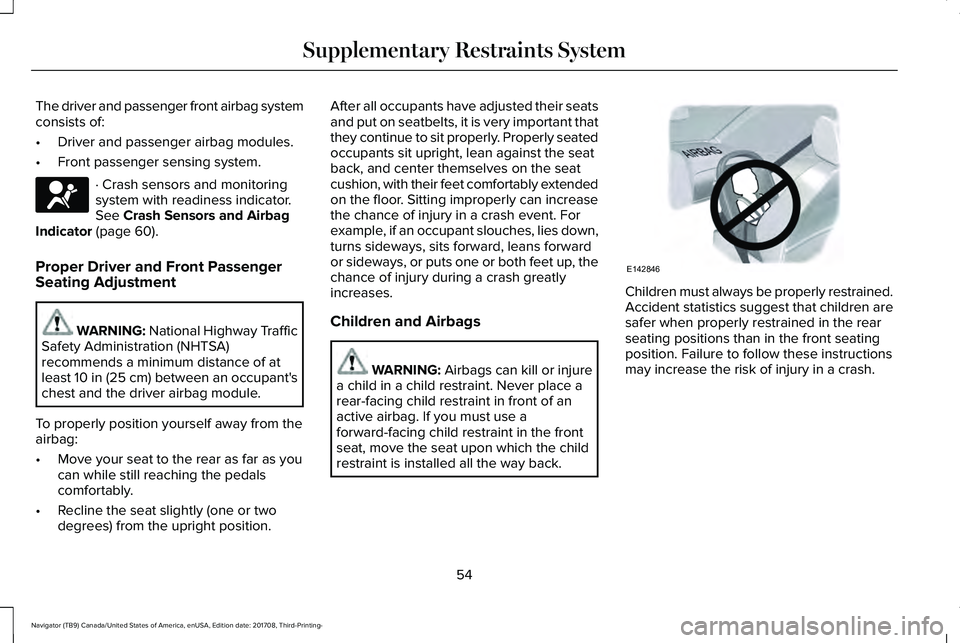
Children and Airbags
WARNING: Airbags can kill or injurea child in a child restraint. Never place arear-facing child restraint in front of anactive airbag. If you must use aforward-facing child restraint in the frontseat, move the seat upon which the childrestraint is installed all the way back.
Children must always be properly restrained.Accident statistics suggest that children aresafer when properly restrained in the rearseating positions than in the front seatingposition. Failure to follow these instructionsmay increase the risk of injury in a crash.
54
Navigator (TB9) Canada/United States of America, enUSA, Edition date: 201708, Third-Printing-
Supplementary Restraints SystemE67017 E142846
Page 60 of 649
Make sure the front passengersensing system is operatingproperly. See Crash Sensors andAirbag Indicator (page 60).
If the airbag readiness light is lit, do thefollowing:
The driver and adult passengers shouldcheck for objects lodged underneath thefront passenger seat or cargo interfering withthe seat.
If objects are lodged or cargo is interferingwith the seat, please take the following stepsto remove the obstruction:
•Pull your vehicle over.
•Switch your vehicle off.
•Driver or adult passengers should checkfor any objects lodged underneath thefront passenger seat or cargo interferingwith the seat.
•Remove the obstruction(s) (if found).
•Restart your vehicle.
•Wait at least two minutes and verify thatthe airbag readiness light in theinstrument cluster is no longerilluminated.
•If the airbag readiness light in theinstrument cluster remains illuminated,this may or may not be a problem due tothe front passenger sensing system.
Do not attempt to repair or service thesystem. Take your vehicle immediately to anauthorized dealer.
If it is necessary to modify an advanced frontairbag system to accommodate a personwith disabilities, contact your CustomerRelationship Center.
SIDE AIRBAGS
WARNING: Do not place objects ormount equipment on or near the airbagcover, on the side of the seatbacks (of thefront seats), or in front seat areas that maycome into contact with a deploying airbag.Failure to follow these instructions mayincrease the risk of personal injury in theevent of a crash.
WARNING: Do not use accessoryseat covers. The use of accessory seatcovers may prevent the deployment of theside airbags and increase the risk of injuryin an accident.
WARNING: Do not lean your headon the door. The side airbag could injureyou as it deploys from the side of theseatback.
57
Navigator (TB9) Canada/United States of America, enUSA, Edition date: 201708, Third-Printing-
Supplementary Restraints SystemE67017
Page 63 of 649
The design and development of the SafetyCanopy included recommended testingprocedures that were developed by a groupof automotive safety experts known as theSide Airbag Technical Working Group. Theserecommended testing procedures helpreduce the risk of injuries related to thedeployment of side airbags (including theSafety Canopy).
CRASH SENSORS AND AIRBAG
INDICATOR
WARNING: Modifying or addingequipment to the front end of your vehicle(including hood, bumper system, frame,front end body structure, tow hooks andhood pins) may affect the performance ofthe airbag system, increasing the risk ofinjury. Do not modify or add equipment tothe front end of your vehicle.
Your vehicle has a collection of crash andoccupant sensors which provide informationto the restraints control module whichdeploys (activates) the front seatbeltpretensioners, driver airbag, passengerairbag, rear inflatable belts, seat mountedside airbags, and the Safety Canopy. Basedon the type of crash, the restraints controlmodule will deploy the appropriate safetydevices.
The restraints control module also monitorsthe readiness of the above safety devicesplus the crash and occupant sensors. Thereadiness of the safety system is indicatedby a warning indicator light in the instrumentcluster or by a backup tone if the warninglight is not working. See Instrument Cluster(page 112). Routine maintenance of theairbag is not required.
A difficulty with the system is indicated byone or more of the following:
The readiness light will notilluminate immediately after youswitch the ignition on.
•The readiness light either flashes or stayslit.
•A series of five beeps will be heard. Thetone pattern will repeat periodically untilthe problem, the light or both arerepaired.
If any of these things happen, evenintermittently, have the supplementalrestraint system serviced at an authorizeddealer immediately. Unless serviced, thesystem may not function properly in theevent of a crash.
60
Navigator (TB9) Canada/United States of America, enUSA, Edition date: 201708, Third-Printing-
Supplementary Restraints SystemE67017
Page 90 of 649
USING POWER RUNNING BOARDS
WARNING: In extreme climates,excessive ice buildup may occur, causingthe running boards not to deploy. Makesure that the running boards havedeployed, and have finished moving beforeattempting to step on them. The runningboards will resume normal function oncethe blockage is cleared.
WARNING: Switch off the runningboards before jacking or placing any objectunder your vehicle. Never place your handbetween the extended running board andyour vehicle. A moving running board maycause injury.
Note:Do not use the running boards, frontand rear hinge assemblies, running boardmotors, or the running board underbodymounts to lift your vehicle when jacking.Always use proper jacking points.
Note:The running boards may operate moreslowly in cool temperatures.
Note:The running board mechanism maytrap debris such as mud, dirt, snow, ice andsalt. This may cause unwanted noise. If thishappens, manually set the running boardsto the deployed position. Then, wash thesystem, in particular the front and rear hingearms, with a high-pressure car wash wand.
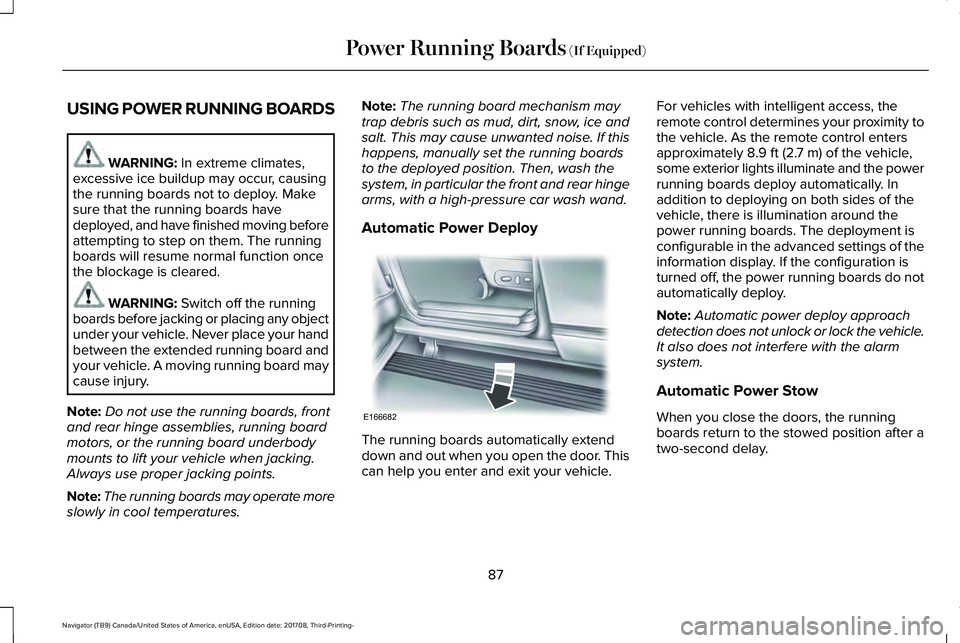
Automatic Power Deploy
The running boards automatically extenddown and out when you open the door. Thiscan help you enter and exit your vehicle.
For vehicles with intelligent access, theremote control determines your proximity tothe vehicle. As the remote control entersapproximately 8.9 ft (2.7 m) of the vehicle,some exterior lights illuminate and the powerrunning boards deploy automatically. Inaddition to deploying on both sides of thevehicle, there is illumination around thepower running boards. The deployment isconfigurable in the advanced settings of theinformation display. If the configuration isturned off, the power running boards do notautomatically deploy.
Note:Automatic power deploy approachdetection does not unlock or lock the vehicle.It also does not interfere with the alarmsystem.
Automatic Power Stow
When you close the doors, the runningboards return to the stowed position after atwo-second delay.
87
Navigator (TB9) Canada/United States of America, enUSA, Edition date: 201708, Third-Printing-
Power Running Boards (If Equipped)E166682
Page 100 of 649
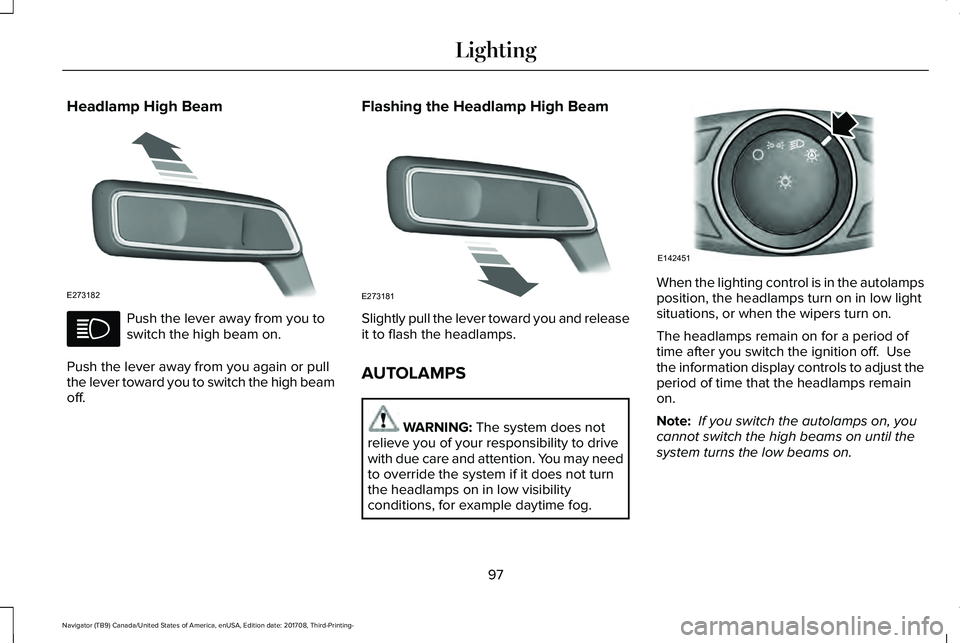
Headlamp High Beam
Push the lever away from you toswitch the high beam on.
Push the lever away from you again or pullthe lever toward you to switch the high beamoff.
Flashing the Headlamp High Beam
Slightly pull the lever toward you and releaseit to flash the headlamps.
AUTOLAMPS
WARNING: The system does notrelieve you of your responsibility to drivewith due care and attention. You may needto override the system if it does not turnthe headlamps on in low visibilityconditions, for example daytime fog.
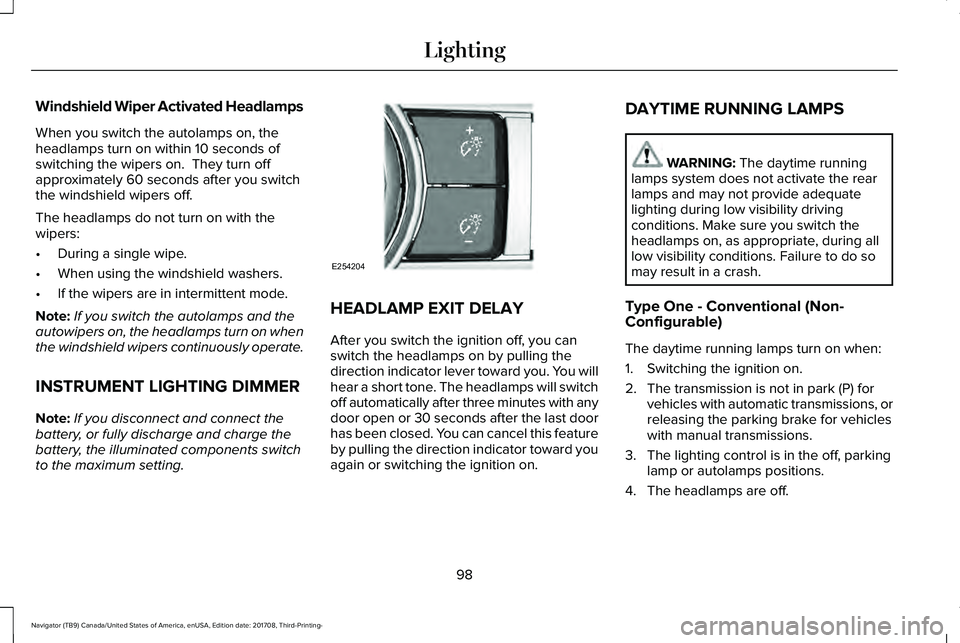
When the lighting control is in the autolampsposition, the headlamps turn on in low lightsituations, or when the wipers turn on.
The headlamps remain on for a period oftime after you switch the ignition off. Usethe information display controls to adjust theperiod of time that the headlamps remainon.
Note: If you switch the autolamps on, youcannot switch the high beams on until thesystem turns the low beams on.
97
Navigator (TB9) Canada/United States of America, enUSA, Edition date: 201708, Third-Printing-
LightingE273182 E273181 E142451
Page 101 of 649
Windshield Wiper Activated Headlamps
When you switch the autolamps on, theheadlamps turn on within 10 seconds ofswitching the wipers on. They turn offapproximately 60 seconds after you switchthe windshield wipers off.
The headlamps do not turn on with thewipers:
•During a single wipe.
•When using the windshield washers.
•If the wipers are in intermittent mode.
Note:If you switch the autolamps and theautowipers on, the headlamps turn on whenthe windshield wipers continuously operate.
INSTRUMENT LIGHTING DIMMER
Note:If you disconnect and connect thebattery, or fully discharge and charge thebattery, the illuminated components switchto the maximum setting.
HEADLAMP EXIT DELAY
After you switch the ignition off, you canswitch the headlamps on by pulling thedirection indicator lever toward you. You willhear a short tone. The headlamps will switchoff automatically after three minutes with anydoor open or 30 seconds after the last doorhas been closed. You can cancel this featureby pulling the direction indicator toward youagain or switching the ignition on.
DAYTIME RUNNING LAMPS
WARNING: The daytime runninglamps system does not activate the rearlamps and may not provide adequatelighting during low visibility drivingconditions. Make sure you switch theheadlamps on, as appropriate, during alllow visibility conditions. Failure to do somay result in a crash.
Type One - Conventional (Non-Configurable)
The daytime running lamps turn on when:
1. Switching the ignition on.
2. The transmission is not in park (P) forvehicles with automatic transmissions, orreleasing the parking brake for vehicleswith manual transmissions.
3. The lighting control is in the off, parkinglamp or autolamps positions.
4. The headlamps are off.
98
Navigator (TB9) Canada/United States of America, enUSA, Edition date: 201708, Third-Printing-
LightingE254204
Page 102 of 649
Type Two - Configurable
Switch the daytime running lamps on or offusing the information display. SeeInformation Displays (page 119).
The daytime running lamps turn on when:
1. The lamps are on in the informationdisplay.
2. Switching the ignition on.
3. The transmission is not in park (P) forvehicles with automatic transmissions, orreleasing the parking brake for vehicleswith manual transmissions.
4. The lighting control is in the autolampsposition.
5. The headlamps are off.
The other lighting control switch positionsdo not turn on the daytime running lamps.
If the daytime running lamps are off in theinformation display, the lamps stay off in allswitch positions.
AUTOMATIC HIGH BEAM
CONTROL (IF EQUIPPED)
WARNING: The system does notrelieve you of your responsibility to drivewith due care and attention. You may needto override the system if it does not turnthe high beams on or off.
The system turns on high beams if it is darkenough and no other traffic is present. If itdetects an approaching vehicle’s headlampsor tail lamps, or street lighting ahead, thesystem turns off high beams before they candistract other road users. Low beams remainon.
Note:The system may not operate properlyif the sensor is blocked. Keep the windshieldfree from obstruction or damage.
Note:The system may not operate properlyin cold or inclement conditions. You canswitch on the high beams by overriding thesystem.
Note:If the system detects a blockage, forexample bird droppings, bug splatter, snowor ice, the system goes into low beam modeuntil you clear the blockage. A message mayappear in the information display if thecamera is blocked.
Note:Using much larger tires or equippingvehicle accessories such as snowplows canmodify your vehicle's ride height anddegrade automatic high beam controlperformance.
A camera sensor, centrally mounted behindthe windshield of your vehicle, continuouslymonitors conditions to turn the high beamson and off.
Once the system is active, the high beamsturn on if:
•The ambient light level is low enough.
•There is no traffic in front of your vehicle.
•The vehicle speed is greater thanapproximately 32 mph (51 km/h).
99
Navigator (TB9) Canada/United States of America, enUSA, Edition date: 201708, Third-Printing-
Lighting
Page 107 of 649
POWER WINDOWS
WARNING: Do not leave childrenunattended in your vehicle and do not letthem play with the power windows. Failureto follow this instruction could result inpersonal injury.
WARNING: When closing the powerwindows, verify they are free of obstructionand make sure that children and pets arenot in the proximity of the windowopenings.
Note: You may hear a pulsing noise whenjust one of the windows is open. Lower theopposite window slightly to reduce thisnoise.
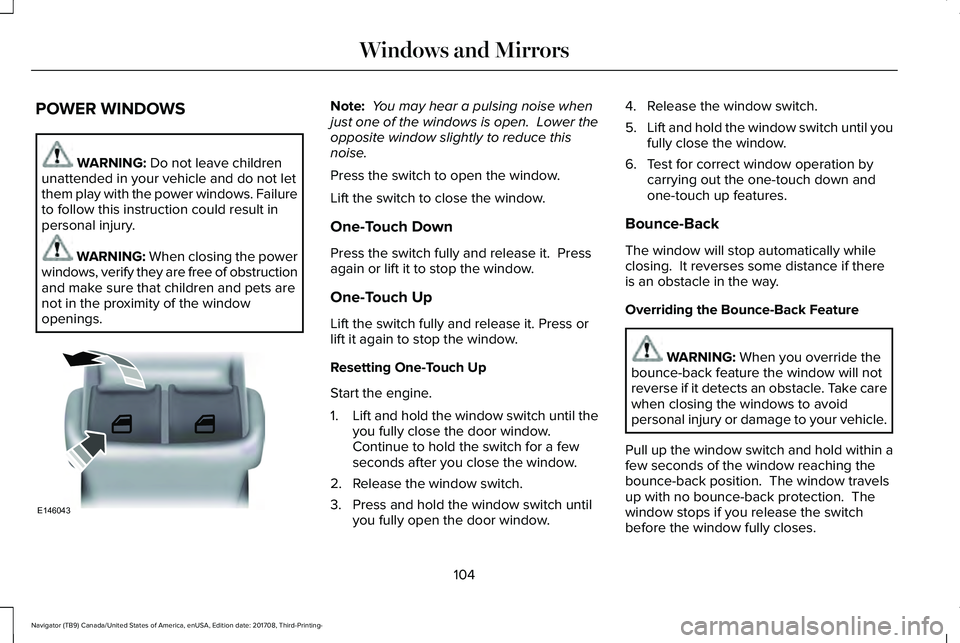
Press the switch to open the window.
Lift the switch to close the window.
One-Touch Down
Press the switch fully and release it. Pressagain or lift it to stop the window.
One-Touch Up
Lift the switch fully and release it. Press orlift it again to stop the window.
Resetting One-Touch Up
Start the engine.
1.Lift and hold the window switch until theyou fully close the door window.Continue to hold the switch for a fewseconds after you close the window.
2. Release the window switch.
3. Press and hold the window switch untilyou fully open the door window.
4. Release the window switch.
5.Lift and hold the window switch until youfully close the window.
6. Test for correct window operation bycarrying out the one-touch down andone-touch up features.
Bounce-Back
The window will stop automatically whileclosing. It reverses some distance if thereis an obstacle in the way.
Overriding the Bounce-Back Feature
WARNING: When you override thebounce-back feature the window will notreverse if it detects an obstacle. Take carewhen closing the windows to avoidpersonal injury or damage to your vehicle.
Pull up the window switch and hold within afew seconds of the window reaching thebounce-back position. The window travelsup with no bounce-back protection. Thewindow stops if you release the switchbefore the window fully closes.
104
Navigator (TB9) Canada/United States of America, enUSA, Edition date: 201708, Third-Printing-
Windows and MirrorsE146043
Page 110 of 649
Loose Mirror
If your power-folding mirrors are manuallyfolded, they may not work properly evenafter you re-position them. You need to resetthem if:
•The mirrors vibrate when you drive.
•The mirrors feel loose.
•The mirrors do not stay in the folded orunfolded position.
•One of the mirrors is not in its normaldriving position.
To reset the power-fold feature, use thepower-folding mirror control to fold andunfold the mirrors. You may hear a loud noiseas you reset the power-folding mirrors. Thissound is normal. Repeat this process asneeded each time the mirrors are manuallyfolded.
Heated Exterior Mirrors
See Heated Windows and Mirrors (page156).
Memory Mirrors
You can save and recall the mirror positionsthrough the memory function. See MemoryFunction (page 167).
Auto-Dimming Feature
The driver’s exterior mirror automaticallydims when the interior auto-dimming mirrorturns on.
Signal Indicator Mirrors (If Equipped)
The outer portion of the appropriate mirrorhousing blinks when you switch on thedirection indicator.
Lincoln Welcome Mat
Projection lights, on the bottom of the mirrorhousings, project an image onto the grounda short distance from the vehicle.
360-Degree Camera (If Equipped)
See 360 Degree Camera (page 253).
Blind Spot Monitor
See Blind Spot Information System (page272).
INTERIOR MIRROR
WARNING: Do not adjust the mirrorwhen your vehicle is moving.
Note:Do not clean the housing or glass ofany mirror with harsh abrasives, fuel or otherpetroleum or ammonia-based cleaningproducts.
You can adjust the interior mirror to yourpreference. Some mirrors also have a secondpivot point. This lets you move the mirrorhead up or down and from side to side.
Auto-Dimming Mirror
Note:Do not block the sensors on the frontand back of the mirror. Mirror performancemay be affected. A rear center passengeror raised rear center head restraint may alsoblock light from reaching the sensor.
107
Navigator (TB9) Canada/United States of America, enUSA, Edition date: 201708, Third-Printing-
Windows and Mirrors
Page 111 of 649
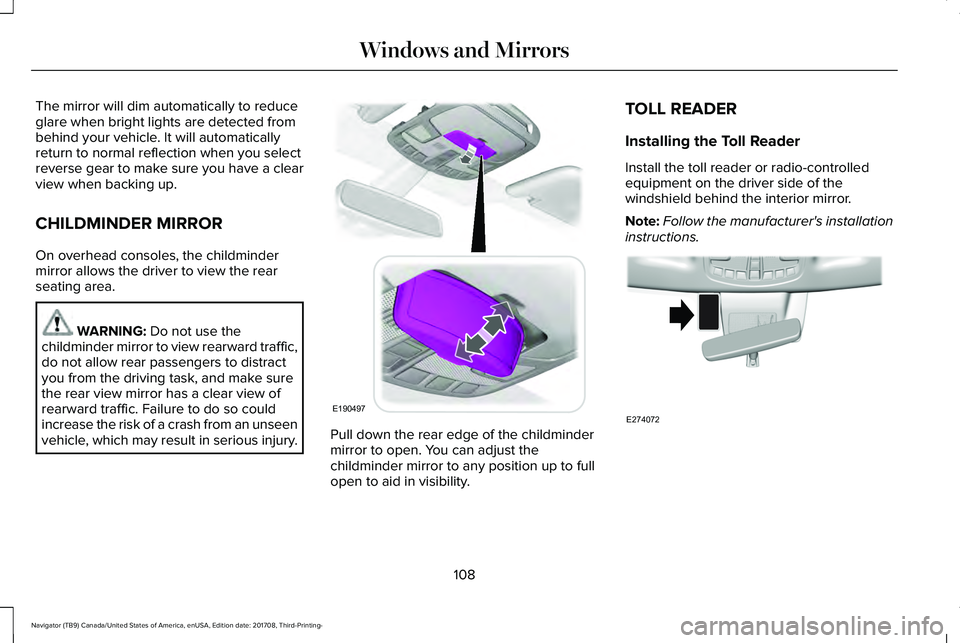
The mirror will dim automatically to reduceglare when bright lights are detected frombehind your vehicle. It will automaticallyreturn to normal reflection when you selectreverse gear to make sure you have a clearview when backing up.
CHILDMINDER MIRROR
On overhead consoles, the childmindermirror allows the driver to view the rearseating area.
WARNING: Do not use thechildminder mirror to view rearward traffic,do not allow rear passengers to distractyou from the driving task, and make surethe rear view mirror has a clear view ofrearward traffic. Failure to do so couldincrease the risk of a crash from an unseenvehicle, which may result in serious injury.Pull down the rear edge of the childmindermirror to open. You can adjust thechildminder mirror to any position up to fullopen to aid in visibility.
TOLL READER
Installing the Toll Reader
Install the toll reader or radio-controlledequipment on the driver side of thewindshield behind the interior mirror.
Note:Follow the manufacturer's installationinstructions.
108
Navigator (TB9) Canada/United States of America, enUSA, Edition date: 201708, Third-Printing-
Windows and MirrorsE190497 E274072