warning light LINCOLN NAVIGATOR 2018 Workshop Manual
[x] Cancel search | Manufacturer: LINCOLN, Model Year: 2018, Model line: NAVIGATOR, Model: LINCOLN NAVIGATOR 2018Pages: 649, PDF Size: 4.96 MB
Page 273 of 649
Troubleshooting
Why is the feature not available (line markings are gray) when I can see the lane markings on the road?
Your vehicle speed is outside the operational range of the feature.
The sun is shining directly into the camera lens.
A quick intentional lane change has occurred.
Your vehicle stays too close to the lane markings.
Driving at high speeds in curves.
The last alert warning or aid intervention occurred a short time ago.
Ambiguous lane markings, for example in construction zones.
Rapid transition from light to dark, or from dark to light.
Sudden offset in lane markings.
ABS or AdvanceTrac™ is active.
There is a camera blockage due to dirt, grime, fog, frost or water on the windshield.
You are driving too close to the vehicle in front of you.
Transitioning between no lane markings to lane markings or vice versa.
There is standing water on the road.
Faint lane markings, for example partial yellow lane markings on concrete roads.
270
Navigator (TB9) Canada/United States of America, enUSA, Edition date: 201708, Third-Printing-
Driving Aids
Page 278 of 649
Note:You do not need to enter an exacttrailer width measurement. You only needto confirm that the width of the trailer is 8.5 ft(2.6 m) or less.
•Trailer length measurement:
The trailer length is the distance betweenthe trailer hitch ball and the rear of the trailer.The maximum length that the system cansupport is 33 ft (10.1 m).
•Enter length of trailer:
The default setting is 18 ft (5.5 m). Togglingup or down using the menu buttonsincreases or decreases the measurement by3 ft (1 m). Select a length that is equal to orwithin 3 ft (1 m) of the actual measuredlength. For example, if the actual measuredlength is 25 ft (7.6 m), toggle the length inthe menu to 27 ft (8.2 m). When you enterthe length of the trailer, the system setup issaved.
Note:If the trailer is actually a bike rack orcargo rack with electrical lighting, enter alength of 3 ft (1 m). Cross Traffic Alert remainson for trailers with a length of 3 ft (1 m) orless.
Note:Proper measurement andmeasurement entry is required for thesystem to function as designed.
System Operation
When you connect a trailer to your vehicle,the trailer set up menu appears in theinformation display. This menu allows you toset up a new trailer or choose from apreviously set up trailer. A warning messageappears and the system turns off if you donot choose or add a new trailer.
Note:The warning message may not appearuntil your vehicle speed reaches 22 mph(35 km/h).
If you select a trailer in the informationdisplay before connecting a trailer to yourvehicle, the system loads the configurationfor the selected trailer. When a trailer isconnected, a warning message appears.
Note:A second warning message mayappear stating that the Cross Traffic Alertsystem has turned off. The Blind SpotInformation System with Trailer Towcontinues to function normally in thissituation.
Note:The system remembers the lastselected trailer set up when you start yourvehicle.
Trailer Considerations
The system is designed to work with a trailerwith a front width of 8.5 ft (2.6 m) or less, anda total length from the trailer hitch ball to therear of the trailer of 33 ft (10.1 m) or less.
Some trailers may cause a slight change insystem performance:
•Large box trailers may cause false alertsto occur when driving next toinfrastructures or near parked cars. Afalse alert may also occur while makinga 90-degree turn.
•Trailers that have a width greater than8.5 ft (2.6 m) at the front and have a totallength greater than 20 ft (6 m) may causedelayed alerts when a vehicle is passingat high speed.
275
Navigator (TB9) Canada/United States of America, enUSA, Edition date: 201708, Third-Printing-
Driving Aids
Page 284 of 649
Note:A high crown in the road or highcrosswinds may also make the steeringseem to wander or pull.
Adaptive Learning
The electronic power steering systemadaptive learning helps correct roadirregularities and improves overall handlingand steering feel. It communicates with thebrake system to help operate advancedstability control and accident avoidancesystems. Additionally, whenever the batteryis disconnected or a new battery installed,you must drive your vehicle a short distancebefore the system relearns the strategy andreactivates all systems.
PRE-COLLISION ASSIST
WARNING: You are responsible forcontrolling your vehicle at all times. Thesystem is designed to be an aid and doesnot relieve you of your responsibility todrive with due care and attention. Failureto follow this instruction could result in theloss of control of your vehicle, personalinjury or death.
WARNING: The system does notdetect vehicles that are driving in adifferent direction, cyclists or animals.Failure to take care may result in the lossof control of your vehicle, serious personalinjury or death.
WARNING: The system does notoperate during hard acceleration orsteering. Failure to take care may lead toa crash or personal injury.
WARNING: The system may fail oroperate with reduced function during coldand severe weather conditions. Snow, ice,rain, spray and fog can adversely affect thesystem. Keep the front camera and radarfree of snow and ice. Failure to take caremay result in the loss of control of yourvehicle, serious personal injury or death.
WARNING: In situations where thevehicle camera has limited detectioncapability, this may reduce systemperformance. These situations include butare not limited to direct or low sunlight,vehicles at night without tail lights,unconventional vehicle types, pedestrianswith complex backgrounds, runningpedestrians, partly obscured pedestrians,or pedestrians that the system cannotdistinguish from a group. Failure to takecare may result in the loss of control ofyour vehicle, serious personal injury ordeath.
281
Navigator (TB9) Canada/United States of America, enUSA, Edition date: 201708, Third-Printing-
Driving Aids
Page 285 of 649
WARNING: The system cannot helpprevent all crashes. Do not rely on thissystem to replace driver judgment and theneed to maintain a safe distance andspeed.
Using the Pre-Collision Assist System
The Pre-Collision Assist system is active atspeeds above approximately 3 mph (5 km/h)and pedestrian detection is active at speedsup to 50 mph (80 km/h).
If your vehicle is rapidly approaching anotherstationary vehicle, a vehicle traveling in thesame direction as yours, or a pedestrianwithin your driving path, the system isdesigned to provide three levels offunctionality:
1. Alert
2. Brake Support
3. Active Braking
Alert: When active, a flashing visual warningappears and an audible warning tonesounds.
Brake Support: The system is designed tohelp reduce the impact speed by preparingthe brakes for rapid braking. Brake supportdoes not automatically apply the brakes. Ifyou press the brake pedal, the system couldapply additional braking up to maximumbraking force, even if you lightly press thebrake pedal.
Active Braking: Active braking may activateif the system determines that a collision isimminent. The system may help the driverreduce impact damage or avoid the crashcompletely.
Note:The Active Braking capability of thesystem is disabled when you select theSLOW CLIMB drive mode.
Note:If you perceive Pre-Collision Assistalerts as being too frequent or disturbing,then you can reduce the alert sensitivity,though the manufacturer recommends usingthe highest sensitivity setting where possible.Setting lower sensitivity would lead to fewerand later system warnings.
Distance Indication and Alert
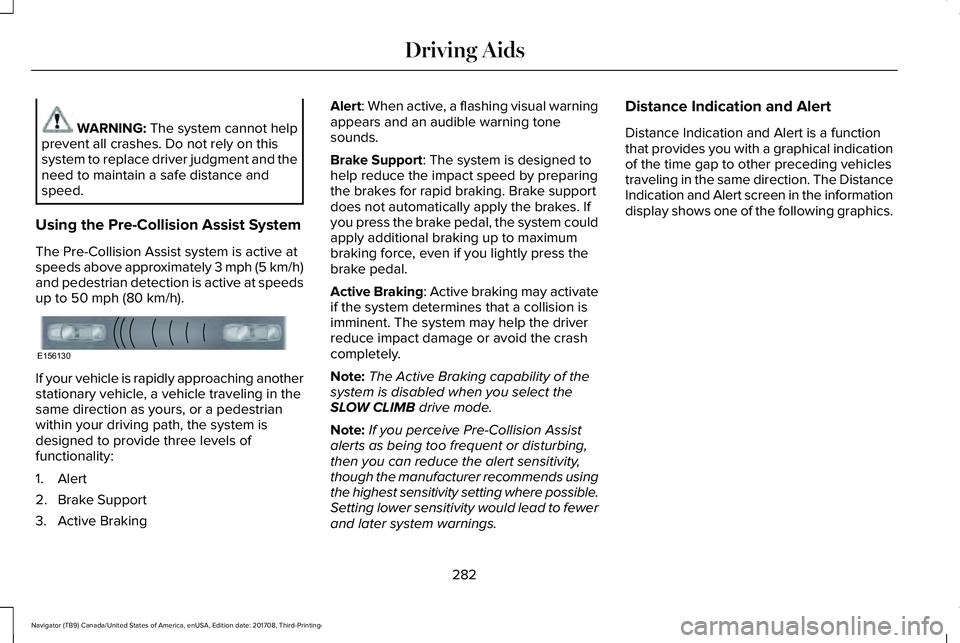
Distance Indication and Alert is a functionthat provides you with a graphical indicationof the time gap to other preceding vehiclestraveling in the same direction. The DistanceIndication and Alert screen in the informationdisplay shows one of the following graphics.
282
Navigator (TB9) Canada/United States of America, enUSA, Edition date: 201708, Third-Printing-
Driving AidsE156130
Page 293 of 649
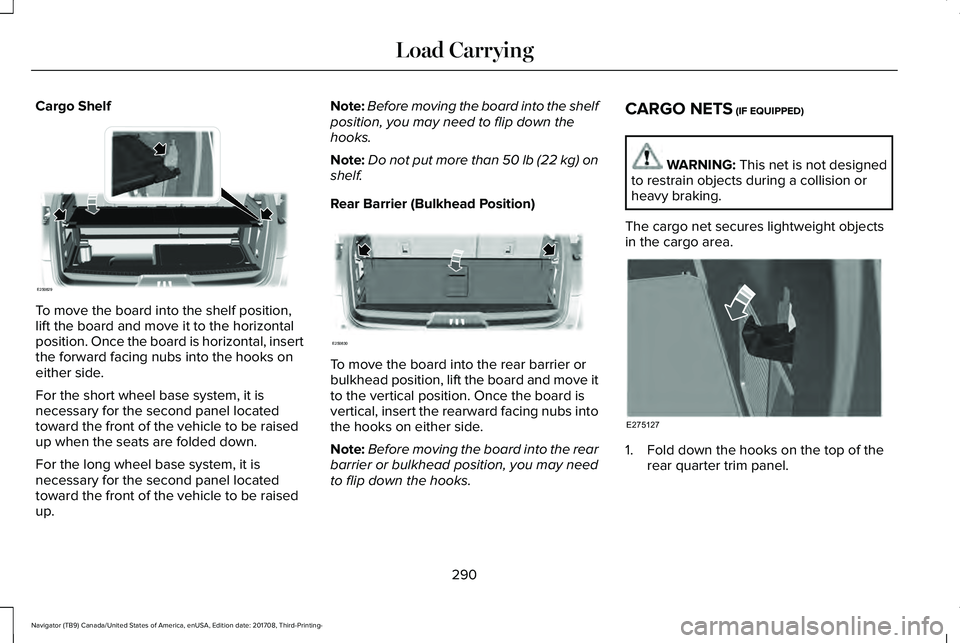
Cargo Shelf
To move the board into the shelf position,lift the board and move it to the horizontalposition. Once the board is horizontal, insertthe forward facing nubs into the hooks oneither side.
For the short wheel base system, it isnecessary for the second panel locatedtoward the front of the vehicle to be raisedup when the seats are folded down.
For the long wheel base system, it isnecessary for the second panel locatedtoward the front of the vehicle to be raisedup.
Note:Before moving the board into the shelfposition, you may need to flip down thehooks.
Note:Do not put more than 50 lb (22 kg) onshelf.
Rear Barrier (Bulkhead Position)
To move the board into the rear barrier orbulkhead position, lift the board and move itto the vertical position. Once the board isvertical, insert the rearward facing nubs intothe hooks on either side.
Note:Before moving the board into the rearbarrier or bulkhead position, you may needto flip down the hooks.
CARGO NETS (IF EQUIPPED)
WARNING: This net is not designedto restrain objects during a collision orheavy braking.
The cargo net secures lightweight objectsin the cargo area.
1. Fold down the hooks on the top of therear quarter trim panel.
290
Navigator (TB9) Canada/United States of America, enUSA, Edition date: 201708, Third-Printing-
Load CarryingE250829 E250830 E275127
Page 301 of 649
TOWING A TRAILER
WARNING: Towing trailersbeyond the maximum recommendedgross trailer weight exceeds the limitof your vehicle and could result inengine damage, transmission damage,structural damage, loss of vehiclecontrol, vehicle rollover and personalinjury.
WARNING: Do not exceed theGVWR or the GAWR specified on thecertification label.
Note: See Recommended TowingWeights (page 310).
Your vehicle may have electrical items,such as fuses or relays, related totowing. See Fuses (page 342).
Your vehicle's load capacity designationis by weight, not by volume, so youcannot necessarily use all availablespace when loading a vehicle or trailer.
Towing a trailer places an extra load onyour vehicle's engine, transmission, axle,brakes, tires and suspension. Inspectthese components periodically during,and after, any towing operation.
Load Placement
To help minimize how trailer movementaffects your vehicle when driving:
•Load the heaviest items closest tothe trailer floor.
•Load the heaviest items centeredbetween the left and right side trailertires.
•Load the heaviest items above thetrailer axles or just slightly forwardtoward the trailer tongue. Do notallow the final trailer tongue weightto go above or below 10-15% of theloaded trailer weight.
•Select a ball mount with the correctrise or drop and load capacity. Whenboth the loaded vehicle and trailerare connected, the trailer frameshould be level, or slightly angleddown toward your vehicle, whenviewed from the side.
When driving with a trailer or payload, aslight takeoff vibration or shudder maybe present due to the increased payloadweight. Additional information regardingproper trailer loading and setting yourvehicle up for towing is located inanother chapter of this manual. SeeLoad Limit (page 293).
You can also find information in the RV& Trailer Towing Guide available at yourauthorized dealer, or online.
298
Navigator (TB9) Canada/United States of America, enUSA, Edition date: 201708, Third-Printing-
Towing
Page 317 of 649
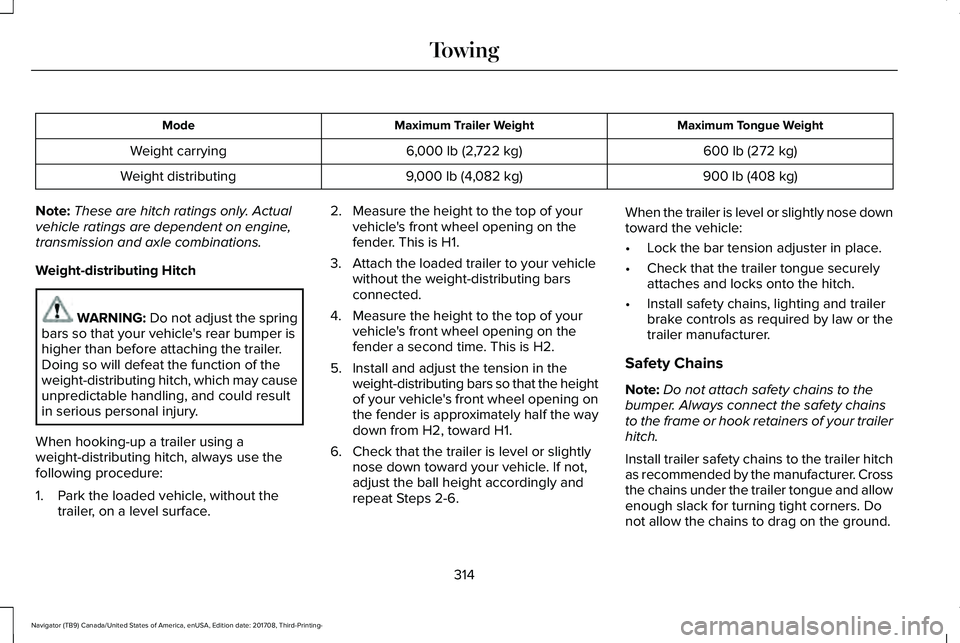
Maximum Tongue WeightMaximum Trailer WeightMode
600 lb (272 kg)6,000 lb (2,722 kg)Weight carrying
900 lb (408 kg)9,000 lb (4,082 kg)Weight distributing
Note:These are hitch ratings only. Actualvehicle ratings are dependent on engine,transmission and axle combinations.
Weight-distributing Hitch
WARNING: Do not adjust the springbars so that your vehicle's rear bumper ishigher than before attaching the trailer.Doing so will defeat the function of theweight-distributing hitch, which may causeunpredictable handling, and could resultin serious personal injury.
When hooking-up a trailer using aweight-distributing hitch, always use thefollowing procedure:
1. Park the loaded vehicle, without thetrailer, on a level surface.
2. Measure the height to the top of yourvehicle's front wheel opening on thefender. This is H1.
3. Attach the loaded trailer to your vehiclewithout the weight-distributing barsconnected.
4. Measure the height to the top of yourvehicle's front wheel opening on thefender a second time. This is H2.
5. Install and adjust the tension in theweight-distributing bars so that the heightof your vehicle's front wheel opening onthe fender is approximately half the waydown from H2, toward H1.
6. Check that the trailer is level or slightlynose down toward your vehicle. If not,adjust the ball height accordingly andrepeat Steps 2-6.
When the trailer is level or slightly nose downtoward the vehicle:
•Lock the bar tension adjuster in place.
•Check that the trailer tongue securelyattaches and locks onto the hitch.
•Install safety chains, lighting and trailerbrake controls as required by law or thetrailer manufacturer.
Safety Chains
Note:Do not attach safety chains to thebumper. Always connect the safety chainsto the frame or hook retainers of your trailerhitch.
Install trailer safety chains to the trailer hitchas recommended by the manufacturer. Crossthe chains under the trailer tongue and allowenough slack for turning tight corners. Donot allow the chains to drag on the ground.
314
Navigator (TB9) Canada/United States of America, enUSA, Edition date: 201708, Third-Printing-
Towing
Page 321 of 649
Points to Remember
Note:Do not attempt removal of the trailerbrake controller without consulting theWorkshop Manual. Damage to the unit mayresult.
•Adjust gain setting before using thetrailer brake controller for the first time.
•Adjust gain setting, using the procedureabove, whenever road, weather andtrailer or vehicle loading conditionschange from when the gain was initiallyset.
•Only use the manual control lever forproper adjustment of the gain duringtrailer setup. Misuse, such as applicationduring trailer sway, could cause instabilityof trailer or tow vehicle.
•Avoid towing in adverse weatherconditions. The trailer brake controllerdoes not provide anti-lock control of thetrailer wheels. Trailer wheels can lock upon slippery surfaces, resulting in reducedstability of trailer and tow vehicle.
•The trailer brake controller is equippedwith a feature that reduces output atvehicle speeds below 11 mph (18 km/h)so trailer and vehicle braking is not jerkyor harsh. This feature is only availablewhen applying the brakes using yourvehicle's brake pedal, not the controller.
•The controller interacts with the brakecontrol system and powertrain controlsystem of your vehicle to provide thebest performance on different roadconditions.
•Your vehicle's brake system and thetrailer brake system work independentlyof each other. Changing the gain settingon the controller does not affect theoperation of your vehicle's brakeswhether you attach a trailer or not.
•When you switch the engine off, thecontroller output is disabled and thedisplay and module shut down. Thecontroller module and display turn onwhen you switch the ignition on.
•The trailer brake controller is only afactory-installed or dealer-installed item.Lincoln is not responsible for warranty orperformance of the controller due tomisuse or customer installation.
Trailer Lamps
WARNING: Never connect any trailerlamp wiring to the vehicle's tail lamp wiring;this may damage the electrical systemresulting in fire. Contact your authorizeddealer as soon as possible for assistancein proper trailer tow wiring installation.Additional electrical equipment may berequired.
Trailer lamps are required on most towedvehicles. Make sure all running lights, brakelights, turn signals and hazard lights areworking.
318
Navigator (TB9) Canada/United States of America, enUSA, Edition date: 201708, Third-Printing-
Towing
Page 325 of 649
WARNING: Do not disconnect thebattery during recreational towing. Itprevents the transfer case from shiftingproperly and may cause the vehicle to roll,even if the transmission is in park (P).
WARNING: Shifting the transfer caseto its neutral position for recreationaltowing may cause the vehicle to roll, evenif the transmission is in park (P). It mayinjure the driver and others. Make sure youpress the foot brake and the vehicle is ina secure, safe position when you shift toneutral (N).
Note:Failing to put the transfer case in itsneutral position can damage vehiclecomponents.
Note:You can check four-wheel-downtowing status at any time by opening thedriver's door or turning the ignition to theaccessory or on position. A messageappears in the information display confirmingyour vehicle is in neutral tow.
To exit four-wheel-down towing and returnthe transfer case to its 2H position:
1. With your vehicle still properly securedto the tow vehicle, press the brake pedaland start the engine.
2. Switch your vehicle off by pressing theengine START/STOP button once.
3.Place your vehicle in accessory mode bypressing the start button once withoutpressing the brake pedal.
4. Press the brake pedal.
5.Place the transmission back into park (P).
6. Release the brake pedal.
Note:If completed successfully, theinformation display shows 2H and NeutralTow Disabled.
Note:If the indicator light and message donot display, you must perform the procedureagain from the beginning.
Note:You may hear an audible noise as thetransfer case shifts out of its neutral position,this is normal.
Note:If Shift Delayed Pull Forward displaysin the instrument cluster, transfer case geartooth blockage is present. See theinstructions following this section.
7.Apply the parking brake, then disconnectyour vehicle from the tow vehicle.
8. Release the parking brake, start theengine, and shift the transmission intodrive (D) to make sure the transfer caseis out of the neutral tow position.
9.If the transfer case does not successfullyshift out of neutral (N), set the parkingbrake until you can have your vehicleserviced.
Resolving the Shift Delayed Pull Forwardor To Exit 4x4 LOW Shift to N Message
If the instrument cluster displays thesemessages, perform the following:
1. Press and hold the brake pedal.
2.Put the transmission into neutral (N), thenstart the engine.
3. With the engine running, shift thetransmission into drive (D) and let thevehicle roll forward, up to 3 ft (1 m). Youmay hear an audible noise as the transfercase shifts out of its neutral position. Thisis normal.
322
Navigator (TB9) Canada/United States of America, enUSA, Edition date: 201708, Third-Printing-
Towing
Page 328 of 649
There are also some things you may want toavoid doing because they reduce your fueleconomy:
•Avoid sudden or hard accelerations.
•Avoid revving the engine before turningoff the car.
•Avoid long idle periods.
•Do not warm up your vehicle on coldmornings.
•Reduce the use of air conditioning andheat.
•Avoid using speed control in hilly terrain.
•Do not rest your foot on the brake pedalwhile driving.
•Avoid carrying unnecessary weight.
•Avoid adding particular accessories toyour vehicle (e.g. bug deflectors,rollbars/light bars, running boards, skiracks).
•Avoid driving with the wheels out ofalignment.
DRIVING THROUGH WATER
WARNING: Do not drive throughflowing or deep water as you may losecontrol of your vehicle.
Note:Driving through standing water cancause vehicle damage.
Note:Engine damage can occur if waterenters the air filter.
Before driving through standing water, checkthe depth. Never drive through water that ishigher than the bottom of the wheel hubs.
When driving through standing water, drivevery slowly and do not stop your vehicle.Your brake performance and traction maybe limited. After driving through water andas soon as it is safe to do so:
•Lightly press the brake pedal to dry thebrakes and to check that they work.
•Check that the horn works.
•Check that the exterior lights work.
•Turn the steering wheel to check that thesteering power assist works.
FLOOR MATS
WARNING: Use a floor mat designedto fit the footwell of your vehicle that doesnot obstruct the pedal area. Failure tofollow this instruction could result in theloss of control of your vehicle, personalinjury or death.
WARNING: Pedals that cannot movefreely can cause loss of vehicle control andincrease the risk of serious personal injury.
325
Navigator (TB9) Canada/United States of America, enUSA, Edition date: 201708, Third-Printing-
Driving HintsE176913