seats LINCOLN NAVIGATOR 2018 Owner's Manual
[x] Cancel search | Manufacturer: LINCOLN, Model Year: 2018, Model line: NAVIGATOR, Model: LINCOLN NAVIGATOR 2018Pages: 649, PDF Size: 4.96 MB
Page 82 of 649
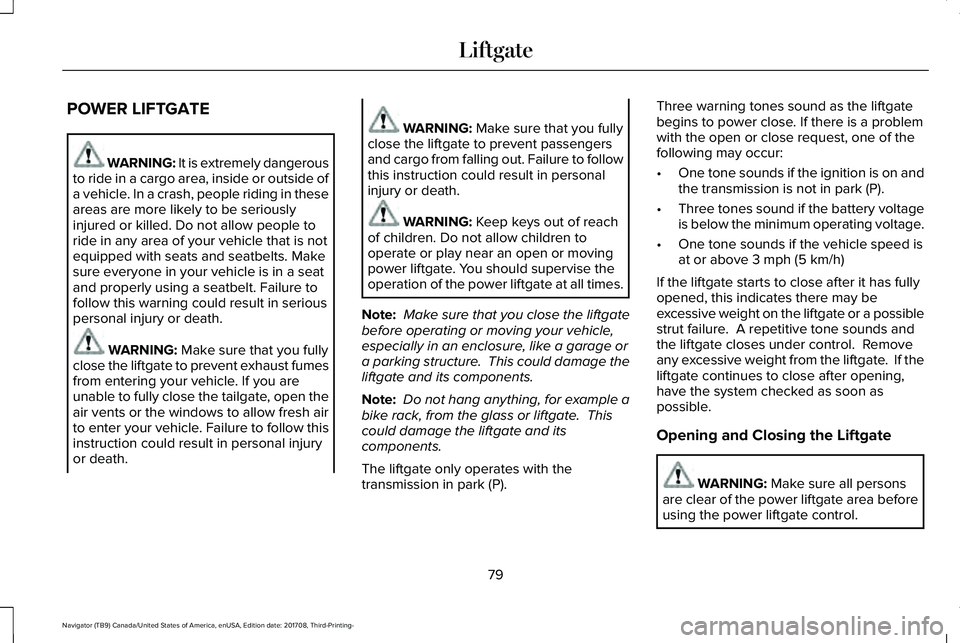
POWER LIFTGATE
WARNING: It is extremely dangerousto ride in a cargo area, inside or outside ofa vehicle. In a crash, people riding in theseareas are more likely to be seriouslyinjured or killed. Do not allow people toride in any area of your vehicle that is notequipped with seats and seatbelts. Makesure everyone in your vehicle is in a seatand properly using a seatbelt. Failure tofollow this warning could result in seriouspersonal injury or death.
WARNING: Make sure that you fullyclose the liftgate to prevent exhaust fumesfrom entering your vehicle. If you areunable to fully close the tailgate, open theair vents or the windows to allow fresh airto enter your vehicle. Failure to follow thisinstruction could result in personal injuryor death.
WARNING: Make sure that you fullyclose the liftgate to prevent passengersand cargo from falling out. Failure to followthis instruction could result in personalinjury or death.
WARNING: Keep keys out of reachof children. Do not allow children tooperate or play near an open or movingpower liftgate. You should supervise theoperation of the power liftgate at all times.
Note: Make sure that you close the liftgatebefore operating or moving your vehicle,especially in an enclosure, like a garage ora parking structure. This could damage theliftgate and its components.
Note: Do not hang anything, for example abike rack, from the glass or liftgate. Thiscould damage the liftgate and itscomponents.
The liftgate only operates with thetransmission in park (P).
Three warning tones sound as the liftgatebegins to power close. If there is a problemwith the open or close request, one of thefollowing may occur:
•One tone sounds if the ignition is on andthe transmission is not in park (P).
•Three tones sound if the battery voltageis below the minimum operating voltage.
•One tone sounds if the vehicle speed isat or above 3 mph (5 km/h)
If the liftgate starts to close after it has fullyopened, this indicates there may beexcessive weight on the liftgate or a possiblestrut failure. A repetitive tone sounds andthe liftgate closes under control. Removeany excessive weight from the liftgate. If theliftgate continues to close after opening,have the system checked as soon aspossible.
Opening and Closing the Liftgate
WARNING: Make sure all personsare clear of the power liftgate area beforeusing the power liftgate control.
79
Navigator (TB9) Canada/United States of America, enUSA, Edition date: 201708, Third-Printing-
Liftgate
Page 145 of 649
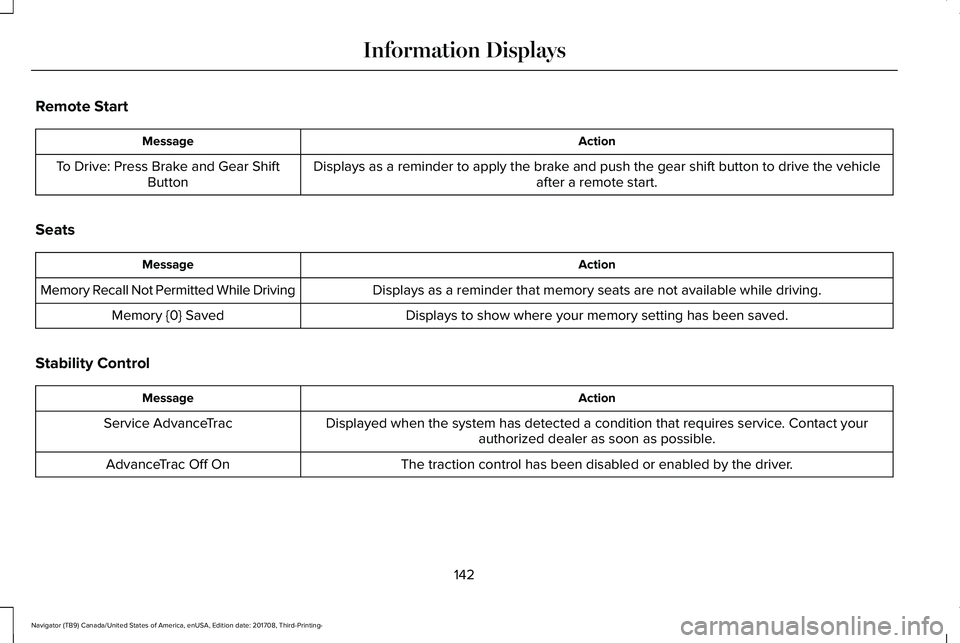
Remote Start
ActionMessage
Displays as a reminder to apply the brake and push the gear shift button to drive the vehicleafter a remote start.To Drive: Press Brake and Gear ShiftButton
Seats
ActionMessage
Displays as a reminder that memory seats are not available while driving.Memory Recall Not Permitted While Driving
Displays to show where your memory setting has been saved.Memory {0} Saved
Stability Control
ActionMessage
Displayed when the system has detected a condition that requires service. Contact yourauthorized dealer as soon as possible.Service AdvanceTrac
The traction control has been disabled or enabled by the driver.AdvanceTrac Off On
142
Navigator (TB9) Canada/United States of America, enUSA, Edition date: 201708, Third-Printing-
Information Displays
Page 155 of 649
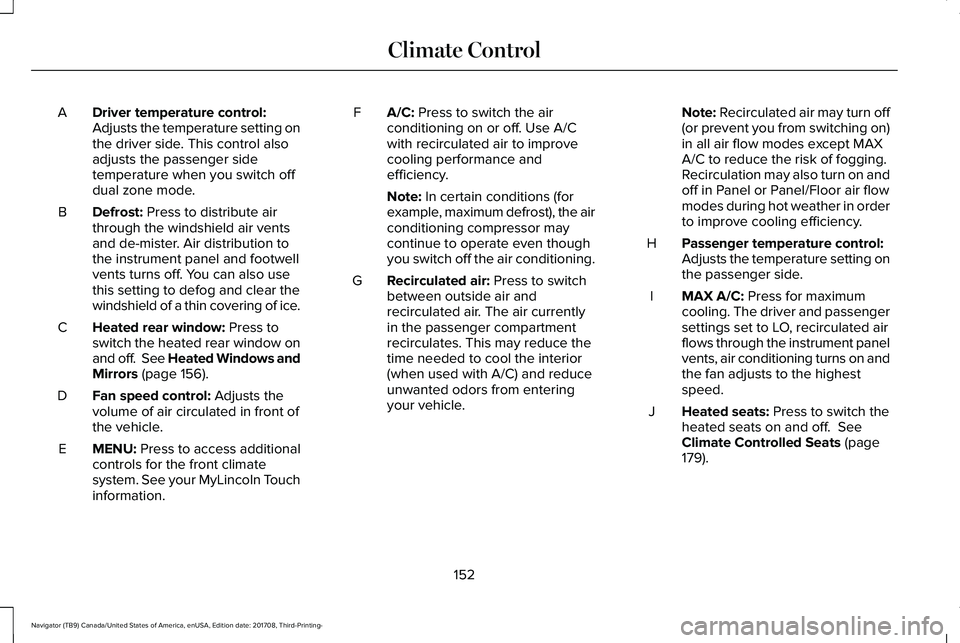
Driver temperature control:Adjusts the temperature setting onthe driver side. This control alsoadjusts the passenger sidetemperature when you switch offdual zone mode.
A
Defrost: Press to distribute airthrough the windshield air ventsand de-mister. Air distribution tothe instrument panel and footwellvents turns off. You can also usethis setting to defog and clear thewindshield of a thin covering of ice.
B
Heated rear window: Press toswitch the heated rear window onand off. See Heated Windows andMirrors (page 156).
C
Fan speed control: Adjusts thevolume of air circulated in front ofthe vehicle.
D
MENU: Press to access additionalcontrols for the front climatesystem. See your MyLincoln Touchinformation.
E
A/C: Press to switch the airconditioning on or off. Use A/Cwith recirculated air to improvecooling performance andefficiency.
F
Note: In certain conditions (forexample, maximum defrost), the airconditioning compressor maycontinue to operate even thoughyou switch off the air conditioning.
Recirculated air: Press to switchbetween outside air andrecirculated air. The air currentlyin the passenger compartmentrecirculates. This may reduce thetime needed to cool the interior(when used with A/C) and reduceunwanted odors from enteringyour vehicle.
G
Note: Recirculated air may turn off(or prevent you from switching on)in all air flow modes except MAXA/C to reduce the risk of fogging.Recirculation may also turn on andoff in Panel or Panel/Floor air flowmodes during hot weather in orderto improve cooling efficiency.
Passenger temperature control:Adjusts the temperature setting onthe passenger side.
H
MAX A/C: Press for maximumcooling. The driver and passengersettings set to LO, recirculated airflows through the instrument panelvents, air conditioning turns on andthe fan adjusts to the highestspeed.
I
Heated seats: Press to switch theheated seats on and off. SeeClimate Controlled Seats (page179).
J
152
Navigator (TB9) Canada/United States of America, enUSA, Edition date: 201708, Third-Printing-
Climate Control
Page 156 of 649
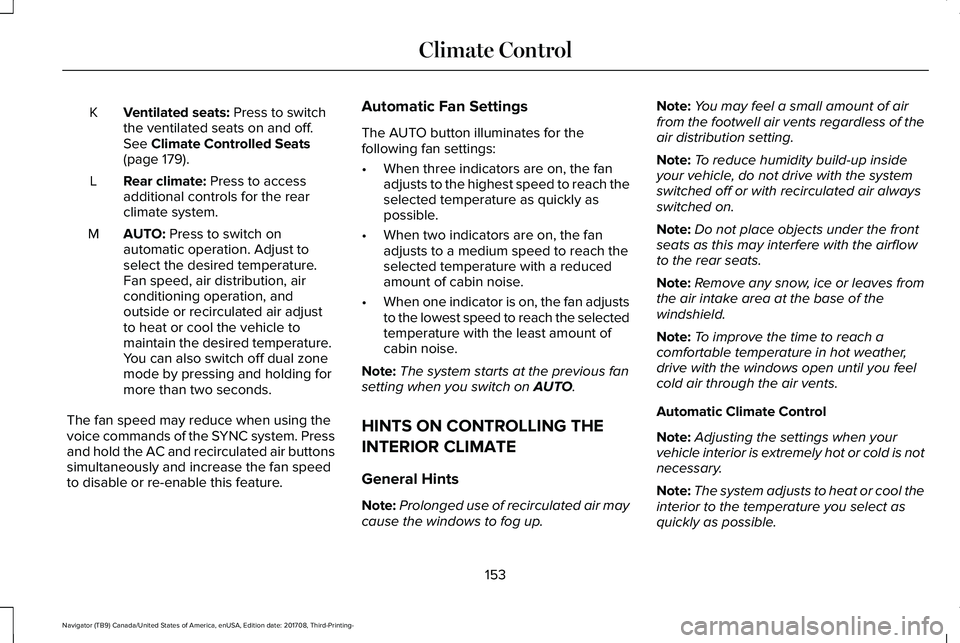
Ventilated seats: Press to switchthe ventilated seats on and off.See Climate Controlled Seats(page 179).
K
Rear climate: Press to accessadditional controls for the rearclimate system.
L
AUTO: Press to switch onautomatic operation. Adjust toselect the desired temperature.Fan speed, air distribution, airconditioning operation, andoutside or recirculated air adjustto heat or cool the vehicle tomaintain the desired temperature.You can also switch off dual zonemode by pressing and holding formore than two seconds.
M
The fan speed may reduce when using thevoice commands of the SYNC system. Pressand hold the AC and recirculated air buttonssimultaneously and increase the fan speedto disable or re-enable this feature.
Automatic Fan Settings
The AUTO button illuminates for thefollowing fan settings:
•When three indicators are on, the fanadjusts to the highest speed to reach theselected temperature as quickly aspossible.
•When two indicators are on, the fanadjusts to a medium speed to reach theselected temperature with a reducedamount of cabin noise.
•When one indicator is on, the fan adjuststo the lowest speed to reach the selectedtemperature with the least amount ofcabin noise.
Note:The system starts at the previous fansetting when you switch on AUTO.
HINTS ON CONTROLLING THE
INTERIOR CLIMATE
General Hints
Note:Prolonged use of recirculated air maycause the windows to fog up.
Note:You may feel a small amount of airfrom the footwell air vents regardless of theair distribution setting.
Note:To reduce humidity build-up insideyour vehicle, do not drive with the systemswitched off or with recirculated air alwaysswitched on.
Note:Do not place objects under the frontseats as this may interfere with the airflowto the rear seats.
Note:Remove any snow, ice or leaves fromthe air intake area at the base of thewindshield.
Note:To improve the time to reach acomfortable temperature in hot weather,drive with the windows open until you feelcold air through the air vents.
Automatic Climate Control
Note:Adjusting the settings when yourvehicle interior is extremely hot or cold is notnecessary.
Note:The system adjusts to heat or cool theinterior to the temperature you select asquickly as possible.
153
Navigator (TB9) Canada/United States of America, enUSA, Edition date: 201708, Third-Printing-
Climate Control
Page 158 of 649
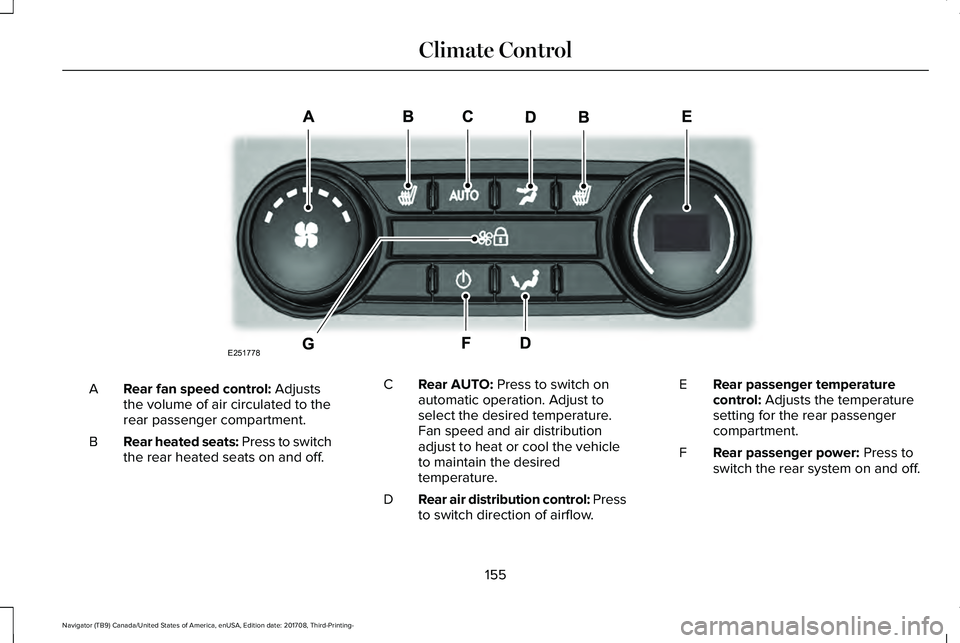
Rear fan speed control: Adjuststhe volume of air circulated to therear passenger compartment.
A
Rear heated seats: Press to switchthe rear heated seats on and off.B
Rear AUTO: Press to switch onautomatic operation. Adjust toselect the desired temperature.Fan speed and air distributionadjust to heat or cool the vehicleto maintain the desiredtemperature.
C
Rear air distribution control: Pressto switch direction of airflow.D
Rear passenger temperaturecontrol: Adjusts the temperaturesetting for the rear passengercompartment.
E
Rear passenger power: Press toswitch the rear system on and off.F
155
Navigator (TB9) Canada/United States of America, enUSA, Edition date: 201708, Third-Printing-
Climate ControlE251778
Page 160 of 649
Replace the filter at regular intervals. SeeScheduled Maintenance (page 552).
For additional cabin air filter information, orto replace the filter, see a qualifiedtechnician.
REMOTE START
The system adjusts the interior temperaturedepending on your chosen settings duringremote start.
You cannot adjust the climate control settingduring remote start operation. When youswitch the ignition on, the climate controlsystem returns to the previous settings. Youcan now make adjustments.
Some features may remain on if they turn onduring remote start:
•Driver heated seat.
•Driver ventilated seat.
•Heated steering wheel.
•Heated mirrors.
•Heated rear window.
•Windshield wiper de-icer.
Note:If the passenger heated or ventilatedseats are on when you switch the vehicleoff, they default to the driver setting whenyou switch the vehicle on.
You can adjust the default remote startsettings using the information displaycontrols. See Information Displays (page119).
Automatic Settings
In hot weather, the system sets to 72°F(22°C). The ventilated seats set to high (ifavailable, and if you select AUTO in theinformation display).
In moderate weather, the system heats orcools (based on pre-selected settings). Therear defroster, heated mirrors and heated orventilated seats do not turn on.
In cold weather, the system sets to 72°F(22°C). The heated seats and heated steeringwheel set to high (if available, and if youselect AUTO in the information display). Therear defroster and heated mirrors turn on.
157
Navigator (TB9) Canada/United States of America, enUSA, Edition date: 201708, Third-Printing-
Climate Control
Page 161 of 649
SITTING IN THE CORRECT
POSITION
WARNING: Sitting improperly, out ofposition or with the seatback reclined toofar can take weight off the seat cushionand affect the decision of the passengersensing system, resulting in serious injuryor death in the event of a crash. Always situpright against your seat back, with yourfeet on the floor.
WARNING: Do not recline theseatback too far as this can cause theoccupant to slide under the seatbelt,resulting in serious injury in the event of acollision.
WARNING: Do not place objectshigher than the top of the seat backrest.Failure to follow this instruction could resultin personal injury or death in the event ofa sudden stop or crash.
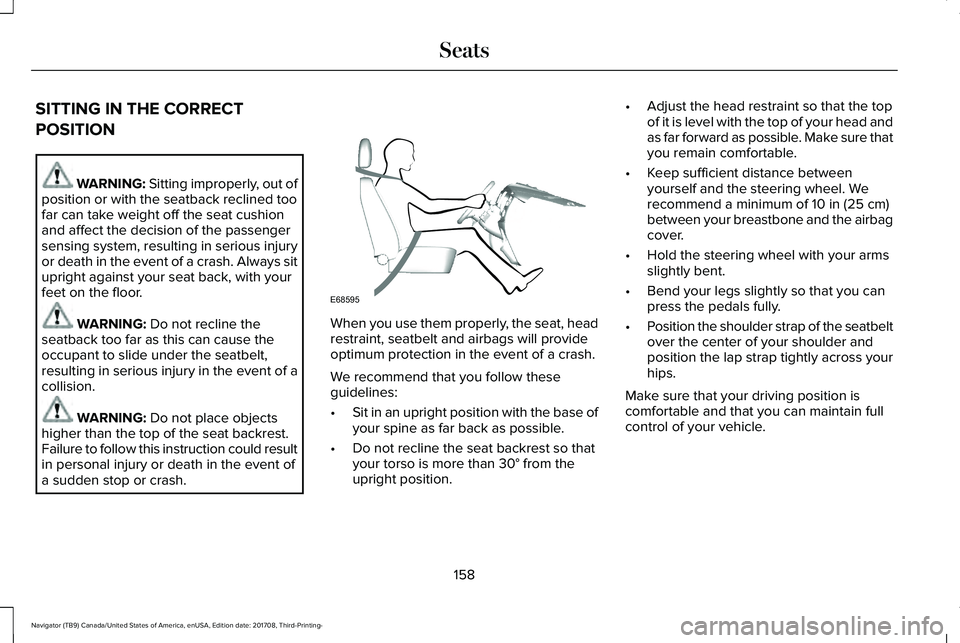
When you use them properly, the seat, headrestraint, seatbelt and airbags will provideoptimum protection in the event of a crash.
We recommend that you follow theseguidelines:
•Sit in an upright position with the base ofyour spine as far back as possible.
•Do not recline the seat backrest so thatyour torso is more than 30° from theupright position.
•Adjust the head restraint so that the topof it is level with the top of your head andas far forward as possible. Make sure thatyou remain comfortable.
•Keep sufficient distance betweenyourself and the steering wheel. Werecommend a minimum of 10 in (25 cm)between your breastbone and the airbagcover.
•Hold the steering wheel with your armsslightly bent.
•Bend your legs slightly so that you canpress the pedals fully.
•Position the shoulder strap of the seatbeltover the center of your shoulder andposition the lap strap tightly across yourhips.
Make sure that your driving position iscomfortable and that you can maintain fullcontrol of your vehicle.
158
Navigator (TB9) Canada/United States of America, enUSA, Edition date: 201708, Third-Printing-
SeatsE68595
Page 162 of 649
HEAD RESTRAINTS
WARNING: Fully adjust the headrestraint before you sit in or operate yourvehicle. This will help minimize the risk ofneck injury in the event of a crash. Do notadjust the head restraint when your vehicleis moving.
WARNING: The head restraint is asafety device. Whenever possible it shouldbe installed and properly adjusted whenthe seat is occupied. Failure to adjust thehead restraint properly could reduce itseffectiveness during certain impacts.
Note:Adjust the seatback to an uprightdriving position before adjusting the headrestraint. Adjust the head restraint so thatthe top of it is level with the top of your headand as far forward as possible. Make surethat you remain comfortable. If you areextremely tall, adjust the head restraint toits highest position.
Front Seat Manual Head Restraints
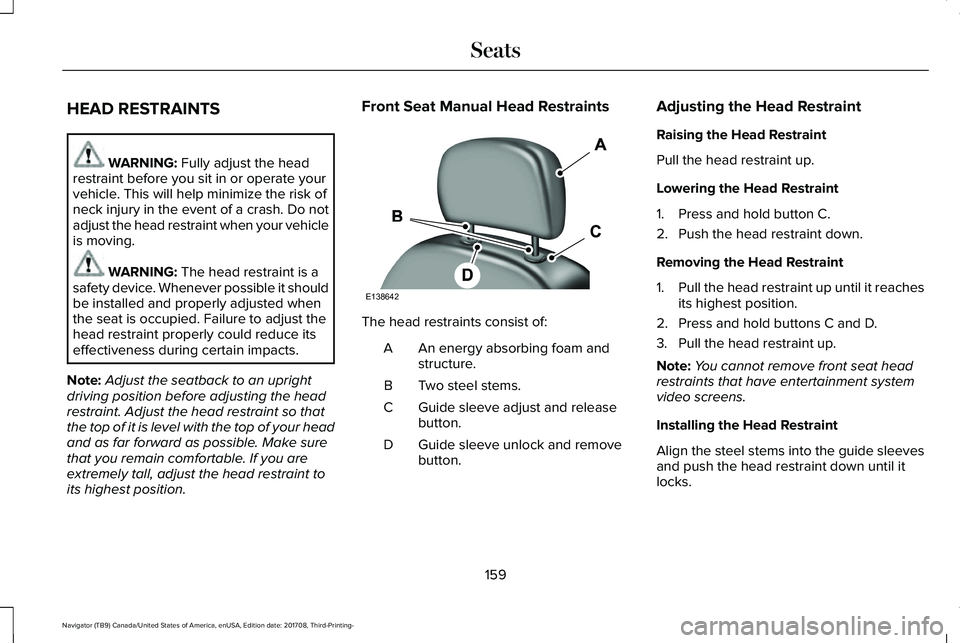
The head restraints consist of:
An energy absorbing foam andstructure.A
Two steel stems.B
Guide sleeve adjust and releasebutton.C
Guide sleeve unlock and removebutton.D
Adjusting the Head Restraint
Raising the Head Restraint
Pull the head restraint up.
Lowering the Head Restraint
1. Press and hold button C.
2. Push the head restraint down.
Removing the Head Restraint
1.Pull the head restraint up until it reachesits highest position.
2. Press and hold buttons C and D.
3. Pull the head restraint up.
Note:You cannot remove front seat headrestraints that have entertainment systemvideo screens.
Installing the Head Restraint
Align the steel stems into the guide sleevesand push the head restraint down until itlocks.
159
Navigator (TB9) Canada/United States of America, enUSA, Edition date: 201708, Third-Printing-
SeatsE138642
Page 163 of 649
Tilting Manual Head Restraints
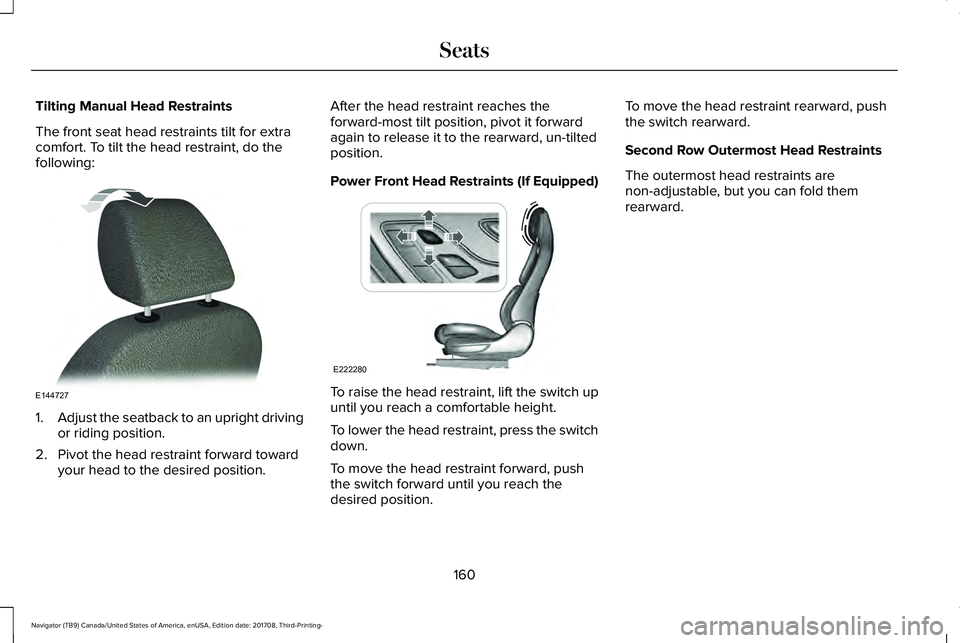
The front seat head restraints tilt for extracomfort. To tilt the head restraint, do thefollowing:
1.Adjust the seatback to an upright drivingor riding position.
2. Pivot the head restraint forward towardyour head to the desired position.
After the head restraint reaches theforward-most tilt position, pivot it forwardagain to release it to the rearward, un-tiltedposition.
Power Front Head Restraints (If Equipped)
To raise the head restraint, lift the switch upuntil you reach a comfortable height.
To lower the head restraint, press the switchdown.
To move the head restraint forward, pushthe switch forward until you reach thedesired position.
To move the head restraint rearward, pushthe switch rearward.
Second Row Outermost Head Restraints
The outermost head restraints arenon-adjustable, but you can fold themrearward.
160
Navigator (TB9) Canada/United States of America, enUSA, Edition date: 201708, Third-Printing-
SeatsE144727 E222280
Page 164 of 649
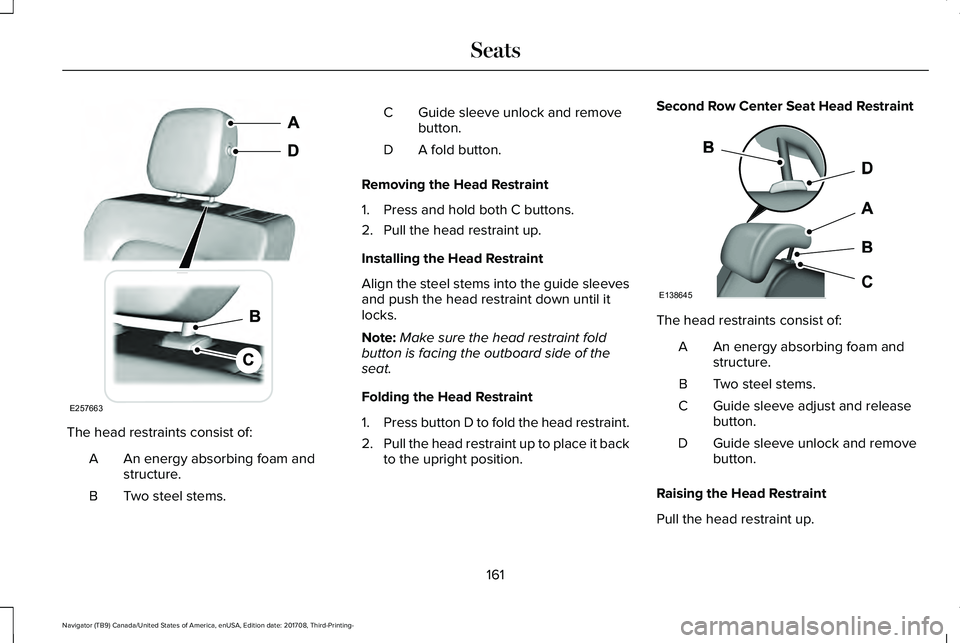
The head restraints consist of:
An energy absorbing foam andstructure.A
Two steel stems.B
Guide sleeve unlock and removebutton.C
A fold button.D
Removing the Head Restraint
1. Press and hold both C buttons.
2. Pull the head restraint up.
Installing the Head Restraint
Align the steel stems into the guide sleevesand push the head restraint down until itlocks.
Note:Make sure the head restraint foldbutton is facing the outboard side of theseat.
Folding the Head Restraint
1.Press button D to fold the head restraint.
2.Pull the head restraint up to place it backto the upright position.
Second Row Center Seat Head Restraint
The head restraints consist of:
An energy absorbing foam andstructure.A
Two steel stems.B
Guide sleeve adjust and releasebutton.C
Guide sleeve unlock and removebutton.D
Raising the Head Restraint
Pull the head restraint up.
161
Navigator (TB9) Canada/United States of America, enUSA, Edition date: 201708, Third-Printing-
SeatsE257663 E138645