buttons LINCOLN NAVIGATOR 2018 Owner's Guide
[x] Cancel search | Manufacturer: LINCOLN, Model Year: 2018, Model line: NAVIGATOR, Model: LINCOLN NAVIGATOR 2018Pages: 649, PDF Size: 4.96 MB
Page 481 of 649
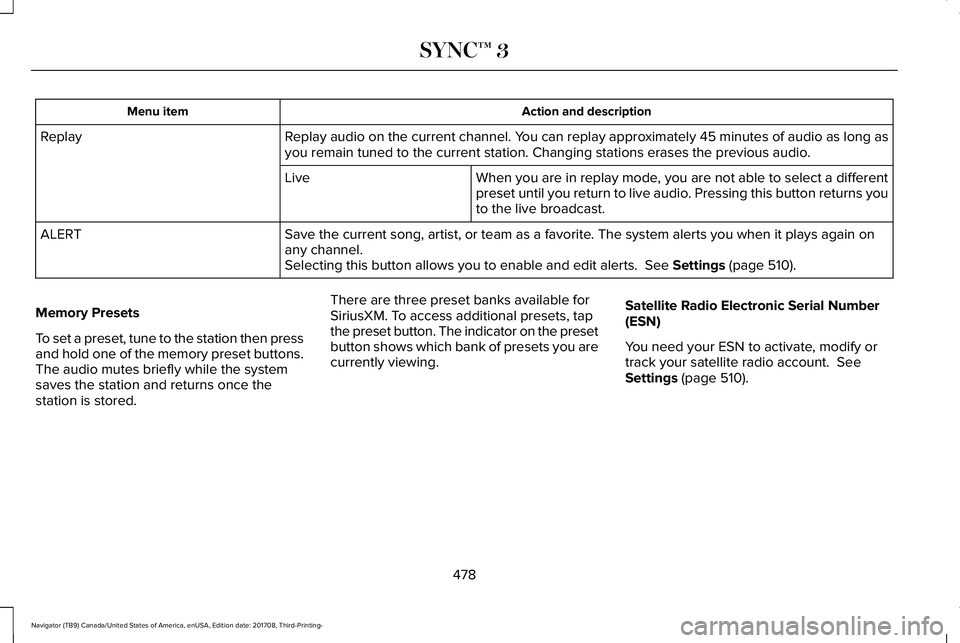
Action and descriptionMenu item
Replay audio on the current channel. You can replay approximately 45 minutes of audio as long asyou remain tuned to the current station. Changing stations erases the previous audio.Replay
When you are in replay mode, you are not able to select a differentpreset until you return to live audio. Pressing this button returns youto the live broadcast.
Live
Save the current song, artist, or team as a favorite. The system alerts you when it plays again onany channel.ALERT
Selecting this button allows you to enable and edit alerts. See Settings (page 510).
Memory Presets
To set a preset, tune to the station then pressand hold one of the memory preset buttons.The audio mutes briefly while the systemsaves the station and returns once thestation is stored.
There are three preset banks available forSiriusXM. To access additional presets, tapthe preset button. The indicator on the presetbutton shows which bank of presets you arecurrently viewing.
Satellite Radio Electronic Serial Number(ESN)
You need your ESN to activate, modify ortrack your satellite radio account. SeeSettings (page 510).
478
Navigator (TB9) Canada/United States of America, enUSA, Edition date: 201708, Third-Printing-
SYNC™ 3
Page 487 of 649
HD Radio Technology manufactured underlicense from DTS Inc. U.S. and foreignpatents. HD Radio and the HD and HD Radiologos are proprietary trademarks of DTS Inc.Ford Motor Company and DTS Inc. are notresponsible for the content sent using HDRadio technology. Content may be changed,added or deleted at any time at the stationowner's discretion.
* You can find the form here:
Website
http://hdradio.com/stations/feedback
CD
Once you select this option, the systemreturns you to the main audio screen.
The current audio information appears onthe screen.
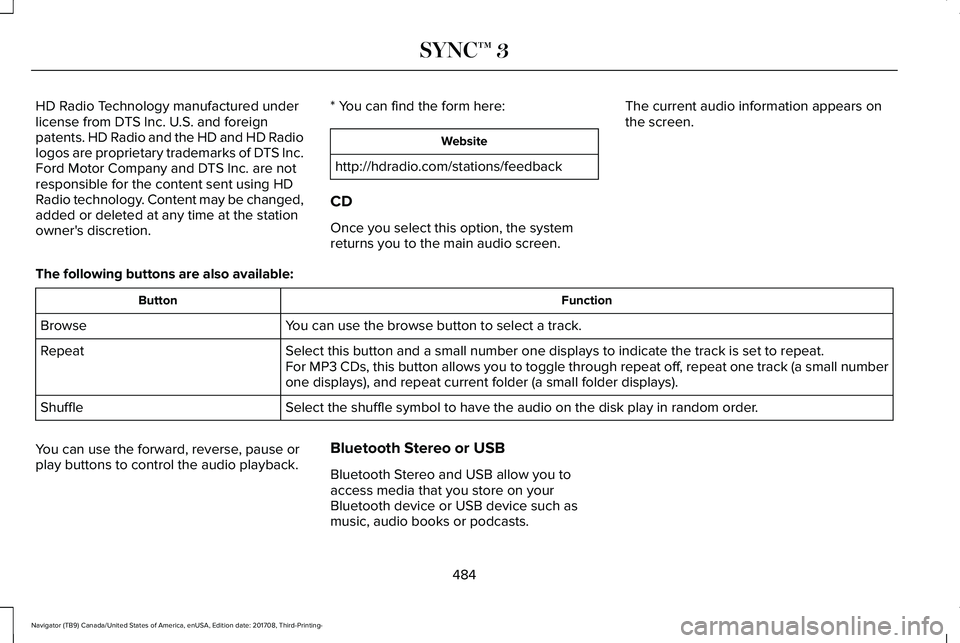
The following buttons are also available:
FunctionButton
You can use the browse button to select a track.Browse
Select this button and a small number one displays to indicate the track is set to repeat.RepeatFor MP3 CDs, this button allows you to toggle through repeat off, repeat one track (a small numberone displays), and repeat current folder (a small folder displays).
Select the shuffle symbol to have the audio on the disk play in random order.Shuffle
You can use the forward, reverse, pause orplay buttons to control the audio playback.
Bluetooth Stereo or USB
Bluetooth Stereo and USB allow you toaccess media that you store on yourBluetooth device or USB device such asmusic, audio books or podcasts.
484
Navigator (TB9) Canada/United States of America, enUSA, Edition date: 201708, Third-Printing-
SYNC™ 3
Page 488 of 649
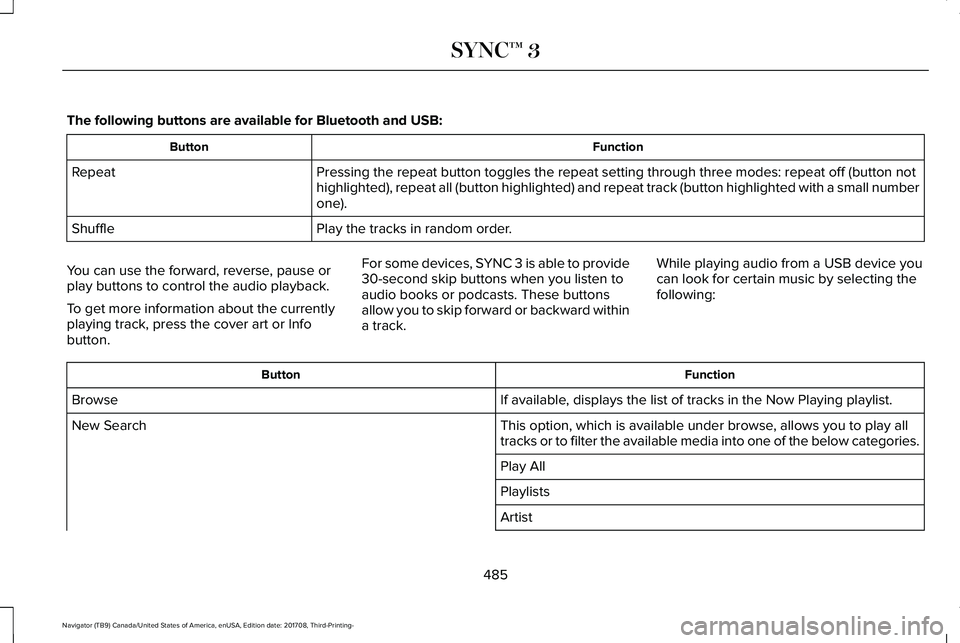
The following buttons are available for Bluetooth and USB:
FunctionButton
Pressing the repeat button toggles the repeat setting through three modes: repeat off (button nothighlighted), repeat all (button highlighted) and repeat track (button highlighted with a small numberone).
Repeat
Play the tracks in random order.Shuffle
You can use the forward, reverse, pause orplay buttons to control the audio playback.
To get more information about the currentlyplaying track, press the cover art or Infobutton.
For some devices, SYNC 3 is able to provide30-second skip buttons when you listen toaudio books or podcasts. These buttonsallow you to skip forward or backward withina track.
While playing audio from a USB device youcan look for certain music by selecting thefollowing:
FunctionButton
If available, displays the list of tracks in the Now Playing playlist.Browse
This option, which is available under browse, allows you to play alltracks or to filter the available media into one of the below categories.New Search
Play All
Playlists
Artist
485
Navigator (TB9) Canada/United States of America, enUSA, Edition date: 201708, Third-Printing-
SYNC™ 3
Page 505 of 649
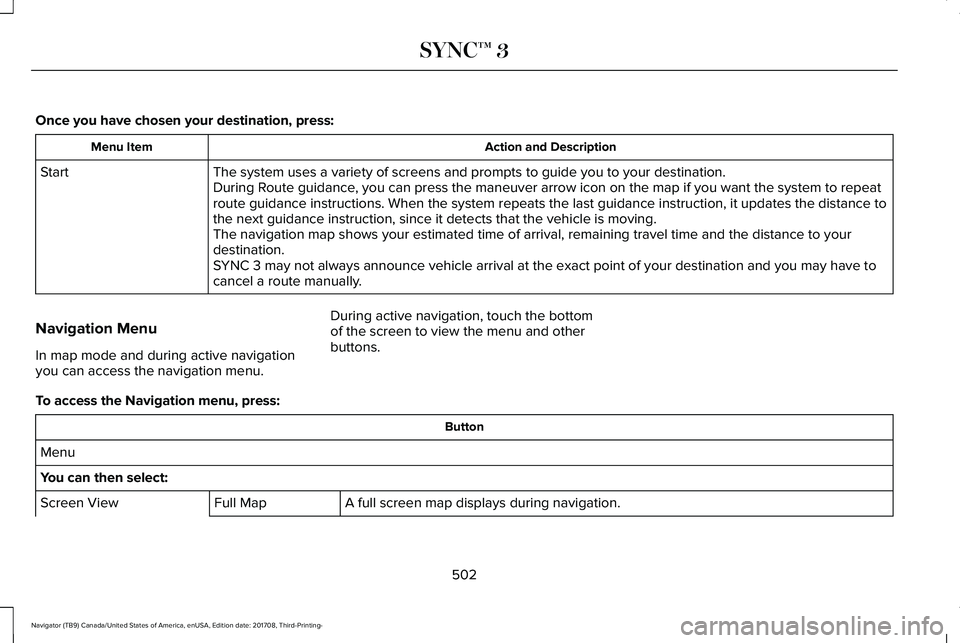
Once you have chosen your destination, press:
Action and DescriptionMenu Item
The system uses a variety of screens and prompts to guide you to your destination.StartDuring Route guidance, you can press the maneuver arrow icon on the map if you want the system to repeatroute guidance instructions. When the system repeats the last guidance instruction, it updates the distance tothe next guidance instruction, since it detects that the vehicle is moving.The navigation map shows your estimated time of arrival, remaining travel time and the distance to yourdestination.SYNC 3 may not always announce vehicle arrival at the exact point of your destination and you may have tocancel a route manually.
Navigation Menu
In map mode and during active navigationyou can access the navigation menu.
During active navigation, touch the bottomof the screen to view the menu and otherbuttons.
To access the Navigation menu, press:
Button
Menu
You can then select:
A full screen map displays during navigation.Full MapScreen View
502
Navigator (TB9) Canada/United States of America, enUSA, Edition date: 201708, Third-Printing-
SYNC™ 3
Page 512 of 649
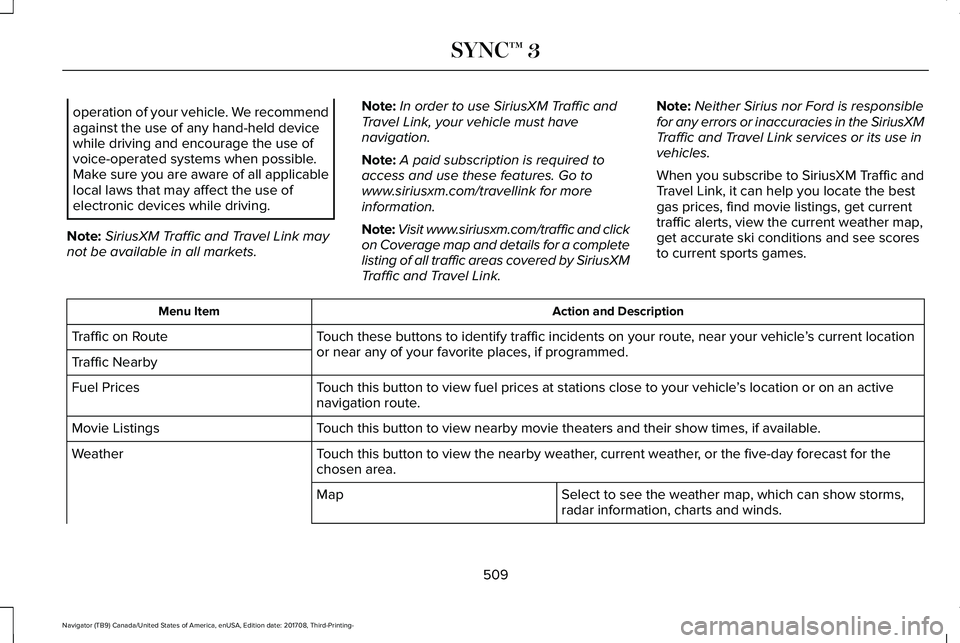
operation of your vehicle. We recommendagainst the use of any hand-held devicewhile driving and encourage the use ofvoice-operated systems when possible.Make sure you are aware of all applicablelocal laws that may affect the use ofelectronic devices while driving.
Note:SiriusXM Traffic and Travel Link maynot be available in all markets.
Note:In order to use SiriusXM Traffic andTravel Link, your vehicle must havenavigation.
Note:A paid subscription is required toaccess and use these features. Go towww.siriusxm.com/travellink for moreinformation.
Note:Visit www.siriusxm.com/traffic and clickon Coverage map and details for a completelisting of all traffic areas covered by SiriusXMTraffic and Travel Link.
Note:Neither Sirius nor Ford is responsiblefor any errors or inaccuracies in the SiriusXMTraffic and Travel Link services or its use invehicles.
When you subscribe to SiriusXM Traffic andTravel Link, it can help you locate the bestgas prices, find movie listings, get currenttraffic alerts, view the current weather map,get accurate ski conditions and see scoresto current sports games.
Action and DescriptionMenu Item
Touch these buttons to identify traffic incidents on your route, near your vehicle’s current locationor near any of your favorite places, if programmed.Traffic on Route
Traffic Nearby
Touch this button to view fuel prices at stations close to your vehicle’s location or on an activenavigation route.Fuel Prices
Touch this button to view nearby movie theaters and their show times, if available.Movie Listings
Touch this button to view the nearby weather, current weather, or the five-day forecast for thechosen area.Weather
Select to see the weather map, which can show storms,radar information, charts and winds.Map
509
Navigator (TB9) Canada/United States of America, enUSA, Edition date: 201708, Third-Printing-
SYNC™ 3
Page 538 of 649
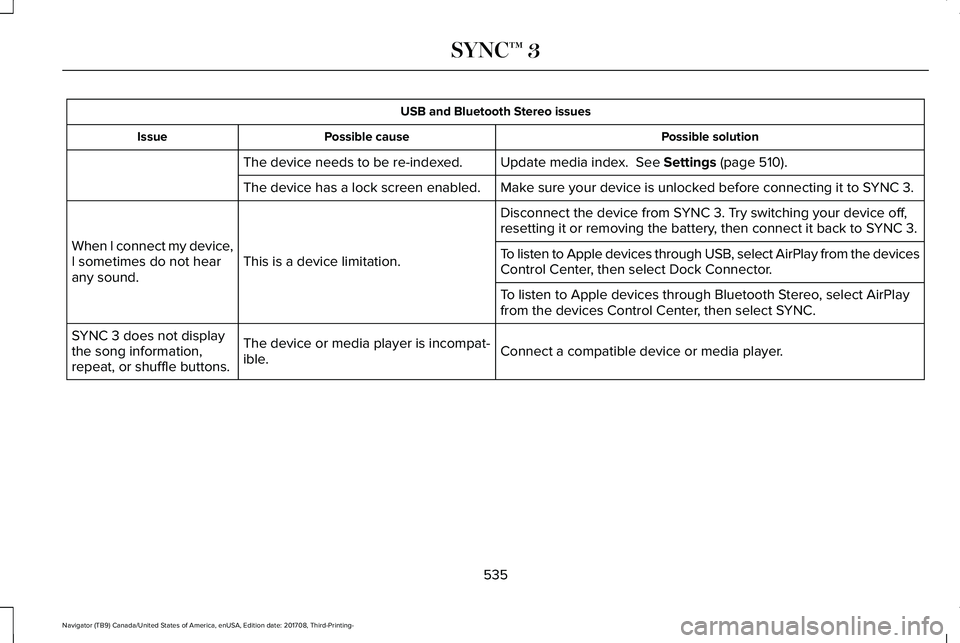
USB and Bluetooth Stereo issues
Possible solutionPossible causeIssue
Update media index. See Settings (page 510).The device needs to be re-indexed.
Make sure your device is unlocked before connecting it to SYNC 3.The device has a lock screen enabled.
Disconnect the device from SYNC 3. Try switching your device off,resetting it or removing the battery, then connect it back to SYNC 3.
This is a device limitation.When I connect my device,I sometimes do not hearany sound.
To listen to Apple devices through USB, select AirPlay from the devicesControl Center, then select Dock Connector.
To listen to Apple devices through Bluetooth Stereo, select AirPlayfrom the devices Control Center, then select SYNC.
Connect a compatible device or media player.The device or media player is incompat-ible.
SYNC 3 does not displaythe song information,repeat, or shuffle buttons.
535
Navigator (TB9) Canada/United States of America, enUSA, Edition date: 201708, Third-Printing-
SYNC™ 3
Page 542 of 649
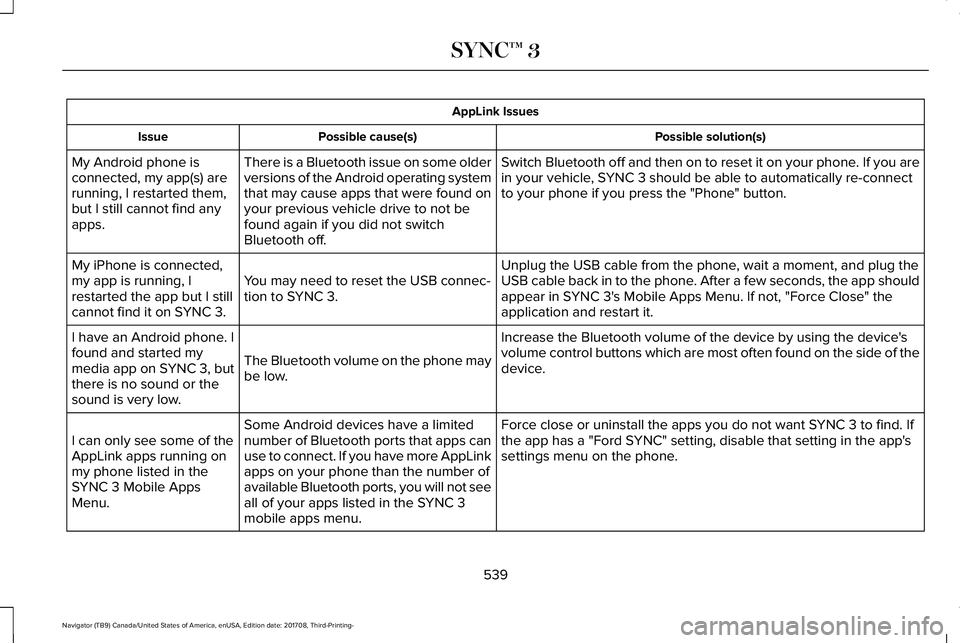
AppLink Issues
Possible solution(s)Possible cause(s)Issue
Switch Bluetooth off and then on to reset it on your phone. If you arein your vehicle, SYNC 3 should be able to automatically re-connectto your phone if you press the "Phone" button.
There is a Bluetooth issue on some olderversions of the Android operating systemthat may cause apps that were found onyour previous vehicle drive to not befound again if you did not switchBluetooth off.
My Android phone isconnected, my app(s) arerunning, I restarted them,but I still cannot find anyapps.
Unplug the USB cable from the phone, wait a moment, and plug theUSB cable back in to the phone. After a few seconds, the app shouldappear in SYNC 3's Mobile Apps Menu. If not, "Force Close" theapplication and restart it.
You may need to reset the USB connec-tion to SYNC 3.
My iPhone is connected,my app is running, Irestarted the app but I stillcannot find it on SYNC 3.
Increase the Bluetooth volume of the device by using the device'svolume control buttons which are most often found on the side of thedevice.The Bluetooth volume on the phone maybe low.
I have an Android phone. Ifound and started mymedia app on SYNC 3, butthere is no sound or thesound is very low.
Force close or uninstall the apps you do not want SYNC 3 to find. Ifthe app has a "Ford SYNC" setting, disable that setting in the app'ssettings menu on the phone.
Some Android devices have a limitednumber of Bluetooth ports that apps canuse to connect. If you have more AppLinkapps on your phone than the number ofavailable Bluetooth ports, you will not seeall of your apps listed in the SYNC 3mobile apps menu.
I can only see some of theAppLink apps running onmy phone listed in theSYNC 3 Mobile AppsMenu.
539
Navigator (TB9) Canada/United States of America, enUSA, Edition date: 201708, Third-Printing-
SYNC™ 3