buttons LINCOLN NAVIGATOR 2018 Owner's Manual
[x] Cancel search | Manufacturer: LINCOLN, Model Year: 2018, Model line: NAVIGATOR, Model: LINCOLN NAVIGATOR 2018Pages: 649, PDF Size: 4.96 MB
Page 278 of 649
Note:You do not need to enter an exacttrailer width measurement. You only needto confirm that the width of the trailer is 8.5 ft(2.6 m) or less.
•Trailer length measurement:
The trailer length is the distance betweenthe trailer hitch ball and the rear of the trailer.The maximum length that the system cansupport is 33 ft (10.1 m).
•Enter length of trailer:
The default setting is 18 ft (5.5 m). Togglingup or down using the menu buttonsincreases or decreases the measurement by3 ft (1 m). Select a length that is equal to orwithin 3 ft (1 m) of the actual measuredlength. For example, if the actual measuredlength is 25 ft (7.6 m), toggle the length inthe menu to 27 ft (8.2 m). When you enterthe length of the trailer, the system setup issaved.
Note:If the trailer is actually a bike rack orcargo rack with electrical lighting, enter alength of 3 ft (1 m). Cross Traffic Alert remainson for trailers with a length of 3 ft (1 m) orless.
Note:Proper measurement andmeasurement entry is required for thesystem to function as designed.
System Operation
When you connect a trailer to your vehicle,the trailer set up menu appears in theinformation display. This menu allows you toset up a new trailer or choose from apreviously set up trailer. A warning messageappears and the system turns off if you donot choose or add a new trailer.
Note:The warning message may not appearuntil your vehicle speed reaches 22 mph(35 km/h).
If you select a trailer in the informationdisplay before connecting a trailer to yourvehicle, the system loads the configurationfor the selected trailer. When a trailer isconnected, a warning message appears.
Note:A second warning message mayappear stating that the Cross Traffic Alertsystem has turned off. The Blind SpotInformation System with Trailer Towcontinues to function normally in thissituation.
Note:The system remembers the lastselected trailer set up when you start yourvehicle.
Trailer Considerations
The system is designed to work with a trailerwith a front width of 8.5 ft (2.6 m) or less, anda total length from the trailer hitch ball to therear of the trailer of 33 ft (10.1 m) or less.
Some trailers may cause a slight change insystem performance:
•Large box trailers may cause false alertsto occur when driving next toinfrastructures or near parked cars. Afalse alert may also occur while makinga 90-degree turn.
•Trailers that have a width greater than8.5 ft (2.6 m) at the front and have a totallength greater than 20 ft (6 m) may causedelayed alerts when a vehicle is passingat high speed.
275
Navigator (TB9) Canada/United States of America, enUSA, Edition date: 201708, Third-Printing-
Driving Aids
Page 318 of 649
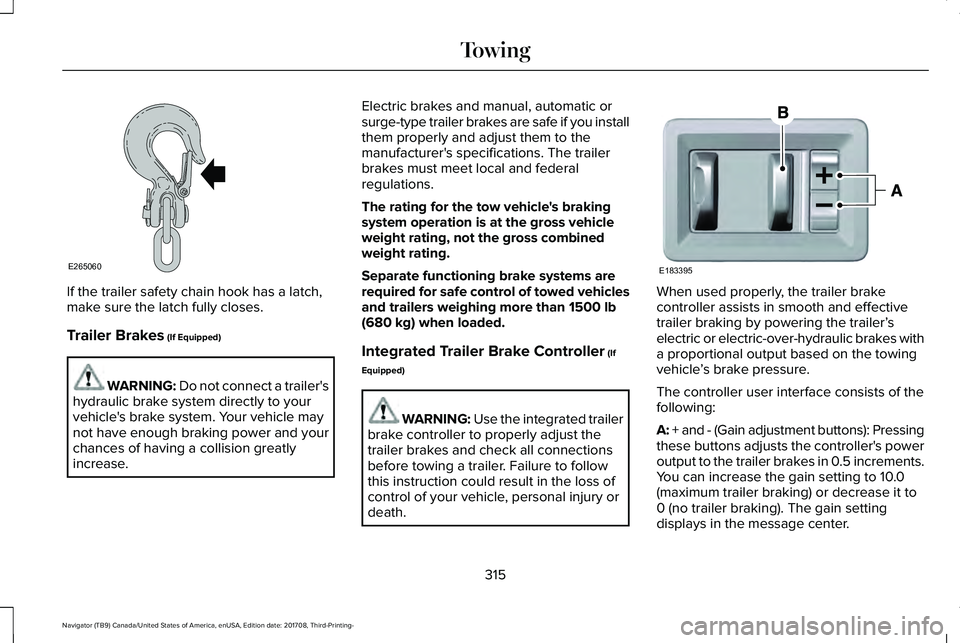
If the trailer safety chain hook has a latch,make sure the latch fully closes.
Trailer Brakes (If Equipped)
WARNING: Do not connect a trailer'shydraulic brake system directly to yourvehicle's brake system. Your vehicle maynot have enough braking power and yourchances of having a collision greatlyincrease.
Electric brakes and manual, automatic orsurge-type trailer brakes are safe if you installthem properly and adjust them to themanufacturer's specifications. The trailerbrakes must meet local and federalregulations.
The rating for the tow vehicle's brakingsystem operation is at the gross vehicleweight rating, not the gross combinedweight rating.
Separate functioning brake systems arerequired for safe control of towed vehiclesand trailers weighing more than 1500 lb(680 kg) when loaded.
Integrated Trailer Brake Controller (If
Equipped)
WARNING: Use the integrated trailerbrake controller to properly adjust thetrailer brakes and check all connectionsbefore towing a trailer. Failure to followthis instruction could result in the loss ofcontrol of your vehicle, personal injury ordeath.
When used properly, the trailer brakecontroller assists in smooth and effectivetrailer braking by powering the trailer’selectric or electric-over-hydraulic brakes witha proportional output based on the towingvehicle’s brake pressure.
The controller user interface consists of thefollowing:
A: + and - (Gain adjustment buttons): Pressingthese buttons adjusts the controller's poweroutput to the trailer brakes in 0.5 increments.You can increase the gain setting to 10.0(maximum trailer braking) or decrease it to0 (no trailer braking). The gain settingdisplays in the message center.
315
Navigator (TB9) Canada/United States of America, enUSA, Edition date: 201708, Third-Printing-
TowingE265060 E183395
Page 320 of 649
The gain setting sets the trailer brakecontroller for the specific towing condition.You should change the setting as towingconditions change. Changes to towingconditions include trailer load, vehicle load,road conditions and weather.
The gain should be set to provide themaximum trailer braking assistance whilemaking sure the trailer wheels do not lockwhen using the brakes. Locked trailer wheelsmay lead to trailer instability.
1.Make sure the trailer brakes are in goodworking condition, functioning normallyand properly adjusted. See your trailerdealer if necessary.
2. Hook up the trailer and make theelectrical connections according to thetrailer manufacturer's instructions.
3.When you plug in a trailer with electric orelectric-over-hydraulic brakes, a messageconfirming connection appears in theinformation display.
4.Use the gain adjustment (+ and -) buttonsto increase or decrease the gain settingto the desired starting point. A gainsetting of 6.0 is a good starting point forheavier loads.
5. In a traffic-free environment, tow thetrailer on a dry, level surface at a speedof 20–25 mph (32–40 km/h) andsqueeze the manual control levercompletely.
6.If the trailer wheels lock up, indicated bysquealing tires, reduce the gain setting.If the trailer wheels turn freely, increasethe gain setting. Repeat Steps 5 and 6until the gain setting is at a point justbelow trailer wheel lock-up. If towing aheavier trailer, trailer wheel lock-up maynot be attainable even with the maximumgain setting of 10.
Explanation of Information Display WarningMessages
Note:An authorized dealer can diagnosethe trailer brake controller to determineexactly which trailer fault has occurred.However, your warranty does not cover thisdiagnosis if the fault is with the trailer.
A message indicating a trailer brake modulefault may display in response to faults sensedby the trailer brake controller, accompaniedby a single tone. If this message appears,contact an authorized dealer as soon aspossible for diagnosis and repair. Thecontroller may still function, but performancemay be degraded.
A message indicating a trailer wiring faultmay display when there is a short circuit onthe electric brake output wire. If this messagedisplays, accompanied by a single tone, withno trailer connected, the problem is with yourvehicle wiring between the trailer brakecontroller and the 7-pin connector at thebumper. If the message only displays with atrailer connected, the problem is with thetrailer wiring. Consult your trailer dealer forassistance. This can be a short to ground(such as a chaffed wire), short to voltage(such as a pulled pin on trailer emergencybreakaway battery) or the trailer brakes maybe drawing too much current.
317
Navigator (TB9) Canada/United States of America, enUSA, Edition date: 201708, Third-Printing-
Towing
Page 442 of 649
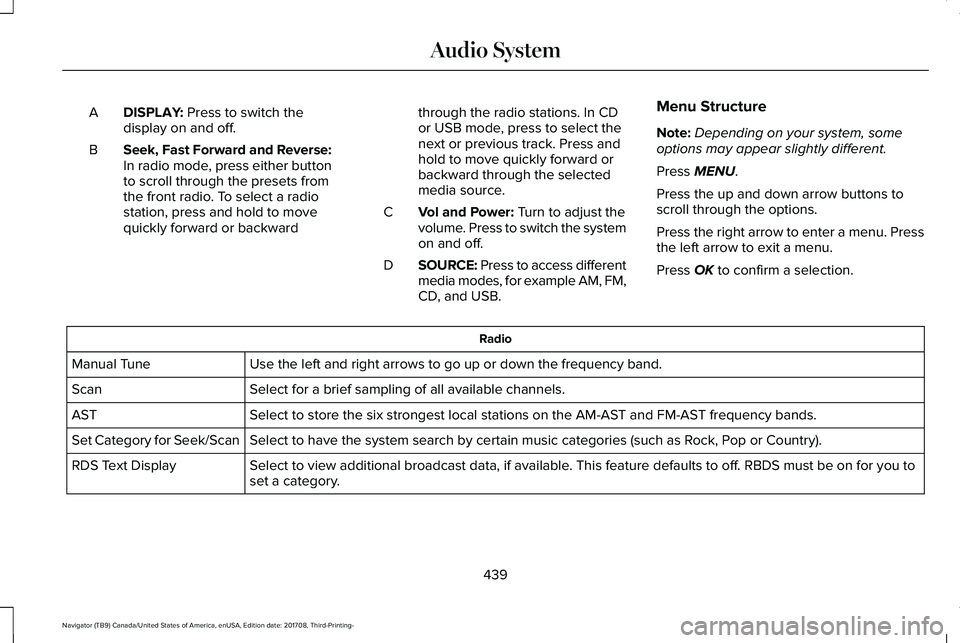
DISPLAY: Press to switch thedisplay on and off.A
Seek, Fast Forward and Reverse:In radio mode, press either buttonto scroll through the presets fromthe front radio. To select a radiostation, press and hold to movequickly forward or backward
B
through the radio stations. In CDor USB mode, press to select thenext or previous track. Press andhold to move quickly forward orbackward through the selectedmedia source.
Vol and Power: Turn to adjust thevolume. Press to switch the systemon and off.
C
SOURCE: Press to access differentmedia modes, for example AM, FM,CD, and USB.
D
Menu Structure
Note:Depending on your system, someoptions may appear slightly different.
Press MENU.
Press the up and down arrow buttons toscroll through the options.
Press the right arrow to enter a menu. Pressthe left arrow to exit a menu.
Press OK to confirm a selection.
Radio
Use the left and right arrows to go up or down the frequency band.Manual Tune
Select for a brief sampling of all available channels.Scan
Select to store the six strongest local stations on the AM-AST and FM-AST frequency bands.AST
Select to have the system search by certain music categories (such as Rock, Pop or Country).Set Category for Seek/Scan
Select to view additional broadcast data, if available. This feature defaults to off. RBDS must be on for you toset a category.RDS Text Display
439
Navigator (TB9) Canada/United States of America, enUSA, Edition date: 201708, Third-Printing-
Audio System
Page 451 of 649
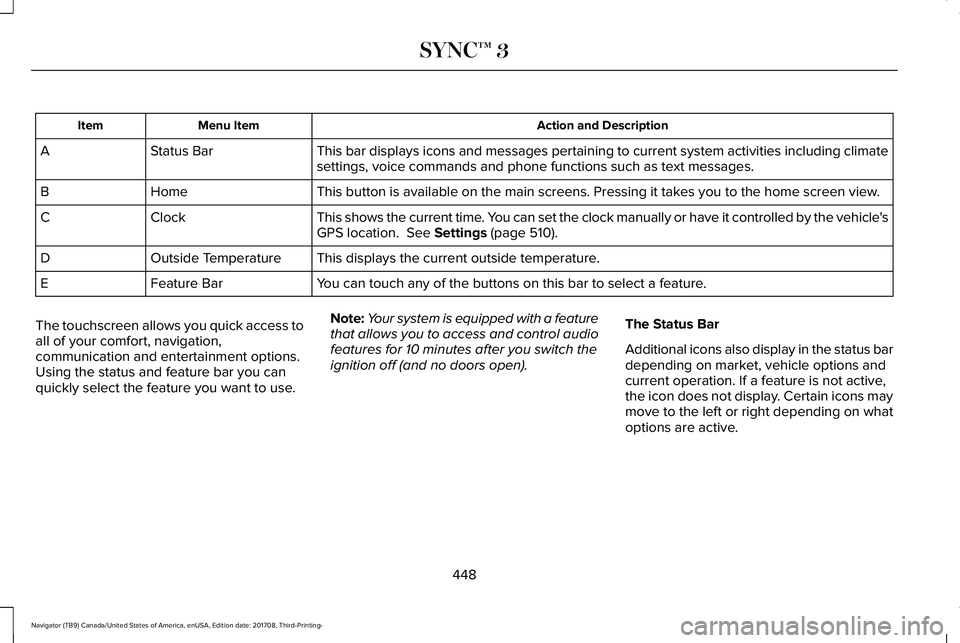
Action and DescriptionMenu ItemItem
This bar displays icons and messages pertaining to current system activities including climatesettings, voice commands and phone functions such as text messages.Status BarA
This button is available on the main screens. Pressing it takes you to the home screen view.HomeB
This shows the current time. You can set the clock manually or have it controlled by the vehicle'sGPS location. See Settings (page 510).ClockC
This displays the current outside temperature.Outside TemperatureD
You can touch any of the buttons on this bar to select a feature.Feature BarE
The touchscreen allows you quick access toall of your comfort, navigation,communication and entertainment options.Using the status and feature bar you canquickly select the feature you want to use.
Note:Your system is equipped with a featurethat allows you to access and control audiofeatures for 10 minutes after you switch theignition off (and no doors open).
The Status Bar
Additional icons also display in the status bardepending on market, vehicle options andcurrent operation. If a feature is not active,the icon does not display. Certain icons maymove to the left or right depending on whatoptions are active.
448
Navigator (TB9) Canada/United States of America, enUSA, Edition date: 201708, Third-Printing-
SYNC™ 3
Page 456 of 649
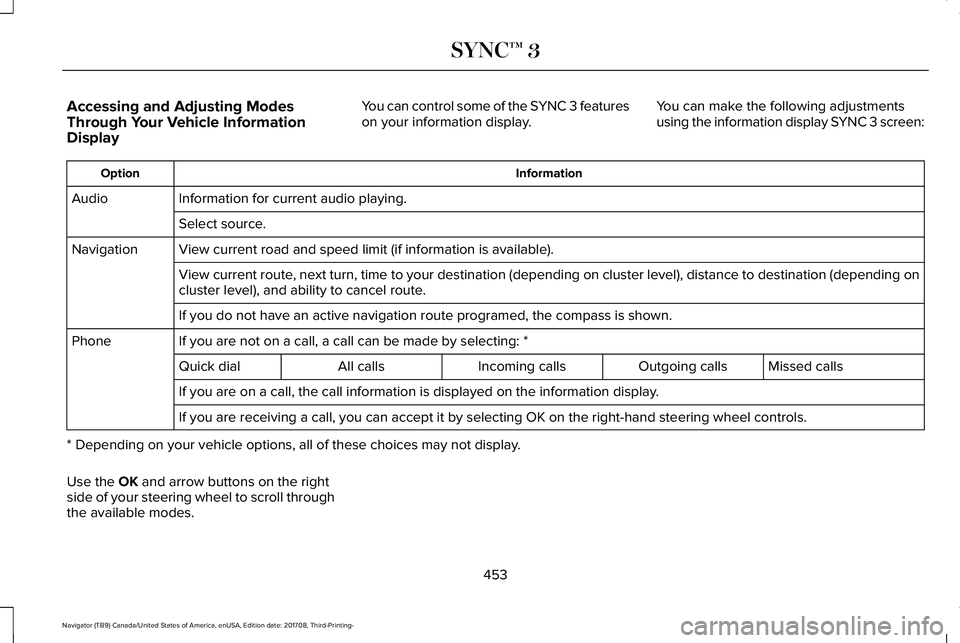
Accessing and Adjusting ModesThrough Your Vehicle InformationDisplay
You can control some of the SYNC 3 featureson your information display.You can make the following adjustmentsusing the information display SYNC 3 screen:
InformationOption
Information for current audio playing.Audio
Select source.
View current road and speed limit (if information is available).Navigation
View current route, next turn, time to your destination (depending on cluster level), distance to destination (depending oncluster level), and ability to cancel route.
If you do not have an active navigation route programed, the compass is shown.
If you are not on a call, a call can be made by selecting: *Phone
Missed callsOutgoing callsIncoming callsAll callsQuick dial
If you are on a call, the call information is displayed on the information display.
If you are receiving a call, you can accept it by selecting OK on the right-hand steering wheel controls.
* Depending on your vehicle options, all of these choices may not display.
Use the OK and arrow buttons on the rightside of your steering wheel to scroll throughthe available modes.
453
Navigator (TB9) Canada/United States of America, enUSA, Edition date: 201708, Third-Printing-
SYNC™ 3
Page 458 of 649
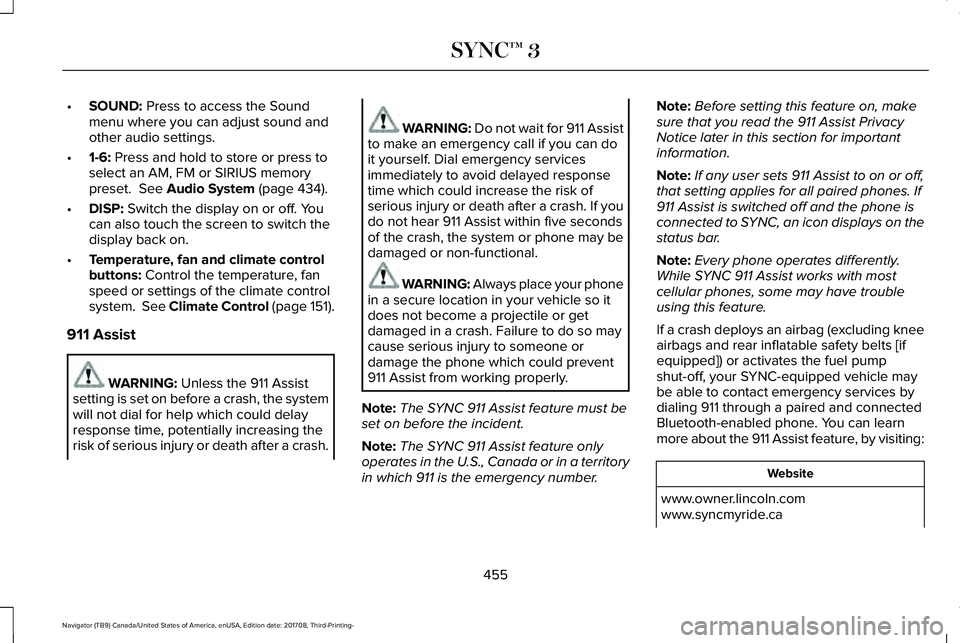
•SOUND: Press to access the Soundmenu where you can adjust sound andother audio settings.
•1-6: Press and hold to store or press toselect an AM, FM or SIRIUS memorypreset. See Audio System (page 434).
•DISP: Switch the display on or off. Youcan also touch the screen to switch thedisplay back on.
•Temperature, fan and climate controlbuttons: Control the temperature, fanspeed or settings of the climate controlsystem. See Climate Control (page 151).
911 Assist
WARNING: Unless the 911 Assistsetting is set on before a crash, the systemwill not dial for help which could delayresponse time, potentially increasing therisk of serious injury or death after a crash.
WARNING: Do not wait for 911 Assistto make an emergency call if you can doit yourself. Dial emergency servicesimmediately to avoid delayed responsetime which could increase the risk ofserious injury or death after a crash. If youdo not hear 911 Assist within five secondsof the crash, the system or phone may bedamaged or non-functional.
WARNING: Always place your phonein a secure location in your vehicle so itdoes not become a projectile or getdamaged in a crash. Failure to do so maycause serious injury to someone ordamage the phone which could prevent911 Assist from working properly.
Note:The SYNC 911 Assist feature must beset on before the incident.
Note:The SYNC 911 Assist feature onlyoperates in the U.S., Canada or in a territoryin which 911 is the emergency number.
Note:Before setting this feature on, makesure that you read the 911 Assist PrivacyNotice later in this section for importantinformation.
Note:If any user sets 911 Assist to on or off,that setting applies for all paired phones. If911 Assist is switched off and the phone isconnected to SYNC, an icon displays on thestatus bar.
Note:Every phone operates differently.While SYNC 911 Assist works with mostcellular phones, some may have troubleusing this feature.
If a crash deploys an airbag (excluding kneeairbags and rear inflatable safety belts [ifequipped]) or activates the fuel pumpshut-off, your SYNC-equipped vehicle maybe able to contact emergency services bydialing 911 through a paired and connectedBluetooth-enabled phone. You can learnmore about the 911 Assist feature, by visiting:
Website
www.owner.lincoln.comwww.syncmyride.ca
455
Navigator (TB9) Canada/United States of America, enUSA, Edition date: 201708, Third-Printing-
SYNC™ 3
Page 476 of 649
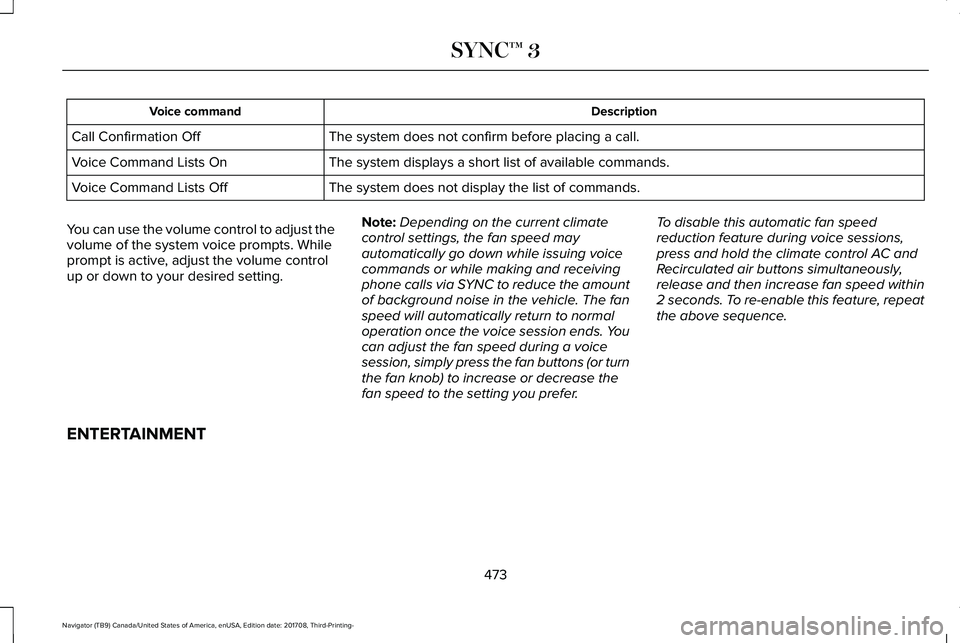
DescriptionVoice command
The system does not confirm before placing a call.Call Confirmation Off
The system displays a short list of available commands.Voice Command Lists On
The system does not display the list of commands.Voice Command Lists Off
You can use the volume control to adjust thevolume of the system voice prompts. Whileprompt is active, adjust the volume controlup or down to your desired setting.
Note:Depending on the current climatecontrol settings, the fan speed mayautomatically go down while issuing voicecommands or while making and receivingphone calls via SYNC to reduce the amountof background noise in the vehicle. The fanspeed will automatically return to normaloperation once the voice session ends. Youcan adjust the fan speed during a voicesession, simply press the fan buttons (or turnthe fan knob) to increase or decrease thefan speed to the setting you prefer.
To disable this automatic fan speedreduction feature during voice sessions,press and hold the climate control AC andRecirculated air buttons simultaneously,release and then increase fan speed within2 seconds. To re-enable this feature, repeatthe above sequence.
ENTERTAINMENT
473
Navigator (TB9) Canada/United States of America, enUSA, Edition date: 201708, Third-Printing-
SYNC™ 3
Page 479 of 649
AM/FM Radio
Tuning a Station
You can use the tune or seek controls on theradio bezel to select a station.
To tune a station using the touchscreen,select:
Menu item
Direct Tune
A pop up appears, allowing you to type inthe frequency of a station. You can only entera valid station for the source you arecurrently listening to.
You can press the backspace button todelete the previously entered number.
Once you have entered the station's callnumbers, you can select:
Action and descriptionMenu item
Press to beginplaying the stationyou have entered.
Enter
Press to exit withoutchanging the station.Cancel
Presets
To set a new preset, tune to the station andthen press and hold one of the memorypreset buttons. The audio mutes briefly whilethe system saves the station and thenreturns.
There are two preset banks available for AMand three banks for FM. To access additionalpresets, tap the preset button. The indicatoron the preset button shows which bank ofpresets you are currently viewing.
SiriusXM® Satellite Radio (If Activated)
Note: This feature may not be available inall markets and requires an activesubscription.
SiriusXM satellite radio is asubscription-based satellite radio service thatbroadcasts a variety of music, sports, news,weather, traffic and entertainmentprogramming. Your factory-installed SiriusXMsatellite radio system includes hardware anda limited subscription term that begins onthe date of sale or lease of your vehicle. Seean authorized dealer for availability.
476
Navigator (TB9) Canada/United States of America, enUSA, Edition date: 201708, Third-Printing-
SYNC™ 3E234451
Page 480 of 649
For more information on extendedsubscription terms (a service fee is required),the online media player and a list of SiriusXMsatellite radio channels, and other features,please visit www.siriusxm.com in the UnitedStates, www.siriusxm.ca in Canada, or callSiriusXM at 1-888-539-7474.
Note:SiriusXM reserves the unrestrictedright to change, rearrange, add or deleteprogramming. This includes canceling,moving or adding particular channels, andits prices, at any time, with or without noticeto you. Ford Motor Company shall not beresponsible for any such programmingchanges.
Note:This receiver includes the eCosreal-time operating system. eCos ispublished under the eCos License.
The following buttons are available for SiriusXM:
Action and descriptionMenu item
Touch this button to see a list of available stations.Browse
A pop-up appears, allowing you to type in the call numbers of a station.Direct TuneOnce you enter the stations call numbers, you can select:
The system tunes to the station you select.Enter
You exit the pop-up and the current station continues to play.Cancel
You can press the backspace button to delete the previous number.
477
Navigator (TB9) Canada/United States of America, enUSA, Edition date: 201708, Third-Printing-
SYNC™ 3