alarm LINCOLN NAVIGATOR 2018 Owners Manual
[x] Cancel search | Manufacturer: LINCOLN, Model Year: 2018, Model line: NAVIGATOR, Model: LINCOLN NAVIGATOR 2018Pages: 649, PDF Size: 4.96 MB
Page 5 of 649
Liftgate
Power Liftgate.................................................79
Security
Passive Anti-Theft System...........................83
Anti-Theft Alarm - Vehicles With: InteriorSensor..........................................................85
Anti-Theft Alarm - Vehicles With: Anti-TheftAlarm System.............................................86
Power Running Boards
Using Power Running Boards .....................87
Steering Wheel
Adjusting the Steering Wheel....................89
Audio Control.................................................90
Voice Control..................................................90
Cruise Control................................................90
Information Display Control.........................91
Heated Steering Wheel...............................92
Pedals
Adjusting the Pedals.....................................93
Wipers and Washers
Autowipers......................................................94
Windshield Washers.....................................95
Rear Window Wiper and Washers............95
Lighting
General Information......................................96
Lighting Control.............................................96
Autolamps........................................................97
Instrument Lighting Dimmer.......................98
Headlamp Exit Delay....................................98
Daytime Running Lamps..............................98
Automatic High Beam Control...................99
Front Fog Lamps..........................................100
Adaptive Headlamps..................................100
Direction Indicators......................................101
Welcome Lighting.........................................101
Interior Lamps...............................................102
Ambient Lighting..........................................103
Windows and Mirrors
Power Windows............................................104
Global Opening and Closing....................105
Exterior Mirrors.............................................105
Interior Mirror.................................................107
Childminder Mirror.......................................108
Toll Reader.....................................................108
Sun Visors......................................................109
Moonroof........................................................109
Liftgate Window............................................110
Instrument Cluster
Gauges.............................................................112
Warning Lamps and Indicators..................113
Audible Warnings and Indicators..............118
Information Displays
General Information......................................119
Information Messages................................124
Head Up Display...........................................147
Climate Control
Automatic Climate Control.........................151
Hints on Controlling the Interior Climate.......................................................................153
Rear Passenger Climate Controls............154
2
Navigator (TB9) Canada/United States of America, enUSA, Edition date: 201708, Third-Printing-
Table of Contents
Page 12 of 649
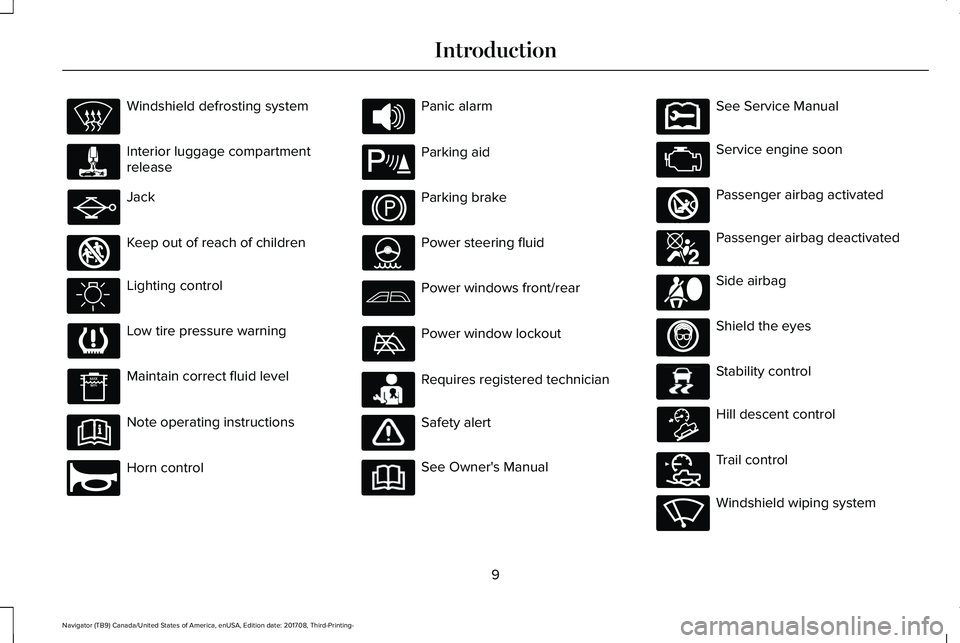
Windshield defrosting system
Interior luggage compartmentrelease
Jack
Keep out of reach of children
Lighting control
Low tire pressure warning
Maintain correct fluid level
Note operating instructions
Horn control
Panic alarm
Parking aid
Parking brake
Power steering fluid
Power windows front/rear
Power window lockout
Requires registered technician
Safety alert
See Owner's Manual
See Service Manual
Service engine soon
Passenger airbag activated
Passenger airbag deactivated
Side airbag
Shield the eyes
Stability control
Hill descent control
Trail control
Windshield wiping system
9
Navigator (TB9) Canada/United States of America, enUSA, Edition date: 201708, Third-Printing-
Introduction E161353 E270945 E139213 E231159 E231158 E270849 E270850 E167012 E138639 E163957 E272858 E270969
Page 65 of 649
GENERAL INFORMATION ON
RADIO FREQUENCIES
This device complies with Part 15 of the FCCRules and with Licence exempt RSSStandards of Industry Canada. Operation issubject to the following two conditions:
•This device may not cause harmfulinterference, and
•This device must accept any interferencereceived, including interference that maycause undesired operation.
Note:Changes or modifications notexpressively approved by the partyresponsible for compliance could void theuser's authority to operate the equipment.The term "IC:" before the radio certificationnumber only signifies that Industry Canadatechnical specifications were met.
The typical operating range for yourtransmitter is approximately 33 ft (10 m).Vehicles with the remote start feature willhave a greater range. One of the followingcould cause a decrease in operating range:
•Weather conditions.
•Nearby radio towers.
•Structures around the vehicle.
•Other vehicles parked next to yourvehicle.
The radio frequency used by your remotecontrol can also be used by other radiotransmitters, for example amateur radios,medical equipment, wireless headphones,wireless remote controls, cell phones, batterychargers and alarm systems. If thefrequencies are jammed, you will not be ableto use your remote control. You can lockand unlock the doors with the key.
Note:Make sure you lock your vehiclebefore leaving it unattended.
Note:If you are within range of your vehicle,the remote control will operate if youunintentionally press any button.
Intelligent Access
The system uses a radio frequency signal tocommunicate with your vehicle andauthorizes your vehicle to unlock when oneof the following conditions are met:
•You touch the unlock sensor on the backof the door handle with the intelligentaccess key within 3 ft (1 m) of yourvehicle.
•You press the luggage compartmentbutton.
•You press the unlock button on thetransmitter.
If excessive radio frequency interference ispresent in the area or if the transmitterbattery is low, you may need to mechanicallyunlock your door. You can use themechanical key blade in your intelligentaccess key to open the driver door in thissituation. See Remote Control (page 63).
62
Navigator (TB9) Canada/United States of America, enUSA, Edition date: 201708, Third-Printing-
Keys and Remote Controls
Page 68 of 649
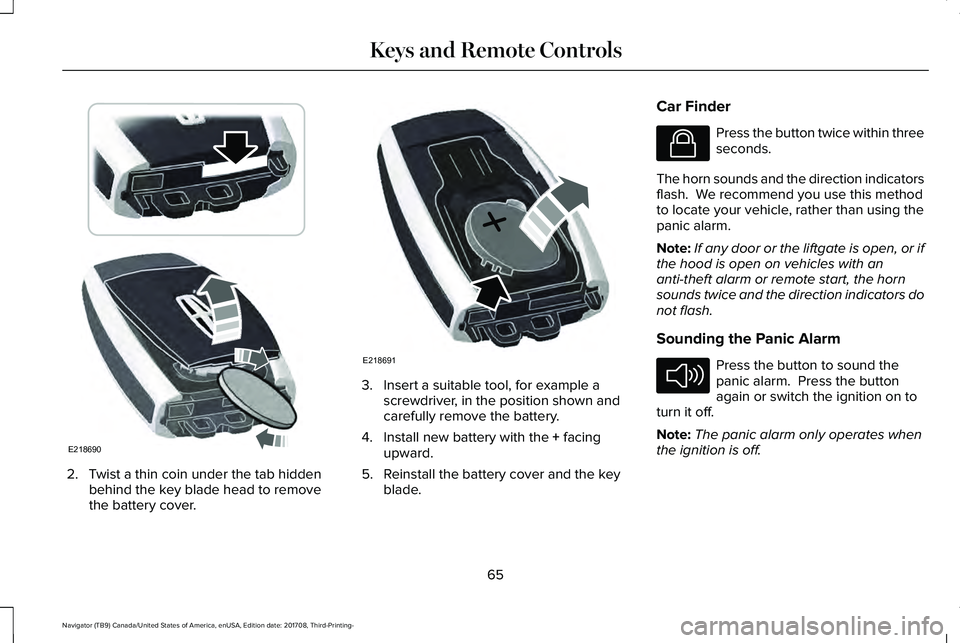
2. Twist a thin coin under the tab hiddenbehind the key blade head to removethe battery cover.
3. Insert a suitable tool, for example ascrewdriver, in the position shown andcarefully remove the battery.
4. Install new battery with the + facingupward.
5. Reinstall the battery cover and the keyblade.
Car Finder
Press the button twice within threeseconds.
The horn sounds and the direction indicatorsflash. We recommend you use this methodto locate your vehicle, rather than using thepanic alarm.
Note:If any door or the liftgate is open, or ifthe hood is open on vehicles with ananti-theft alarm or remote start, the hornsounds twice and the direction indicators donot flash.
Sounding the Panic Alarm
Press the button to sound thepanic alarm. Press the buttonagain or switch the ignition on toturn it off.
Note:The panic alarm only operates whenthe ignition is off.
65
Navigator (TB9) Canada/United States of America, enUSA, Edition date: 201708, Third-Printing-
Keys and Remote ControlsE218690 E218691 E138623 E138624
Page 69 of 649
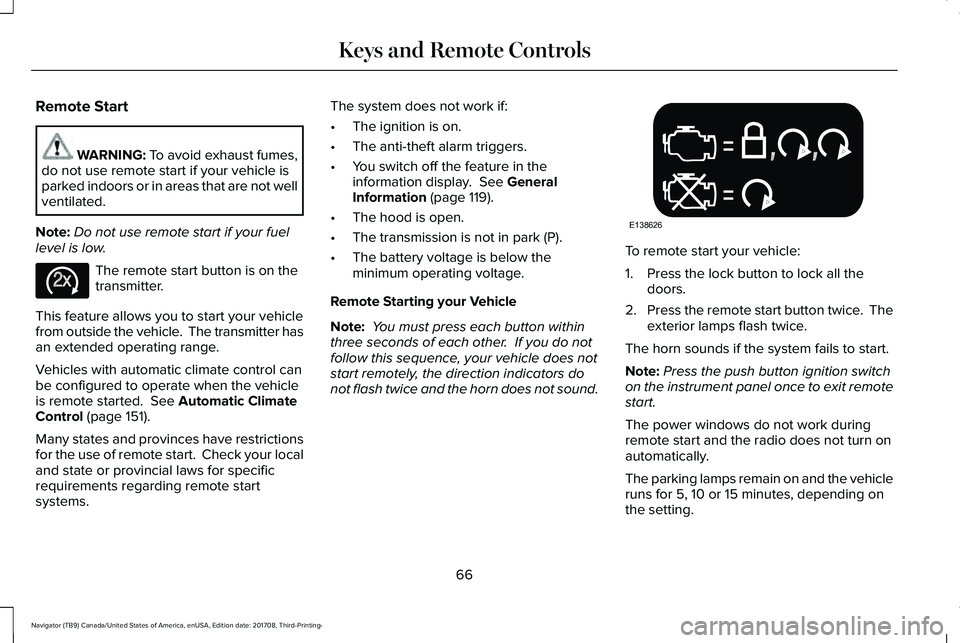
Remote Start
WARNING: To avoid exhaust fumes,do not use remote start if your vehicle isparked indoors or in areas that are not wellventilated.
Note:Do not use remote start if your fuellevel is low.
The remote start button is on thetransmitter.
This feature allows you to start your vehiclefrom outside the vehicle. The transmitter hasan extended operating range.
Vehicles with automatic climate control canbe configured to operate when the vehicleis remote started. See Automatic ClimateControl (page 151).
Many states and provinces have restrictionsfor the use of remote start. Check your localand state or provincial laws for specificrequirements regarding remote startsystems.
The system does not work if:
•The ignition is on.
•The anti-theft alarm triggers.
•You switch off the feature in theinformation display. See GeneralInformation (page 119).
•The hood is open.
•The transmission is not in park (P).
•The battery voltage is below theminimum operating voltage.
Remote Starting your Vehicle
Note: You must press each button withinthree seconds of each other. If you do notfollow this sequence, your vehicle does notstart remotely, the direction indicators donot flash twice and the horn does not sound.
To remote start your vehicle:
1. Press the lock button to lock all thedoors.
2.Press the remote start button twice. Theexterior lamps flash twice.
The horn sounds if the system fails to start.
Note:Press the push button ignition switchon the instrument panel once to exit remotestart.
The power windows do not work duringremote start and the radio does not turn onautomatically.
The parking lamps remain on and the vehicleruns for 5, 10 or 15 minutes, depending onthe setting.
66
Navigator (TB9) Canada/United States of America, enUSA, Edition date: 201708, Third-Printing-
Keys and Remote ControlsE138625 E138626
Page 70 of 649
Extending the Engine Running Time
To extend the engine running time durationof your vehicle during remote start, repeatsteps 1 and 2 while the engine is running. Ifthe duration is set to 15 minutes, the durationextends by another 15 minutes. For example,if your vehicle had been running from thefirst remote start for 5 minutes, your vehiclecontinues to run now for a total of 30minutes. You can extend the remote startup to a maximum of 35 minutes.
Wait at least five seconds before remotestarting after the engine stops running.
Turning Your Vehicle Off After RemoteStarting
Press the button once. Theparking lamps turn off.
You may have to be closer to your vehicleto remotely switch off your vehicle afterremote starting. This is due to the addednoise of your running vehicle.
You can switch this feature on or off in theinformation display.
Memory Feature
You can use the intelligent access key torecall memory positional settings for thedriver seat, power mirrors, power steeringcolumn and power adjustable foot pedals;and to recall your personal profile. Unlockyour vehicle with the intelligent access keyto recall the memory positions. You canprogram the intelligent access key to recallmemory positions. See Memory Function(page 167).
REPLACING A LOST KEY OR
REMOTE CONTROL
Replacement keys or remote controls canbe purchased from an authorized dealer.Authorized dealers can program remotecontrols for your vehicle. See Anti-TheftAlarm (page 86).
67
Navigator (TB9) Canada/United States of America, enUSA, Edition date: 201708, Third-Printing-
Keys and Remote ControlsE138625
Page 72 of 649
•Various vehicle speed reminders so youknow when your vehicle approaches thelimits. Warnings appear in the informationdisplay and an audible warning soundswhen you exceed the limit.
•Audio system maximum volume of 45%.A message will be shown in the displaywhen you attempt to exceed the limitedvolume. Also, the speed-sensitive orcompensated automatic volume controlwill be disabled.
•Always on setting. When this is selected,you will not be able to turn off AdvanceTrac or traction control, 911 Assist orEmergency Assistance, or Do Not Disturb(if your vehicle is equipped with thesefeatures).
CREATING A MYKEY
Use the information display to create aMyKey:
1. Insert the key you want to program intothe ignition. See Starting a GasolineEngine (page 192). If your vehicle isequipped with a push-button start, placethe remote control into the backup slot.See Anti-Theft Alarm (page 86).
2. Switch the ignition on.
3.Access the main menu in the informationdisplay and then scroll through themenus to change the settings of yourMyKey. From the MyKey menu select theoption Create MyKey. See InformationDisplays (page 119).
4.When prompted, hold the OK button untilyou see a message informing you to labelthis key as a MyKey. The programmedrestrictions apply when you key off, openand close the driver door and restart yourvehicle with the programmed key ortransmitter.
MyKey is successfully created. Make sureyou label it so you can distinguish it from theadmin keys.
You can also program configurable settingsfor the key(s). See Programming andChanging Configurable Settings.
Programming and ChangingConfigurable Settings
Use the information display to access yourconfigurable MyKey settings.
1.Switch the ignition on using an admin keyor transmitter you want to program.
2.Access the main menu in the informationdisplay and then scroll through themenus to change the settings of yourMyKey. See Information Displays (page119).
3. Follow the instructions in the display.
Note:You can clear or change your MyKeysettings at any time during the same keycycle as you created the MyKey. Once youhave switched the vehicle off, however, youwill need an admin key to change or clearyour MyKey settings.
69
Navigator (TB9) Canada/United States of America, enUSA, Edition date: 201708, Third-Printing-
MyKey™
Page 74 of 649
Potential CausesCondition
The key or transmitter used to start the vehicle does not have admin privileges.I cannot create a MyKey.Vehicles with keyless start: Make sure you place the transmitter into the backup slot. See Anti-TheftAlarm (page 86).The key or transmitter used to start the vehicle is the only admin key. There always has to be atleast one admin key.The passive anti-theft system is disabled or in unlimited mode.
The transmitter used to start your vehicle does not have admin privileges.I cannot program the configurablesettings.There are no MyKeys programmed to the vehicle. See Creating a MyKey (page 69).
The key or transmitter used to start the vehicle does not have admin privileges.I cannot clear the MyKeys.No MyKeys are created. See Creating a MyKey (page 69).
Purchase a new key or transmitter from an authorized dealer.I lost the only admin key.
Program a spare key or transmitter. You may need to see an authorized dealer. See Anti-TheftAlarm (page 86).I lost a key.
The MyKey user is not using the MyKey.The MyKey distance does not accumu-late.An admin key holder cleared the MyKeys and created new MyKeys.The key system has been reset.
An admin transmitter is present at vehicle start.No MyKey functions with the trans-mitter.There are no MyKeys programmed to your vehicle. See Creating a MyKey (page 69).
71
Navigator (TB9) Canada/United States of America, enUSA, Edition date: 201708, Third-Printing-
MyKey™
Page 76 of 649
you press the unlock button once. Theunlocking mode applies to the remotecontrol, keyless entry keypad and intelligentaccess. You can also change between theunlocking modes using the informationdisplay. See General Information (page 119).
Reprogramming the Unlocking Function
Note: When you press the unlock button,either all the doors are unlocked or only thedriver door is unlocked. Pressing the unlockbutton again unlocks all the doors.
Press and hold the unlock and lock buttonson the remote control simultaneously for atleast four seconds with the ignition off. Thedirection indicators flash twice to confirm thechange.
To return to the original unlocking function,repeat the process.
Locking the Doors
Press the button to lock all doors. The direction indicators will flash.
Press the button again within three secondsto confirm that all the doors are closed. Thedoor lock again, the horn sounds and thedirection indicators flash if all the doors andthe liftgate are closed.
Note:If the system does not function, usethe key blade to lock and unlock yourvehicle.
Mislock
If any door or the liftgate is open, or if
the hood is open on vehicles with an
anti-theft alarm or remote start, the horn
sounds twice and the direction
indicators do not flash. You can switch
this feature on or off in the information
display. See General Information (page
119).
Opening the Liftgate
Press twice within three secondsto open the liftgate.
Activating Intelligent Access
General Information
You can unlock and lock the vehicle withouttaking the keys out of your pocket or pursewhen your intelligent access key is within3 ft (1 m) of your vehicle. Intelligent accessuses a sensor on the back of the door handlefor unlocking and a separate sensor on theface of each door handle for locking.
The system does not function if:
•Your vehicle battery has no charge.
•The key battery has no charge.
•The key frequencies are jammed.
Note:The system may not function if the keyis close to metal objects or electronicdevices, for example keys or a cell phone.
Note:If the system does not function, usethe key blade to lock and unlock yourvehicle. See Remote Control (page 63).
73
Navigator (TB9) Canada/United States of America, enUSA, Edition date: 201708, Third-Printing-
Doors and LocksE138623 E267940
Page 80 of 649
You can use the keypad to:
•Lock or unlock the doors.
•Unlock the liftgate glass.
•Program and erase user codes.
•Arm and disarm the anti-theft alarm.
You can operate the keypad with thefactory-set five-digit entry code. The codeis on the owner's wallet card in the glove boxand is available from an authorized dealer. You can also program up to five of your ownfive-digit personal entry codes.
Programming a Personal Entry Code
To create your own personal entry code:
1. Enter the factory-set five-digit code.
2. Press 1·2 on the keypad within fiveseconds.
3.Enter your personal five-digit code. Youmust press each number within fiveseconds of each other.
4.Press 1·2 on the keypad to save personalcode 1.
The doors lock then unlock to confirm thatprogramming was successful.
To program additional personal entry codes,repeat Steps 1-3, then for Step 4:
•Press 3·4 to save personal code 2
•Press 5·6 to save personal code 3
•Press 7·8 to save personal code 4
•Press 9·0 to save personal code 5.
You may also program a personal entry codethrough the information display.
Tips:
•Do not set a code that uses five of thesame number.
•Do not use five numbers in sequentialorder.
•The factory-set code works even if youhave set your own personal code.
Erasing a Personal Code
1. Enter the factory-set 5-digit code.
2. Press and release 1·2 on the keypadwithin five seconds.
3. Press and hold 1·2 for two seconds. Youmust do this within five seconds ofcompleting Step 2.
All personal codes erase and only thefactory-set 5-digit code works.
Anti-Scan Feature
The keypad goes into an anti-scan mode ifyou enter the wrong code seven times. Thismode turns off the keypad for one minuteand the keypad lamp flashes.
The anti-scan feature turns off after:
•One minute of keypad inactivity.
•Pressing the unlock button on the remotecontrol.
•Switching the ignition on.
Locking and Unlocking
To Unlock All Doors
Enter the factory-set 5-digit code or yourpersonal code to unlock all doors.
To Lock All Doors
Press and hold 7·8 and 9·0 at the same timewith the driver door closed to lock all doors.You do not need to enter the keypad codefirst.
77
Navigator (TB9) Canada/United States of America, enUSA, Edition date: 201708, Third-Printing-
Doors and Locks