check oil LINCOLN NAVIGATOR 2019 User Guide
[x] Cancel search | Manufacturer: LINCOLN, Model Year: 2019, Model line: NAVIGATOR, Model: LINCOLN NAVIGATOR 2019Pages: 645, PDF Size: 5.02 MB
Page 367 of 645
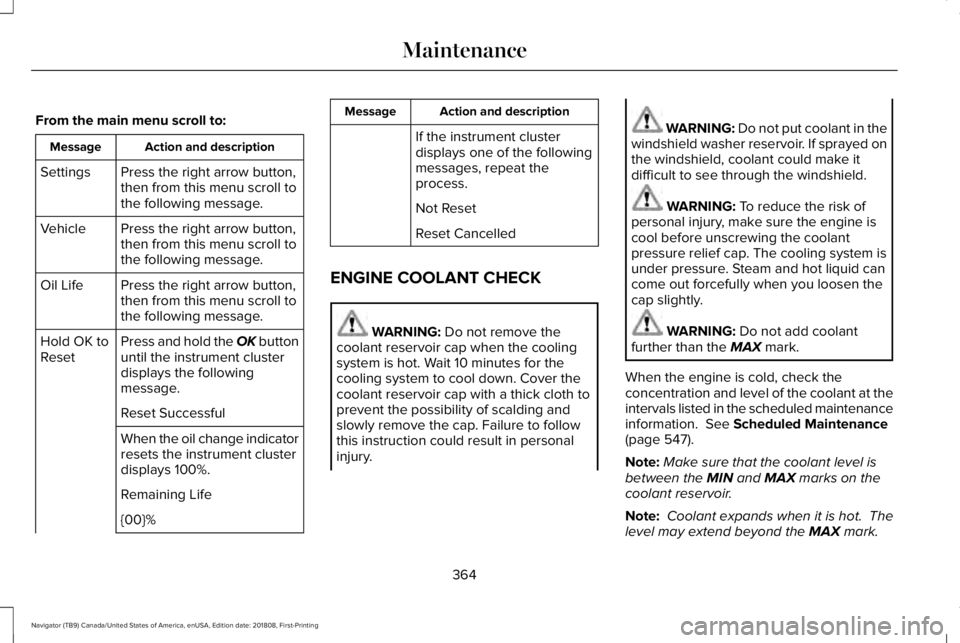
From the main menu scroll to:
Action and descriptionMessage
Press the right arrow button,then from this menu scroll tothe following message.
Settings
Press the right arrow button,then from this menu scroll tothe following message.
Vehicle
Press the right arrow button,then from this menu scroll tothe following message.
Oil Life
Press and hold the OK buttonuntil the instrument clusterdisplays the followingmessage.
Hold OK toReset
Reset Successful
When the oil change indicatorresets the instrument clusterdisplays 100%.
Remaining Life
{00}%
Action and descriptionMessage
If the instrument clusterdisplays one of the followingmessages, repeat theprocess.
Not Reset
Reset Cancelled
ENGINE COOLANT CHECK
WARNING: Do not remove thecoolant reservoir cap when the coolingsystem is hot. Wait 10 minutes for thecooling system to cool down. Cover thecoolant reservoir cap with a thick cloth toprevent the possibility of scalding andslowly remove the cap. Failure to followthis instruction could result in personalinjury.
WARNING: Do not put coolant in thewindshield washer reservoir. If sprayed onthe windshield, coolant could make itdifficult to see through the windshield.
WARNING: To reduce the risk ofpersonal injury, make sure the engine iscool before unscrewing the coolantpressure relief cap. The cooling system isunder pressure. Steam and hot liquid cancome out forcefully when you loosen thecap slightly.
WARNING: Do not add coolantfurther than the MAX mark.
When the engine is cold, check theconcentration and level of the coolant at theintervals listed in the scheduled maintenanceinformation. See Scheduled Maintenance(page 547).
Note:Make sure that the coolant level isbetween the MIN and MAX marks on thecoolant reservoir.
Note: Coolant expands when it is hot. Thelevel may extend beyond the MAX mark.
364
Navigator (TB9) Canada/United States of America, enUSA, Edition date: 201808, First-Printing
Maintenance
Page 390 of 645
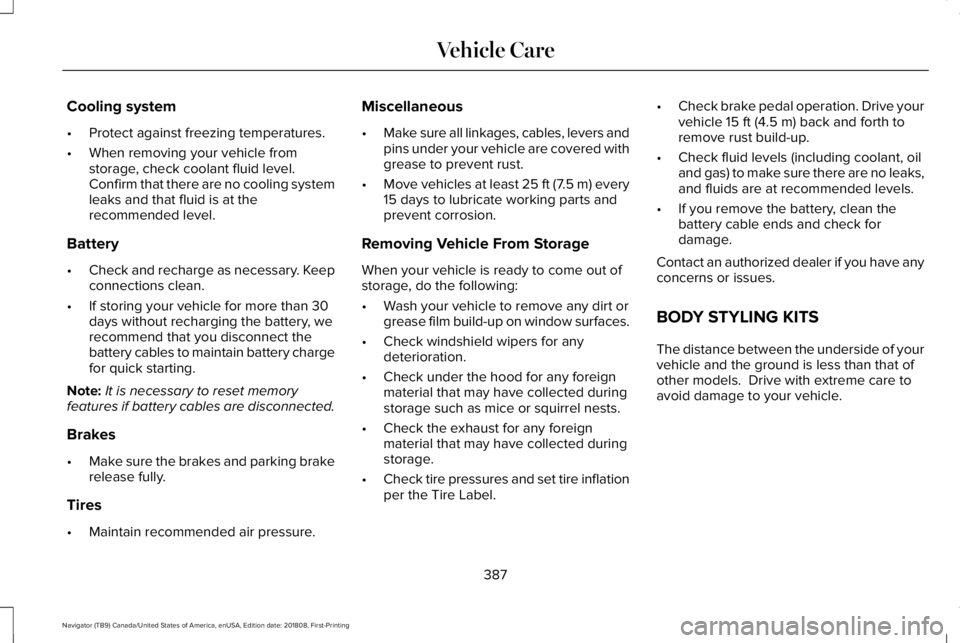
Cooling system
•Protect against freezing temperatures.
•When removing your vehicle fromstorage, check coolant fluid level.Confirm that there are no cooling systemleaks and that fluid is at therecommended level.
Battery
•Check and recharge as necessary. Keepconnections clean.
•If storing your vehicle for more than 30days without recharging the battery, werecommend that you disconnect thebattery cables to maintain battery chargefor quick starting.
Note:It is necessary to reset memoryfeatures if battery cables are disconnected.
Brakes
•Make sure the brakes and parking brakerelease fully.
Tires
•Maintain recommended air pressure.
Miscellaneous
•Make sure all linkages, cables, levers andpins under your vehicle are covered withgrease to prevent rust.
•Move vehicles at least 25 ft (7.5 m) every15 days to lubricate working parts andprevent corrosion.
Removing Vehicle From Storage
When your vehicle is ready to come out ofstorage, do the following:
•Wash your vehicle to remove any dirt orgrease film build-up on window surfaces.
•Check windshield wipers for anydeterioration.
•Check under the hood for any foreignmaterial that may have collected duringstorage such as mice or squirrel nests.
•Check the exhaust for any foreignmaterial that may have collected duringstorage.
•Check tire pressures and set tire inflationper the Tire Label.
•Check brake pedal operation. Drive yourvehicle 15 ft (4.5 m) back and forth toremove rust build-up.
•Check fluid levels (including coolant, oiland gas) to make sure there are no leaks,and fluids are at recommended levels.
•If you remove the battery, clean thebattery cable ends and check fordamage.
Contact an authorized dealer if you have anyconcerns or issues.
BODY STYLING KITS
The distance between the underside of yourvehicle and the ground is less than that ofother models. Drive with extreme care toavoid damage to your vehicle.
387
Navigator (TB9) Canada/United States of America, enUSA, Edition date: 201808, First-Printing
Vehicle Care
Page 426 of 645
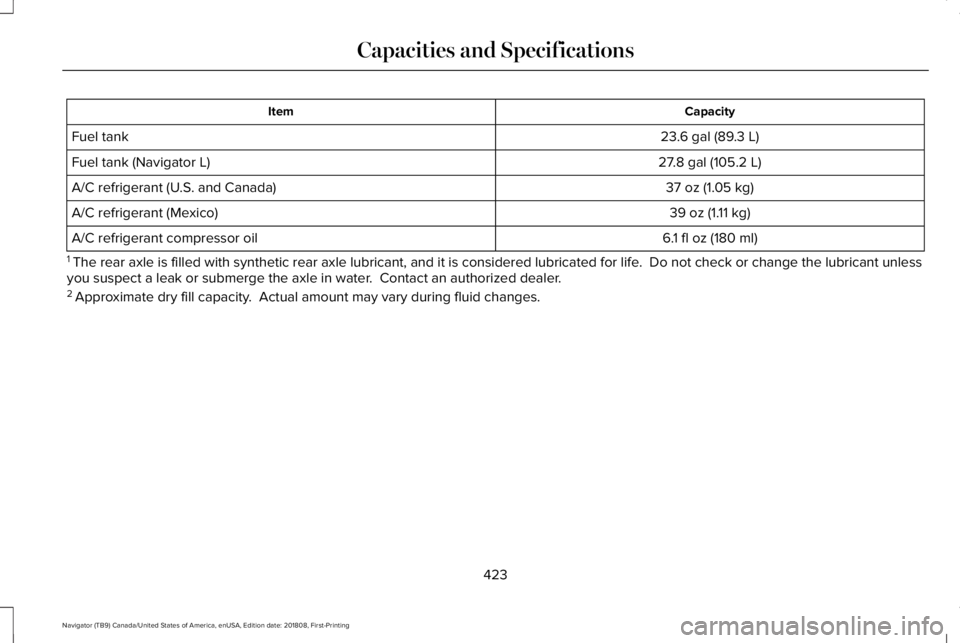
CapacityItem
23.6 gal (89.3 L)Fuel tank
27.8 gal (105.2 L)Fuel tank (Navigator L)
37 oz (1.05 kg)A/C refrigerant (U.S. and Canada)
39 oz (1.11 kg)A/C refrigerant (Mexico)
6.1 fl oz (180 ml)A/C refrigerant compressor oil
1 The rear axle is filled with synthetic rear axle lubricant, and it is considered lubricated for life. Do not check or change the lubricant unlessyou suspect a leak or submerge the axle in water. Contact an authorized dealer.2 Approximate dry fill capacity. Actual amount may vary during fluid changes.
423
Navigator (TB9) Canada/United States of America, enUSA, Edition date: 201808, First-Printing
Capacities and Specifications
Page 551 of 645
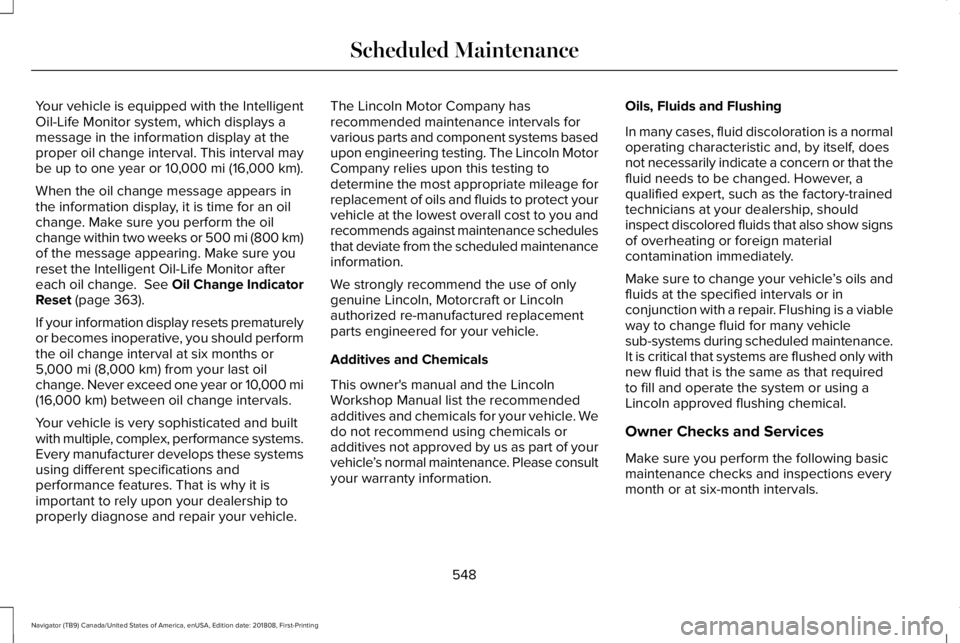
Your vehicle is equipped with the IntelligentOil-Life Monitor system, which displays amessage in the information display at theproper oil change interval. This interval maybe up to one year or 10,000 mi (16,000 km).
When the oil change message appears inthe information display, it is time for an oilchange. Make sure you perform the oilchange within two weeks or 500 mi (800 km)of the message appearing. Make sure youreset the Intelligent Oil-Life Monitor aftereach oil change. See Oil Change IndicatorReset (page 363).
If your information display resets prematurelyor becomes inoperative, you should performthe oil change interval at six months or5,000 mi (8,000 km) from your last oilchange. Never exceed one year or 10,000 mi(16,000 km) between oil change intervals.
Your vehicle is very sophisticated and builtwith multiple, complex, performance systems.Every manufacturer develops these systemsusing different specifications andperformance features. That is why it isimportant to rely upon your dealership toproperly diagnose and repair your vehicle.
The Lincoln Motor Company hasrecommended maintenance intervals forvarious parts and component systems basedupon engineering testing. The Lincoln MotorCompany relies upon this testing todetermine the most appropriate mileage forreplacement of oils and fluids to protect yourvehicle at the lowest overall cost to you andrecommends against maintenance schedulesthat deviate from the scheduled maintenanceinformation.
We strongly recommend the use of onlygenuine Lincoln, Motorcraft or Lincolnauthorized re-manufactured replacementparts engineered for your vehicle.
Additives and Chemicals
This owner's manual and the LincolnWorkshop Manual list the recommendedadditives and chemicals for your vehicle. Wedo not recommend using chemicals oradditives not approved by us as part of yourvehicle’s normal maintenance. Please consultyour warranty information.
Oils, Fluids and Flushing
In many cases, fluid discoloration is a normaloperating characteristic and, by itself, doesnot necessarily indicate a concern or that thefluid needs to be changed. However, aqualified expert, such as the factory-trainedtechnicians at your dealership, shouldinspect discolored fluids that also show signsof overheating or foreign materialcontamination immediately.
Make sure to change your vehicle’s oils andfluids at the specified intervals or inconjunction with a repair. Flushing is a viableway to change fluid for many vehiclesub-systems during scheduled maintenance.It is critical that systems are flushed only withnew fluid that is the same as that requiredto fill and operate the system or using aLincoln approved flushing chemical.
Owner Checks and Services
Make sure you perform the following basicmaintenance checks and inspections everymonth or at six-month intervals.
548
Navigator (TB9) Canada/United States of America, enUSA, Edition date: 201808, First-Printing
Scheduled Maintenance
Page 552 of 645
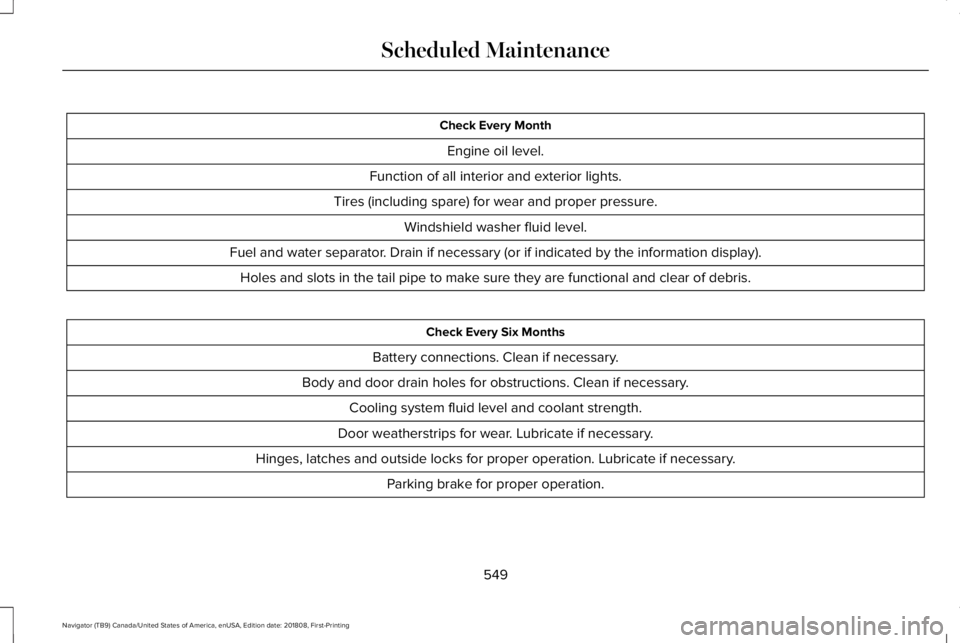
Check Every Month
Engine oil level.
Function of all interior and exterior lights.
Tires (including spare) for wear and proper pressure.
Windshield washer fluid level.
Fuel and water separator. Drain if necessary (or if indicated by the information display).
Holes and slots in the tail pipe to make sure they are functional and clear of debris.
Check Every Six Months
Battery connections. Clean if necessary.
Body and door drain holes for obstructions. Clean if necessary.
Cooling system fluid level and coolant strength.
Door weatherstrips for wear. Lubricate if necessary.
Hinges, latches and outside locks for proper operation. Lubricate if necessary.
Parking brake for proper operation.
549
Navigator (TB9) Canada/United States of America, enUSA, Edition date: 201808, First-Printing
Scheduled Maintenance
Page 554 of 645
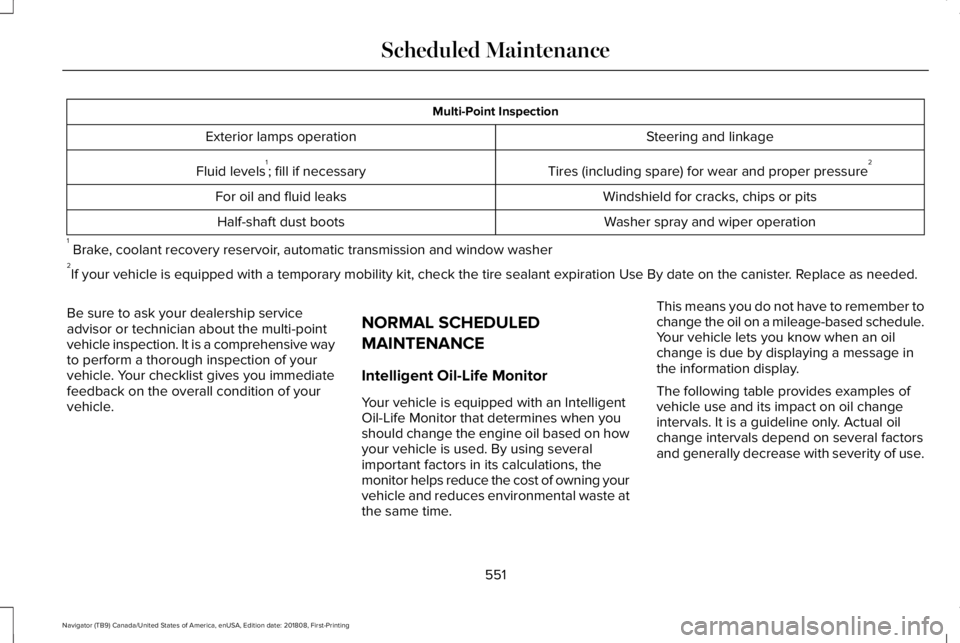
Multi-Point Inspection
Steering and linkageExterior lamps operation
Tires (including spare) for wear and proper pressure2Fluid levels1; fill if necessary
Windshield for cracks, chips or pitsFor oil and fluid leaks
Washer spray and wiper operationHalf-shaft dust boots
1 Brake, coolant recovery reservoir, automatic transmission and window washer2If your vehicle is equipped with a temporary mobility kit, check the tire sealant expiration Use By date on the canister. Replace as needed.
Be sure to ask your dealership serviceadvisor or technician about the multi-pointvehicle inspection. It is a comprehensive wayto perform a thorough inspection of yourvehicle. Your checklist gives you immediatefeedback on the overall condition of yourvehicle.
NORMAL SCHEDULED
MAINTENANCE
Intelligent Oil-Life Monitor
Your vehicle is equipped with an IntelligentOil-Life Monitor that determines when youshould change the engine oil based on howyour vehicle is used. By using severalimportant factors in its calculations, themonitor helps reduce the cost of owning yourvehicle and reduces environmental waste atthe same time.
This means you do not have to remember tochange the oil on a mileage-based schedule.Your vehicle lets you know when an oilchange is due by displaying a message inthe information display.
The following table provides examples ofvehicle use and its impact on oil changeintervals. It is a guideline only. Actual oilchange intervals depend on several factorsand generally decrease with severity of use.
551
Navigator (TB9) Canada/United States of America, enUSA, Edition date: 201808, First-Printing
Scheduled Maintenance
Page 561 of 645
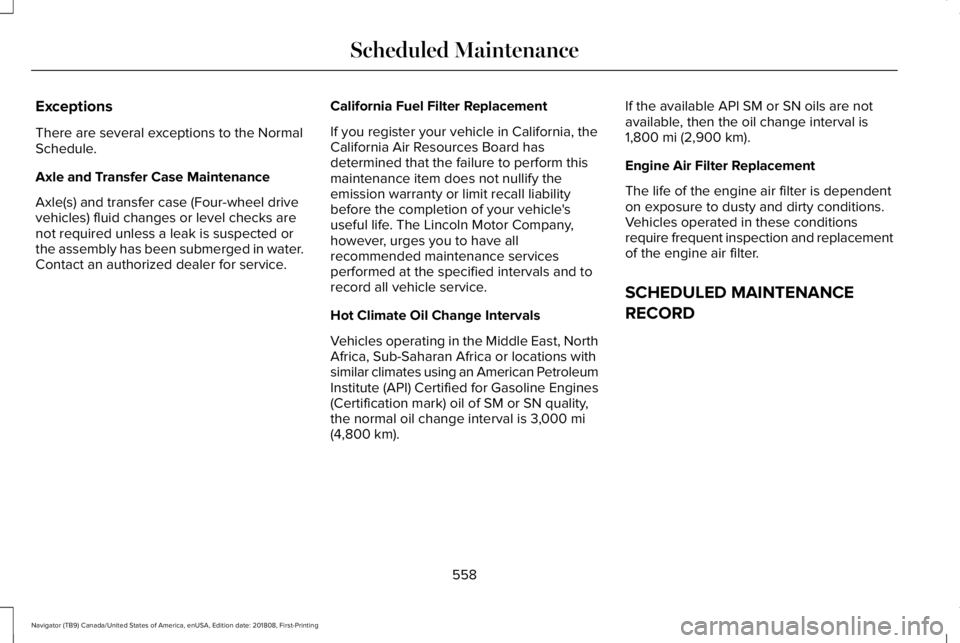
Exceptions
There are several exceptions to the NormalSchedule.
Axle and Transfer Case Maintenance
Axle(s) and transfer case (Four-wheel drivevehicles) fluid changes or level checks arenot required unless a leak is suspected orthe assembly has been submerged in water.Contact an authorized dealer for service.
California Fuel Filter Replacement
If you register your vehicle in California, theCalifornia Air Resources Board hasdetermined that the failure to perform thismaintenance item does not nullify theemission warranty or limit recall liabilitybefore the completion of your vehicle'suseful life. The Lincoln Motor Company,however, urges you to have allrecommended maintenance servicesperformed at the specified intervals and torecord all vehicle service.
Hot Climate Oil Change Intervals
Vehicles operating in the Middle East, NorthAfrica, Sub-Saharan Africa or locations withsimilar climates using an American PetroleumInstitute (API) Certified for Gasoline Engines(Certification mark) oil of SM or SN quality,the normal oil change interval is 3,000 mi(4,800 km).
If the available API SM or SN oils are notavailable, then the oil change interval is1,800 mi (2,900 km).
Engine Air Filter Replacement
The life of the engine air filter is dependenton exposure to dusty and dirty conditions.Vehicles operated in these conditionsrequire frequent inspection and replacementof the engine air filter.
SCHEDULED MAINTENANCE
RECORD
558
Navigator (TB9) Canada/United States of America, enUSA, Edition date: 201808, First-Printing
Scheduled Maintenance
Page 634 of 645
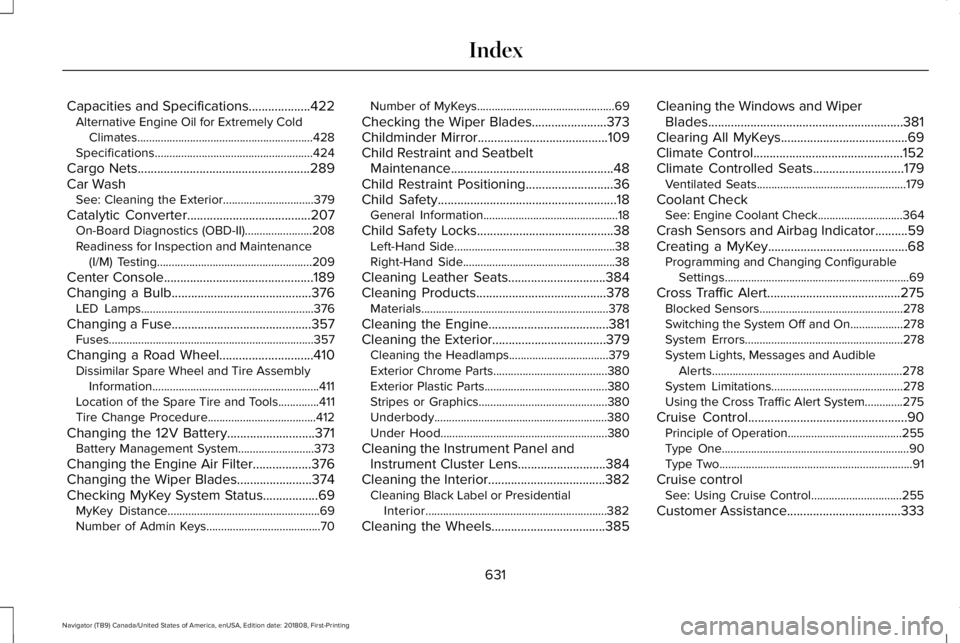
Capacities and Specifications...................422Alternative Engine Oil for Extremely ColdClimates............................................................428Specifications......................................................424
Cargo Nets.....................................................289Car WashSee: Cleaning the Exterior...............................379
Catalytic Converter......................................207On-Board Diagnostics (OBD-II).......................208Readiness for Inspection and Maintenance(I/M) Testing.....................................................209
Center Console..............................................189Changing a Bulb...........................................376LED Lamps...........................................................376
Changing a Fuse...........................................357Fuses......................................................................357
Changing a Road Wheel.............................410Dissimilar Spare Wheel and Tire AssemblyInformation.........................................................411Location of the Spare Tire and Tools..............411Tire Change Procedure.....................................412
Changing the 12V Battery...........................371Battery Management System..........................373
Changing the Engine Air Filter..................376Changing the Wiper Blades.......................374Checking MyKey System Status.................69MyKey Distance....................................................69Number of Admin Keys.......................................70
Number of MyKeys...............................................69
Checking the Wiper Blades.......................373Childminder Mirror........................................109Child Restraint and SeatbeltMaintenance..................................................48Child Restraint Positioning...........................36Child Safety.......................................................18General Information..............................................18
Child Safety Locks..........................................38Left-Hand Side.......................................................38Right-Hand Side....................................................38
Cleaning Leather Seats..............................384Cleaning Products........................................378Materials................................................................378
Cleaning the Engine.....................................381Cleaning the Exterior...................................379Cleaning the Headlamps..................................379Exterior Chrome Parts.......................................380Exterior Plastic Parts..........................................380Stripes or Graphics............................................380Underbody...........................................................380Under Hood.........................................................380
Cleaning the Instrument Panel andInstrument Cluster Lens...........................384Cleaning the Interior....................................382Cleaning Black Label or PresidentialInterior..............................................................382
Cleaning the Wheels...................................385
Cleaning the Windows and WiperBlades............................................................381Clearing All MyKeys.......................................69Climate Control..............................................152Climate Controlled Seats............................179Ventilated Seats...................................................179
Coolant CheckSee: Engine Coolant Check.............................364
Crash Sensors and Airbag Indicator..........59Creating a MyKey...........................................68Programming and Changing ConfigurableSettings...............................................................69
Cross Traffic Alert.........................................275Blocked Sensors.................................................278Switching the System Off and On..................278System Errors......................................................278System Lights, Messages and AudibleAlerts.................................................................278System Limitations.............................................278Using the Cross Traffic Alert System.............275
Cruise Control.................................................90Principle of Operation.......................................255Type One................................................................90Type Two..................................................................91
Cruise controlSee: Using Cruise Control...............................255
Customer Assistance...................................333
631
Navigator (TB9) Canada/United States of America, enUSA, Edition date: 201808, First-Printing
Index
Page 635 of 645
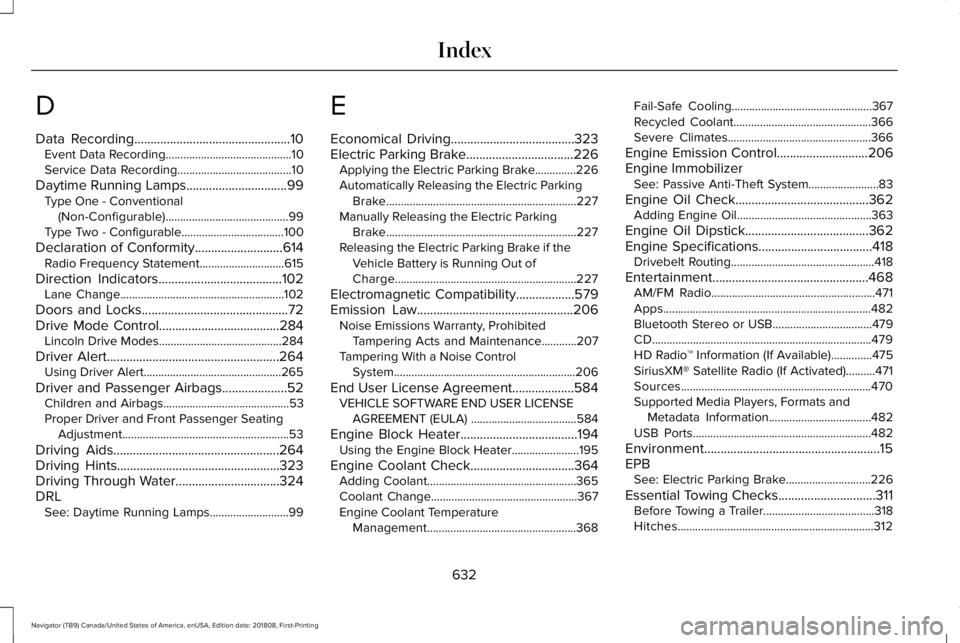
D
Data Recording................................................10Event Data Recording...........................................10Service Data Recording.......................................10
Daytime Running Lamps...............................99Type One - Conventional(Non-Configurable)..........................................99Type Two - Configurable...................................100
Declaration of Conformity...........................614Radio Frequency Statement.............................615
Direction Indicators......................................102Lane Change........................................................102
Doors and Locks.............................................72Drive Mode Control.....................................284Lincoln Drive Modes..........................................284
Driver Alert.....................................................264Using Driver Alert...............................................265
Driver and Passenger Airbags....................52Children and Airbags...........................................53Proper Driver and Front Passenger SeatingAdjustment.........................................................53
Driving Aids...................................................264Driving Hints..................................................323Driving Through Water................................324DRLSee: Daytime Running Lamps...........................99
E
Economical Driving......................................323Electric Parking Brake.................................226Applying the Electric Parking Brake..............226Automatically Releasing the Electric ParkingBrake.................................................................227Manually Releasing the Electric ParkingBrake.................................................................227Releasing the Electric Parking Brake if theVehicle Battery is Running Out ofCharge..............................................................227
Electromagnetic Compatibility..................579Emission Law................................................206Noise Emissions Warranty, ProhibitedTampering Acts and Maintenance............207Tampering With a Noise ControlSystem..............................................................206
End User License Agreement...................584VEHICLE SOFTWARE END USER LICENSEAGREEMENT (EULA) ....................................584
Engine Block Heater....................................194Using the Engine Block Heater.......................195
Engine Coolant Check................................364Adding Coolant...................................................365Coolant Change..................................................367Engine Coolant TemperatureManagement...................................................368
Fail-Safe Cooling................................................367Recycled Coolant...............................................366Severe Climates.................................................366
Engine Emission Control............................206Engine ImmobilizerSee: Passive Anti-Theft System........................83
Engine Oil Check.........................................362Adding Engine Oil..............................................363
Engine Oil Dipstick......................................362Engine Specifications...................................418Drivebelt Routing.................................................418
Entertainment................................................468AM/FM Radio........................................................471Apps.......................................................................482Bluetooth Stereo or USB..................................479CD...........................................................................479HD Radio™ Information (If Available)..............475SiriusXM® Satellite Radio (If Activated)..........471Sources.................................................................470Supported Media Players, Formats andMetadata Information...................................482USB Ports.............................................................482
Environment......................................................15EPBSee: Electric Parking Brake.............................226
Essential Towing Checks..............................311Before Towing a Trailer......................................318Hitches...................................................................312
632
Navigator (TB9) Canada/United States of America, enUSA, Edition date: 201808, First-Printing
Index
Page 639 of 645
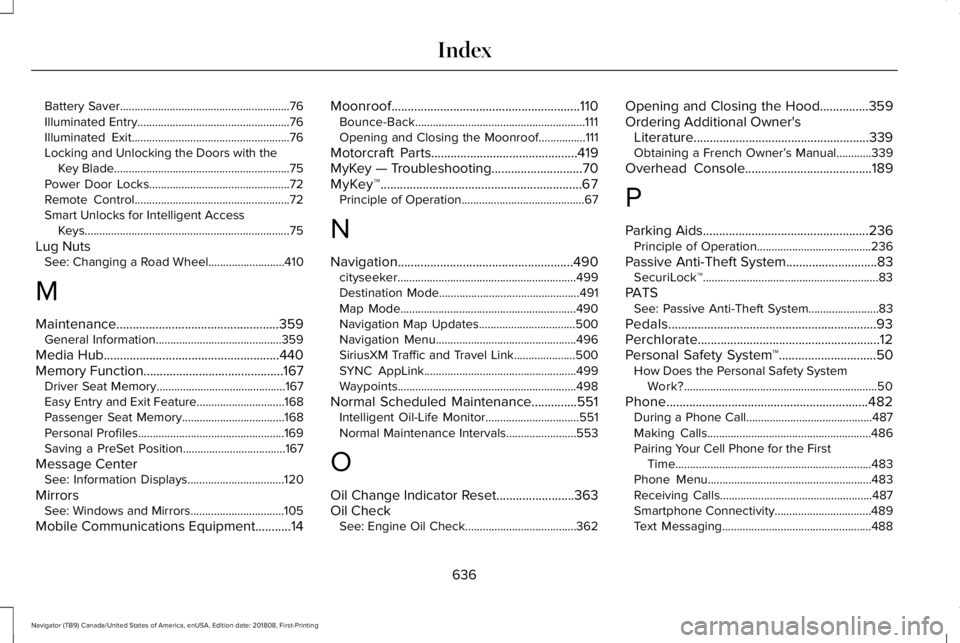
Battery Saver..........................................................76Illuminated Entry....................................................76Illuminated Exit......................................................76Locking and Unlocking the Doors with theKey Blade............................................................75Power Door Locks................................................72Remote Control.....................................................72Smart Unlocks for Intelligent AccessKeys......................................................................75
Lug NutsSee: Changing a Road Wheel..........................410
M
Maintenance..................................................359General Information...........................................359
Media Hub......................................................440Memory Function...........................................167Driver Seat Memory............................................167Easy Entry and Exit Feature..............................168Passenger Seat Memory...................................168Personal Profiles..................................................169Saving a PreSet Position...................................167
Message CenterSee: Information Displays.................................120
MirrorsSee: Windows and Mirrors................................105
Mobile Communications Equipment...........14
Moonroof..........................................................110Bounce-Back..........................................................111Opening and Closing the Moonroof................111
Motorcraft Parts.............................................419MyKey — Troubleshooting............................70MyKey™..............................................................67Principle of Operation..........................................67
N
Navigation......................................................490cityseeker.............................................................499Destination Mode................................................491Map Mode............................................................490Navigation Map Updates.................................500Navigation Menu................................................496SiriusXM Traffic and Travel Link.....................500SYNC AppLink....................................................499Waypoints.............................................................498
Normal Scheduled Maintenance..............551Intelligent Oil-Life Monitor................................551Normal Maintenance Intervals........................553
O
Oil Change Indicator Reset........................363Oil CheckSee: Engine Oil Check......................................362
Opening and Closing the Hood...............359Ordering Additional Owner'sLiterature......................................................339Obtaining a French Owner’s Manual............339
Overhead Console.......................................189
P
Parking Aids...................................................236Principle of Operation.......................................236
Passive Anti-Theft System............................83SecuriLock™............................................................83
PATSSee: Passive Anti-Theft System........................83
Pedals................................................................93Perchlorate........................................................12Personal Safety System™..............................50How Does the Personal Safety SystemWork?..................................................................50
Phone..............................................................482During a Phone Call...........................................487Making Calls........................................................486Pairing Your Cell Phone for the FirstTime...................................................................483Phone Menu........................................................483Receiving Calls....................................................487Smartphone Connectivity.................................489Text Messaging...................................................488
636
Navigator (TB9) Canada/United States of America, enUSA, Edition date: 201808, First-Printing
Index