wheel LINCOLN NAVIGATOR 2019 User Guide
[x] Cancel search | Manufacturer: LINCOLN, Model Year: 2019, Model line: NAVIGATOR, Model: LINCOLN NAVIGATOR 2019Pages: 645, PDF Size: 5.02 MB
Page 92 of 645
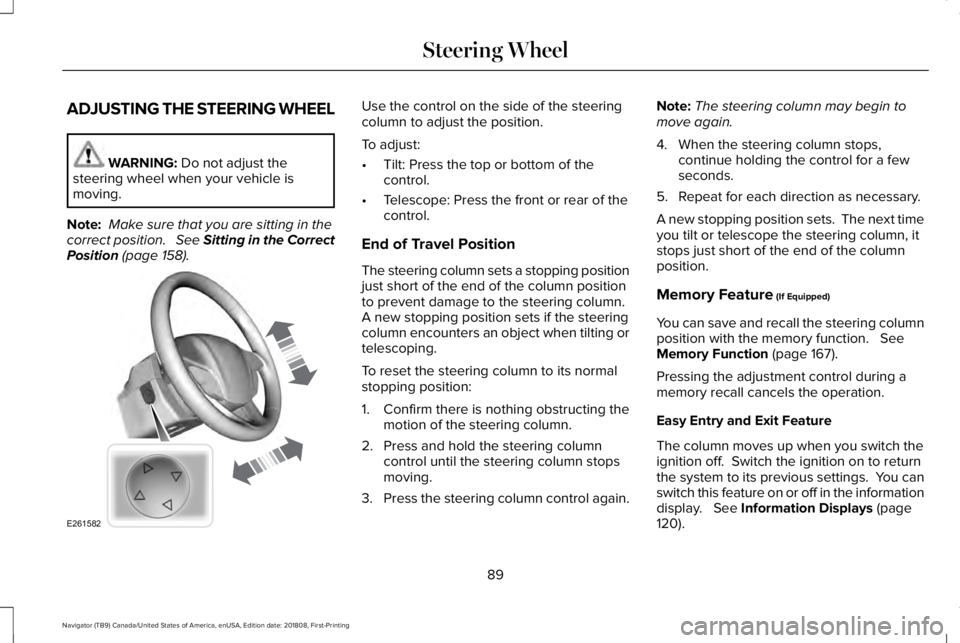
ADJUSTING THE STEERING WHEEL
WARNING: Do not adjust thesteering wheel when your vehicle ismoving.
Note: Make sure that you are sitting in thecorrect position. See Sitting in the CorrectPosition (page 158).
Use the control on the side of the steeringcolumn to adjust the position.
To adjust:
•Tilt: Press the top or bottom of thecontrol.
•Telescope: Press the front or rear of thecontrol.
End of Travel Position
The steering column sets a stopping positionjust short of the end of the column positionto prevent damage to the steering column. A new stopping position sets if the steeringcolumn encounters an object when tilting ortelescoping.
To reset the steering column to its normalstopping position:
1. Confirm there is nothing obstructing themotion of the steering column.
2. Press and hold the steering columncontrol until the steering column stopsmoving.
3.Press the steering column control again.
Note:The steering column may begin tomove again.
4. When the steering column stops,continue holding the control for a fewseconds.
5. Repeat for each direction as necessary.
A new stopping position sets. The next timeyou tilt or telescope the steering column, itstops just short of the end of the columnposition.
Memory Feature (If Equipped)
You can save and recall the steering columnposition with the memory function. SeeMemory Function (page 167).
Pressing the adjustment control during amemory recall cancels the operation.
Easy Entry and Exit Feature
The column moves up when you switch theignition off. Switch the ignition on to returnthe system to its previous settings. You canswitch this feature on or off in the informationdisplay. See Information Displays (page120).
89
Navigator (TB9) Canada/United States of America, enUSA, Edition date: 201808, First-Printing
Steering WheelE261582
Page 93 of 645
Note: If you press any adjustment ormemory button when in easy exit mode, thesystem cancels the operation.
Note:Depending on your vehicle, the columnmay move up and in.
AUDIO CONTROL
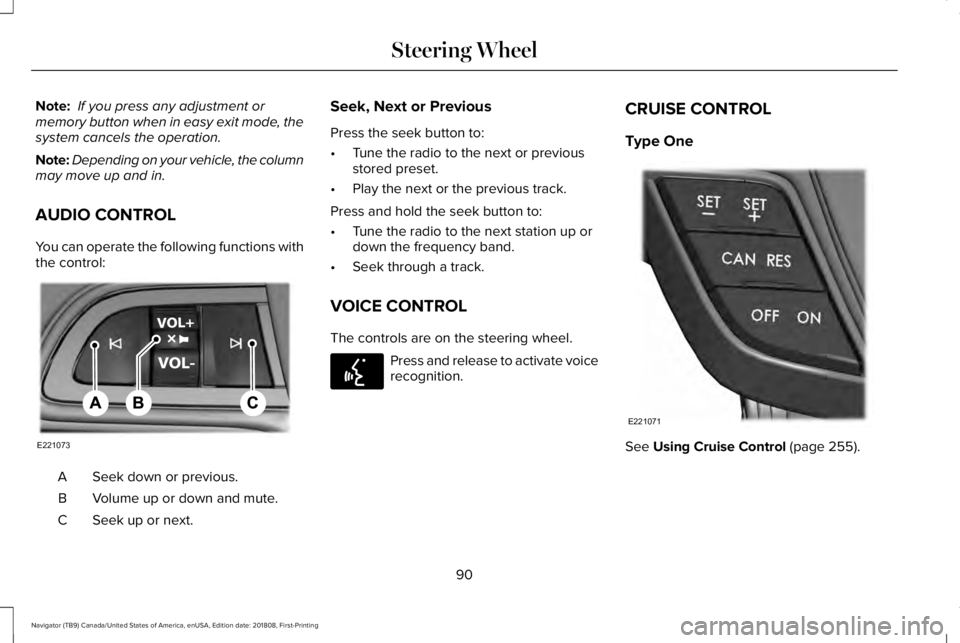
You can operate the following functions withthe control:
Seek down or previous.A
Volume up or down and mute.B
Seek up or next.C
Seek, Next or Previous
Press the seek button to:
•Tune the radio to the next or previousstored preset.
•Play the next or the previous track.
Press and hold the seek button to:
•Tune the radio to the next station up ordown the frequency band.
•Seek through a track.
VOICE CONTROL
The controls are on the steering wheel.
Press and release to activate voicerecognition.
CRUISE CONTROL
Type One
See Using Cruise Control (page 255).
90
Navigator (TB9) Canada/United States of America, enUSA, Edition date: 201808, First-Printing
Steering WheelE221073 E142599 E221071
Page 94 of 645
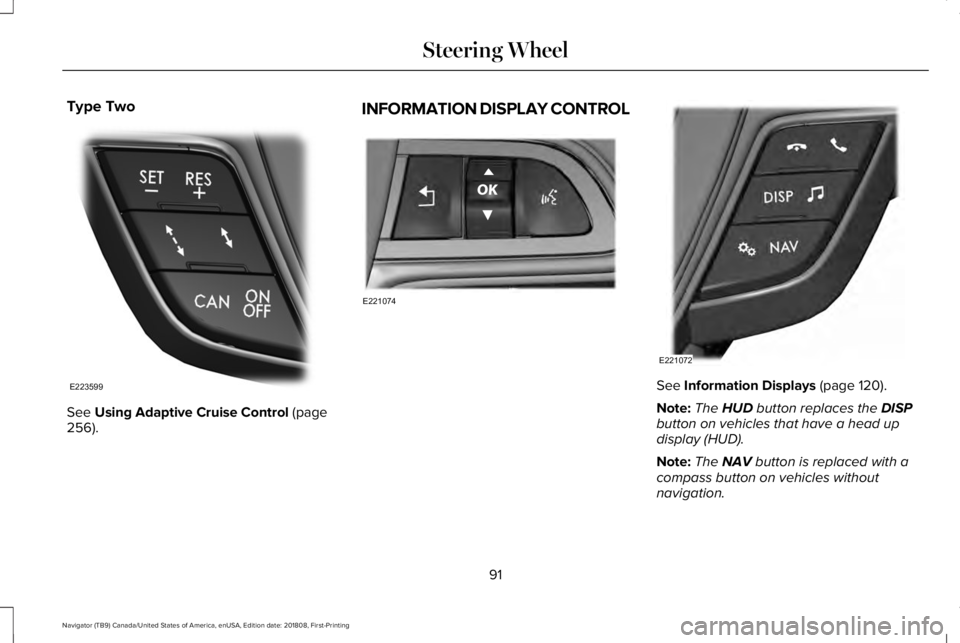
Type Two
See Using Adaptive Cruise Control (page256).
INFORMATION DISPLAY CONTROL
See Information Displays (page 120).
Note:The HUD button replaces the DISPbutton on vehicles that have a head updisplay (HUD).
Note:The NAV button is replaced with acompass button on vehicles withoutnavigation.
91
Navigator (TB9) Canada/United States of America, enUSA, Edition date: 201808, First-Printing
Steering WheelE223599 E221074 E221072
Page 95 of 645
HEATED STEERING WHEEL (IF
EQUIPPED)
Switch the heated steering wheel on and offusing the touchscreen.
Touch the button to switch theheated steering wheel on and off.
Note:You can use the heated steeringwheel only when the engine is running.
Note:The system uses a sensor and isdesigned to control the temperature of thesteering wheel and to prevent it fromoverheating.
Note:In warm temperatures, the steeringwheel quickly reaches its maximumtemperature and the system reduces thecurrent to the heating element. This couldcause you to think that the system hasstopped working but it has not. This isnormal.
92
Navigator (TB9) Canada/United States of America, enUSA, Edition date: 201808, First-Printing
Steering Wheel
Page 104 of 645
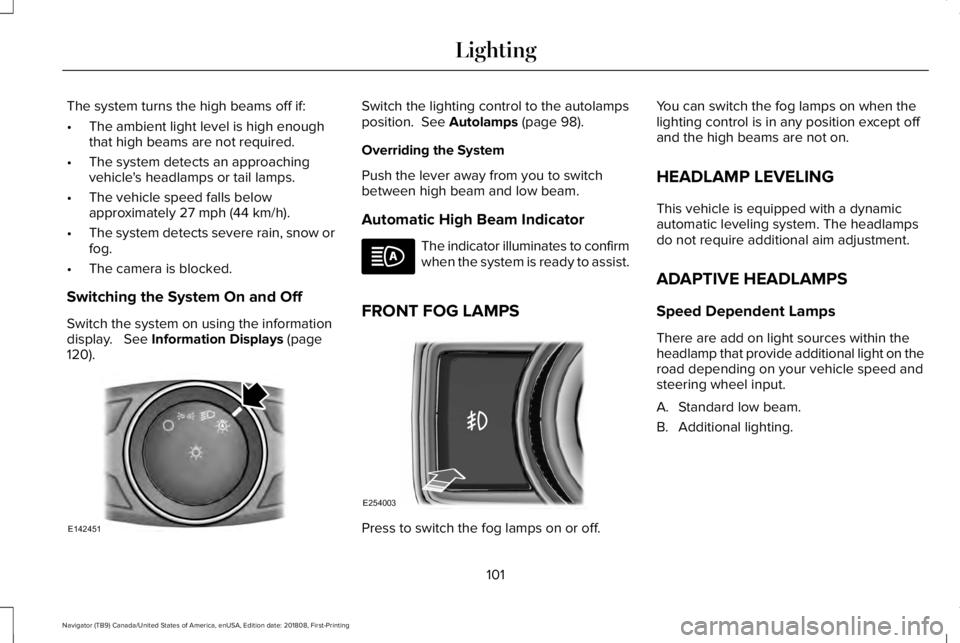
The system turns the high beams off if:
•The ambient light level is high enoughthat high beams are not required.
•The system detects an approachingvehicle's headlamps or tail lamps.
•The vehicle speed falls belowapproximately 27 mph (44 km/h).
•The system detects severe rain, snow orfog.
•The camera is blocked.
Switching the System On and Off
Switch the system on using the informationdisplay. See Information Displays (page120).
Switch the lighting control to the autolampsposition. See Autolamps (page 98).
Overriding the System
Push the lever away from you to switchbetween high beam and low beam.
Automatic High Beam Indicator
The indicator illuminates to confirmwhen the system is ready to assist.
FRONT FOG LAMPS
Press to switch the fog lamps on or off.
You can switch the fog lamps on when thelighting control is in any position except offand the high beams are not on.
HEADLAMP LEVELING
This vehicle is equipped with a dynamicautomatic leveling system. The headlampsdo not require additional aim adjustment.
ADAPTIVE HEADLAMPS
Speed Dependent Lamps
There are add on light sources within theheadlamp that provide additional light on theroad depending on your vehicle speed andsteering wheel input.
A. Standard low beam.
B. Additional lighting.
101
Navigator (TB9) Canada/United States of America, enUSA, Edition date: 201808, First-Printing
LightingE142451 E254003
Page 120 of 645
See Engine Coolant Check (page 364).
Engine Oil
If it illuminates with the enginerunning or when you are driving,this indicates a malfunction. Stopyour vehicle as soon as it is safe to do soand switch the engine off. Check the engineoil level.
See Engine Oil Check (page 362).
Note:Do not resume your journey if itilluminates despite the level being correct.Have the system checked by your authorizeddealer immediately.
Fasten Rear Seatbelt (If Equipped)
Illuminates and a chime sounds tosignal the rear seatbelts are notbuckled.
Fasten Seatbelt Warning Lamp
It illuminates and a chime soundsuntil you fasten the seatbelts.
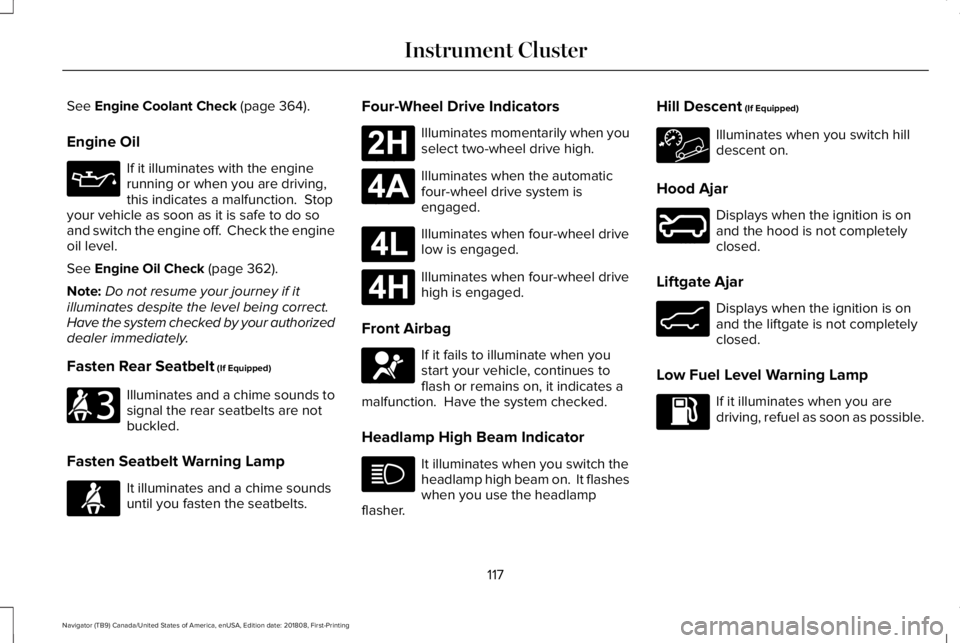
Four-Wheel Drive Indicators
Illuminates momentarily when youselect two-wheel drive high.
Illuminates when the automaticfour-wheel drive system isengaged.
Illuminates when four-wheel drivelow is engaged.
Illuminates when four-wheel drivehigh is engaged.
Front Airbag
If it fails to illuminate when youstart your vehicle, continues toflash or remains on, it indicates amalfunction. Have the system checked.
Headlamp High Beam Indicator
It illuminates when you switch theheadlamp high beam on. It flasheswhen you use the headlampflasher.
Hill Descent (If Equipped)
Illuminates when you switch hilldescent on.
Hood Ajar
Displays when the ignition is onand the hood is not completelyclosed.
Liftgate Ajar
Displays when the ignition is onand the liftgate is not completelyclosed.
Low Fuel Level Warning Lamp
If it illuminates when you aredriving, refuel as soon as possible.
117
Navigator (TB9) Canada/United States of America, enUSA, Edition date: 201808, First-Printing
Instrument Cluster E206718 E71880 E181778 E181781 E181780 E181779 E67017 E246598 E162453
Page 123 of 645
GENERAL INFORMATION
WARNING: Driving while distractedcan result in loss of vehicle control, crashand injury. We strongly recommend thatyou use extreme caution when using anydevice that may take your focus off theroad. Your primary responsibility is the safeoperation of your vehicle. We recommendagainst the use of any hand-held devicewhile driving and encourage the use ofvoice-operated systems when possible.Make sure you are aware of all applicablelocal laws that may affect the use ofelectronic devices while driving.
You can control various systems on yourvehicle using the quick action menu (QAM)buttons on the right-hand side of the steeringwheel. The information display provides thecorresponding information.
Note:Some options may appear slightlydifferent or not at all if the items are optional.
Note:Trailer options are not available if yourvehicle speed is greater than 3 mph (5 km/h).
Note:Some MyKey menu options onlyappear if MyKey is enabled and at least oneMyKey is programmed.
This icon gives you the ability toswitch a feature on or off. A checkin the box indicates the feature ison, and unchecked indicates the feature isoff.
120
Navigator (TB9) Canada/United States of America, enUSA, Edition date: 201808, First-Printing
Information DisplaysE204495
Page 130 of 645
Adaptive Headlamps
ActionMessage
Displays when a fault with the system has occurred. Contact an authorized dealer as soon aspossible.Check Headlamp System See Manual
Alarm
ActionMessage
The alarm has been triggered due to unauthorized entry. See Anti-Theft Alarm (page 86).Vehicle Alarm To Stop Alarm, Start Vehicle.
Automatic Engine Shutdown
ActionMessage
The engine is getting ready to shut off.Vehicle Shuts Off In {seconds:#0} Seconds
The engine has shut off to help increase fuel economy.Vehicle Shut Off to Save Energy
The engine is getting ready to shut off. You can press OK on the left steering wheel button tooverride the shut down.Vehicle Shuts Off in {seconds:#0} SecondsPress Ok to Override
127
Navigator (TB9) Canada/United States of America, enUSA, Edition date: 201808, First-Printing
Information Displays
Page 132 of 645
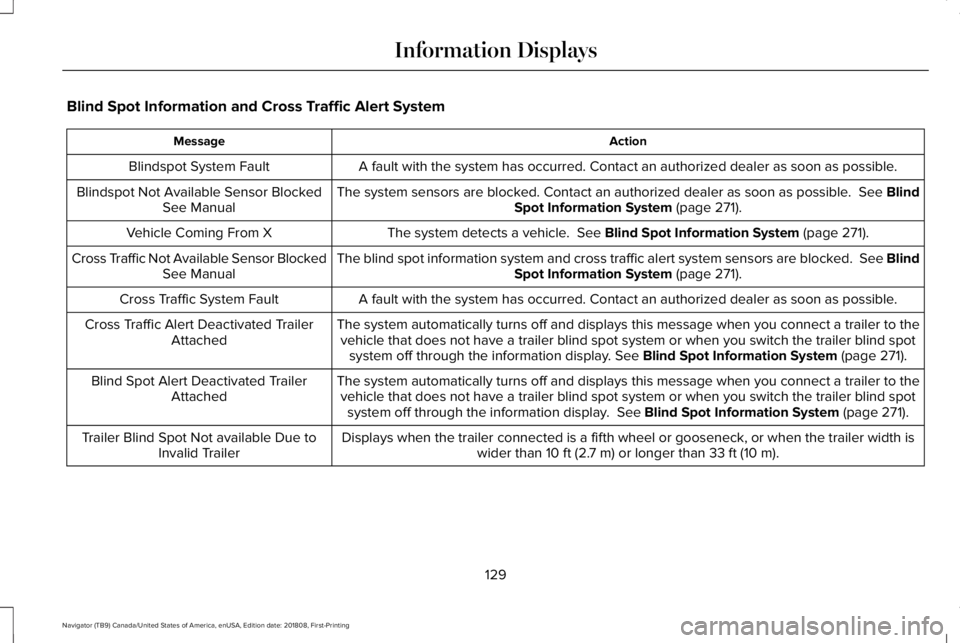
Blind Spot Information and Cross Traffic Alert System
ActionMessage
A fault with the system has occurred. Contact an authorized dealer as soon as possible.Blindspot System Fault
The system sensors are blocked. Contact an authorized dealer as soon as possible. See BlindSpot Information System (page 271).Blindspot Not Available Sensor BlockedSee Manual
The system detects a vehicle. See Blind Spot Information System (page 271).Vehicle Coming From X
The blind spot information system and cross traffic alert system sensors are blocked. See BlindSpot Information System (page 271).Cross Traffic Not Available Sensor BlockedSee Manual
A fault with the system has occurred. Contact an authorized dealer as soon as possible.Cross Traffic System Fault
The system automatically turns off and displays this message when you connect a trailer to thevehicle that does not have a trailer blind spot system or when you switch the trailer blind spotsystem off through the information display. See Blind Spot Information System (page 271).
Cross Traffic Alert Deactivated TrailerAttached
The system automatically turns off and displays this message when you connect a trailer to thevehicle that does not have a trailer blind spot system or when you switch the trailer blind spotsystem off through the information display. See Blind Spot Information System (page 271).
Blind Spot Alert Deactivated TrailerAttached
Displays when the trailer connected is a fifth wheel or gooseneck, or when the trailer width iswider than 10 ft (2.7 m) or longer than 33 ft (10 m).Trailer Blind Spot Not available Due toInvalid Trailer
129
Navigator (TB9) Canada/United States of America, enUSA, Edition date: 201808, First-Printing
Information Displays
Page 135 of 645
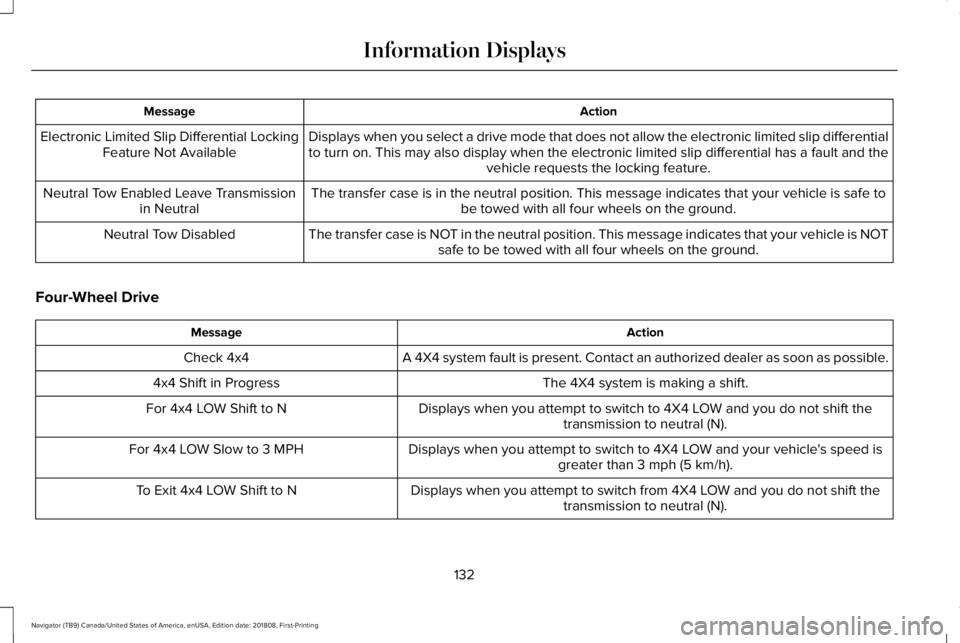
ActionMessage
Displays when you select a drive mode that does not allow the electronic limited slip differentialto turn on. This may also display when the electronic limited slip differential has a fault and thevehicle requests the locking feature.
Electronic Limited Slip Differential LockingFeature Not Available
The transfer case is in the neutral position. This message indicates that your vehicle is safe tobe towed with all four wheels on the ground.Neutral Tow Enabled Leave Transmissionin Neutral
The transfer case is NOT in the neutral position. This message indicates that your vehicle is NOTsafe to be towed with all four wheels on the ground.Neutral Tow Disabled
Four-Wheel Drive
ActionMessage
A 4X4 system fault is present. Contact an authorized dealer as soon as possible.Check 4x4
The 4X4 system is making a shift.4x4 Shift in Progress
Displays when you attempt to switch to 4X4 LOW and you do not shift thetransmission to neutral (N).For 4x4 LOW Shift to N
Displays when you attempt to switch to 4X4 LOW and your vehicle's speed isgreater than 3 mph (5 km/h).For 4x4 LOW Slow to 3 MPH
Displays when you attempt to switch from 4X4 LOW and you do not shift thetransmission to neutral (N).To Exit 4x4 LOW Shift to N
132
Navigator (TB9) Canada/United States of America, enUSA, Edition date: 201808, First-Printing
Information Displays