trailer LINCOLN NAVIGATOR 2019 Owner's Manual
[x] Cancel search | Manufacturer: LINCOLN, Model Year: 2019, Model line: NAVIGATOR, Model: LINCOLN NAVIGATOR 2019Pages: 645, PDF Size: 5.02 MB
Page 253 of 645
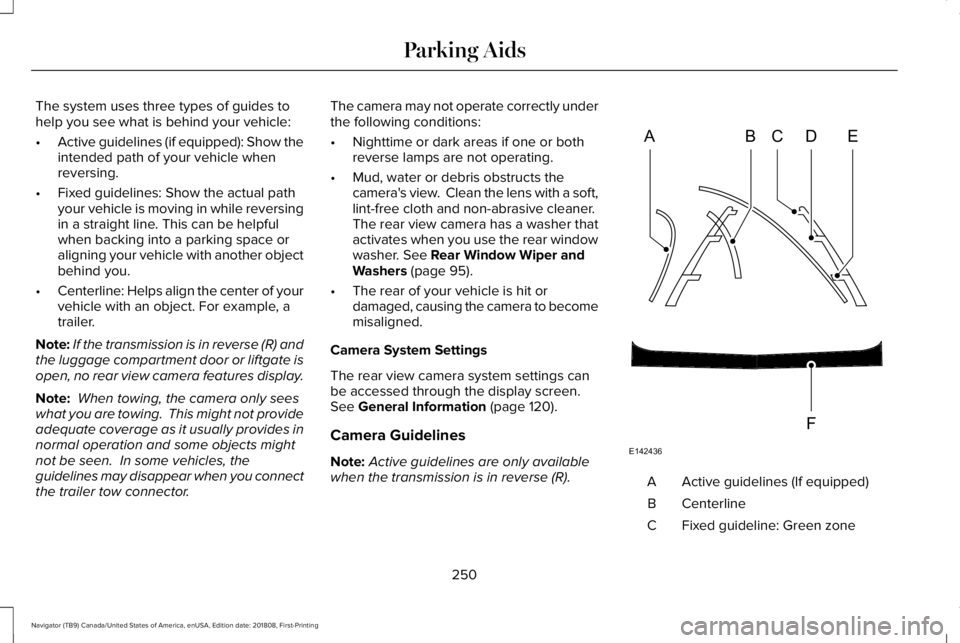
The system uses three types of guides tohelp you see what is behind your vehicle:
•Active guidelines (if equipped): Show theintended path of your vehicle whenreversing.
•Fixed guidelines: Show the actual pathyour vehicle is moving in while reversingin a straight line. This can be helpfulwhen backing into a parking space oraligning your vehicle with another objectbehind you.
•Centerline: Helps align the center of yourvehicle with an object. For example, atrailer.
Note:If the transmission is in reverse (R) andthe luggage compartment door or liftgate isopen, no rear view camera features display.
Note: When towing, the camera only seeswhat you are towing. This might not provideadequate coverage as it usually provides innormal operation and some objects mightnot be seen. In some vehicles, theguidelines may disappear when you connectthe trailer tow connector.
The camera may not operate correctly underthe following conditions:
•Nighttime or dark areas if one or bothreverse lamps are not operating.
•Mud, water or debris obstructs thecamera's view. Clean the lens with a soft,lint-free cloth and non-abrasive cleaner. The rear view camera has a washer thatactivates when you use the rear windowwasher. See Rear Window Wiper andWashers (page 95).
•The rear of your vehicle is hit ordamaged, causing the camera to becomemisaligned.
Camera System Settings
The rear view camera system settings canbe accessed through the display screen.See General Information (page 120).
Camera Guidelines
Note:Active guidelines are only availablewhen the transmission is in reverse (R).Active guidelines (If equipped)A
CenterlineB
Fixed guideline: Green zoneC
250
Navigator (TB9) Canada/United States of America, enUSA, Edition date: 201808, First-Printing
Parking AidsABCD
F
E
E142436
Page 259 of 645
Press the accelerator or brake pedal untilyou reach your preferred speed. Press eitherbutton.
Note: If you accelerate by pressing only theaccelerator pedal, the set speed does notchange. When you release the acceleratorpedal, your vehicle returns to the speed youpreviously set.
Canceling the Set Speed
Press the button, or tap the brakepedal to cancel the set speed.
Note:The system remembers the set speed.
Resuming the Set Speed
Press to resume the set speed.
Switching Cruise Control Off
Press and release the button whenthe system is in standby mode orswitch the ignition off.
Note:You erase the set speed when youswitch the system off.
USING ADAPTIVE CRUISE
CONTROL (IF EQUIPPED)
WARNING: Always pay closeattention to changing road conditions whenusing adaptive cruise control. The systemdoes not replace attentive driving. Failingto pay attention to the road may result ina crash, serious injury or death.
WARNING: Do not use the adaptivecruise control when entering or leaving ahighway, on roads with intersections orroundabouts or non-vehicular traffic orroads that are winding, slippery, unpaved,or steep slopes.
WARNING: Do not use the systemin poor visibility, for example fog, heavyrain, spray or snow.
WARNING: Do not use the systemwhen towing a trailer that has aftermarketelectronic trailer brake controls. Failure tofollow this instruction could result in theloss of control of your vehicle, personalinjury or death.
WARNING: Do not use tire sizesother than those recommended becausethis can affect the normal operation of thesystem. Failure to do so may result in a lossof vehicle control, which could result inserious injury.
WARNING: Adaptive cruise controlmay not detect stationary or slow movingvehicles below 6 mph (10 km/h).
WARNING: Adaptive cruise controldoes not detect pedestrians or objects inthe road.
WARNING: Adaptive cruise controldoes not detect oncoming vehicles in thesame lane.
256
Navigator (TB9) Canada/United States of America, enUSA, Edition date: 201808, First-Printing
Cruise Control E265297
Page 275 of 645
Note:The system does not operate in park(P) or reverse (R).
Vehicles with Manual Transmission
The system turns on when all of the followingoccur:
•You start your vehicle.
•The vehicle speed is greater than 6 mph(10 km/h).
Note:The system does not operate inreverse (R).
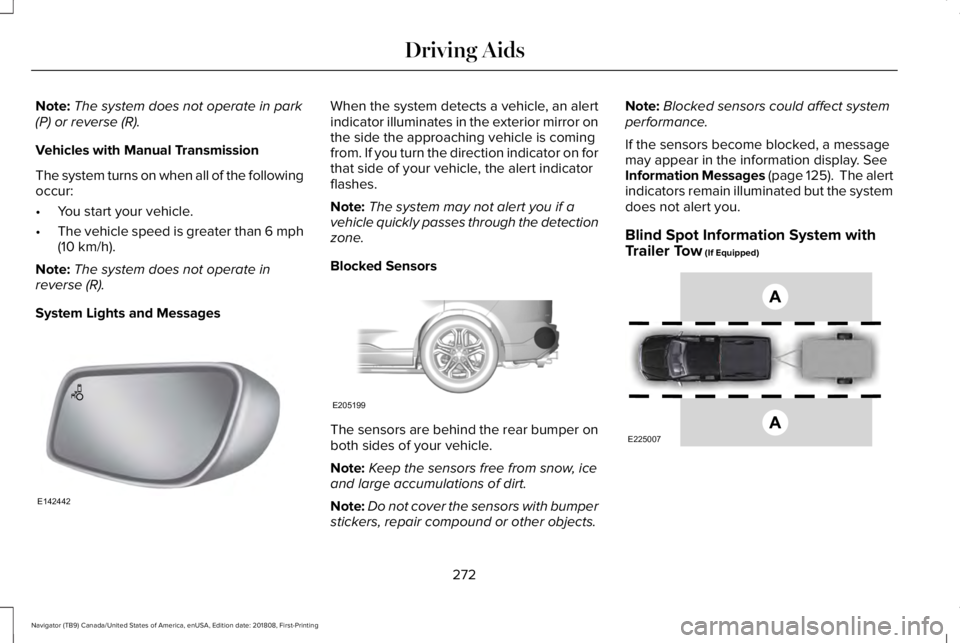
System Lights and Messages
When the system detects a vehicle, an alertindicator illuminates in the exterior mirror onthe side the approaching vehicle is comingfrom. If you turn the direction indicator on forthat side of your vehicle, the alert indicatorflashes.
Note:The system may not alert you if avehicle quickly passes through the detectionzone.
Blocked Sensors
The sensors are behind the rear bumper onboth sides of your vehicle.
Note:Keep the sensors free from snow, iceand large accumulations of dirt.
Note:Do not cover the sensors with bumperstickers, repair compound or other objects.
Note:Blocked sensors could affect systemperformance.
If the sensors become blocked, a messagemay appear in the information display. SeeInformation Messages (page 125). The alertindicators remain illuminated but the systemdoes not alert you.
Blind Spot Information System withTrailer Tow (If Equipped)
272
Navigator (TB9) Canada/United States of America, enUSA, Edition date: 201808, First-Printing
Driving AidsE142442 E205199 E225007
Page 276 of 645
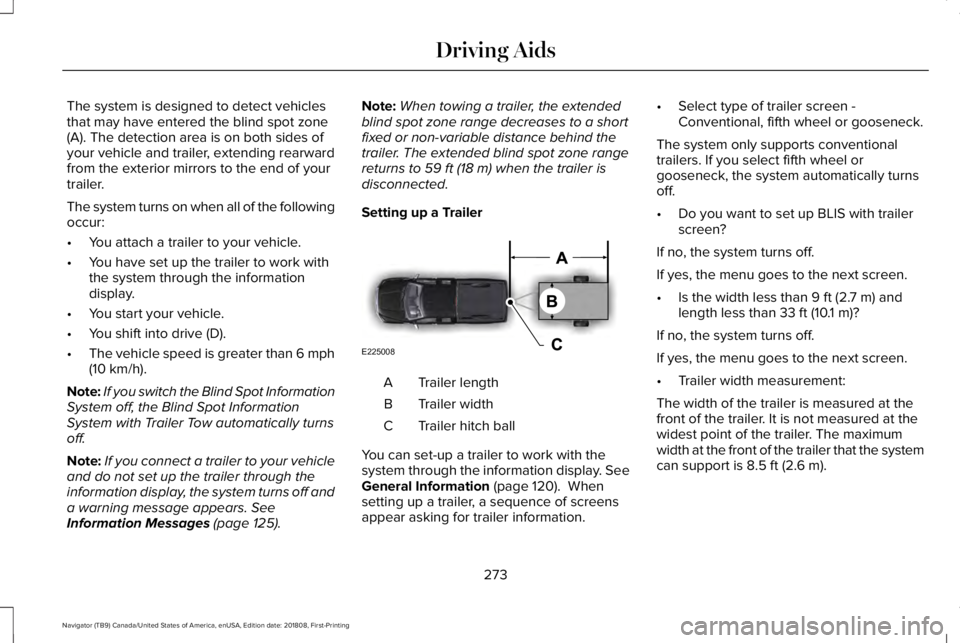
The system is designed to detect vehiclesthat may have entered the blind spot zone(A). The detection area is on both sides ofyour vehicle and trailer, extending rearwardfrom the exterior mirrors to the end of yourtrailer.
The system turns on when all of the followingoccur:
•You attach a trailer to your vehicle.
•You have set up the trailer to work withthe system through the informationdisplay.
•You start your vehicle.
•You shift into drive (D).
•The vehicle speed is greater than 6 mph(10 km/h).
Note:If you switch the Blind Spot InformationSystem off, the Blind Spot InformationSystem with Trailer Tow automatically turnsoff.
Note:If you connect a trailer to your vehicleand do not set up the trailer through theinformation display, the system turns off anda warning message appears. SeeInformation Messages (page 125).
Note:When towing a trailer, the extendedblind spot zone range decreases to a shortfixed or non-variable distance behind thetrailer. The extended blind spot zone rangereturns to 59 ft (18 m) when the trailer isdisconnected.
Setting up a Trailer
Trailer lengthA
Trailer widthB
Trailer hitch ballC
You can set-up a trailer to work with thesystem through the information display. SeeGeneral Information (page 120). Whensetting up a trailer, a sequence of screensappear asking for trailer information.
•Select type of trailer screen -Conventional, fifth wheel or gooseneck.
The system only supports conventionaltrailers. If you select fifth wheel orgooseneck, the system automatically turnsoff.
•Do you want to set up BLIS with trailerscreen?
If no, the system turns off.
If yes, the menu goes to the next screen.
•Is the width less than 9 ft (2.7 m) andlength less than 33 ft (10.1 m)?
If no, the system turns off.
If yes, the menu goes to the next screen.
•Trailer width measurement:
The width of the trailer is measured at thefront of the trailer. It is not measured at thewidest point of the trailer. The maximumwidth at the front of the trailer that the systemcan support is 8.5 ft (2.6 m).
273
Navigator (TB9) Canada/United States of America, enUSA, Edition date: 201808, First-Printing
Driving AidsE225008
Page 277 of 645
Note:You do not need to enter an exacttrailer width measurement. You only needto confirm that the width of the trailer is 8.5 ft(2.6 m) or less.
•Trailer length measurement:
The trailer length is the distance betweenthe trailer hitch ball and the rear of the trailer.The maximum length that the system cansupport is 33 ft (10.1 m).
•Enter length of trailer:
The default setting is 18 ft (5.5 m). Togglingup or down using the menu buttonsincreases or decreases the measurement by3 ft (1 m). Select a length that is equal to orwithin 3 ft (1 m) of the actual measuredlength. For example, if the actual measuredlength is 25 ft (7.6 m), toggle the length inthe menu to 27 ft (8.2 m). When you enterthe length of the trailer, the system setup issaved.
Note:If the trailer is actually a bike rack orcargo rack with electrical lighting, enter alength of 3 ft (1 m). Cross Traffic Alert remainson for trailers with a length of 3 ft (1 m) orless.
Note:Proper measurement andmeasurement entry is required for thesystem to function as designed.
System Operation
When you connect a trailer to your vehicle,the trailer set up menu appears in theinformation display. This menu allows you toset up a new trailer or choose from apreviously set up trailer. A warning messageappears and the system turns off if you donot choose or add a new trailer.
Note:The warning message may not appearuntil your vehicle speed reaches 22 mph(35 km/h).
If you select a trailer in the informationdisplay before connecting a trailer to yourvehicle, the system loads the configurationfor the selected trailer. When a trailer isconnected, a warning message appears.
Note:A second warning message mayappear stating that the Cross Traffic Alertsystem has turned off. The Blind SpotInformation System with Trailer Towcontinues to function normally in thissituation.
Note:The system remembers the lastselected trailer set up when you start yourvehicle.
Trailer Considerations
The system is designed to work with a trailerwith a front width of 8.5 ft (2.6 m) or less, anda total length from the trailer hitch ball to therear of the trailer of 33 ft (10.1 m) or less.
Some trailers may cause a slight change insystem performance:
•Large box trailers may cause false alertsto occur when driving next toinfrastructures or near parked cars. Afalse alert may also occur while makinga 90-degree turn.
•Trailers that have a width greater than8.5 ft (2.6 m) at the front and have a totallength greater than 20 ft (6 m) may causedelayed alerts when a vehicle is passingat high speed.
274
Navigator (TB9) Canada/United States of America, enUSA, Edition date: 201808, First-Printing
Driving Aids
Page 278 of 645
•Box trailers that have a width greater than8.5 ft (2.6 m) at the front may cause earlyalerts when you pass a vehicle.
•Clam shell or V-Nose box trailers with awidth greater than 8.5 ft (2.6 m) at thefront may cause delayed alerts when avehicle traveling the same speed as yourvehicle merges lanes.
System Errors
If the system detects a fault, a warning lampilluminates and a message displays. SeeInformation Messages (page 125).
Switching the System On and Off
You can switch the system off using theinformation display. See General Information(page 120). When you switch the system off,a warning lamp illuminates and a messagedisplays. When you switch the system on oroff, the alert indicators flash twice.
Note:The system remembers the last settingwhen you start your vehicle.
Note:The system may not correctly operatewhen towing a trailer. For vehicles with atrailer tow module and tow bar approved byus, the system turns off when you attach atrailer. For vehicles with an aftermarkettrailer tow module or tow bar, werecommend that you switch the system offwhen you attach a trailer.
To permanently switch the system off,contact an authorized dealer.
CROSS TRAFFIC ALERT
WARNING: Do not use the crosstraffic alert system as a replacement forusing the interior and exterior mirrors orlooking over your shoulder beforereversing out of a parking space. The crosstraffic alert system is not a replacement forcareful driving.
WARNING: The system may notoperate properly during severe weatherconditions, for example snow, ice, heavyrain and spray. Always drive with due careand attention. Failure to take care mayresult in a crash.
The system is designed to alert you ofvehicles approaching from the sides whenyou shift into reverse (R).
Using the Cross Traffic Alert System
The system is designed to detect vehiclesthat approach with a speed up to 37 mph(60 km/h). Coverage decreases when thesensors are partially, mostly or fullyobstructed. Slowly reversing helps increasethe coverage area and effectiveness.
The system turns on when you start theengine and you shift into reverse (R). Thesystem turns off when you shift out of reverse(R).
275
Navigator (TB9) Canada/United States of America, enUSA, Edition date: 201808, First-Printing
Driving Aids
Page 282 of 645
Note:The system turns on each time youswitch the ignition on and you shift intoreverse (R). If you temporarily switch thesystem off, it turns on the next time youswitch the ignition on.
Note:The system may not correctly operatewhen towing a trailer. For vehicles with atrailer tow module and tow bar approved byus, the system turns off when you attach atrailer. For vehicles with an aftermarkettrailer tow module or tow bar, werecommend that you switch the system offwhen you attach a trailer.
To permanently switch the system off,contact an authorized dealer.
STEERING
Electric Power Steering
WARNING: The electric powersteering system has diagnostic checks thatcontinuously monitor the system. If a faultis detected, a message displays in theinformation display. Stop your vehicle assoon as it is safe to do so. Switch theignition off. After at least 10 seconds,switch the ignition on and watch theinformation display for a steering systemwarning message. If a steering systemwarning message returns, have the systemchecked by an authorized dealer.
WARNING: If the system detects anerror, you may not feel a difference in thesteering, however a serious condition mayexist. Obtain immediate service from anauthorized dealer, failure to do so mayresult in loss of steering control.
Your vehicle has an electric power steeringsystem. There is no fluid reservoir. Nomaintenance is required.
If your vehicle loses electrical power whileyou are driving, electric power steeringassistance is lost. The steering system stilloperates and you can steer your vehiclemanually. Manually steering your vehiclerequires more effort.
Extreme continuous steering may increasethe effort required for you to steer yourvehicle. This increased effort preventsoverheating and permanent damage to thesteering system. You do not lose the abilityto steer your vehicle manually. Typicalsteering and driving maneuvers allow thesystem to cool and return to normaloperation.
Steering Tips
If the steering wanders or pulls, check for:
•Correct tire pressures.
•Uneven tire wear.
•Loose or worn suspension components.
•Loose or worn steering components.
•Improper vehicle alignment.
279
Navigator (TB9) Canada/United States of America, enUSA, Edition date: 201808, First-Printing
Driving Aids
Page 295 of 645
LOAD LIMIT
Vehicle Loading - with and without aTrailer
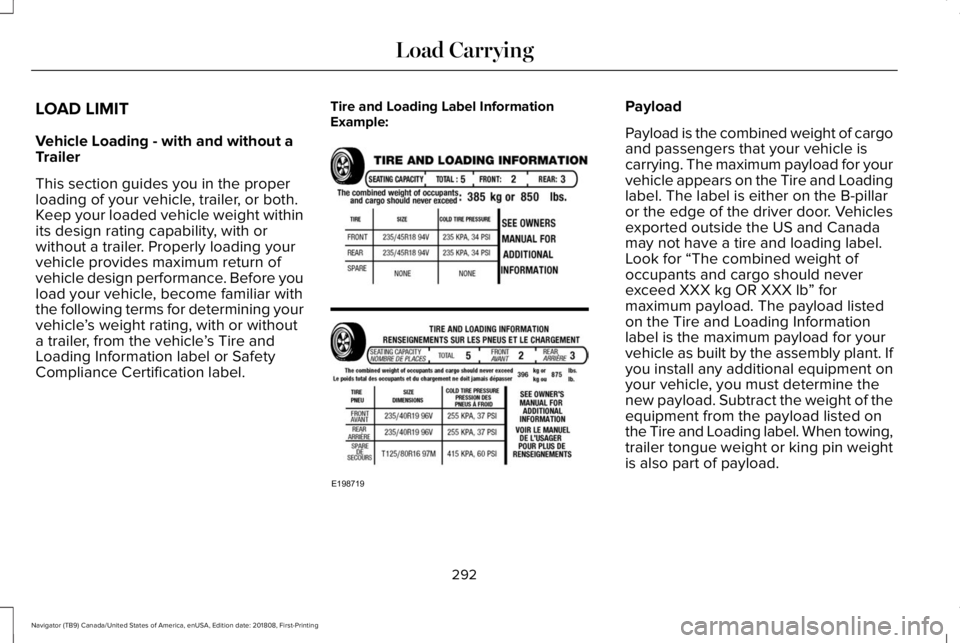
This section guides you in the properloading of your vehicle, trailer, or both.Keep your loaded vehicle weight withinits design rating capability, with orwithout a trailer. Properly loading yourvehicle provides maximum return ofvehicle design performance. Before youload your vehicle, become familiar withthe following terms for determining yourvehicle’s weight rating, with or withouta trailer, from the vehicle’s Tire andLoading Information label or SafetyCompliance Certification label.
Tire and Loading Label InformationExample:Payload
Payload is the combined weight of cargoand passengers that your vehicle iscarrying. The maximum payload for yourvehicle appears on the Tire and Loadinglabel. The label is either on the B-pillaror the edge of the driver door. Vehiclesexported outside the US and Canadamay not have a tire and loading label.Look for “The combined weight ofoccupants and cargo should neverexceed XXX kg OR XXX lb” formaximum payload. The payload listedon the Tire and Loading Informationlabel is the maximum payload for yourvehicle as built by the assembly plant. Ifyou install any additional equipment onyour vehicle, you must determine thenew payload. Subtract the weight of the
equipment from the payload listed onthe Tire and Loading label. When towing,trailer tongue weight or king pin weightis also part of payload.
292
Navigator (TB9) Canada/United States of America, enUSA, Edition date: 201808, First-Printing
Load CarryingE198719
Page 296 of 645
WARNING: The appropriateloading capacity of your vehicle canbe limited either by volume capacity(how much space is available) or bypayload capacity (how much weightthe vehicle should carry). Once youhave reached the maximum payloadof your vehicle, do not add morecargo, even if there is space available.Overloading or improperly loadingyour vehicle can contribute to loss ofvehicle control and vehicle rollover.
GAWR (Gross Axle Weight Rating)
GAWR is the maximum allowable weightthat a single axle (front or rear) can carry.These numbers are on the SafetyCompliance Certification label. The labelis located on the door hinge pillar,door-latch post, or the door edge thatmeets the door-latch post, next to thedriver seating position.
The total load on each axle must neverexceed its Gross Axle Weight Rating.
GVWR (Gross Vehicle Weight Rating)
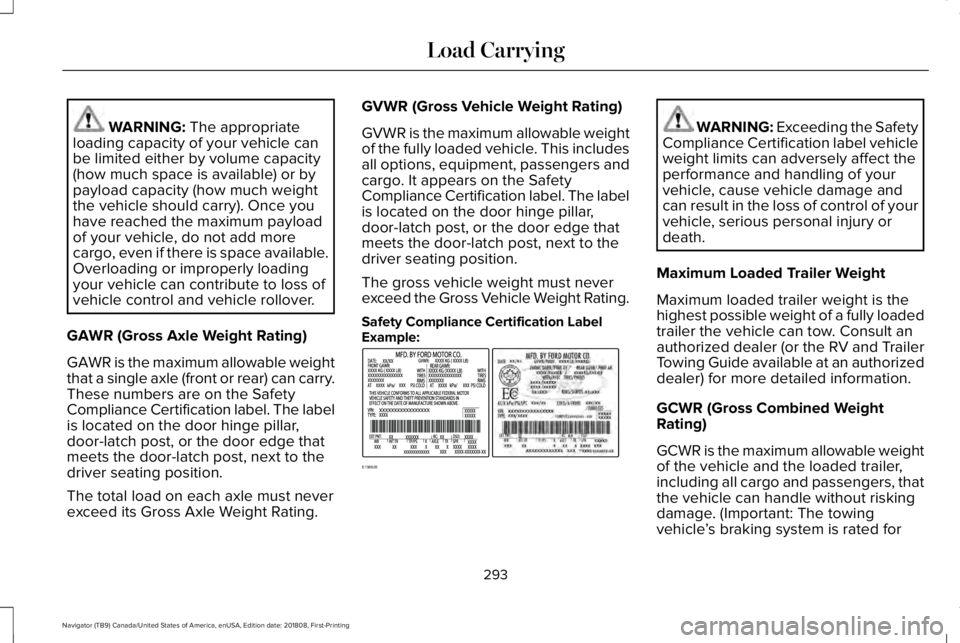
GVWR is the maximum allowable weightof the fully loaded vehicle. This includesall options, equipment, passengers andcargo. It appears on the SafetyCompliance Certification label. The labelis located on the door hinge pillar,door-latch post, or the door edge thatmeets the door-latch post, next to thedriver seating position.
The gross vehicle weight must neverexceed the Gross Vehicle Weight Rating.
Safety Compliance Certification LabelExample:
WARNING: Exceeding the SafetyCompliance Certification label vehicleweight limits can adversely affect theperformance and handling of yourvehicle, cause vehicle damage andcan result in the loss of control of yourvehicle, serious personal injury ordeath.
Maximum Loaded Trailer Weight
Maximum loaded trailer weight is thehighest possible weight of a fully loadedtrailer the vehicle can tow. Consult anauthorized dealer (or the RV and TrailerTowing Guide available at an authorizeddealer) for more detailed information.
GCWR (Gross Combined WeightRating)
GCWR is the maximum allowable weightof the vehicle and the loaded trailer,including all cargo and passengers, thatthe vehicle can handle without riskingdamage. (Important: The towingvehicle’s braking system is rated for
293
Navigator (TB9) Canada/United States of America, enUSA, Edition date: 201808, First-Printing
Load CarryingE198828
Page 297 of 645
operation at Gross Vehicle WeightRating, not at Gross Combined WeightRating.) Separate functional brakesshould be used for safe control of towedvehicles and for trailers where the GrossCombined Weight of the towing vehicleplus the trailer exceed the Gross VehicleWeight Rating of the towing vehicle.
The gross combined weight must neverexceed the Gross Combined WeightRating.
Note: For trailer towing informationrefer to the RV and Trailer Towing Guideavailable at an authorized dealer.
WARNING: Do not exceed theGVWR or the GAWR specified on thecertification label.
WARNING: Do not usereplacement tires with lower loadcarrying capacities than the originaltires because they may lower yourvehicle's GVWR and GAWR limitations.Replacement tires with a higher limitthan the original tires do not increasethe GVWR and GAWR limitations.
WARNING: Exceeding anyvehicle weight rating can adverselyaffect the performance and handlingof your vehicle, cause vehicle damageand can result in the loss of control ofyour vehicle, serious personal injuryor death.
Steps for determining the correct loadlimit:
1.Locate the statement "The combinedweight of occupants and cargoshould never exceed XXX kg or XXXlb." on your vehicle’s placard.
2.Determine the combined weight ofthe driver and passengers that willbe riding in your vehicle.
3.Subtract the combined weight of thedriver and passengers from XXX kgor XXX lb.
4. The resulting figure equals theavailable amount of cargo andluggage load capacity. For example,if the “XXX” amount equals 1,400 lb.and there will be five 150 lb.passengers in your vehicle, theamount of available cargo andluggage load capacity is 650 lb.(1400-750 (5 x 150) = 650 lb.)
5.Determine the combined weight ofluggage and cargo being loaded onthe vehicle. That weight may not
safely exceed the available cargoand luggage load capacity calculatedin Step 4.
294
Navigator (TB9) Canada/United States of America, enUSA, Edition date: 201808, First-Printing
Load Carrying