washer fluid LINCOLN NAVIGATOR 2019 Owners Manual
[x] Cancel search | Manufacturer: LINCOLN, Model Year: 2019, Model line: NAVIGATOR, Model: LINCOLN NAVIGATOR 2019Pages: 645, PDF Size: 5.02 MB
Page 8 of 645
Getting Assistance Outside the U.S. andCanada.......................................................337
Ordering Additional Owner's Literature......................................................................339
Reporting Safety Defects (U.S. Only)......339
Reporting Safety Defects (Canada Only)......................................................................340
Fuses
Fuse Specification Chart............................341
Changing a Fuse.........................................357
Maintenance
General Information...................................359
Opening and Closing the Hood..............359
Under Hood Overview..............................360
Engine Oil Dipstick.....................................362
Engine Oil Check........................................362
Oil Change Indicator Reset......................363
Engine Coolant Check...............................364
Automatic Transmission Fluid Check......369
Transfer Case Fluid Check.......................369
Brake Fluid Check.......................................370
Washer Fluid Check.....................................371
Fuel Filter........................................................371
Changing the 12V Battery..........................371
Checking the Wiper Blades......................373
Changing the Wiper Blades......................374
Adjusting the Headlamps..........................374
Changing a Bulb..........................................376
Changing the Engine Air Filter.................376
Vehicle Care
General Information....................................378
Cleaning Products.......................................378
Cleaning the Exterior..................................379
Waxing...........................................................380
Cleaning the Engine....................................381
Cleaning the Windows and Wiper Blades.......................................................................381
Cleaning the Interior...................................382
Cleaning the Instrument Panel andInstrument Cluster Lens........................384
Cleaning Leather Seats.............................384
Repairing Minor Paint Damage................385
Cleaning the Wheels..................................385
Vehicle Storage...........................................386
Body Styling Kits..........................................387
Wheels and Tires
General Information....................................388
Tire Care........................................................390
Using Snow Chains....................................404
Tire Pressure Monitoring System...........405
Changing a Road Wheel............................410
Technical Specifications.............................416
Capacities and Specifications
Engine Specifications..................................418
Motorcraft Parts............................................419
Vehicle Identification Number.................420
Vehicle Certification Label........................420
Transmission Code Designation..............421
Capacities and Specifications..................422
Bulb Specification Chart............................429
Audio System
General Information....................................432
Audio Unit.....................................................434
Satellite Radio..............................................436
5
Navigator (TB9) Canada/United States of America, enUSA, Edition date: 201808, First-Printing
Table of Contents
Page 98 of 645
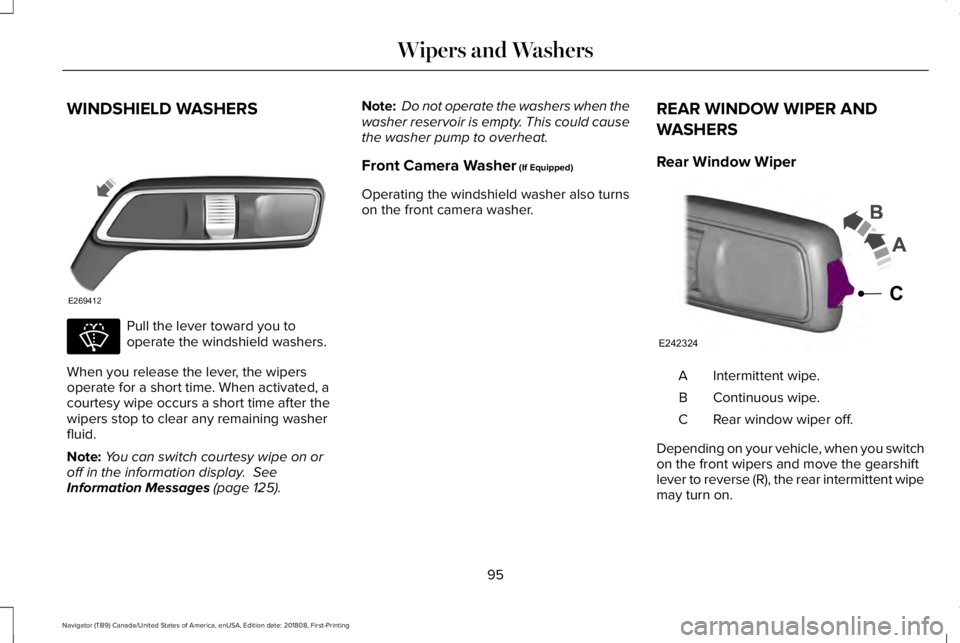
WINDSHIELD WASHERS
Pull the lever toward you tooperate the windshield washers.
When you release the lever, the wipersoperate for a short time. When activated, acourtesy wipe occurs a short time after thewipers stop to clear any remaining washerfluid.
Note:You can switch courtesy wipe on oroff in the information display. SeeInformation Messages (page 125).
Note: Do not operate the washers when thewasher reservoir is empty. This could causethe washer pump to overheat.
Front Camera Washer (If Equipped)
Operating the windshield washer also turnson the front camera washer.
REAR WINDOW WIPER AND
WASHERS
Rear Window Wiper
Intermittent wipe.A
Continuous wipe.B
Rear window wiper off.C
Depending on your vehicle, when you switchon the front wipers and move the gearshiftlever to reverse (R), the rear intermittent wipemay turn on.
95
Navigator (TB9) Canada/United States of America, enUSA, Edition date: 201808, First-Printing
Wipers and WashersE269412 E270967 E242324
C
Page 121 of 645
Low Tire Pressure Warning Lamp
It illuminates when your tirepressure is low. If the lamp remainson with the engine running orwhen driving, check your tire pressure assoon as possible.
It also illuminates momentarily when youswitch the ignition on to confirm the lamp isfunctional. If it does not illuminate when youswitch the ignition on, or begins to flash atany time, have the system checked by yourauthorized dealer.
Low Beam Malfunction Warning Lamp
It illuminates when there is amalfunction with the low beamheadlamp bulb.
Low Washer Fluid Level Warning Lamp
It illuminates when the washer fluidis low.
Parking Lamps
Illuminates when you switch theparking lamps on.
Powertrain Fault
Illuminates when a powertrain oran 4WD fault has been detected. Contact an authorized dealer.
Service Engine Soon
If it illuminates when the engine isrunning this indicates amalfunction. The On BoardDiagnostics system has detected amalfunction of the vehicle emission controlsystem.
If it flashes, engine misfire may be occurring.Increased exhaust gas temperatures coulddamage the catalytic converter or othervehicle components. Drive in a moderatefashion (avoid heavy acceleration anddeceleration) and have your vehicleimmediately serviced.
It illuminates when you switch the ignitionon prior to engine start to check the bulb andto indicate whether your vehicle is ready forInspection and Maintenance (I/M) testing.
Normally, it illuminates until the engine iscranked and automatically turns off if nomalfunctions are present. However, if after15 seconds it flashes eight times, thisindicates that your vehicle is not ready forInspection and Maintenance (I/M) testing.
See Catalytic Converter (page 207).
Stability Control and Traction ControlIndicator
Flashes during operation.
If it does not illuminate when youswitch the ignition on, or remainson when the engine is running, this indicatesa malfunction. Have your vehicle checkedas soon as possible.
See Using Stability Control (page 233).
118
Navigator (TB9) Canada/United States of America, enUSA, Edition date: 201808, First-Printing
Instrument Cluster E181350 E132353 E138639
Page 139 of 645
Maintenance
ActionMessage
Stop your vehicle as soon as safely possible, turn off the engine. Check the oil level. If the warningstays on or continues to come on with your engine running, contact an authorized dealer assoon as possible.
Low Engine Oil Pressure
The engine oil life remaining is 10% or less. See General Maintenance Information (page 547).Change Engine Oil Soon
The oil life left reaches 0%. See General Maintenance Information (page 547).Oil Change Required
The brake fluid level is low and the brake system should be inspected immediately. See BrakeFluid Check (page 370).Brake Fluid Level Low
The brake system needs servicing. Stop the vehicle in a safe place. Contact an authorized dealer.Check Brake System
The engine coolant temperature is excessively high.Engine Coolant Over Temperature
The washer fluid is low and needs to be refilled.Washer Fluid Level Low
Indicates that your vehicle is still in Transport mode. This may not allow some features to operateproperly. Contact an authorized dealer.Transport Mode Contact Dealer
Indicates that your vehicle is still in Factory mode. This may not allow some features to operateproperly. Contact an authorized dealer.Factory Mode Contact Dealer
Informs the driver that the powertrain needs service due to a powertrain malfunction.See Manual
The engine has reduced power to help reduce high engine temperature.Power Reduced to Lower Engine Temp
The brake system has reduced stopping power.Brake Applied Power Reduced
136
Navigator (TB9) Canada/United States of America, enUSA, Edition date: 201808, First-Printing
Information Displays
Page 365 of 645
Windshield washer fluid reservoir.See Washer Fluid Check (page371).
A.
Power distribution box. SeeChanging a Fuse (page 357).B.
Battery. See Changing the 12VBattery (page 371).C.
Engine oil filler cap. See EngineOil Check (page 362).D.
Engine oil dipstick. See Engine OilDipstick (page 362).E.
Brake fluid reservoir. See BrakeFluid Check (page 370).F.
Air filter. See Changing the EngineAir Filter (page 376).G.
Engine coolant reservoir. SeeEngine Coolant Check (page 364).H.
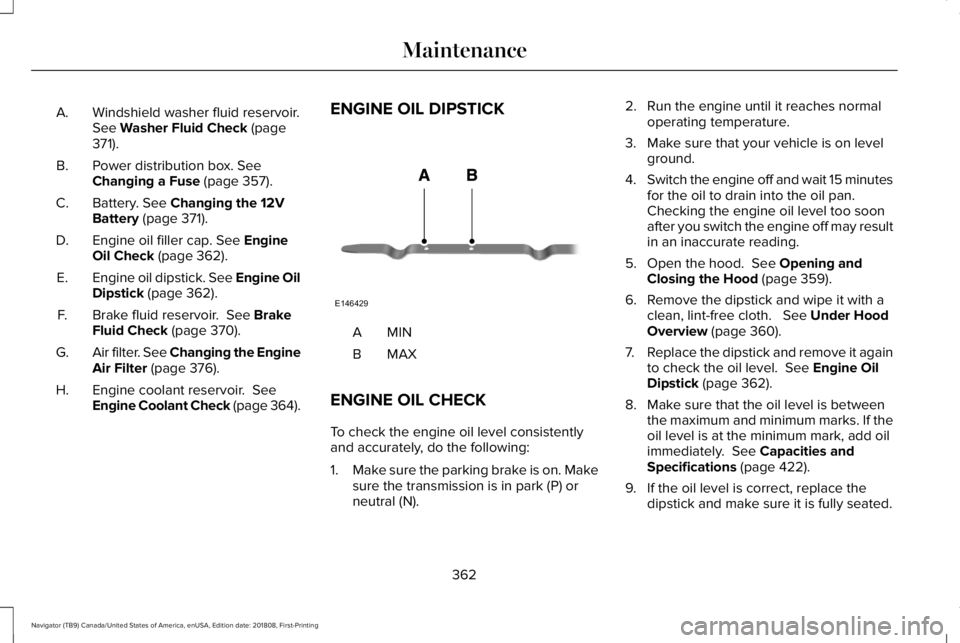
ENGINE OIL DIPSTICK
MINA
MAXB
ENGINE OIL CHECK
To check the engine oil level consistentlyand accurately, do the following:
1.Make sure the parking brake is on. Makesure the transmission is in park (P) orneutral (N).
2. Run the engine until it reaches normaloperating temperature.
3. Make sure that your vehicle is on levelground.
4.Switch the engine off and wait 15 minutesfor the oil to drain into the oil pan. Checking the engine oil level too soonafter you switch the engine off may resultin an inaccurate reading.
5. Open the hood. See Opening andClosing the Hood (page 359).
6. Remove the dipstick and wipe it with aclean, lint-free cloth. See Under HoodOverview (page 360).
7.Replace the dipstick and remove it againto check the oil level. See Engine OilDipstick (page 362).
8. Make sure that the oil level is betweenthe maximum and minimum marks. If theoil level is at the minimum mark, add oilimmediately. See Capacities andSpecifications (page 422).
9. If the oil level is correct, replace thedipstick and make sure it is fully seated.
362
Navigator (TB9) Canada/United States of America, enUSA, Edition date: 201808, First-Printing
MaintenanceE146429
Page 368 of 645
Maintain coolant concentration within 48%to 50%, which equates to a freeze pointbetween -29°F (-34°C) and -35°F (-37°C).Coolant concentration should be checkedusing a refractometer. We do not recommendthe use of hydrometers or coolant test stripsfor measuring coolant concentration.
Adding Coolant
WARNING: Do not add enginecoolant when the engine is hot. Failure tofollow this instruction could result inpersonal injury.
WARNING: Do not remove thecoolant reservoir cap when the coolingsystem is hot. Wait 10 minutes for thecooling system to cool down. Cover thecoolant reservoir cap with a thick cloth toprevent the possibility of scalding andslowly remove the cap. Failure to followthis instruction could result in personalinjury.
Note: Automotive fluids are notinterchangeable. Take care not to putengine coolant in the windshield washer fluidreservoir or windshield washer fluid in theengine coolant reservoir.
Note: Do not use stop leak pellets, coolingsystem sealants, or non-specified additivesas they can cause damage to the enginecooling or heating systems. Resultingcomponent damage may not be covered bythe vehicle Warranty.
It is very important to use prediluted coolantapproved to the correct specification in orderto avoid plugging the small passageways inthe engine cooling system. See Capacitiesand Specifications (page 418). Do not mixdifferent colors or types of coolant in yourvehicle. Mixing of engine coolants or usingan incorrect coolant may harm the engine orcooling system components and may not becovered by the vehicle Warranty.
Note:If prediluted coolant is not available,use the approved concentrated coolantdiluting it to 50/50 with distilled water. SeeCapacities and Specifications (page 418).Using water that has not been deionisedmay contribute to deposit formation,corrosion and plugging of the small coolingsystem passageways.
Note: Coolants marketed for all makes andmodels may not be approved to ourspecifications and may cause damage tothe cooling system. Resulting componentdamage may not be covered by the vehicleWarranty.
If the coolant level is at or below theminimum mark, add prediluted coolantimmediately.
To top up the coolant level do the following:
1. Unscrew the cap slowly. Any pressureescapes as you unscrew the cap.
2. Add prediluted coolant approved to thecorrect specification. See Capacities andSpecifications (page 418).
3.Add enough prediluted coolant to reachthe correct level.
365
Navigator (TB9) Canada/United States of America, enUSA, Edition date: 201808, First-Printing
Maintenance
Page 374 of 645
WASHER FLUID CHECK
WARNING: If you operate yourvehicle in temperatures below 41.0°F (5°C),use washer fluid with antifreeze protection.Failure to use washer fluid with antifreezeprotection in cold weather could result inimpaired windshield vision and increasethe risk of injury or accident.
Note:The front and rear washer systemsare supplied from the same reservoir.
Add fluid to fill the reservoir if the level is low.Only use a washer fluid that meets ourspecifications. See Capacities andSpecifications (page 418).
State or local regulations on volatile organiccompounds may restrict the use of methanol,a common windshield washer antifreezeadditive. Washer fluids containingnon-methanol antifreeze agents should beused only if they provide cold weatherprotection without damaging the vehicle’spaint finish, wiper blades or washer system.
FUEL FILTER
Your vehicle is equipped with a lifetime fuelfilter that is integrated with the fuel tank.Regular maintenance or replacement is notneeded.
CHANGING THE 12V BATTERY
WARNING: Batteries normallyproduce explosive gases which can causepersonal injury. Therefore, do not allowflames, sparks or lighted substances tocome near the battery. When working nearthe battery, always shield your face andprotect your eyes. Always provide correctventilation.
WARNING: When lifting aplastic-cased battery, excessive pressureon the end walls could cause acid to flowthrough the vent caps, resulting in personalinjury and damage to the vehicle or battery.Lift the battery with a battery carrier or withyour hands on opposite corners.
WARNING: Keep batteries out ofreach of children. Batteries contain sulfuricacid. Avoid contact with skin, eyes orclothing. Shield your eyes when workingnear the battery to protect against possiblesplashing of acid solution. In case of acidcontact with skin or eyes, flush immediatelywith water for a minimum of 15 minutes andget prompt medical attention. If acid isswallowed, call a physician immediately.
WARNING: Battery posts, terminalsand related accessories contain lead andlead compounds, chemicals known to theState of California to cause cancer andreproductive harm. Wash your hands afterhandling.
371
Navigator (TB9) Canada/United States of America, enUSA, Edition date: 201808, First-Printing
Maintenance
Page 377 of 645
Run the tip of your fingers over the edge ofthe blade to check for roughness.
Clean the wiper blades with washer fluid orwater applied with a soft sponge or cloth.
CHANGING THE WIPER BLADES
Note:Do not hold the wiper blade whenlifting the wiper arm.
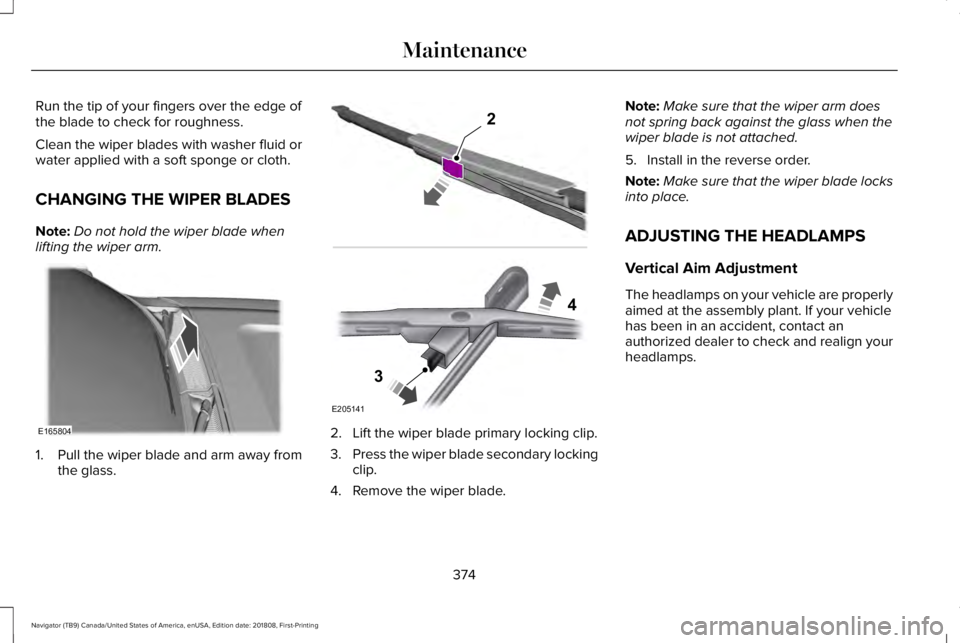
1. Pull the wiper blade and arm away fromthe glass.
2. Lift the wiper blade primary locking clip.
3.Press the wiper blade secondary lockingclip.
4. Remove the wiper blade.
Note:Make sure that the wiper arm doesnot spring back against the glass when thewiper blade is not attached.
5. Install in the reverse order.
Note:Make sure that the wiper blade locksinto place.
ADJUSTING THE HEADLAMPS
Vertical Aim Adjustment
The headlamps on your vehicle are properlyaimed at the assembly plant. If your vehiclehas been in an accident, contact anauthorized dealer to check and realign yourheadlamps.
374
Navigator (TB9) Canada/United States of America, enUSA, Edition date: 201808, First-Printing
MaintenanceE165804 E205141
2
3
4
Page 381 of 645
GENERAL INFORMATION
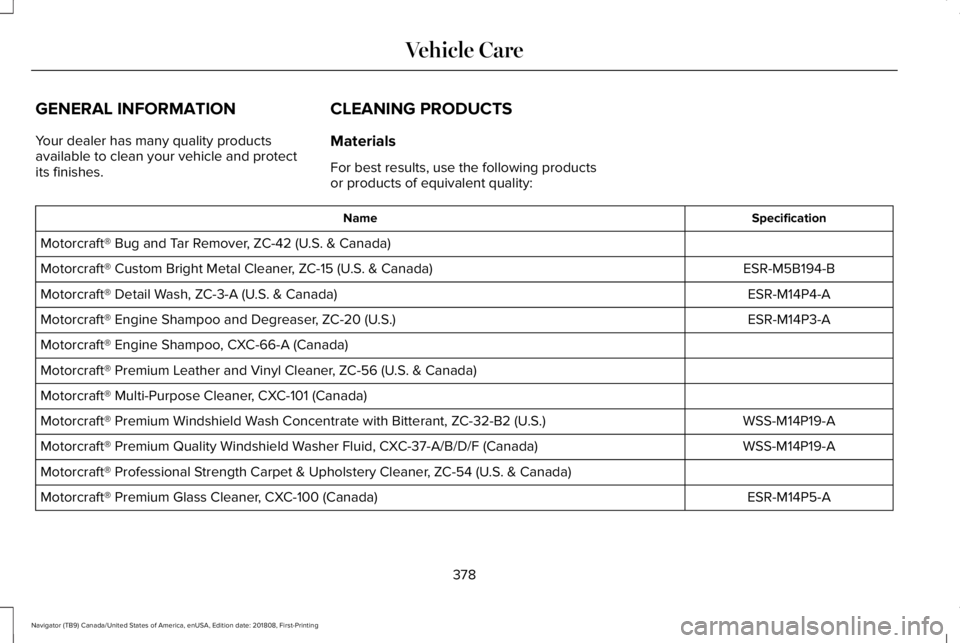
Your dealer has many quality productsavailable to clean your vehicle and protectits finishes.
CLEANING PRODUCTS
Materials
For best results, use the following productsor products of equivalent quality:
SpecificationName
Motorcraft® Bug and Tar Remover, ZC-42 (U.S. & Canada)
ESR-M5B194-BMotorcraft® Custom Bright Metal Cleaner, ZC-15 (U.S. & Canada)
ESR-M14P4-AMotorcraft® Detail Wash, ZC-3-A (U.S. & Canada)
ESR-M14P3-AMotorcraft® Engine Shampoo and Degreaser, ZC-20 (U.S.)
Motorcraft® Engine Shampoo, CXC-66-A (Canada)
Motorcraft® Premium Leather and Vinyl Cleaner, ZC-56 (U.S. & Canada)
Motorcraft® Multi-Purpose Cleaner, CXC-101 (Canada)
WSS-M14P19-AMotorcraft® Premium Windshield Wash Concentrate with Bitterant, ZC-32-B2 (U.S.)
WSS-M14P19-AMotorcraft® Premium Quality Windshield Washer Fluid, CXC-37-A/B/D/F (Canada)
Motorcraft® Professional Strength Carpet & Upholstery Cleaner, ZC-54 (U.S. & Canada)
ESR-M14P5-AMotorcraft® Premium Glass Cleaner, CXC-100 (Canada)
378
Navigator (TB9) Canada/United States of America, enUSA, Edition date: 201808, First-Printing
Vehicle Care
Page 384 of 645
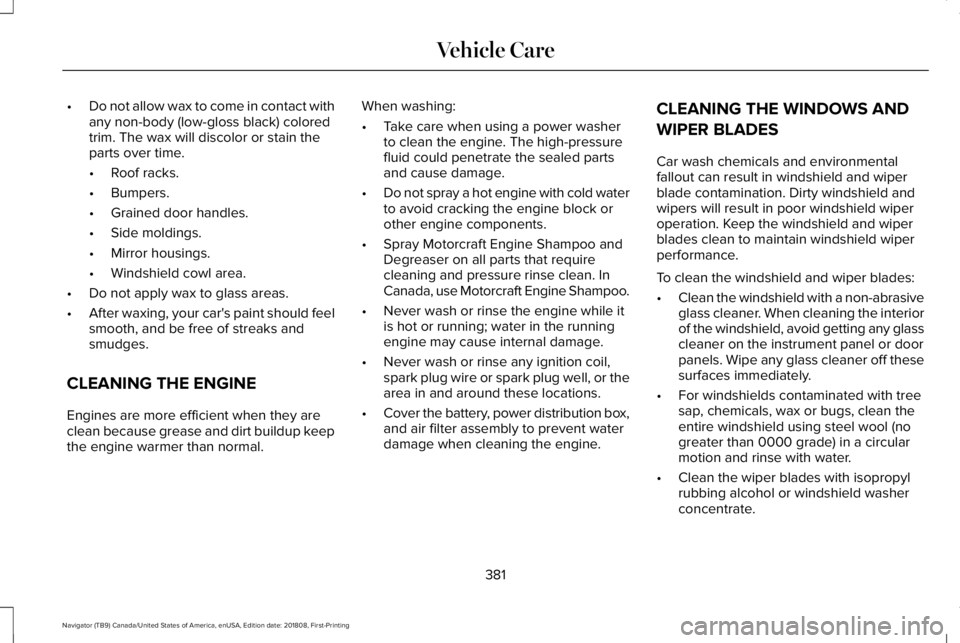
•Do not allow wax to come in contact withany non-body (low-gloss black) coloredtrim. The wax will discolor or stain theparts over time.
•Roof racks.
•Bumpers.
•Grained door handles.
•Side moldings.
•Mirror housings.
•Windshield cowl area.
•Do not apply wax to glass areas.
•After waxing, your car's paint should feelsmooth, and be free of streaks andsmudges.
CLEANING THE ENGINE
Engines are more efficient when they areclean because grease and dirt buildup keepthe engine warmer than normal.
When washing:
•Take care when using a power washerto clean the engine. The high-pressurefluid could penetrate the sealed partsand cause damage.
•Do not spray a hot engine with cold waterto avoid cracking the engine block orother engine components.
•Spray Motorcraft Engine Shampoo andDegreaser on all parts that requirecleaning and pressure rinse clean. InCanada, use Motorcraft Engine Shampoo.
•Never wash or rinse the engine while itis hot or running; water in the runningengine may cause internal damage.
•Never wash or rinse any ignition coil,spark plug wire or spark plug well, or thearea in and around these locations.
•Cover the battery, power distribution box,and air filter assembly to prevent waterdamage when cleaning the engine.
CLEANING THE WINDOWS AND
WIPER BLADES
Car wash chemicals and environmentalfallout can result in windshield and wiperblade contamination. Dirty windshield andwipers will result in poor windshield wiperoperation. Keep the windshield and wiperblades clean to maintain windshield wiperperformance.
To clean the windshield and wiper blades:
•Clean the windshield with a non-abrasiveglass cleaner. When cleaning the interiorof the windshield, avoid getting any glasscleaner on the instrument panel or doorpanels. Wipe any glass cleaner off thesesurfaces immediately.
•For windshields contaminated with treesap, chemicals, wax or bugs, clean theentire windshield using steel wool (nogreater than 0000 grade) in a circularmotion and rinse with water.
•Clean the wiper blades with isopropylrubbing alcohol or windshield washerconcentrate.
381
Navigator (TB9) Canada/United States of America, enUSA, Edition date: 201808, First-Printing
Vehicle Care