child seat LINCOLN NAVIGATOR 2019 Owner's Guide
[x] Cancel search | Manufacturer: LINCOLN, Model Year: 2019, Model line: NAVIGATOR, Model: LINCOLN NAVIGATOR 2019Pages: 645, PDF Size: 5.02 MB
Page 56 of 645
The driver and passenger front airbag systemconsists of:
•Driver and passenger airbag modules.
•Front passenger sensing system.
· Crash sensors and monitoringsystem with readiness indicator.See Crash Sensors and AirbagIndicator (page 59).
Proper Driver and Front PassengerSeating Adjustment
WARNING: National Highway TrafficSafety Administration (NHTSA)recommends a minimum distance of atleast 10 in (25 cm) between an occupant'schest and the driver airbag module.
To properly position yourself away from theairbag:
•Move your seat to the rear as far as youcan while still reaching the pedalscomfortably.
•Recline the seat slightly (one or twodegrees) from the upright position.
After all occupants have adjusted their seatsand put on seatbelts, it is very important thatthey continue to sit properly. Properly seatedoccupants sit upright, lean against the seatback, and center themselves on the seatcushion, with their feet comfortably extendedon the floor. Sitting improperly can increasethe chance of injury in a crash event. Forexample, if an occupant slouches, lies down,turns sideways, sits forward, leans forwardor sideways, or puts one or both feet up, thechance of injury during a crash greatlyincreases.
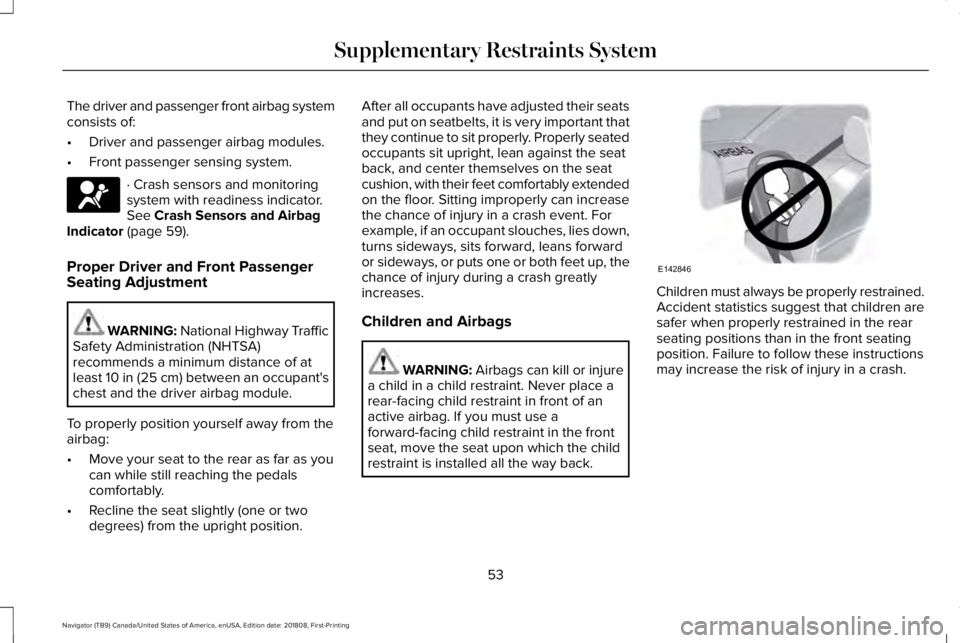
Children and Airbags
WARNING: Airbags can kill or injurea child in a child restraint. Never place arear-facing child restraint in front of anactive airbag. If you must use aforward-facing child restraint in the frontseat, move the seat upon which the childrestraint is installed all the way back.
Children must always be properly restrained.Accident statistics suggest that children aresafer when properly restrained in the rearseating positions than in the front seatingposition. Failure to follow these instructionsmay increase the risk of injury in a crash.
53
Navigator (TB9) Canada/United States of America, enUSA, Edition date: 201808, First-Printing
Supplementary Restraints SystemE67017 E142846
Page 57 of 645
FRONT PASSENGER SENSING
SYSTEM
WARNING: Even with advancedrestraints systems, properly restrainchildren 12 and under in a rear seatingposition. Failure to follow this couldseriously increase the risk of injury ordeath.
WARNING: Sitting improperly, out ofposition or with the seatback reclined toofar can take weight off the seat cushionand affect the decision of the passengersensing system, resulting in serious injuryor death in the event of a crash. Always situpright against your seat back, with yourfeet on the floor.
WARNING: Any alteration ormodification to the front passenger seatmay affect the performance of the frontpassenger sensing system. This couldseriously increase the risk of injury ordeath.
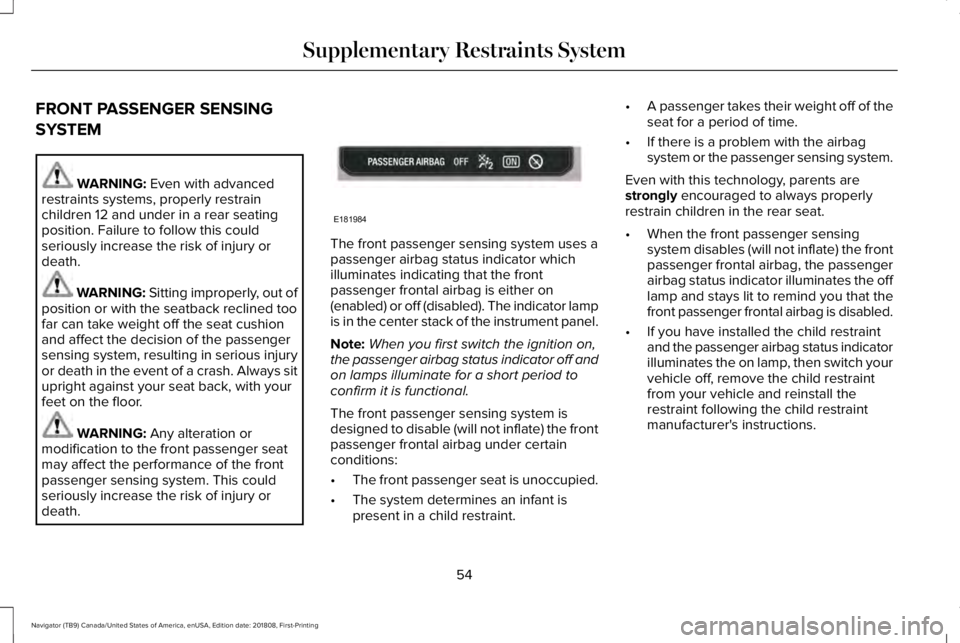
The front passenger sensing system uses apassenger airbag status indicator whichilluminates indicating that the frontpassenger frontal airbag is either on(enabled) or off (disabled). The indicator lampis in the center stack of the instrument panel.
Note:When you first switch the ignition on,the passenger airbag status indicator off andon lamps illuminate for a short period toconfirm it is functional.
The front passenger sensing system isdesigned to disable (will not inflate) the frontpassenger frontal airbag under certainconditions:
•The front passenger seat is unoccupied.
•The system determines an infant ispresent in a child restraint.
•A passenger takes their weight off of theseat for a period of time.
•If there is a problem with the airbagsystem or the passenger sensing system.
Even with this technology, parents arestrongly encouraged to always properlyrestrain children in the rear seat.
•When the front passenger sensingsystem disables (will not inflate) the frontpassenger frontal airbag, the passengerairbag status indicator illuminates the offlamp and stays lit to remind you that thefront passenger frontal airbag is disabled.
•If you have installed the child restraintand the passenger airbag status indicatorilluminates the on lamp, then switch yourvehicle off, remove the child restraintfrom your vehicle and reinstall therestraint following the child restraintmanufacturer's instructions.
54
Navigator (TB9) Canada/United States of America, enUSA, Edition date: 201808, First-Printing
Supplementary Restraints SystemE181984
Page 61 of 645
WARNING: Do not attempt to service,repair, or modify the supplementaryrestraint system or associated components.Failure to follow this instruction could resultin personal injury or death.
WARNING: All occupants of yourvehicle, including the driver, should alwaysproperly wear their seatbelts, even whenan airbag supplemental restraint system isprovided. Failure to properly wear yourseatbelt could seriously increase the riskof injury or death.
WARNING: To reduce risk of injury,do not obstruct or place objects in thedeployment path of the airbag.
WARNING: If a supplementaryrestraint system component has deployed,it will not function again. Have the systemand associated components inspected assoon as possible. Failure to follow thisinstruction could result in personal injuryor death.
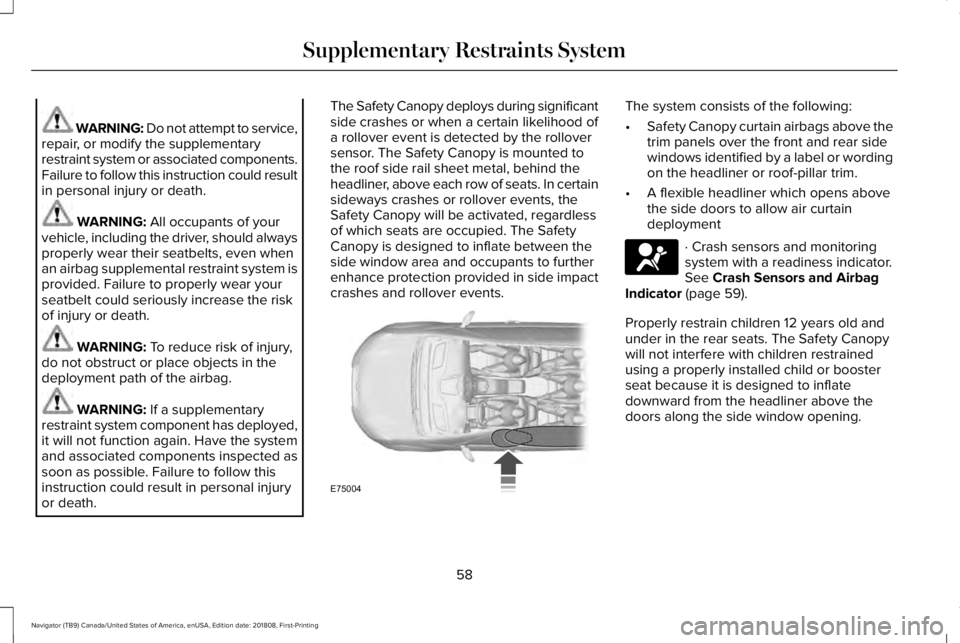
The Safety Canopy deploys during significantside crashes or when a certain likelihood ofa rollover event is detected by the rolloversensor. The Safety Canopy is mounted tothe roof side rail sheet metal, behind theheadliner, above each row of seats. In certainsideways crashes or rollover events, theSafety Canopy will be activated, regardlessof which seats are occupied. The SafetyCanopy is designed to inflate between theside window area and occupants to furtherenhance protection provided in side impactcrashes and rollover events.
The system consists of the following:
•Safety Canopy curtain airbags above thetrim panels over the front and rear sidewindows identified by a label or wordingon the headliner or roof-pillar trim.
•A flexible headliner which opens abovethe side doors to allow air curtaindeployment
· Crash sensors and monitoringsystem with a readiness indicator.See Crash Sensors and AirbagIndicator (page 59).
Properly restrain children 12 years old andunder in the rear seats. The Safety Canopywill not interfere with children restrainedusing a properly installed child or boosterseat because it is designed to inflatedownward from the headliner above thedoors along the side window opening.
58
Navigator (TB9) Canada/United States of America, enUSA, Edition date: 201808, First-Printing
Supplementary Restraints SystemE75004 E67017
Page 82 of 645
POWER LIFTGATE
WARNING: It is extremely dangerousto ride in a cargo area, inside or outside ofa vehicle. In a crash, people riding in theseareas are more likely to be seriouslyinjured or killed. Do not allow people toride in any area of your vehicle that is notequipped with seats and seatbelts. Makesure everyone in your vehicle is in a seatand properly using a seatbelt. Failure tofollow this warning could result in seriouspersonal injury or death.
WARNING: Make sure that you fullyclose the liftgate to prevent exhaust fumesfrom entering your vehicle. If you areunable to fully close the tailgate, open theair vents or the windows to allow fresh airto enter your vehicle. Failure to follow thisinstruction could result in personal injuryor death.
WARNING: Make sure that you fullyclose the liftgate to prevent passengersand cargo from falling out. Failure to followthis instruction could result in personalinjury or death.
WARNING: Keep keys out of reachof children. Do not allow children tooperate or play near an open or movingpower liftgate. You should supervise theoperation of the power liftgate at all times.
Note: Make sure that you close the liftgatebefore operating or moving your vehicle,especially in an enclosure, like a garage ora parking structure. This could damage theliftgate and its components.
Note: Do not hang anything, for example abike rack, from the glass or liftgate. Thiscould damage the liftgate and itscomponents.
The liftgate only operates with thetransmission in park (P).
Three warning tones sound as the liftgatebegins to power close. If there is a problemwith the open or close request, one of thefollowing may occur:
•One tone sounds if the ignition is on andthe transmission is not in park (P).
•Three tones sound if the battery voltageis below the minimum operating voltage.
•One tone sounds if the vehicle speed isat or above 3 mph (5 km/h)
If the liftgate starts to close after it has fullyopened, this indicates there may beexcessive weight on the liftgate or a possiblestrut failure. A repetitive tone sounds andthe liftgate closes under control. Removeany excessive weight from the liftgate. If theliftgate continues to close after opening,have the system checked as soon aspossible.
Opening and Closing the Liftgate
WARNING: Make sure all personsare clear of the power liftgate area beforeusing the power liftgate control.
79
Navigator (TB9) Canada/United States of America, enUSA, Edition date: 201808, First-Printing
Liftgate
Page 112 of 645
Auto-Dimming Mirror
Note: Do not block the sensors on the frontand back of the mirror. A rear centerpassenger or raised rear center headrestraint may also block light from reachingthe sensor.
The mirror dims to reduce the effect of brightlight from behind. It returns to normal whenthe bright light from behind is no longerpresent or if you shift into reverse (R).
CHILDMINDER MIRROR
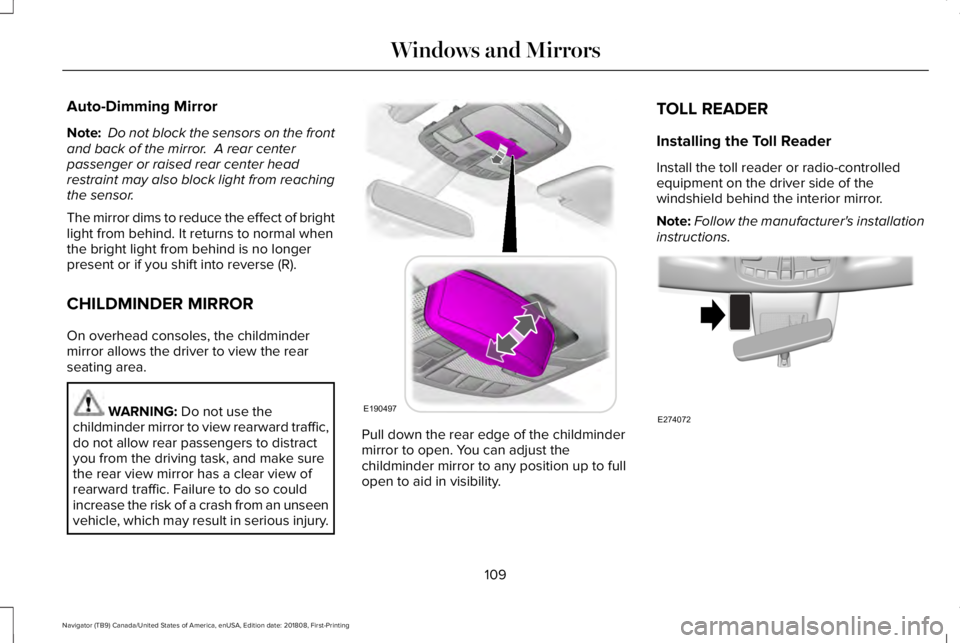
On overhead consoles, the childmindermirror allows the driver to view the rearseating area.
WARNING: Do not use thechildminder mirror to view rearward traffic,do not allow rear passengers to distractyou from the driving task, and make surethe rear view mirror has a clear view ofrearward traffic. Failure to do so couldincrease the risk of a crash from an unseenvehicle, which may result in serious injury.
Pull down the rear edge of the childmindermirror to open. You can adjust thechildminder mirror to any position up to fullopen to aid in visibility.
TOLL READER
Installing the Toll Reader
Install the toll reader or radio-controlledequipment on the driver side of thewindshield behind the interior mirror.
Note:Follow the manufacturer's installationinstructions.
109
Navigator (TB9) Canada/United States of America, enUSA, Edition date: 201808, First-Printing
Windows and MirrorsE190497 E274072
Page 176 of 645
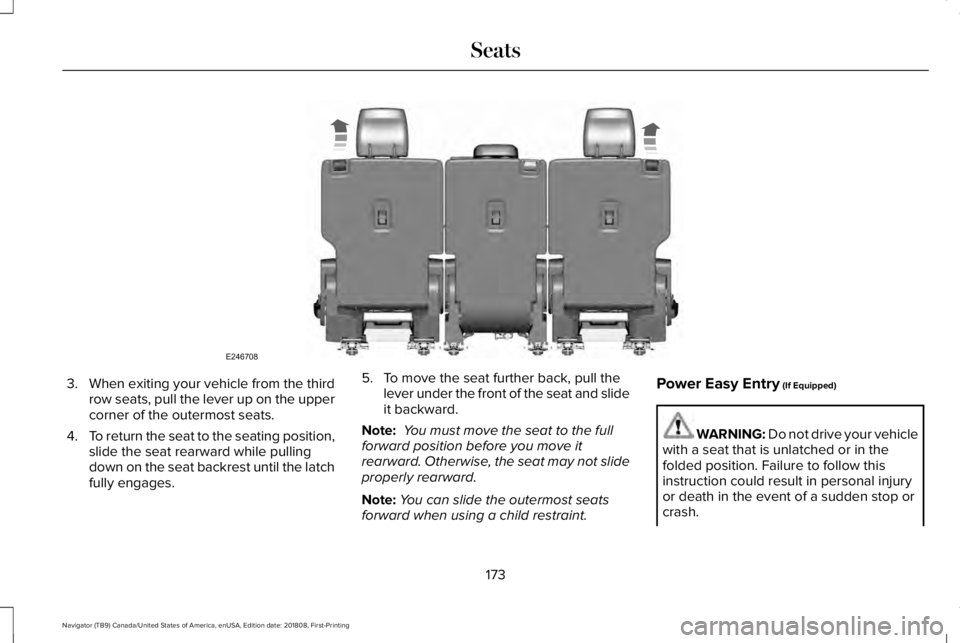
3.When exiting your vehicle from the thirdrow seats, pull the lever up on the uppercorner of the outermost seats.
4.To return the seat to the seating position,slide the seat rearward while pullingdown on the seat backrest until the latchfully engages.
5. To move the seat further back, pull thelever under the front of the seat and slideit backward.
Note: You must move the seat to the fullforward position before you move itrearward. Otherwise, the seat may not slideproperly rearward.
Note:You can slide the outermost seatsforward when using a child restraint.
Power Easy Entry (If Equipped)
WARNING: Do not drive your vehiclewith a seat that is unlatched or in thefolded position. Failure to follow thisinstruction could result in personal injuryor death in the event of a sudden stop orcrash.
173
Navigator (TB9) Canada/United States of America, enUSA, Edition date: 201808, First-Printing
SeatsE246708
Page 178 of 645
WARNING: Do not place cargo orany objects behind the seat backrestbefore returning it to the original position.Pull on the seat backrest to make sure thatit has fully latched after returning the seatbackrest to its original position. Anunlatched seat may become dangerous ifyou stop suddenly or have a crash.
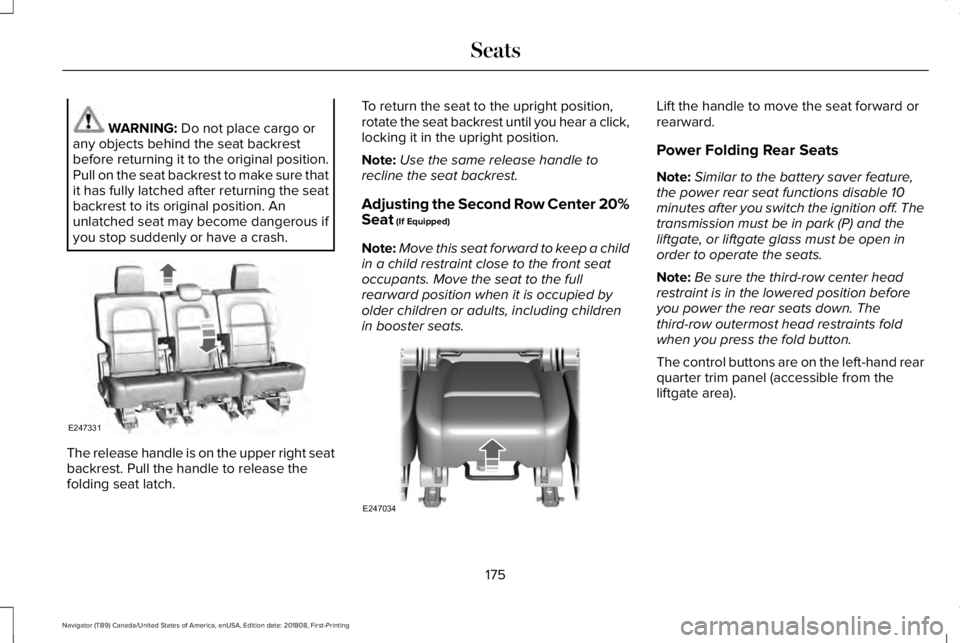
The release handle is on the upper right seatbackrest. Pull the handle to release thefolding seat latch.
To return the seat to the upright position,rotate the seat backrest until you hear a click,locking it in the upright position.
Note:Use the same release handle torecline the seat backrest.
Adjusting the Second Row Center 20%Seat (If Equipped)
Note:Move this seat forward to keep a childin a child restraint close to the front seatoccupants. Move the seat to the fullrearward position when it is occupied byolder children or adults, including childrenin booster seats.
Lift the handle to move the seat forward orrearward.
Power Folding Rear Seats
Note:Similar to the battery saver feature,the power rear seat functions disable 10minutes after you switch the ignition off. Thetransmission must be in park (P) and theliftgate, or liftgate glass must be open inorder to operate the seats.
Note:Be sure the third-row center headrestraint is in the lowered position beforeyou power the rear seats down. Thethird-row outermost head restraints foldwhen you press the fold button.
The control buttons are on the left-hand rearquarter trim panel (accessible from theliftgate area).
175
Navigator (TB9) Canada/United States of America, enUSA, Edition date: 201808, First-Printing
SeatsE247331 E247034
Page 180 of 645
Folding Down the Rear Seats to the LoadFloor
WARNING: To prevent possibledamage to the seat or seatbelts, make surethat the seatbelts are not fastened beforefolding the seatback.
WARNING: Do not place cargo orany objects behind the seatback beforereturning it to the original position.
The third-row seats have obstacle detectionthat prevents the seats from folding orreturning if they are obstructed.
Power Recline
WARNING: Do not recline a rear seaton which a child restraint is installed.Failure to follow this instruction couldreduce the effectiveness of the childrestraint.
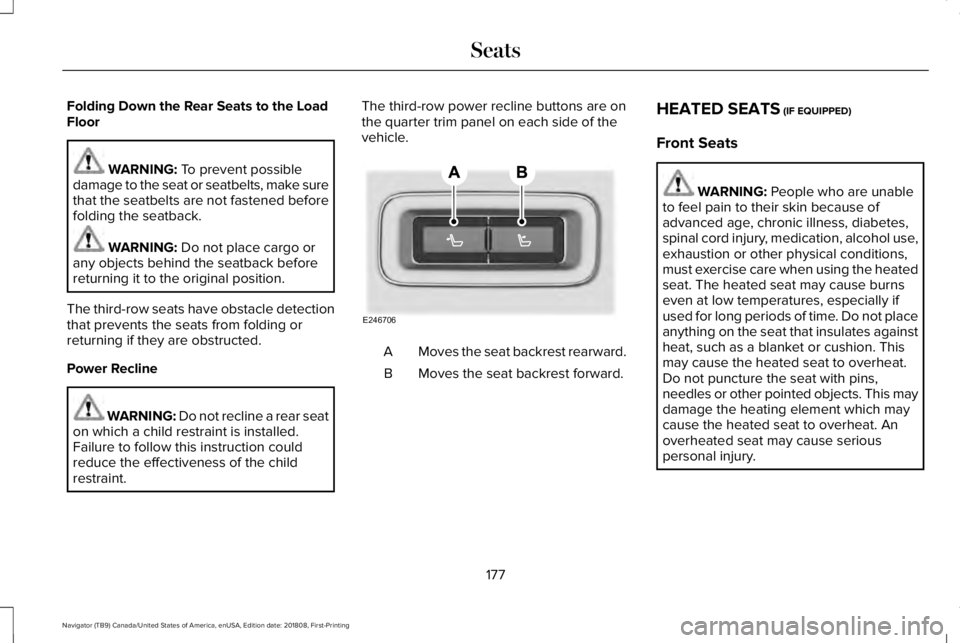
The third-row power recline buttons are onthe quarter trim panel on each side of thevehicle.
Moves the seat backrest rearward.A
Moves the seat backrest forward.B
HEATED SEATS (IF EQUIPPED)
Front Seats
WARNING: People who are unableto feel pain to their skin because ofadvanced age, chronic illness, diabetes,spinal cord injury, medication, alcohol use,exhaustion or other physical conditions,must exercise care when using the heatedseat. The heated seat may cause burnseven at low temperatures, especially ifused for long periods of time. Do not placeanything on the seat that insulates againstheat, such as a blanket or cushion. Thismay cause the heated seat to overheat.Do not puncture the seat with pins,needles or other pointed objects. This maydamage the heating element which maycause the heated seat to overheat. Anoverheated seat may cause seriouspersonal injury.
177
Navigator (TB9) Canada/United States of America, enUSA, Edition date: 201808, First-Printing
SeatsE246706
Page 634 of 645
Capacities and Specifications...................422Alternative Engine Oil for Extremely ColdClimates............................................................428Specifications......................................................424
Cargo Nets.....................................................289Car WashSee: Cleaning the Exterior...............................379
Catalytic Converter......................................207On-Board Diagnostics (OBD-II).......................208Readiness for Inspection and Maintenance(I/M) Testing.....................................................209
Center Console..............................................189Changing a Bulb...........................................376LED Lamps...........................................................376
Changing a Fuse...........................................357Fuses......................................................................357
Changing a Road Wheel.............................410Dissimilar Spare Wheel and Tire AssemblyInformation.........................................................411Location of the Spare Tire and Tools..............411Tire Change Procedure.....................................412
Changing the 12V Battery...........................371Battery Management System..........................373
Changing the Engine Air Filter..................376Changing the Wiper Blades.......................374Checking MyKey System Status.................69MyKey Distance....................................................69Number of Admin Keys.......................................70
Number of MyKeys...............................................69
Checking the Wiper Blades.......................373Childminder Mirror........................................109Child Restraint and SeatbeltMaintenance..................................................48Child Restraint Positioning...........................36Child Safety.......................................................18General Information..............................................18
Child Safety Locks..........................................38Left-Hand Side.......................................................38Right-Hand Side....................................................38
Cleaning Leather Seats..............................384Cleaning Products........................................378Materials................................................................378
Cleaning the Engine.....................................381Cleaning the Exterior...................................379Cleaning the Headlamps..................................379Exterior Chrome Parts.......................................380Exterior Plastic Parts..........................................380Stripes or Graphics............................................380Underbody...........................................................380Under Hood.........................................................380
Cleaning the Instrument Panel andInstrument Cluster Lens...........................384Cleaning the Interior....................................382Cleaning Black Label or PresidentialInterior..............................................................382
Cleaning the Wheels...................................385
Cleaning the Windows and WiperBlades............................................................381Clearing All MyKeys.......................................69Climate Control..............................................152Climate Controlled Seats............................179Ventilated Seats...................................................179
Coolant CheckSee: Engine Coolant Check.............................364
Crash Sensors and Airbag Indicator..........59Creating a MyKey...........................................68Programming and Changing ConfigurableSettings...............................................................69
Cross Traffic Alert.........................................275Blocked Sensors.................................................278Switching the System Off and On..................278System Errors......................................................278System Lights, Messages and AudibleAlerts.................................................................278System Limitations.............................................278Using the Cross Traffic Alert System.............275
Cruise Control.................................................90Principle of Operation.......................................255Type One................................................................90Type Two..................................................................91
Cruise controlSee: Using Cruise Control...............................255
Customer Assistance...................................333
631
Navigator (TB9) Canada/United States of America, enUSA, Edition date: 201808, First-Printing
Index
Page 635 of 645
D
Data Recording................................................10Event Data Recording...........................................10Service Data Recording.......................................10
Daytime Running Lamps...............................99Type One - Conventional(Non-Configurable)..........................................99Type Two - Configurable...................................100
Declaration of Conformity...........................614Radio Frequency Statement.............................615
Direction Indicators......................................102Lane Change........................................................102
Doors and Locks.............................................72Drive Mode Control.....................................284Lincoln Drive Modes..........................................284
Driver Alert.....................................................264Using Driver Alert...............................................265
Driver and Passenger Airbags....................52Children and Airbags...........................................53Proper Driver and Front Passenger SeatingAdjustment.........................................................53
Driving Aids...................................................264Driving Hints..................................................323Driving Through Water................................324DRLSee: Daytime Running Lamps...........................99
E
Economical Driving......................................323Electric Parking Brake.................................226Applying the Electric Parking Brake..............226Automatically Releasing the Electric ParkingBrake.................................................................227Manually Releasing the Electric ParkingBrake.................................................................227Releasing the Electric Parking Brake if theVehicle Battery is Running Out ofCharge..............................................................227
Electromagnetic Compatibility..................579Emission Law................................................206Noise Emissions Warranty, ProhibitedTampering Acts and Maintenance............207Tampering With a Noise ControlSystem..............................................................206
End User License Agreement...................584VEHICLE SOFTWARE END USER LICENSEAGREEMENT (EULA) ....................................584
Engine Block Heater....................................194Using the Engine Block Heater.......................195
Engine Coolant Check................................364Adding Coolant...................................................365Coolant Change..................................................367Engine Coolant TemperatureManagement...................................................368
Fail-Safe Cooling................................................367Recycled Coolant...............................................366Severe Climates.................................................366
Engine Emission Control............................206Engine ImmobilizerSee: Passive Anti-Theft System........................83
Engine Oil Check.........................................362Adding Engine Oil..............................................363
Engine Oil Dipstick......................................362Engine Specifications...................................418Drivebelt Routing.................................................418
Entertainment................................................468AM/FM Radio........................................................471Apps.......................................................................482Bluetooth Stereo or USB..................................479CD...........................................................................479HD Radio™ Information (If Available)..............475SiriusXM® Satellite Radio (If Activated)..........471Sources.................................................................470Supported Media Players, Formats andMetadata Information...................................482USB Ports.............................................................482
Environment......................................................15EPBSee: Electric Parking Brake.............................226
Essential Towing Checks..............................311Before Towing a Trailer......................................318Hitches...................................................................312
632
Navigator (TB9) Canada/United States of America, enUSA, Edition date: 201808, First-Printing
Index