radio LINCOLN NAVIGATOR 2019 Owner's Guide
[x] Cancel search | Manufacturer: LINCOLN, Model Year: 2019, Model line: NAVIGATOR, Model: LINCOLN NAVIGATOR 2019Pages: 645, PDF Size: 5.02 MB
Page 476 of 645
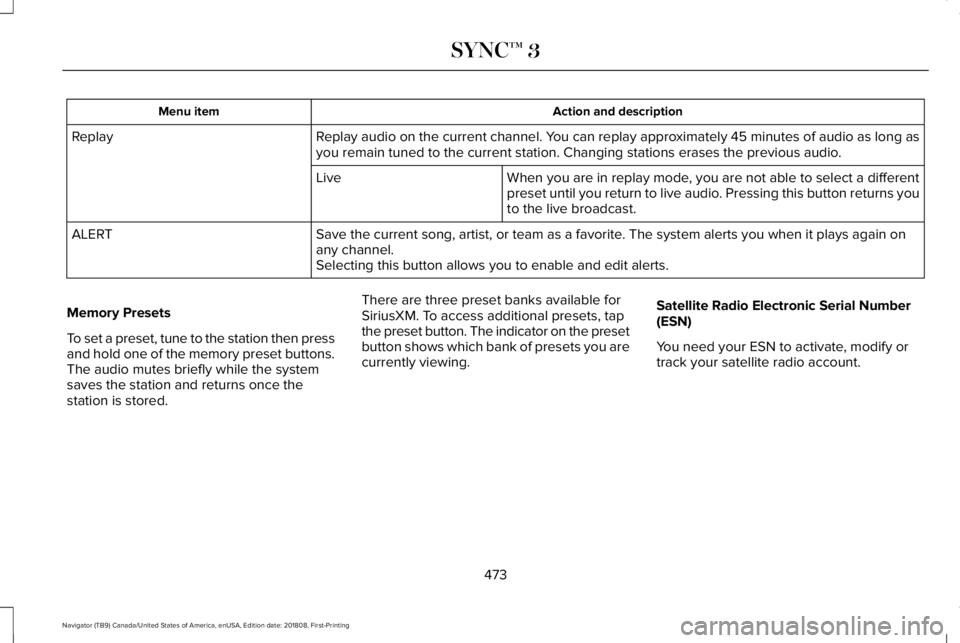
Action and descriptionMenu item
Replay audio on the current channel. You can replay approximately 45 minutes of audio as long asyou remain tuned to the current station. Changing stations erases the previous audio.Replay
When you are in replay mode, you are not able to select a differentpreset until you return to live audio. Pressing this button returns youto the live broadcast.
Live
Save the current song, artist, or team as a favorite. The system alerts you when it plays again onany channel.ALERT
Selecting this button allows you to enable and edit alerts.
Memory Presets
To set a preset, tune to the station then pressand hold one of the memory preset buttons.The audio mutes briefly while the systemsaves the station and returns once thestation is stored.
There are three preset banks available forSiriusXM. To access additional presets, tapthe preset button. The indicator on the presetbutton shows which bank of presets you arecurrently viewing.
Satellite Radio Electronic Serial Number(ESN)
You need your ESN to activate, modify ortrack your satellite radio account.
473
Navigator (TB9) Canada/United States of America, enUSA, Edition date: 201808, First-Printing
SYNC™ 3
Page 477 of 645
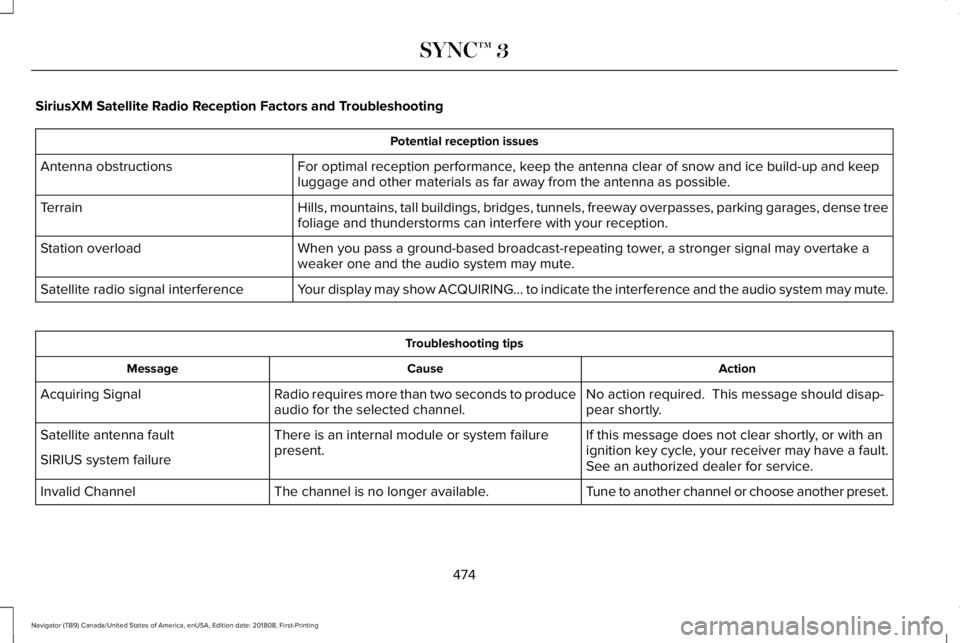
SiriusXM Satellite Radio Reception Factors and Troubleshooting
Potential reception issues
For optimal reception performance, keep the antenna clear of snow and ice build-up and keepluggage and other materials as far away from the antenna as possible.Antenna obstructions
Hills, mountains, tall buildings, bridges, tunnels, freeway overpasses, parking garages, dense treefoliage and thunderstorms can interfere with your reception.Terrain
When you pass a ground-based broadcast-repeating tower, a stronger signal may overtake aweaker one and the audio system may mute.Station overload
Your display may show ACQUIRING... to indicate the interference and the audio system may mute.Satellite radio signal interference
Troubleshooting tips
ActionCauseMessage
No action required. This message should disap-pear shortly.Radio requires more than two seconds to produceaudio for the selected channel.Acquiring Signal
If this message does not clear shortly, or with anignition key cycle, your receiver may have a fault.See an authorized dealer for service.
There is an internal module or system failurepresent.Satellite antenna fault
SIRIUS system failure
Tune to another channel or choose another preset.The channel is no longer available.Invalid Channel
474
Navigator (TB9) Canada/United States of America, enUSA, Edition date: 201808, First-Printing
SYNC™ 3
Page 478 of 645
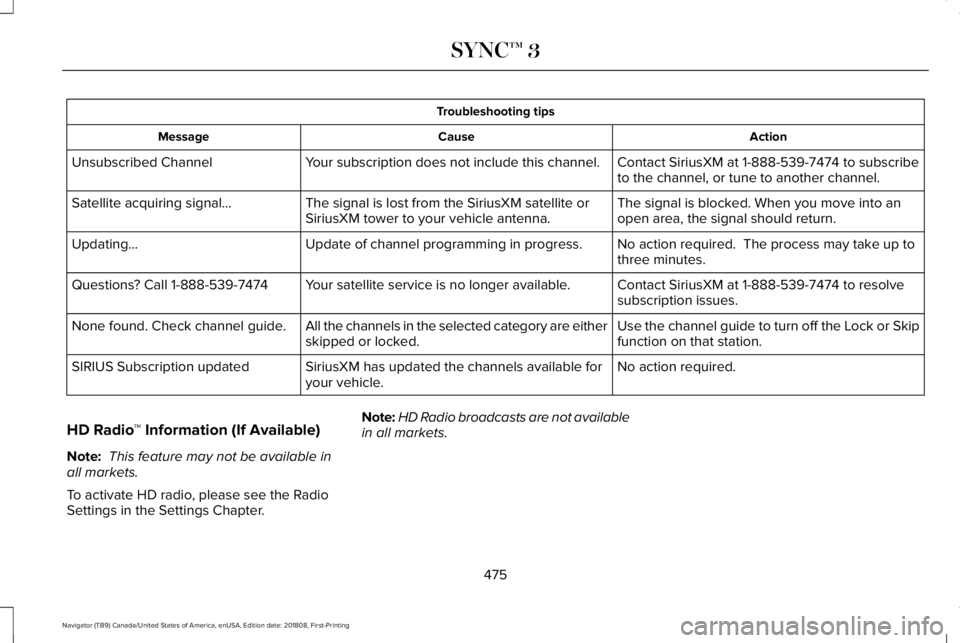
Troubleshooting tips
ActionCauseMessage
Contact SiriusXM at 1-888-539-7474 to subscribeto the channel, or tune to another channel.Your subscription does not include this channel.Unsubscribed Channel
The signal is blocked. When you move into anopen area, the signal should return.The signal is lost from the SiriusXM satellite orSiriusXM tower to your vehicle antenna.Satellite acquiring signal…
No action required. The process may take up tothree minutes.Update of channel programming in progress.Updating…
Contact SiriusXM at 1-888-539-7474 to resolvesubscription issues.Your satellite service is no longer available.Questions? Call 1-888-539-7474
Use the channel guide to turn off the Lock or Skipfunction on that station.All the channels in the selected category are eitherskipped or locked.None found. Check channel guide.
No action required.SiriusXM has updated the channels available foryour vehicle.SIRIUS Subscription updated
HD Radio™ Information (If Available)
Note: This feature may not be available inall markets.
To activate HD radio, please see the RadioSettings in the Settings Chapter.
Note:HD Radio broadcasts are not availablein all markets.
475
Navigator (TB9) Canada/United States of America, enUSA, Edition date: 201808, First-Printing
SYNC™ 3
Page 479 of 645
HD Radio technology is the digital evolutionof analog AM/FM radio. Your system has aspecial receiver that allows it to receivedigital broadcasts (where available) inaddition to the analog broadcasts, it alreadyreceives. Digital broadcasts provide a bettersound quality than analog broadcasts withfree, crystal-clear audio and no static ordistortion. For more information, and a guideto available stations and programming,please visit:
Website
www.hdradio.com
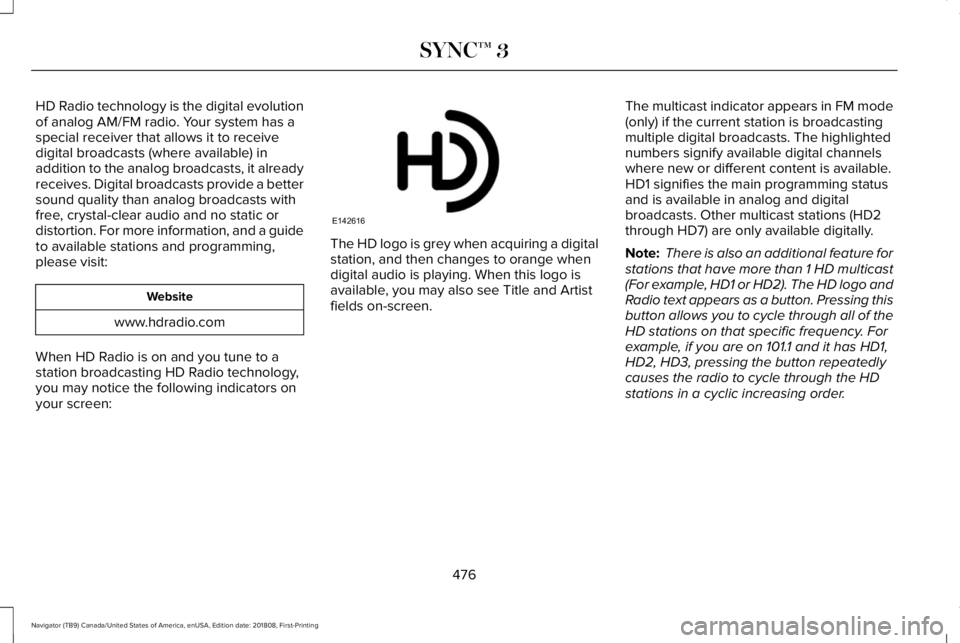
When HD Radio is on and you tune to astation broadcasting HD Radio technology,you may notice the following indicators onyour screen:
The HD logo is grey when acquiring a digitalstation, and then changes to orange whendigital audio is playing. When this logo isavailable, you may also see Title and Artistfields on-screen.
The multicast indicator appears in FM mode(only) if the current station is broadcastingmultiple digital broadcasts. The highlightednumbers signify available digital channelswhere new or different content is available.HD1 signifies the main programming statusand is available in analog and digitalbroadcasts. Other multicast stations (HD2through HD7) are only available digitally.
Note: There is also an additional feature forstations that have more than 1 HD multicast(For example, HD1 or HD2). The HD logo andRadio text appears as a button. Pressing thisbutton allows you to cycle through all of theHD stations on that specific frequency. Forexample, if you are on 101.1 and it has HD1,HD2, HD3, pressing the button repeatedlycauses the radio to cycle through the HDstations in a cyclic increasing order.
476
Navigator (TB9) Canada/United States of America, enUSA, Edition date: 201808, First-Printing
SYNC™ 3E142616
Page 480 of 645
When HD Radio broadcasts are active, you can access the following functions:
Action and descriptionMessage
Allows you to save an active channel as a memory preset. Touch and hold a memory preset slotuntil the sound returns. There is a brief mute while the radio saves the station. Sound returnswhen the channel saves. When switching to an HD2 or HD3 memory preset, the sound mutesbefore the digital audio plays, because the system has to reacquire the digital signal.
Presets
Note:As with any station you save, you cannot access the saved station if your vehicle is outside the station’s reception area.
HD Radio Reception and Station Troubleshooting
Potential reception issues
If you are listening to a multicast station and you are on the fringe of the reception area, the stationmay mute due to weak signal strength.Reception area
If you are listening to HD1, the system changes back to the analog broadcast until the digitalbroadcast is available again. However, if you are listening to any of the possible HD2-HD7 multicastchannels, the station mutes and stays muted unless it is able to connect to the digital signal again.
When the system first receives a station (aside from HD2-HD7 multicast stations), it first plays thestation in the analog version. Once the receiver verifies the station is an HD Radio station, it shiftsto the digital version. Depending on the station quality, you may hear a slight sound change whenthe station changes from analog to digital. Blending is the shift from analog to digital sound ordigital back to analog sound.
Station blending
477
Navigator (TB9) Canada/United States of America, enUSA, Edition date: 201808, First-Printing
SYNC™ 3
Page 481 of 645
In order to provide the best possibleexperience, use the contact form to reportany station issues found while listening to astation broadcasting with HD Radio
technology. Independent entities own andoperate each station. These stations areresponsible for ensuring all audio streamsand data fields are accurate.
Potential station issues
ActionCauseIssues
No action required. This is a broadcast issue.This is poor time alignment by the radio broad-caster.Echo, stutter, skip or repeat in audio.Increase or decrease in audiovolume.
No action required. The reception issue may clearup as you continue to drive.The radio is shifting between analog and digitalaudio.Sound fading or blending in and out.
No action required. This is normal behavior. Waituntil the audio is available.The digital multicast is not available until the HDRadio broadcast is decoded. Once decoded, theaudio is available.
There is an audio mute delay whenselecting HD2 or HD3, multicastpreset or Direct Tune.
No action required. The station is not available inyour current location.The previously stored multicast preset or directtune is not available in your current reception area.Cannot access HD2 or HD3 multicastchannel when recalling a preset orfrom a direct tune.
Fill out the station issue form. *Data service issue by the radio broadcaster.Text information does not matchcurrently playing audio.
Fill out the station issue form. *Data service issue by the radio broadcaster.There is no text information shownfor currently selected frequency.
478
Navigator (TB9) Canada/United States of America, enUSA, Edition date: 201808, First-Printing
SYNC™ 3
Page 482 of 645
HD Radio Technology manufactured underlicense from DTS Inc. U.S. and foreignpatents. HD Radio and the HD and HD Radiologos are proprietary trademarks of DTS Inc.Ford Motor Company and DTS Inc. are notresponsible for the content sent using HDRadio technology. Content may be changed,added or deleted at any time at the stationowner's discretion.
* You can find the form here:
Website
http://hdradio.com/stations/feedback
CD
Once you select this option, the systemreturns you to the main audio screen.
The current audio information appears onthe screen.
The following buttons are also available:
FunctionButton
You can use the browse button to select a track.Browse
Select this button and a small number one displays to indicate the track is set to repeat.RepeatFor MP3 CDs, this button allows you to toggle through repeat off, repeat one track (a small numberone displays), and repeat current folder (a small folder displays).
Select the shuffle symbol to have the audio on the disk play in random order.Shuffle
You can use the forward, reverse, pause orplay buttons to control the audio playback.
Bluetooth Stereo or USB
Bluetooth Stereo and USB allow you toaccess media that you store on yourBluetooth device or USB device such asmusic, audio books or podcasts.
479
Navigator (TB9) Canada/United States of America, enUSA, Edition date: 201808, First-Printing
SYNC™ 3
Page 485 of 645
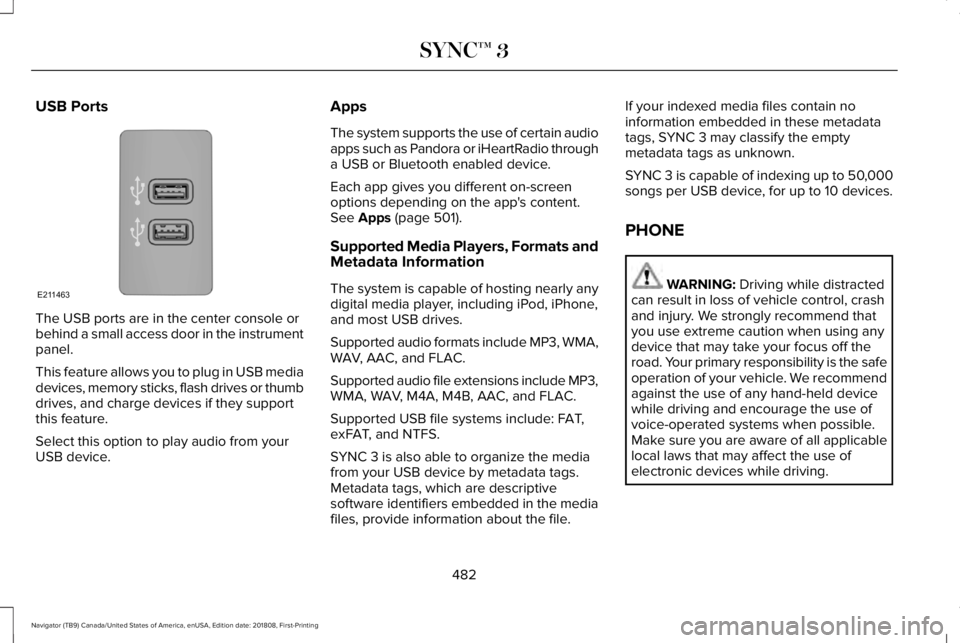
USB Ports
The USB ports are in the center console orbehind a small access door in the instrumentpanel.
This feature allows you to plug in USB mediadevices, memory sticks, flash drives or thumbdrives, and charge devices if they supportthis feature.
Select this option to play audio from yourUSB device.
Apps
The system supports the use of certain audioapps such as Pandora or iHeartRadio througha USB or Bluetooth enabled device.
Each app gives you different on-screenoptions depending on the app's content.See Apps (page 501).
Supported Media Players, Formats andMetadata Information
The system is capable of hosting nearly anydigital media player, including iPod, iPhone,and most USB drives.
Supported audio formats include MP3, WMA,WAV, AAC, and FLAC.
Supported audio file extensions include MP3,WMA, WAV, M4A, M4B, AAC, and FLAC.
Supported USB file systems include: FAT,exFAT, and NTFS.
SYNC 3 is also able to organize the mediafrom your USB device by metadata tags.Metadata tags, which are descriptivesoftware identifiers embedded in the mediafiles, provide information about the file.
If your indexed media files contain noinformation embedded in these metadatatags, SYNC 3 may classify the emptymetadata tags as unknown.
SYNC 3 is capable of indexing up to 50,000songs per USB device, for up to 10 devices.
PHONE
WARNING: Driving while distractedcan result in loss of vehicle control, crashand injury. We strongly recommend thatyou use extreme caution when using anydevice that may take your focus off theroad. Your primary responsibility is the safeoperation of your vehicle. We recommendagainst the use of any hand-held devicewhile driving and encourage the use ofvoice-operated systems when possible.Make sure you are aware of all applicablelocal laws that may affect the use ofelectronic devices while driving.
482
Navigator (TB9) Canada/United States of America, enUSA, Edition date: 201808, First-Printing
SYNC™ 3E211463
Page 514 of 645
Action and DescriptionMenu Item
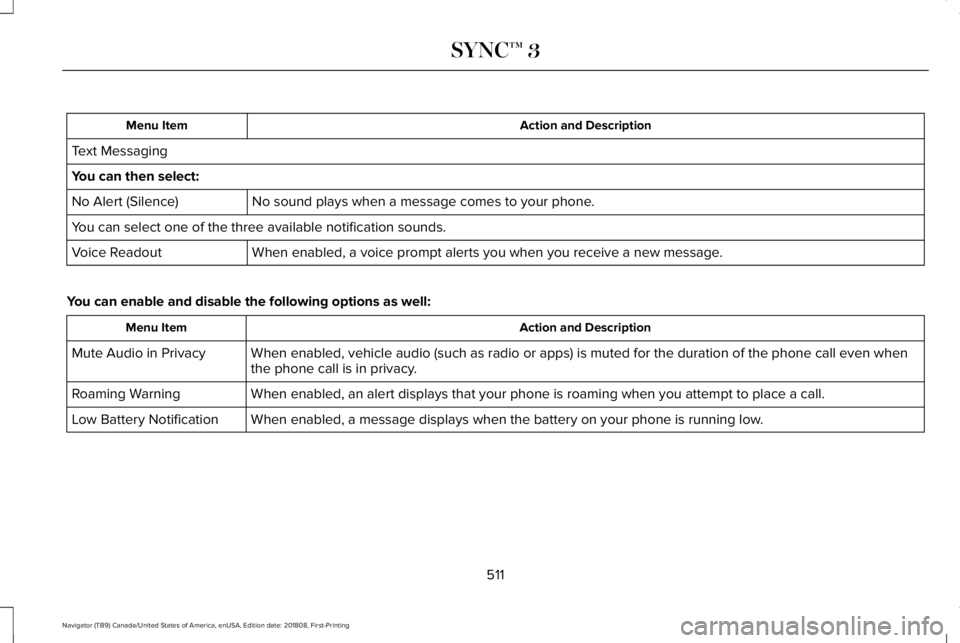
Text Messaging
You can then select:
No sound plays when a message comes to your phone.No Alert (Silence)
You can select one of the three available notification sounds.
When enabled, a voice prompt alerts you when you receive a new message.Voice Readout
You can enable and disable the following options as well:
Action and DescriptionMenu Item
When enabled, vehicle audio (such as radio or apps) is muted for the duration of the phone call even whenthe phone call is in privacy.Mute Audio in Privacy
When enabled, an alert displays that your phone is roaming when you attempt to place a call.Roaming Warning
When enabled, a message displays when the battery on your phone is running low.Low Battery Notification
511
Navigator (TB9) Canada/United States of America, enUSA, Edition date: 201808, First-Printing
SYNC™ 3
Page 516 of 645
The screen lists contacts in the phone book.Select the contact that you want to set asemergency contact. You can set EmergencyContact 2 by same process. You can set twoEmergency Contacts in total.
Note:After SYNC3 tries to place anemergency call, the Emergency Contactbutton displays on the touch screen. Youneed to press the button to call the contactthrough your Bluetooth phone.
Note:If the vehicle is equipped withnavigation, a map with your current streetinformation displays on the screen when 911Assist is in process.
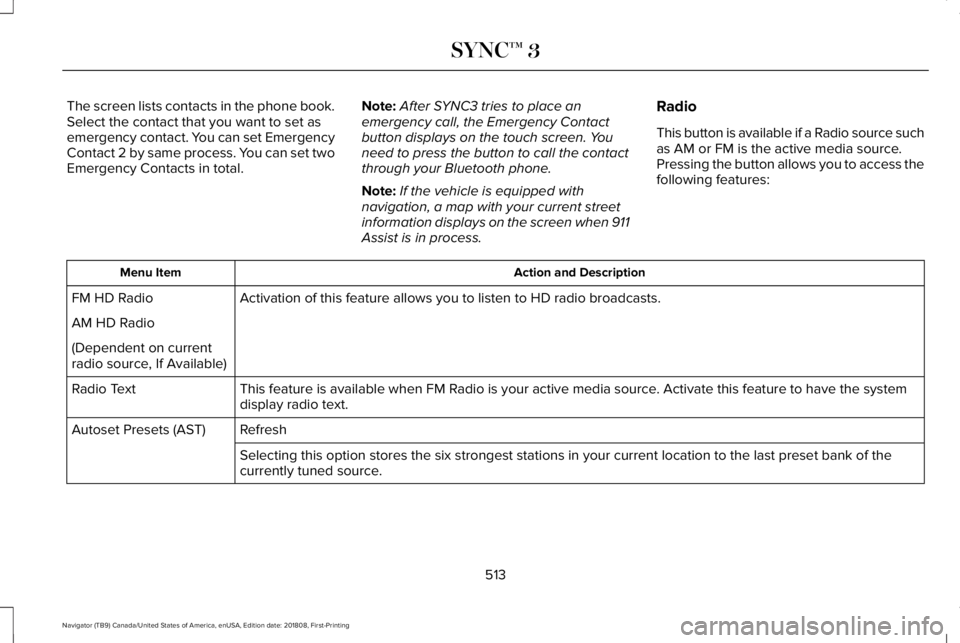
Radio
This button is available if a Radio source suchas AM or FM is the active media source.Pressing the button allows you to access thefollowing features:
Action and DescriptionMenu Item
Activation of this feature allows you to listen to HD radio broadcasts.FM HD Radio
AM HD Radio
(Dependent on currentradio source, If Available)
This feature is available when FM Radio is your active media source. Activate this feature to have the systemdisplay radio text.Radio Text
RefreshAutoset Presets (AST)
Selecting this option stores the six strongest stations in your current location to the last preset bank of thecurrently tuned source.
513
Navigator (TB9) Canada/United States of America, enUSA, Edition date: 201808, First-Printing
SYNC™ 3