tires LINCOLN NAVIGATOR 2019 Workshop Manual
[x] Cancel search | Manufacturer: LINCOLN, Model Year: 2019, Model line: NAVIGATOR, Model: LINCOLN NAVIGATOR 2019Pages: 645, PDF Size: 5.02 MB
Page 419 of 645
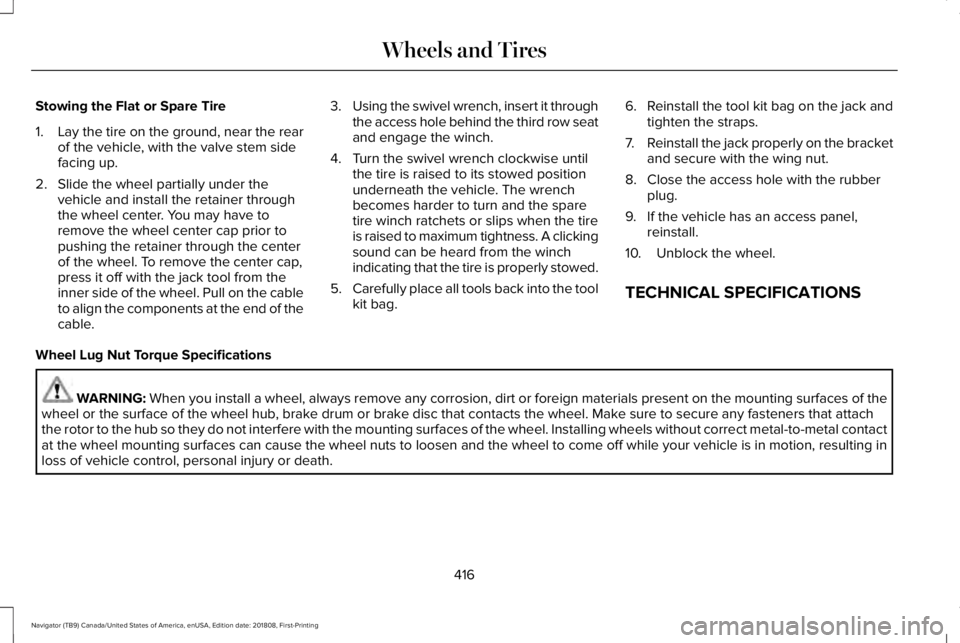
Stowing the Flat or Spare Tire
1.Lay the tire on the ground, near the rearof the vehicle, with the valve stem sidefacing up.
2. Slide the wheel partially under thevehicle and install the retainer throughthe wheel center. You may have toremove the wheel center cap prior topushing the retainer through the centerof the wheel. To remove the center cap,press it off with the jack tool from theinner side of the wheel. Pull on the cableto align the components at the end of thecable.
3.Using the swivel wrench, insert it throughthe access hole behind the third row seatand engage the winch.
4. Turn the swivel wrench clockwise untilthe tire is raised to its stowed positionunderneath the vehicle. The wrenchbecomes harder to turn and the sparetire winch ratchets or slips when the tireis raised to maximum tightness. A clickingsound can be heard from the winchindicating that the tire is properly stowed.
5.Carefully place all tools back into the toolkit bag.
6.Reinstall the tool kit bag on the jack andtighten the straps.
7.Reinstall the jack properly on the bracketand secure with the wing nut.
8. Close the access hole with the rubberplug.
9. If the vehicle has an access panel,reinstall.
10. Unblock the wheel.
TECHNICAL SPECIFICATIONS
Wheel Lug Nut Torque Specifications
WARNING: When you install a wheel, always remove any corrosion, dirt or foreign materials present on the mounting surfaces of thewheel or the surface of the wheel hub, brake drum or brake disc that contacts the wheel. Make sure to secure any fasteners that attachthe rotor to the hub so they do not interfere with the mounting surfaces of the wheel. Installing wheels without correct metal-to-metal contactat the wheel mounting surfaces can cause the wheel nuts to loosen and the wheel to come off while your vehicle is in motion, resulting inloss of vehicle control, personal injury or death.
416
Navigator (TB9) Canada/United States of America, enUSA, Edition date: 201808, First-Printing
Wheels and Tires
Page 420 of 645
lb.ft (Nm)1Bolt Size
150 lb.ft (204 Nm)M14 x 1.5
1 Torque specifications are for nut and bolt threads free of dirt and rust. Use only our recommended replacement fasteners.
Retighten the lug nuts to the specified torque within 100 miles (160 kilometers) after any wheel disturbance, such as tire rotation, changing aflat tire or wheel removal.
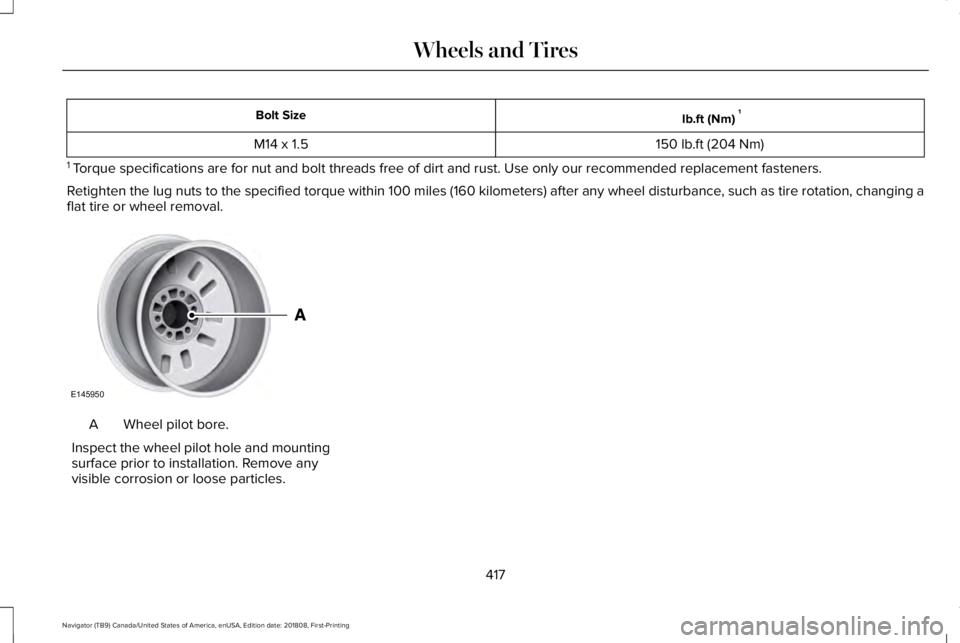
Wheel pilot bore.A
Inspect the wheel pilot hole and mountingsurface prior to installation. Remove anyvisible corrosion or loose particles.
417
Navigator (TB9) Canada/United States of America, enUSA, Edition date: 201808, First-Printing
Wheels and TiresE145950
Page 552 of 645
Check Every Month
Engine oil level.
Function of all interior and exterior lights.
Tires (including spare) for wear and proper pressure.
Windshield washer fluid level.
Fuel and water separator. Drain if necessary (or if indicated by the information display).
Holes and slots in the tail pipe to make sure they are functional and clear of debris.
Check Every Six Months
Battery connections. Clean if necessary.
Body and door drain holes for obstructions. Clean if necessary.
Cooling system fluid level and coolant strength.
Door weatherstrips for wear. Lubricate if necessary.
Hinges, latches and outside locks for proper operation. Lubricate if necessary.
Parking brake for proper operation.
549
Navigator (TB9) Canada/United States of America, enUSA, Edition date: 201808, First-Printing
Scheduled Maintenance
Page 554 of 645
Multi-Point Inspection
Steering and linkageExterior lamps operation
Tires (including spare) for wear and proper pressure2Fluid levels1; fill if necessary
Windshield for cracks, chips or pitsFor oil and fluid leaks
Washer spray and wiper operationHalf-shaft dust boots
1 Brake, coolant recovery reservoir, automatic transmission and window washer2If your vehicle is equipped with a temporary mobility kit, check the tire sealant expiration Use By date on the canister. Replace as needed.
Be sure to ask your dealership serviceadvisor or technician about the multi-pointvehicle inspection. It is a comprehensive wayto perform a thorough inspection of yourvehicle. Your checklist gives you immediatefeedback on the overall condition of yourvehicle.
NORMAL SCHEDULED
MAINTENANCE
Intelligent Oil-Life Monitor
Your vehicle is equipped with an IntelligentOil-Life Monitor that determines when youshould change the engine oil based on howyour vehicle is used. By using severalimportant factors in its calculations, themonitor helps reduce the cost of owning yourvehicle and reduces environmental waste atthe same time.
This means you do not have to remember tochange the oil on a mileage-based schedule.Your vehicle lets you know when an oilchange is due by displaying a message inthe information display.
The following table provides examples ofvehicle use and its impact on oil changeintervals. It is a guideline only. Actual oilchange intervals depend on several factorsand generally decrease with severity of use.
551
Navigator (TB9) Canada/United States of America, enUSA, Edition date: 201808, First-Printing
Scheduled Maintenance
Page 556 of 645
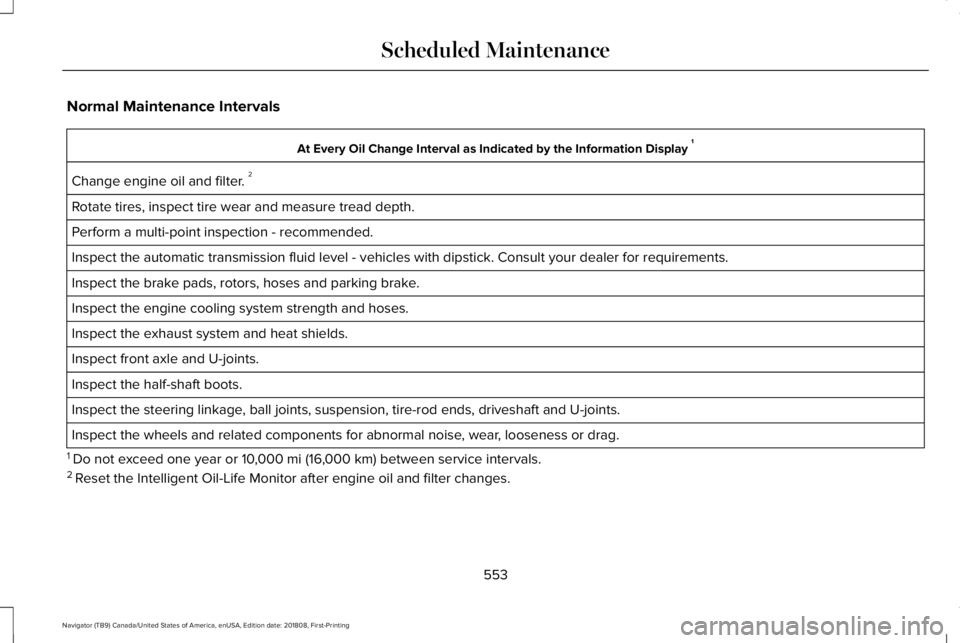
Normal Maintenance Intervals
At Every Oil Change Interval as Indicated by the Information Display 1
Change engine oil and filter. 2
Rotate tires, inspect tire wear and measure tread depth.
Perform a multi-point inspection - recommended.
Inspect the automatic transmission fluid level - vehicles with dipstick. Consult your dealer for requirements.
Inspect the brake pads, rotors, hoses and parking brake.
Inspect the engine cooling system strength and hoses.
Inspect the exhaust system and heat shields.
Inspect front axle and U-joints.
Inspect the half-shaft boots.
Inspect the steering linkage, ball joints, suspension, tire-rod ends, driveshaft and U-joints.
Inspect the wheels and related components for abnormal noise, wear, looseness or drag.
1 Do not exceed one year or 10,000 mi (16,000 km) between service intervals.2 Reset the Intelligent Oil-Life Monitor after engine oil and filter changes.
553
Navigator (TB9) Canada/United States of America, enUSA, Edition date: 201808, First-Printing
Scheduled Maintenance
Page 559 of 645
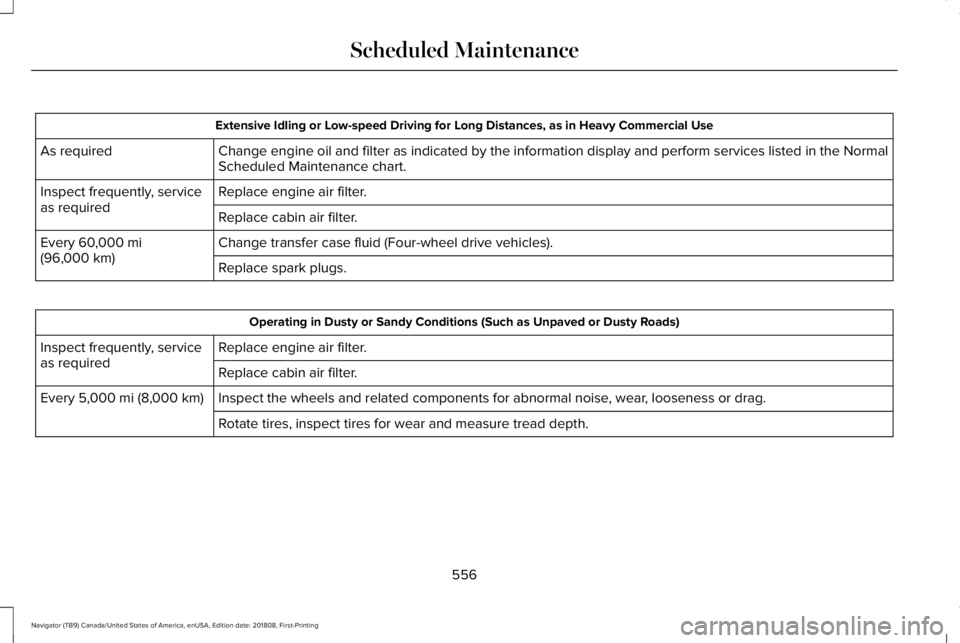
Extensive Idling or Low-speed Driving for Long Distances, as in Heavy Commercial Use
Change engine oil and filter as indicated by the information display and perform services listed in the NormalScheduled Maintenance chart.As required
Replace engine air filter.Inspect frequently, serviceas requiredReplace cabin air filter.
Change transfer case fluid (Four-wheel drive vehicles).Every 60,000 mi(96,000 km)Replace spark plugs.
Operating in Dusty or Sandy Conditions (Such as Unpaved or Dusty Roads)
Replace engine air filter.Inspect frequently, serviceas requiredReplace cabin air filter.
Inspect the wheels and related components for abnormal noise, wear, looseness or drag.Every 5,000 mi (8,000 km)
Rotate tires, inspect tires for wear and measure tread depth.
556
Navigator (TB9) Canada/United States of America, enUSA, Edition date: 201808, First-Printing
Scheduled Maintenance
Page 560 of 645
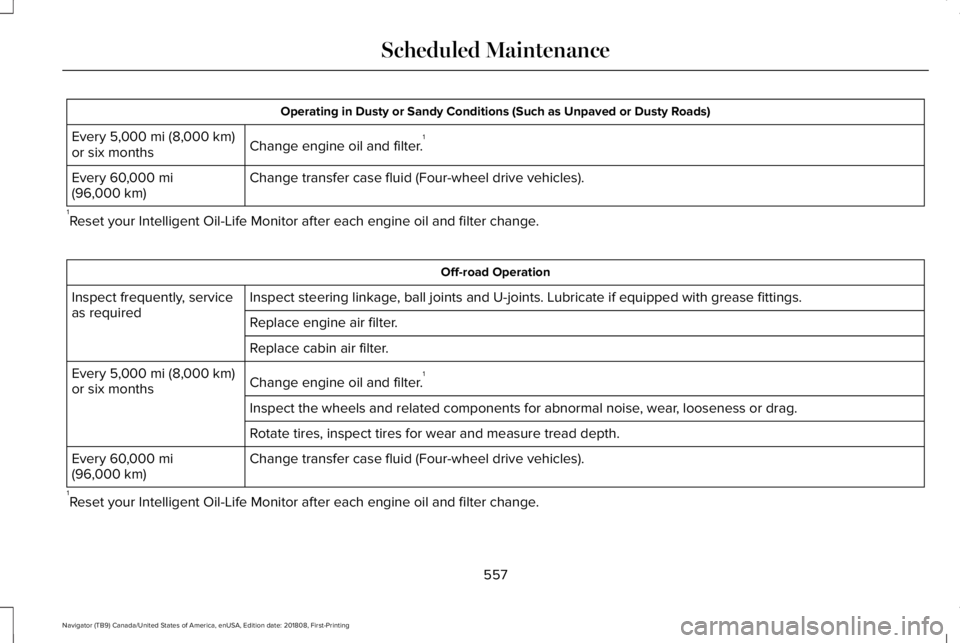
Operating in Dusty or Sandy Conditions (Such as Unpaved or Dusty Roads)
Change engine oil and filter.1Every 5,000 mi (8,000 km)or six months
Change transfer case fluid (Four-wheel drive vehicles).Every 60,000 mi(96,000 km)
1Reset your Intelligent Oil-Life Monitor after each engine oil and filter change.
Off-road Operation
Inspect steering linkage, ball joints and U-joints. Lubricate if equipped with grease fittings.Inspect frequently, serviceas requiredReplace engine air filter.
Replace cabin air filter.
Change engine oil and filter.1Every 5,000 mi (8,000 km)or six months
Inspect the wheels and related components for abnormal noise, wear, looseness or drag.
Rotate tires, inspect tires for wear and measure tread depth.
Change transfer case fluid (Four-wheel drive vehicles).Every 60,000 mi(96,000 km)
1Reset your Intelligent Oil-Life Monitor after each engine oil and filter change.
557
Navigator (TB9) Canada/United States of America, enUSA, Edition date: 201808, First-Printing
Scheduled Maintenance
Page 636 of 645
Integrated Trailer Brake Controller.................314Launching or Retrieving a Boat or PersonalWatercraft (PWC).............................................319Safety Chains........................................................313Trailer Brakes........................................................314Trailer Hitch Cover...............................................311Trailer Lamps.........................................................317Trailer Towing Connector (Vehicles with aTrailer Towing Package and 7–PinConnector).........................................................311When Towing a Trailer........................................318
Event Data RecordingSee: Data Recording.............................................10
Export Unique Options...................................14Exterior Mirrors..............................................106360-Degree Camera..........................................108Auto-Dimming Feature......................................108Auto-Folding Mirrors...........................................107Blind Spot Monitor..............................................108Fold-Away Exterior Mirrors...............................107Heated Exterior Mirrors.....................................108Lincoln Welcome Mat.........................................108Memory Mirrors...................................................108Power Exterior Mirrors.......................................106Signal Indicator Mirrors......................................108
F
Fastening the Seatbelts................................40Rear Inflatable Seatbelt.......................................44Seatbelt Locking Modes.....................................42Using Seatbelts During Pregnancy..................42
Flat TireSee: Changing a Road Wheel..........................410
Floor Mats.......................................................324Fog Lamps - FrontSee: Front Fog Lamps.........................................101
Foot PedalsSee: Adjusting the Pedals..................................93
Four-Wheel Drive..........................................216Front Fog Lamps............................................101Front Parking Aid..........................................238Obstacle Distance Indicator............................238
Front Passenger Sensing System..............54Fuel and Refueling........................................199Fuel Consumption.......................................205Advertised Capacity..........................................205Fuel Economy.....................................................205
Fuel Filler Funnel Location........................200Fuel Filter.........................................................371Fuel Quality...................................................200Choosing the Right Fuel..................................200
Fuel Shutoff....................................................327Fuses................................................................341
Fuse Specification Chart.............................341Passenger Compartment Fuse Panel............351Power Distribution Box......................................341
G
Garage Door Opener....................................181Garage Door OpenerSee: Universal Garage Door Opener..............181
Gauges..............................................................113Engine Coolant Temperature Gauge..............114Fuel Gauge.............................................................114Left and Right Information Group.....................114Status Bar...............................................................114
GearboxSee: Transmission...............................................210
General Information on RadioFrequencies....................................................61Intelligent Access..................................................61
General Maintenance Information...........547Multi-Point Inspection.......................................550Owner Checks and Services...........................548Protecting Your Investment..............................547Why Maintain Your Vehicle?.............................547Why Maintain Your Vehicle at YourDealership?......................................................547
Getting Assistance Outside the U.S. andCanada.........................................................337
633
Navigator (TB9) Canada/United States of America, enUSA, Edition date: 201808, First-Printing
Index
Page 642 of 645
Side Sensing System..................................239Obstacle Distance Indicator............................239
Sitting in the Correct Position....................158Snow ChainsSee: Using Snow Chains..................................404
Spare WheelSee: Changing a Road Wheel..........................410
Special Notices.................................................13New Vehicle Limited Warranty...........................13On Board Diagnostics Data LinkConnector............................................................13Special Instructions...............................................13
Special Operating Conditions ScheduledMaintenance...............................................555Exceptions............................................................558
Speed ControlSee: Cruise Control...........................................255
Stability Control............................................232Principle of Operation.......................................232
Starting a Gasoline Engine.........................192Automatic Engine Shutdown............................193Failure to Start......................................................193Guarding Against Exhaust Fumes...................194Important Ventilating Information...................194Stopping the Engine When Your Vehicle isMoving...............................................................194Stopping the Engine When Your Vehicle isStationary..........................................................194
Starting and Stopping the Engine..............191General Information.............................................191
Steering...........................................................279Electric Power Steering.....................................279
Steering Wheel................................................89Storage Compartments...............................189SunroofSee: Moonroof......................................................110
Sun Visors........................................................110Illuminated Vanity Mirror....................................110
Supplementary Restraints System..............51Principle of Operation..........................................51
Symbols Glossary..............................................7SYNC™ 3...........................................................441General Information............................................441
SYNC™ 3 Troubleshooting..........................524
T
Technical SpecificationsSee: Capacities and Specifications................418
The Better Business Bureau (BBB) AutoLine Program (U.S. Only)..........................335Tire Care.........................................................390Glossary of Tire Terminology...........................391Information About Uniform Tire QualityGrading.............................................................390
Information Contained on the TireSidewall............................................................392Temperature A B C..............................................391Traction AA A B C................................................391Treadwear.............................................................391
Tire Pressure Monitoring System............405Changing Tires With a Tire PressureMonitoring System.........................................407Understanding Your Tire Pressure MonitoringSystem .............................................................407
TiresSee: Wheels and Tires......................................388
Toll Reader......................................................109Installing the Toll Reader...................................109
Towing a Trailer.............................................297Load Placement..................................................297
Towing Points.................................................331Towing the Vehicle on Four Wheels........319Four-wheel-down Towing................................320Recreational Towing...........................................319
Towing.............................................................297Traction Control.............................................231Principle of Operation........................................231
Trailer Reversing Aids.................................298Principle of Operation.......................................298Pro Trailer Backup Assist™...............................298Setting Up Pro Trailer Backup Assist............299Troubleshooting..................................................303
639
Navigator (TB9) Canada/United States of America, enUSA, Edition date: 201808, First-Printing
Index
Page 643 of 645
Using Pro Trailer Backup Assist.....................302
Trailer Sway Control....................................308Transfer Case Fluid Check.........................369Transmission Code Designation...............421Transmission...................................................210Transporting the Vehicle.............................331Type Approvals..............................................615Radio Frequency Certification for Keys andRemote Controls............................................627Radio Frequency Certifications for Blind SpotInformation System.......................................625Radio Frequency Certifications for BodyControl Module...............................................627Radio Frequency Certifications for CruiseControl Module...............................................627Radio Frequency Certifications for Mid RangeRadar..................................................................619Radio Frequency Certifications for PassiveAnti-Theft System..........................................620Radio Frequency Certifications for RadioTransceiver Module.......................................623Radio Frequency Certifications for SYNC3..........................................................................627Radio Frequency Certifications for TirePressure Monitoring Sensor(s)....................615Radio Frequency Certifications for WirelessCharging..........................................................626
Radio Frequency Statement for AudioUnit....................................................................628
U
Under Hood Overview................................360Unique Driving Characteristics..................196Universal Garage Door Opener.................181HomeLink Wireless Control System................181
USB Port.........................................................439Using Adaptive Cruise Control.................256Automatic Cancellation....................................260Blocked Sensor..................................................262Canceling the Set Speed.................................260Changing the Set Speed..................................259Detection Issues.................................................260Following a Vehicle...........................................258Following a Vehicle to a CompleteStop...................................................................258Hilly Condition Usage.......................................260Overriding the Set Speed................................259Park Brake Application.....................................260Resuming the Set Speed.................................260Setting the Adaptive Cruise Speed...............257Setting the Adaptive Cruise Speed When YourVehicle is Stationary......................................257Setting the Gap Distance.................................258Switching Adaptive Cruise Control Off........260
Switching Adaptive Cruise Control On.........257Switching to Normal Cruise Control..............263System Not Available........................................262
Using Cruise Control...................................255Canceling the Set Speed.................................256Changing the Set Speed..................................255Resuming the Set Speed.................................256Setting the Cruise Speed.................................255Switching Cruise Control Off...........................256Switching Cruise Control On...........................255
Using Four-Wheel Drive..............................2164X4 Indicator Lights............................................2164X4 Modes............................................................216Driving Off-Road With Truck and UtilityVehicles.............................................................219How Your Vehicle Differs From OtherVehicles.............................................................218Operating 4WD Vehicles With Spare orMismatched Tires...........................................218
Using Hill Descent Control........................235Hill Descent Modes...........................................235
Using MyKey With Remote StartSystems..........................................................70Using Power Running Boards......................87Automatic Power Deploy....................................87Automatic Power Stow........................................87Bounce-back..........................................................88Enabling and Disabling.......................................88
640
Navigator (TB9) Canada/United States of America, enUSA, Edition date: 201808, First-Printing
Index