engine LINCOLN NAVIGATOR 2019 Manual PDF
[x] Cancel search | Manufacturer: LINCOLN, Model Year: 2019, Model line: NAVIGATOR, Model: LINCOLN NAVIGATOR 2019Pages: 645, PDF Size: 5.02 MB
Page 316 of 645
Maximum Tongue WeightMaximum Trailer WeightMode
600 lb (272 kg)6,000 lb (2,722 kg)Weight carrying
900 lb (408 kg)9,000 lb (4,082 kg)Weight distributing
Note:These are hitch ratings only. Actualvehicle ratings are dependent on engine,transmission and axle combinations.
Weight-distributing Hitch
WARNING: Do not adjust the springbars so that your vehicle's rear bumper ishigher than before attaching the trailer.Doing so will defeat the function of theweight-distributing hitch, which may causeunpredictable handling, and could resultin serious personal injury.
When hooking-up a trailer using aweight-distributing hitch, always use thefollowing procedure:
1. Park the loaded vehicle, without thetrailer, on a level surface.
2. Measure the height to the top of yourvehicle's front wheel opening on thefender. This is H1.
3. Attach the loaded trailer to your vehiclewithout the weight-distributing barsconnected.
4. Measure the height to the top of yourvehicle's front wheel opening on thefender a second time. This is H2.
5. Install and adjust the tension in theweight-distributing bars so that the heightof your vehicle's front wheel opening onthe fender is approximately half the waydown from H2, toward H1.
6. Check that the trailer is level or slightlynose down toward your vehicle. If not,adjust the ball height accordingly andrepeat Steps 2-6.
When the trailer is level or slightly nose downtoward the vehicle:
•Lock the bar tension adjuster in place.
•Check that the trailer tongue securelyattaches and locks onto the hitch.
•Install safety chains, lighting and trailerbrake controls as required by law or thetrailer manufacturer.
Safety Chains
Note:Do not attach safety chains to thebumper. Always connect the safety chainsto the frame or hook retainers of your trailerhitch.
Install trailer safety chains to the trailer hitchas recommended by the manufacturer. Crossthe chains under the trailer tongue and allowenough slack for turning tight corners. Donot allow the chains to drag on the ground.
313
Navigator (TB9) Canada/United States of America, enUSA, Edition date: 201808, First-Printing
Towing
Page 320 of 645
Points to Remember
Note:Do not attempt removal of the trailerbrake controller without consulting theWorkshop Manual. Damage to the unit mayresult.
•Adjust gain setting before using thetrailer brake controller for the first time.
•Adjust gain setting, using the procedureabove, whenever road, weather andtrailer or vehicle loading conditionschange from when the gain was initiallyset.
•Only use the manual control lever forproper adjustment of the gain duringtrailer setup. Misuse, such as applicationduring trailer sway, could cause instabilityof trailer or tow vehicle.
•Avoid towing in adverse weatherconditions. The trailer brake controllerdoes not provide anti-lock control of thetrailer wheels. Trailer wheels can lock upon slippery surfaces, resulting in reducedstability of trailer and tow vehicle.
•The trailer brake controller is equippedwith a feature that reduces output atvehicle speeds below 11 mph (18 km/h)so trailer and vehicle braking is not jerkyor harsh. This feature is only availablewhen applying the brakes using yourvehicle's brake pedal, not the controller.
•The controller interacts with the brakecontrol system and powertrain controlsystem of your vehicle to provide thebest performance on different roadconditions.
•Your vehicle's brake system and thetrailer brake system work independentlyof each other. Changing the gain settingon the controller does not affect theoperation of your vehicle's brakeswhether you attach a trailer or not.
•When you switch the engine off, thecontroller output is disabled and thedisplay and module shut down. Thecontroller module and display turn onwhen you switch the ignition on.
•The trailer brake controller is only afactory-installed or dealer-installed item.Lincoln is not responsible for warranty orperformance of the controller due tomisuse or customer installation.
Trailer Lamps
WARNING: Never connect any trailerlamp wiring to the vehicle's tail lamp wiring;this may damage the electrical systemresulting in fire. Contact your authorizeddealer as soon as possible for assistancein proper trailer tow wiring installation.Additional electrical equipment may berequired.
Trailer lamps are required on most towedvehicles. Make sure all running lights, brakelights, turn signals and hazard lights areworking.
317
Navigator (TB9) Canada/United States of America, enUSA, Edition date: 201808, First-Printing
Towing
Page 321 of 645
Before Towing a Trailer
Practice turning, stopping and backing up toget the feel of your vehicle-trailercombination before starting on a trip. Whenturning, make wider turns so the trailerwheels clear curbs and other obstacles.
When Towing a Trailer
•Do not drive faster than 70 mph(113 km/h) during the first 500 mi(800 km).
•Do not make full-throttle starts.
•Check your hitch, electrical connectionsand trailer wheel lug nuts thoroughly afteryou have traveled 50 mi (80 km).
•When stopped in congested or heavytraffic during hot weather, place thetransmission in park (P) to aid engine andtransmission cooling and to help A/Cperformance.
•Turn off the speed control when carryingheavy loads or in hilly terrain. The speedcontrol may turn off automatically whenyou are towing on long, steep grades.
•Shift to a lower gear when driving downa long or steep hill. Do not apply thebrakes continuously, as they mayoverheat and become less effective.
•If your transmission has a Grade Assistor Tow/Haul feature, use this featurewhen towing. This provides enginebraking and helps eliminate excessivetransmission shifting for optimum fueleconomy and transmission cooling.
•If your vehicle has AdvanceTrac withRSC, this system may turn on duringtypical cornering maneuvers with aheavily loaded trailer. This is normal.Turning the corner at a slower speedwhile towing may reduce this tendency.
•If your vehicle has Adaptive suspension,you can select NORMAL or SPORT drivecontrol modes for better experiencewhen towing a trailer. See InformationDisplays (page 120).
•If you are towing a trailer frequently inhot weather, hilly conditions, at the grosscombined weight rating (or anycombination of these factors), considerrefilling your rear axle with synthetic gearlubricant (if the axle is not already filledwith it). See Capacities andSpecifications (page 418).
•Allow more distance for stopping with atrailer attached. Anticipate stops andbrake gradually.
•Avoid parking on a grade. However, ifyou must park on a grade:
1. Turn the steering wheel to point yourvehicle tires away from traffic flow.
2. Set your vehicle parking brake.
3. Place the transmission in park (P).
4.Place wheel chocks in the front and backof the trailer wheels.
Note:Chocks are not included with yourvehicle.
318
Navigator (TB9) Canada/United States of America, enUSA, Edition date: 201808, First-Printing
Towing
Page 323 of 645
Four-wheel Drive Vehicles Without 4x4LOW
If your vehicle does not have 4x4 Low, youcannot tow your vehicle with any wheels onthe ground or vehicle damage may occur.You must tow your vehicle with all fourwheels off the ground, for example whenusing a car-hauling trailer.
Four-wheel Drive Vehicles With 4x4 LOW
You can only tow a vehicle with 4X4 LOWwith all wheels on the ground by placing thetransfer case in its neutral position andengaging the four wheel down towingfeature. Perform the steps outlined in thefollowing section after positioning yourvehicle behind the tow vehicle and properlysecuring them together.
Four-wheel-down Towing
Note:If completed successfully, theinformation display shows Neutral TowEnabled Leave Transmission in Neutral.This indicates that your vehicle is safe to towwith all wheels on the ground.
Note:If you do not see the message in theinformation display, you must perform theprocedure again from the beginning.
Note:Make sure you properly secure yourvehicle to the tow vehicle.
1. Start your vehicle.
2. Confirm that your vehicle is in NORMALmode. See Drive Mode Control (page284).
3. Place your vehicle in stay in neutralmode. See Automatic Transmission(page 210).
4. Switch your vehicle off by pressing theengine START/STOP button once. ATransmission Not in Park messageappears in the information display.
5.Place your vehicle in accessory mode bypressing the start button once withoutpressing the brake pedal.
6. Press and hold the brake pedal.
7. Enable neutral tow through theinformation display by selecting Settingsfrom the menu. See General Information(page 120).
8. Then select Advanced Settings.
9. Then select Vehicle.
10. Then select Neutral Tow.
11. Press and hold the OK button until theinformation display states Neutral TowEnabled Leave Transmission inNeutral.
Note:If completed successfully, theinformation display shows Neutral TowEnabled Leave Transmission in Neutral.This indicates that your vehicle is safe to towwith all wheels on the ground.
Note:If you do not see the message in theinformation display, you must perform theprocedure again from the beginning.
Note:You may hear an audible noise as thetransfer case shifts into neutral, this isnormal.
12. Leave the transmission in neutral (N)and switch the ignition off by pressingthe engine START/STOP button oncewithout pressing the brake pedal. Youdo not need to leave your keys in thevehicle. You can lock and unlock yourvehicle as you normally do.
320
Navigator (TB9) Canada/United States of America, enUSA, Edition date: 201808, First-Printing
Towing
Page 324 of 645
WARNING: Do not disconnect thebattery during recreational towing. Itprevents the transfer case from shiftingproperly and may cause the vehicle to roll,even if the transmission is in park (P).
WARNING: Shifting the transfer caseto its neutral position for recreationaltowing may cause the vehicle to roll, evenif the transmission is in park (P). It mayinjure the driver and others. Make sure youpress the foot brake and the vehicle is ina secure, safe position when you shift toneutral (N).
Note:Failing to put the transfer case in itsneutral position can damage vehiclecomponents.
Note:You can check four-wheel-downtowing status at any time by opening thedriver's door or turning the ignition to theaccessory or on position. A messageappears in the information display confirmingyour vehicle is in neutral tow.
To exit four-wheel-down towing and returnthe transfer case to its 2H position:
1. With your vehicle still properly securedto the tow vehicle, press the brake pedaland start the engine.
2. Switch your vehicle off by pressing theengine START/STOP button once.
3.Place your vehicle in accessory mode bypressing the start button once withoutpressing the brake pedal.
4. Press the brake pedal.
5.Place the transmission back into park (P).
6. Release the brake pedal.
Note:If completed successfully, theinformation display shows 2H and NeutralTow Disabled.
Note:If the indicator light and message donot display, you must perform the procedureagain from the beginning.
Note:You may hear an audible noise as thetransfer case shifts out of its neutral position,this is normal.
Note:If Shift Delayed Pull Forward displaysin the instrument cluster, transfer case geartooth blockage is present. See theinstructions following this section.
7.Apply the parking brake, then disconnectyour vehicle from the tow vehicle.
8. Release the parking brake, start theengine, and shift the transmission intodrive (D) to make sure the transfer caseis out of the neutral tow position.
9.If the transfer case does not successfullyshift out of neutral (N), set the parkingbrake until you can have your vehicleserviced.
Resolving the Shift Delayed Pull Forwardor To Exit 4x4 LOW Shift to N Message
If the instrument cluster displays thesemessages, perform the following:
1. Press and hold the brake pedal.
2.Put the transmission into neutral (N), thenstart the engine.
3. With the engine running, shift thetransmission into drive (D) and let thevehicle roll forward, up to 3 ft (1 m). Youmay hear an audible noise as the transfercase shifts out of its neutral position. Thisis normal.
321
Navigator (TB9) Canada/United States of America, enUSA, Edition date: 201808, First-Printing
Towing
Page 326 of 645
BREAKING-IN
You need to break in new tires forapproximately 300 mi (480 km). During thistime, your vehicle may exhibit some unusualdriving characteristics.
Avoid driving too fast during the first 1,000 mi(1,600 km). Vary your speed frequently andchange up through the gears early. Do notlabor the engine.
Do not tow during the first 1,000 mi(1,600 km).
REDUCED ENGINE PERFORMANCE
WARNING: If you continue to driveyour vehicle when the engine isoverheating, the engine could stop withoutwarning. Failure to follow this instructioncould result in the loss of control of yourvehicle.
If the engine coolant temperature gaugeneedle moves to the upper limit position, theengine is overheating. See Gauges (page113).
You must only drive your vehicle for a shortdistance if the engine overheats. Thedistance you can travel depends on ambienttemperature, vehicle load and terrain. Theengine continues to operate with limitedpower for a short period of time.
If the engine temperature continues to rise,the fuel supply to the engine reduces. Theair conditioning switches off and the enginecooling fan operates continually.
1. Gradually reduce your speed and stopyour vehicle as soon as it is safe to doso.
2. Immediately switch the engine off toprevent severe engine damage.
3. Wait for the engine to cool down.
4. Check the coolant level. See EngineCoolant Check (page 364).
5. Have your vehicle checked as soon aspossible.
ECONOMICAL DRIVING
Fuel economy is affected by several thingssuch as how you drive, the conditions youdrive under and how you maintain yourvehicle.
There are some things to keep in mind thatmay improve your fuel economy:
•Accelerate and slow down in a smooth,moderate fashion.
•Drive at steady speeds.
•Anticipate stops; slowing down mayeliminate the need to stop.
•Combine errands and minimizestop-and-go driving (When runningerrands, go to the furthest destinationfirst and then work your way back home).
•Close the windows for high-speeddriving.
•Drive at reasonable speeds.
•Keep the tires properly inflated and useonly the recommended size.
•Use the recommended engine oil.
•Perform all regularly scheduledmaintenance.
323
Navigator (TB9) Canada/United States of America, enUSA, Edition date: 201808, First-Printing
Driving Hints
Page 327 of 645
There are also some things you may want toavoid doing because they reduce your fueleconomy:
•Avoid sudden or hard accelerations.
•Avoid revving the engine before turningoff the car.
•Avoid long idle periods.
•Do not warm up your vehicle on coldmornings.
•Reduce the use of air conditioning andheat.
•Avoid using speed control in hilly terrain.
•Do not rest your foot on the brake pedalwhile driving.
•Avoid carrying unnecessary weight.
•Avoid adding particular accessories toyour vehicle (e.g. bug deflectors,rollbars/light bars, running boards, skiracks).
•Avoid driving with the wheels out ofalignment.
DRIVING THROUGH WATER
WARNING: Do not drive throughflowing or deep water as you may losecontrol of your vehicle.
Note:Driving through standing water cancause vehicle damage.
Note:Engine damage can occur if waterenters the air filter.
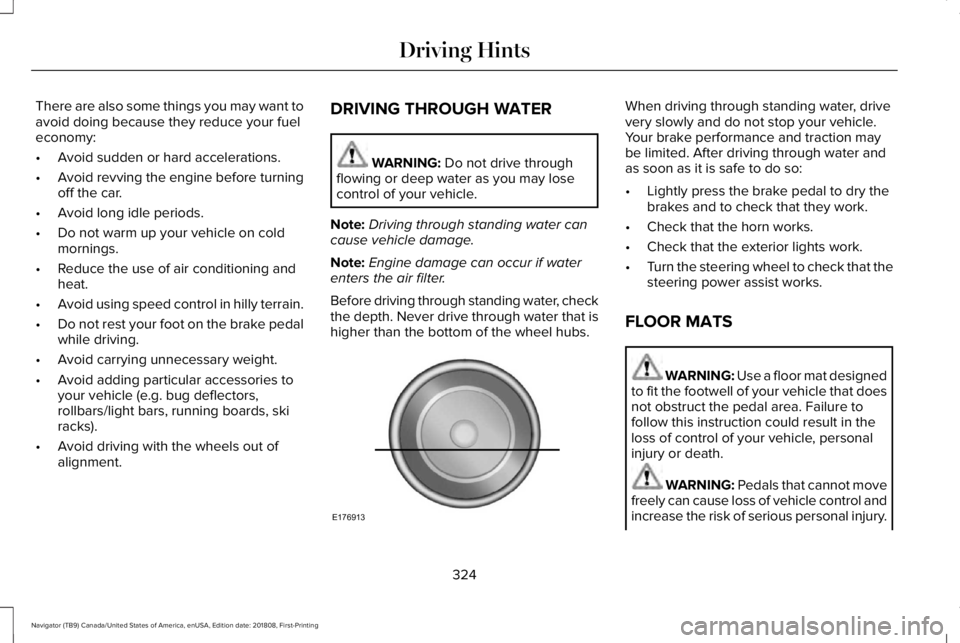
Before driving through standing water, checkthe depth. Never drive through water that ishigher than the bottom of the wheel hubs.
When driving through standing water, drivevery slowly and do not stop your vehicle.Your brake performance and traction maybe limited. After driving through water andas soon as it is safe to do so:
•Lightly press the brake pedal to dry thebrakes and to check that they work.
•Check that the horn works.
•Check that the exterior lights work.
•Turn the steering wheel to check that thesteering power assist works.
FLOOR MATS
WARNING: Use a floor mat designedto fit the footwell of your vehicle that doesnot obstruct the pedal area. Failure tofollow this instruction could result in theloss of control of your vehicle, personalinjury or death.
WARNING: Pedals that cannot movefreely can cause loss of vehicle control andincrease the risk of serious personal injury.
324
Navigator (TB9) Canada/United States of America, enUSA, Edition date: 201808, First-Printing
Driving HintsE176913
Page 330 of 645
If you need to arrange roadside assistancefor yourself, Lincoln Motor Companyreimburses a reasonable amount for towingto the nearest Lincoln dealership within100 mi (160 km). To obtain reimbursementinformation, United States clients, call1-800-521-4140. Clients need to submit theiroriginal receipts.
Vehicles Sold in Canada: GettingRoadside Assistance
To fully assist you should you have a vehicleconcern, Lincoln Motor Company of Canada,Limited offers a complimentary roadsideassistance program. This program is eligiblewithin Canada or the continental UnitedStates.
The service is available 24 hours a day,seven days a week.
This program is separate from the NewVehicle Limited Warranty, but the coverageis concurrent with the powertrain coverageperiod of your vehicle. Canadian roadsidecoverage and benefits may differ from theU.S. coverage.
If you require more information, please callus in Canada at 1-800-387-9333, or visit ourwebsite at www.lincolncanada.com.
HAZARD FLASHERS
Note:The hazard flashers operate when theignition is in any position, or if the key is notin the ignition. If used when the vehicle is notrunning, the battery loses charge. As a result,there may be insufficient power to restartyour vehicle.
The flasher control is on theinstrument panel. Use your hazardflashers when your vehicle iscreating a safety hazard for other motorists.
•Press the flasher control and all front andrear direction indicators flash.
•Press the button again to switch them off.
FUEL SHUTOFF
WARNING: If your vehicle has beeninvolved in a crash, have the fuel systemchecked. Failure to follow this instructioncould result in fire, personal injury or death.
Note: When you try to restart your vehicleafter a fuel shutoff, the vehicle makes surethat various systems are safe to restart. Once the vehicle determines the systemsare safe, then the vehicle allows you torestart.
Note: In the event that your vehicle doesnot restart after your third attempt, contacta qualified technician.
The fuel pump shutoff stops the flow of fuelto the engine in the event of a moderate tosevere crash. Not every impact causes ashutoff.
Should your vehicle shut off after a crash,you may restart your vehicle.
327
Navigator (TB9) Canada/United States of America, enUSA, Edition date: 201808, First-Printing
Roadside Emergencies
Page 331 of 645
1. Press START/STOP to switch off yourvehicle.
2.Press the brake pedal and START/STOPto switch on your vehicle.
3. Remove your foot from the brake pedaland press START/STOP to switch offyour vehicle.
4. You can attempt to start the vehicle bypressing the brake pedal andSTART/STOP, or press START/STOPwithout pressing the brake pedal.
JUMP STARTING THE VEHICLE
WARNING: Batteries normallyproduce explosive gases which can causepersonal injury. Therefore, do not allowflames, sparks or lighted substances tocome near the battery. When working nearthe battery, always shield your face andprotect your eyes. Always provide correctventilation.
WARNING: Keep batteries out ofreach of children. Batteries contain sulfuricacid. Avoid contact with skin, eyes orclothing. Shield your eyes when workingnear the battery to protect against possiblesplashing of acid solution. In case of acidcontact with skin or eyes, flush immediatelywith water for a minimum of 15 minutes andget prompt medical attention. If acid isswallowed, call a physician immediately.
WARNING: Use only adequatelysized cables with insulated clamps.
Note:To avoid reverse polarity connections,make sure that you correctly identify thepositive (+) and negative (-) terminals on boththe disabled and booster vehicles beforeconnecting the cables. Stay clear of movingparts.
Preparing Your Vehicle
Do not attempt to push-start your automatictransmission vehicle.
Note:Attempting to push-start a vehicle withan automatic transmission may causetransmission damage.
Note:Use only a 12-volt supply to start yourvehicle.
Note:Do not disconnect the battery of thedisabled vehicle as this could damage thevehicle electrical system.
Park the booster vehicle close to the hoodof the disabled vehicle, making sure the twovehicles do not touch.
Connecting the Jumper Cables
WARNING: Do not use fuel lines,engine valve covers, windshield wiperarms, the intake manifold, or hood latch asground points.
WARNING: Do not connect the endof the second cable to the negative (-)terminal of the battery to be jumped. Aspark may cause an explosion of the gasesthat surround the battery.
328
Navigator (TB9) Canada/United States of America, enUSA, Edition date: 201808, First-Printing
Roadside Emergencies
Page 332 of 645
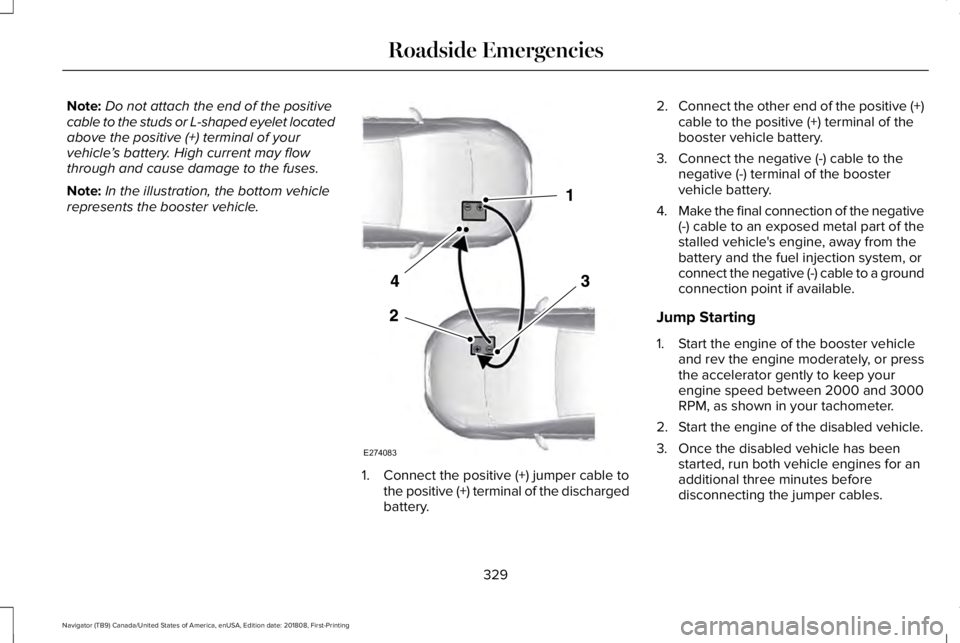
Note:Do not attach the end of the positivecable to the studs or L-shaped eyelet locatedabove the positive (+) terminal of yourvehicle’s battery. High current may flowthrough and cause damage to the fuses.
Note:In the illustration, the bottom vehiclerepresents the booster vehicle.
1. Connect the positive (+) jumper cable tothe positive (+) terminal of the dischargedbattery.
2.Connect the other end of the positive (+)cable to the positive (+) terminal of thebooster vehicle battery.
3. Connect the negative (-) cable to thenegative (-) terminal of the boostervehicle battery.
4.Make the final connection of the negative(-) cable to an exposed metal part of thestalled vehicle's engine, away from thebattery and the fuel injection system, orconnect the negative (-) cable to a groundconnection point if available.
Jump Starting
1. Start the engine of the booster vehicleand rev the engine moderately, or pressthe accelerator gently to keep yourengine speed between 2000 and 3000RPM, as shown in your tachometer.
2. Start the engine of the disabled vehicle.
3. Once the disabled vehicle has beenstarted, run both vehicle engines for anadditional three minutes beforedisconnecting the jumper cables.
329
Navigator (TB9) Canada/United States of America, enUSA, Edition date: 201808, First-Printing
Roadside EmergenciesE274083