transmission LINCOLN NAVIGATOR 2019 Manual Online
[x] Cancel search | Manufacturer: LINCOLN, Model Year: 2019, Model line: NAVIGATOR, Model: LINCOLN NAVIGATOR 2019Pages: 645, PDF Size: 5.02 MB
Page 556 of 645
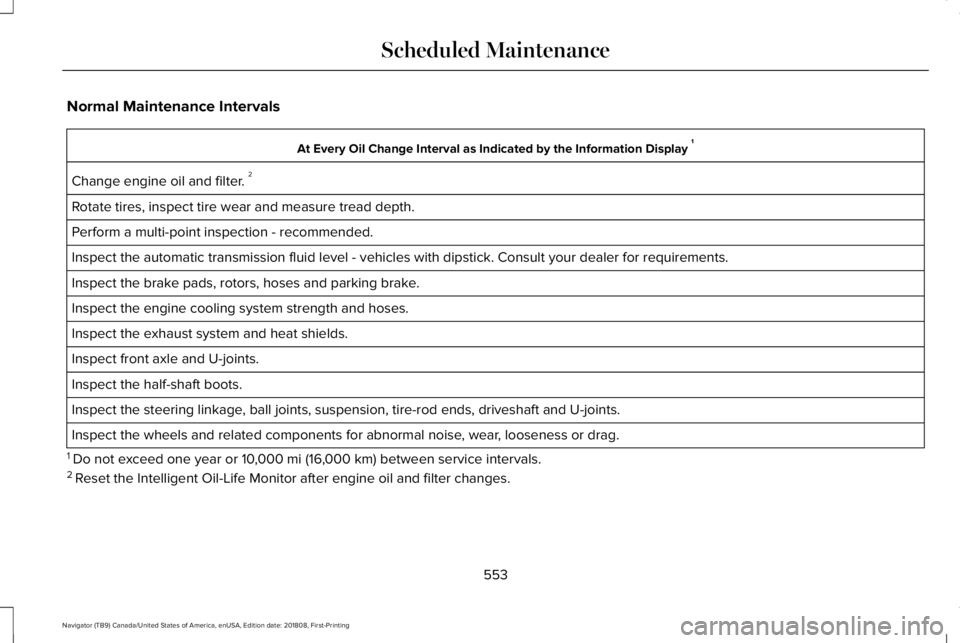
Normal Maintenance Intervals
At Every Oil Change Interval as Indicated by the Information Display 1
Change engine oil and filter. 2
Rotate tires, inspect tire wear and measure tread depth.
Perform a multi-point inspection - recommended.
Inspect the automatic transmission fluid level - vehicles with dipstick. Consult your dealer for requirements.
Inspect the brake pads, rotors, hoses and parking brake.
Inspect the engine cooling system strength and hoses.
Inspect the exhaust system and heat shields.
Inspect front axle and U-joints.
Inspect the half-shaft boots.
Inspect the steering linkage, ball joints, suspension, tire-rod ends, driveshaft and U-joints.
Inspect the wheels and related components for abnormal noise, wear, looseness or drag.
1 Do not exceed one year or 10,000 mi (16,000 km) between service intervals.2 Reset the Intelligent Oil-Life Monitor after engine oil and filter changes.
553
Navigator (TB9) Canada/United States of America, enUSA, Edition date: 201808, First-Printing
Scheduled Maintenance
Page 557 of 645
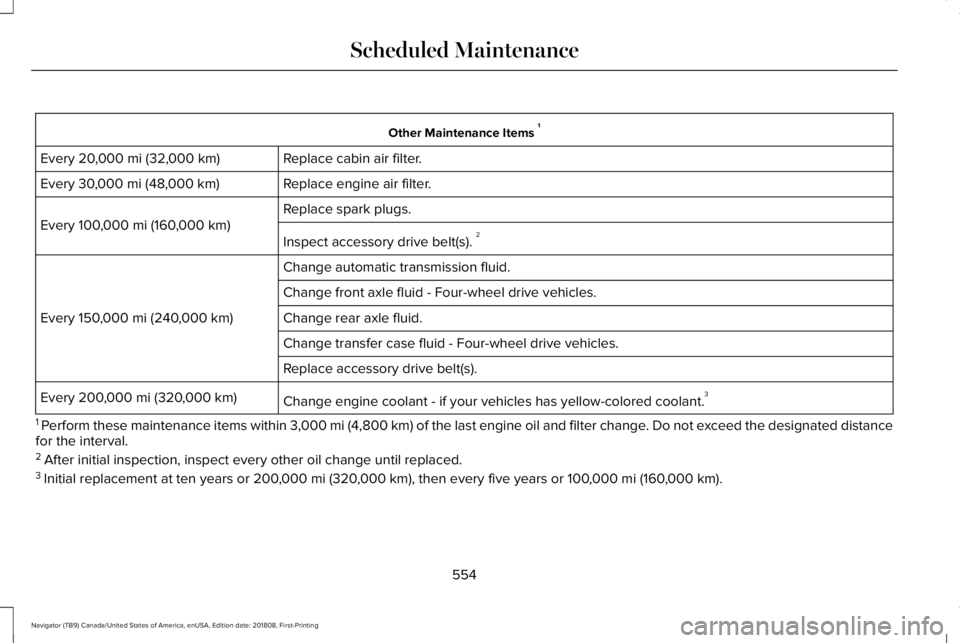
Other Maintenance Items 1
Replace cabin air filter.Every 20,000 mi (32,000 km)
Replace engine air filter.Every 30,000 mi (48,000 km)
Replace spark plugs.
Every 100,000 mi (160,000 km)
Inspect accessory drive belt(s). 2
Change automatic transmission fluid.
Every 150,000 mi (240,000 km)
Change front axle fluid - Four-wheel drive vehicles.
Change rear axle fluid.
Change transfer case fluid - Four-wheel drive vehicles.
Replace accessory drive belt(s).
Change engine coolant - if your vehicles has yellow-colored coolant.3Every 200,000 mi (320,000 km)
1 Perform these maintenance items within 3,000 mi (4,800 km) of the last engine oil and filter change. Do not exceed the designated distancefor the interval.2 After initial inspection, inspect every other oil change until replaced.3 Initial replacement at ten years or 200,000 mi (320,000 km), then every five years or 100,000 mi (160,000 km).
554
Navigator (TB9) Canada/United States of America, enUSA, Edition date: 201808, First-Printing
Scheduled Maintenance
Page 558 of 645
SPECIAL OPERATING CONDITIONS
SCHEDULED MAINTENANCE
If you operate your vehicle primarily in anyof the following conditions, you need toperform extra maintenance, as indicated. Ifyou operate your vehicle occasionally underany of these conditions, it is not necessaryto perform the extra maintenance. For
specific recommendations, see yourdealership service advisor or technician.
Perform the services shown in the followingtables when specified or within 3,000 mi(4,800 km) of the message appearing in theinformation display prompting you to changeyour oil.
•Example 1: The message comes on at28,751 mi (46,270 km). Perform the30,000 mi (48,000 km) automatictransmission fluid replacement.
•Example 2: The message has not comeon, but the odometer reads 30,000 mi(48,000 km) (for example, the IntelligentOil-Life Monitor was reset at 25,000 mi(40,000 km)). Perform the engine air filterreplacement.
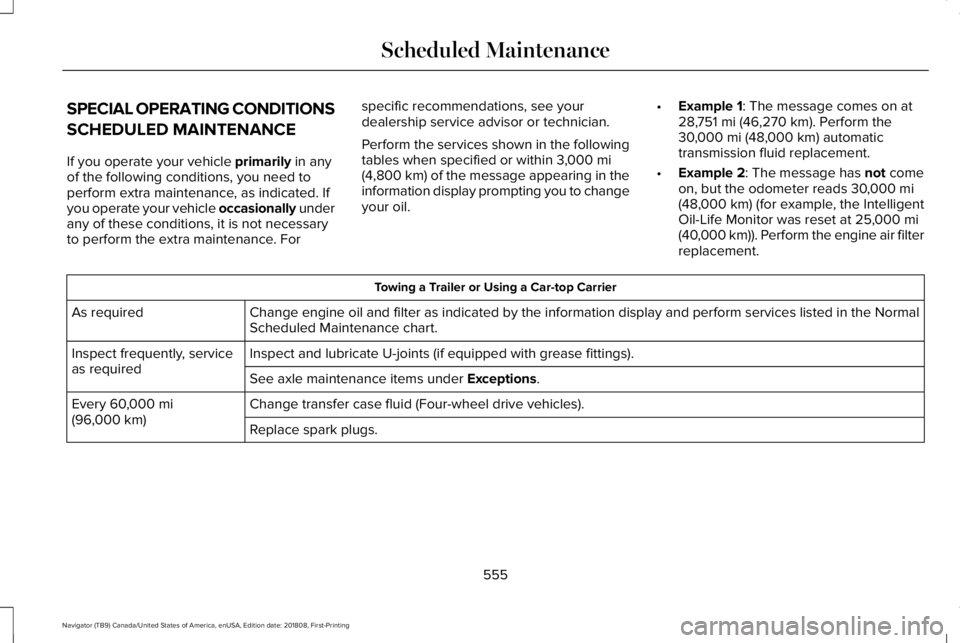
Towing a Trailer or Using a Car-top Carrier
Change engine oil and filter as indicated by the information display and perform services listed in the NormalScheduled Maintenance chart.As required
Inspect and lubricate U-joints (if equipped with grease fittings).Inspect frequently, serviceas requiredSee axle maintenance items under Exceptions.
Change transfer case fluid (Four-wheel drive vehicles).Every 60,000 mi(96,000 km)Replace spark plugs.
555
Navigator (TB9) Canada/United States of America, enUSA, Edition date: 201808, First-Printing
Scheduled Maintenance
Page 590 of 645
•Links to Third Party Sites: TheSOFTWARE may provide you with theability to link to third party sites. The thirdparty sites are not under the control ofFORD MOTOR COMPANY, its affiliatesand/or its designated agent. NeitherFORD MOTOR COMPANY nor itsaffiliates nor its designated agent areresponsible for (I) the contents of anythird party sites, any links contained inthird party sites, or any changes orupdates to third party sites, or (ii)webcasting or any other form oftransmission received from any thirdparty sites. If the SOFTWARE provideslinks to third party sites, those links areprovided to you only as a convenience,and the inclusion of any link does notimply an endorsement of the third partysite by FORD MOTOR COMPANY, itsaffiliates and/or its designated agent.
•Obligation to Drive Responsibly: Yourecognize your obligation to driveresponsibly and keep attention on theroad. You will read and abide with theDEVICES operating instructionsparticularly as they pertain to safety andyou agree to assume any risk associated
with the use of the DEVICES.
UPGRADES AND RECOVERY MEDIA: If theSOFTWARE is provided by FORD MOTORCOMPANY separate from the DEVICES onmedia such as a ROM chip, CD ROM disk(s)or via web download or other means, and islabeled "For Upgrade Purposes Only" or "ForRecovery Purposes Only" you may install one(1) copy of such SOFTWARE onto theDEVICES as a replacement copy for theexisting SOFTWARE, and use it inaccordance with this EULA, including anyadditional EULA terms accompanying theupgrade SOFTWARE.
INTELLECTUAL PROPERTY RIGHTS: Alltitle and intellectual property rights in and tothe SOFTWARE (including but not limited toany images, photographs, animations, video,audio, music, text and "applets" incorporatedinto the SOFTWARE), the accompanyingprinted materials, and any copies of theSOFTWARE, are owned by FORD MOTORCOMPANY, or its affiliates or suppliers. TheSOFTWARE is licensed, not sold. You maynot copy the printed materials accompanyingthe SOFTWARE. All title and intellectualproperty rights in and to the content which
may be accessed through use of theSOFTWARE is the property of the respectivecontent owner and may be protected byapplicable copyright or other intellectualproperty laws and treaties. This EULA grantsyou no rights to use such content outside itsintended use. All rights not specificallygranted under this EULA are reserved byFORD MOTOR COMPANY, its affiliates, andthird party software and service providersand suppliers. Use of any on-line serviceswhich may be accessed through theSOFTWARE may be governed by therespective terms of use relating to suchservices. If this SOFTWARE containsdocumentation that is provided only inelectronic form, you may print one copy ofsuch electronic documentation.
587
Navigator (TB9) Canada/United States of America, enUSA, Edition date: 201808, First-Printing
Appendices
Page 611 of 645
(ii) END USER AGREES TO INDEMNIFY ANDHOLD HARMLESS THE UNDERLYINGWIRELESS SERVICE CARRIER AND ITSOFFICERS, EMPLOYEES, AND AGENTSAGAINST ANY AND ALL CLAIMS,INCLUDING WITHOUT LIMITATION CLAIMSFOR LIBEL, SLANDER, OR ANY PROPERTYDAMAGE, PERSONAL INJURY OR DEATH,ARISING IN ANY WAY, DIRECTLY ORINDIRECTLY, IN CONNECTION WITH THISAGREEMENT OR THE USE, FAILURE TO USE,OR INABILITY TO USE THE DEVICE EXCEPTWHERE THE CLAIMS RESULT FROM THEUNDERLYING CARRIER’S GROSSNEGLIGENCE OR WILLFUL MISCONDUCT.THIS INDEMNITY WILL SURVIVE THETERMINATION OF THE AGREEMENT.
(iii) END USER HAS NO PROPERTY RIGHTIN ANY NUMBER ASSIGNED TO THEDEVICE.
(iv) END USER UNDERSTANDS THAT FORDAND THE UNDERLYING CARRIER CANNOTGUARANTY THE SECURITY OF WIRELESSTRANSMISSIONS, AND WILL NOT BE LIABLEFOR ANY LACK OF SECURITY RELATINGTO THE USE OF THE SERVICES
THE SERVICE IS FOR [END USER’S] USEONLY AND END USER MAY NOT RESELLTHE SERVICE TO ANY OTHER PARTY ENDUSER UNDERSTANDS THAT THEUNDERLYING CARRIER DOES NOTGUARANTEE ANY END USERUNINTERRUPTED SERVICE OR COVERAGE.THE UNDERLYING CARRIER DOES NOTWARRANT THAT END USERS CAN OR WILLBE LOCATED USING THE SERVICE. THEUNDERLYING CARRIER MAKES NOWARRANTY, EXPRESS OR IMPLIED, OFMERCHANTABILITY OR FITNESS FOR APARTICULAR PURPOSE, SUITABILITY, ORPERFORMANCE REGARDING ANY SERVICESOR GOODS, AND IN NO EVENT SHALLAT&T BE LIABLE, WHETHER OR NOT DUETO ITS OWN NEGLIGENCE, FOR ANY: (A)ACT OR OMISSION OF A THIRD PARTY; (B)MISTAKES, OMISSIONS, INTERRUPTIONS,ERRORS, FAILURES TO TRANSMIT, DELAYS,OR DEFECTS IN THE SERVICE PROVIDEDBY OR THROUGH THE UNDERLYINGCARRIER; (C) DAMAGE OR INJURY CAUSEDBY SUSPENSION OR TERMINATION BY THEUNDERLYING CARRIER; OR (D) DAMAGE ORINJURY CAUSED BY A FAILURE OR DELAYIN CONNECTING A CALL TO ANY ENTITY,
INCLUDING 911 OR ANY OTHEREMERGENCY SERVICE. TO THE FULLEXTENT ALLOWED BY LAW, THE END USERRELEASES, INDEMNIFIES AND HOLDS THEUNDERLYING CARRIER HARMLESS FROMAND AGAINST ANY AND ALL CLAIMS OFANY PERSON OR ENTITY FOR DAMAGESOF ANY NATURE ARISING IN ANY WAYFROM OR RELATING TO, DIRECTLY ORINDIRECTLY, SERVICES PROVIDED BY THEUNDERLYING CARRIER OR ANY PERSON’SUSE THEREOF, INCLUDING CLAIMS ARISINGIN WHOLE OR IN PART FROM THE ALLEGEDNEGLIGENCE OF THE UNDERLYINGCARRIER.
VII. China Territory
Personal Use Only
You agree to use this Data together with[insert name of Client Application] for thesolely personal, non-commercial purposesfor which you were licensed, and not forservice bureau, time-sharing or other similarpurposes. Accordingly, but subject to therestrictions set forth in the followingparagraphs, you may copy this Data only asnecessary for your personal use to (i) view
608
Navigator (TB9) Canada/United States of America, enUSA, Edition date: 201808, First-Printing
Appendices
Page 633 of 645
Audio System................................................432General Information...........................................432
Audio Unit.......................................................434Adjusting the Volume........................................434Changing Radio Stations..................................434Ejecting the CD...................................................435Inserting a CD......................................................435Locking the Rear Audio Controls...................435Rear Passenger Audio......................................435Selecting the Audio Modes.............................435Switching the Audio Unit On and Off............435Using Seek, Fast Forward and Reverse.......435
Auto Hold.......................................................229Using Auto Hold.................................................230
Autolamps.........................................................98Windshield Wiper Activated Headlamps........99
Automatic Climate Control.........................152Accessing Rear Climate Controls...................152Accessing the Climate Control Menu............152Setting the Blower Motor Speed....................152Setting the Temperature...................................152Switching Auto Mode On and Off...................152Switching Defrost On and Off..........................153Switching Maximum Air Conditioning On andOff.......................................................................153Switching Recirculated Air On and Off..........153Switching the Air Conditioning On andOff.......................................................................153
Switching the Heated Seats On and Off.......153Switching the Ventilated Seats On andOff.......................................................................153
Automatic High Beam Control...................100Automatic High Beam Indicator.......................101Switching the System On and Off....................101
Automatic Transmission..............................210Automatic Transmission AdaptiveLearning............................................................215Brake-Shift Interlock Override.........................214If Your Vehicle Gets Stuck In Mud orSnow..................................................................215SelectShift™ Automatic Transmission.............213Understanding the Shift Positions of yourAutomatic Transmission................................210
Automatic Transmission FluidCheck...........................................................369Auto-Start-Stop..............................................196Disabling Auto-Start-Stop..................................198Enabling Auto-Start-Stop...................................196
Autowipers.......................................................94Autowipers Settings.............................................94Low Temperature Wipe Inhibit..........................94
Auxiliary Power Points.................................185110 Volt AC Power Point.....................................18512 Volt DC Power Point......................................185USB Port and Power Point Locations.............185
B
BatterySee: Changing the 12V Battery........................371
Blind Spot Information System..................271..................................................................................271Blind Spot Information System with TrailerTow....................................................................272Switching the System On and Off..................275System Errors......................................................275Using the Blind Spot InformationSystem...............................................................271
BLISSee: Blind Spot Information System...............271
Body Styling Kits...........................................387Bonnet LockSee: Opening and Closing the Hood............359
Booster Seats..................................................33Types of Booster Seats.......................................33
Brake Fluid Check........................................370Brakes.............................................................225General Information...........................................225
Breaking-In.....................................................323Bulb Specification Chart.............................429
C
Cabin Air Filter...............................................156
630
Navigator (TB9) Canada/United States of America, enUSA, Edition date: 201808, First-Printing
Index
Page 636 of 645
Integrated Trailer Brake Controller.................314Launching or Retrieving a Boat or PersonalWatercraft (PWC).............................................319Safety Chains........................................................313Trailer Brakes........................................................314Trailer Hitch Cover...............................................311Trailer Lamps.........................................................317Trailer Towing Connector (Vehicles with aTrailer Towing Package and 7–PinConnector).........................................................311When Towing a Trailer........................................318
Event Data RecordingSee: Data Recording.............................................10
Export Unique Options...................................14Exterior Mirrors..............................................106360-Degree Camera..........................................108Auto-Dimming Feature......................................108Auto-Folding Mirrors...........................................107Blind Spot Monitor..............................................108Fold-Away Exterior Mirrors...............................107Heated Exterior Mirrors.....................................108Lincoln Welcome Mat.........................................108Memory Mirrors...................................................108Power Exterior Mirrors.......................................106Signal Indicator Mirrors......................................108
F
Fastening the Seatbelts................................40Rear Inflatable Seatbelt.......................................44Seatbelt Locking Modes.....................................42Using Seatbelts During Pregnancy..................42
Flat TireSee: Changing a Road Wheel..........................410
Floor Mats.......................................................324Fog Lamps - FrontSee: Front Fog Lamps.........................................101
Foot PedalsSee: Adjusting the Pedals..................................93
Four-Wheel Drive..........................................216Front Fog Lamps............................................101Front Parking Aid..........................................238Obstacle Distance Indicator............................238
Front Passenger Sensing System..............54Fuel and Refueling........................................199Fuel Consumption.......................................205Advertised Capacity..........................................205Fuel Economy.....................................................205
Fuel Filler Funnel Location........................200Fuel Filter.........................................................371Fuel Quality...................................................200Choosing the Right Fuel..................................200
Fuel Shutoff....................................................327Fuses................................................................341
Fuse Specification Chart.............................341Passenger Compartment Fuse Panel............351Power Distribution Box......................................341
G
Garage Door Opener....................................181Garage Door OpenerSee: Universal Garage Door Opener..............181
Gauges..............................................................113Engine Coolant Temperature Gauge..............114Fuel Gauge.............................................................114Left and Right Information Group.....................114Status Bar...............................................................114
GearboxSee: Transmission...............................................210
General Information on RadioFrequencies....................................................61Intelligent Access..................................................61
General Maintenance Information...........547Multi-Point Inspection.......................................550Owner Checks and Services...........................548Protecting Your Investment..............................547Why Maintain Your Vehicle?.............................547Why Maintain Your Vehicle at YourDealership?......................................................547
Getting Assistance Outside the U.S. andCanada.........................................................337
633
Navigator (TB9) Canada/United States of America, enUSA, Edition date: 201808, First-Printing
Index
Page 638 of 645
Remote Start.........................................................143Seats.......................................................................143Stability Control....................................................143Starting System ...................................................144Tire Pressure Monitoring System....................144Trailer......................................................................145Transmission.........................................................146
Installing Child Restraints.............................20Child Seats.............................................................20Combining Seatbelt and LATCH LowerAnchors for Attaching Child SafetySeats....................................................................28Using Lap and Shoulder Belts...........................20Using Lower Anchors and Tethers forCHildren (LATCH).............................................26Using Tether Straps..............................................28
Instrument Cluster..........................................113Instrument Lighting Dimmer........................99Instrument Panel Overview...........................16Interior Lamps................................................103Front Interior Lamp.............................................103Rear Interior Lamps.............................................104
Interior Mirror.................................................108Auto-Dimming Mirror..........................................109
Introduction.........................................................7
J
Jump Starting the Vehicle..........................328Connecting the Jumper Cables......................328Jump Starting......................................................329Preparing Your Vehicle.....................................328Removing the Jumper Cables.........................330
K
Keyless Entry....................................................76Displaying the Factory-Set Code......................78Locking and Unlocking........................................77SECURICODE™ KEYLESS ENTRYKEYPAD...............................................................76
Keyless Starting..............................................191Switching the Ignition On...................................191
Keys and Remote Controls............................61
L
Lane Keeping System.................................265Switching the System On and Off..................266System Display...................................................268System Settings..................................................267Troubleshooting.................................................269
Liftgate...............................................................79
Liftgate Window...............................................111Opening the Liftgate Window............................111
Lighting Control...............................................97Flashing the Headlamp High Beam.................98Headlamp High Beam.........................................98
Lighting..............................................................97General Information.............................................97
Limited Slip Differential..............................224Spare Tire.............................................................224Trailer Towing......................................................224
Lincoln Automotive Financial Services......12Lincoln Protect..............................................544Lincoln Protect (CANADA ONLY)...................545Lincoln Protect Extended Service Plans (U.S.Only)..................................................................544
Load CarriersSee: Roof Racks and Load Carriers...............290
Load Carrying................................................287Load Limit.......................................................292Special Loading Instructions for Owners ofPick-up Trucks and Utility-typeVehicles............................................................296Vehicle Loading - with and without aTrailer................................................................292
Locking and Unlocking..................................72Activating Intelligent Access..............................73Approach Detection Illumination......................76Autolock..................................................................75
635
Navigator (TB9) Canada/United States of America, enUSA, Edition date: 201808, First-Printing
Index
Page 643 of 645
Using Pro Trailer Backup Assist.....................302
Trailer Sway Control....................................308Transfer Case Fluid Check.........................369Transmission Code Designation...............421Transmission...................................................210Transporting the Vehicle.............................331Type Approvals..............................................615Radio Frequency Certification for Keys andRemote Controls............................................627Radio Frequency Certifications for Blind SpotInformation System.......................................625Radio Frequency Certifications for BodyControl Module...............................................627Radio Frequency Certifications for CruiseControl Module...............................................627Radio Frequency Certifications for Mid RangeRadar..................................................................619Radio Frequency Certifications for PassiveAnti-Theft System..........................................620Radio Frequency Certifications for RadioTransceiver Module.......................................623Radio Frequency Certifications for SYNC3..........................................................................627Radio Frequency Certifications for TirePressure Monitoring Sensor(s)....................615Radio Frequency Certifications for WirelessCharging..........................................................626
Radio Frequency Statement for AudioUnit....................................................................628
U
Under Hood Overview................................360Unique Driving Characteristics..................196Universal Garage Door Opener.................181HomeLink Wireless Control System................181
USB Port.........................................................439Using Adaptive Cruise Control.................256Automatic Cancellation....................................260Blocked Sensor..................................................262Canceling the Set Speed.................................260Changing the Set Speed..................................259Detection Issues.................................................260Following a Vehicle...........................................258Following a Vehicle to a CompleteStop...................................................................258Hilly Condition Usage.......................................260Overriding the Set Speed................................259Park Brake Application.....................................260Resuming the Set Speed.................................260Setting the Adaptive Cruise Speed...............257Setting the Adaptive Cruise Speed When YourVehicle is Stationary......................................257Setting the Gap Distance.................................258Switching Adaptive Cruise Control Off........260
Switching Adaptive Cruise Control On.........257Switching to Normal Cruise Control..............263System Not Available........................................262
Using Cruise Control...................................255Canceling the Set Speed.................................256Changing the Set Speed..................................255Resuming the Set Speed.................................256Setting the Cruise Speed.................................255Switching Cruise Control Off...........................256Switching Cruise Control On...........................255
Using Four-Wheel Drive..............................2164X4 Indicator Lights............................................2164X4 Modes............................................................216Driving Off-Road With Truck and UtilityVehicles.............................................................219How Your Vehicle Differs From OtherVehicles.............................................................218Operating 4WD Vehicles With Spare orMismatched Tires...........................................218
Using Hill Descent Control........................235Hill Descent Modes...........................................235
Using MyKey With Remote StartSystems..........................................................70Using Power Running Boards......................87Automatic Power Deploy....................................87Automatic Power Stow........................................87Bounce-back..........................................................88Enabling and Disabling.......................................88
640
Navigator (TB9) Canada/United States of America, enUSA, Edition date: 201808, First-Printing
Index