Spare LINCOLN NAVIGATOR 2019 Owners Manual
[x] Cancel search | Manufacturer: LINCOLN, Model Year: 2019, Model line: NAVIGATOR, Model: LINCOLN NAVIGATOR 2019Pages: 645, PDF Size: 5.02 MB
Page 74 of 645
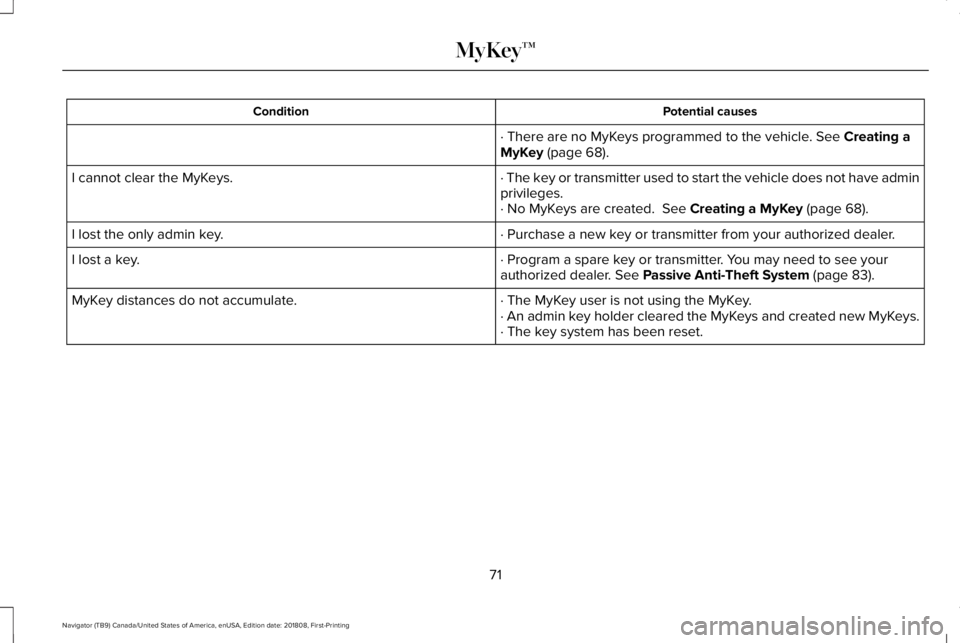
Potential causesCondition
· There are no MyKeys programmed to the vehicle. See Creating aMyKey (page 68).
· The key or transmitter used to start the vehicle does not have adminprivileges.I cannot clear the MyKeys.
· No MyKeys are created. See Creating a MyKey (page 68).
· Purchase a new key or transmitter from your authorized dealer.I lost the only admin key.
· Program a spare key or transmitter. You may need to see yourauthorized dealer. See Passive Anti-Theft System (page 83).I lost a key.
· The MyKey user is not using the MyKey.MyKey distances do not accumulate.· An admin key holder cleared the MyKeys and created new MyKeys.· The key system has been reset.
71
Navigator (TB9) Canada/United States of America, enUSA, Edition date: 201808, First-Printing
MyKey™
Page 86 of 645
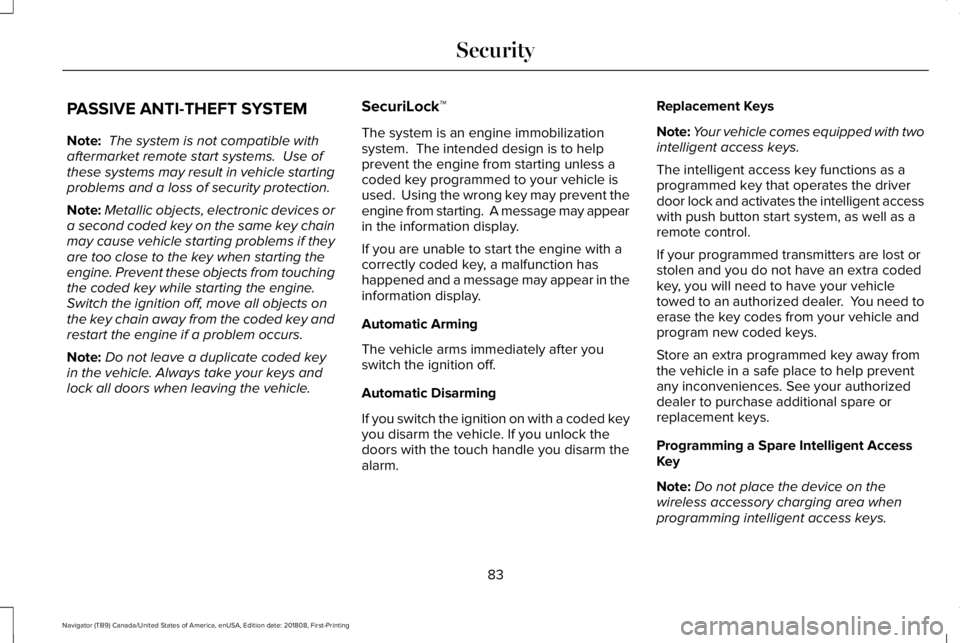
PASSIVE ANTI-THEFT SYSTEM
Note: The system is not compatible withaftermarket remote start systems. Use ofthese systems may result in vehicle startingproblems and a loss of security protection.
Note:Metallic objects, electronic devices ora second coded key on the same key chainmay cause vehicle starting problems if theyare too close to the key when starting theengine. Prevent these objects from touchingthe coded key while starting the engine.Switch the ignition off, move all objects onthe key chain away from the coded key andrestart the engine if a problem occurs.
Note:Do not leave a duplicate coded keyin the vehicle. Always take your keys andlock all doors when leaving the vehicle.
SecuriLock™
The system is an engine immobilizationsystem. The intended design is to helpprevent the engine from starting unless acoded key programmed to your vehicle isused. Using the wrong key may prevent theengine from starting. A message may appearin the information display.
If you are unable to start the engine with acorrectly coded key, a malfunction hashappened and a message may appear in theinformation display.
Automatic Arming
The vehicle arms immediately after youswitch the ignition off.
Automatic Disarming
If you switch the ignition on with a coded keyyou disarm the vehicle. If you unlock thedoors with the touch handle you disarm thealarm.
Replacement Keys
Note:Your vehicle comes equipped with twointelligent access keys.
The intelligent access key functions as aprogrammed key that operates the driverdoor lock and activates the intelligent accesswith push button start system, as well as aremote control.
If your programmed transmitters are lost orstolen and you do not have an extra codedkey, you will need to have your vehicletowed to an authorized dealer. You need toerase the key codes from your vehicle andprogram new coded keys.
Store an extra programmed key away fromthe vehicle in a safe place to help preventany inconveniences. See your authorizeddealer to purchase additional spare orreplacement keys.
Programming a Spare Intelligent AccessKey
Note:Do not place the device on thewireless accessory charging area whenprogramming intelligent access keys.
83
Navigator (TB9) Canada/United States of America, enUSA, Edition date: 201808, First-Printing
Security
Page 134 of 645
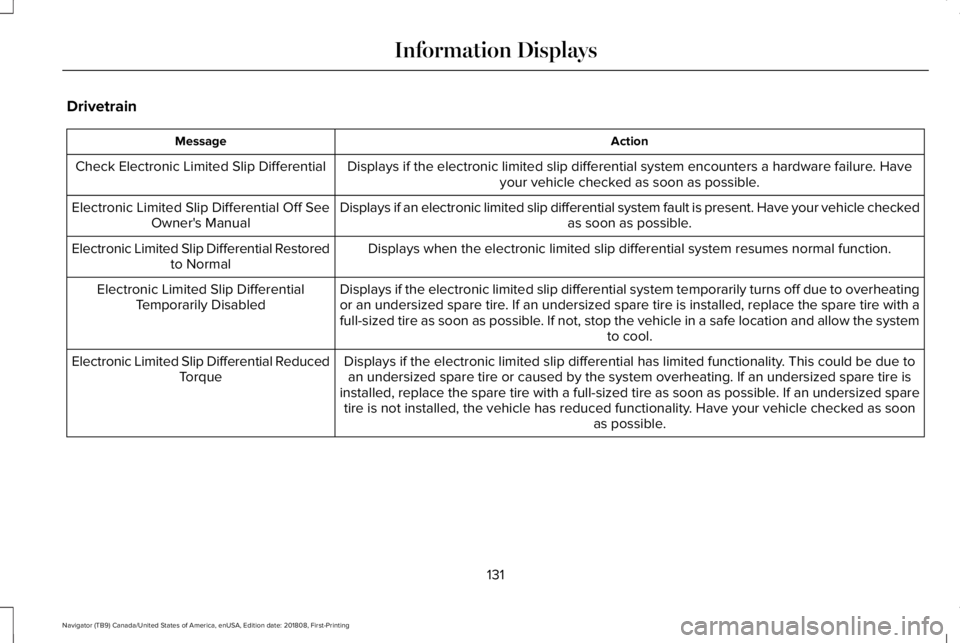
Drivetrain
ActionMessage
Displays if the electronic limited slip differential system encounters a hardware failure. Haveyour vehicle checked as soon as possible.Check Electronic Limited Slip Differential
Displays if an electronic limited slip differential system fault is present. Have your vehicle checkedas soon as possible.Electronic Limited Slip Differential Off SeeOwner's Manual
Displays when the electronic limited slip differential system resumes normal function.Electronic Limited Slip Differential Restoredto Normal
Displays if the electronic limited slip differential system temporarily turns off due to overheatingor an undersized spare tire. If an undersized spare tire is installed, replace the spare tire with afull-sized tire as soon as possible. If not, stop the vehicle in a safe location and allow the systemto cool.
Electronic Limited Slip DifferentialTemporarily Disabled
Displays if the electronic limited slip differential has limited functionality. This could be due toan undersized spare tire or caused by the system overheating. If an undersized spare tire isinstalled, replace the spare tire with a full-sized tire as soon as possible. If an undersized sparetire is not installed, the vehicle has reduced functionality. Have your vehicle checked as soonas possible.
Electronic Limited Slip Differential ReducedTorque
131
Navigator (TB9) Canada/United States of America, enUSA, Edition date: 201808, First-Printing
Information Displays
Page 137 of 645
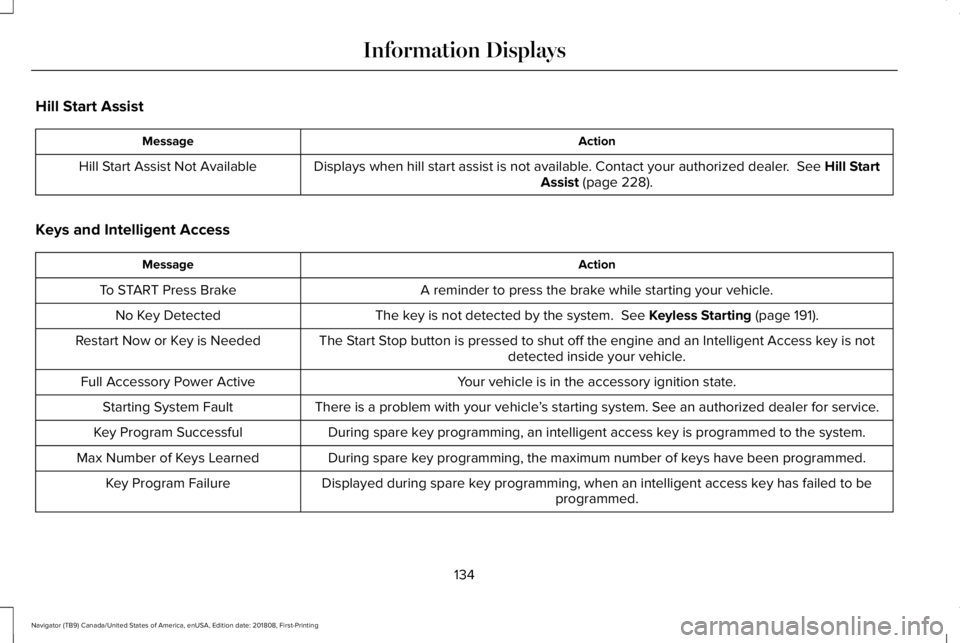
Hill Start Assist
ActionMessage
Displays when hill start assist is not available. Contact your authorized dealer. See Hill StartAssist (page 228).Hill Start Assist Not Available
Keys and Intelligent Access
ActionMessage
A reminder to press the brake while starting your vehicle.To START Press Brake
The key is not detected by the system. See Keyless Starting (page 191).No Key Detected
The Start Stop button is pressed to shut off the engine and an Intelligent Access key is notdetected inside your vehicle.Restart Now or Key is Needed
Your vehicle is in the accessory ignition state.Full Accessory Power Active
There is a problem with your vehicle’s starting system. See an authorized dealer for service.Starting System Fault
During spare key programming, an intelligent access key is programmed to the system.Key Program Successful
During spare key programming, the maximum number of keys have been programmed.Max Number of Keys Learned
Displayed during spare key programming, when an intelligent access key has failed to beprogrammed.Key Program Failure
134
Navigator (TB9) Canada/United States of America, enUSA, Edition date: 201808, First-Printing
Information Displays
Page 138 of 645
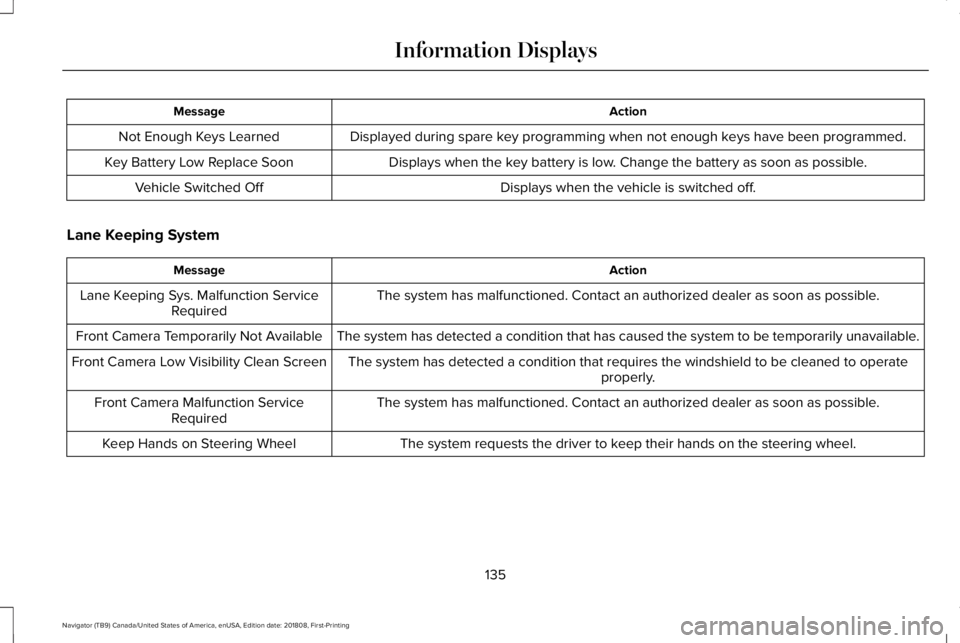
ActionMessage
Displayed during spare key programming when not enough keys have been programmed.Not Enough Keys Learned
Displays when the key battery is low. Change the battery as soon as possible.Key Battery Low Replace Soon
Displays when the vehicle is switched off.Vehicle Switched Off
Lane Keeping System
ActionMessage
The system has malfunctioned. Contact an authorized dealer as soon as possible.Lane Keeping Sys. Malfunction ServiceRequired
The system has detected a condition that has caused the system to be temporarily unavailable.Front Camera Temporarily Not Available
The system has detected a condition that requires the windshield to be cleaned to operateproperly.Front Camera Low Visibility Clean Screen
The system has malfunctioned. Contact an authorized dealer as soon as possible.Front Camera Malfunction ServiceRequired
The system requests the driver to keep their hands on the steering wheel.Keep Hands on Steering Wheel
135
Navigator (TB9) Canada/United States of America, enUSA, Edition date: 201808, First-Printing
Information Displays
Page 147 of 645
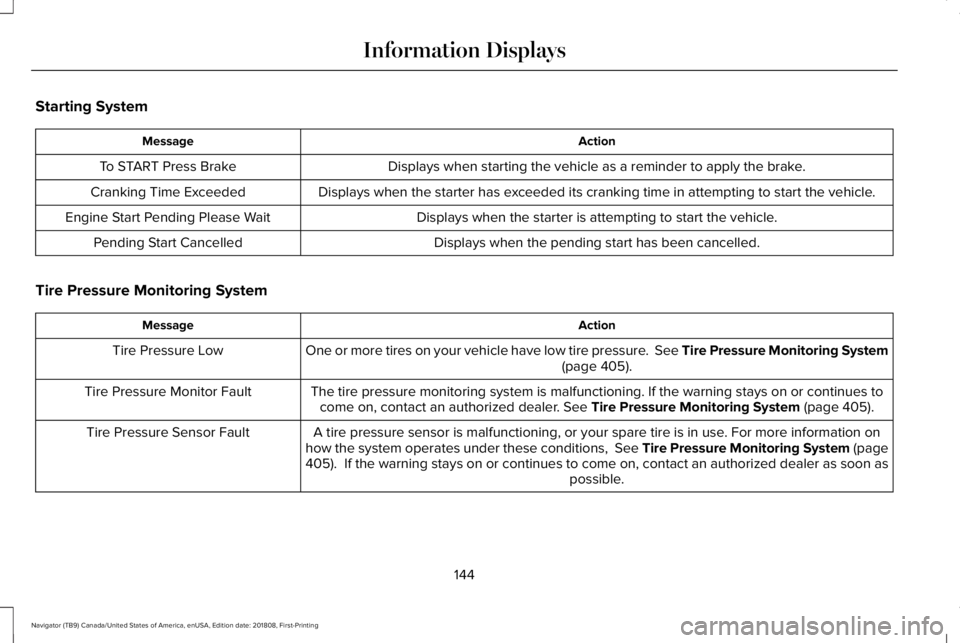
Starting System
ActionMessage
Displays when starting the vehicle as a reminder to apply the brake.To START Press Brake
Displays when the starter has exceeded its cranking time in attempting to start the vehicle.Cranking Time Exceeded
Displays when the starter is attempting to start the vehicle.Engine Start Pending Please Wait
Displays when the pending start has been cancelled.Pending Start Cancelled
Tire Pressure Monitoring System
ActionMessage
One or more tires on your vehicle have low tire pressure. See Tire Pressure Monitoring System(page 405).Tire Pressure Low
The tire pressure monitoring system is malfunctioning. If the warning stays on or continues tocome on, contact an authorized dealer. See Tire Pressure Monitoring System (page 405).Tire Pressure Monitor Fault
A tire pressure sensor is malfunctioning, or your spare tire is in use. For more information onhow the system operates under these conditions, See Tire Pressure Monitoring System (page405). If the warning stays on or continues to come on, contact an authorized dealer as soon aspossible.
Tire Pressure Sensor Fault
144
Navigator (TB9) Canada/United States of America, enUSA, Edition date: 201808, First-Printing
Information Displays
Page 154 of 645
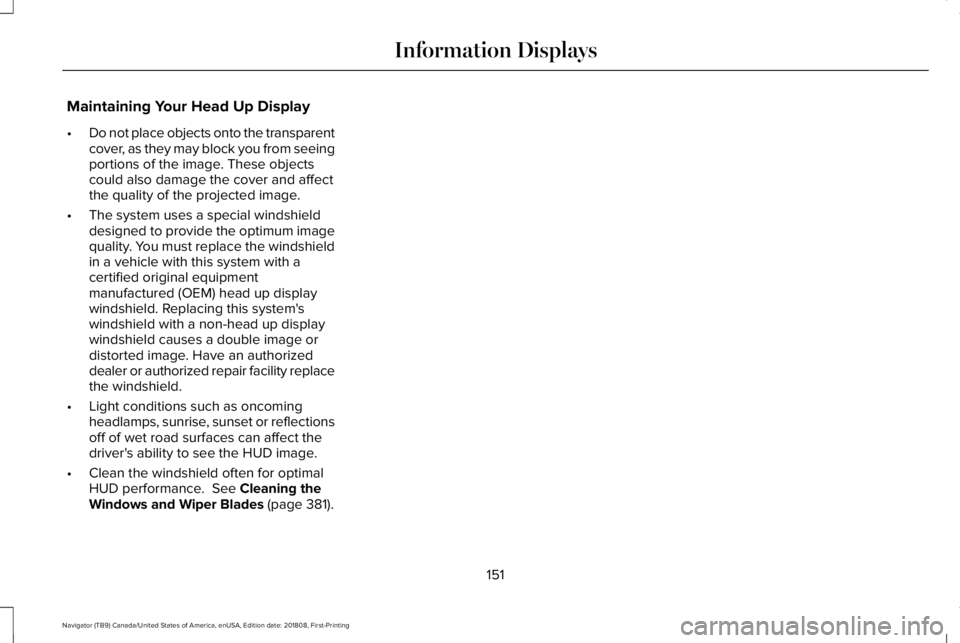
Maintaining Your Head Up Display
•Do not place objects onto the transparentcover, as they may block you from seeingportions of the image. These objectscould also damage the cover and affectthe quality of the projected image.
•The system uses a special windshielddesigned to provide the optimum imagequality. You must replace the windshieldin a vehicle with this system with acertified original equipmentmanufactured (OEM) head up displaywindshield. Replacing this system'swindshield with a non-head up displaywindshield causes a double image ordistorted image. Have an authorizeddealer or authorized repair facility replacethe windshield.
•Light conditions such as oncomingheadlamps, sunrise, sunset or reflectionsoff of wet road surfaces can affect thedriver's ability to see the HUD image.
•Clean the windshield often for optimalHUD performance. See Cleaning theWindows and Wiper Blades (page 381).
151
Navigator (TB9) Canada/United States of America, enUSA, Edition date: 201808, First-Printing
Information Displays
Page 203 of 645
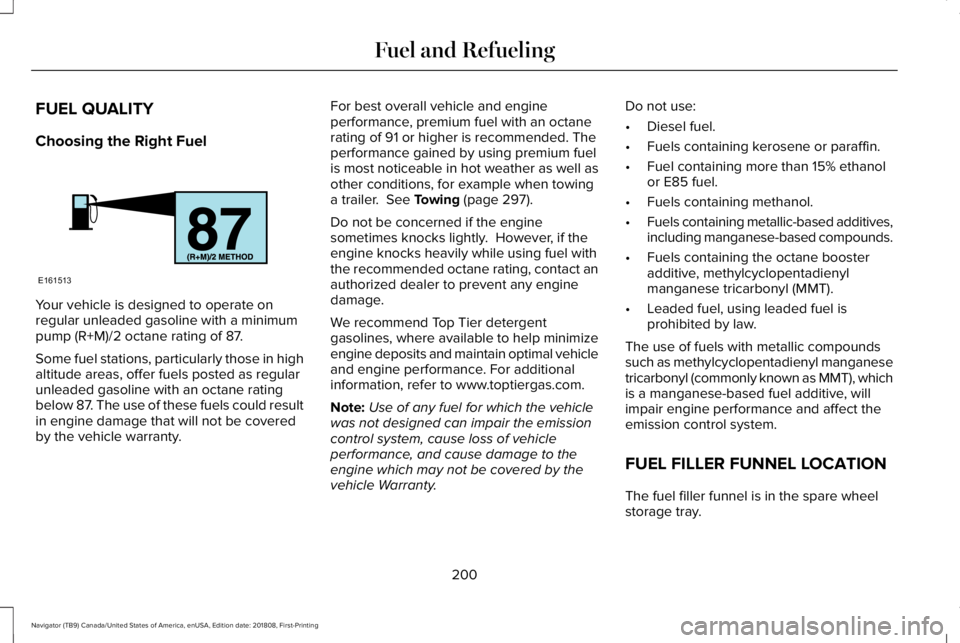
FUEL QUALITY
Choosing the Right Fuel
Your vehicle is designed to operate onregular unleaded gasoline with a minimumpump (R+M)/2 octane rating of 87.
Some fuel stations, particularly those in highaltitude areas, offer fuels posted as regularunleaded gasoline with an octane ratingbelow 87. The use of these fuels could resultin engine damage that will not be coveredby the vehicle warranty.
For best overall vehicle and engineperformance, premium fuel with an octanerating of 91 or higher is recommended. Theperformance gained by using premium fuelis most noticeable in hot weather as well asother conditions, for example when towinga trailer. See Towing (page 297).
Do not be concerned if the enginesometimes knocks lightly. However, if theengine knocks heavily while using fuel withthe recommended octane rating, contact anauthorized dealer to prevent any enginedamage.
We recommend Top Tier detergentgasolines, where available to help minimizeengine deposits and maintain optimal vehicleand engine performance. For additionalinformation, refer to www.toptiergas.com.
Note:Use of any fuel for which the vehiclewas not designed can impair the emissioncontrol system, cause loss of vehicleperformance, and cause damage to theengine which may not be covered by thevehicle Warranty.
Do not use:
•Diesel fuel.
•Fuels containing kerosene or paraffin.
•Fuel containing more than 15% ethanolor E85 fuel.
•Fuels containing methanol.
•Fuels containing metallic-based additives,including manganese-based compounds.
•Fuels containing the octane boosteradditive, methylcyclopentadienylmanganese tricarbonyl (MMT).
•Leaded fuel, using leaded fuel isprohibited by law.
The use of fuels with metallic compoundssuch as methylcyclopentadienyl manganesetricarbonyl (commonly known as MMT), whichis a manganese-based fuel additive, willimpair engine performance and affect theemission control system.
FUEL FILLER FUNNEL LOCATION
The fuel filler funnel is in the spare wheelstorage tray.
200
Navigator (TB9) Canada/United States of America, enUSA, Edition date: 201808, First-Printing
Fuel and RefuelingE161513
Page 221 of 645
Shifting To or From 4L - 4X4 LOW
Note:4L mode is not intended for use on drypavement.
1. Bring the vehicle to a rolling speed of3 mph (5 km/h) or less.
2. Place the gearshift in neutral (N).
3. Rotate the drive mode knob to desiredmode.
The information display shows a messageindicating a 4X4 shift is in progress. Theinformation display shows the system modeselected. If any of the previous shiftconditions are not present, the shift does notoccur and the information display shows theinformation guiding the driver through theproper shifting procedures. If the previousconditions are not satisfied in 30 seconds,the system reverts back to the previous 4WDmode or drive mode.
If Shift Delayed Pull Forward displays in theinformation display, transfer case gear toothblockage is present. To alleviate thiscondition, place the transmission in a forwardgear, move the vehicle forwardapproximately 5 ft (2 m), and shift thetransmission back to neutral (N) to allow thetransfer case to complete the range shift.
Operating 4WD Vehicles With Spareor Mismatched Tires
On four-wheel drive vehicles, the size of thespare tire can affect the 4X4 system. If thereis a significant difference between the sizeof the spare tire and the remaining tires, youmay have limited four-wheel drivefunctionality.
When driving with the full-size dissimilarspare wheel and tire assembly, it isrecommended that you do not:
•Exceed 50 mph (80 km/h) with a 4WDmode turned on.
•Turn on a 4WD mode unless the vehicleis stationary.
•Use a 4WD mode on dry pavement.
Use of a dissimilar spare wheel and tireassembly may lead to impairment of thefollowing:
•Comfort and noise.
•Winter weather driving capability.
•Wet driving capability.
•Four-wheel drive capability.
How Your Vehicle Differs From OtherVehicles
WARNING: Vehicles with a highercenter of gravity (utility and four-wheeldrive vehicles) handle differently thanvehicles with a lower center of gravity(passenger cars). Avoid sharp turns,excessive speed and abrupt steering inthese vehicles. Failure to drive cautiouslyincreases the risk of losing control of yourvehicle, vehicle rollover, personal injuryand death.
218
Navigator (TB9) Canada/United States of America, enUSA, Edition date: 201808, First-Printing
Four-Wheel Drive (If Equipped)
Page 227 of 645
LIMITED SLIP DIFFERENTIAL (IF
EQUIPPED)
The Electronic Limited Slip Differential (eLSD)system directs torque, enabling the vehicleto drive over terrain and road conditions thata conventional axle cannot. The system isactive at all times and requires no input fromthe driver.
Note:If your vehicle is not at optimaloperating conditions or a system fault ispresent, a warning may be displayed in theinstrument cluster. Depending on thewarning, your vehicle may need to beserviced. You can find more informationregarding the system information messagesin the Information Displays chapter. SeeInformation Messages (page 125).
Spare Tire
If your vehicle has an Electronic Limited SlipDifferential, do not use a spare tire of adifferent size than the tire provided. If a sparetire is installed, a message may appear,indicating the system has disabledautomatically or reduced function to prevent
system overheat and damage. It isrecommended to reinstall the repaired orreplaced road tire as soon as possible. Whenthe road tire is replaced, the system willresume normal operation on the next keycycle.
Trailer Towing
The Electronic Limited Slip Differentialenhances vehicle stability during trailer towoperation. During high demand traileringevents, such as steep slopes, high speedsor with a spare tire, the system may providea warning in the instrument cluster andreduce function or enter a temporarilydisabled state. To resume normal function,stop the vehicle in a safe location and allowthe unit to adequately cool. Once the systemhas reached normal operating temperatures,system function will be restored and theElectronic Limited Slip Differential Restoredmessage will be displayed.
224
Navigator (TB9) Canada/United States of America, enUSA, Edition date: 201808, First-Printing
Rear Axle