maintenance schedule LINCOLN NAVIGATOR 2019 Owners Manual
[x] Cancel search | Manufacturer: LINCOLN, Model Year: 2019, Model line: NAVIGATOR, Model: LINCOLN NAVIGATOR 2019Pages: 645, PDF Size: 5.02 MB
Page 9 of 645
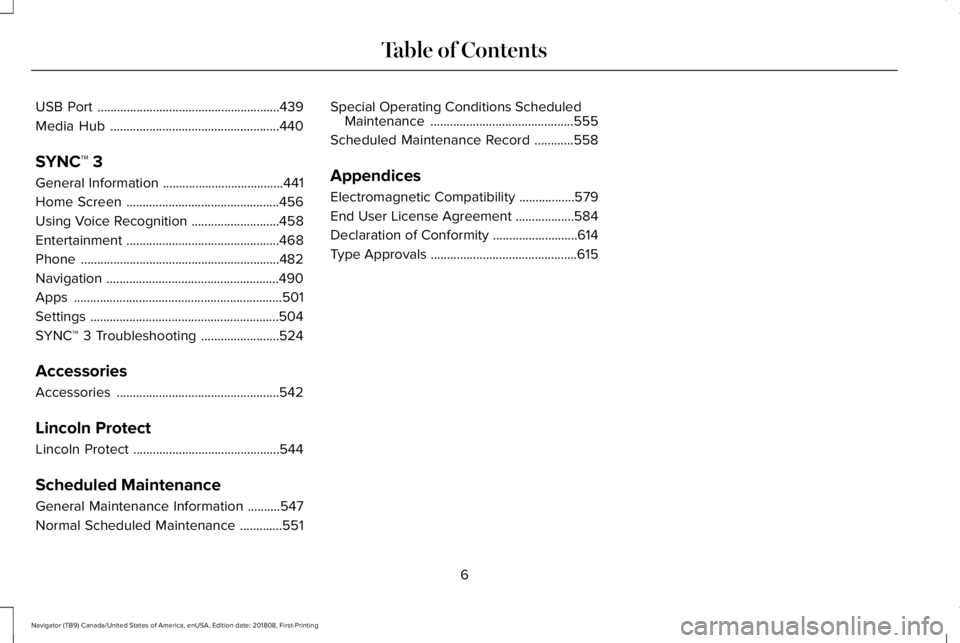
USB Port........................................................439
Media Hub....................................................440
SYNC™ 3
General Information.....................................441
Home Screen...............................................456
Using Voice Recognition...........................458
Entertainment...............................................468
Phone.............................................................482
Navigation.....................................................490
Apps................................................................501
Settings..........................................................504
SYNC™ 3 Troubleshooting........................524
Accessories
Accessories..................................................542
Lincoln Protect
Lincoln Protect.............................................544
Scheduled Maintenance
General Maintenance Information..........547
Normal Scheduled Maintenance.............551
Special Operating Conditions ScheduledMaintenance............................................555
Scheduled Maintenance Record............558
Appendices
Electromagnetic Compatibility.................579
End User License Agreement..................584
Declaration of Conformity..........................614
Type Approvals.............................................615
6
Navigator (TB9) Canada/United States of America, enUSA, Edition date: 201808, First-Printing
Table of Contents
Page 15 of 645
Additionally, when you connect to Traffic,Directions and Information (if equipped,U.S. only), the service uses GPS technologyand advanced vehicle sensors to collectthe vehicle’s current location, traveldirection, and speed (“vehicle travelinformation”), only to help provide you withthe directions, traffic reports, or businesssearches that you request. If you do notwant Ford or its vendors to receive thisinformation, do not activate the service. Formore information, see Traffic, Directionsand Information, Terms and Conditions.
PERCHLORATE
Certain components in your vehicle such asairbag modules, seatbelt pretensioners andremote control batteries may containperchlorate material. Special handling mayapply for service or vehicle end of lifedisposal.
For more information visit:
Web Address
www.dtsc.ca.gov/hazard-ouswaste/perchlorate
LINCOLN AUTOMOTIVE
FINANCIAL SERVICES
Lincoln Automotive Financial Services offersa full range of financing and lease plans tohelp you acquire your vehicle. We arededicated to providing answers, informationand a truly extraordinary experience.
Use the options below to contact us withquestions about your account or financingand we will respond promptly:
Web Address
www.LincolnAFS.com
Phone: 1-888-498-8801
Mail: Lincoln Automotive Financial Services
P.O. Box 542000
Omaha, NE 68154-8000
REPLACEMENT PARTS
RECOMMENDATION
We have built your vehicle to the higheststandards using quality parts. Werecommend that you demand the use ofgenuine Ford and Motorcraft parts wheneveryour vehicle requires scheduledmaintenance or repair. You can clearlyidentify genuine Ford and Motorcraft partsby looking for the Ford, FoMoCo orMotorcraft branding on the parts or theirpackaging.
Scheduled Maintenance andMechanical Repairs
One of the best ways for you to make surethat your vehicle provides years of serviceis to have it maintained in line with ourrecommendations using parts that conformto the specifications detailed in this Owner’sManual. Genuine Ford and Motorcraft partsmeet or exceed these specifications.
12
Navigator (TB9) Canada/United States of America, enUSA, Edition date: 201808, First-Printing
Introduction
Page 160 of 645
Replace the filter at regular intervals. SeeScheduled Maintenance (page 547).
For additional cabin air filter information, orto replace the filter, see an authorized dealer.
REMOTE START
The climate control system adjusts theinterior temperature during remote start.
You can switch this feature on or off andadjust the settings using the informationdisplay controls. See Information Displays(page 120).
You cannot adjust the climate control settingduring remote start operation. Switch theignition on to make adjustments.
Based on your remote start settings, thefollowing vehicle-dependent features mayor may not remain on after remote startingyour vehicle:
•Climate controlled seats.
•Heated steering wheel.
•Heated mirrors.
•Heated rear window.
•Windshield wiper de-icer.
Note:For dual zone climate controlled seats,the passenger seat setting defaults to matchthe driver seat during remote start.
Automatic Settings
If Auto is on, the system sets the interiortemperature to 72°F (22°C) and heats orcools the vehicle interior as required toachieve comfort.
Note:In cold weather, the heated rearwindow and heated mirrors turn on.
Last Settings
If Last Settings is on, the system uses thesettings last selected before you turned offthe vehicle.
Heated and Cooled Features
In Auto mode, certain heated features mayswitch on during cold weather, and cooledfeatures during hot weather.
157
Navigator (TB9) Canada/United States of America, enUSA, Edition date: 201808, First-Printing
Climate Control
Page 210 of 645
•An open or pinched sensor hose.
•Incorrect engine oil level.
•Incorrect fuel for climatic conditions.
•Incorrect engine oil viscosity for climacticconditions.
Note:Some vehicles have a lifetime fuel filterthat is integrated with the fuel tank. Regularmaintenance or replacement is not needed.
Note:If these checks do not help you correctthe concern, have your vehicle checked assoon as possible.
Noise Emissions Warranty, ProhibitedTampering Acts and Maintenance
On January 1, 1978, Federal regulationbecame effective governing the noiseemission on trucks over 10,000 lb (4,536 kg)Gross Vehicle Weight Rating (GVWR). Thepreceding statements concerning prohibitedtampering acts and maintenance, and thenoise warranty found in the Warranty Guide,are applicable to complete chassis cabs over10,000 lb (4,536 kg) GVWR.
CATALYTIC CONVERTER
WARNING: Do not park, idle or driveyour vehicle on dry grass or other dryground cover. The emission system heatsup the engine compartment and exhaustsystem, creating the risk of fire.
WARNING: The normal operatingtemperature of the exhaust system is veryhigh. Never work around or attempt torepair any part of the exhaust system untilit has cooled. Use special care whenworking around the catalytic converter.The catalytic converter heats up to a veryhigh temperature after only a short periodof engine operation and stays hot after theengine is switched off.
WARNING: Exhaust leaks may resultin entry of harmful and potentially lethalfumes into the passenger compartment. Ifyou smell exhaust fumes inside yourvehicle, have your vehicle inspectedimmediately. Do not drive if you smellexhaust fumes.
Your vehicle has various emission controlcomponents and a catalytic converter thatenables it to comply with applicable exhaustemission standards.
To make sure that the catalytic converter andother emission control components continueto work properly:
•Do not crank the engine for more than10 seconds at a time.
•Do not run the engine with a spark pluglead disconnected.
•Do not push-start or tow-start yourvehicle. Use booster cables. See JumpStarting the Vehicle (page 328).
•Use only the specified fuel listed.
•Do not switch the ignition off when yourvehicle is moving.
•Avoid running out of fuel.
•Have the items listed in scheduledmaintenance information performedaccording to the specified schedule.
Note:Resulting component damage maynot be covered by the vehicle Warranty.
207
Navigator (TB9) Canada/United States of America, enUSA, Edition date: 201808, First-Printing
Engine Emission Control
Page 211 of 645
The scheduled maintenance items listed inscheduled maintenance information areessential to the life and performance of yourvehicle and to its emissions system.
If you use anything other than Lincoln,Motorcraft or Lincoln-authorized parts formaintenance replacements or for service ofcomponents affecting emission control, suchnon-Lincoln parts should be equivalent togenuine Lincoln Motor Company parts inperformance and durability.
Illumination of the service engine soonindicator, charging system warning light orthe temperature warning light, fluid leaks,strange odors, smoke or loss of enginepower could indicate that the emissioncontrol system is not working properly.
An improperly operating or damaged exhaustsystem may allow exhaust to enter thevehicle. Have a damaged or improperlyoperating exhaust system inspected andrepaired immediately.
Do not make any unauthorized changes toyour vehicle or engine. By law, vehicleowners and anyone who manufactures,repairs, services, sells, leases, tradesvehicles, or supervises a fleet of vehicles arenot permitted to intentionally remove anemission control device or prevent it fromworking. Information about your vehicle’semission system is on the Vehicle EmissionControl Information Decal located on or nearthe engine. This decal also lists enginedisplacement.
Please consult your warranty information forcomplete details.
On-Board Diagnostics (OBD-II)
Your vehicle has a computer known as theon-board diagnostics system (OBD-II) thatmonitors the engine’s emission controlsystem. The system protects the environmentby making sure that your vehicle continuesto meet government emission standards. TheOBD-II system also assists a servicetechnician in properly servicing your vehicle.
When the service engine soonindicator illuminates, the OBD-IIsystem has detected a malfunction.Temporary malfunctions may cause theservice engine soon indicator to illuminate.Examples are:
1. Your vehicle has run out of fuel—theengine may misfire or run poorly.
2.Poor fuel quality or water in the fuel—theengine may misfire or run poorly.
3. The fuel fill inlet may not have closedproperly. See Refueling (page 202).
4. Driving through deep water—theelectrical system may be wet.
You can correct these temporarymalfunctions by filling the fuel tank with goodquality fuel, properly closing the fuel fill inletor letting the electrical system dry out. Afterthree driving cycles without these or anyother temporary malfunctions present, theservice engine soon indicator should stay offthe next time you start the engine. A drivingcycle consists of a cold engine startupfollowed by mixed city and highway driving.No additional vehicle service is required.
208
Navigator (TB9) Canada/United States of America, enUSA, Edition date: 201808, First-Printing
Engine Emission Control
Page 314 of 645
ESSENTIAL TOWING CHECKS
Follow these guidelines for safe towing:
•Do not tow a trailer until you drive yourvehicle at least 1,000 mi (1,600 km).
•Consult your local motor vehicle laws fortowing a trailer.
•See any instructions that come withtowing accessories for the properinstallation and adjustment specifications.
•Service your vehicle more frequently ifyou tow a trailer. See ScheduledMaintenance (page 547).
•If you use a rental trailer, follow theinstructions the rental agency gives you.
You can find information on loadspecification terms found on the tire labeland Safety Compliance label as well asinstructions on calculating your vehicle's loadin the Load Carrying chapter. See Load Limit(page 292).
Remember to account for the trailer tongueweight as part of your vehicle load whencalculating the total vehicle weight.
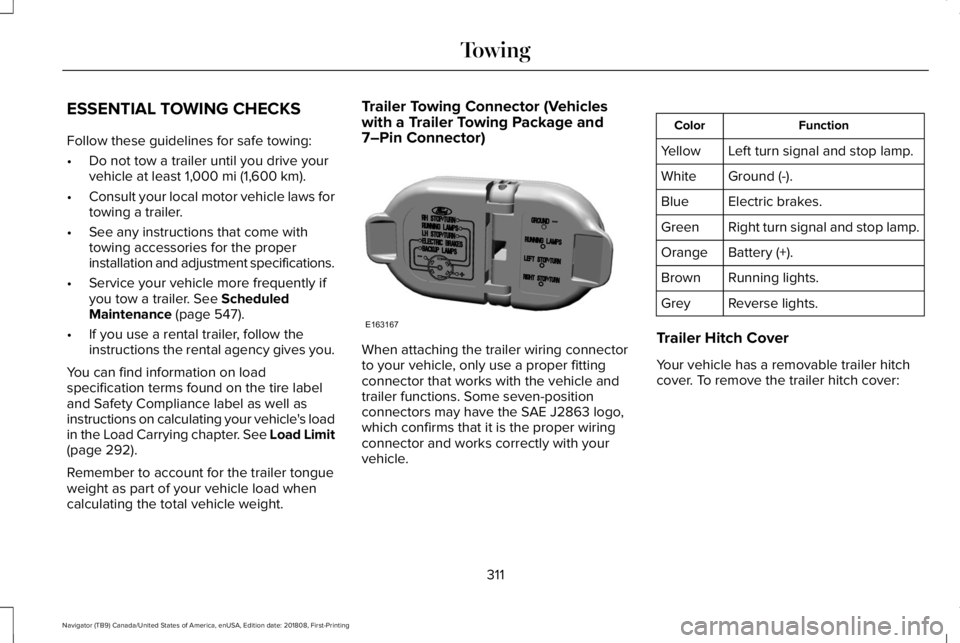
Trailer Towing Connector (Vehicleswith a Trailer Towing Package and7–Pin Connector)
When attaching the trailer wiring connectorto your vehicle, only use a proper fittingconnector that works with the vehicle andtrailer functions. Some seven-positionconnectors may have the SAE J2863 logo,which confirms that it is the proper wiringconnector and works correctly with yourvehicle.
FunctionColor
Left turn signal and stop lamp.Yellow
Ground (-).White
Electric brakes.Blue
Right turn signal and stop lamp.Green
Battery (+).Orange
Running lights.Brown
Reverse lights.Grey
Trailer Hitch Cover
Your vehicle has a removable trailer hitchcover. To remove the trailer hitch cover:
311
Navigator (TB9) Canada/United States of America, enUSA, Edition date: 201808, First-Printing
TowingE163167
Page 326 of 645
BREAKING-IN
You need to break in new tires forapproximately 300 mi (480 km). During thistime, your vehicle may exhibit some unusualdriving characteristics.
Avoid driving too fast during the first 1,000 mi(1,600 km). Vary your speed frequently andchange up through the gears early. Do notlabor the engine.
Do not tow during the first 1,000 mi(1,600 km).
REDUCED ENGINE PERFORMANCE
WARNING: If you continue to driveyour vehicle when the engine isoverheating, the engine could stop withoutwarning. Failure to follow this instructioncould result in the loss of control of yourvehicle.
If the engine coolant temperature gaugeneedle moves to the upper limit position, theengine is overheating. See Gauges (page113).
You must only drive your vehicle for a shortdistance if the engine overheats. Thedistance you can travel depends on ambienttemperature, vehicle load and terrain. Theengine continues to operate with limitedpower for a short period of time.
If the engine temperature continues to rise,the fuel supply to the engine reduces. Theair conditioning switches off and the enginecooling fan operates continually.
1. Gradually reduce your speed and stopyour vehicle as soon as it is safe to doso.
2. Immediately switch the engine off toprevent severe engine damage.
3. Wait for the engine to cool down.
4. Check the coolant level. See EngineCoolant Check (page 364).
5. Have your vehicle checked as soon aspossible.
ECONOMICAL DRIVING
Fuel economy is affected by several thingssuch as how you drive, the conditions youdrive under and how you maintain yourvehicle.
There are some things to keep in mind thatmay improve your fuel economy:
•Accelerate and slow down in a smooth,moderate fashion.
•Drive at steady speeds.
•Anticipate stops; slowing down mayeliminate the need to stop.
•Combine errands and minimizestop-and-go driving (When runningerrands, go to the furthest destinationfirst and then work your way back home).
•Close the windows for high-speeddriving.
•Drive at reasonable speeds.
•Keep the tires properly inflated and useonly the recommended size.
•Use the recommended engine oil.
•Perform all regularly scheduledmaintenance.
323
Navigator (TB9) Canada/United States of America, enUSA, Edition date: 201808, First-Printing
Driving Hints
Page 336 of 645
GETTING THE SERVICES YOU
NEED
Warranty repairs to your vehicle must beperformed by an authorized dealer. Whileany authorized dealer handling your vehicleline provides warranty service, werecommend you return to your sellingauthorized dealer who wants to ensure yourcontinued satisfaction.
Please note that certain warranty repairsrequire special training and equipment, sonot all authorized dealers are authorized toperform all warranty repairs. This means that,depending on the warranty repair needed,you may have to take your vehicle to anotherauthorized dealer.
A reasonable time must be allowed toperform a repair after taking your vehicle tothe authorized dealer. Repairs are madeusing Lincoln or Motorcraft parts, orremanufactured or other parts that areauthorized by Lincoln.
Away From Home
If you are away from home when your vehicleneeds service, contact the Lincoln ClientRelationship Center or use the onlineresources listed below to find the nearestauthorized dealer.
In the United States:
Mailing address
Lincoln Motor CompanyClient Relationship CenterP.O. Box 6248Dearborn, MI 48126
Telephone
1-800-521-4140TDD for the hearing impaired:1-800-232-5952
Web Address
www.LincolnOwner.com
These are some of the items that can befound online:
•United States dealer locator by DealerName, City, State or ZIP Code.
•Owner Manuals.
•Maintenance Schedules.
•Recalls.
•Lincoln Extended Service Plans.
•Lincoln Original Accessories.
•Service specials and promotions.
In Canada:
Mailing address
Lincoln Client Relationship CentreLincoln Motor Company of Canada, LimitedP.O. Box 2000Oakville, Ontario L6K 1C8
Telephone
1-800-387-9333
333
Navigator (TB9) Canada/United States of America, enUSA, Edition date: 201808, First-Printing
Customer Assistance
Page 367 of 645
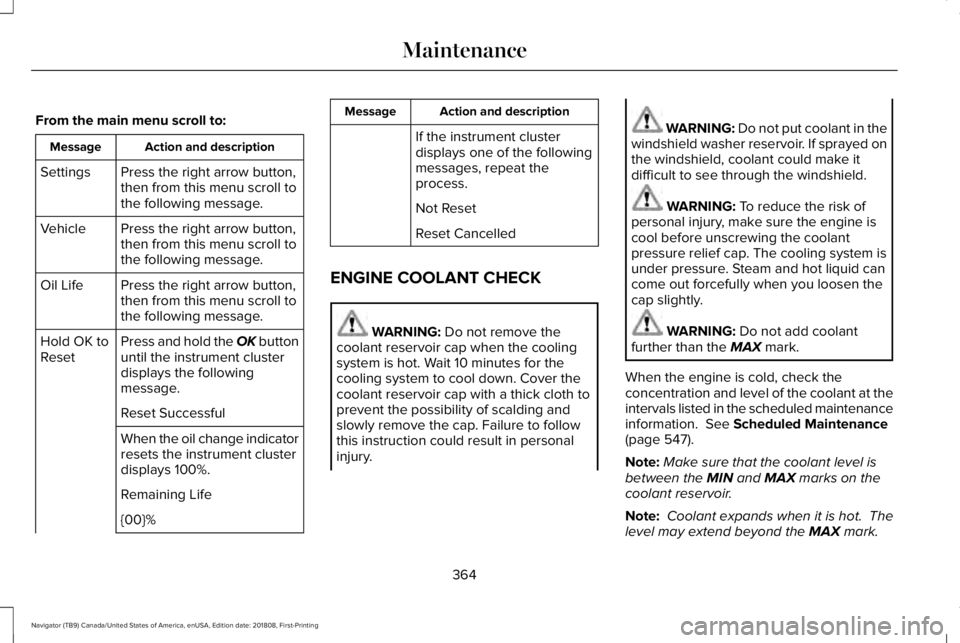
From the main menu scroll to:
Action and descriptionMessage
Press the right arrow button,then from this menu scroll tothe following message.
Settings
Press the right arrow button,then from this menu scroll tothe following message.
Vehicle
Press the right arrow button,then from this menu scroll tothe following message.
Oil Life
Press and hold the OK buttonuntil the instrument clusterdisplays the followingmessage.
Hold OK toReset
Reset Successful
When the oil change indicatorresets the instrument clusterdisplays 100%.
Remaining Life
{00}%
Action and descriptionMessage
If the instrument clusterdisplays one of the followingmessages, repeat theprocess.
Not Reset
Reset Cancelled
ENGINE COOLANT CHECK
WARNING: Do not remove thecoolant reservoir cap when the coolingsystem is hot. Wait 10 minutes for thecooling system to cool down. Cover thecoolant reservoir cap with a thick cloth toprevent the possibility of scalding andslowly remove the cap. Failure to followthis instruction could result in personalinjury.
WARNING: Do not put coolant in thewindshield washer reservoir. If sprayed onthe windshield, coolant could make itdifficult to see through the windshield.
WARNING: To reduce the risk ofpersonal injury, make sure the engine iscool before unscrewing the coolantpressure relief cap. The cooling system isunder pressure. Steam and hot liquid cancome out forcefully when you loosen thecap slightly.
WARNING: Do not add coolantfurther than the MAX mark.
When the engine is cold, check theconcentration and level of the coolant at theintervals listed in the scheduled maintenanceinformation. See Scheduled Maintenance(page 547).
Note:Make sure that the coolant level isbetween the MIN and MAX marks on thecoolant reservoir.
Note: Coolant expands when it is hot. Thelevel may extend beyond the MAX mark.
364
Navigator (TB9) Canada/United States of America, enUSA, Edition date: 201808, First-Printing
Maintenance
Page 370 of 645
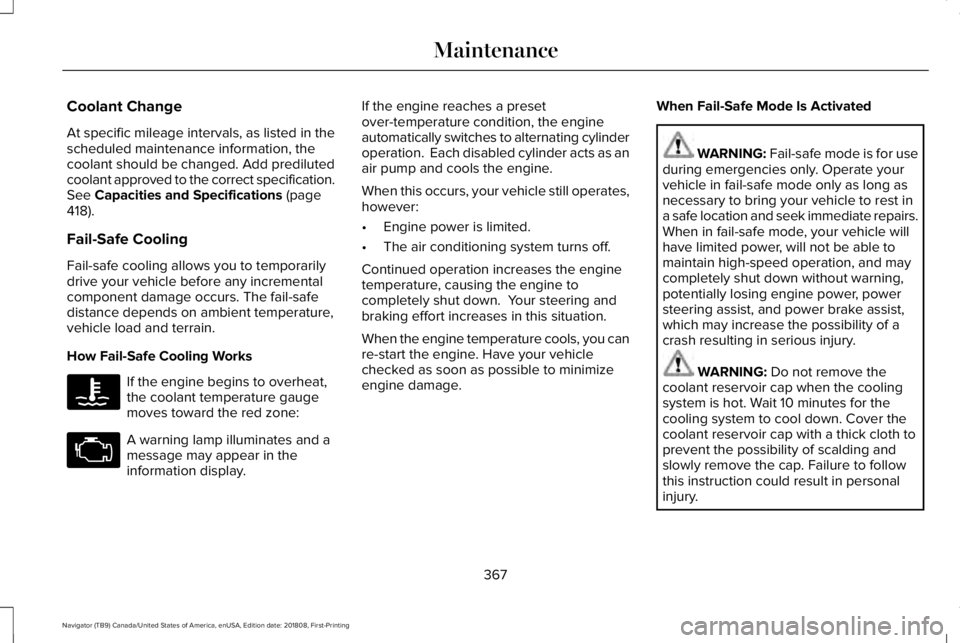
Coolant Change
At specific mileage intervals, as listed in thescheduled maintenance information, thecoolant should be changed. Add predilutedcoolant approved to the correct specification.See Capacities and Specifications (page418).
Fail-Safe Cooling
Fail-safe cooling allows you to temporarilydrive your vehicle before any incrementalcomponent damage occurs. The fail-safedistance depends on ambient temperature,vehicle load and terrain.
How Fail-Safe Cooling Works
If the engine begins to overheat,the coolant temperature gaugemoves toward the red zone:
A warning lamp illuminates and amessage may appear in theinformation display.
If the engine reaches a presetover-temperature condition, the engineautomatically switches to alternating cylinderoperation. Each disabled cylinder acts as anair pump and cools the engine.
When this occurs, your vehicle still operates,however:
•Engine power is limited.
•The air conditioning system turns off.
Continued operation increases the enginetemperature, causing the engine tocompletely shut down. Your steering andbraking effort increases in this situation.
When the engine temperature cools, you canre-start the engine. Have your vehiclechecked as soon as possible to minimizeengine damage.
When Fail-Safe Mode Is Activated
WARNING: Fail-safe mode is for useduring emergencies only. Operate yourvehicle in fail-safe mode only as long asnecessary to bring your vehicle to rest ina safe location and seek immediate repairs.When in fail-safe mode, your vehicle willhave limited power, will not be able tomaintain high-speed operation, and maycompletely shut down without warning,potentially losing engine power, powersteering assist, and power brake assist,which may increase the possibility of acrash resulting in serious injury.
WARNING: Do not remove thecoolant reservoir cap when the coolingsystem is hot. Wait 10 minutes for thecooling system to cool down. Cover thecoolant reservoir cap with a thick cloth toprevent the possibility of scalding andslowly remove the cap. Failure to followthis instruction could result in personalinjury.
367
Navigator (TB9) Canada/United States of America, enUSA, Edition date: 201808, First-Printing
Maintenance