lock LINCOLN NAVIGATOR 2020 Owners Manual
[x] Cancel search | Manufacturer: LINCOLN, Model Year: 2020, Model line: NAVIGATOR, Model: LINCOLN NAVIGATOR 2020Pages: 622, PDF Size: 6.47 MB
Page 294 of 622
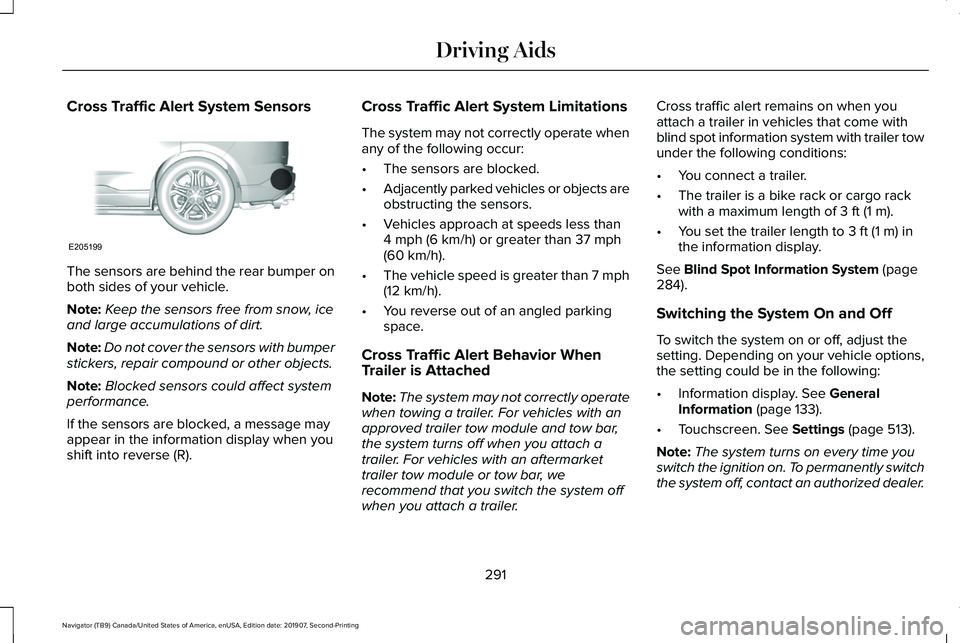
Cross Traffic Alert System Sensors
The sensors are behind the rear bumper on
both sides of your vehicle.
Note:
Keep the sensors free from snow, ice
and large accumulations of dirt.
Note: Do not cover the sensors with bumper
stickers, repair compound or other objects.
Note: Blocked sensors could affect system
performance.
If the sensors are blocked, a message may
appear in the information display when you
shift into reverse (R). Cross Traffic Alert System Limitations
The system may not correctly operate when
any of the following occur:
•
The sensors are blocked.
• Adjacently parked vehicles or objects are
obstructing the sensors.
• Vehicles approach at speeds less than
4 mph (6 km/h) or greater than 37 mph
(60 km/h).
• The vehicle speed is greater than 7 mph
(12 km/h)
.
• You reverse out of an angled parking
space.
Cross Traffic Alert Behavior When
Trailer is Attached
Note: The system may not correctly operate
when towing a trailer. For vehicles with an
approved trailer tow module and tow bar,
the system turns off when you attach a
trailer. For vehicles with an aftermarket
trailer tow module or tow bar, we
recommend that you switch the system off
when you attach a trailer. Cross traffic alert remains on when you
attach a trailer in vehicles that come with
blind spot information system with trailer tow
under the following conditions:
•
You connect a trailer.
• The trailer is a bike rack or cargo rack
with a maximum length of
3 ft (1 m).
• You set the trailer length to
3 ft (1 m) in
the information display.
See
Blind Spot Information System (page
284).
Switching the System On and Off
To switch the system on or off, adjust the
setting. Depending on your vehicle options,
the setting could be in the following:
• Information display.
See General
Information (page 133).
• Touchscreen.
See Settings (page 513).
Note: The system turns on every time you
switch the ignition on. To permanently switch
the system off, contact an authorized dealer.
291
Navigator (TB9) Canada/United States of America, enUSA, Edition date: 201907, Second-Printing Driving AidsE205199
Page 295 of 622
Cross Traffic Alert Indicator
When the system detects an
approaching vehicle, a tone
sounds, a warning lamp illuminates
in the relevant exterior mirror and arrows
appear in the information display to show
which side the approaching vehicle is coming
from. Note:
If arrows do not display, a message
appears in the information display.
If the system malfunctions, a warning lamp
illuminates in the instrument cluster and a
message appears in the information display.
Have your vehicle checked as soon as
possible. Note:
In exceptional conditions, the system
could alert you, even when there is nothing
in the detection zone, for example a vehicle
passing further away from your vehicle.
Cross Traffic Alert Information Messages Action
Message
Displays instead of indication arrows when the system detects a vehicle. Check for approaching
traffic.
Cross Traffic Alert
Indicates blocked cross traffic alert system sensors. Clean the sensors. If the message\
continues
to appear, have your vehicle checked as soon as possible.
Cross Traffic Not Available Sensor
Blocked See Manual
The system has malfunctioned. Have your vehicle checked as soon as possible.
Cross Traffic System Fault
Displays if you attach a trailer to your vehicle.
Cross Traffic Alert Deactivated Trailer
Attached
292
Navigator (TB9) Canada/United States of America, enUSA, Edition date: 201907, Second-Printing Driving AidsE268294
Page 299 of 622
Time Gap
Distance Gap
Graphics
Sensitivity
Speed
>0.9sec
>82 ft (25 m)
Grey
Normal
62 mph (100 km/h)
0.6sec — 0.9sec
56–82 ft (17–25 m)
Yellow
Normal
62 mph (100 km/h)
<0.6sec
<
56 ft (17 m)
Red
Normal
62 mph (100 km/h)
Adjusting the Pre-Collision Assist
Settings
You can adjust the following settings by
using the information display controls.
See
General Information (page 133).
• You can adjust the Alert and Distance
Alert sensitivity to one of three settings.
• You can switch the Distance Indication
and Alert function on or off.
• If required, you can switch Active Braking
on or off.
Note: Active braking automatically turns on
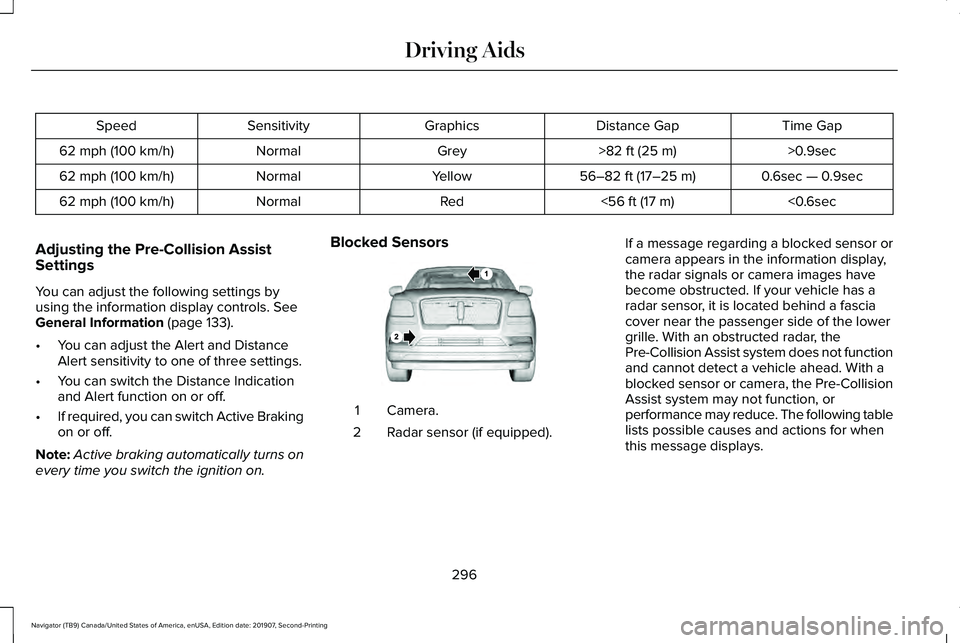
every time you switch the ignition on. Blocked Sensors
Camera.
1
Radar sensor (if equipped).
2 If a message regarding a blocked sensor or
camera appears in the information display,
the radar signals or camera images have
become obstructed. If your vehicle has a
radar sensor, it is located behind a fascia
cover near the passenger side of the lower
grille. With an obstructed radar, the
Pre-Collision Assist system does not function
and cannot detect a vehicle ahead. With a
blocked sensor or camera, the Pre-Collision
Assist system may not function, or
performance may reduce. The following table
lists possible causes and actions for when
this message displays.
296
Navigator (TB9) Canada/United States of America, enUSA, Edition date: 201907, Second-Printing Driving AidsE253503
Page 320 of 622
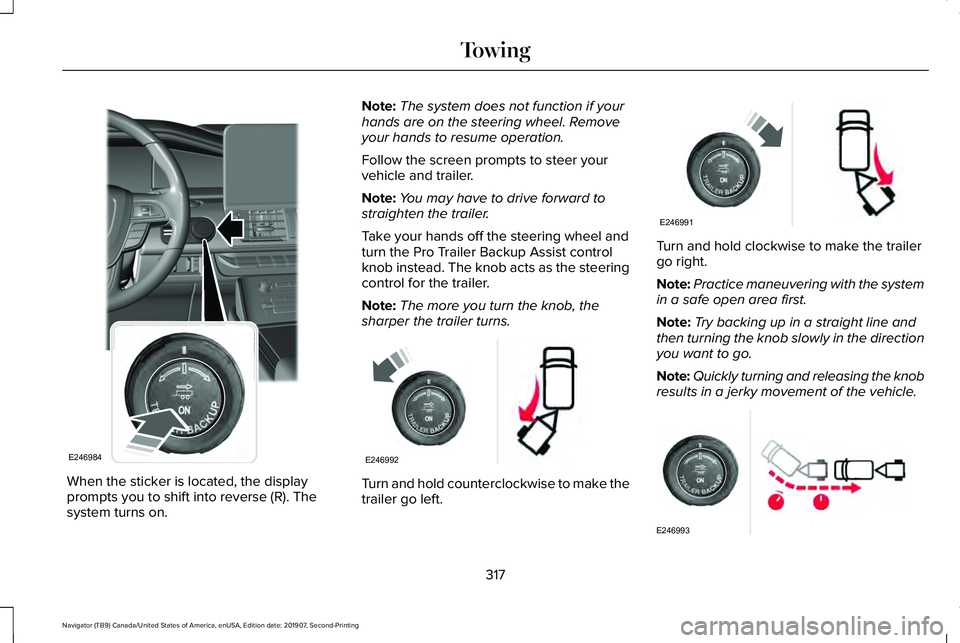
When the sticker is located, the display
prompts you to shift into reverse (R). The
system turns on. Note:
The system does not function if your
hands are on the steering wheel. Remove
your hands to resume operation.
Follow the screen prompts to steer your
vehicle and trailer.
Note: You may have to drive forward to
straighten the trailer.
Take your hands off the steering wheel and
turn the Pro Trailer Backup Assist control
knob instead. The knob acts as the steering
control for the trailer.
Note: The more you turn the knob, the
sharper the trailer turns. Turn and hold counterclockwise to make the
trailer go left. Turn and hold clockwise to make the trailer
go right.
Note:
Practice maneuvering with the system
in a safe open area first.
Note: Try backing up in a straight line and
then turning the knob slowly in the direction
you want to go.
Note: Quickly turning and releasing the knob
results in a jerky movement of the vehicle. 317
Navigator (TB9) Canada/United States of America, enUSA, Edition date: 201907, Second-Printing TowingE246984 E246992 E246991 E246993
Page 323 of 622
Calibration
The system monitors various vehicle
parameters to ensure your vehicle is being
driven straight and the trailer straight behind
your vehicle. Any steering input or trailer
movement will pause the calibration.
For best results:
•
Use a long, straight, smooth and level
road when attempting to calibrate.
• Drive straight forward.
• Drive between 4 mph (6 km/h) and
24 mph (39 km/h).
System Operation
The following warnings or difficulties may
occur during feature operation. Tips to
resolve them are listed below. The system is not available:
•
The system relies on many sub-systems
in your vehicle to operate correctly. If
those sub-systems are not operating
correctly the system may not be
available.
• Low battery voltage is a condition which
will prevent the system from operating.
Please make sure the battery is correctly
charged if the system is not available.
• You may need to drive your vehicle
straight forward above 25 mph (40 km/h)
before the system is available again.
• If the message still displays take your
vehicle to an authorized dealer for
service.
Sticker lost:
• If the system cannot initially find the
sticker, it may be necessary for you to
change the lighting conditions by moving
the vehicle and trailer or waiting until
conditions change.
• Check for the following if you receive the
lost sticker message while using the
system. •
Stop your vehicle as soon as the
message displays.
• Make sure the sticker is visible and the
pattern is discernable in the rear view
camera image.
• Clean the sticker and camera to make
sure they are unobstructed.
• Clean the lens with a soft, lint-free cloth
and water.
• Clean the sticker with isopropyl rubbing
alcohol sprayed directly onto the sticker,
and then wipe clean with a soft cloth.
• Remove any items that may be blocking
the view of the sticker. Depending on
your trailer configuration and any
equipment mounted to your trailer it is
possible for the sticker to be blocked
from view of the camera as it rotates on
the hitch ball but not be blocked during
setup. Remove the obstruction if
possible. It will be necessary to remove
the sticker from it’ s current location if the
obstruction cannot be cleared and place
a new sticker that will be visible to the
camera in all positions of the trailer
behind your vehicle.
320
Navigator (TB9) Canada/United States of America, enUSA, Edition date: 201907, Second-Printing Towing
Page 327 of 622
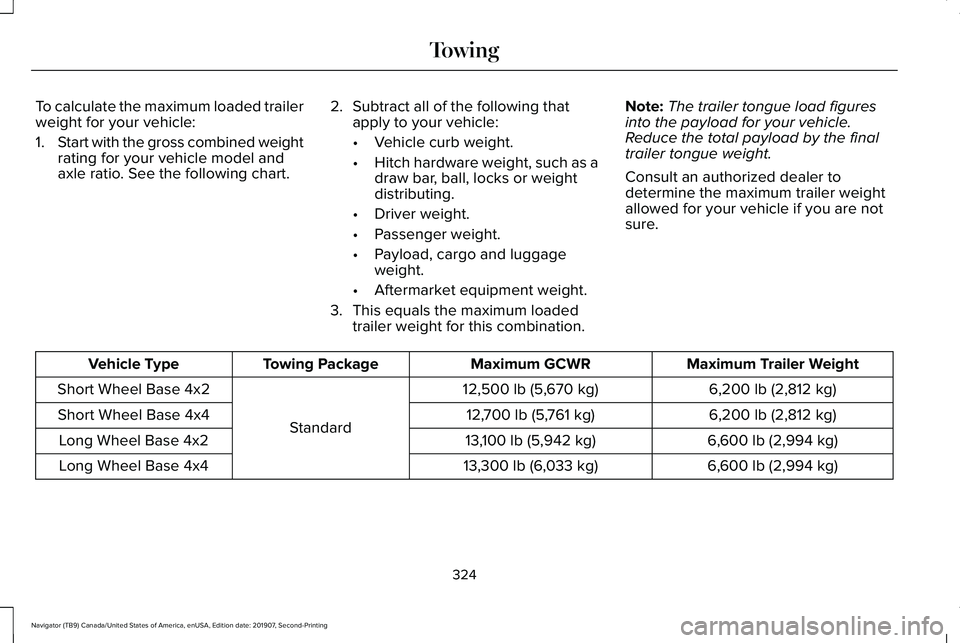
To calculate the maximum loaded trailer
weight for your vehicle:
1.
Start with the gross combined weight
rating for your vehicle model and
axle ratio. See the following chart. 2.
Subtract all of the following that
apply to your vehicle:
•Vehicle curb weight.
• Hitch hardware weight, such as a
draw bar, ball, locks or weight
distributing.
• Driver weight.
• Passenger weight.
• Payload, cargo and luggage
weight.
• Aftermarket equipment weight.
3. This equals the maximum loaded trailer weight for this combination. Note:
The trailer tongue load figures
into the payload for your vehicle.
Reduce the total payload by the final
trailer tongue weight.
Consult an authorized dealer to
determine the maximum trailer weight
allowed for your vehicle if you are not
sure. Maximum Trailer Weight
Maximum GCWR
Towing Package
Vehicle Type
6,200 lb (2,812 kg)
12,500 lb (5,670 kg)
Standard
Short Wheel Base 4x2
6,200 lb (2,812 kg)
12,700 lb (5,761 kg)
Short Wheel Base 4x4
6,600 lb (2,994 kg)
13,100 lb (5,942 kg)
Long Wheel Base 4x2
6,600 lb (2,994 kg)
13,300 lb (6,033 kg)
Long Wheel Base 4x4
324
Navigator (TB9) Canada/United States of America, enUSA, Edition date: 201907, Second-Printing Towing
Page 331 of 622
Note:
These are hitch ratings only. Actual
vehicle ratings are dependent on engine,
transmission and axle combinations.
Weight-distributing Hitch WARNING: Do not adjust the spring
bars so that your vehicle's rear bumper is
higher than before attaching the trailer.
Doing so will defeat the function of the
weight-distributing hitch, which may cause
unpredictable handling, and could result
in serious personal injury.
When hooking-up a trailer using a
weight-distributing hitch, always use the
following procedure:
1. Park the loaded vehicle, without the trailer, on a level surface.
2. Measure the height to the top of your vehicle's front wheel opening on the
fender. This is H1.
3. Attach the loaded trailer to your vehicle without the weight-distributing bars
connected. 4. Measure the height to the top of your
vehicle's front wheel opening on the
fender a second time. This is H2.
5. Install and adjust the tension in the weight-distributing bars so that the height
of your vehicle's front wheel opening on
the fender is approximately half the way
down from H2, toward H1.
6. Check that the trailer is level or slightly nose down toward your vehicle. If not,
adjust the ball height accordingly and
repeat Steps 2-6.
When the trailer is level or slightly nose down
toward the vehicle:
• Lock the bar tension adjuster in place.
• Check that the trailer tongue securely
attaches and locks onto the hitch.
• Install safety chains, lighting and trailer
brake controls as required by law or the
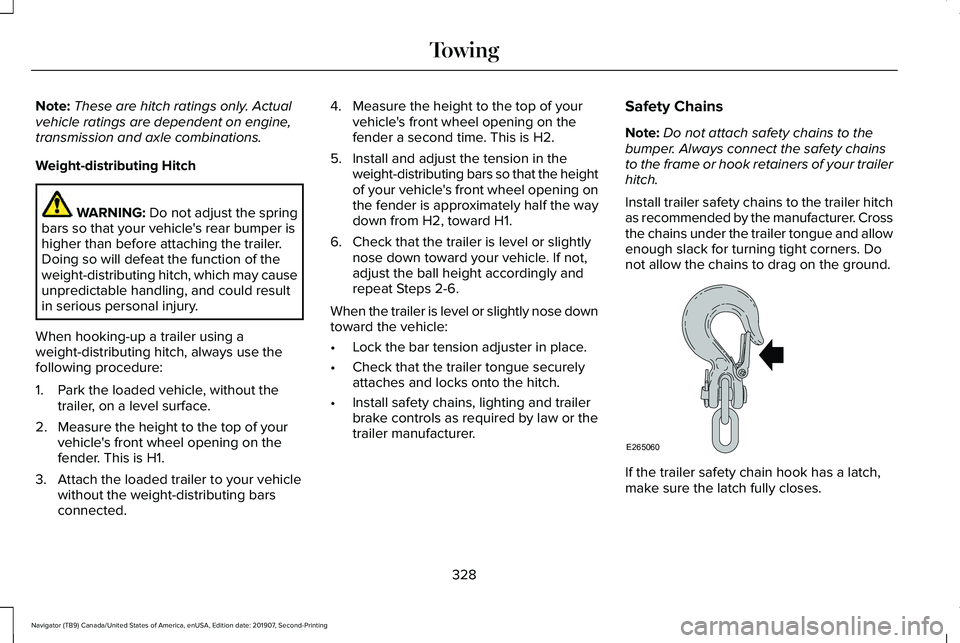
trailer manufacturer. Safety Chains
Note:
Do not attach safety chains to the
bumper. Always connect the safety chains
to the frame or hook retainers of your trailer
hitch.
Install trailer safety chains to the trailer hitch
as recommended by the manufacturer. Cross
the chains under the trailer tongue and allow
enough slack for turning tight corners. Do
not allow the chains to drag on the ground. If the trailer safety chain hook has a latch,
make sure the latch fully closes.
328
Navigator (TB9) Canada/United States of America, enUSA, Edition date: 201907, Second-Printing TowingE265060
Page 334 of 622
The gain setting sets the trailer brake
controller for the specific towing condition.
You should change the setting as towing
conditions change. Changes to towing
conditions include trailer load, vehicle load,
road conditions and weather.
The gain should be set to provide the
maximum trailer braking assistance while
making sure the trailer wheels do not lock
when using the brakes. Locked trailer wheels
may lead to trailer instability.
1.
Make sure the trailer brakes are in good
working condition, functioning normally
and properly adjusted. See your trailer
dealer if necessary.
2. Hook up the trailer and make the electrical connections according to the
trailer manufacturer's instructions.
3. When you plug in a trailer with electric or
electric-over-hydraulic brakes, a message
confirming connection appears in the
information display. 4.
Use the gain adjustment (+ and -) buttons
to increase or decrease the gain setting
to the desired starting point. A gain
setting of 6.0 is a good starting point for
heavier loads.
5. In a traffic-free environment, tow the trailer on a dry, level surface at a speed
of 20–25 mph (32–40 km/h) and
squeeze the manual control lever
completely.
6. If the trailer wheels lock up, indicated by
squealing tires, reduce the gain setting.
If the trailer wheels turn freely, increase
the gain setting. Repeat Steps 5 and 6
until the gain setting is at a point just
below trailer wheel lock-up. If towing a
heavier trailer, trailer wheel lock-up may
not be attainable even with the maximum
gain setting of 10.
Explanation of Information Display Warning
Messages
Note: An authorized dealer can diagnose
the trailer brake controller to determine
exactly which trailer fault has occurred.
However, your warranty does not cover this
diagnosis if the fault is with the trailer. A message indicating a trailer brake module
fault may display in response to faults sensed
by the trailer brake controller, accompanied
by a single tone. If this message appears,
contact an authorized dealer as soon as
possible for diagnosis and repair. The
controller may still function, but performance
may be degraded.
A message indicating a trailer wiring fault
may display when there is a short circuit on
the electric brake output wire. If this message
displays, accompanied by a single tone, with
no trailer connected, the problem is with your
vehicle wiring between the trailer brake
controller and the 7-pin connector at the
bumper. If the message only displays with a
trailer connected, the problem is with the
trailer wiring. Consult your trailer dealer for
assistance. This can be a short to ground
(such as a chaffed wire), short to voltage
(such as a pulled pin on trailer emergency
breakaway battery) or the trailer brakes may
be drawing too much current.
331
Navigator (TB9) Canada/United States of America, enUSA, Edition date: 201907, Second-Printing Towing
Page 335 of 622
Points to Remember
Note:
Do not attempt removal of the trailer
brake controller without consulting the
Workshop Manual. Damage to the unit may
result.
• Adjust gain setting before using the
trailer brake controller for the first time.
• Adjust gain setting, using the procedure
above, whenever road, weather and
trailer or vehicle loading conditions
change from when the gain was initially
set.
• Only use the manual control lever for
proper adjustment of the gain during
trailer setup. Misuse, such as application
during trailer sway, could cause instability
of trailer or tow vehicle.
• Avoid towing in adverse weather
conditions. The trailer brake controller
does not provide anti-lock control of the
trailer wheels. Trailer wheels can lock up
on slippery surfaces, resulting in reduced
stability of trailer and tow vehicle. •
The trailer brake controller is equipped
with a feature that reduces output at
vehicle speeds below 11 mph (18 km/h)
so trailer and vehicle braking is not jerky
or harsh. This feature is only available
when applying the brakes using your
vehicle's brake pedal, not the controller.
• The controller interacts with the brake
control system and powertrain control
system of your vehicle to provide the
best performance on different road
conditions.
• Your vehicle's brake system and the
trailer brake system work independently
of each other. Changing the gain setting
on the controller does not affect the
operation of your vehicle's brakes
whether you attach a trailer or not. •
When you switch the engine off, the
controller output is disabled and the
display and module shut down. The
controller module and display turn on
when you switch the ignition on.
• The trailer brake controller is only a
factory-installed or dealer-installed item.
Lincoln is not responsible for warranty or
performance of the controller due to
misuse or customer installation.
Trailer Lamps WARNING: Never connect any trailer
lamp wiring to the vehicle's tail lamp wiring;
this may damage the electrical system
resulting in fire. Contact your authorized
dealer as soon as possible for assistance
in proper trailer tow wiring installation.
Additional electrical equipment may be
required.
Trailer lamps are required on most towed
vehicles. Make sure all running lights, brake
lights, turn signals and hazard lights are
working.
332
Navigator (TB9) Canada/United States of America, enUSA, Edition date: 201907, Second-Printing Towing
Page 337 of 622
Your vehicle may be equipped with a
temporary or conventional spare tire. A
temporary spare tire is different in size
(diameter or width), tread-type (All-Season
or All-Terrain) or is from a different
manufacturer than the road tires on your
vehicle. Consult information on the tire label
or Safety Compliance label for limitations
when using.
Launching or Retrieving a Boat or
Personal Watercraft (PWC)
Note:
Disconnect the wiring to the trailer
before backing the trailer into the water.
Note: Reconnect the wiring to the trailer
after
removing the trailer from the water.
When backing down a ramp during boat
launching or retrieval:
• Do not allow the static water level to rise
above the bottom edge of the rear
bumper.
• Do not allow waves to break higher than
6 in (15 cm)
above the bottom edge of
the rear bumper. Exceeding these limits may allow water to
enter vehicle components:
•
Causing internal damage to the
components.
• Affecting driveability, emissions, and
reliability.
Replace the rear axle lubricant anytime the
rear axle has been submerged in water.
Water may have contaminated the rear axle
lubricant, which is not normally checked or
changed unless a leak is suspected or other
axle repair is required.
TOWING THE VEHICLE ON FOUR
WHEELS WARNING:
If your vehicle has a
steering wheel lock make sure the ignition
is in the accessory or on position when
being towed. Recreational Towing
Note:
Put your climate control system in
recirculated air mode to prevent exhaust
fumes from entering your vehicle.
See
Climate Control (page 165).
Follow these guidelines if you have a need
for recreational towing, such as towing your
vehicle behind a motorhome. These
guidelines are designed to prevent damage
to your transmission.
Two-wheel Drive Vehicles
You cannot tow a two-wheel drive vehicle
with any wheels on the ground as vehicle or
transmission damage may occur. You must
tow your vehicle with all four wheels off the
ground, for example when using a
car-hauling trailer.
Four-wheel Drive Vehicles Without
SLOW
CLIMB Mode
You cannot tow your vehicle with any wheels
on the ground or vehicle damage may occur.
You must tow your vehicle with all four
wheels off the ground, for example when
using a car-hauling trailer.
334
Navigator (TB9) Canada/United States of America, enUSA, Edition date: 201907, Second-Printing Towing