lock LINCOLN NAVIGATOR 2020 Repair Manual
[x] Cancel search | Manufacturer: LINCOLN, Model Year: 2020, Model line: NAVIGATOR, Model: LINCOLN NAVIGATOR 2020Pages: 622, PDF Size: 6.47 MB
Page 193 of 622
Folds the second-row bench
center seat or both second-row
captain chair seats.
E
Folds the right-hand second-row
seat.
F
To return the second-row seat backrest to
the original position, rotate the seat backrest
up until it latches in the upright position. The
seat backrest clicks when it is locked into
position.
To return the third-row seat backrest to the
original position, press the corresponding
control again.
If the power rear seat is disabled after 10
minutes, you can enable the seat by:
• Opening any door.
• Pressing the unlock button on the key
fob.
• Pressing any keyless entry keypad
button.
• Switching the ignition on. Folding Down the Rear Seats to the Load
Floor WARNING: To prevent possible
damage to the seat or seatbelts, make sure
that the seatbelts are not fastened before
folding the seatback. WARNING:
Do not place cargo or
any objects behind the seatback before
returning it to the original position.
The third-row seats have obstacle detection
that prevents the seats from folding or
returning if they are obstructed.
Reclining the Third Row Power Seats WARNING:
Do not recline a rear seat
on which a child restraint is installed.
Failure to follow this instruction could
reduce the effectiveness of the child
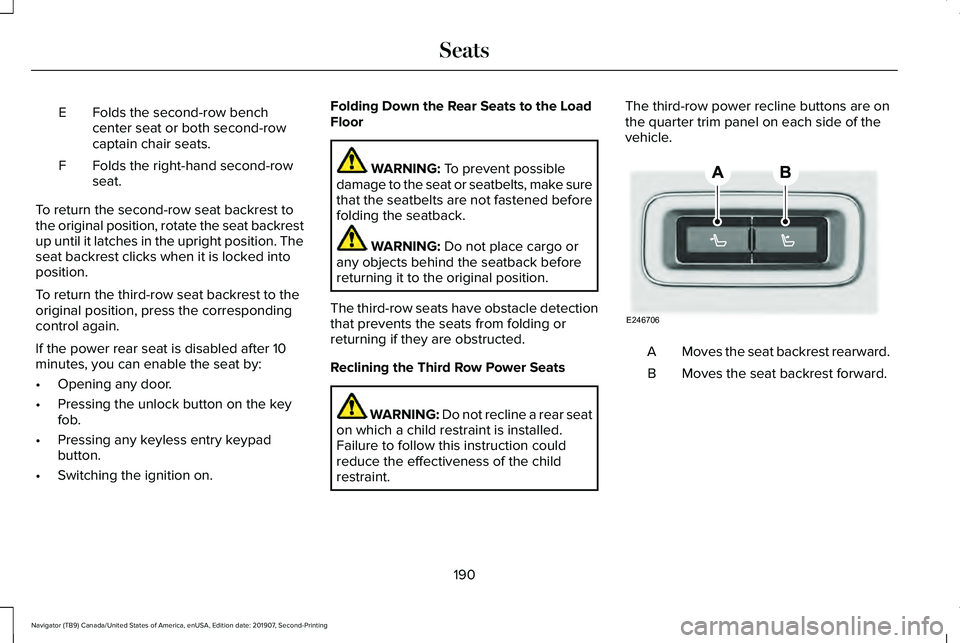
restraint. The third-row power recline buttons are on
the quarter trim panel on each side of the
vehicle.
Moves the seat backrest rearward.
A
Moves the seat backrest forward.
B
190
Navigator (TB9) Canada/United States of America, enUSA, Edition date: 201907, Second-Printing SeatsE246706
Page 194 of 622
HEATED SEATS (IF EQUIPPED)
WARNING:
Use caution when using
the heated seat if you are unable to feel
pain to your skin because of advanced
age, chronic illness, diabetes, spinal cord
injury, medication, alcohol use, exhaustion
or other physical conditions. The heated
seat could cause burns even at low
temperatures, especially if used for long
periods of time. Failure to follow this
instruction could result in personal injury. WARNING:
Do not poke sharp
objects into the seat cushion or seat
backrest. This could damage the heated
seat element and cause it to overheat.
Failure to follow this instruction could result
in personal injury. WARNING:
Do not place anything on
the seat that blocks the heat, for example
a seat cover or a cushion. This could cause
the seat to overheat. Failure to follow this
instruction could result in personal injury. Front Seats
Do not do the following:
•
Place heavy objects on the seat.
• Operate the heated seat if water or any
other liquid spills on the seat. Allow the
seat to dry thoroughly.
Note: The engine must be running to use
this feature. Press the heated seat symbol to cycle
through the various heat settings and off.
More indicator lights indicate warmer
settings.
Note:
The heated seats switch on during a
remote start if they are enabled. Note:
The heated seats may switch on when
you start your vehicle if they were on when
you previously switched your vehicle off.
Automatic Climate Controlled Seats
(If
Equipped)
When you switch on the auto setting, the
seats switch between the heated seats and
ventilated seats to match your climate control
setting.
Second Row Heated Seats
The heated seat controls are on the rear of
the center console.
VENTILATED SEATS
(IF EQUIPPED)
Do not do the following:
• Spill liquid on the front seats. This may
cause the air vent holes to become
blocked and not work properly.
• Place cargo or objects under the seats.
They may block the air intake causing
the air vents to not work properly.
191
Navigator (TB9) Canada/United States of America, enUSA, Edition date: 201907, Second-Printing SeatsE146322
Page 196 of 622
UNIVERSAL GARAGE DOOR
OPENER
HomeLink Wireless Control System
WARNING: Do not use the system
with any garage door opener that does not
have the safety stop and reverse feature
as required by U.S. Federal Safety
Standards (this includes any garage door
opener manufactured before April 1, 1982).
A garage door opener which cannot detect
an object, signaling the door to stop and
reverse, does not meet current federal
safety standards. Using a garage door
opener without these features increases
the risk of serious injury or death.
Note: Make sure that the garage door and
security device are free from obstruction
when you are programming. Do not program
the system with the vehicle in the garage.
Note: Make sure you keep the original
remote control transmitter for use in other
vehicles as well as for future system
programming. Note:
We recommend that upon the sale or
lease termination of your vehicle, you erase
the programmed function buttons for security
reasons. See
Erasing the Function Button
Codes later in this section.
Note: You can program a maximum of three
devices. To change or replace any of the
three devices after it has been initially
programmed, you must first erase the current
settings. See
Erasing the Function Button
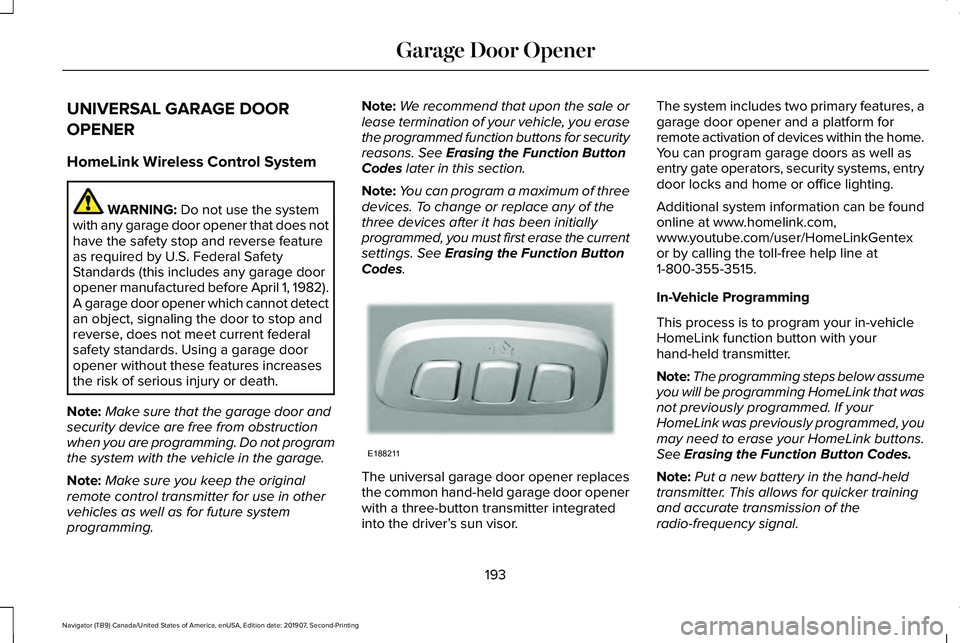
Codes. The universal garage door opener replaces
the common hand-held garage door opener
with a three-button transmitter integrated
into the driver’
s sun visor. The system includes two primary features, a
garage door opener and a platform for
remote activation of devices within the home.
You can program garage doors as well as
entry gate operators, security systems, entry
door locks and home or office lighting.
Additional system information can be found
online at www.homelink.com,
www.youtube.com/user/HomeLinkGentex
or by calling the toll-free help line at
1-800-355-3515.
In-Vehicle Programming
This process is to program your in-vehicle
HomeLink function button with your
hand-held transmitter.
Note:
The programming steps below assume
you will be programming HomeLink that was
not previously programmed. If your
HomeLink was previously programmed, you
may need to erase your HomeLink buttons.
See
Erasing the Function Button Codes.
Note: Put a new battery in the hand-held
transmitter. This allows for quicker training
and accurate transmission of the
radio-frequency signal.
193
Navigator (TB9) Canada/United States of America, enUSA, Edition date: 201907, Second-Printing Garage Door OpenerE188211
Page 209 of 622
You can stop the shutdown, or reset the
timer, at any point before the 30-second
countdown has expired by doing any of the
following:
•
Interacting with your vehicle, for example
pressing the brake or accelerator pedal.
• You can temporarily switch off the
shutdown feature any time the ignition is
on using the information display. See
Information Displays (page 133). The
feature only remains off for the current
ignition cycle.
• During the 30-second countdown, the
system prompts you to press OK or
RESET to temporarily switch the feature
off for the current ignition cycle only.
Stopping the Engine When Your
Vehicle is Stationary
1. Shift into park (P).
2. Press the push button ignition switch.
3. Apply the parking brake.
Note: The ignition, all electrical circuits and
all warning lamps and indicators will be
turned off. Note:
If the engine is idling for 30 minutes,
the ignition and engine automatically shuts
down.
Stopping the Engine When Your
Vehicle is Moving WARNING:
Switching off the engine
when the vehicle is still moving will result
in a loss of brake and steering assistance.
The steering will not lock, but higher effort
will be required. When the ignition is
switched off, some electrical circuits,
including air bags, warning lamps and
indicators may also be off. If the ignition
was turned off accidentally, you can shift
into neutral (N) and re-start the engine.
1. Shift into neutral and use the brakes to bring your vehicle to a safe stop.
2. When your vehicle has stopped, shift into
park (P).
3. Press and hold the push button ignition switch, or press it three times within two
seconds.
4. Apply the parking brake. Guarding Against Exhaust Fumes WARNING: Exhaust leaks may result
in entry of harmful and potentially lethal
fumes into the passenger compartment. If
you smell exhaust fumes inside your
vehicle, have your vehicle inspected
immediately. Do not drive if you smell
exhaust fumes.
Important Ventilating Information
If you stop your vehicle and then leave the
engine idling for long periods, we
recommend that you do one of the following:
• Open the windows at least
1 in (3 cm).
• Set your climate control to outside air.
ENGINE BLOCK HEATER
(IF EQUIPPED) WARNING:
Failure to follow engine
block heater instructions could result in
property damage or serious personal
injury.
206
Navigator (TB9) Canada/United States of America, enUSA, Edition date: 201907, Second-Printing Starting and Stopping the Engine
Page 210 of 622
WARNING: Do not use your heater
with ungrounded electrical systems or
two-pronged adapters. There is a risk of
electrical shock. WARNING:
Do not fully close the
hood, or allow it to drop under its own
weight when using the engine block
heater. This could damage the power cable
and may cause an electrical short resulting
in fire, injury and property damage.
Note: The heater is most effective when
outdoor temperatures are below
0°F (-18°C).
The heater acts as a starting aid by warming
the engine coolant. This allows the climate
control system to respond quickly. The
equipment includes a heater element,
installed in the engine block and a wire
harness. You can connect the system to a
grounded 120-volt AC electrical source. We recommend that you do the following for
a safe and correct operation:
•
Use a 16-gauge outdoor extension cord
that is product certified by Underwriter’ s
Laboratory (UL) or Canadian Standards
Association (CSA). This extension cord
must be suitable for use outdoors, in cold
temperatures, and be clearly marked
Suitable for Use with Outdoor
Appliances. Do not use an indoor
extension cord outdoors. This could
result in an electric shock or become a
fire hazard.
• Use as short an extension cord as
possible.
• Do not use multiple extension cords.
• Make sure that when in operation, the
extension cord plug and heater cord plug
connections are free and clear of water.
This could cause an electric shock or fire.
• If the block heater cord is under the
hood, Do Not remove the wiring from its
original location. Do Not close the hood
on the extension wiring.
• Make sure your vehicle is parked in a
clean area, clear of combustibles. •
Make sure the heater, heater cord and
extension cord are firmly connected.
• Check for heat anywhere in the electrical
hookup once the system has been
operating for approximately 30 minutes.
• Make sure the system is unplugged and
properly stowed before starting and
driving your vehicle. Make sure the
protective cover seals the prongs of the
block heater cord plug when not in use.
• Make sure the heater system is checked
for proper operation before winter.
Using the Engine Block Heater
Make sure the receptacle terminals are clean
and dry prior to use. Clean them with a dry
cloth if necessary.
The heater uses 0.4 to 1.0 kilowatt-hours of
energy per hour of use. The system does not
have a thermostat. It achieves maximum
temperature after approximately three hours
of operation. Using the heater longer than
three hours does not improve system
performance and unnecessarily uses
electricity.
207
Navigator (TB9) Canada/United States of America, enUSA, Edition date: 201907, Second-Printing Starting and Stopping the Engine
Page 225 of 622
AUTOMATIC TRANSMISSION
WARNING: Always fully apply the
parking brake and make sure you shift into
park (P). Failure to follow this instruction
could result in personal injury or death. WARNING:
Do not use tow/haul
when the road surface is slippery. Failure
to follow this instruction could result in the
loss of control of your vehicle. WARNING:
When your vehicle is
stationary, keep the brake pedal fully
pressed when shifting gears. Failure to
follow this instruction could result in
personal injury, death or property damage.
Note: You may not be able to shift out of
park (P) unless the intelligent access key is
inside your vehicle. Understanding the Shift Positions of
your Automatic Transmission
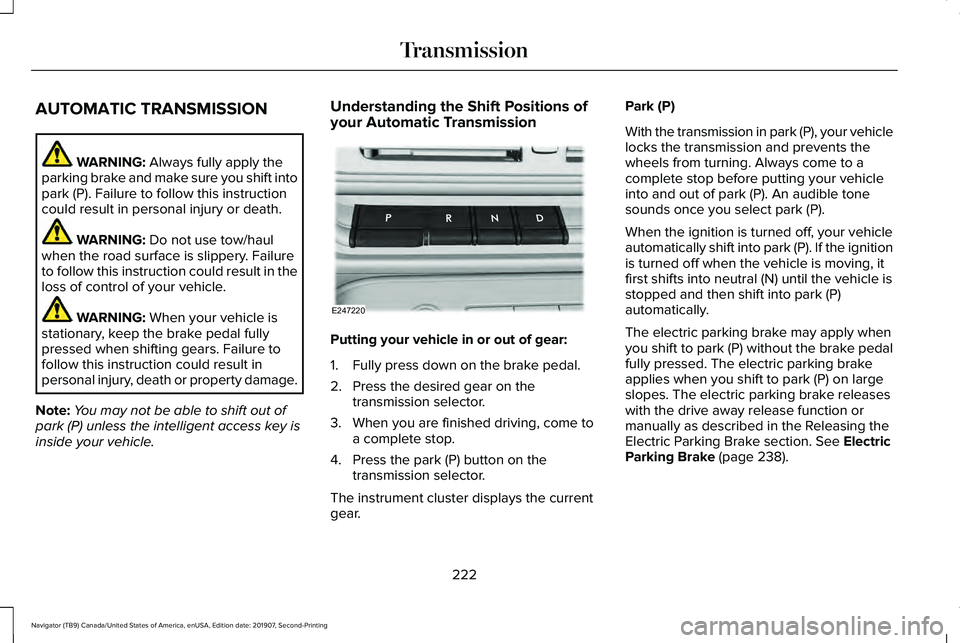
Putting your vehicle in or out of gear:
1. Fully press down on the brake pedal.
2. Press the desired gear on the
transmission selector.
3. When you are finished driving, come to a complete stop.
4. Press the park (P) button on the transmission selector.
The instrument cluster displays the current
gear. Park (P)
With the transmission in park (P), your vehicle
locks the transmission and prevents the
wheels from turning. Always come to a
complete stop before putting your vehicle
into and out of park (P). An audible tone
sounds once you select park (P).
When the ignition is turned off, your vehicle
automatically shift into park (P). If the ignition
is turned off when the vehicle is moving, it
first shifts into neutral (N) until the vehicle is
stopped and then shift into park (P)
automatically.
The electric parking brake may apply when
you shift to park (P) without the brake pedal
fully pressed. The electric parking brake
applies when you shift to park (P) on large
slopes. The electric parking brake releases
with the drive away release function or
manually as described in the Releasing the
Electric Parking Brake section.
See Electric
Parking Brake (page 238).
222
Navigator (TB9) Canada/United States of America, enUSA, Edition date: 201907, Second-Printing TransmissionE247220
Page 229 of 622
Brake-Shift Interlock Override
WARNING: When doing this
procedure, you need to take the
transmission out of park (P) which means
your vehicle can roll freely. To avoid
unwanted vehicle movement, always fully
apply the parking brake prior to doing this
procedure. Use wheels chocks if
appropriate. WARNING: Do not drive your vehicle
until you verify that the stoplamps are
working. WARNING:
If the parking brake is
fully released, but the brake warning lamp
remains illuminated, the brakes may not
be working properly. Have your vehicle
checked as soon as possible.
Note: See your authorized dealer as soon
as possible if this procedure is used.
Note: For some markets this feature is
disabled. Note:
This feature only functions if your
12-volt battery has power.
Use the brake-shift interlock override to
move your transmission from the park
position in the event of an electrical
malfunction.
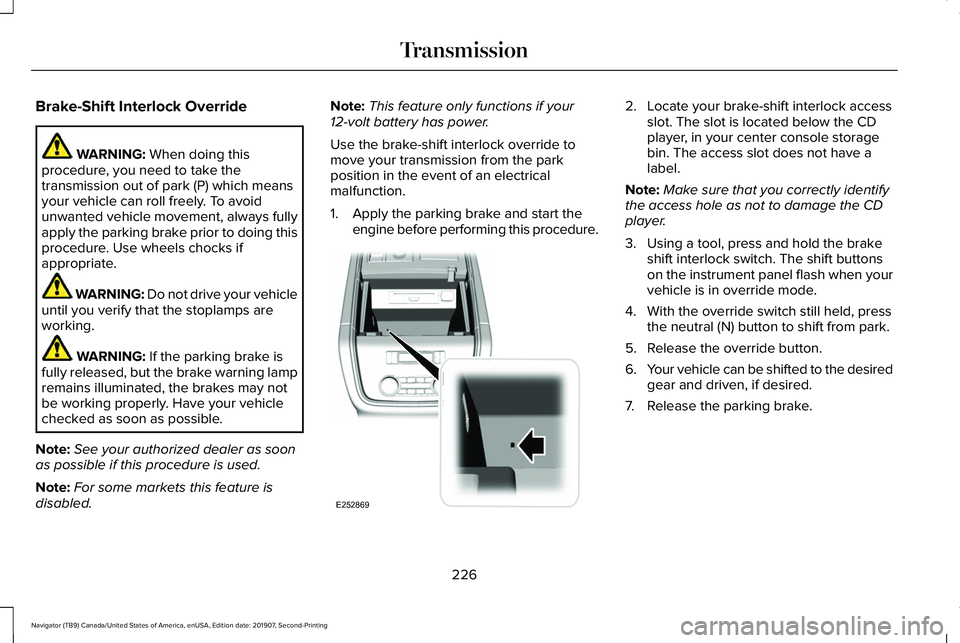
1. Apply the parking brake and start the engine before performing this procedure. 2. Locate your brake-shift interlock access
slot. The slot is located below the CD
player, in your center console storage
bin. The access slot does not have a
label.
Note: Make sure that you correctly identify
the access hole as not to damage the CD
player.
3. Using a tool, press and hold the brake shift interlock switch. The shift buttons
on the instrument panel flash when your
vehicle is in override mode.
4. With the override switch still held, press the neutral (N) button to shift from park.
5. Release the override button.
6. Your vehicle can be shifted to the desired
gear and driven, if desired.
7. Release the parking brake.
226
Navigator (TB9) Canada/United States of America, enUSA, Edition date: 201907, Second-Printing TransmissionE252869
Page 232 of 622
Note:
The AdvanceTrac® with RSC® stability
enhancement system can be switched off
by deselecting the feature in the cluster
menu. See Using Traction Control (page
243). This disables the engine management
feature, allowing the vehicle to maintain full
power and enhanced momentum through
the obstacle.
Note: The AdvanceTrac system can take
control of the transfer case clutch and
disable it during driving maneuvers when
necessary.
Your vehicle engages 4X4 modes based on
the currently selected Drive Mode.
See
Drive Mode Control (page 299).
Note: The information display could show
messages during 4WD operation.
See
Information Messages (page 138).
2H - 4X2
2H turns on when you select
NORMAL or
CONSERVE. Power is delivered to the rear
wheels only. This mode is appropriate for
normal on-road driving on dry pavement and
provides the best fuel economy. 4A - 4X4 Auto
4A turns on when you select
EXCITE,
NORMAL 4x4 AUTO or SLIPPERY. It
provides electronically controlled four-wheel
drive with power delivered to all four wheels,
as required, for increased traction. 4A is
calibrated in conjunction with Drive Mode.
4A in EXCITE is less aggressively tuned and
is appropriate for dry road surfaces. 4A in
NORMAL 4x4 AUTO
is appropriate for all
on-road driving conditions, such as dry road
surfaces, wet pavement, light snow or gravel.
4A in
SLIPPERY is more aggressively tuned
and is appropriate for slippery surfaces, such
as light snow or gravel.
4H - 4X4 High
4H turns on when you select
DEEP
CONDITIONS. It provides electronically
locked four-wheel drive power to both the
front and rear wheels for use in off-road or
winter conditions such as deep snow, sand
or mud. This mode is not for use on dry
pavement. 4L - 4X4 Low - (If Equipped)
4L turns on when you select
SLOW CLIMB.
It provides electronically locked four-wheel
drive power to both the front and rear wheels
for use on low traction surfaces, but does so
with additional gearing for increased torque
multiplication. Intended only for off-road
applications such as deep sand, steep
grades or pulling heavy objects. 4L does not
engage when your vehicle is moving above
3 mph (5 km/h); this is normal and should be
no reason for concern.
Shifting Between 4WD System Modes
Note: Momentarily releasing the accelerator
pedal when a shift in progress message
displays improves engagement and
disengagement performance.
Note: Do not perform this operation if the
rear wheels are slipping.
Note: You may hear some noise as the
system shifts or engages; this is normal.
229
Navigator (TB9) Canada/United States of America, enUSA, Edition date: 201907, Second-Printing Four-Wheel Drive
(If Equipped)
Page 233 of 622
Shifting to or from 4L - 4X4 LOW
Note:
4L mode is not intended for use on dry
pavement.
1. Bring the vehicle to a rolling speed of 3 mph (5 km/h) or less.
2. Place the gearshift in neutral (N).
3. Rotate the drive mode knob to desired mode.
The information display shows a message
indicating a 4X4 shift is in progress. The
information display shows the system mode
selected. If any of the previous shift
conditions are not present, the shift does not
occur and the information display shows the
information guiding the driver through the
proper shifting procedures. If the previous
conditions are not satisfied in 30 seconds,
the system reverts back to the previous 4WD
mode or drive mode. If
Shift Delayed Pull Forward displays in the
information display, transfer case gear tooth
blockage is present. To alleviate this
condition, place the transmission in a forward
gear, move the vehicle forward
approximately
5 ft (2 m), and shift the
transmission back to neutral (N) to allow the
transfer case to complete the range shift.
Operating 4WD Vehicles with Spare or
Mismatched Tires
On four-wheel drive vehicles, the size of the
spare tire can affect the 4X4 system. If there
is a significant difference between the size
of the spare tire and the remaining tires, you
may have limited four-wheel drive
functionality.
When driving with the full-size dissimilar
spare wheel and tire assembly, it is
recommended that you do not:
• Exceed
50 mph (80 km/h) with a 4WD
mode turned on.
• Turn on a 4WD mode unless the vehicle
is stationary.
• Use a 4WD mode on dry pavement. Use of a dissimilar spare wheel and tire
assembly may lead to impairment of the
following:
•
Comfort and noise.
• Winter weather driving capability.
• Wet driving capability.
• Four-wheel drive capability.
How Your Vehicle Differs from Other
Vehicles WARNING:
Vehicles with a higher
center of gravity (utility and four-wheel
drive vehicles) handle differently than
vehicles with a lower center of gravity
(passenger cars). Avoid sharp turns,
excessive speed and abrupt steering in
these vehicles. Failure to drive cautiously
increases the risk of losing control of your
vehicle, vehicle rollover, personal injury
and death.
230
Navigator (TB9) Canada/United States of America, enUSA, Edition date: 201907, Second-Printing Four-Wheel Drive
(If Equipped)
Page 234 of 622
Truck and utility vehicles can differ from
some other vehicles. Your vehicle may be
higher to allow it to travel over rough terrain
without getting hung up or damaging
underbody components.
The differences that make your vehicle so
versatile also make it handle differently than
an ordinary passenger car.
Maintain steering wheel control at all times,
especially in rough terrain. Since sudden
changes in terrain can result in abrupt
steering wheel motion, make sure you grip
the steering wheel from the outside. Do not
grip the spokes.
Drive cautiously to avoid vehicle damage
from concealed objects such as rocks and
stumps.
You should either know the terrain or
examine maps of the area before driving.
Map out your route before driving in the area.
To maintain steering and braking control of
your vehicle, you must have all four wheels
on the ground and they must be rolling, not
sliding or spinning.
Driving Off-Road with Truck and Utility
Vehicles
Note:
On some models, the initial shift from
two-wheel drive to four-wheel drive when
the vehicle is moving can cause some
momentary clunk and ratcheting sounds.
This is the front drivetrain coming up to
speed and the automatic locking hubs
engaging and is not cause for concern.
Note: Your vehicle may have a front air dam.
Due to low ground clearance, you can
damage it when taking your vehicle off-road.
You can take the air dam off by removing
the bolts that secure it.
Four-wheel drive vehicles are specially
equipped for driving on sand, snow, mud and
rough terrain and have operating
characteristics that are somewhat different
from conventional vehicles, both on and off
the road.
Power is supplied to all four wheels through
a transfer case. On four-wheel drive vehicles,
the transfer case allows you to utilize
different 4X4 modes when necessary.
Information on transfer case operation and
shifting procedures can be found in this chapter and the Driving Aids chapter.
Information on transfer case maintenance
can be found in the Maintenance chapter.
You should become thoroughly familiar with
this information before you operate your
vehicle.
Four-wheel drive, when you select a
4X4-capable drive mode, it uses all four
wheels to power the vehicle. This increases
traction, enabling you to drive over terrain
and road conditions that a conventional
two-wheel drive vehicle cannot.
231
Navigator (TB9) Canada/United States of America, enUSA, Edition date: 201907, Second-Printing Four-Wheel Drive (If Equipped)