steering wheel LINCOLN NAVIGATOR 2020 User Guide
[x] Cancel search | Manufacturer: LINCOLN, Model Year: 2020, Model line: NAVIGATOR, Model: LINCOLN NAVIGATOR 2020Pages: 622, PDF Size: 6.47 MB
Page 103 of 622
ADJUSTING THE STEERING WHEEL
WARNING: Do not adjust the steering
wheel when your vehicle is moving.
Note: Make sure that you are sitting in the
correct position. See Sitting in the Correct
Position (page 172). Use the control on the side of the steering
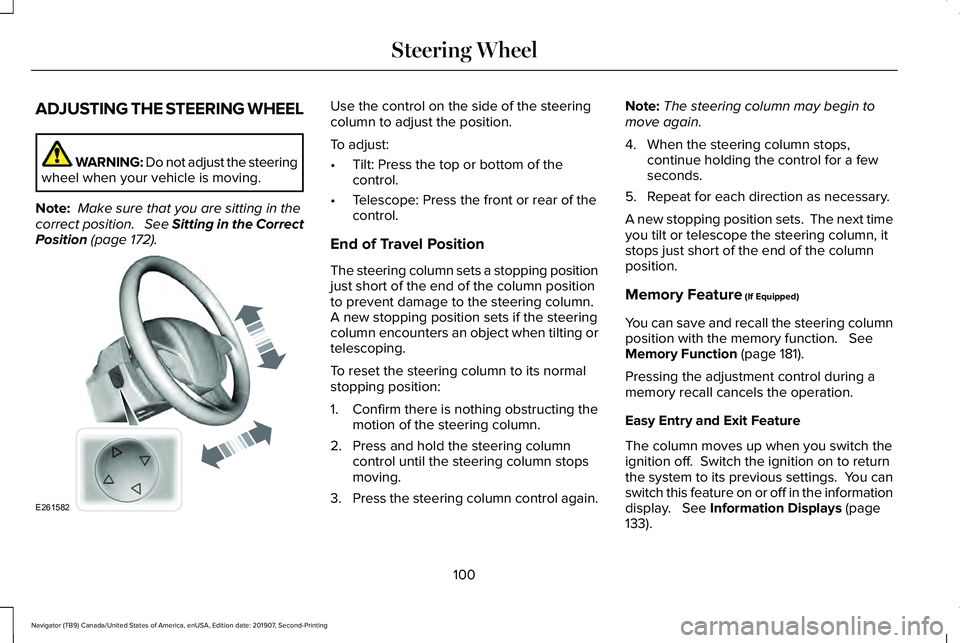
column to adjust the position.
To adjust:
•
Tilt: Press the top or bottom of the
control.
• Telescope: Press the front or rear of the
control.
End of Travel Position
The steering column sets a stopping position
just short of the end of the column position
to prevent damage to the steering column.
A new stopping position sets if the steering
column encounters an object when tilting or
telescoping.
To reset the steering column to its normal
stopping position:
1. Confirm there is nothing obstructing the motion of the steering column.
2. Press and hold the steering column control until the steering column stops
moving.
3. Press the steering column control again. Note:
The steering column may begin to
move again.
4. When the steering column stops, continue holding the control for a few
seconds.
5. Repeat for each direction as necessary.
A new stopping position sets. The next time
you tilt or telescope the steering column, it
stops just short of the end of the column
position.
Memory Feature
(If Equipped)
You can save and recall the steering column
position with the memory function.
See
Memory Function (page 181).
Pressing the adjustment control during a
memory recall cancels the operation.
Easy Entry and Exit Feature
The column moves up when you switch the
ignition off. Switch the ignition on to return
the system to its previous settings. You can
switch this feature on or off in the information
display.
See Information Displays (page
133).
100
Navigator (TB9) Canada/United States of America, enUSA, Edition date: 201907, Second-Printing Steering WheelE261582
Page 104 of 622
Note:
If you press any adjustment or
memory button when in easy exit mode, the
system cancels the operation.
Note: Depending on your vehicle, the column
may move up and in.
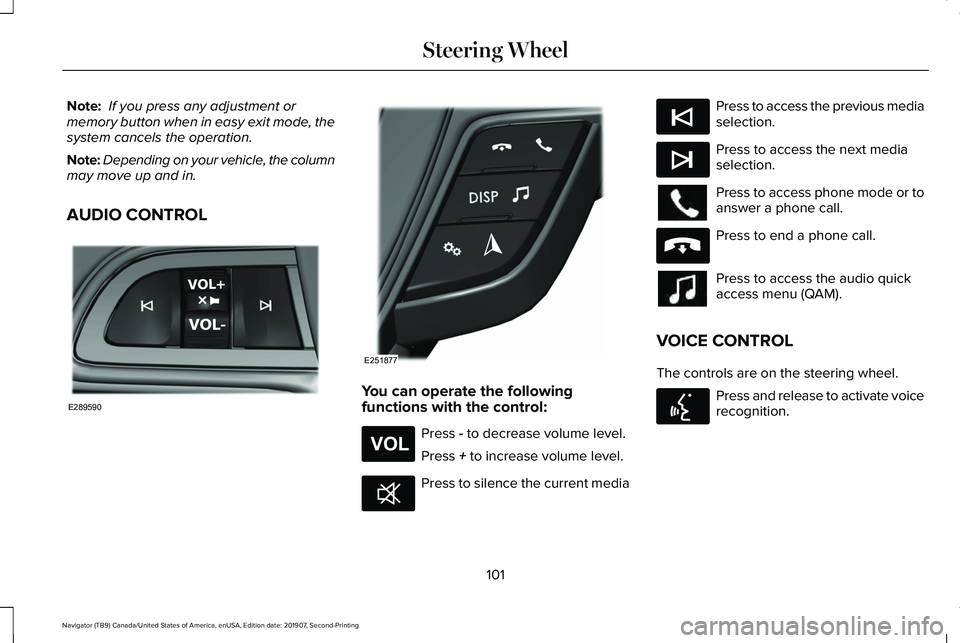
AUDIO CONTROL You can operate the following
functions with the control:
Press - to decrease volume level.
Press
+ to increase volume level. Press to silence the current media Press to access the previous media
selection.
Press to access the next media
selection.
Press to access phone mode or to
answer a phone call.
Press to end a phone call.
Press to access the audio quick
access menu (QAM).
VOICE CONTROL
The controls are on the steering wheel. Press and release to activate voice
recognition.
101
Navigator (TB9) Canada/United States of America, enUSA, Edition date: 201907, Second-Printing Steering WheelE289590 E251877 E265304 E268549 E265045 E265044 E265040 E142599
Page 105 of 622
CRUISE CONTROL - VEHICLES
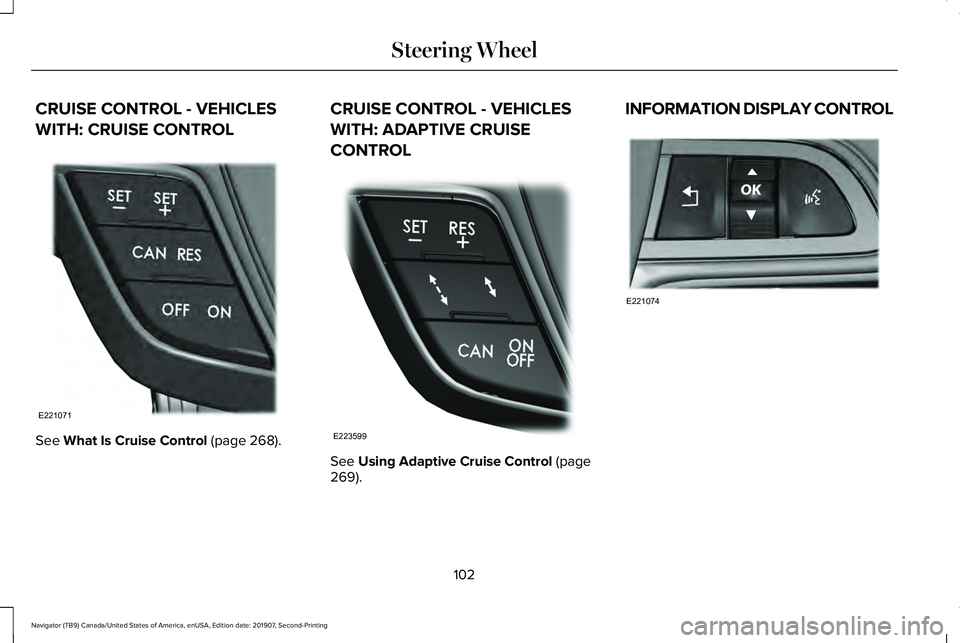
WITH: CRUISE CONTROL
See What Is Cruise Control (page 268). CRUISE CONTROL - VEHICLES
WITH: ADAPTIVE CRUISE
CONTROL
See
Using Adaptive Cruise Control (page
269). INFORMATION DISPLAY CONTROL
102
Navigator (TB9) Canada/United States of America, enUSA, Edition date: 201907, Second-Printing Steering WheelE221071 E223599 E221074
Page 106 of 622
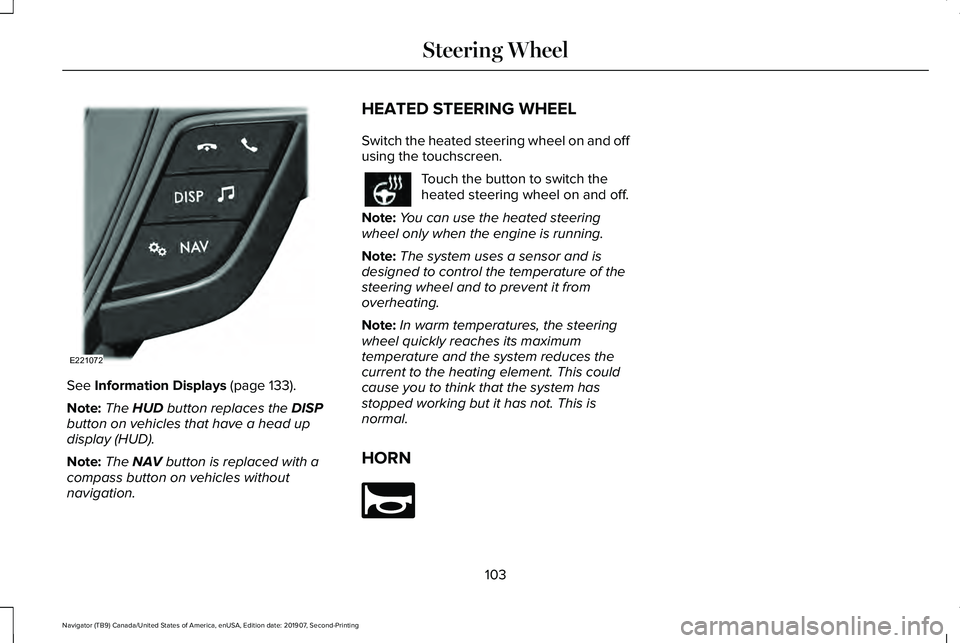
See Information Displays (page 133).
Note: The
HUD button replaces the DISP
button on vehicles that have a head up
display (HUD).
Note: The
NAV button is replaced with a
compass button on vehicles without
navigation. HEATED STEERING WHEEL
Switch the heated steering wheel on and off
using the touchscreen. Touch the button to switch the
heated steering wheel on and off.
Note: You can use the heated steering
wheel only when the engine is running.
Note: The system uses a sensor and is
designed to control the temperature of the
steering wheel and to prevent it from
overheating.
Note: In warm temperatures, the steering
wheel quickly reaches its maximum
temperature and the system reduces the
current to the heating element. This could
cause you to think that the system has
stopped working but it has not. This is
normal.
HORN 103
Navigator (TB9) Canada/United States of America, enUSA, Edition date: 201907, Second-Printing Steering WheelE221072 E270945
Page 115 of 622
To switch the system on, switch the lighting
control to any position except headlamps.
FRONT FOG LAMPS
Switching the Front Fog Lamps On or
Off
Only switch the front fog lamps on during
reduced visibility.
You can switch the front fog lamps on if any
of the following occur:
•
You set the lighting control to the parking
lamps position.
• You set the lighting control to the
headlamps position.
• You set the lighting control to the
autolamps position and the headlamps
are on.
The front fog lamp button is on the lighting
control. Press the button to switch the front
fog lamps on or off. Note:
The brightness of the daytime running
lamps may decrease when the front fog
lamps are switched on.
Front Fog Lamp Indicator It illuminates when you switch the
front fog lamps on.
HEADLAMP LEVELING
This vehicle is equipped with a dynamic
automatic leveling system. The headlamps
do not require additional aim adjustment.
ADAPTIVE HEADLAMPS
Speed Dependent Lamps
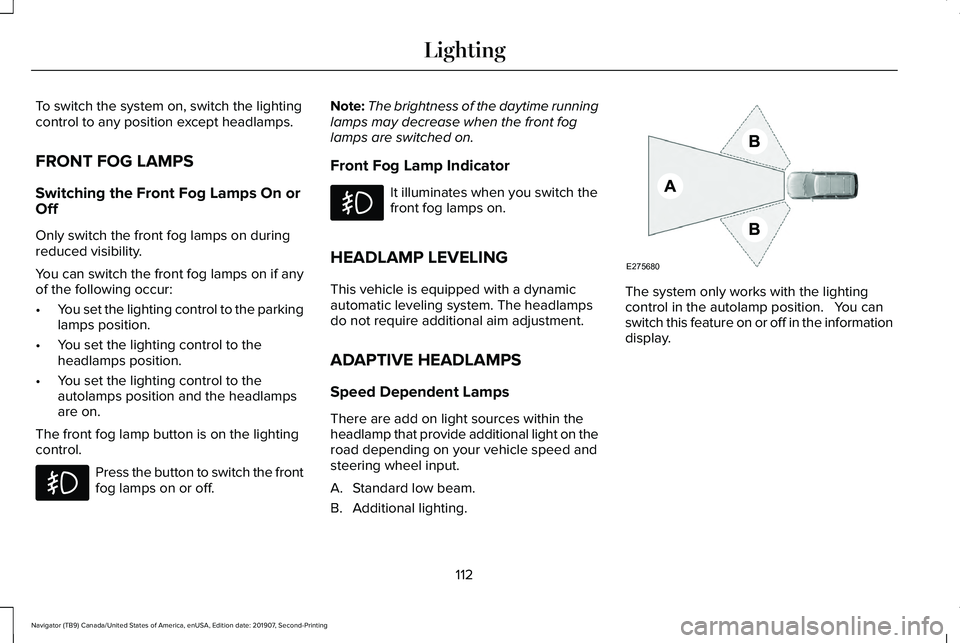
There are add on light sources within the
headlamp that provide additional light on the
road depending on your vehicle speed and
steering wheel input.
A. Standard low beam.
B. Additional lighting. The system only works with the lighting
control in the autolamp position. You can
switch this feature on or off in the information
display.
112
Navigator (TB9) Canada/United States of America, enUSA, Edition date: 201907, Second-Printing Lighting E275680
Page 136 of 622
GENERAL INFORMATION
WARNING: Driving while distracted
can result in loss of vehicle control, crash
and injury. We strongly recommend that
you use extreme caution when using any
device that may take your focus off the
road. Your primary responsibility is the safe
operation of your vehicle. We recommend
against the use of any hand-held device
while driving and encourage the use of
voice-operated systems when possible.
Make sure you are aware of all applicable
local laws that may affect the use of
electronic devices while driving.
You can control various systems on your
vehicle using the quick action menu (QAM)
buttons on the right-hand side of the steering
wheel. The information display provides the
corresponding information.
Note: Some options may appear slightly
different or not at all if the items are optional.
Note: Trailer options are not available if your
vehicle speed is greater than 3 mph (5 km/h). Note:
Some MyKey menu options only
appear if MyKey is enabled and at least one
MyKey is programmed. This icon gives you the ability to
switch a feature on or off. A check
in the box indicates the feature is
on, and unchecked indicates the feature is
off.
133
Navigator (TB9) Canada/United States of America, enUSA, Edition date: 201907, Second-Printing Information DisplaysE204495
Page 143 of 622

Adaptive Headlamps
Action
Message
Displays when a fault with the system has occurred. Contact an authorize\
d dealer as soon as possible.
Check Headlamp System See Manual
Alarm Action
Message
The alarm has been triggered due to unauthorized entry.
Vehicle Alarm To Stop Alarm, Start Vehicle.
Automatic Engine Shutdown Action
Message
The engine is getting ready to shut off.
Vehicle Shuts Off In {seconds:#0} Seconds
The engine has shut off to help increase fuel economy.
Vehicle Shut Off to Save Energy
The engine is getting ready to shut off. You can press OK on the left steering wheel button tooverride the shut down.
Vehicle Shuts Off in {seconds:#0} Seconds
Press Ok to Override
140
Navigator (TB9) Canada/United States of America, enUSA, Edition date: 201907, Second-Printing Information Displays
Page 151 of 622
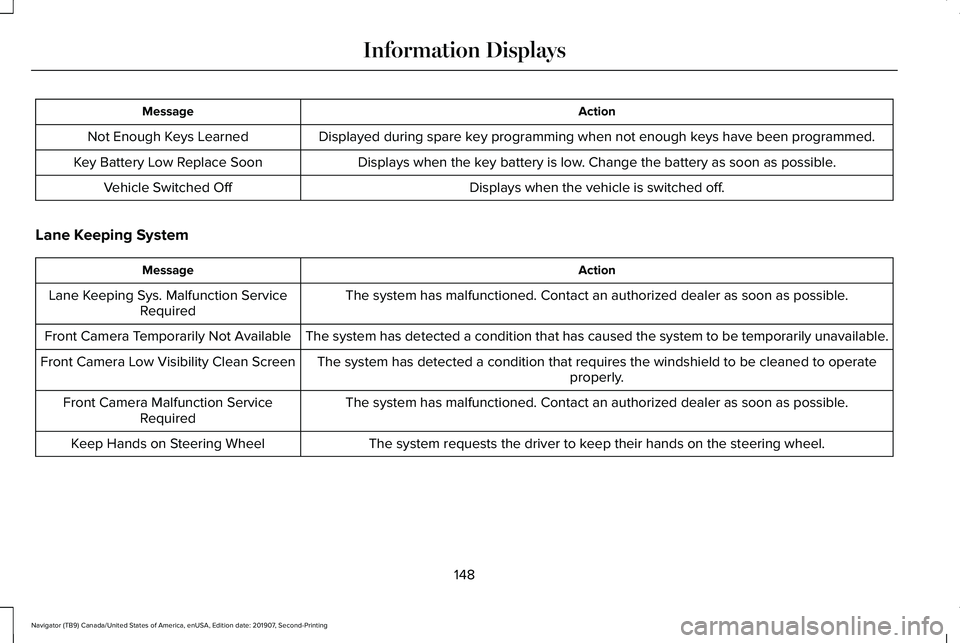
Action
Message
Displayed during spare key programming when not enough keys have been programmed.
Not Enough Keys Learned
Displays when the key battery is low. Change the battery as soon as possible.
Key Battery Low Replace Soon
Displays when the vehicle is switched off.
Vehicle Switched Off
Lane Keeping System Action
Message
The system has malfunctioned. Contact an authorized dealer as soon as po\
ssible.
Lane Keeping Sys. Malfunction Service
Required
The system has detected a condition that has caused the system to be tem\
porarily unavailable.
Front Camera Temporarily Not Available
The system has detected a condition that requires the windshield to be c\
leaned to operateproperly.
Front Camera Low Visibility Clean Screen
The system has malfunctioned. Contact an authorized dealer as soon as po\
ssible.
Front Camera Malfunction Service
Required
The system requests the driver to keep their hands on the steering wheel.
Keep Hands on Steering Wheel
148
Navigator (TB9) Canada/United States of America, enUSA, Edition date: 201907, Second-Printing Information Displays
Page 157 of 622
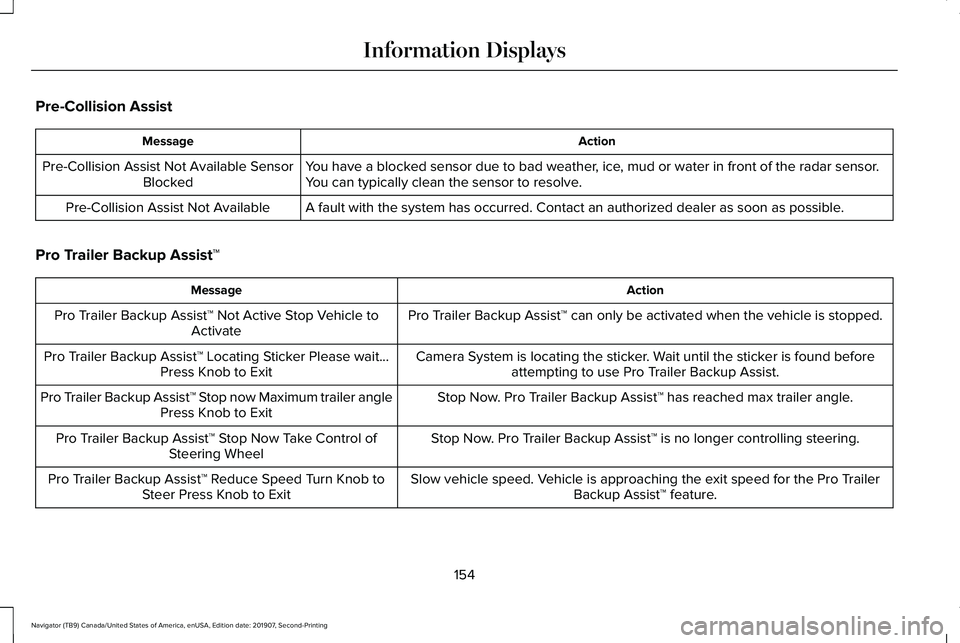
Pre-Collision Assist
Action
Message
You have a blocked sensor due to bad weather, ice, mud or water in front of the radar sensor.
You can typically clean the sensor to resolve.
Pre-Collision Assist Not Available Sensor
Blocked
A fault with the system has occurred. Contact an authorized dealer as so\
on as possible.
Pre-Collision Assist Not Available
Pro Trailer Backup Assist™ Action
Message
Pro Trailer Backup Assist™ can only be activated when the vehicle is stopped.
Pro Trailer Backup Assist™ Not Active Stop Vehicle to
Activate
Camera System is locating the sticker. Wait until the sticker is found beforeattempting to use Pro Trailer Backup Assist.
Pro Trailer Backup Assist™ Locating Sticker Please wait...
Press Knob to Exit
Stop Now. Pro Trailer Backup Assist™ has reached max trailer angle.
Pro Trailer Backup Assist™ Stop now Maximum trailer angle
Press Knob to Exit
Stop Now. Pro Trailer Backup Assist™ is no longer controlling steering.
Pro Trailer Backup Assist™ Stop Now Take Control of
Steering Wheel
Slow vehicle speed. Vehicle is approaching the exit speed for the Pro TrailerBackup Assist™ feature.
Pro Trailer Backup Assist™ Reduce Speed Turn Knob to
Steer Press Knob to Exit
154
Navigator (TB9) Canada/United States of America, enUSA, Edition date: 201907, Second-Printing Information Displays
Page 158 of 622
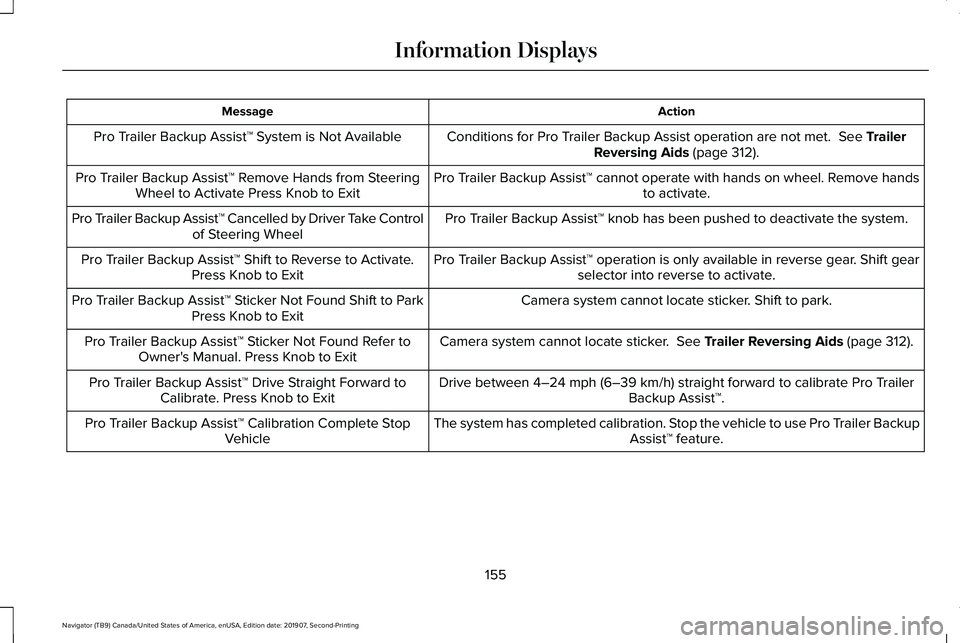
Action
Message
Conditions for Pro Trailer Backup Assist operation are not met. See Trailer
Reversing Aids (page 312).
Pro Trailer Backup Assist™ System is Not Available
Pro Trailer Backup Assist™ cannot operate with hands on wheel. Remove handsto activate.
Pro Trailer Backup Assist™ Remove Hands from Steering
Wheel to Activate Press Knob to Exit
Pro Trailer Backup Assist™ knob has been pushed to deactivate the system.
Pro Trailer Backup Assist™ Cancelled by Driver Take Control
of Steering Wheel
Pro Trailer Backup Assist™ operation is only available in reverse gear. Shift gearselector into reverse to activate.
Pro Trailer Backup Assist™ Shift to Reverse to Activate.
Press Knob to Exit
Camera system cannot locate sticker. Shift to park.
Pro Trailer Backup Assist™ Sticker Not Found Shift to Park
Press Knob to Exit
Camera system cannot locate sticker.
See Trailer Reversing Aids (page 312).
Pro Trailer Backup Assist™ Sticker Not Found Refer to
Owner's Manual. Press Knob to Exit
Drive between
4–24 mph (6–39 km/h) straight forward to calibrate Pro Trailer
Backup Assist™.
Pro Trailer Backup Assist™ Drive Straight Forward to
Calibrate. Press Knob to Exit
The system has completed calibration. Stop the vehicle to use Pro Trailer BackupAssist™ feature.
Pro Trailer Backup Assist™ Calibration Complete Stop
Vehicle
155
Navigator (TB9) Canada/United States of America, enUSA, Edition date: 201907, Second-Printing Information Displays