transmission LINCOLN NAVIGATOR 2020 Owner's Manual
[x] Cancel search | Manufacturer: LINCOLN, Model Year: 2020, Model line: NAVIGATOR, Model: LINCOLN NAVIGATOR 2020Pages: 622, PDF Size: 6.47 MB
Page 192 of 622
Folding the Power Rear Seats
Note:
Similar to the battery saver feature,
the power rear seat functions disable 10
minutes after you switch the ignition off. The
transmission must be in park (P) and the
liftgate, or liftgate glass must be open in
order to operate the seats.
Note: Be sure the third-row center head
restraint is in the lowered position before
you power the rear seats down. The
third-row outermost head restraints fold
when you press the fold button.
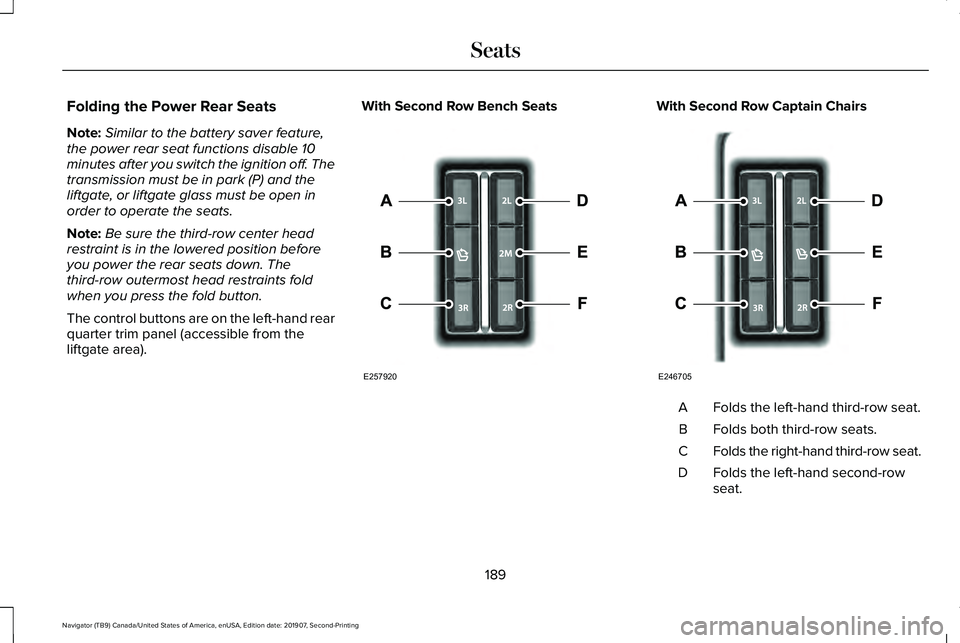
The control buttons are on the left-hand rear
quarter trim panel (accessible from the
liftgate area). With Second Row Bench Seats With Second Row Captain Chairs
Folds the left-hand third-row seat.
A
Folds both third-row seats.
B
Folds the right-hand third-row seat.
C
Folds the left-hand second-row
seat.
D
189
Navigator (TB9) Canada/United States of America, enUSA, Edition date: 201907, Second-Printing SeatsE257920 E246705
Page 196 of 622
UNIVERSAL GARAGE DOOR
OPENER
HomeLink Wireless Control System
WARNING: Do not use the system
with any garage door opener that does not
have the safety stop and reverse feature
as required by U.S. Federal Safety
Standards (this includes any garage door
opener manufactured before April 1, 1982).
A garage door opener which cannot detect
an object, signaling the door to stop and
reverse, does not meet current federal
safety standards. Using a garage door
opener without these features increases
the risk of serious injury or death.
Note: Make sure that the garage door and
security device are free from obstruction
when you are programming. Do not program
the system with the vehicle in the garage.
Note: Make sure you keep the original
remote control transmitter for use in other
vehicles as well as for future system
programming. Note:
We recommend that upon the sale or
lease termination of your vehicle, you erase
the programmed function buttons for security
reasons. See
Erasing the Function Button
Codes later in this section.
Note: You can program a maximum of three
devices. To change or replace any of the
three devices after it has been initially
programmed, you must first erase the current
settings. See
Erasing the Function Button
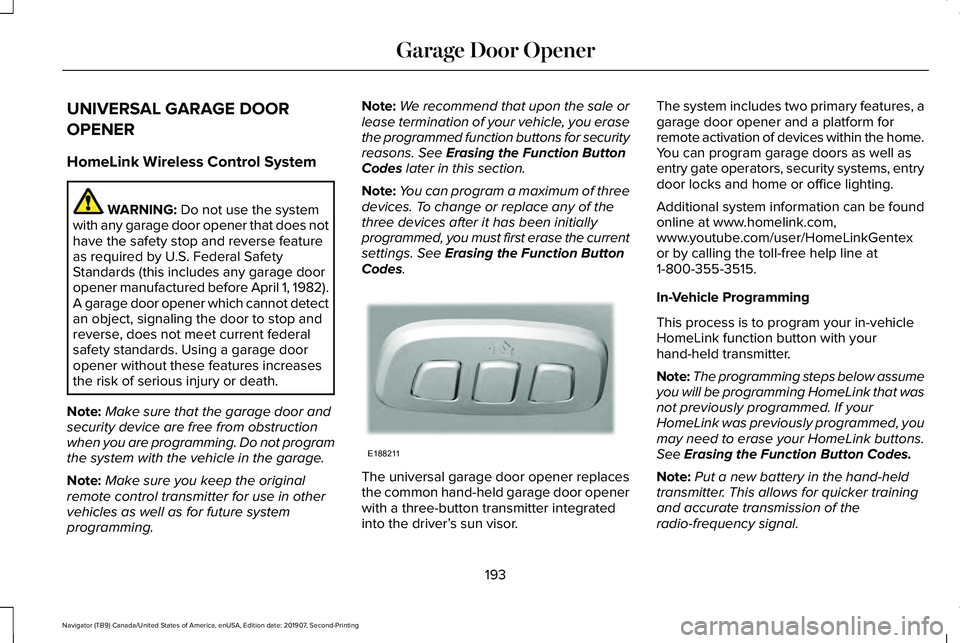
Codes. The universal garage door opener replaces
the common hand-held garage door opener
with a three-button transmitter integrated
into the driver’
s sun visor. The system includes two primary features, a
garage door opener and a platform for
remote activation of devices within the home.
You can program garage doors as well as
entry gate operators, security systems, entry
door locks and home or office lighting.
Additional system information can be found
online at www.homelink.com,
www.youtube.com/user/HomeLinkGentex
or by calling the toll-free help line at
1-800-355-3515.
In-Vehicle Programming
This process is to program your in-vehicle
HomeLink function button with your
hand-held transmitter.
Note:
The programming steps below assume
you will be programming HomeLink that was
not previously programmed. If your
HomeLink was previously programmed, you
may need to erase your HomeLink buttons.
See
Erasing the Function Button Codes.
Note: Put a new battery in the hand-held
transmitter. This allows for quicker training
and accurate transmission of the
radio-frequency signal.
193
Navigator (TB9) Canada/United States of America, enUSA, Edition date: 201907, Second-Printing Garage Door OpenerE188211
Page 198 of 622
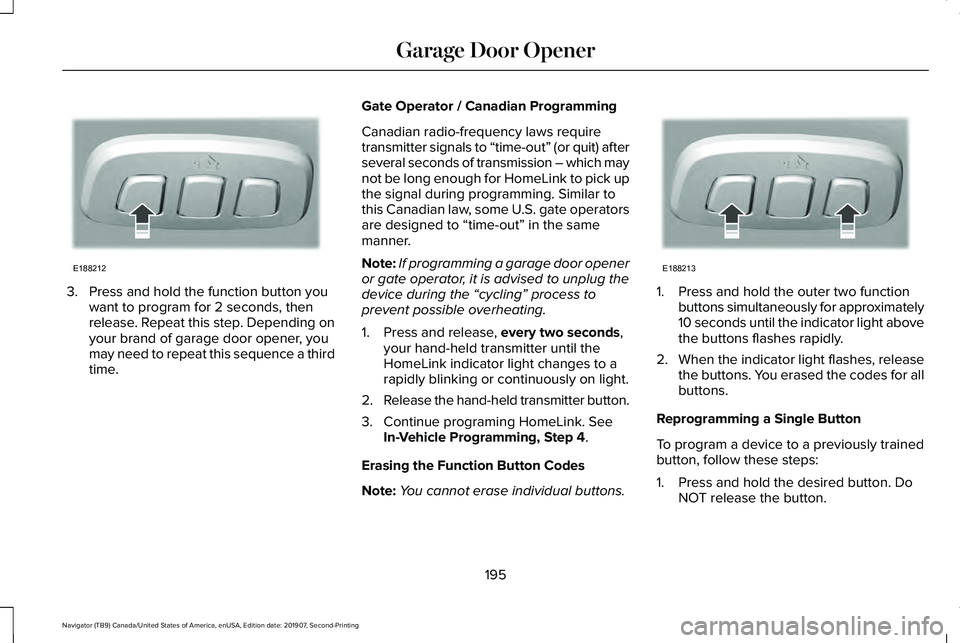
3. Press and hold the function button you
want to program for 2 seconds, then
release. Repeat this step. Depending on
your brand of garage door opener, you
may need to repeat this sequence a third
time. Gate Operator / Canadian Programming
Canadian radio-frequency laws require
transmitter signals to “time-out” (or quit) after
several seconds of transmission – which may
not be long enough for HomeLink to pick up
the signal during programming. Similar to
this Canadian law, some U.S. gate operators
are designed to “time-out” in the same
manner.
Note:
If programming a garage door opener
or gate operator, it is advised to unplug the
device during the “cycling” process to
prevent possible overheating.
1. Press and release, every two seconds,
your hand-held transmitter until the
HomeLink indicator light changes to a
rapidly blinking or continuously on light.
2. Release the hand-held transmitter button.
3. Continue programing HomeLink. See In-Vehicle Programming, Step 4
.
Erasing the Function Button Codes
Note: You cannot erase individual buttons. 1. Press and hold the outer two function
buttons simultaneously for approximately
10 seconds until the indicator light above
the buttons flashes rapidly.
2. When the indicator light flashes, release
the buttons. You erased the codes for all
buttons.
Reprogramming a Single Button
To program a device to a previously trained
button, follow these steps:
1. Press and hold the desired button. Do NOT release the button.
195
Navigator (TB9) Canada/United States of America, enUSA, Edition date: 201907, Second-Printing Garage Door OpenerE188212 E188213
Page 207 of 622
Press the push button ignition switch once
without your foot on the brake pedal. It is on
the instrument panel near the steering wheel.
All electrical circuits and accessories are
operational and the warning lamps and
indicators illuminate.
Press the push button ignition switch again
without your foot on the brake pedal to
switch the ignition off.
STARTING A GASOLINE ENGINE
When you start the engine, the idle speed
increases.
This helps to warm up the engine. If the
engine idle speed does not slow down
automatically, have your vehicle checked by
an authorized dealer.
Note:
You can crank the engine for a total
of 60 seconds without the engine starting
before the starting system temporarily
disables. The 60 seconds does not have to
be all at once. For example, if you crank the
engine three times for 20 seconds each time,
without the engine starting, you reached the
60-second time limit. You cannot attempt
to start the engine for at least 15 minutes.
After 15 minutes, you are limited to a
15-second engine cranking time. You need
to wait 60 minutes before you can crank the
engine for 60 seconds again.
Before starting your vehicle, check the
following:
• Make sure all occupants have fastened
their seatbelts.
• Make sure the headlamps and electrical
accessories are off.
• Make sure the parking brake is on.
• Make sure the transmission is in park (P).
Note: Do not touch the accelerator pedal.
Note: You must have your intelligent access
key in your vehicle to shift the transmission
out of park (P). 1. Fully depress the brake pedal.
2. Press the push button ignition switch.
The system does not function if:
•
The passive key frequencies are jammed.
• The key battery has no charge.
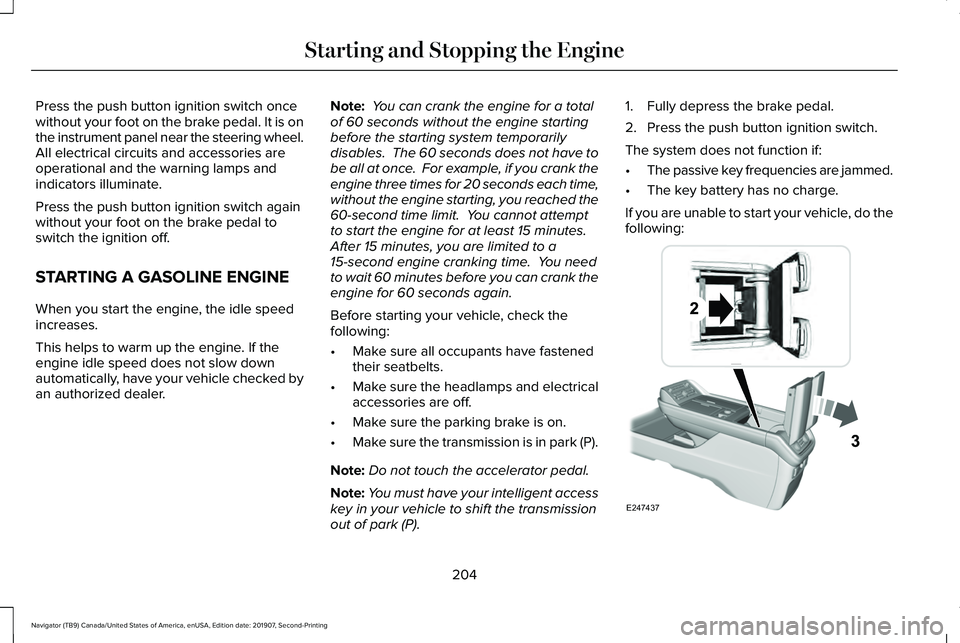
If you are unable to start your vehicle, do the
following: 204
Navigator (TB9) Canada/United States of America, enUSA, Edition date: 201907, Second-Printing Starting and Stopping the EngineE247437
Page 211 of 622
AUTO-START-STOP
The system helps reduce fuel consumption
by automatically stopping and restarting the
engine when your vehicle has stopped. The
engine restarts automatically when you
release the brake pedal.
In some situations, your vehicle may restart
automatically, for example:
•
To maintain interior comfort.
• To recharge the battery.
Note: Power assist steering turns off when
the engine is off.
Note: If your vehicle is flex fuel capable,
Auto-Start-Stop is inhibited for a short time
after a refuel event when the system is
verifying the fuel type being used. WARNING: Always fully apply the
parking brake. Make sure you shift into
park (P) for vehicles with an automatic
transmission. Switch the ignition off and
remove the key whenever you leave your
vehicle. WARNING: Before opening the hood
or performing any maintenance, fully apply
the parking brake, shift into park (P) or
neutral (N) and switch the ignition off. WARNING: Always switch the ignition
off before leaving the vehicle. If the ignition
is switched on an automatic restart may
occur at any time. WARNING:
The system may require
the engine to automatically restart when
the auto-start-stop indicator illuminates
green or flashes amber. Failure to follow
this instruction could result in personal
injury.
The Auto-Start-Stop system status is
available at a glance within the information
display.
See Information Displays (page
133).
Enabling Auto-Start-Stop
The system automatically enables every time
you start your vehicle if: •
You do not press the Auto-Start-Stop
button (not illuminated).
• Your vehicle exceeds an initial speed of
3 mph (5 km/h)
after you have initially
started your vehicle.
• You have stopped your vehicle.
• Your foot is on the brake pedal.
• The transmission is in drive.
• Not in Excite mode (enable by pressing
the Auto-Start-Stop button).
• The driver door is closed.
• There is adequate brake vacuum.
• The interior compartment has cooled or
warmed to an acceptable level.
• The front windshield defroster is off.
• You have not turned the steering wheel
rapidly or you do not have it at a sharp
angle.
• The vehicle is not on a steep road grade.
• The battery is within optimal operating
conditions, (with the battery state of
charge and temperature in range).
• The engine coolant is at operating
temperature.
208
Navigator (TB9) Canada/United States of America, enUSA, Edition date: 201907, Second-Printing Unique Driving Characteristics
Page 213 of 622
Disabling Auto-Start-Stop
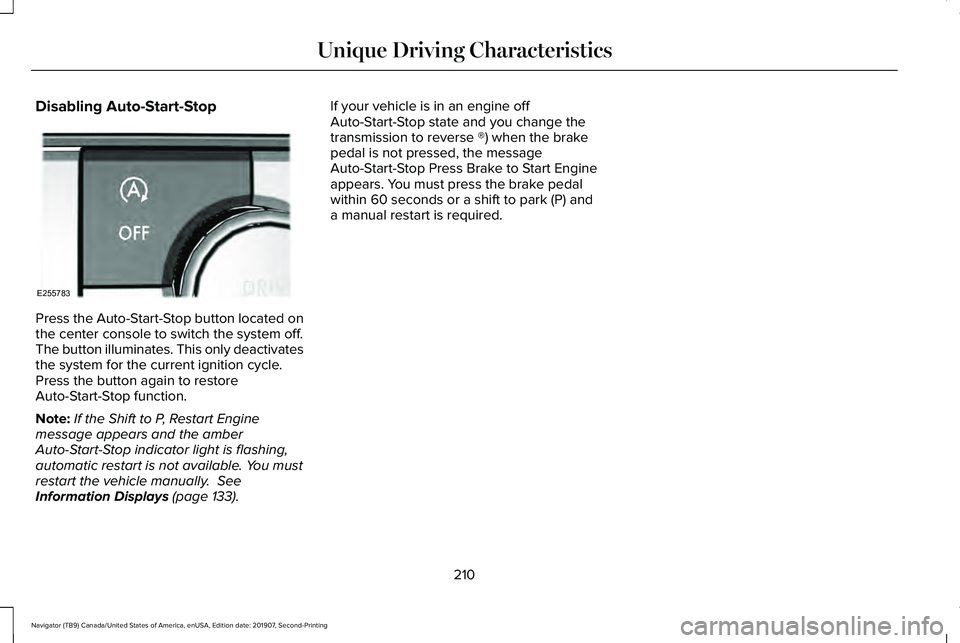
Press the Auto-Start-Stop button located on
the center console to switch the system off.
The button illuminates. This only deactivates
the system for the current ignition cycle.
Press the button again to restore
Auto-Start-Stop function.
Note:
If the Shift to P, Restart Engine
message appears and the amber
Auto-Start-Stop indicator light is flashing,
automatic restart is not available. You must
restart the vehicle manually. See
Information Displays (page 133). If your vehicle is in an engine off
Auto-Start-Stop state and you change the
transmission to reverse ®) when the brake
pedal is not pressed, the message
Auto-Start-Stop Press Brake to Start Engine
appears. You must press the brake pedal
within 60 seconds or a shift to park (P) and
a manual restart is required.
210
Navigator (TB9) Canada/United States of America, enUSA, Edition date: 201907, Second-Printing Unique Driving CharacteristicsE255783
Page 224 of 622
If the service engine soon indicator remains
on, have your vehicle serviced at the first
available opportunity. Although some
malfunctions detected by the OBD-II may not
have symptoms that are apparent, continued
driving with the service engine soon indicator
on can result in increased emissions, lower
fuel economy, reduced engine and
transmission smoothness and lead to more
costly repairs.
Readiness for Inspection and
Maintenance (I/M) Testing
Some state and provincial and local
governments may have
Inspection/Maintenance (I/M) programs to
inspect the emission control equipment on
your vehicle. Failure to pass this inspection
could prevent you from getting a vehicle
registration.
If the service engine soon indicator
is on or the bulb does not work,
your vehicle may need service.
See On-Board Diagnostics. Your vehicle may not pass the I/M test if the
service engine soon indicator is on or not
working properly (bulb is burned out), or if
the OBD-II system has determined that some
of the emission control systems have not
been properly checked. In this case, the
vehicle is not ready for I/M testing.
If the vehicle
’s engine or transmission has
just been serviced, or the battery has
recently run down or been replaced, the
OBD-II system may indicate that the vehicle
is not ready for I/M testing. To determine if
the vehicle is ready for I/M testing, turn the
ignition key to the on position for 15 seconds
without cranking the engine. If the service
engine soon indicator blinks eight times, it
means that the vehicle is not ready for I/M
testing; if the service engine soon indicator
stays on solid, it means that your vehicle is
ready for I/M testing.
The OBD-II system checks the emission
control system during normal driving. A
complete check may take several days.
If the vehicle is not ready for I/M testing, you
can perform the following driving cycle
consisting of mixed city and highway driving: 1. 15 minutes of steady driving on an
expressway or highway followed by 20
minutes of stop-and-go driving with at
least four 30-second idle periods.
2. Allow your vehicle to sit for at least eight
hours with the ignition off. Then, start the
vehicle and complete the above driving
cycle. The vehicle must warm up to its
normal operating temperature. Once
started, do not turn off the vehicle until
the above driving cycle is complete.
If the vehicle is still not ready for I/M testing,
you need to repeat the above driving cycle.
221
Navigator (TB9) Canada/United States of America, enUSA, Edition date: 201907, Second-Printing Engine Emission Control
Page 225 of 622
AUTOMATIC TRANSMISSION
WARNING: Always fully apply the
parking brake and make sure you shift into
park (P). Failure to follow this instruction
could result in personal injury or death. WARNING:
Do not use tow/haul
when the road surface is slippery. Failure
to follow this instruction could result in the
loss of control of your vehicle. WARNING:
When your vehicle is
stationary, keep the brake pedal fully
pressed when shifting gears. Failure to
follow this instruction could result in
personal injury, death or property damage.
Note: You may not be able to shift out of
park (P) unless the intelligent access key is
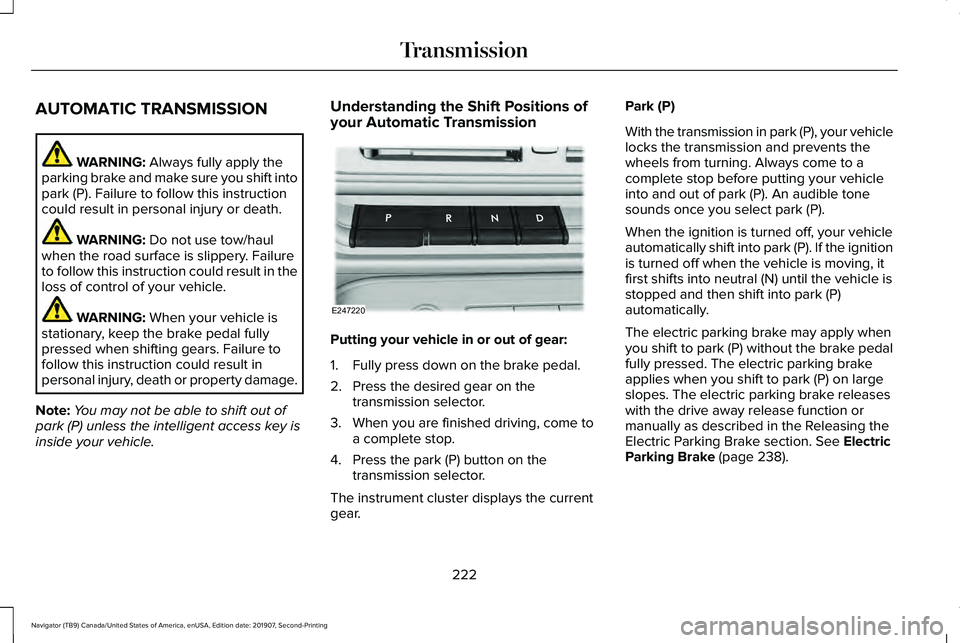
inside your vehicle. Understanding the Shift Positions of
your Automatic Transmission
Putting your vehicle in or out of gear:
1. Fully press down on the brake pedal.
2. Press the desired gear on the
transmission selector.
3. When you are finished driving, come to a complete stop.
4. Press the park (P) button on the transmission selector.
The instrument cluster displays the current
gear. Park (P)
With the transmission in park (P), your vehicle
locks the transmission and prevents the
wheels from turning. Always come to a
complete stop before putting your vehicle
into and out of park (P). An audible tone
sounds once you select park (P).
When the ignition is turned off, your vehicle
automatically shift into park (P). If the ignition
is turned off when the vehicle is moving, it
first shifts into neutral (N) until the vehicle is
stopped and then shift into park (P)
automatically.
The electric parking brake may apply when
you shift to park (P) without the brake pedal
fully pressed. The electric parking brake
applies when you shift to park (P) on large
slopes. The electric parking brake releases
with the drive away release function or
manually as described in the Releasing the
Electric Parking Brake section.
See Electric
Parking Brake (page 238).
222
Navigator (TB9) Canada/United States of America, enUSA, Edition date: 201907, Second-Printing TransmissionE247220
Page 226 of 622
Automatic Return to Park
Note:
This feature does not operate when
your vehicle is in Stay in Neutral mode or
neutral tow.
Your vehicle has a feature that automatically
shifts your vehicle into park (P) when any of
the following conditions occur:
• You turn the vehicle off.
• You open the driver's door with your
seatbelt unlatched with the vehicle
stopped.
• You unlatch your seatbelt when the
driver's door is open with the vehicle
stopped.
If you turn your vehicle off when moving,
your vehicle first shifts into neutral (N) until
it stops and then shift into park (P)
automatically.
Note: If you have waited an extended period
of time, 2-15 minutes before starting your
vehicle, unlatching your seatbelt can cause
this feature to activate, even with the driver
door closed. Note:
This feature may not work properly if
the door ajar switch is malfunctioning. If your
door ajar indicator does not illuminate when
you open the driver’ s door or the indicator
illuminates with the driver’ s door closed, see
your authorized dealer.
Reverse (R)
With the selector in reverse (R), your vehicle
moves backward. Always come to a
complete stop before shifting into and out
of reverse (R).
Neutral (N)
With the selector in neutral (N), your vehicle
can be started and is free to roll. Hold the
brake pedal down when in this position.
Stay in Neutral Mode
Note: Stay in neutral mode is a temporary
vehicle state with the ignition off. Once in
this mode, sufficient battery voltage must be
maintained or your vehicle returns to park.
Extended usage of Stay in Neutral mode
may result in a battery voltage reduction to
a level where the vehicle may no longer
start. Do not tow your vehicle in this mode. Note:
Always put your vehicle in Stay in
Neutral mode when entering an automatic
car wash. Failure to do this could result in
vehicle damage not covered by warranty.
Stay in Neutral mode allows your vehicle to
stay in neutral when you exit your vehicle.
Your vehicle must be stationary to enter this
mode.
To enter Stay in Neutral mode:
• Press the neutral (N) button on the
transmission selector.
• Press the neutral (N) button again to
enter Stay in Neutral mode.
A message appears in your information
display screen when your vehicle has
entered Stay in Neutral mode.
To exit Stay in Neutral mode, apply the brake
and select a different gear.
Stay in Neutral Mode - No Start
Use this to move your transmission from the
park position in the event of a no start
situation. If your vehicle has a dead battery,
an external power source is required. Do not
tow your vehicle in this mode.
223
Navigator (TB9) Canada/United States of America, enUSA, Edition date: 201907, Second-Printing Transmission
Page 227 of 622
Note:
This only functions if your 12-volt
battery has power and the starter can spin
the engine. If vehicle battery voltage is not
sufficient, an external 12-volt power source
such as jumper cables, battery charger or
jump pack may be required for this feature
to function.
Note: Once in this mode, sufficient battery
voltage must be maintained or your vehicle
returns to park. WARNING: When doing this
procedure, you need to take the
transmission out of park (P) which means
your vehicle can roll freely. To avoid
unwanted vehicle movement, always fully
apply the parking brake prior to doing this
procedure. Use wheels chocks if
appropriate.
1. Do not press the brake pedal. Press the START/STOP
button.
2. Fully press down on the brake pedal. Keep the brakes applied through step 7.
3. Press the accelerator pedal to the floor and hold through step 7. 4. Press the neutral (N) button on the
transmission selector.
5. Press the neutral (N) button again to enter Stay in Neutral mode.
6. Press and release the push to start button, the transmission needs a
minimum of 2 seconds to exit park.
7. When neutral (N) is displayed, the brake and accelerator pedals can be released.
To exit Stay in Neutral mode, select a
different gear.
A message appears in your information
display screen when your vehicle has
entered Stay in Neutral mode.
Drive (D)
Drive (D) is the normal driving position for
the best fuel economy. The overdrive
function allows automatic upshifts and
downshifts through gears one through ten. Adaptive Tow/Haul Mode WARNING:
Do not use tow/haul
when the road surface is slippery. Failure
to follow this instruction could result in the
loss of control of your vehicle.
Adaptive tow/haul has two modes, automatic
that is enabled by default and off.
To turn adaptive tow/haul off or on, use the
information display controls.
See General
Information (page 133). The indicator light
illuminates in the instrument cluster.
Key adaptive tow/haul features:
• The system remains in the same mode,
even after a key cycle.
• Is only available in normal drive modes
(Normal 2H and Normal 4A).
The adaptive tow/haul feature improves
transmission operation when towing a trailer
or a heavy load. All transmission gear ranges
are available when using adaptive tow/haul.
For information on towing.
See Towing (page
311).
224
Navigator (TB9) Canada/United States of America, enUSA, Edition date: 201907, Second-Printing Transmission