wheel LINCOLN NAVIGATOR 2020 Owner's Manual
[x] Cancel search | Manufacturer: LINCOLN, Model Year: 2020, Model line: NAVIGATOR, Model: LINCOLN NAVIGATOR 2020Pages: 622, PDF Size: 6.47 MB
Page 145 of 622

Blind Spot Information and Cross Traffic Alert System
Action
Message
A fault with the system has occurred. Contact an authorized dealer as so\
on as possible.
Blindspot System Fault
The system sensors are blocked. Contact an authorized dealer as soon as possible. See Blind
Spot Information System (page 284).
Blindspot Not Available Sensor Blocked
See Manual
The system detects a vehicle.
See Blind Spot Information System (page 284).
Vehicle Coming From X
The blind spot information system and cross traffic alert system sensors\
are blocked. See BlindSpot Information System
(page 284).
Cross Traffic Not Available Sensor Blocked
See Manual
A fault with the system has occurred. Contact an authorized dealer as so\
on as possible.
Cross Traffic System Fault
The system automatically turns off and displays this message when you co\
nnect a trailer to thevehicle that does not have a trailer blind spot system or when you switc\
h the trailer blind spot system off through the information display.
See Blind Spot Information System (page 284).
Cross Traffic Alert Deactivated Trailer
Attached
The system automatically turns off and displays this message when you co\
nnect a trailer to thevehicle that does not have a trailer blind spot system or when you switc\
h the trailer blind spot system off through the information display.
See Blind Spot Information System (page 284).
Blind Spot Alert Deactivated Trailer
Attached
Displays when the trailer connected is a fifth wheel or gooseneck, or wh\
en the trailer width iswider than
10 ft (2.7 m) or longer than 33 ft (10 m).
Trailer Blind Spot Not available Due to
Invalid Trailer
142
Navigator (TB9) Canada/United States of America, enUSA, Edition date: 201907, Second-Printing Information Displays
Page 148 of 622

Action
Message
Displays when you select a drive mode that does not allow the electronic\
limited slip differential
to turn on. This may also display when the electronic limited slip diffe\
rential has a fault and the vehicle requests the locking feature.
Electronic Limited Slip Differential Locking
Feature Not Available
The transfer case is in the neutral position. This message indicates tha\
t your vehicle is safe tobe towed with all four wheels on the ground.
Neutral Tow Enabled Leave Transmission
in Neutral
The transfer case is NOT in the neutral position. This message indicates that your vehicle is N\
OTsafe to be towed with all four wheels on the ground.
Neutral Tow Disabled
Four-Wheel Drive Action
Message
A 4X4 system fault is present. Contact an authorized dealer as soon as p\
ossible.
Check 4x4
The 4X4 system is making a shift.
4x4 Shift in Progress
Displays when you attempt to switch to 4X4 LOW and you do not shift thetransmission to neutral (N).
For 4x4 LOW Shift to N
Displays when you attempt to switch to 4X4 LOW and your vehicle's speed isgreater than 3 mph (5 km/h).
For 4x4 LOW Slow to 3 MPH
Displays when you attempt to switch from 4X4 LOW and you do not shift thetransmission to neutral (N).
To Exit 4x4 LOW Shift to N
145
Navigator (TB9) Canada/United States of America, enUSA, Edition date: 201907, Second-Printing Information Displays
Page 151 of 622
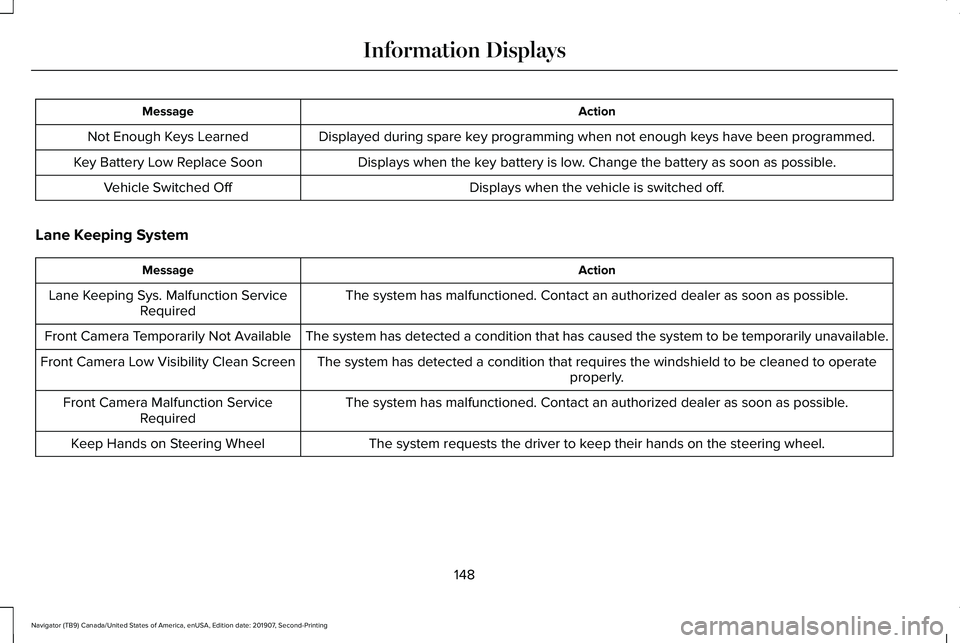
Action
Message
Displayed during spare key programming when not enough keys have been programmed.
Not Enough Keys Learned
Displays when the key battery is low. Change the battery as soon as possible.
Key Battery Low Replace Soon
Displays when the vehicle is switched off.
Vehicle Switched Off
Lane Keeping System Action
Message
The system has malfunctioned. Contact an authorized dealer as soon as po\
ssible.
Lane Keeping Sys. Malfunction Service
Required
The system has detected a condition that has caused the system to be tem\
porarily unavailable.
Front Camera Temporarily Not Available
The system has detected a condition that requires the windshield to be c\
leaned to operateproperly.
Front Camera Low Visibility Clean Screen
The system has malfunctioned. Contact an authorized dealer as soon as po\
ssible.
Front Camera Malfunction Service
Required
The system requests the driver to keep their hands on the steering wheel.
Keep Hands on Steering Wheel
148
Navigator (TB9) Canada/United States of America, enUSA, Edition date: 201907, Second-Printing Information Displays
Page 157 of 622
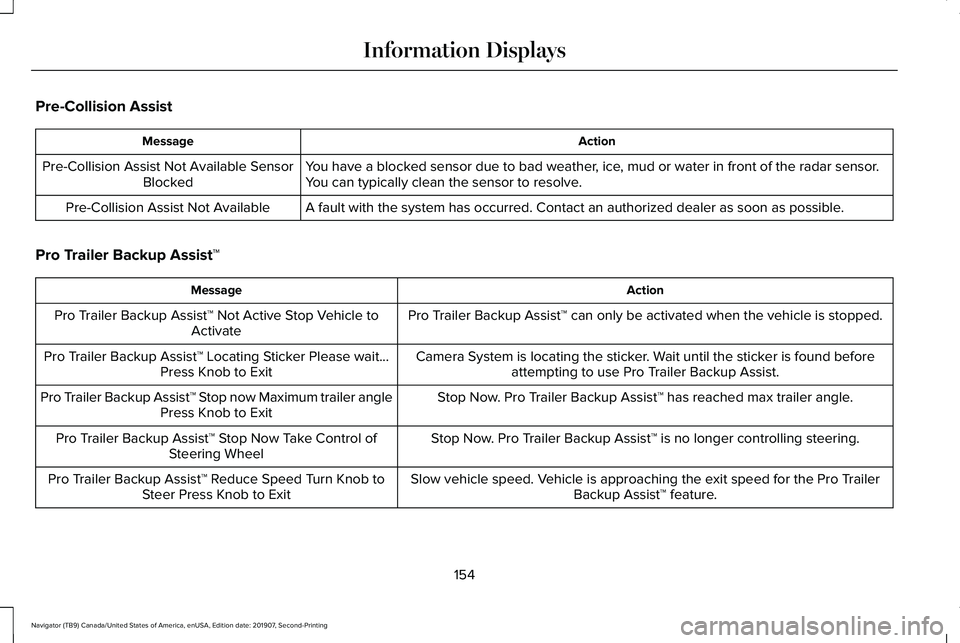
Pre-Collision Assist
Action
Message
You have a blocked sensor due to bad weather, ice, mud or water in front of the radar sensor.
You can typically clean the sensor to resolve.
Pre-Collision Assist Not Available Sensor
Blocked
A fault with the system has occurred. Contact an authorized dealer as so\
on as possible.
Pre-Collision Assist Not Available
Pro Trailer Backup Assist™ Action
Message
Pro Trailer Backup Assist™ can only be activated when the vehicle is stopped.
Pro Trailer Backup Assist™ Not Active Stop Vehicle to
Activate
Camera System is locating the sticker. Wait until the sticker is found beforeattempting to use Pro Trailer Backup Assist.
Pro Trailer Backup Assist™ Locating Sticker Please wait...
Press Knob to Exit
Stop Now. Pro Trailer Backup Assist™ has reached max trailer angle.
Pro Trailer Backup Assist™ Stop now Maximum trailer angle
Press Knob to Exit
Stop Now. Pro Trailer Backup Assist™ is no longer controlling steering.
Pro Trailer Backup Assist™ Stop Now Take Control of
Steering Wheel
Slow vehicle speed. Vehicle is approaching the exit speed for the Pro TrailerBackup Assist™ feature.
Pro Trailer Backup Assist™ Reduce Speed Turn Knob to
Steer Press Knob to Exit
154
Navigator (TB9) Canada/United States of America, enUSA, Edition date: 201907, Second-Printing Information Displays
Page 158 of 622
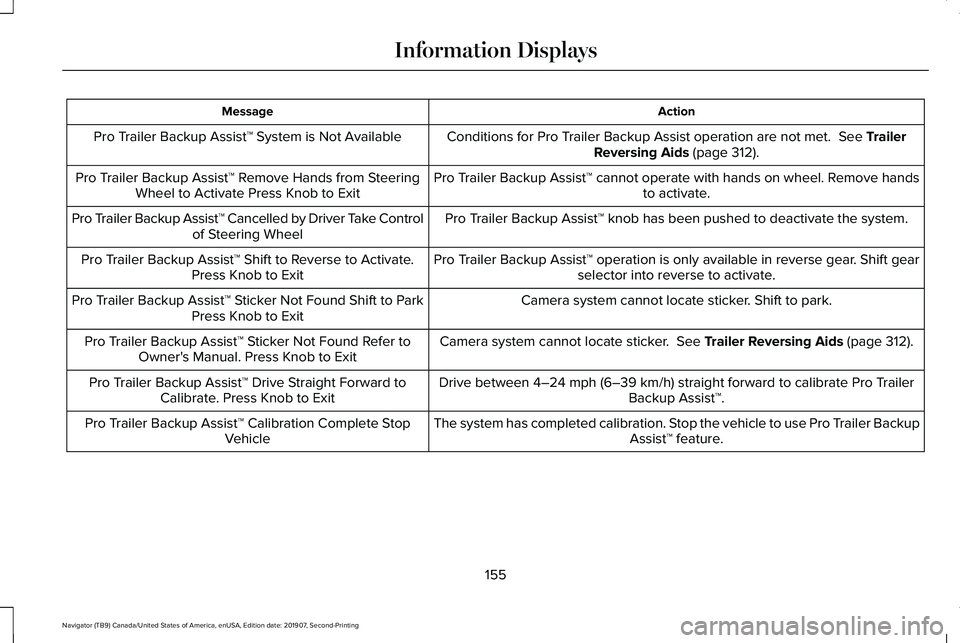
Action
Message
Conditions for Pro Trailer Backup Assist operation are not met. See Trailer
Reversing Aids (page 312).
Pro Trailer Backup Assist™ System is Not Available
Pro Trailer Backup Assist™ cannot operate with hands on wheel. Remove handsto activate.
Pro Trailer Backup Assist™ Remove Hands from Steering
Wheel to Activate Press Knob to Exit
Pro Trailer Backup Assist™ knob has been pushed to deactivate the system.
Pro Trailer Backup Assist™ Cancelled by Driver Take Control
of Steering Wheel
Pro Trailer Backup Assist™ operation is only available in reverse gear. Shift gearselector into reverse to activate.
Pro Trailer Backup Assist™ Shift to Reverse to Activate.
Press Knob to Exit
Camera system cannot locate sticker. Shift to park.
Pro Trailer Backup Assist™ Sticker Not Found Shift to Park
Press Knob to Exit
Camera system cannot locate sticker.
See Trailer Reversing Aids (page 312).
Pro Trailer Backup Assist™ Sticker Not Found Refer to
Owner's Manual. Press Knob to Exit
Drive between
4–24 mph (6–39 km/h) straight forward to calibrate Pro Trailer
Backup Assist™.
Pro Trailer Backup Assist™ Drive Straight Forward to
Calibrate. Press Knob to Exit
The system has completed calibration. Stop the vehicle to use Pro Trailer BackupAssist™ feature.
Pro Trailer Backup Assist™ Calibration Complete Stop
Vehicle
155
Navigator (TB9) Canada/United States of America, enUSA, Edition date: 201907, Second-Printing Information Displays
Page 165 of 622
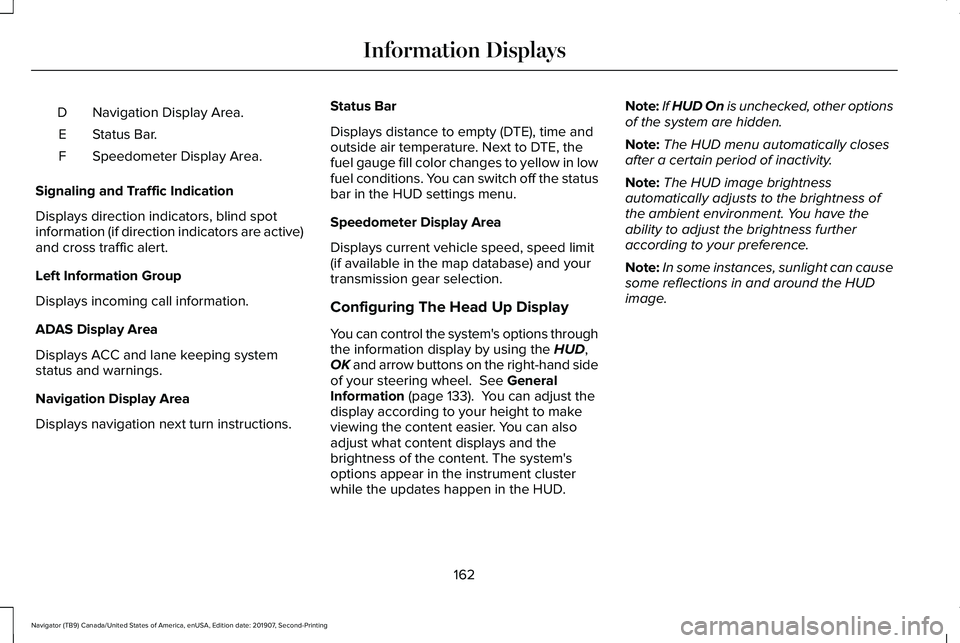
Navigation Display Area.
D
Status Bar.
E
Speedometer Display Area.
F
Signaling and Traffic Indication
Displays direction indicators, blind spot
information (if direction indicators are active)
and cross traffic alert.
Left Information Group
Displays incoming call information.
ADAS Display Area
Displays ACC and lane keeping system
status and warnings.
Navigation Display Area
Displays navigation next turn instructions. Status Bar
Displays distance to empty (DTE), time and
outside air temperature. Next to DTE, the
fuel gauge fill color changes to yellow in low
fuel conditions. You can switch off the status
bar in the HUD settings menu.
Speedometer Display Area
Displays current vehicle speed, speed limit
(if available in the map database) and your
transmission gear selection.
Configuring The Head Up Display
You can control the system's options through
the information display by using the HUD,
OK and arrow buttons on the right-hand side
of your steering wheel.
See General
Information (page 133). You can adjust the
display according to your height to make
viewing the content easier. You can also
adjust what content displays and the
brightness of the content. The system's
options appear in the instrument cluster
while the updates happen in the HUD. Note:
If HUD On is unchecked, other options
of the system are hidden.
Note: The HUD menu automatically closes
after a certain period of inactivity.
Note: The HUD image brightness
automatically adjusts to the brightness of
the ambient environment. You have the
ability to adjust the brightness further
according to your preference.
Note: In some instances, sunlight can cause
some reflections in and around the HUD
image.
162
Navigator (TB9) Canada/United States of America, enUSA, Edition date: 201907, Second-Printing Information Displays
Page 174 of 622
CABIN AIR FILTER
Your vehicle is equipped with a cabin air
filter, which gives you and your passengers
the following benefits:
•
It improves your driving comfort by
reducing particle concentration.
• It improves the interior compartment
cleanliness.
• It protects the climate control
components from particle deposits.
You can locate the cabin air filter behind the
glove box.
Note: Make sure you have a cabin air filter
installed at all times. This prevents foreign
objects from entering the system. Running
the system without a filter in place could
result in degradation or damage to the
system.
Replace the filter at regular intervals. See
Scheduled Maintenance (page 537).
For additional cabin air filter information, or
to replace the filter, see an authorized dealer. REMOTE START
You can switch this feature on or off and
adjust the settings using the information
display controls.
See Information Displays
(page 133).
The climate control system adjusts the
interior temperature during remote start.
You cannot adjust the climate control setting
during remote start operation. Switch the
ignition on to make adjustments.
Based on your remote start settings, the
following vehicle-dependent features may
or may not remain on after remote starting
your vehicle:
• Climate controlled seats.
• Heated steering wheel.
• Heated mirrors.
• Heated rear window.
• Windshield wiper de-icer.
Note: For dual zone climate controlled seats,
the passenger seat setting defaults to match
the driver seat during remote start. Automatic Settings
If
Auto is on, the system sets the interior
temperature to 72°F (22°C) and heats or
cools the vehicle interior as required to
achieve comfort.
Note: In cold weather, the heated rear
window and heated mirrors turn on.
Last Settings
If
Last Settings is on, the system uses the
settings last selected before you turned off
the vehicle.
Heated and Cooled Features
In
Auto mode, certain heated features may
switch on during cold weather, and cooled
features during hot weather.
171
Navigator (TB9) Canada/United States of America, enUSA, Edition date: 201907, Second-Printing Climate Control
Page 175 of 622
SITTING IN THE CORRECT
POSITION
WARNING: Sitting improperly, out of
position or with the seatback reclined too
far can take weight off the seat cushion
and affect the decision of the passenger
sensing system, resulting in serious injury
or death in the event of a crash. Always sit
upright against your seat back, with your
feet on the floor. WARNING: Do not recline the
seatback too far as this can cause the
occupant to slide under the seatbelt,
resulting in serious injury in the event of a
collision. WARNING:
Do not place objects
higher than the top of the seat backrest.
Failure to follow this instruction could result
in personal injury or death in the event of
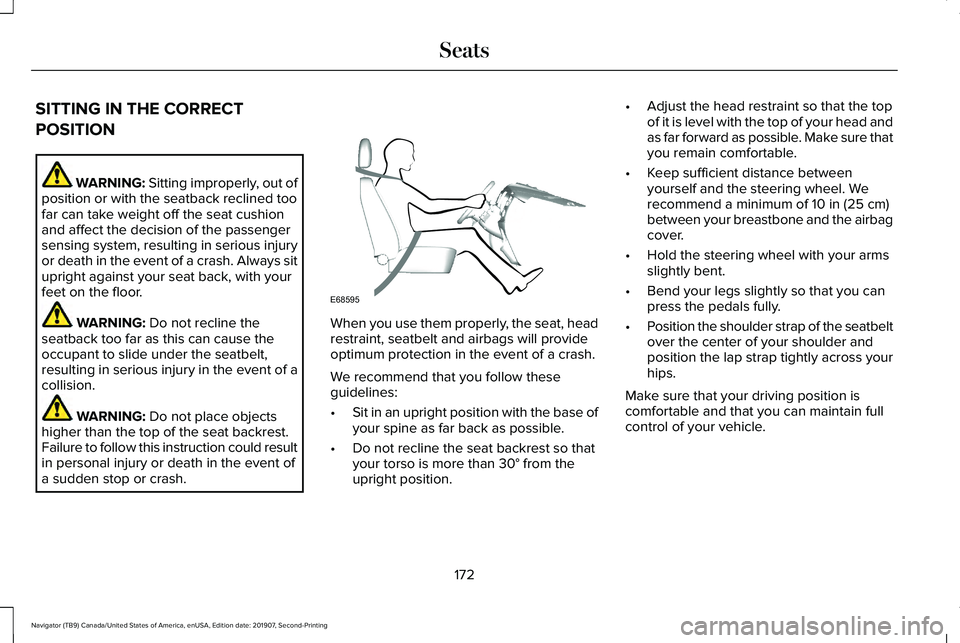
a sudden stop or crash. When you use them properly, the seat, head
restraint, seatbelt and airbags will provide
optimum protection in the event of a crash.
We recommend that you follow these
guidelines:
•
Sit in an upright position with the base of
your spine as far back as possible.
• Do not recline the seat backrest so that
your torso is more than
30° from the
upright position. •
Adjust the head restraint so that the top
of it is level with the top of your head and
as far forward as possible. Make sure that
you remain comfortable.
• Keep sufficient distance between
yourself and the steering wheel. We
recommend a minimum of
10 in (25 cm)
between your breastbone and the airbag
cover.
• Hold the steering wheel with your arms
slightly bent.
• Bend your legs slightly so that you can
press the pedals fully.
• Position the shoulder strap of the seatbelt
over the center of your shoulder and
position the lap strap tightly across your
hips.
Make sure that your driving position is
comfortable and that you can maintain full
control of your vehicle.
172
Navigator (TB9) Canada/United States of America, enUSA, Edition date: 201907, Second-Printing SeatsE68595
Page 207 of 622
Press the push button ignition switch once
without your foot on the brake pedal. It is on
the instrument panel near the steering wheel.
All electrical circuits and accessories are
operational and the warning lamps and
indicators illuminate.
Press the push button ignition switch again
without your foot on the brake pedal to
switch the ignition off.
STARTING A GASOLINE ENGINE
When you start the engine, the idle speed
increases.
This helps to warm up the engine. If the
engine idle speed does not slow down
automatically, have your vehicle checked by
an authorized dealer.
Note:
You can crank the engine for a total
of 60 seconds without the engine starting
before the starting system temporarily
disables. The 60 seconds does not have to
be all at once. For example, if you crank the
engine three times for 20 seconds each time,
without the engine starting, you reached the
60-second time limit. You cannot attempt
to start the engine for at least 15 minutes.
After 15 minutes, you are limited to a
15-second engine cranking time. You need
to wait 60 minutes before you can crank the
engine for 60 seconds again.
Before starting your vehicle, check the
following:
• Make sure all occupants have fastened
their seatbelts.
• Make sure the headlamps and electrical
accessories are off.
• Make sure the parking brake is on.
• Make sure the transmission is in park (P).
Note: Do not touch the accelerator pedal.
Note: You must have your intelligent access
key in your vehicle to shift the transmission
out of park (P). 1. Fully depress the brake pedal.
2. Press the push button ignition switch.
The system does not function if:
•
The passive key frequencies are jammed.
• The key battery has no charge.
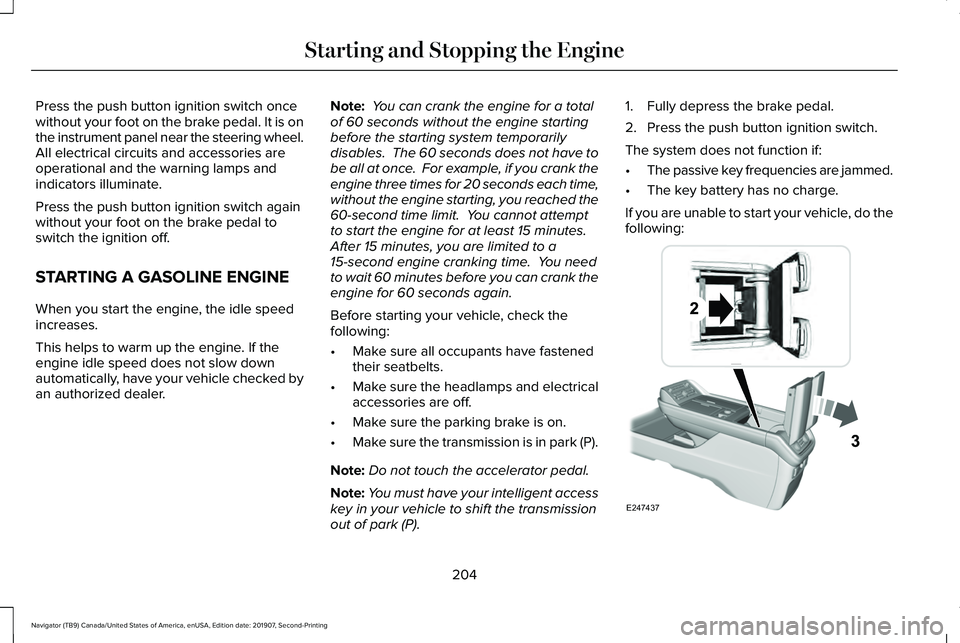
If you are unable to start your vehicle, do the
following: 204
Navigator (TB9) Canada/United States of America, enUSA, Edition date: 201907, Second-Printing Starting and Stopping the EngineE247437
Page 211 of 622
AUTO-START-STOP
The system helps reduce fuel consumption
by automatically stopping and restarting the
engine when your vehicle has stopped. The
engine restarts automatically when you
release the brake pedal.
In some situations, your vehicle may restart
automatically, for example:
•
To maintain interior comfort.
• To recharge the battery.
Note: Power assist steering turns off when
the engine is off.
Note: If your vehicle is flex fuel capable,
Auto-Start-Stop is inhibited for a short time
after a refuel event when the system is
verifying the fuel type being used. WARNING: Always fully apply the
parking brake. Make sure you shift into
park (P) for vehicles with an automatic
transmission. Switch the ignition off and
remove the key whenever you leave your
vehicle. WARNING: Before opening the hood
or performing any maintenance, fully apply
the parking brake, shift into park (P) or
neutral (N) and switch the ignition off. WARNING: Always switch the ignition
off before leaving the vehicle. If the ignition
is switched on an automatic restart may
occur at any time. WARNING:
The system may require
the engine to automatically restart when
the auto-start-stop indicator illuminates
green or flashes amber. Failure to follow
this instruction could result in personal
injury.
The Auto-Start-Stop system status is
available at a glance within the information
display.
See Information Displays (page
133).
Enabling Auto-Start-Stop
The system automatically enables every time
you start your vehicle if: •
You do not press the Auto-Start-Stop
button (not illuminated).
• Your vehicle exceeds an initial speed of
3 mph (5 km/h)
after you have initially
started your vehicle.
• You have stopped your vehicle.
• Your foot is on the brake pedal.
• The transmission is in drive.
• Not in Excite mode (enable by pressing
the Auto-Start-Stop button).
• The driver door is closed.
• There is adequate brake vacuum.
• The interior compartment has cooled or
warmed to an acceptable level.
• The front windshield defroster is off.
• You have not turned the steering wheel
rapidly or you do not have it at a sharp
angle.
• The vehicle is not on a steep road grade.
• The battery is within optimal operating
conditions, (with the battery state of
charge and temperature in range).
• The engine coolant is at operating
temperature.
208
Navigator (TB9) Canada/United States of America, enUSA, Edition date: 201907, Second-Printing Unique Driving Characteristics