brakes LINCOLN NAVIGATOR 2020 Owners Manual
[x] Cancel search | Manufacturer: LINCOLN, Model Year: 2020, Model line: NAVIGATOR, Model: LINCOLN NAVIGATOR 2020Pages: 622, PDF Size: 6.47 MB
Page 7 of 622
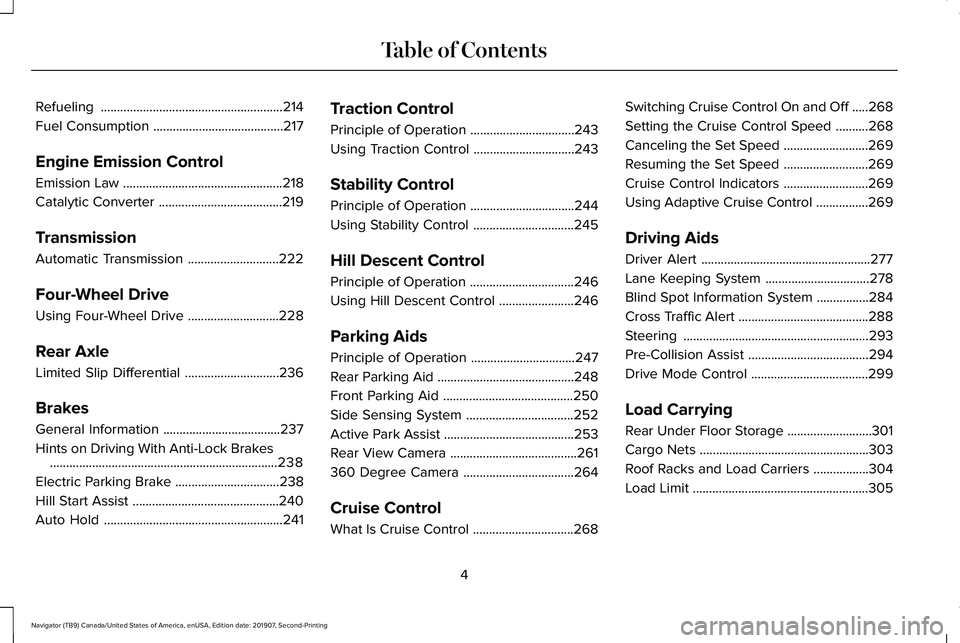
Refueling
........................................................214
Fuel Consumption ........................................
217
Engine Emission Control
Emission Law .................................................
218
Catalytic Converter ......................................
219
Transmission
Automatic Transmission ............................
222
Four-Wheel Drive
Using Four-Wheel Drive ............................
228
Rear Axle
Limited Slip Differential .............................
236
Brakes
General Information ....................................
237
Hints on Driving With Anti-Lock Brakes ......................................................................
238
Electric Parking Brake ................................
238
Hill Start Assist .............................................
240
Auto Hold .......................................................
241Traction Control
Principle of Operation
................................
243
Using Traction Control ...............................
243
Stability Control
Principle of Operation ................................
244
Using Stability Control ...............................
245
Hill Descent Control
Principle of Operation ................................
246
Using Hill Descent Control .......................
246
Parking Aids
Principle of Operation ................................
247
Rear Parking Aid ..........................................
248
Front Parking Aid ........................................
250
Side Sensing System .................................
252
Active Park Assist ........................................
253
Rear View Camera .......................................
261
360 Degree Camera ..................................
264
Cruise Control
What Is Cruise Control ...............................
268Switching Cruise Control On and Off
.....
268
Setting the Cruise Control Speed ..........
268
Canceling the Set Speed ..........................
269
Resuming the Set Speed ..........................
269
Cruise Control Indicators ..........................
269
Using Adaptive Cruise Control ................
269
Driving Aids
Driver Alert ....................................................
277
Lane Keeping System ................................
278
Blind Spot Information System ................
284
Cross Traffic Alert ........................................
288
Steering .........................................................
293
Pre-Collision Assist .....................................
294
Drive Mode Control ....................................
299
Load Carrying
Rear Under Floor Storage ..........................
301
Cargo Nets ....................................................
303
Roof Racks and Load Carriers .................
304
Load Limit ......................................................
305
4
Navigator (TB9) Canada/United States of America, enUSA, Edition date: 201907, Second-Printing Table of Contents
Page 15 of 622
Windshield wash and wipe
DATA RECORDING WARNING: Do not connect wireless
plug-in devices to the data link connector.
Unauthorized third parties could gain
access to vehicle data and impair the
performance of safety related systems.
Only allow repair facilities that follow our
service and repair instructions to connect
their equipment to the data link connector.
We respect your privacy and are committed
to protecting it. The information contained
in this publication was correct at the time of
going to print but as technology rapidly
changes, we recommend that you visit the
regional Lincoln website for the latest
information. Your vehicle has electronic control units that
have data recording functionality and the
ability to permanently or temporarily store
data. This data could include information on
the condition and status of your vehicle,
vehicle maintenance requirements, events
and malfunctions. The types of data that can
be recorded are described in this section.
Some of the data recorded is stored in event
logs or error logs.
Note:
Error logs are reset following a service
or repair.
Note: We may provide information in
response to requests from law enforcement,
other government authorities and third
parties acting with lawful authority or through
a legal process. Such information could be
used by them in legal proceedings.
Data recorded includes, for example:
• Operating states of system components,
for example, fuel level, tire pressure and
battery charge level.
• Vehicle and component status, for
example, wheel speed, deceleration,
lateral acceleration and seatbelt status. •
Events or errors in essential systems, for
example, headlamps and brakes.
• System responses to driving situations,
for example, airbag deployment and
stability control.
• Environmental conditions, for example,
temperature.
Some of this data, when used in combination
with other information, for example, an
accident report, damage to a vehicle or
eyewitness statements, could be associated
with a specific person.
Service Data
Service data recorders in your vehicle are
capable of collecting and storing diagnostic
information about your vehicle. This
potentially includes information about the
performance or status of various systems
and modules in the vehicle, such as engine,
throttle, steering or brake systems. In order
to properly diagnose and service your
vehicle, Lincoln Motor Company (Lincoln of
Canada in Canada), and service and repair
facilities may access or share among them
vehicle diagnostic information received
12
Navigator (TB9) Canada/United States of America, enUSA, Edition date: 201907, Second-Printing Introduction
Page 51 of 622
3.
Pull the larger tongue across the lap and
insert it into the buckle to the right of the
center seat.
Note: If in constant use, you can leave the
belt buckled in the smaller buckle. When it
is not in use, or when you fold or move the
rear seats, you should release the belt from
the smaller buckle. Using the tongue of the
adjacent seatbelt, press the red button on
the smaller buckle.
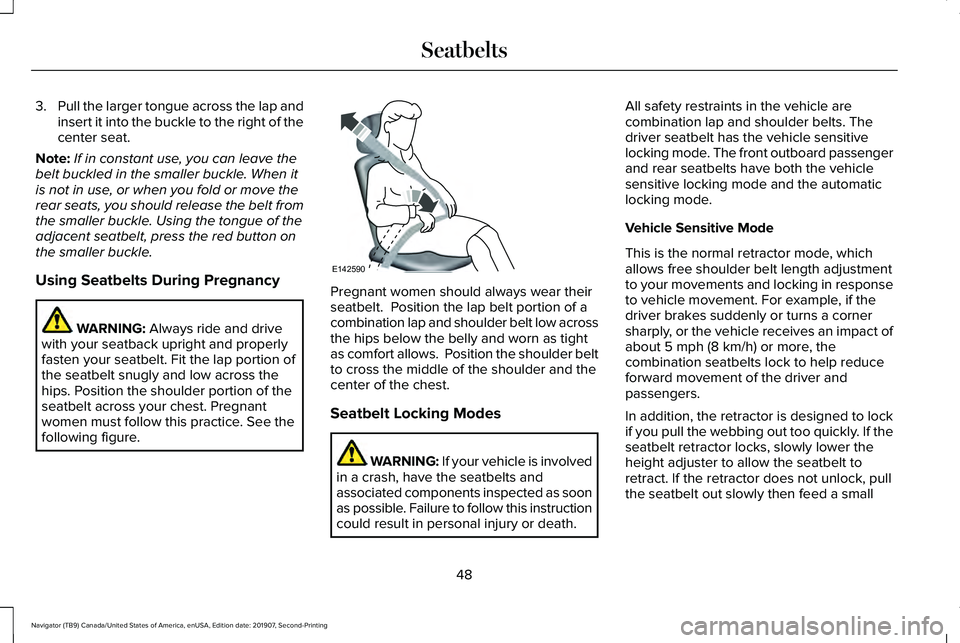
Using Seatbelts During Pregnancy WARNING: Always ride and drive
with your seatback upright and properly
fasten your seatbelt. Fit the lap portion of
the seatbelt snugly and low across the
hips. Position the shoulder portion of the
seatbelt across your chest. Pregnant
women must follow this practice. See the
following figure. Pregnant women should always wear their
seatbelt. Position the lap belt portion of a
combination lap and shoulder belt low across
the hips below the belly and worn as tight
as comfort allows. Position the shoulder belt
to cross the middle of the shoulder and the
center of the chest.
Seatbelt Locking Modes
WARNING: If your vehicle is involved
in a crash, have the seatbelts and
associated components inspected as soon
as possible. Failure to follow this instruction
could result in personal injury or death. All safety restraints in the vehicle are
combination lap and shoulder belts. The
driver seatbelt has the vehicle sensitive
locking mode. The front outboard passenger
and rear seatbelts have both the vehicle
sensitive locking mode and the automatic
locking mode.
Vehicle Sensitive Mode
This is the normal retractor mode, which
allows free shoulder belt length adjustment
to your movements and locking in response
to vehicle movement. For example, if the
driver brakes suddenly or turns a corner
sharply, or the vehicle receives an impact of
about
5 mph (8 km/h) or more, the
combination seatbelts lock to help reduce
forward movement of the driver and
passengers.
In addition, the retractor is designed to lock
if you pull the webbing out too quickly. If the
seatbelt retractor locks, slowly lower the
height adjuster to allow the seatbelt to
retract. If the retractor does not unlock, pull
the seatbelt out slowly then feed a small
48
Navigator (TB9) Canada/United States of America, enUSA, Edition date: 201907, Second-Printing SeatbeltsE142590
Page 155 of 622
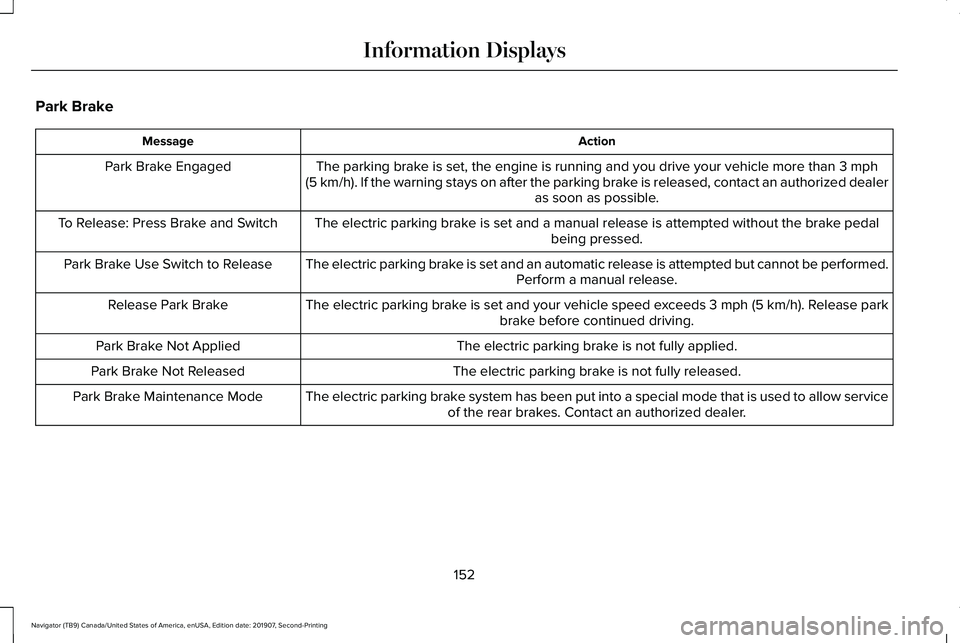
Park Brake
Action
Message
The parking brake is set, the engine is running and you drive your vehicle more than 3 mph
(5 km/h). If the warning stays on after the parking brake is released, contact an authorized dealer as soon as possible.
Park Brake Engaged
The electric parking brake is set and a manual release is attempted without the brake pedal being pressed.
To Release: Press Brake and Switch
The electric parking brake is set and an automatic release is attempted but cannot be performed.Perform a manual release.
Park Brake Use Switch to Release
The electric parking brake is set and your vehicle speed exceeds 3 mph (5 km/h)
. Release park
brake before continued driving.
Release Park Brake
The electric parking brake is not fully applied.
Park Brake Not Applied
The electric parking brake is not fully released.
Park Brake Not Released
The electric parking brake system has been put into a special mode that is used to allow serviceof the rear brakes. Contact an authorized dealer.
Park Brake Maintenance Mode
152
Navigator (TB9) Canada/United States of America, enUSA, Edition date: 201907, Second-Printing Information Displays
Page 209 of 622
You can stop the shutdown, or reset the
timer, at any point before the 30-second
countdown has expired by doing any of the
following:
•
Interacting with your vehicle, for example
pressing the brake or accelerator pedal.
• You can temporarily switch off the
shutdown feature any time the ignition is
on using the information display. See
Information Displays (page 133). The
feature only remains off for the current
ignition cycle.
• During the 30-second countdown, the
system prompts you to press OK or
RESET to temporarily switch the feature
off for the current ignition cycle only.
Stopping the Engine When Your
Vehicle is Stationary
1. Shift into park (P).
2. Press the push button ignition switch.
3. Apply the parking brake.
Note: The ignition, all electrical circuits and
all warning lamps and indicators will be
turned off. Note:
If the engine is idling for 30 minutes,
the ignition and engine automatically shuts
down.
Stopping the Engine When Your
Vehicle is Moving WARNING:
Switching off the engine
when the vehicle is still moving will result
in a loss of brake and steering assistance.
The steering will not lock, but higher effort
will be required. When the ignition is
switched off, some electrical circuits,
including air bags, warning lamps and
indicators may also be off. If the ignition
was turned off accidentally, you can shift
into neutral (N) and re-start the engine.
1. Shift into neutral and use the brakes to bring your vehicle to a safe stop.
2. When your vehicle has stopped, shift into
park (P).
3. Press and hold the push button ignition switch, or press it three times within two
seconds.
4. Apply the parking brake. Guarding Against Exhaust Fumes WARNING: Exhaust leaks may result
in entry of harmful and potentially lethal
fumes into the passenger compartment. If
you smell exhaust fumes inside your
vehicle, have your vehicle inspected
immediately. Do not drive if you smell
exhaust fumes.
Important Ventilating Information
If you stop your vehicle and then leave the
engine idling for long periods, we
recommend that you do one of the following:
• Open the windows at least
1 in (3 cm).
• Set your climate control to outside air.
ENGINE BLOCK HEATER
(IF EQUIPPED) WARNING:
Failure to follow engine
block heater instructions could result in
property damage or serious personal
injury.
206
Navigator (TB9) Canada/United States of America, enUSA, Edition date: 201907, Second-Printing Starting and Stopping the Engine
Page 227 of 622
Note:
This only functions if your 12-volt
battery has power and the starter can spin
the engine. If vehicle battery voltage is not
sufficient, an external 12-volt power source
such as jumper cables, battery charger or
jump pack may be required for this feature
to function.
Note: Once in this mode, sufficient battery
voltage must be maintained or your vehicle
returns to park. WARNING: When doing this
procedure, you need to take the
transmission out of park (P) which means
your vehicle can roll freely. To avoid
unwanted vehicle movement, always fully
apply the parking brake prior to doing this
procedure. Use wheels chocks if
appropriate.
1. Do not press the brake pedal. Press the START/STOP
button.
2. Fully press down on the brake pedal. Keep the brakes applied through step 7.
3. Press the accelerator pedal to the floor and hold through step 7. 4. Press the neutral (N) button on the
transmission selector.
5. Press the neutral (N) button again to enter Stay in Neutral mode.
6. Press and release the push to start button, the transmission needs a
minimum of 2 seconds to exit park.
7. When neutral (N) is displayed, the brake and accelerator pedals can be released.
To exit Stay in Neutral mode, select a
different gear.
A message appears in your information
display screen when your vehicle has
entered Stay in Neutral mode.
Drive (D)
Drive (D) is the normal driving position for
the best fuel economy. The overdrive
function allows automatic upshifts and
downshifts through gears one through ten. Adaptive Tow/Haul Mode WARNING:
Do not use tow/haul
when the road surface is slippery. Failure
to follow this instruction could result in the
loss of control of your vehicle.
Adaptive tow/haul has two modes, automatic
that is enabled by default and off.
To turn adaptive tow/haul off or on, use the
information display controls.
See General
Information (page 133). The indicator light
illuminates in the instrument cluster.
Key adaptive tow/haul features:
• The system remains in the same mode,
even after a key cycle.
• Is only available in normal drive modes
(Normal 2H and Normal 4A).
The adaptive tow/haul feature improves
transmission operation when towing a trailer
or a heavy load. All transmission gear ranges
are available when using adaptive tow/haul.
For information on towing.
See Towing (page
311).
224
Navigator (TB9) Canada/United States of America, enUSA, Edition date: 201907, Second-Printing Transmission
Page 229 of 622
Brake-Shift Interlock Override
WARNING: When doing this
procedure, you need to take the
transmission out of park (P) which means
your vehicle can roll freely. To avoid
unwanted vehicle movement, always fully
apply the parking brake prior to doing this
procedure. Use wheels chocks if
appropriate. WARNING: Do not drive your vehicle
until you verify that the stoplamps are
working. WARNING:
If the parking brake is
fully released, but the brake warning lamp
remains illuminated, the brakes may not
be working properly. Have your vehicle
checked as soon as possible.
Note: See your authorized dealer as soon
as possible if this procedure is used.
Note: For some markets this feature is
disabled. Note:
This feature only functions if your
12-volt battery has power.
Use the brake-shift interlock override to
move your transmission from the park
position in the event of an electrical
malfunction.
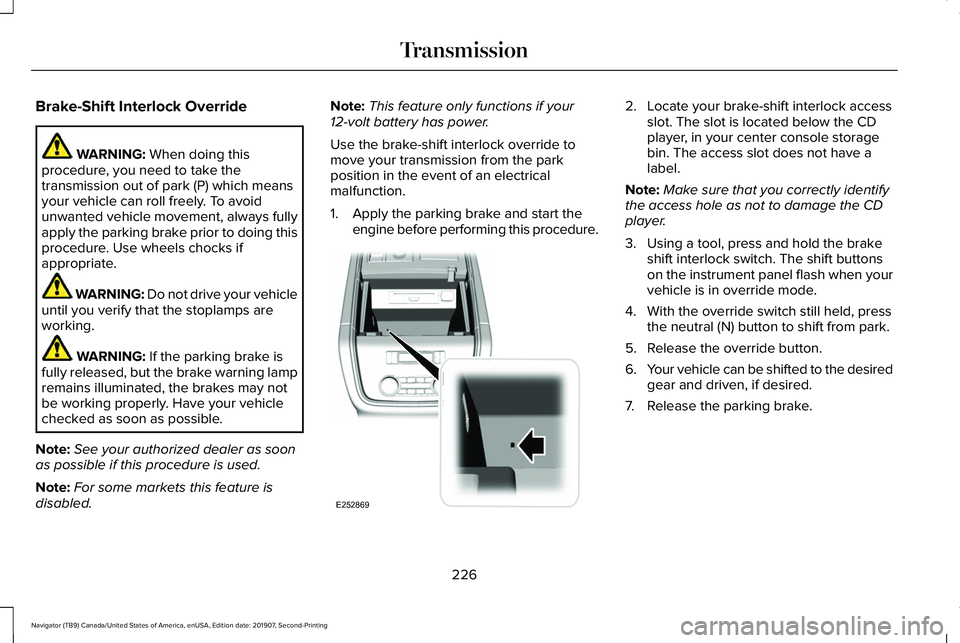
1. Apply the parking brake and start the engine before performing this procedure. 2. Locate your brake-shift interlock access
slot. The slot is located below the CD
player, in your center console storage
bin. The access slot does not have a
label.
Note: Make sure that you correctly identify
the access hole as not to damage the CD
player.
3. Using a tool, press and hold the brake shift interlock switch. The shift buttons
on the instrument panel flash when your
vehicle is in override mode.
4. With the override switch still held, press the neutral (N) button to shift from park.
5. Release the override button.
6. Your vehicle can be shifted to the desired
gear and driven, if desired.
7. Release the parking brake.
226
Navigator (TB9) Canada/United States of America, enUSA, Edition date: 201907, Second-Printing TransmissionE252869
Page 236 of 622
If your vehicle goes from one type of surface
to another (i.e. from concrete to gravel) there
may be a change in the way your vehicle
responds to a maneuver (i.e. steering,
acceleration or braking).
Sand
When driving over sand, try to keep all four
wheels on the most solid area of the trail.
Avoid reducing the tire pressures but shift
to a lower gear and drive steadily through
the terrain. Apply the accelerator slowly and
avoid excessive wheel slip.
Avoid driving at excessive speeds, this
causes vehicle momentum to work against
you and your vehicle could become stuck to
the point that assistance may be required
from another vehicle. Remember, you may
be able to back out the way you came if you
proceed with caution.
Mud and Water
Note:
Driving through deep water may
damage the vehicle. If you must drive through high water, drive
slowly. Traction or brake capability may be
limited.
When driving through water, determine the
depth and avoid water higher than the
bottom of the hubs. If the ignition system
gets wet, your vehicle may stall.
Once through water, always try the brakes.
Wet brakes do not stop your vehicle as
effectively as dry brakes. Drying can be
improved by applying light pressure to the
brake pedal when moving slowly.
Be cautious of sudden changes in vehicle
speed or direction when you are driving in
mud. Even 4X4 vehicles can lose traction in
slick mud. As when you are driving over
sand, apply the accelerator slowly and avoid
spinning your wheels. If the vehicle does
slide, steer in the direction of the slide until
you regain control of the vehicle.
If the transmission, transfer case or front axle
are submerged in water, their fluids should
be checked and changed, if necessary.
If the front or rear axle is submerged in water,
the axle lubricant should be replaced.After driving through mud, clean off residue
stuck to rotating driveshafts and tires. Excess
mud stuck on tires and rotating driveshafts
causes an imbalance that could damage
drive components.
Driving on Hilly or Sloping Terrain
Note:
Avoid driving crosswise or turning on
steep slopes or hills.
Note: Avoid turning on steep slopes or hills.
A danger lies in losing traction, slipping
sideways and possible vehicle roll over.
Whenever driving on a hill, determine
beforehand the route you will use. Do not
drive over the crest of a hill without seeing
what conditions are on the other side. Do
not drive in reverse over a hill without the
aid of an observer.
Although natural obstacles may make it
necessary to travel diagonally up or down a
hill or steep incline, you should always try to
drive straight up or straight down.
233
Navigator (TB9) Canada/United States of America, enUSA, Edition date: 201907, Second-Printing Four-Wheel Drive (If Equipped)
Page 237 of 622
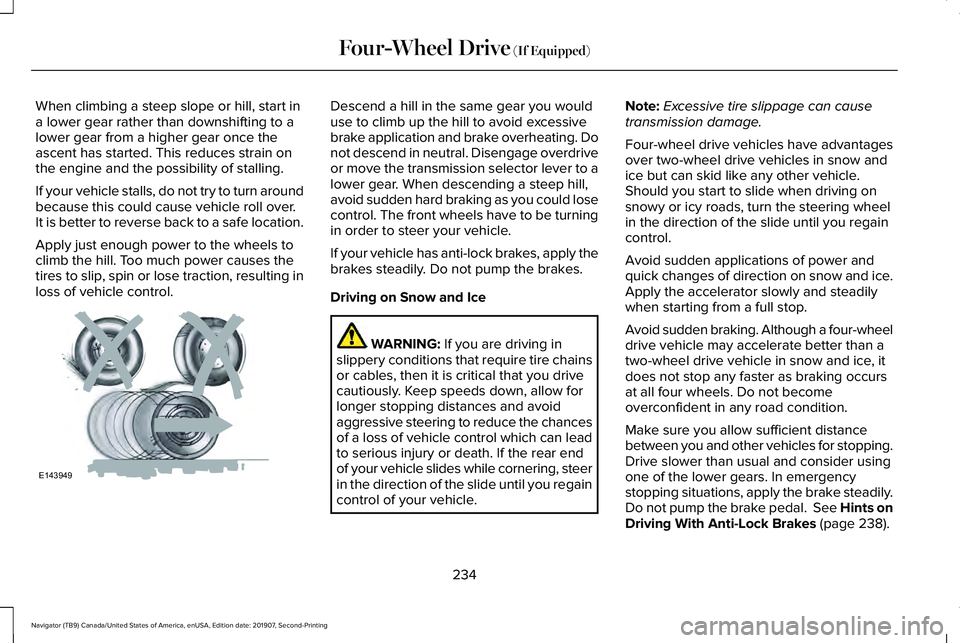
When climbing a steep slope or hill, start in
a lower gear rather than downshifting to a
lower gear from a higher gear once the
ascent has started. This reduces strain on
the engine and the possibility of stalling.
If your vehicle stalls, do not try to turn around
because this could cause vehicle roll over.
It is better to reverse back to a safe location.
Apply just enough power to the wheels to
climb the hill. Too much power causes the
tires to slip, spin or lose traction, resulting in
loss of vehicle control. Descend a hill in the same gear you would
use to climb up the hill to avoid excessive
brake application and brake overheating. Do
not descend in neutral. Disengage overdrive
or move the transmission selector lever to a
lower gear. When descending a steep hill,
avoid sudden hard braking as you could lose
control. The front wheels have to be turning
in order to steer your vehicle.
If your vehicle has anti-lock brakes, apply the
brakes steadily. Do not pump the brakes.
Driving on Snow and Ice
WARNING: If you are driving in
slippery conditions that require tire chains
or cables, then it is critical that you drive
cautiously. Keep speeds down, allow for
longer stopping distances and avoid
aggressive steering to reduce the chances
of a loss of vehicle control which can lead
to serious injury or death. If the rear end
of your vehicle slides while cornering, steer
in the direction of the slide until you regain
control of your vehicle. Note:
Excessive tire slippage can cause
transmission damage.
Four-wheel drive vehicles have advantages
over two-wheel drive vehicles in snow and
ice but can skid like any other vehicle.
Should you start to slide when driving on
snowy or icy roads, turn the steering wheel
in the direction of the slide until you regain
control.
Avoid sudden applications of power and
quick changes of direction on snow and ice.
Apply the accelerator slowly and steadily
when starting from a full stop.
Avoid sudden braking. Although a four-wheel
drive vehicle may accelerate better than a
two-wheel drive vehicle in snow and ice, it
does not stop any faster as braking occurs
at all four wheels. Do not become
overconfident in any road condition.
Make sure you allow sufficient distance
between you and other vehicles for stopping.
Drive slower than usual and consider using
one of the lower gears. In emergency
stopping situations, apply the brake steadily.
Do not pump the brake pedal. See Hints on
Driving With Anti-Lock Brakes
(page 238).
234
Navigator (TB9) Canada/United States of America, enUSA, Edition date: 201907, Second-Printing Four-Wheel Drive
(If Equipped)E143949
Page 240 of 622
GENERAL INFORMATION
Note:
Occasional brake noise is normal. If
a metal-to-metal, continuous grinding or
continuous squeal sound is present, the
brake linings may be worn-out and an
authorized dealer should check them. If the
vehicle has continuous vibration or shudder
in the steering wheel while braking, an
authorized dealer should check your vehicle.
Note: Brake dust may accumulate on the
wheels, even under normal driving
conditions. Some dust is inevitable as the
brakes wear and does not contribute to
brake noise. See Cleaning the Wheels
(page 400). See
Warning Lamps and
Indicators (page 128).
Wet brakes result in reduced braking
efficiency. Gently press the brake pedal a
few times when driving from a car wash or
standing water to dry the brakes. Brake Over Accelerator
In the event the accelerator pedal becomes
stuck or entrapped, apply steady and firm
pressure to the brake pedal to slow the
vehicle and reduce engine power. If you
experience this condition, apply the brakes
and bring your vehicle to a safe stop. Switch
the engine off, move the transmission to park
(P) and apply the parking brake. Inspect the
accelerator pedal and the area around it for
any items or debris that may be obstructing
its movement.If none are found and the
condition persists, have your vehicle towed
to the nearest authorized dealer.
Emergency Brake Assist
Emergency brake assist detects when you
brake heavily by measuring the rate at which
you press the brake pedal. It provides
maximum braking efficiency as long as you
press the pedal. Emergency brake assist
can reduce stopping distances in critical
situations.Anti-lock Brake System
This system helps you maintain steering
control during emergency stops by keeping
the brakes from locking. This lamp momentarily illuminates
when you switch the ignition on. If
the light does not illuminate during
start up, remains on or flashes, the anti-lock
braking system may be disabled. Have the
system checked by an authorized dealer. If
the anti-lock brake system is disabled,
normal braking is still effective. If the brake warning lamp
illuminates with the parking brake
released, have your brake system
serviced immediately.
It also illuminates momentarily when you
switch the ignition on to confirm the lamp is
functional. If it does not illuminate when you
switch the ignition on, or begins to flash at
any time, have the system checked by an
authorized dealer.
237
Navigator (TB9) Canada/United States of America, enUSA, Edition date: 201907, Second-Printing BrakesE138644 E138644