tire size LINCOLN NAVIGATOR 2020 Owners Manual
[x] Cancel search | Manufacturer: LINCOLN, Model Year: 2020, Model line: NAVIGATOR, Model: LINCOLN NAVIGATOR 2020Pages: 622, PDF Size: 6.47 MB
Page 147 of 622

Drivetrain
Action
Message
Displays if the electronic limited slip differential system encounters a\
hardware failure. Haveyour vehicle checked as soon as possible.
Check Electronic Limited Slip Differential
Displays if an electronic limited slip differential system fault is pres\
ent. Have your vehicle checkedas soon as possible.
Electronic Limited Slip Differential Off See
Owner's Manual
Displays when the electronic limited slip differential system resumes no\
rmal function.
Electronic Limited Slip Differential Restored
to Normal
Displays if the electronic limited slip differential system temporarily \
turns off due to overheating
or an undersized spare tire. If an undersized spare tire is installed, replace the spare tire with \
a
full-sized tire as soon as possible. If not, stop the vehicle in a safe location and allow the system to cool.
Electronic Limited Slip Differential
Temporarily Disabled
Displays if the electronic limited slip differential has limited functio\
nality. This could be due toan undersized spare tire or caused by the system overheating. If an unde\
rsized spare tire is
installed, replace the spare tire with a full-sized tire as soon as poss\
ible. If an undersized spare tire is not installed, the vehicle has reduced functionality. Have your vehicle checked as soon as possible.
Electronic Limited Slip Differential Reduced
Torque
144
Navigator (TB9) Canada/United States of America, enUSA, Edition date: 201907, Second-Printing Information Displays
Page 233 of 622
Shifting to or from 4L - 4X4 LOW
Note:
4L mode is not intended for use on dry
pavement.
1. Bring the vehicle to a rolling speed of 3 mph (5 km/h) or less.
2. Place the gearshift in neutral (N).
3. Rotate the drive mode knob to desired mode.
The information display shows a message
indicating a 4X4 shift is in progress. The
information display shows the system mode
selected. If any of the previous shift
conditions are not present, the shift does not
occur and the information display shows the
information guiding the driver through the
proper shifting procedures. If the previous
conditions are not satisfied in 30 seconds,
the system reverts back to the previous 4WD
mode or drive mode. If
Shift Delayed Pull Forward displays in the
information display, transfer case gear tooth
blockage is present. To alleviate this
condition, place the transmission in a forward
gear, move the vehicle forward
approximately
5 ft (2 m), and shift the
transmission back to neutral (N) to allow the
transfer case to complete the range shift.
Operating 4WD Vehicles with Spare or
Mismatched Tires
On four-wheel drive vehicles, the size of the
spare tire can affect the 4X4 system. If there
is a significant difference between the size
of the spare tire and the remaining tires, you
may have limited four-wheel drive
functionality.
When driving with the full-size dissimilar
spare wheel and tire assembly, it is
recommended that you do not:
• Exceed
50 mph (80 km/h) with a 4WD
mode turned on.
• Turn on a 4WD mode unless the vehicle
is stationary.
• Use a 4WD mode on dry pavement. Use of a dissimilar spare wheel and tire
assembly may lead to impairment of the
following:
•
Comfort and noise.
• Winter weather driving capability.
• Wet driving capability.
• Four-wheel drive capability.
How Your Vehicle Differs from Other
Vehicles WARNING:
Vehicles with a higher
center of gravity (utility and four-wheel
drive vehicles) handle differently than
vehicles with a lower center of gravity
(passenger cars). Avoid sharp turns,
excessive speed and abrupt steering in
these vehicles. Failure to drive cautiously
increases the risk of losing control of your
vehicle, vehicle rollover, personal injury
and death.
230
Navigator (TB9) Canada/United States of America, enUSA, Edition date: 201907, Second-Printing Four-Wheel Drive
(If Equipped)
Page 239 of 622
LIMITED SLIP DIFFERENTIAL (IF
EQUIPPED)
The Electronic Limited Slip Differential (eLSD)
system directs torque, enabling the vehicle
to drive over terrain and road conditions that
a conventional axle cannot. The system is
active at all times and requires no input from
the driver.
Note: If your vehicle is not at optimal
operating conditions or a system fault is
present, a warning may be displayed in the
instrument cluster. Depending on the
warning, your vehicle may need to be
serviced. You can find more information
regarding the system information messages
in the Information Displays chapter.
See
Information Messages (page 138).
Spare Tire
If your vehicle has an Electronic Limited Slip
Differential, do not use a spare tire of a
different size than the tire provided. If a spare
tire is installed, a message may appear,
indicating the system has disabled
automatically or reduced function to prevent system overheat and damage. It is
recommended to reinstall the repaired or
replaced road tire as soon as possible. When
the road tire is replaced, the system will
resume normal operation on the next key
cycle.
Trailer Towing
The Electronic Limited Slip Differential
enhances vehicle stability during trailer tow
operation. During high demand trailering
events, such as steep slopes, high speeds
or with a spare tire, the system may provide
a warning in the instrument cluster and
reduce function or enter a temporarily
disabled state. To resume normal function,
stop the vehicle in a safe location and allow
the unit to adequately cool. Once the system
has reached normal operating temperatures,
system function will be restored and the
Electronic Limited Slip Differential Restored
message will be displayed.
236
Navigator (TB9) Canada/United States of America, enUSA, Edition date: 201907, Second-Printing Rear Axle
Page 247 of 622
PRINCIPLE OF OPERATION
WARNING: Vehicle modifications
involving braking system, aftermarket roof
racks, suspension, steering system, tire
construction and wheel and tire size may
change the handling characteristics of your
vehicle and may adversely affect the
performance of the electronic stability
control system. In addition, installing any
stereo loudspeakers may interfere with
and adversely affect the electronic stability
control system. Install any aftermarket
stereo loudspeaker as far as possible from
the front center console, the tunnel, and
the front seats in order to minimize the risk
of interfering with the electronic stability
control sensors. Reducing the
effectiveness of the electronic stability
control system could lead to an increased
risk of loss of vehicle control, vehicle
rollover, personal injury and death. WARNING:
Remember that even
advanced technology cannot defy the laws
of physics. It’ s always possible to lose
control of a vehicle due to inappropriate
driver input for the conditions. Aggressive
driving on any road condition can cause
you to lose control of your vehicle
increasing the risk of personal injury or
property damage. Activation of the
electronic stability control system is an
indication that at least some of the tires
have exceeded their ability to grip the
road; this could reduce the operator’ s
ability to control the vehicle potentially
resulting in a loss of vehicle control, vehicle
rollover, personal injury and death. If your
electronic stability control system activates,
SLOW DOWN.
The system automatically turns on each time
you switch the ignition on.
If a fault occurs in either the stability control
or the traction control system, you may
experience the following conditions: •
The stability and traction control light
illuminates steadily.
• The stability control and traction control
systems do not enhance your vehicle's
ability to maintain traction of the wheels.
If a driving condition activates either the
stability control or the traction control system
you may experience the following conditions:
• The stability and traction control light
flashes.
• Your vehicle slows down.
• Reduced engine power.
• A vibration in the brake pedal.
• The brake pedal is stiffer than usual.
• If the driving condition is severe and your
foot is not on the brake, the brake pedal
may move as the system applies higher
brake force.
The stability control system has several
features built into it to help you maintain
control of your vehicle:
244
Navigator (TB9) Canada/United States of America, enUSA, Edition date: 201907, Second-Printing Stability Control
Page 257 of 622
WARNING: Active park assist does
not apply the brakes under any
circumstances. WARNING:
You are responsible for
controlling your vehicle at all times. The
system is designed to be an aid and does
not relieve you of your responsibility to
drive with due care and attention. Failure
to follow this instruction could result in the
loss of control of your vehicle, personal
injury or death.
Active park assist is a multi-step process and
may require you to shift the transmission
multiple times. Follow the onscreen
instructions until the parking maneuver is
complete.
If you are uncomfortable with the proximity
to any vehicle or object, you may choose to
override the system by grabbing the steering
wheel, or by taking full control of your vehicle
after pressing the active park assist button.
Keep your hands, hair, clothing and any
loose items clear of the steering wheel when
using active park assist. The sensors are on the front and rear
bumpers.
Note:
Keep the sensors free from snow, ice
and large accumulations of dirt.
Note: Do not cover up the sensors.
Note: Do not clean the sensors with sharp
objects.
Note: The sensors may not detect objects
with surfaces that absorb ultrasonic waves.
The sensors may falsely detect objects due
to ultrasonic interference caused by
motorcycle exhausts, truck air brakes or
horns, for example.
Note: If you change any tires, the system
must recalibrate and may not correctly
operate for a short time.
The system may not correctly operate in any
of the following conditions:
• You use a spare tire or a tire that is
significantly worn more than the other
tires.
• One or more tires are incorrectly inflated.
• You try to park on a tight curve. •
Something passes between the front
bumper and the parking space. For
example, a pedestrian or cyclist.
• The edge of the neighboring parked
vehicle is high off the ground. For
example, a bus, tow truck or flatbed
truck.
• The weather conditions are poor. For
example, during heavy rain, snow, fog,
high humidity and high temperatures.
Do not use the system if:
• You have attached an add-on accessory
close to the sensors on the front or rear
of your vehicle. For example, a bike rack
or trailer.
• You have attached an overhanging
object to the roof. For example, a
surfboard.
• The front bumper, rear bumper or the
side sensors are damaged.
• The correct tire size is not in use on your
vehicle. For example, a mini-spare tire.
254
Navigator (TB9) Canada/United States of America, enUSA, Edition date: 201907, Second-Printing Parking Aids
Page 264 of 622
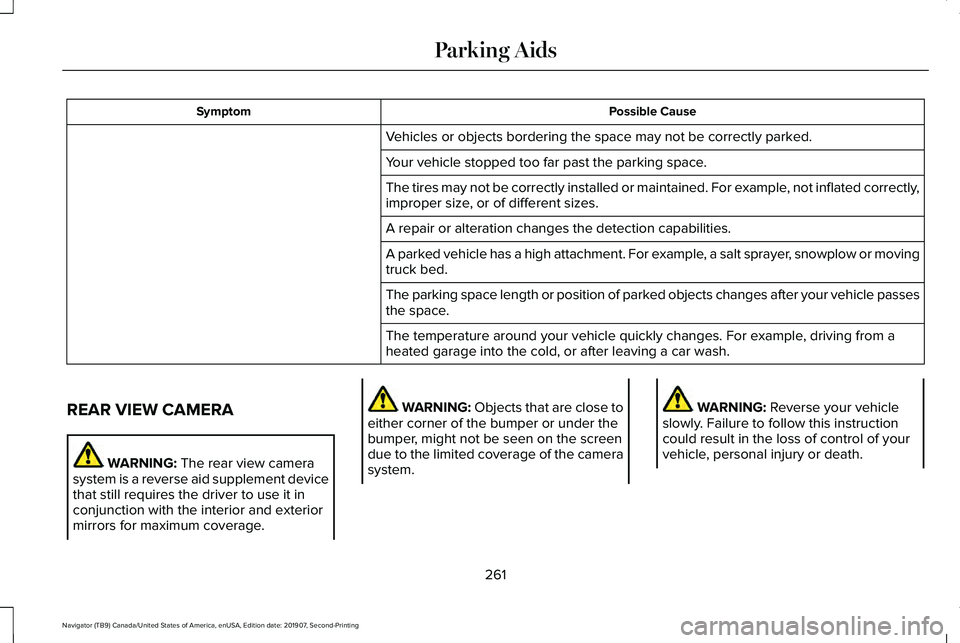
Possible Cause
Symptom
Vehicles or objects bordering the space may not be correctly parked.
Your vehicle stopped too far past the parking space.
The tires may not be correctly installed or maintained. For example, not inflated correctly,
improper size, or of different sizes.
A repair or alteration changes the detection capabilities.
A parked vehicle has a high attachment. For example, a salt sprayer, snowplow or moving
truck bed.
The parking space length or position of parked objects changes after your vehicle passes
the space.
The temperature around your vehicle quickly changes. For example, driving from a
heated garage into the cold, or after leaving a car wash.
REAR VIEW CAMERA WARNING: The rear view camera
system is a reverse aid supplement device
that still requires the driver to use it in
conjunction with the interior and exterior
mirrors for maximum coverage. WARNING:
Objects that are close to
either corner of the bumper or under the
bumper, might not be seen on the screen
due to the limited coverage of the camera
system. WARNING: Reverse your vehicle
slowly. Failure to follow this instruction
could result in the loss of control of your
vehicle, personal injury or death.
261
Navigator (TB9) Canada/United States of America, enUSA, Edition date: 201907, Second-Printing Parking Aids
Page 272 of 622
CANCELING THE SET SPEED
Press the button, or tap the brake
pedal to cancel the set speed.
Note: The system remembers the set speed.
Note: The system cancels if the vehicle
speed drops below 10 mph (16 km/h) under
the set speed when driving uphill.
RESUMING THE SET SPEED Press the button.
CRUISE CONTROL INDICATORS Illuminates when you switch the
system on. USING ADAPTIVE CRUISE
CONTROL
(IF EQUIPPED) WARNING:
Always pay close
attention to changing road conditions when
using adaptive cruise control. The system
does not replace attentive driving. Failing
to pay attention to the road may result in
a crash, serious injury or death. WARNING:
Do not use the adaptive
cruise control when entering or leaving a
highway, on roads with intersections or
roundabouts or non-vehicular traffic or
roads that are winding, slippery, unpaved,
or steep slopes. WARNING:
Do not use the system in
poor visibility, for example fog, heavy rain,
spray or snow. WARNING:
Do not use the system
when towing a trailer that has aftermarket
electronic trailer brake controls. Failure to
follow this instruction could result in the
loss of control of your vehicle, personal
injury or death. WARNING:
Do not use tire sizes
other than those recommended because
this can affect the normal operation of the
system. Failure to do so may result in a loss
of vehicle control, which could result in
serious injury. WARNING:
Adaptive cruise control
may not detect stationary or slow moving
vehicles below
6 mph (10 km/h). WARNING:
Adaptive cruise control
does not detect pedestrians or objects in
the road. WARNING:
Adaptive cruise control
does not detect oncoming vehicles in the
same lane.
269
Navigator (TB9) Canada/United States of America, enUSA, Edition date: 201907, Second-Printing Cruise Control E71340
Page 337 of 622
Your vehicle may be equipped with a
temporary or conventional spare tire. A
temporary spare tire is different in size
(diameter or width), tread-type (All-Season
or All-Terrain) or is from a different
manufacturer than the road tires on your
vehicle. Consult information on the tire label
or Safety Compliance label for limitations
when using.
Launching or Retrieving a Boat or
Personal Watercraft (PWC)
Note:
Disconnect the wiring to the trailer
before backing the trailer into the water.
Note: Reconnect the wiring to the trailer
after
removing the trailer from the water.
When backing down a ramp during boat
launching or retrieval:
• Do not allow the static water level to rise
above the bottom edge of the rear
bumper.
• Do not allow waves to break higher than
6 in (15 cm)
above the bottom edge of
the rear bumper. Exceeding these limits may allow water to
enter vehicle components:
•
Causing internal damage to the
components.
• Affecting driveability, emissions, and
reliability.
Replace the rear axle lubricant anytime the
rear axle has been submerged in water.
Water may have contaminated the rear axle
lubricant, which is not normally checked or
changed unless a leak is suspected or other
axle repair is required.
TOWING THE VEHICLE ON FOUR
WHEELS WARNING:
If your vehicle has a
steering wheel lock make sure the ignition
is in the accessory or on position when
being towed. Recreational Towing
Note:
Put your climate control system in
recirculated air mode to prevent exhaust
fumes from entering your vehicle.
See
Climate Control (page 165).
Follow these guidelines if you have a need
for recreational towing, such as towing your
vehicle behind a motorhome. These
guidelines are designed to prevent damage
to your transmission.
Two-wheel Drive Vehicles
You cannot tow a two-wheel drive vehicle
with any wheels on the ground as vehicle or
transmission damage may occur. You must
tow your vehicle with all four wheels off the
ground, for example when using a
car-hauling trailer.
Four-wheel Drive Vehicles Without
SLOW
CLIMB Mode
You cannot tow your vehicle with any wheels
on the ground or vehicle damage may occur.
You must tow your vehicle with all four
wheels off the ground, for example when
using a car-hauling trailer.
334
Navigator (TB9) Canada/United States of America, enUSA, Edition date: 201907, Second-Printing Towing
Page 340 of 622
REDUCED ENGINE PERFORMANCE
WARNING: If you continue to drive
your vehicle when the engine is
overheating, the engine could stop without
warning. Failure to follow this instruction
could result in the loss of control of your
vehicle.
If the engine coolant temperature gauge
needle moves to the upper limit position, the
engine is overheating.
See Gauges (page
126).
You must only drive your vehicle for a short
distance if the engine overheats. The
distance you can travel depends on ambient
temperature, vehicle load and terrain. The
engine continues to operate with limited
power for a short period of time.
If the engine temperature continues to rise,
the fuel supply to the engine reduces. The
air conditioning switches off and the engine
cooling fan operates continually. 1. Gradually reduce your speed and stop
your vehicle as soon as it is safe to do
so.
2. Immediately switch the engine off to prevent severe engine damage.
3. Wait for the engine to cool down.
4. Check the coolant level.
See Engine
Coolant Check (page 380).
5. Have your vehicle checked as soon as possible.
ECONOMICAL DRIVING
Fuel economy is affected by several things
such as how you drive, the conditions you
drive under and how you maintain your
vehicle.
There are some things to keep in mind that
may improve your fuel economy:
• Accelerate and slow down in a smooth,
moderate fashion.
• Drive at steady speeds.
• Anticipate stops; slowing down may
eliminate the need to stop. •
Combine errands and minimize
stop-and-go driving (When running
errands, go to the furthest destination
first and then work your way back home).
• Close the windows for high-speed
driving.
• Drive at reasonable speeds.
• Keep the tires properly inflated and use
only the recommended size.
• Use the recommended engine oil.
• Perform all regularly scheduled
maintenance.
There are also some things you may want to
avoid doing because they reduce your fuel
economy:
• Avoid sudden or hard accelerations.
• Avoid revving the engine before turning
off the car.
• Avoid long idle periods.
• Do not warm up your vehicle on cold
mornings.
• Reduce the use of air conditioning and
heat.
• Avoid using speed control in hilly terrain.
337
Navigator (TB9) Canada/United States of America, enUSA, Edition date: 201907, Second-Printing Driving Hints
Page 407 of 622
GENERAL INFORMATION
Use only approved wheel and tire sizes,
using other sizes could damage your vehicle.
If you change the diameter of the tires from
that fitted at the factory, the speedometer
may not display the correct speed. If you
intend to change the size of the wheels from
that fitted by the manufacturer, you can
check the suitability with an authorized
dealer.
Additional information related to the
functionality and maintenance of your tires
can be found later in this chapter. See Tire
Care (page 406).
You can find the recommended tire inflation
pressures can on the Tire Label, which is on
the B-pillar or the edge of the driver door.
You can also find this information on the
Safety Compliance Certification Label, affixed
to either the door hinge pillar, door-latch
post, or the door edge that meets the door
latch post; next to the driver seating position. We strongly recommend maintaining these
tire pressures at all times. Failure to follow
the tire pressure recommendations can
cause uneven treadwear patterns, reduced
fuel economy, and adversely affect the way
your vehicle handles.
Note:
Check and set the tire pressure at the
ambient temperature in which you are
intending to drive your vehicle and when the
tires are cold.
Note: Check your tire pressures at least once
per month.
If your vehicle has a spare tire, set the
pressure to the highest value given for your
vehicle and tire size combination.
Notice to utility vehicle and truck
owners WARNING:
Utility vehicles have a
significantly higher rollover rate than other
types of vehicles. WARNING:
Vehicles with a higher
center of gravity (utility and four-wheel
drive vehicles) handle differently than
vehicles with a lower center of gravity
(passenger cars). Avoid sharp turns,
excessive speed and abrupt steering in
these vehicles. Failure to drive cautiously
increases the risk of losing control of your
vehicle, vehicle rollover, personal injury
and death. WARNING:
In a rollover crash, an
unbelted person is significantly more likely
to die than a person wearing a seatbelt. WARNING:
Do not become
overconfident in the ability of four-wheel
drive vehicles. Although a four-wheel drive
vehicle may accelerate better than a
two-wheel drive vehicle in low traction
situations, it won't stop any faster than
two-wheel drive vehicles. Always drive at
a safe speed.
404
Navigator (TB9) Canada/United States of America, enUSA, Edition date: 201907, Second-Printing Wheels and Tires