trailer LINCOLN NAVIGATOR 2020 Owners Manual
[x] Cancel search | Manufacturer: LINCOLN, Model Year: 2020, Model line: NAVIGATOR, Model: LINCOLN NAVIGATOR 2020Pages: 622, PDF Size: 6.47 MB
Page 8 of 622
Towing
Towing a Trailer
..............................................311
Trailer Reversing Aids .................................
312
Trailer Sway Control ...................................
323
Recommended Towing Weights .............
323
Essential Towing Checks ..........................
326
Towing the Vehicle on Four Wheels .......
334
Driving Hints
Reduced Engine Performance .................
337
Economical Driving .....................................
337
Breaking-In ....................................................
338
Driving Through Water ...............................
338
Floor Mats .....................................................
338
Roadside Emergencies
Roadside Assistance ..................................
340
Hazard Flashers ............................................
341
Fuel Shutoff ....................................................
341
Jump Starting the Vehicle .........................
342
Post-Crash Alert System ............................
344
Transporting the Vehicle ...........................
345
Towing Points - 4WD ..................................
345Customer Assistance
Getting the Services You Need
...............
347
In California (U.S. Only) ..............................
348
The Better Business Bureau (BBB) Auto Line Program (U.S. Only) .......................
349
Utilizing the Mediation/Arbitration Program (Canada Only) ..........................................
350
Getting Assistance Outside the U.S. and Canada .......................................................
351
Ordering Additional Owner's Literature ......................................................................
353
Reporting Safety Defects (U.S. Only) ......
354
Reporting Safety Defects (Canada Only) ......................................................................
354
Fuses
Fuse Specification Chart ...........................
356
Changing a Fuse .........................................
370
Maintenance
General Information ....................................
373
Opening and Closing the Hood ...............
373
Under Hood Overview ...............................
375
Engine Oil Dipstick ......................................
377Engine Oil Check
.........................................
377
Oil Change Indicator Reset .......................
378
Changing the Engine Air Filter .................
379
Engine Coolant Check ...............................
380
Automatic Transmission Fluid Check ......
384
Transfer Case Fluid Check .......................
385
Brake Fluid Check ......................................
385
Changing the 12V Battery .........................
387
Adjusting the Headlamps .........................
389
Washer Fluid Check ...................................
390
Fuel Filter .......................................................
391
Checking the Wiper Blades .......................
391
Changing the Wiper Blades ......................
391
Changing a Bulb ..........................................
392
Vehicle Care
General Information ....................................
393
Cleaning Products .......................................
393
Cleaning the Exterior .................................
394
Waxing ...........................................................
395
Cleaning the Engine ...................................
396
Cleaning the Windows and Wiper Blades ......................................................................
396
5
Navigator (TB9) Canada/United States of America, enUSA, Edition date: 201907, Second-Printing Table of Contents
Page 25 of 622
Direction indicators. See Direction Indicators (page 113).
A
Instrument cluster.
See Instrument Cluster (page 126).
B
Wiper lever.
See Wipers and Washers (page 105).
C
Start button.
See Keyless Starting (page 203).
D
Trailer backup assist.
See Trailer Reversing Aids (page 312).
E
Information and entertainment display.
See General Information (page 472).
F
Hazard flasher switch.
See Hazard Flashers (page 341).
G
Automatic transmission.
See Automatic Transmission (page 222).
H
Climate control.
See Climate Control (page 165).
I
Rear defrost.
See Heated Rear Window (page 170).
J
Audio.
See Audio System (page 460).
K
Voice control.
See Voice Control (page 101).
L
Information display controls.
See Information Displays (page 133).
M
Information display control.
See Information Display Control (page 102).
N
Horn.
See Horn (page 103).
O
Steering wheel adjustment.
See Adjusting the Steering Wheel (page 100).
P
Cruise control.
See Cruise Control (page 268).
Q
Pedal adjustment.
See Adjusting the Pedals (page 104).
R
Audio control.
See Audio Control (page 101).
S
22
Navigator (TB9) Canada/United States of America, enUSA, Edition date: 201907, Second-Printing At a Glance
Page 96 of 622
2. Move your foot, in a single-kick motion,
without pausing, under and away from
the rear bumper detection area.
3. The liftgate power opens or closes.
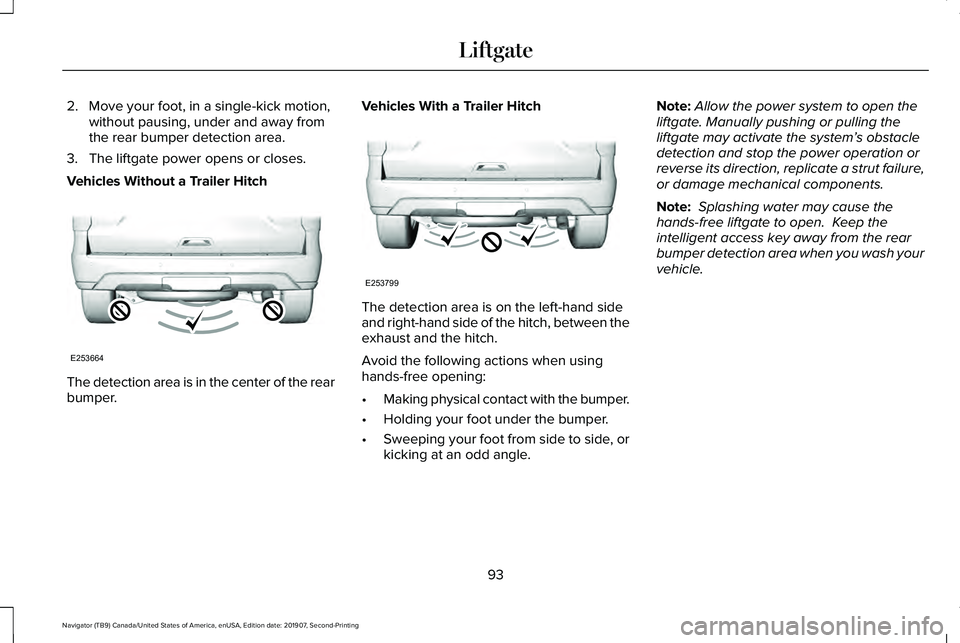
Vehicles Without a Trailer Hitch The detection area is in the center of the rear
bumper. Vehicles With a Trailer Hitch The detection area is on the left-hand side
and right-hand side of the hitch, between the
exhaust and the hitch.
Avoid the following actions when using
hands-free opening:
•
Making physical contact with the bumper.
• Holding your foot under the bumper.
• Sweeping your foot from side to side, or
kicking at an odd angle. Note:
Allow the power system to open the
liftgate. Manually pushing or pulling the
liftgate may activate the system’ s obstacle
detection and stop the power operation or
reverse its direction, replicate a strut failure,
or damage mechanical components.
Note: Splashing water may cause the
hands-free liftgate to open. Keep the
intelligent access key away from the rear
bumper detection area when you wash your
vehicle.
93
Navigator (TB9) Canada/United States of America, enUSA, Edition date: 201907, Second-Printing LiftgateE253664 E253799
Page 136 of 622
GENERAL INFORMATION
WARNING: Driving while distracted
can result in loss of vehicle control, crash
and injury. We strongly recommend that
you use extreme caution when using any
device that may take your focus off the
road. Your primary responsibility is the safe
operation of your vehicle. We recommend
against the use of any hand-held device
while driving and encourage the use of
voice-operated systems when possible.
Make sure you are aware of all applicable
local laws that may affect the use of
electronic devices while driving.
You can control various systems on your
vehicle using the quick action menu (QAM)
buttons on the right-hand side of the steering
wheel. The information display provides the
corresponding information.
Note: Some options may appear slightly
different or not at all if the items are optional.
Note: Trailer options are not available if your
vehicle speed is greater than 3 mph (5 km/h). Note:
Some MyKey menu options only
appear if MyKey is enabled and at least one
MyKey is programmed. This icon gives you the ability to
switch a feature on or off. A check
in the box indicates the feature is
on, and unchecked indicates the feature is
off.
133
Navigator (TB9) Canada/United States of America, enUSA, Edition date: 201907, Second-Printing Information DisplaysE204495
Page 138 of 622
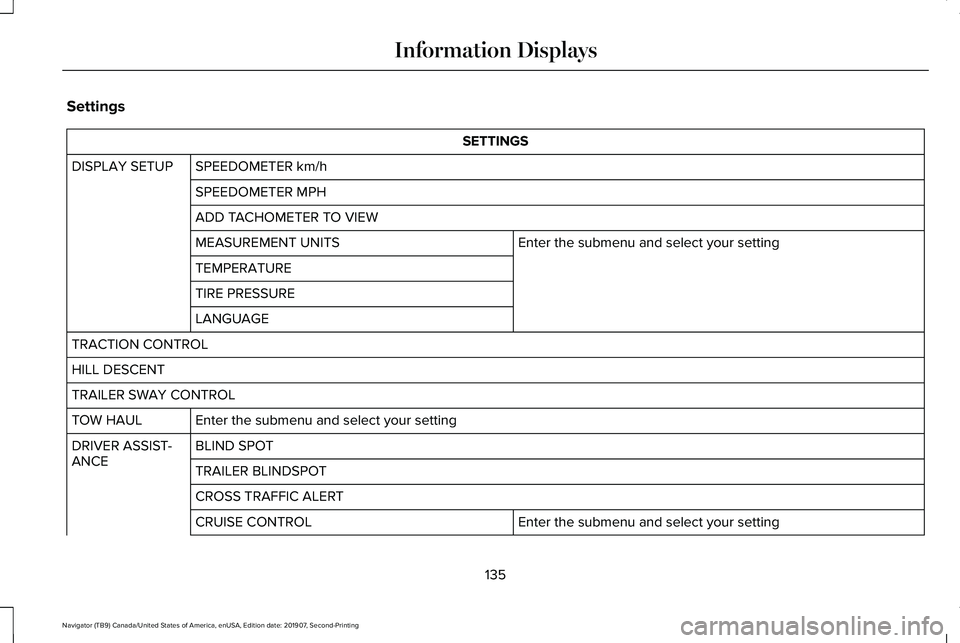
Settings
SETTINGS
SPEEDOMETER km/h
DISPLAY SETUP
SPEEDOMETER MPH
ADD TACHOMETER TO VIEW Enter the submenu and select your setting
MEASUREMENT UNITS
TEMPERATURE
TIRE PRESSURE
LANGUAGE
TRACTION CONTROL
HILL DESCENT
TRAILER SWAY CONTROL Enter the submenu and select your setting
TOW HAUL
BLIND SPOT
DRIVER ASSIST-
ANCE
TRAILER BLINDSPOT
CROSS TRAFFIC ALERT
Enter the submenu and select your setting
CRUISE CONTROL
135
Navigator (TB9) Canada/United States of America, enUSA, Edition date: 201907, Second-Printing Information Displays
Page 139 of 622
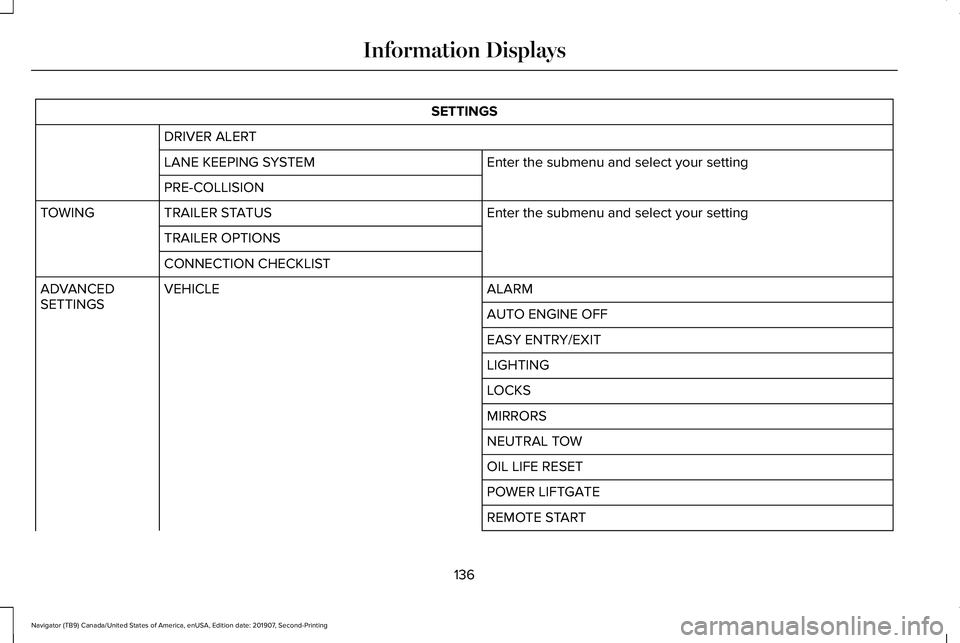
SETTINGS
DRIVER ALERT Enter the submenu and select your setting
LANE KEEPING SYSTEM
PRE-COLLISION
Enter the submenu and select your setting
TRAILER STATUS
TOWING
TRAILER OPTIONS
CONNECTION CHECKLIST ALARM
VEHICLE
ADVANCED
SETTINGS
AUTO ENGINE OFF
EASY ENTRY/EXIT
LIGHTING
LOCKS
MIRRORS
NEUTRAL TOW
OIL LIFE RESET
POWER LIFTGATE
REMOTE START
136
Navigator (TB9) Canada/United States of America, enUSA, Edition date: 201907, Second-Printing Information Displays
Page 140 of 622
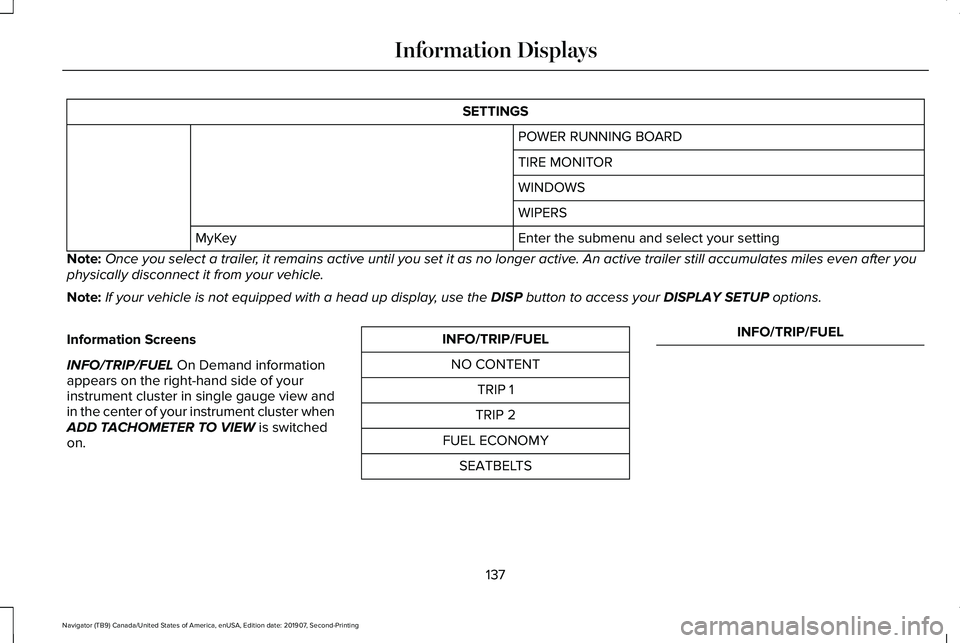
SETTINGS
POWER RUNNING BOARD
TIRE MONITOR
WINDOWS
WIPERS
Enter the submenu and select your setting
MyKey
Note: Once you select a trailer, it remains active until you set it as no longer active. An active trailer still accumulates miles even after you
physically disconnect it from your vehicle.
Note: If your vehicle is not equipped with a head up display, use the DISP button to access your DISPLAY SETUP options.
Information Screens
INFO/TRIP/FUEL
On Demand information
appears on the right-hand side of your
instrument cluster in single gauge view and
in the center of your instrument cluster when
ADD TACHOMETER TO VIEW
is switched
on. INFO/TRIP/FUEL
NO CONTENT TRIP 1
TRIP 2
FUEL ECONOMY SEATBELTS INFO/TRIP/FUEL
137
Navigator (TB9) Canada/United States of America, enUSA, Edition date: 201907, Second-Printing Information Displays
Page 141 of 622
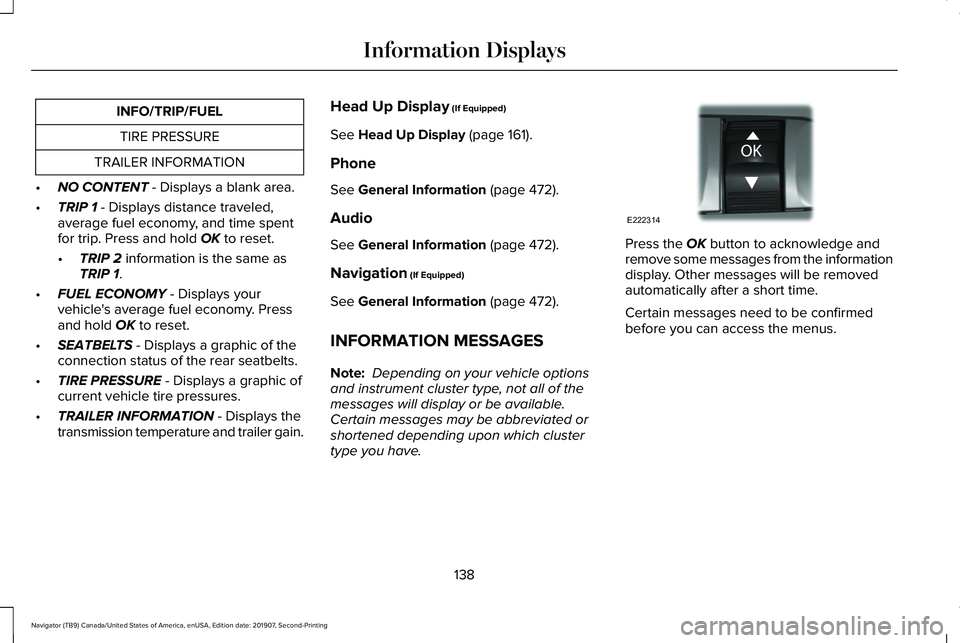
INFO/TRIP/FUEL
TIRE PRESSURE
TRAILER INFORMATION
• NO CONTENT - Displays a blank area.
• TRIP 1
- Displays distance traveled,
average fuel economy, and time spent
for trip. Press and hold
OK to reset.
• TRIP 2
information is the same as
TRIP 1.
• FUEL ECONOMY
- Displays your
vehicle's average fuel economy. Press
and hold
OK to reset.
• SEATBELTS
- Displays a graphic of the
connection status of the rear seatbelts.
• TIRE PRESSURE
- Displays a graphic of
current vehicle tire pressures.
• TRAILER INFORMATION
- Displays the
transmission temperature and trailer gain. Head Up Display
(If Equipped)
See
Head Up Display (page 161).
Phone
See
General Information (page 472).
Audio
See
General Information (page 472).
Navigation
(If Equipped)
See
General Information (page 472).
INFORMATION MESSAGES
Note: Depending on your vehicle options
and instrument cluster type, not all of the
messages will display or be available.
Certain messages may be abbreviated or
shortened depending upon which cluster
type you have. Press the
OK button to acknowledge and
remove some messages from the information
display. Other messages will be removed
automatically after a short time.
Certain messages need to be confirmed
before you can access the menus.
138
Navigator (TB9) Canada/United States of America, enUSA, Edition date: 201907, Second-Printing Information DisplaysE222314
Page 145 of 622

Blind Spot Information and Cross Traffic Alert System
Action
Message
A fault with the system has occurred. Contact an authorized dealer as so\
on as possible.
Blindspot System Fault
The system sensors are blocked. Contact an authorized dealer as soon as possible. See Blind
Spot Information System (page 284).
Blindspot Not Available Sensor Blocked
See Manual
The system detects a vehicle.
See Blind Spot Information System (page 284).
Vehicle Coming From X
The blind spot information system and cross traffic alert system sensors\
are blocked. See BlindSpot Information System
(page 284).
Cross Traffic Not Available Sensor Blocked
See Manual
A fault with the system has occurred. Contact an authorized dealer as so\
on as possible.
Cross Traffic System Fault
The system automatically turns off and displays this message when you co\
nnect a trailer to thevehicle that does not have a trailer blind spot system or when you switc\
h the trailer blind spot system off through the information display.
See Blind Spot Information System (page 284).
Cross Traffic Alert Deactivated Trailer
Attached
The system automatically turns off and displays this message when you co\
nnect a trailer to thevehicle that does not have a trailer blind spot system or when you switc\
h the trailer blind spot system off through the information display.
See Blind Spot Information System (page 284).
Blind Spot Alert Deactivated Trailer
Attached
Displays when the trailer connected is a fifth wheel or gooseneck, or wh\
en the trailer width iswider than
10 ft (2.7 m) or longer than 33 ft (10 m).
Trailer Blind Spot Not available Due to
Invalid Trailer
142
Navigator (TB9) Canada/United States of America, enUSA, Edition date: 201907, Second-Printing Information Displays
Page 157 of 622
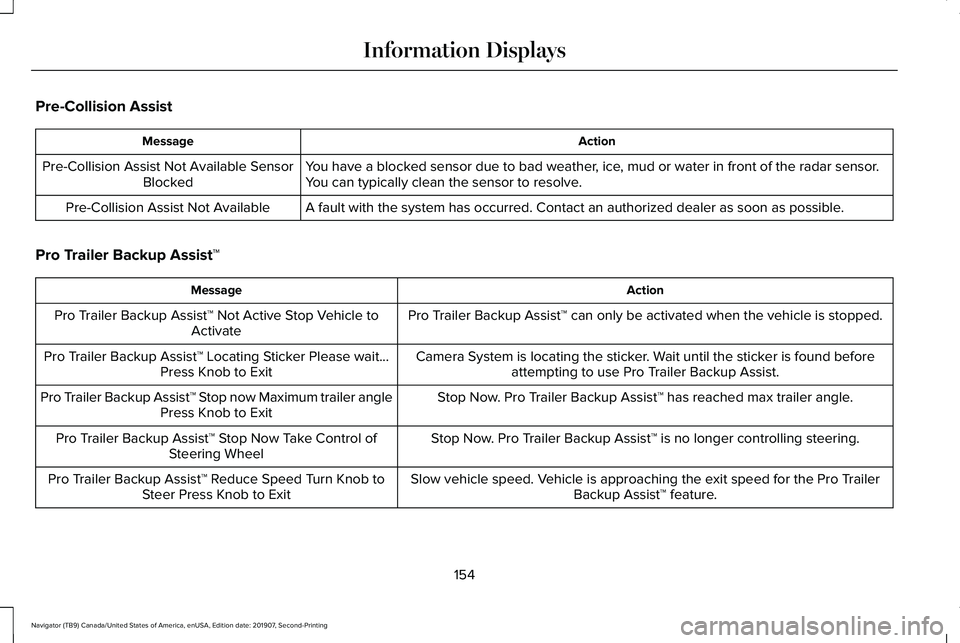
Pre-Collision Assist
Action
Message
You have a blocked sensor due to bad weather, ice, mud or water in front of the radar sensor.
You can typically clean the sensor to resolve.
Pre-Collision Assist Not Available Sensor
Blocked
A fault with the system has occurred. Contact an authorized dealer as so\
on as possible.
Pre-Collision Assist Not Available
Pro Trailer Backup Assist™ Action
Message
Pro Trailer Backup Assist™ can only be activated when the vehicle is stopped.
Pro Trailer Backup Assist™ Not Active Stop Vehicle to
Activate
Camera System is locating the sticker. Wait until the sticker is found beforeattempting to use Pro Trailer Backup Assist.
Pro Trailer Backup Assist™ Locating Sticker Please wait...
Press Knob to Exit
Stop Now. Pro Trailer Backup Assist™ has reached max trailer angle.
Pro Trailer Backup Assist™ Stop now Maximum trailer angle
Press Knob to Exit
Stop Now. Pro Trailer Backup Assist™ is no longer controlling steering.
Pro Trailer Backup Assist™ Stop Now Take Control of
Steering Wheel
Slow vehicle speed. Vehicle is approaching the exit speed for the Pro TrailerBackup Assist™ feature.
Pro Trailer Backup Assist™ Reduce Speed Turn Knob to
Steer Press Knob to Exit
154
Navigator (TB9) Canada/United States of America, enUSA, Edition date: 201907, Second-Printing Information Displays