lock LINCOLN NAVIGATOR 2021 Owners Manual
[x] Cancel search | Manufacturer: LINCOLN, Model Year: 2021, Model line: NAVIGATOR, Model: LINCOLN NAVIGATOR 2021Pages: 639, PDF Size: 6.09 MB
Page 339 of 639
Points to Remember
Note:
Do not attempt removal of the trailer
brake controller without consulting the
Workshop Manual. Damage to the unit may
result.
• Adjust gain setting before using the
trailer brake controller for the first time.
• Adjust gain setting, using the procedure
above, whenever road, weather and
trailer or vehicle loading conditions
change from when the gain was initially
set.
• Only use the manual control lever for
proper adjustment of the gain during
trailer setup. Misuse, such as application
during trailer sway, could cause instability
of trailer or tow vehicle.
• Avoid towing in adverse weather
conditions. The trailer brake controller
does not provide anti-lock control of the
trailer wheels. Trailer wheels can lock up
on slippery surfaces, resulting in reduced
stability of trailer and tow vehicle. •
The trailer brake controller is equipped
with a feature that reduces output at
vehicle speeds below 11 mph (18 km/h)
so trailer and vehicle braking is not jerky
or harsh. This feature is only available
when applying the brakes using your
vehicle's brake pedal, not the controller.
• The controller interacts with the brake
control system and powertrain control
system of your vehicle to provide the
best performance on different road
conditions.
• Your vehicle's brake system and the
trailer brake system work independently
of each other. Changing the gain setting
on the controller does not affect the
operation of your vehicle's brakes
whether you attach a trailer or not. •
When you switch the engine off, the
controller output is disabled and the
display and module shut down. The
controller module and display turn on
when you switch the ignition on.
• The trailer brake controller is only a
factory-installed or dealer-installed item.
Lincoln is not responsible for warranty or
performance of the controller due to
misuse or customer installation.
Trailer Lamps WARNING: Never connect any trailer
lamp wiring to the vehicle's tail lamp wiring;
this may damage the electrical system
resulting in fire. Contact your authorized
dealer as soon as possible for assistance
in proper trailer tow wiring installation.
Additional electrical equipment may be
required.
Trailer lamps are required on most towed
vehicles. Make sure all running lights, brake
lights, turn signals and hazard lights are
working.
336
Navigator (TB9) Canada/United States of America, enUSA, First-Printing Towing
Page 341 of 639
Your vehicle may be equipped with a
temporary or conventional spare tire. A
temporary spare tire is different in size
(diameter or width), tread-type (All-Season
or All-Terrain) or is from a different
manufacturer than the road tires on your
vehicle. Consult information on the tire label
or Safety Compliance label for limitations
when using.
Launching or Retrieving a Boat or
Personal Watercraft (PWC)
Note:
Disconnect the wiring to the trailer
before backing the trailer into the water.
Note: Reconnect the wiring to the trailer
after
removing the trailer from the water.
When backing down a ramp during boat
launching or retrieval:
• Do not allow the static water level to rise
above the bottom edge of the rear
bumper.
• Do not allow waves to break higher than
6 in (15 cm)
above the bottom edge of
the rear bumper. Exceeding these limits may allow water to
enter vehicle components:
•
Causing internal damage to the
components.
• Affecting driveability, emissions, and
reliability.
Replace the rear axle lubricant anytime the
rear axle has been submerged in water.
Water may have contaminated the rear axle
lubricant, which is not normally checked or
changed unless a leak is suspected or other
axle repair is required.
TOWING THE VEHICLE ON FOUR
WHEELS WARNING:
If your vehicle has a
steering wheel lock make sure the ignition
is in the accessory or on position when
being towed. Recreational Towing
Note:
Put your climate control system in
recirculated air mode to prevent exhaust
fumes from entering your vehicle.
See
Climate Control (page 166).
Follow these guidelines if you have a need
for recreational towing, such as towing your
vehicle behind a motorhome. These
guidelines are designed to prevent damage
to your transmission.
Two-wheel Drive Vehicles
You cannot tow a two-wheel drive vehicle
with any wheels on the ground as vehicle or
transmission damage may occur. You must
tow your vehicle with all four wheels off the
ground, for example when using a
car-hauling trailer.
Four-wheel Drive Vehicles Without
SLOW
CLIMB Mode
You cannot tow your vehicle with any wheels
on the ground or vehicle damage may occur.
You must tow your vehicle with all four
wheels off the ground, for example when
using a car-hauling trailer.
338
Navigator (TB9) Canada/United States of America, enUSA, First-Printing Towing
Page 342 of 639
Four-wheel Drive Vehicles With SLOW
CLIMB Mode
You can only tow your vehicle with all wheels
on the ground by placing the transfer case
in its neutral position and engaging the four
wheel down towing feature. Perform the
steps outlined in the following section after
positioning your vehicle behind the tow
vehicle and properly securing them together.
Four-wheel-down Towing
Note: If completed successfully, the
information display shows
Neutral Tow
Enabled Leave Transmission in Neutral.
This indicates that your vehicle is safe to tow
with all wheels on the ground.
Note: If you do not see the message in the
information display, you must perform the
procedure again from the beginning.
Note: Make sure you properly secure your
vehicle to the tow vehicle.
1. Start your vehicle.
2. Confirm that your vehicle is in
NORMAL
mode. See Drive Mode Control (page
303). 3. Place your vehicle in stay in neutral
mode.
See Automatic Transmission
(page 227).
4. Switch your vehicle off by pressing the engine
START/STOP button once. A
Transmission Not in Park message
appears in the information display.
5. Place your vehicle in accessory mode by
pressing the start button once without
pressing the brake pedal.
6. Press and hold the brake pedal.
7. Enable neutral tow through the information display by selecting Settings
from the menu. See General Information
(page
134).
8. Then select
Advanced Settings.
9. Then select
Vehicle.
10. Then select
Neutral Tow.
11. Press and hold the
OK button until the
information display states Neutral Tow
Enabled Leave Transmission in
Neutral
. Note:
If completed successfully, the
information display shows
Neutral Tow
Enabled Leave Transmission in Neutral.
This indicates that your vehicle is safe to tow
with all wheels on the ground.
Note: If you do not see the message in the
information display, you must perform the
procedure again from the beginning.
Note: You may hear an audible noise as the
transfer case shifts into neutral, this is
normal.
12. Leave the transmission in neutral (N) and switch the ignition off by pressing
the engine
START/STOP button once
without pressing the brake pedal. You
do not need to leave your keys in the
vehicle. You can lock and unlock your
vehicle as you normally do. WARNING:
Do not disconnect the
battery during recreational towing. It
prevents the transfer case from shifting
properly and may cause the vehicle to roll,
even if the transmission is in park (P).
339
Navigator (TB9) Canada/United States of America, enUSA, First-Printing Towing
Page 343 of 639
WARNING: Shifting the transfer case
to its neutral position for recreational
towing may cause the vehicle to roll, even
if the transmission is in park (P). It may
injure the driver and others. Make sure you
press the foot brake and the vehicle is in
a secure, safe position when you shift to
neutral (N).
Note: Failing to put the transfer case in its
neutral position can damage vehicle
components.
Note: You can check four-wheel-down
towing status at any time by opening the
driver's door or turning the ignition to the
accessory or on position. A message
appears in the information display confirming
your vehicle is in neutral tow.
To exit four-wheel-down towing and return
the transfer case to its
2H position:
1. With your vehicle still properly secured to the tow vehicle, press the brake pedal
and start the engine.
2. Switch your vehicle off by pressing the engine
START/STOP button once. 3.
Place your vehicle in accessory mode by
pressing the start button once without
pressing the brake pedal.
4. Press the brake pedal.
5. Place the transmission back into park (P).
6. Release the brake pedal.
Note: If completed successfully, the
information display shows
2H and Neutral
Tow Disabled.
Note: If the indicator light and message do
not display, you must perform the procedure
again from the beginning.
Note: You may hear an audible noise as the
transfer case shifts out of its neutral position,
this is normal.
Note: If Shift Delayed Pull Forward displays
in the instrument cluster, transfer case gear
tooth blockage is present. See the
instructions following this section.
7. Apply the parking brake, then disconnect
your vehicle from the tow vehicle. 8. Release the parking brake, start the
engine, and shift the transmission into
drive (D) to make sure the transfer case
is out of the neutral tow position.
9. If the transfer case does not successfully
shift out of neutral (N), set the parking
brake until you can have your vehicle
serviced.
Resolving the Shift Delayed Pull Forward
or To Exit 4x4 LOW Shift to N Message
If the instrument cluster displays these
messages, perform the following:
1. Press and hold the brake pedal.
2. Put the transmission into neutral (N), then
start the engine.
3. With the engine running, shift the transmission into drive (D) and let the
vehicle roll forward, up to
3 ft (1 m). You
may hear an audible noise as the transfer
case shifts out of its neutral position. This
is normal.
4. Make sure the instrument cluster displays
Neutral Tow Disabled
.
340
Navigator (TB9) Canada/United States of America, enUSA, First-Printing Towing
Page 346 of 639
WARNING: Secure the floor mat to
both retention devices so that it cannot slip
out of position and interfere with the
pedals. Failure to follow this instruction
could result in the loss of control of your
vehicle, personal injury or death. WARNING:
Do not place additional
floor mats or any other covering on top of
the original floor mats. This could result in
the floor mat interfering with the operation
of the pedals. Failure to follow this
instruction could result in the loss of
control of your vehicle, personal injury or
death. WARNING:
Always make sure that
objects cannot fall into the driver foot well
while your vehicle is moving. Objects that
are loose can become trapped under the
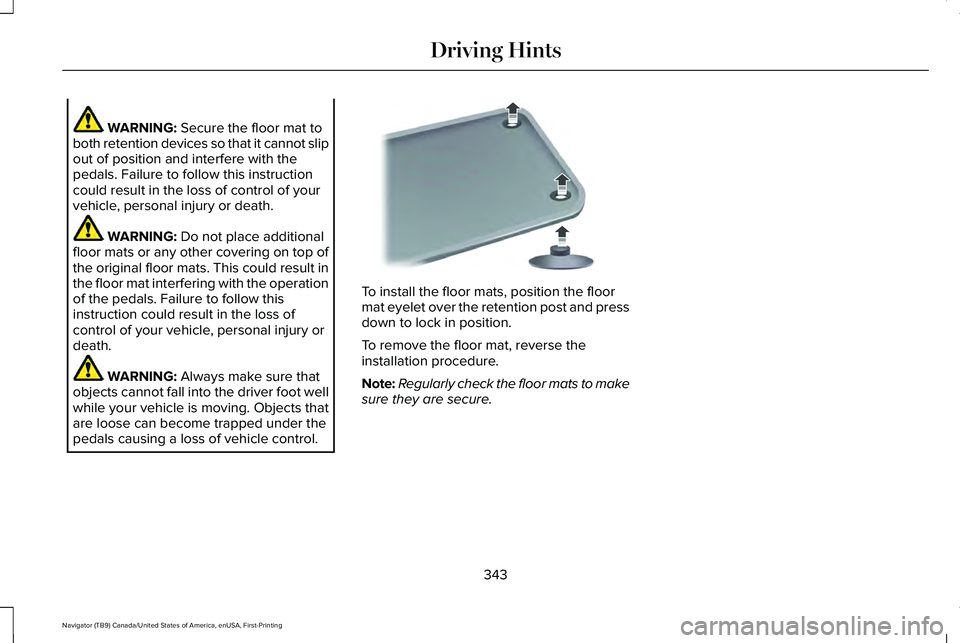
pedals causing a loss of vehicle control. To install the floor mats, position the floor
mat eyelet over the retention post and press
down to lock in position.
To remove the floor mat, reverse the
installation procedure.
Note:
Regularly check the floor mats to make
sure they are secure.
343
Navigator (TB9) Canada/United States of America, enUSA, First-Printing Driving HintsE142666
Page 347 of 639
ROADSIDE ASSISTANCE
Vehicles sold in the United States:
Getting Roadside Assistance
To fully assist you should you have a vehicle
concern, Lincoln Motor Company offers a
complimentary roadside assistance program.
This program is separate from the New
Vehicle Limited Warranty.
The service is available:
•
Throughout the life of the vehicle for
original owners.
• For six years or 70,000 mi (110,000 km)
(whichever comes first) for subsequent
owners.
Roadside Assistance covers:
• A flat tire change with a good spare
(except vehicles supplied with a tire
inflation kit).
• Battery jump start.
• Lock-out assistance (key replacement
cost is the client's responsibility). •
Fuel delivery — independent service
contractors, if not prohibited by state,
local or municipal law shall deliver up to
2 gal (8 L)
of gasoline fuel to a disabled
vehicle. Roadside Assistance limits fuel
delivery service to two no-charge
occurrences within a 12-month period.
• Winch out — available within 100 ft (30 m)
of a paved or county maintained road,
no recoveries. •
Towing — independent service
contractors, if not prohibited by state,
local or municipal law shall tow Lincoln
eligible vehicles to the client's selling or
preferred dealer within 100 mi (160 km)
of the disablement location or to the
nearest Lincoln dealer. If a client requests
a tow to a selling or preferred dealer that
is more than
100 mi (160 km) from the
disablement location, the client is
responsible for any mileage costs in
excess of
100 mi (160 km).
• Roadside Assistance includes up to $200
for a towed trailer if the disabled eligible
vehicle requires service at the nearest
authorized dealer. If the towing vehicle
is operational but the trailer is not, then
the trailer does not qualify for any
roadside services.
Vehicles Sold in the United States:
Using Roadside Assistance
United States clients who require roadside
assistance, call 1-800-521-4140 or contact
Roadside Assistance using the Lincoln Way
mobile app.
344
Navigator (TB9) Canada/United States of America, enUSA, First-Printing Roadside Emergencies
Page 366 of 639
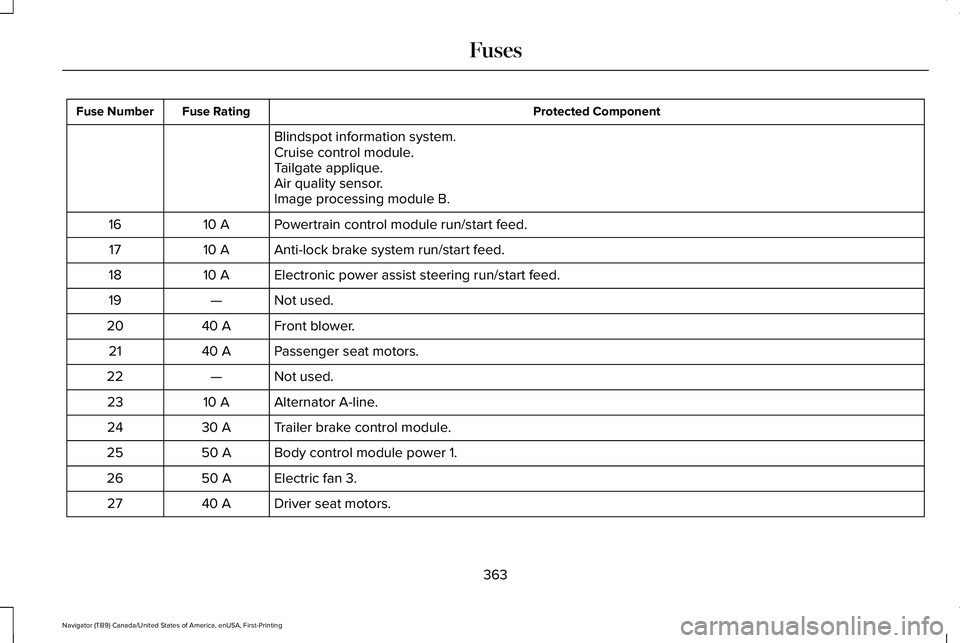
Protected Component
Fuse Rating
Fuse Number
Blindspot information system.
Cruise control module.
Tailgate applique.
Air quality sensor.
Image processing module B.
Powertrain control module run/start feed.
10 A
16
Anti-lock brake system run/start feed.
10 A
17
Electronic power assist steering run/start feed.
10 A
18
Not used.
—
19
Front blower.
40 A
20
Passenger seat motors.
40 A
21
Not used.
—
22
Alternator A-line.
10 A
23
Trailer brake control module.
30 A
24
Body control module power 1.
50 A
25
Electric fan 3.
50 A
26
Driver seat motors.
40 A
27
363
Navigator (TB9) Canada/United States of America, enUSA, First-Printing Fuses
Page 369 of 639
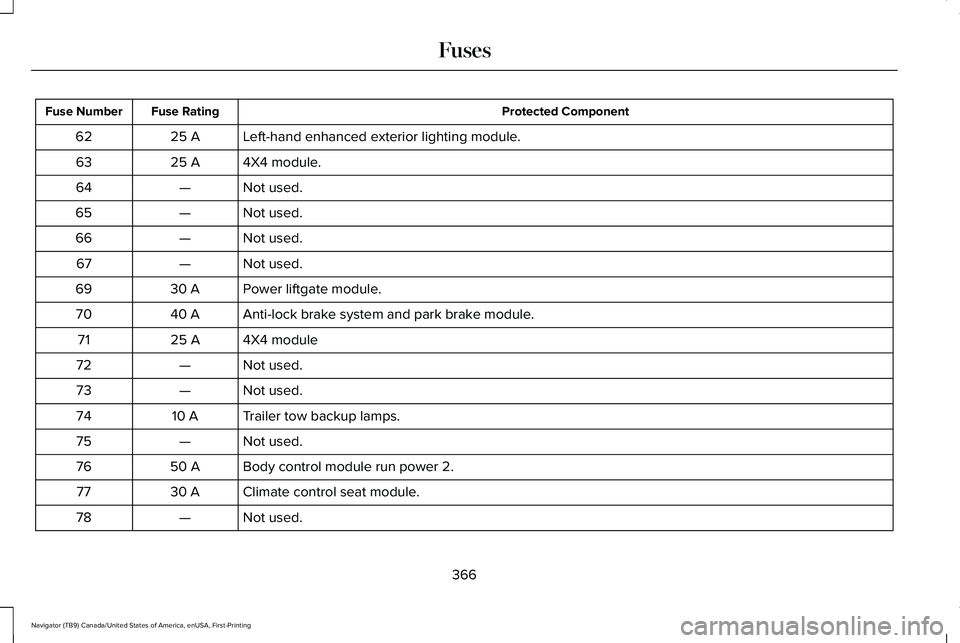
Protected Component
Fuse Rating
Fuse Number
Left-hand enhanced exterior lighting module.
25 A
62
4X4 module.
25 A
63
Not used.
—
64
Not used.
—
65
Not used.
—
66
Not used.
—
67
Power liftgate module.
30 A
69
Anti-lock brake system and park brake module.
40 A
70
4X4 module
25 A
71
Not used.
—
72
Not used.
—
73
Trailer tow backup lamps.
10 A
74
Not used.
—
75
Body control module run power 2.
50 A
76
Climate control seat module.
30 A
77
Not used.
—
78
366
Navigator (TB9) Canada/United States of America, enUSA, First-Printing Fuses
Page 373 of 639
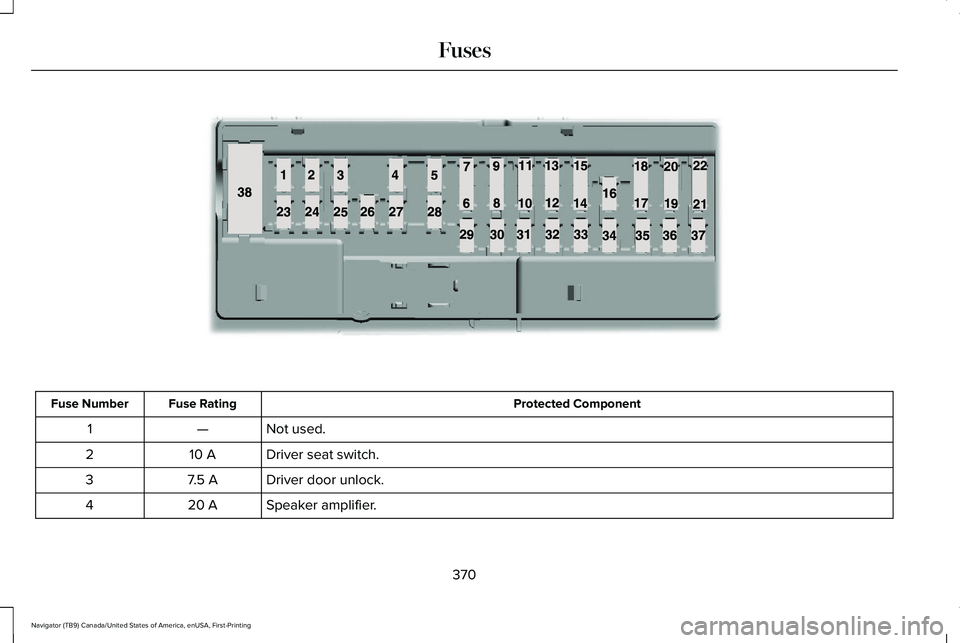
Protected Component
Fuse Rating
Fuse Number
Not used.
—
1
Driver seat switch.
10 A
2
Driver door unlock.
7.5 A
3
Speaker amplifier.
20 A
4
370
Navigator (TB9) Canada/United States of America, enUSA, First-Printing FusesE145984
Page 380 of 639
GENERAL INFORMATION
Have your vehicle serviced regularly to help
maintain its roadworthiness and resale value.
There is a large network of authorized
dealers that are there to help you with their
professional servicing expertise. We believe
that their specially trained technicians are
best qualified to service your vehicle properly
and expertly. They are supported by a wide
range of highly specialized tools developed
specifically for servicing your vehicle.
If your vehicle requires professional service,
an authorized dealer can provide the
necessary parts and service. Check your
warranty information to find out which parts
and services are covered.
Use only recommended fuels, lubricants,
fluids and service parts conforming to
specifications. Motorcraft® parts are
designed and built to provide the best
performance in your vehicle.
Precautions
•
Do not work on a hot engine.
• Make sure that nothing gets caught in
moving parts.
• Do not work on a vehicle with the engine
running in an enclosed space, unless you
are sure you have enough ventilation.
• Keep all open flames and other burning
material (such as cigarettes) away from
the battery and all fuel related parts.
Working with the Engine Off
1. Set the parking brake and shift the transmission to park (P).
2. Switch off the engine.
3. Block the wheels.
Working with the Engine On WARNING: To reduce the risk of
vehicle damage and personal burn injuries,
do not start your engine with the air
cleaner removed and do not remove it
while the engine is running. 1. Set the parking brake and shift the
transmission to park (P).
2. Block the wheels.
OPENING AND CLOSING THE
HOOD
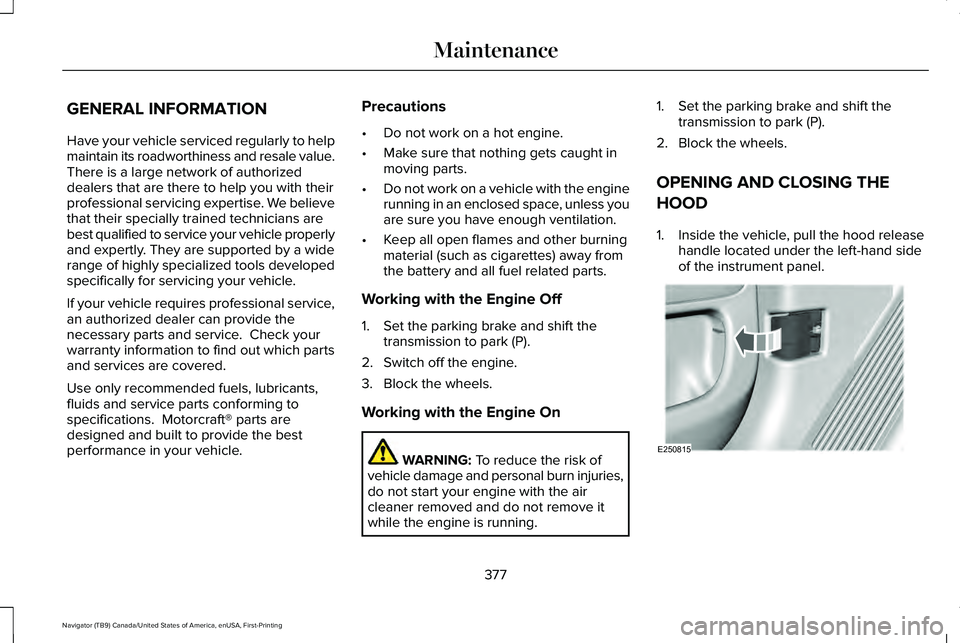
1. Inside the vehicle, pull the hood release handle located under the left-hand side
of the instrument panel. 377
Navigator (TB9) Canada/United States of America, enUSA, First-Printing MaintenanceE250815