coolant level LINCOLN NAVIGATOR 2021 User Guide
[x] Cancel search | Manufacturer: LINCOLN, Model Year: 2021, Model line: NAVIGATOR, Model: LINCOLN NAVIGATOR 2021Pages: 639, PDF Size: 6.09 MB
Page 390 of 639
Your vehicle has limited engine power when
in the fail-safe mode, drive your vehicle with
caution. Your vehicle does not maintain
high-speed operation and the engine may
operate poorly.
Remember that the engine is capable of
automatically shutting down to prevent
engine damage. In this situation:
1. Pull off the road as soon as safely
possible and switch the engine off.
2. If you are a member of a roadside assistance program, we recommend that
you contact your roadside assistance
service provider.
3. If this is not possible, wait a short period
for the engine to cool.
4. Check the coolant level. If the coolant level is at or below the minimum mark,
add prediluted coolant immediately.
5. When the engine temperature cools, you
can re-start the engine. Have your vehicle
checked as soon as possible to minimize
engine damage.
Note: Driving your vehicle without repair
increases the chance of engine damage. Engine Coolant Temperature
Management (If Equipped) WARNING:
To reduce the risk of
crash and injury, be prepared that the
vehicle speed may reduce and the vehicle
may not be able to accelerate with full
power until the coolant temperature
reduces.
If you tow a trailer with your vehicle, the
engine may temporarily reach a higher
temperature during severe operating
conditions, for example ascending a long or
steep grade in high ambient temperatures.
At this time, you may notice the coolant
temperature gauge moves toward the red
zone and a message may appear in the
information display. You may notice a reduction in vehicle speed
caused by reduced engine power in order
to manage the engine coolant temperature.
Your vehicle may enter this mode if certain
high-temperature and high-load conditions
take place. The amount of speed reduction
depends on vehicle loading, grade and
ambient temperature. If this occurs, there is
no need to stop your vehicle. You can
continue to drive.
The air conditioning may automatically turn
on and off during severe operating
conditions to protect the engine from
overheating. When the coolant temperature
decreases to the normal operating
temperature, the air conditioning turns on.
If the coolant temperature gauge moves fully
into the red zone, or if the coolant
temperature warning or service engine soon
messages appear in your information display,
do the following:
1.
Stop your vehicle as soon as it is safe to
do so. Fully apply the parking brake, shift
into park (P) or neutral (N).
387
Navigator (TB9) Canada/United States of America, enUSA, First-Printing Maintenance
Page 391 of 639
2. Leave the engine running until the
coolant temperature gauge needle
returns to the normal position. If the
temperature does not drop after several
minutes, follow the remaining steps.
3. Switch the engine off and wait for it to cool. Check the coolant level.
4. If the coolant level is at or below the minimum mark, add prediluted coolant
immediately.
5. If the coolant level is normal, restart the engine and continue.
AUTOMATIC TRANSMISSION
FLUID CHECK
If required, have an authorized dealer check
and change the transmission fluid at the
correct service interval. See Scheduled
Maintenance (page 539).
The automatic transmission does not have
a transmission fluid dipstick. Refer to your scheduled maintenance
information for scheduled intervals for fluid
checks and changes. Your transmission does
not consume fluid. However, if the
transmission slips, shifts slowly or if you
notice a sign of leaking fluid, contact an
authorized dealer.
Do not use supplemental transmission fluid
additives, treatments or cleaning agents. The
use of these materials may affect
transmission operation and result in damage
to internal transmission components.
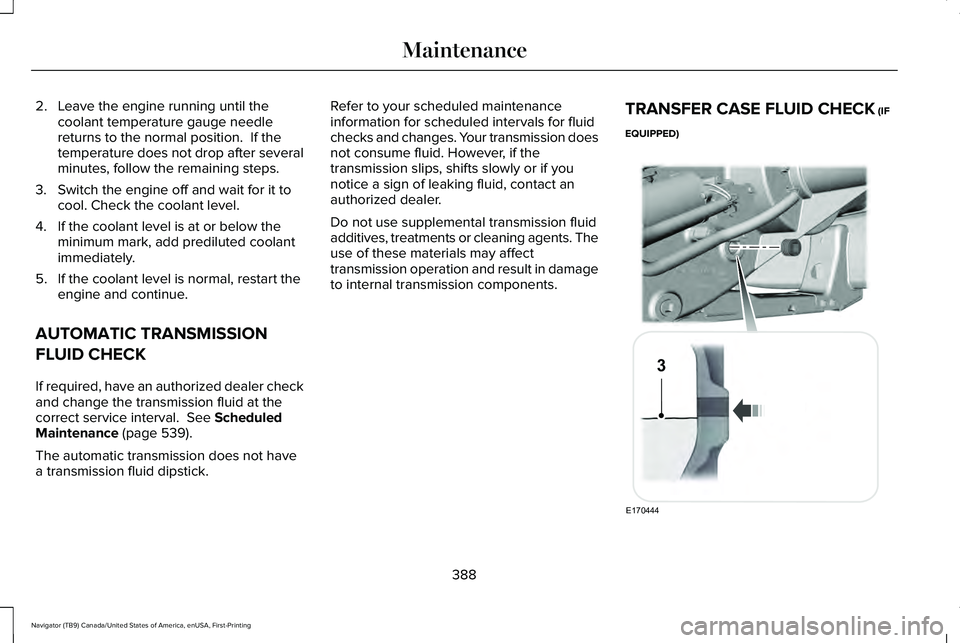
TRANSFER CASE FLUID CHECK
(IF
EQUIPPED) 388
Navigator (TB9) Canada/United States of America, enUSA, First-Printing MaintenanceE170444
3
Page 408 of 639
Fuel system
•
Fill the fuel tank with high-quality fuel
until the first automatic shutoff of the fuel
pump nozzle.
Cooling system
• Protect against freezing temperatures.
• When removing your vehicle from
storage, check coolant fluid level.
Confirm that there are no cooling system
leaks and that fluid is at the
recommended level.
Disconnecting Your 12 Volt Battery
• Check and recharge as necessary. Keep
connections clean.
• If storing your vehicle for more than 30
days without recharging the battery, we
recommend that you disconnect the
battery cables to maintain battery charge
for quick starting.
Note: It is necessary to reset memory
features if you disconnect the battery cables. Brakes
•
Make sure the brakes and parking brake
release fully.
Tires
• Maintain recommended air pressure.
Miscellaneous
• Make sure all linkages, cables, levers and
pins under your vehicle are covered with
grease to prevent rust.
• Move vehicles at least 25 ft (7.5 m) every
15 days to lubricate working parts and
prevent corrosion.
Removing Vehicle From Storage
When your vehicle is ready to come out of
storage, do the following:
• Wash your vehicle to remove any dirt or
grease film build-up on window surfaces.
• Check windshield wipers for any
deterioration. •
Check under the hood for any foreign
material that may have collected during
storage such as mice or squirrel nests.
• Check the exhaust for any foreign
material that may have collected during
storage.
• Check tire pressures and set tire inflation
per the Tire Label.
• Check brake pedal operation. Drive your
vehicle 15 ft (4.5 m) back and forth to
remove rust build-up.
• Check fluid levels (including coolant, oil
and gas) to make sure there are no leaks,
and fluids are at recommended levels.
• If you remove the battery, clean the
battery cable ends and check for
damage.
Contact an authorized dealer if you have any
concerns or issues.
405
Navigator (TB9) Canada/United States of America, enUSA, First-Printing Vehicle Care
Page 544 of 639
Check Every Month
Engine oil level.
Function of all interior and exterior lights.
Tires (including spare) for wear and proper pressure. Windshield washer fluid level.
Fuel and water separator. Drain if necessary (or if indicated by the information display). Holes and slots in the tail pipe to make sure they are functional and clear of debris. Check Every Six Months
Battery connections. Clean if necessary.
Body and door drain holes for obstructions. Clean if necessary. Cooling system fluid level and coolant strength.
Door weatherstrips for wear. Lubricate if necessary.
Hinges, latches and outside locks for proper operation. Lubricate if necessary. Parking brake for proper operation.
541
Navigator (TB9) Canada/United States of America, enUSA, First-Printing Scheduled Maintenance
Page 546 of 639
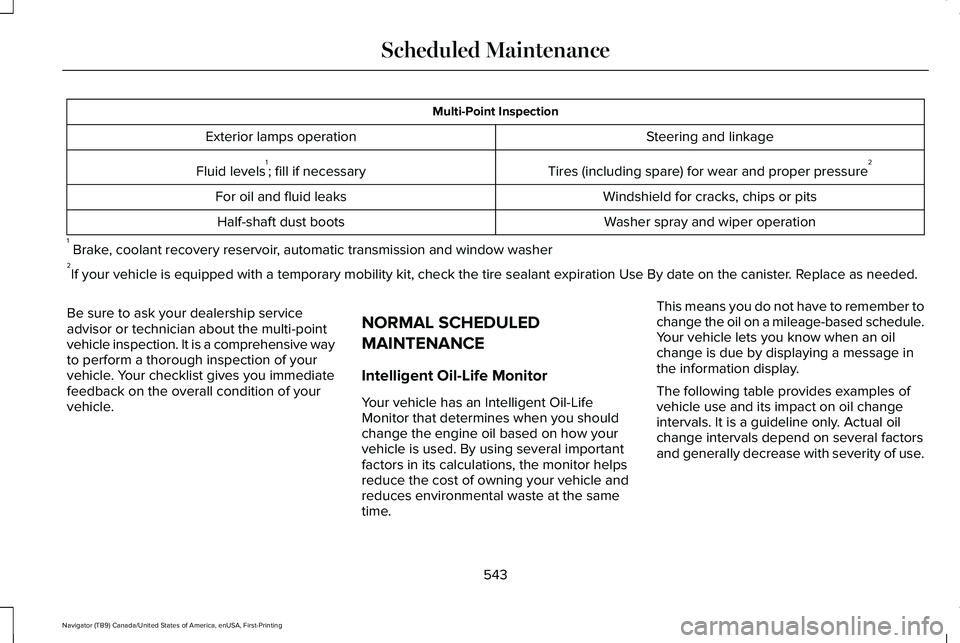
Multi-Point Inspection
Steering and linkage
Exterior lamps operation
Tires (including spare) for wear and proper pressure2
Fluid levels 1
; fill if necessary
Windshield for cracks, chips or pits
For oil and fluid leaks
Washer spray and wiper operation
Half-shaft dust boots
1 Brake, coolant recovery reservoir, automatic transmission and window washer
2 If your vehicle is equipped with a temporary mobility kit, check the tir\
e sealant expiration Use By date on the canister. Replace as needed.
Be sure to ask your dealership service
advisor or technician about the multi-point
vehicle inspection. It is a comprehensive way
to perform a thorough inspection of your
vehicle. Your checklist gives you immediate
feedback on the overall condition of your
vehicle. NORMAL SCHEDULED
MAINTENANCE
Intelligent Oil-Life Monitor
Your vehicle has an Intelligent Oil-Life
Monitor that determines when you should
change the engine oil based on how your
vehicle is used. By using several important
factors in its calculations, the monitor helps
reduce the cost of owning your vehicle and
reduces environmental waste at the same
time.This means you do not have to remember to
change the oil on a mileage-based schedule.
Your vehicle lets you know when an oil
change is due by displaying a message in
the information display.
The following table provides examples of
vehicle use and its impact on oil change
intervals. It is a guideline only. Actual oil
change intervals depend on several factors
and generally decrease with severity of use.
543
Navigator (TB9) Canada/United States of America, enUSA, First-Printing Scheduled Maintenance
Page 638 of 639
Voice Settings Commands..............................485
Utilizing the Mediation/Arbitration Program (Canada Only)
.............................................354
V
Vehicle Care
..................................................396
General Information...........................................396
Vehicle Identification Number..................440
Vehicle Identification
...................................454
Vehicle Storage............................................404 Body.......................................................................404
Brakes...................................................................405
Cooling system...................................................405
Disconnecting Your 12 Volt Battery...............405
Engine...................................................................404
Fuel system..........................................................405
General.................................................................404
Miscellaneous.....................................................405
Removing Vehicle From Storage
...................405
Tires.......................................................................405
Vehicle Wi-Fi Hotspot.................................459
Ventilation See: Climate Control..........................................166
VIN See: Vehicle Identification Number...............440
Voice Control
.................................................102 W
Warning Lamps and Indicators..................129
Adaptive Cruise Control Indicator..................
129
Anti-Lock Brake System Warning Lamp........129
Auto Hold Active.................................................129
Auto Hold Unavailable.......................................129
Automatic Headlamp High Beam Indicator............................................................129
Auto-Start-Stop Indicator...................................129
Battery....................................................................129
Blind Spot Monitor..............................................130
Brake System Warning Lamp...........................
130
Cruise Control Indicator....................................130
Direction Indicator...............................................130
Door Ajar...............................................................130
Electric Park Brake..............................................130
Engine Coolant Temperature Warning Lamp..................................................................130
Engine Oil...............................................................131
Fasten Rear Seatbelt...........................................131
Fasten Seatbelt Warning Lamp.........................131
Four-Wheel Drive Indicators..............................131
Front Airbag...........................................................131
Headlamp High Beam Indicator.......................131
Hill Descent............................................................131
Hood Ajar...............................................................131
Liftgate Ajar............................................................131 Low Beam Malfunction Warning Lamp..........132
Low Fuel Level Warning Lamp..........................131
Low Tire Pressure Warning Lamp...................132
Low Washer Fluid Level Warning Lamp........132
Parking Lamps......................................................132
Powertrain Fault...................................................132
Service Engine Soon..........................................132
Stability Control and Traction Control
Indicator............................................................132
Stability Control and Traction Control Off Warning Lamp..................................................133
Tow Haul Indicator..............................................133
Washer Fluid Check.....................................394
Washers See: Cleaning the Exterior...............................
397
See: Wipers and Washers.................................106
Waxing............................................................398
Welcome Lighting..........................................114
What Is 911 Assist............................................67
What Is Automatic High Beam Control............................................................117
What Is Cruise Control................................272 Requirements......................................................272
What Is Phone As a Key................................75
What Is the Cabin Air Filter.........................173
What Is the Power Outlet
............................201
What is the Rear Occupant Alert System...........................................................195
635
Navigator (TB9) Canada/United States of America, enUSA, First-Printing Index