service LINCOLN NAVIGATOR 2021 Owner's Manual
[x] Cancel search | Manufacturer: LINCOLN, Model Year: 2021, Model line: NAVIGATOR, Model: LINCOLN NAVIGATOR 2021Pages: 639, PDF Size: 6.09 MB
Page 144 of 639
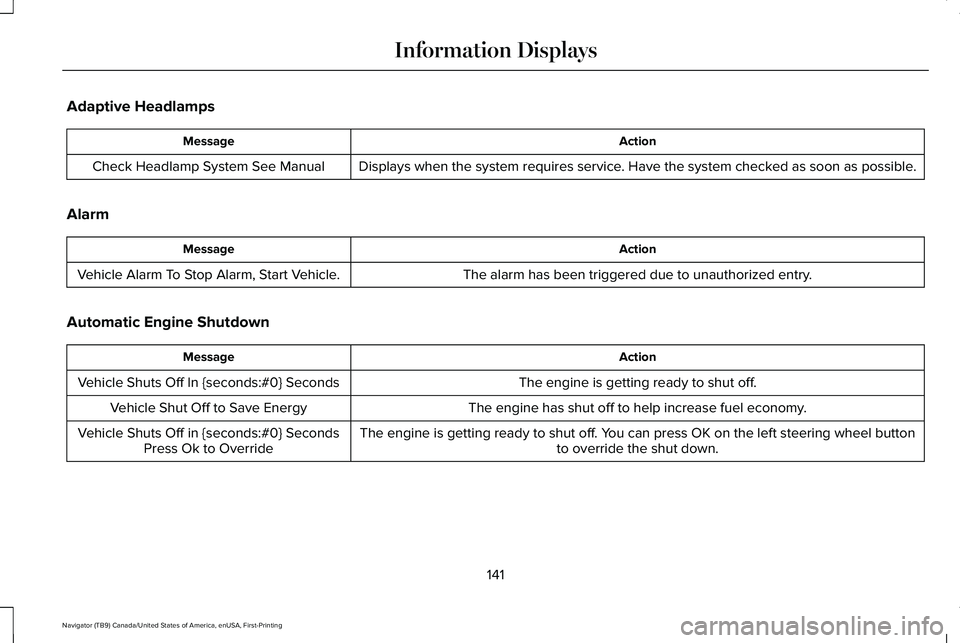
Adaptive Headlamps
Action
Message
Displays when the system requires service. Have the system checked as soon as possible.
Check Headlamp System See Manual
Alarm Action
Message
The alarm has been triggered due to unauthorized entry.
Vehicle Alarm To Stop Alarm, Start Vehicle.
Automatic Engine Shutdown Action
Message
The engine is getting ready to shut off.
Vehicle Shuts Off In {seconds:#0} Seconds
The engine has shut off to help increase fuel economy.
Vehicle Shut Off to Save Energy
The engine is getting ready to shut off. You can press OK on the left steering wheel buttonto override the shut down.
Vehicle Shuts Off in {seconds:#0} Seconds
Press Ok to Override
141
Navigator (TB9) Canada/United States of America, enUSA, First-Printing Information Displays
Page 145 of 639

Battery and Charging System
Action
Message
The charging system needs servicing. If the warning stays on or continue\
s to come on, contactan authorized dealer as soon as possible.
Check Charging System
The charging system needs servicing. If the warning stays on or continue\
s to come on, contactan authorized dealer as soon as possible.
Charging System Service Soon
The charging system needs servicing. Contact an authorized dealer as soo\
n as possible.
Charging System Service Now
The battery management system determines that the battery is at a low st\
ate of charge. Turnyour ignition off as soon as possible to protect the battery. This message clears once you restart your vehicle and the battery state of charge has recovered.
Battery State of Charge Low
The battery management system determines that the battery is at a low st\
ate of charge. Turnthe ignition off as soon as possible to protect the battery. This message will clear once the
vehicle has been started and the battery state of charge has recovered. \
Turning off unneces- sary electrical loads will allow faster battery state-of-charge recovery\
.
Turn Power Off To Save Battery
Displayed when the battery management system detects an extended low-vol\
tage condition.
Various vehicle features will be disabled to help preserve the battery. Turn off as many of theelectrical loads as soon as possible to improve system voltage. If the system voltage has recovered, the disabled features will operate again as normal.
Low Battery Features Temporarily Turned Off
142
Navigator (TB9) Canada/United States of America, enUSA, First-Printing Information Displays
Page 146 of 639
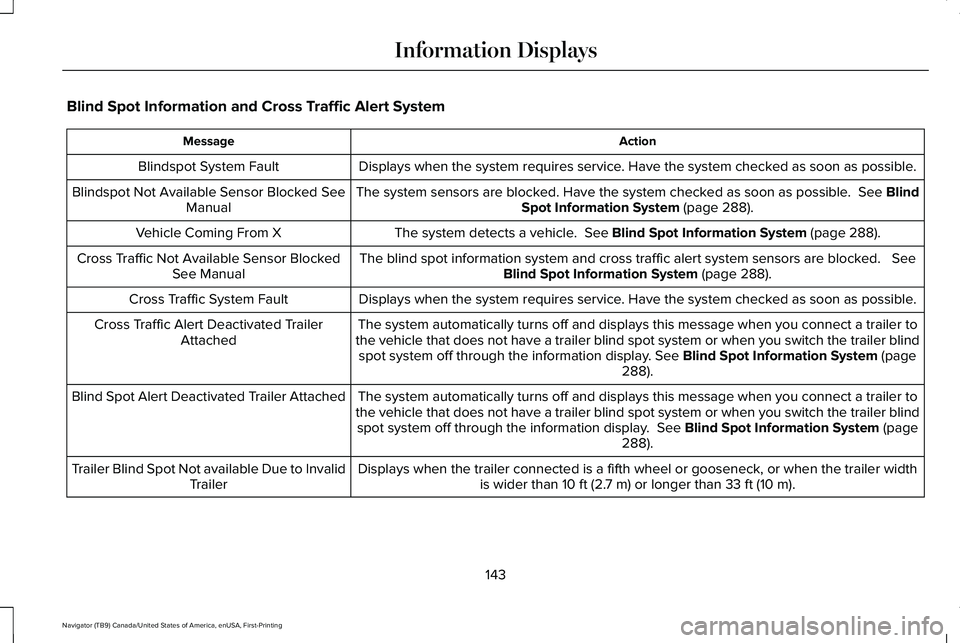
Blind Spot Information and Cross Traffic Alert System
Action
Message
Displays when the system requires service. Have the system checked as soon as possible.
Blindspot System Fault
The system sensors are blocked. Have the system checked as soon as possible. See Blind
Spot Information System (page 288).
Blindspot Not Available Sensor Blocked See
Manual
The system detects a vehicle.
See Blind Spot Information System (page 288).
Vehicle Coming From X
The blind spot information system and cross traffic alert system sensors\
are blocked.
See
Blind Spot Information System (page 288).
Cross Traffic Not Available Sensor Blocked
See Manual
Displays when the system requires service. Have the system checked as soon as possible.
Cross Traffic System Fault
The system automatically turns off and displays this message when you co\
nnect a trailer to
the vehicle that does not have a trailer blind spot system or when you s\
witch the trailer blind spot system off through the information display.
See Blind Spot Information System (page
288).
Cross Traffic Alert Deactivated Trailer
Attached
The system automatically turns off and displays this message when you co\
nnect a trailer to
the vehicle that does not have a trailer blind spot system or when you s\
witch the trailer blind spot system off through the information display.
See Blind Spot Information System (page
288).
Blind Spot Alert Deactivated Trailer Attached
Displays when the trailer connected is a fifth wheel or gooseneck, or wh\
en the trailer widthis wider than
10 ft (2.7 m) or longer than 33 ft (10 m).
Trailer Blind Spot Not available Due to Invalid
Trailer
143
Navigator (TB9) Canada/United States of America, enUSA, First-Printing Information Displays
Page 147 of 639
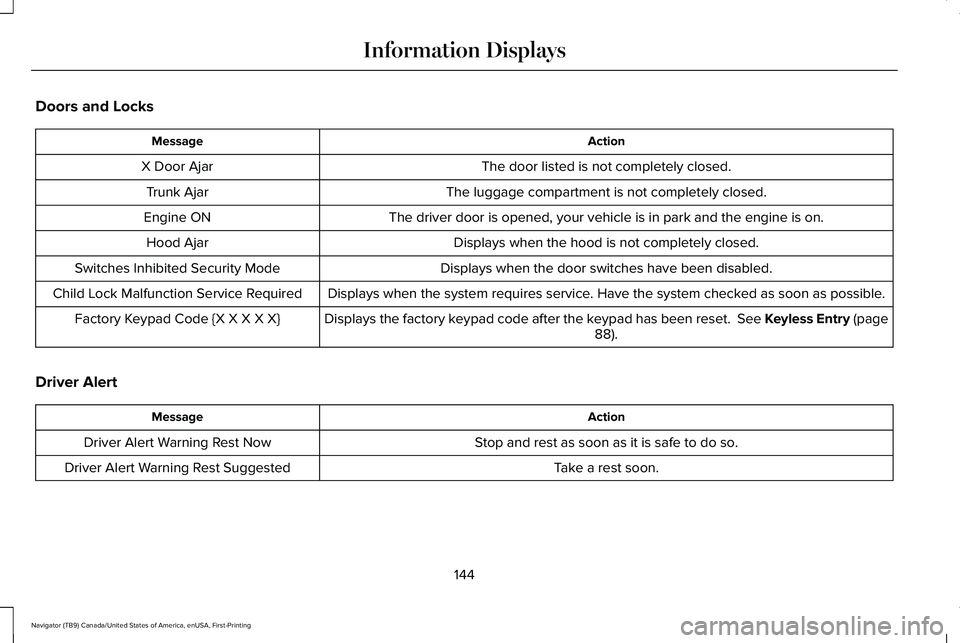
Doors and Locks
Action
Message
The door listed is not completely closed.
X Door Ajar
The luggage compartment is not completely closed.
Trunk Ajar
The driver door is opened, your vehicle is in park and the engine is on.\
Engine ON
Displays when the hood is not completely closed.
Hood Ajar
Displays when the door switches have been disabled.
Switches Inhibited Security Mode
Displays when the system requires service. Have the system checked as soon as possible.
Child Lock Malfunction Service Required
Displays the factory keypad code after the keypad has been reset. See Keyless Entry (page88).
Factory Keypad Code {X X X X X}
Driver Alert Action
Message
Stop and rest as soon as it is safe to do so.
Driver Alert Warning Rest Now
Take a rest soon.
Driver Alert Warning Rest Suggested
144
Navigator (TB9) Canada/United States of America, enUSA, First-Printing Information Displays
Page 148 of 639
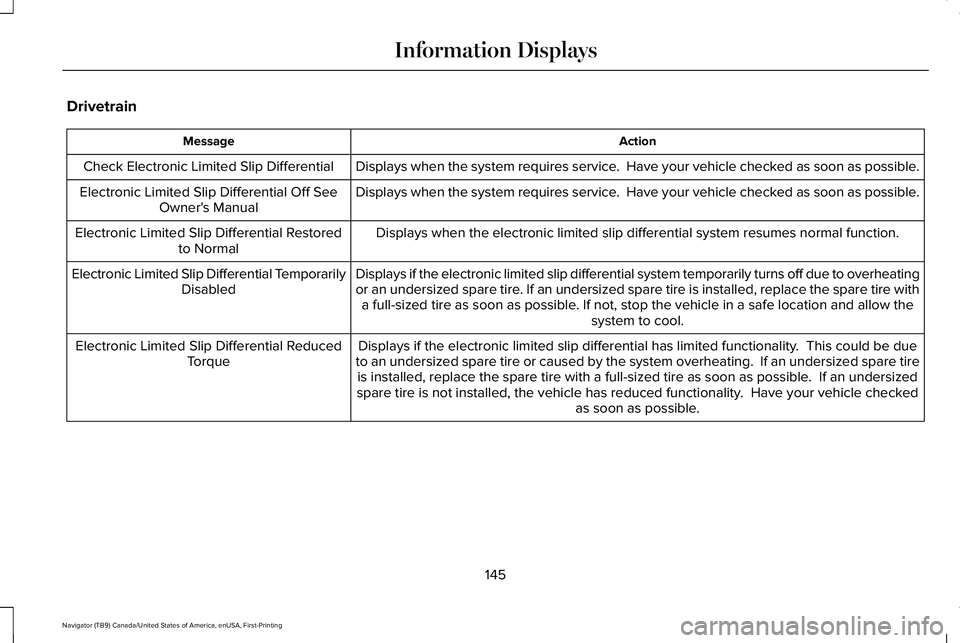
Drivetrain
Action
Message
Displays when the system requires service. Have your vehicle checked as soon as possible.
Check Electronic Limited Slip Differential
Displays when the system requires service. Have your vehicle checked as soon as possible.
Electronic Limited Slip Differential Off See
Owner's Manual
Displays when the electronic limited slip differential system resumes no\
rmal function.
Electronic Limited Slip Differential Restored
to Normal
Displays if the electronic limited slip differential system temporarily \
turns off due to overheating
or an undersized spare tire. If an undersized spare tire is installed, replace the spare tire witha full-sized tire as soon as possible. If not, stop the vehicle in a safe location and allow the system to cool.
Electronic Limited Slip Differential Temporarily
Disabled
Displays if the electronic limited slip differential has limited functio\
nality. This could be due
to an undersized spare tire or caused by the system overheating. If an \
undersized spare tire is installed, replace the spare tire with a full-sized tire as soon as p\
ossible. If an undersized
spare tire is not installed, the vehicle has reduced functionality. Have your vehicle checked as soon as possible.
Electronic Limited Slip Differential Reduced
Torque
145
Navigator (TB9) Canada/United States of America, enUSA, First-Printing Information Displays
Page 149 of 639

Action
Message
Displays when you select a drive mode that does not allow the electronic\
limited slip differentialto turn on. This may also display when the electronic limited slip diffe\
rential has a fault and the vehicle requests the locking feature.
Electronic Limited Slip Differential Locking
Feature Not Available
The transfer case is in the neutral position. This message indicates tha\
t your vehicle is safeto be towed with all four wheels on the ground.
Neutral Tow Enabled Leave Transmission in
Neutral
The transfer case is NOT in the neutral position. This message indicates that your vehicle isNOT safe to be towed with all four wheels on the ground.
Neutral Tow Disabled
Four-Wheel Drive Action
Message
Displays when the system requires service. Have the system checkedas soon as possible.
Check 4x4
The 4X4 system is making a shift.
4x4 Shift in Progress
Displays when you attempt to switch to 4X4 LOW and you do not shiftthe transmission to neutral (N).
For 4x4 LOW Shift to N
Displays when you attempt to switch to 4X4 LOW and your vehicle'sspeed is greater than 3 mph (5 km/h).
For 4x4 LOW Slow to 3 MPH
Displays when you attempt to switch from 4X4 LOW and you do notshift the transmission to neutral (N).
To Exit 4x4 LOW Shift to N
146
Navigator (TB9) Canada/United States of America, enUSA, First-Printing Information Displays
Page 152 of 639
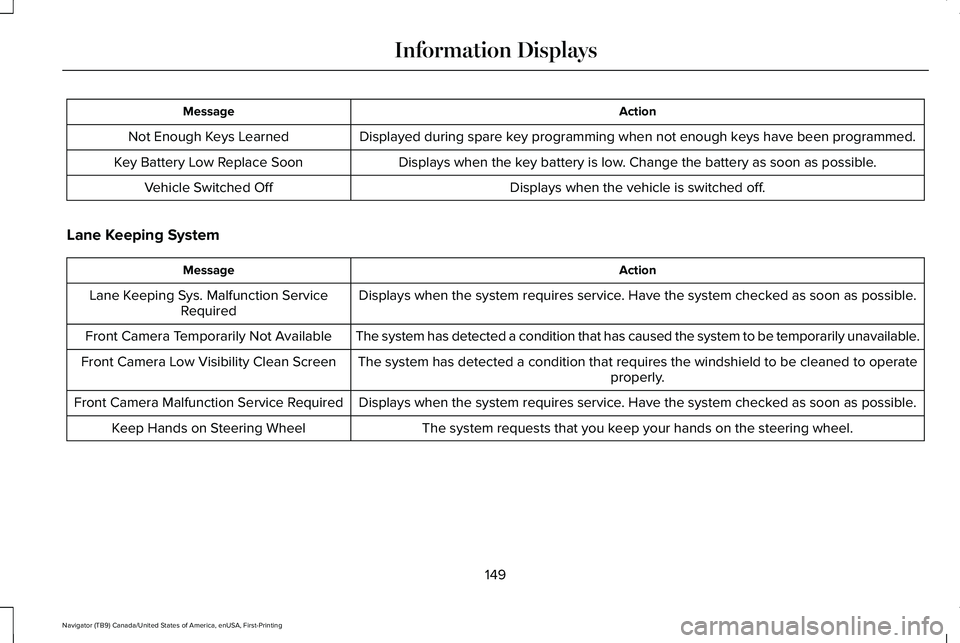
Action
Message
Displayed during spare key programming when not enough keys have been programmed.
Not Enough Keys Learned
Displays when the key battery is low. Change the battery as soon as possible.
Key Battery Low Replace Soon
Displays when the vehicle is switched off.
Vehicle Switched Off
Lane Keeping System Action
Message
Displays when the system requires service. Have the system checked as soon as possible.
Lane Keeping Sys. Malfunction Service
Required
The system has detected a condition that has caused the system to be tem\
porarily unavailable.
Front Camera Temporarily Not Available
The system has detected a condition that requires the windshield to be c\
leaned to operateproperly.
Front Camera Low Visibility Clean Screen
Displays when the system requires service. Have the system checked as soon as possible.
Front Camera Malfunction Service Required
The system requests that you keep your hands on the steering wheel.
Keep Hands on Steering Wheel
149
Navigator (TB9) Canada/United States of America, enUSA, First-Printing Information Displays
Page 154 of 639

Action
Message
Informs the driver that the powertrain needs service due to a powertrain\
malfunction.
See Manual
The engine has reduced power to help reduce high engine temperature.
Power Reduced to Lower Engine Temp
The brake system has reduced stopping power.
Brake Applied Power Reduced
MyKey Action
Message
Displays when a MyKey cannot be programmed during key programming. Restart programming.
MyKey not Created
When starting your vehicle, a MyKey is in use and the MyKey speed limit is on.
Speed Limited to XX MPH/km/h
When a MyKey is in use, the MyKey speed limit is on and your vehicle speed is approaching80 mph (130 km/h).
Near Vehicle Top Speed
Displays when MyKey is active.
MyKey Active Drive Safely
Displays when MyKey is active.
Check Speed Drive Safely
Displays when a MyKey is in use and the MyKey speed limit is reached.
Vehicle at Top Speed of MyKey Setting
Displays when a MyKey is in use and Belt-Minder is activated.
Buckle Up to Unmute Audio
151
Navigator (TB9) Canada/United States of America, enUSA, First-Printing Information Displays
Page 155 of 639
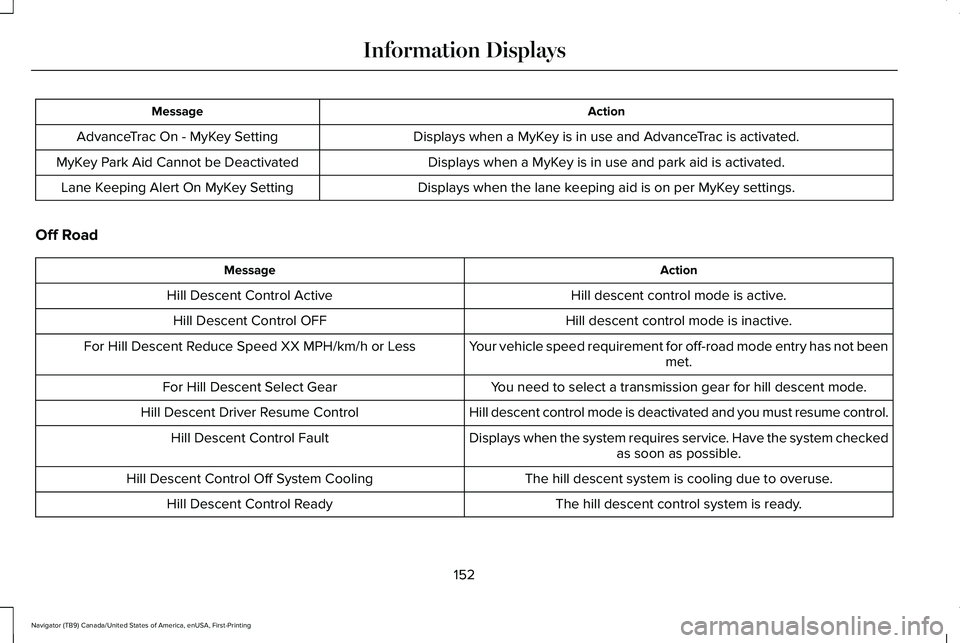
Action
Message
Displays when a MyKey is in use and AdvanceTrac is activated.
AdvanceTrac On - MyKey Setting
Displays when a MyKey is in use and park aid is activated.
MyKey Park Aid Cannot be Deactivated
Displays when the lane keeping aid is on per MyKey settings.
Lane Keeping Alert On MyKey Setting
Off Road Action
Message
Hill descent control mode is active.
Hill Descent Control Active
Hill descent control mode is inactive.
Hill Descent Control OFF
Your vehicle speed requirement for off-road mode entry has not beenmet.
For Hill Descent Reduce Speed XX MPH/km/h or Less
You need to select a transmission gear for hill descent mode.
For Hill Descent Select Gear
Hill descent control mode is deactivated and you must resume control.
Hill Descent Driver Resume Control
Displays when the system requires service. Have the system checkedas soon as possible.
Hill Descent Control Fault
The hill descent system is cooling due to overuse.
Hill Descent Control Off System Cooling
The hill descent control system is ready.
Hill Descent Control Ready
152
Navigator (TB9) Canada/United States of America, enUSA, First-Printing Information Displays
Page 156 of 639
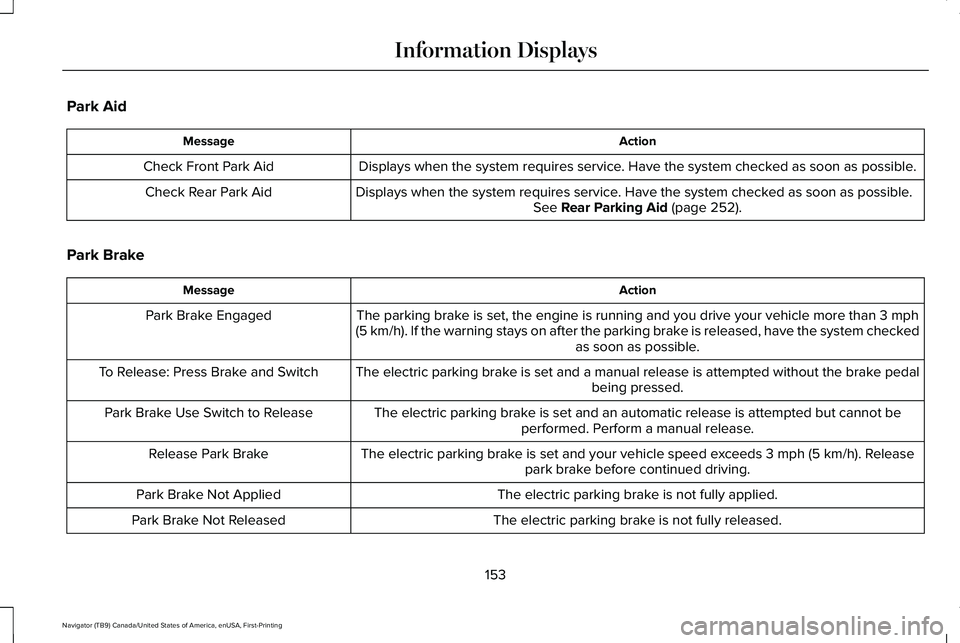
Park Aid
Action
Message
Displays when the system requires service. Have the system checked as soon as possible.
Check Front Park Aid
Displays when the system requires service. Have the system checked as soon as possible. See Rear Parking Aid (page 252).
Check Rear Park Aid
Park Brake Action
Message
The parking brake is set, the engine is running and you drive your vehicle more than
3 mph
(5 km/h). If the warning stays on after the parking brake is released, have the system checked as soon as possible.
Park Brake Engaged
The electric parking brake is set and a manual release is attempted without the brake pedal being pressed.
To Release: Press Brake and Switch
The electric parking brake is set and an automatic release is attempted but cannot beperformed. Perform a manual release.
Park Brake Use Switch to Release
The electric parking brake is set and your vehicle speed exceeds
3 mph (5 km/h). Release
park brake before continued driving.
Release Park Brake
The electric parking brake is not fully applied.
Park Brake Not Applied
The electric parking brake is not fully released.
Park Brake Not Released
153
Navigator (TB9) Canada/United States of America, enUSA, First-Printing Information Displays