traction control LINCOLN NAVIGATOR 2021 Owner's Manual
[x] Cancel search | Manufacturer: LINCOLN, Model Year: 2021, Model line: NAVIGATOR, Model: LINCOLN NAVIGATOR 2021Pages: 639, PDF Size: 6.09 MB
Page 345 of 639
•
Do not rest your foot on the brake pedal
while driving.
• Avoid carrying unnecessary weight.
• Avoid adding particular accessories to
your vehicle (e.g. bug deflectors,
rollbars/light bars, running boards, ski
racks).
• Avoid driving with the wheels out of
alignment.
BREAKING-IN
You need to break in new tires for
approximately 300 mi (480 km). During this
time, your vehicle may exhibit some unusual
driving characteristics.
DRIVING THROUGH WATER WARNING:
Do not drive through
flowing or deep water as you may lose
control of your vehicle. Note:
Driving through standing water can
cause vehicle damage.
Note: Engine damage can occur if water
enters the air filter.
Before driving through standing water, check
the depth. Never drive through water that is
higher than the bottom of the wheel hubs. When driving through standing water, drive
very slowly and do not stop your vehicle.
Your brake performance and traction may
be limited. After driving through water and
as soon as it is safe to do so:•
Lightly press the brake pedal to dry the
brakes and to check that they work.
• Check that the horn works.
• Check that the exterior lights work.
• Turn the steering wheel to check that the
steering power assist works.
FLOOR MATS WARNING:
Use a floor mat designed
to fit the footwell of your vehicle that does
not obstruct the pedal area. Failure to
follow this instruction could result in the
loss of control of your vehicle, personal
injury or death. WARNING:
Pedals that cannot move
freely can cause loss of vehicle control and
increase the risk of serious personal injury.
342
Navigator (TB9) Canada/United States of America, enUSA, First-Printing Driving HintsE176913
Page 410 of 639
GENERAL INFORMATION
Use only approved wheel and tire sizes,
using other sizes could damage your vehicle.
If you change the diameter of the tires from
that fitted at the factory, the speedometer
may not display the correct speed. If you
intend to change the size of the wheels from
that fitted by the manufacturer, you can
check the suitability with an authorized
dealer.
Additional information related to the
functionality and maintenance of your tires
can be found later in this chapter. See Tire
Care (page 409).
You can find the recommended tire inflation
pressures can on the Tire Label, which is on
the B-pillar or the edge of the driver door.
You can also find this information on the
Safety Compliance Certification Label, affixed
to either the door hinge pillar, door-latch
post, or the door edge that meets the door
latch post; next to the driver seating position. We strongly recommend maintaining these
tire pressures at all times. Failure to follow
the tire pressure recommendations can
cause uneven treadwear patterns, reduced
fuel economy, and adversely affect the way
your vehicle handles.
Note:
Check and set the tire pressure at the
ambient temperature in which you are
intending to drive your vehicle and when the
tires are cold.
Note: Check your tire pressures at least once
per month.
If your vehicle has a spare tire, set the
pressure to the highest value given for your
vehicle and tire size combination.
Notice to utility vehicle and truck
owners WARNING:
Utility vehicles have a
significantly higher rollover rate than other
types of vehicles. WARNING:
Vehicles with a higher
center of gravity (utility and four-wheel
drive vehicles) handle differently than
vehicles with a lower center of gravity
(passenger cars). Avoid sharp turns,
excessive speed and abrupt steering in
these vehicles. Failure to drive cautiously
increases the risk of losing control of your
vehicle, vehicle rollover, personal injury
and death. WARNING:
In a rollover crash, an
unbelted person is significantly more likely
to die than a person wearing a seatbelt. WARNING:
Do not become
overconfident in the ability of four-wheel
drive vehicles. Although a four-wheel drive
vehicle may accelerate better than a
two-wheel drive vehicle in low traction
situations, it won't stop any faster than
two-wheel drive vehicles. Always drive at
a safe speed.
407
Navigator (TB9) Canada/United States of America, enUSA, First-Printing Wheels and Tires
Page 413 of 639
Treadwear
The treadwear grade is a comparative
rating based on the wear rate of the tire
when tested under controlled conditions
on a specified government test course.
For example, a tire graded 150 would
wear one and one-half (1 ½) times as well
on the government course as a tire
graded 100. The relative performance
of tires depends upon the actual
conditions of their use, however, and
may depart significantly from the norm
due to variations in driving habits,
service practices, and differences in
road characteristics and climate.
Traction AA A B C
WARNING: The traction grade
assigned to this tire is based on
straight-ahead braking traction tests,
and does not include acceleration,
cornering, hydroplaning or peak
traction characteristics. The traction grades, from highest to
lowest are AA, A, B, and C. The grades
represent the tire
’s ability to stop on wet
pavement as measured under controlled
conditions on specified government test
surfaces of asphalt and concrete. A tire
marked C may have poor traction
performance.
Temperature A B C WARNING:
The temperature
grade for this tire is established for a
tire that is properly inflated and not
overloaded. Excessive speed,
underinflation, or excessive loading,
either separately or in combination,
can cause heat buildup and possible
tire failure.
The temperature grades are A (the
highest), B and C, representing the tire ’s
resistance to the generation of heat and
its ability to dissipate heat when tested
under controlled conditions on a
specified indoor laboratory test wheel.
Sustained high temperature can cause the material of the tire to degenerate
and reduce tire life, and excessive
temperature can lead to sudden tire
failure. The grade C corresponds to a
level of performance which all
passenger car tires must meet under the
Federal Motor Vehicle Safety Standard
No. 139. Grades B and A represent
higher levels of performance on the
laboratory test wheel than the minimum
required by law.
Glossary of Tire Terminology
*
Tire label: A label showing the original
equipment tire sizes, recommended
inflation pressure and the maximum
weight the vehicle can carry.
*
Tire Identification Number (TIN): A
number on the sidewall of each tire
providing information about the tire
brand and manufacturing plant, tire size
and date of manufacture. Also referred
to as DOT code.
*
Inflation pressure: A measure of the
amount of air in a tire.
410
Navigator (TB9) Canada/United States of America, enUSA, First-Printing Wheels and Tires
Page 417 of 639
K. Maximum Load: Indicates the
maximum load in kilograms and pounds
that can be carried by the tire (affixed to
either the door hinge pillar, door-latch
post, or the door edge that meets the
door-latch post, next to the driver's
seating position), or Tire Label located
on the B-pillar or the edge of the driver's
door.
L.
Treadwear, Traction and
Temperature Grades:
*
Treadwear: The treadwear grade is a
comparative rating based on the wear
rate of the tire when tested under
controlled conditions on a specified
government test course. For example,
a tire graded 150 would wear 1½ times
as well on the government course as a
tire graded 100. *
Traction: The traction grades, from
highest to lowest are AA, A, B, and C.
The grades represent the tire's ability to
stop on wet pavement as measured
under controlled conditions on specified
government test surfaces of asphalt and
concrete. A tire marked C may have
poor traction performance.
*
Temperature: The temperature grades
are A (the highest), B and C,
representing the tire's resistance to the
generation of heat and its ability to
dissipate heat when tested under
controlled conditions on a specified
indoor laboratory test wheel.
M.
Maximum Inflation Pressure:
Indicates the tire manufacturers'
maximum permissible pressure or the
pressure at which the maximum load
can be carried by the tire. This pressure
is normally higher than the vehicle
manufacturer's recommended cold
inflation pressure which can be found
on the Safety Compliance Certification
Label (affixed to either the door hinge
pillar, door-latch post, or the door edge
that meets the door-latch post, next to the driver's seating position), or Tire
Label located on the B-pillar or the edge
of the driver's door. The cold inflation
pressure should never be set lower than
the recommended pressure on the
vehicle label.
The tire suppliers may have additional
markings, notes or warnings such as
standard load or radial tubeless.
Additional Information Contained on
the Tire Sidewall for LT Type Tires
Note:
Tire Quality Grades do not apply
to this type of tire.
414
Navigator (TB9) Canada/United States of America, enUSA, First-Printing Wheels and Tires
Page 426 of 639
Note:
Your vehicle may be equipped
with a dissimilar spare wheel and tire
assembly. A dissimilar spare wheel and
tire assembly is defined as a spare
wheel and tire assembly that is different
in brand, size or appearance from the
road tires and wheels. If you have a
dissimilar spare wheel and tire assembly
it is intended for temporary use only and
should not be used in a tire rotation.
Note: After having your tires rotated,
inflation pressure must be checked and
adjusted to the vehicle requirements.
Rotating your tires at the recommended
interval (as indicated in the Scheduled
Maintenance chapter) will help your tires
wear more evenly, providing better tire
performance and longer tire life.
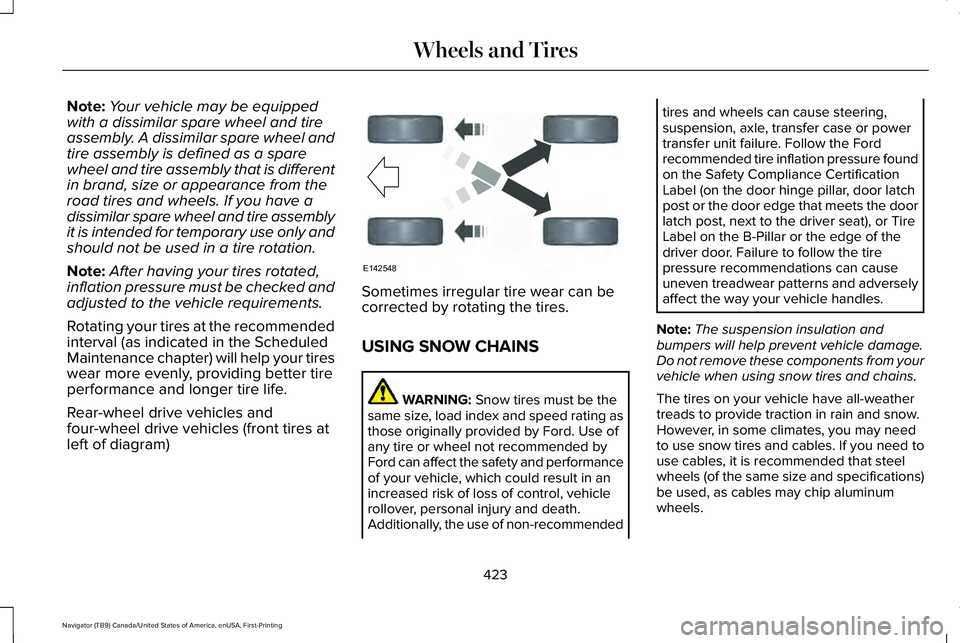
Rear-wheel drive vehicles and
four-wheel drive vehicles (front tires at
left of diagram) Sometimes irregular tire wear can be
corrected by rotating the tires.
USING SNOW CHAINS
WARNING: Snow tires must be the
same size, load index and speed rating as
those originally provided by Ford. Use of
any tire or wheel not recommended by
Ford can affect the safety and performance
of your vehicle, which could result in an
increased risk of loss of control, vehicle
rollover, personal injury and death.
Additionally, the use of non-recommended tires and wheels can cause steering,
suspension, axle, transfer case or power
transfer unit failure. Follow the Ford
recommended tire inflation pressure found
on the Safety Compliance Certification
Label (on the door hinge pillar, door latch
post or the door edge that meets the door
latch post, next to the driver seat), or Tire
Label on the B-Pillar or the edge of the
driver door. Failure to follow the tire
pressure recommendations can cause
uneven treadwear patterns and adversely
affect the way your vehicle handles.
Note: The suspension insulation and
bumpers will help prevent vehicle damage.
Do not remove these components from your
vehicle when using snow tires and chains.
The tires on your vehicle have all-weather
treads to provide traction in rain and snow.
However, in some climates, you may need
to use snow tires and cables. If you need to
use cables, it is recommended that steel
wheels (of the same size and specifications)
be used, as cables may chip aluminum
wheels.
423
Navigator (TB9) Canada/United States of America, enUSA, First-Printing Wheels and TiresE142548
Page 513 of 639
Adjusting the Guidance Prompt Volume
Turn the volume control when a guidance
prompt plays to adjust the volume.
Note:
If you have inadvertently adjusted the
volume to zero, press the turn indicator
button to play the last voice prompt and then
adjust the volume to the desired level.
Muting Guidance Prompts Select the mute option on the
screen to mute guidance prompts.
Note: The system mutes the next and all
future guidance prompts.
Adding Waypoints
You can add a waypoint to a navigation route
as a destination along your route. You can
add up to five waypoints.
1. Select the search option on the map.
2. Set a destination.
3. Select Add Waypoint.
4. Select
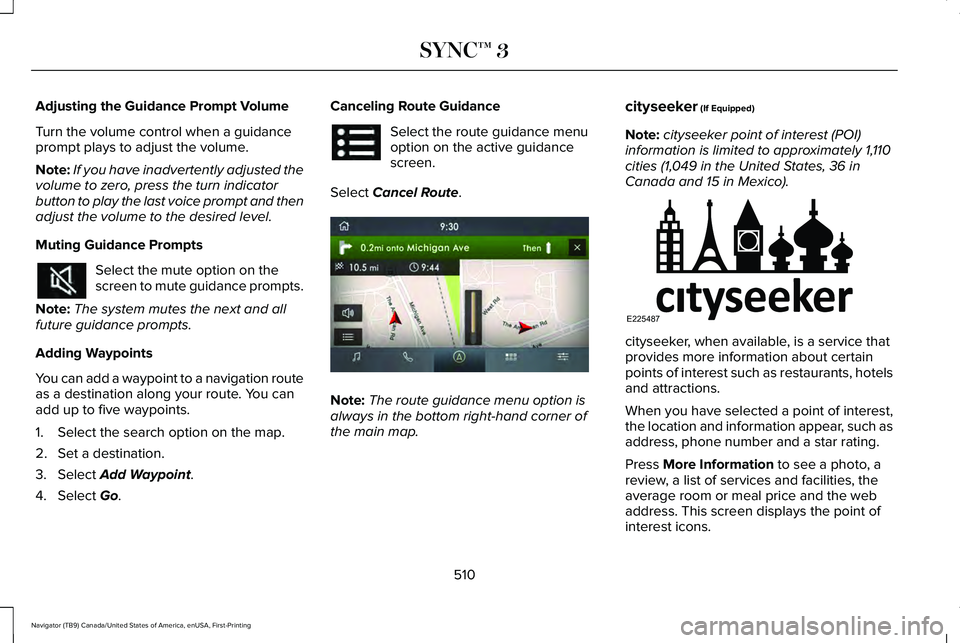
Go. Canceling Route Guidance Select the route guidance menu
option on the active guidance
screen.
Select
Cancel Route. Note:
The route guidance menu option is
always in the bottom right-hand corner of
the main map. cityseeker
(If Equipped)
Note: cityseeker point of interest (POI)
information is limited to approximately 1,110
cities (1,049 in the United States, 36 in
Canada and 15 in Mexico). cityseeker, when available, is a service that
provides more information about certain
points of interest such as restaurants, hotels
and attractions.
When you have selected a point of interest,
the location and information appear, such as
address, phone number and a star rating.
Press
More Information to see a photo, a
review, a list of services and facilities, the
average room or meal price and the web
address. This screen displays the point of
interest icons.
510
Navigator (TB9) Canada/United States of America, enUSA, First-Printing SYNC™ 3 E297860 E225487
Page 597 of 639
•
Navigation Features: Any navigation
features included in the system are
intended to provide turn by turn
instructions to get you to a desired
destination. Please make certain all
persons using this system carefully read
and follow instructions and safety
information fully.
• Distraction Hazard:
Any navigation
features may require manual (non-verbal)
setup. Attempting to perform such set-up
or insert data while driving can distract
your attention and could cause an
accident or other serious injury. Stop the
vehicle in a safe and legal manner before
attempting these operations.
• Let Your Judgment Prevail:
Any
navigation features are provided only as
an aid. Make your driving decisions
based on your observations of local
conditions and existing traffic regulations.
Any such feature is not a substitute for
your personal judgment. Any route
suggestions made by this system should
never replace any local traffic regulations
or your personal judgment or knowledge
of safe driving practices. •
Route Safety:
Do not follow the route
suggestions if doing so would result in
an unsafe or illegal maneuver, if you
would be placed in an unsafe situation,
or if you would be directed into an area
that you consider unsafe. The driver is
ultimately responsible for the safe
operation of the vehicle and therefore,
must evaluate whether it is safe to follow
the suggested directions.
• Potential Map Inaccuracy:
Maps used
by this system may be inaccurate
because of changes in roads, traffic
controls or driving conditions. Always use
good judgment and common sense when
following the suggested routes.
• Emergency Services:
Do not rely on any
navigation features included in the
system to route you to emergency
services. Ask local authorities or an
emergency services operator for these
locations. Not all emergency services
such as police, fire stations, hospitals and
clinics are likely to be contained in the
map database for such navigation
features.
594
Navigator (TB9) Canada/United States of America, enUSA, First-Printing Appendices
Page 636 of 639
Speed Control
See: Cruise Control............................................272
Stability Control............................................248 Principle of Operation.......................................248
Starting a Gasoline Engine........................208 Automatic Engine Shutdown..........................209
Failure to Start.....................................................209
Guarding Against Exhaust Fumes..................210
Important Ventilating Information...................210
Stopping the Engine When Your Vehicle is Moving...............................................................210
Stopping the Engine When Your Vehicle is Stationary..........................................................210
Starting and Stopping the Engine............207 General Information...........................................207
Steering...........................................................297 Adaptive Learning..............................................297
Electric Power Steering.....................................297
Steering Wheel...............................................101
Storage Compartments
..............................205
Sunroof See: Moonroof.....................................................124
Sun Visors.......................................................124 Illuminated Vanity Mirror....................................124
Supplementary Restraints System.............57 Principle of Operation..........................................57 Switching Automatic High Beam Control
On and Off
.....................................................117
Activating the Automatic High Beam
Control
................................................................117
Switching Cruise Control On and Off..................................................................272
Switching Cruise Control Off...........................272
Switching Cruise Control On...........................272
Switching Rear Occupant Alert System On and Off
..........................................................196
Semiannual Reminder........................................196
Symbols Glossary..............................................9
SYNC™ 3
..........................................................473
General Information...........................................473
SYNC™ 3 Troubleshooting...........................517 Additional Information and Assistance.........533
Apps.......................................................................527
Navigation............................................................526
Personal Profiles..................................................531
Phone....................................................................523
Resetting the System........................................533
USB and Bluetooth Audio.................................519
Voice Recognition...............................................517
Wi-Fi Connectivity..............................................529 T
Technical Specifications
See: Capacities and Specifications...............
438
The Better Business Bureau (BBB) Auto Line Program (U.S. Only)..........................353
Tire Care
.........................................................409
Glossary of Tire Terminology...........................410
Information About Uniform Tire Quality
Grading.............................................................409
Information Contained on the Tire Sidewall..............................................................411
Temperature A B C.............................................410
Traction AA A B C................................................410
Treadwear.............................................................410
Tire Pressure Monitoring System
.............424
Changing Tires With a Tire Pressure
Monitoring System........................................
426
Understanding Your Tire Pressure Monitoring System .............................................................426
Tires See: Wheels and Tires......................................407
Toll Reader
......................................................123
Installing the Toll Reader...................................123
Towing a Trailer
..............................................315
Load Placement...................................................315
Towing Points................................................349
633
Navigator (TB9) Canada/United States of America, enUSA, First-Printing Index
Page 637 of 639
Towing the Vehicle on Four Wheels........338
Four-wheel-down Towing.................................339
Recreational Towing..........................................338
Towing..............................................................315
Traction Control............................................247 Principle of Operation.......................................247
Trailer Reversing Aids..................................316
Principle of Operation........................................316
Pro Trailer Backup Assist™.................................316
Setting Up Pro Trailer Backup Assist..............317
Troubleshooting ..................................................322
Using Pro Trailer Backup Assist.....................320
Trailer Sway Control
.....................................327
Transfer Case Fluid Check.........................388
Transmission..................................................227
Transporting the Vehicle
............................349
U
Under Hood Overview................................379
Unique Driving Characteristics
..................212
Universal Garage Door Opener................197 HomeLink Wireless Control System...............197
USB Port...........................................................471 Locating the USB Ports.....................................472
Using Adaptive Cruise Control
.................273
Automatic Cancellation.....................................277
Blocked Sensor...................................................279 Canceling the Set Speed..................................277
Changing the Set Speed..................................276
Detection Issues.................................................277
Following a Vehicle............................................275
Following a Vehicle to a Complete
Stop...................................................................275
Hilly Condition Usage........................................277
Overriding the Set Speed................................276
Park Brake Application......................................277
Resuming the Set Speed..................................277
Setting the Adaptive Cruise Speed...............274
Setting the Adaptive Cruise Speed When Your Vehicle is Stationary......................................274
Setting the Gap Distance.................................275
Switching Adaptive Cruise Control Off.........277
Switching Adaptive Cruise Control On.........274
Switching to Normal Cruise Control..............280
System Not Available........................................279
Using Four-Wheel Drive
.............................233
4X4 Indicator Lights...........................................233
4X4 Modes...........................................................233
Driving Off-Road with Truck and Utility
Vehicles............................................................236
How Your Vehicle Differs from Other Vehicles............................................................235
Operating Four-Wheel Drive Vehicles with Spare or Mismatched Tires.........................235 Using Hill Descent Control........................250
Hill Descent Modes...........................................250
Using MyKey With Remote Start Systems..........................................................82
Using Power Running Boards.....................99 Automatic Power Deploy....................................99
Automatic Power Stow........................................99
Bounce-back........................................................100
Enabling and Disabling......................................100
Manual Power Deploy.......................................100
Using Snow Chains
......................................423
Using Stability Control................................249 Stability Control and Traction Control with Roll
Stability Control™ (RSC™)...............................249
Using the Backup Start Passcode..............76 System Lockout.....................................................77
Using the Valet Mode....................................76
Using Traction Control................................247 Switching the System On and Off..................247
System Indicator Lights and Messages........247
Using Voice Recognition............................475 Audio Voice Commands...................................477
Climate Voice Commands................................
478
Mobile App Voice Commands........................484
Navigation Voice Commands...........................481
Phone Voice Commands..................................
479
SiriusXM Traffic and Travel Link Voice Commands......................................................484
634
Navigator (TB9) Canada/United States of America, enUSA, First-Printing Index
Page 638 of 639
Voice Settings Commands..............................485
Utilizing the Mediation/Arbitration Program (Canada Only)
.............................................354
V
Vehicle Care
..................................................396
General Information...........................................396
Vehicle Identification Number..................440
Vehicle Identification
...................................454
Vehicle Storage............................................404 Body.......................................................................404
Brakes...................................................................405
Cooling system...................................................405
Disconnecting Your 12 Volt Battery...............405
Engine...................................................................404
Fuel system..........................................................405
General.................................................................404
Miscellaneous.....................................................405
Removing Vehicle From Storage
...................405
Tires.......................................................................405
Vehicle Wi-Fi Hotspot.................................459
Ventilation See: Climate Control..........................................166
VIN See: Vehicle Identification Number...............440
Voice Control
.................................................102 W
Warning Lamps and Indicators..................129
Adaptive Cruise Control Indicator..................
129
Anti-Lock Brake System Warning Lamp........129
Auto Hold Active.................................................129
Auto Hold Unavailable.......................................129
Automatic Headlamp High Beam Indicator............................................................129
Auto-Start-Stop Indicator...................................129
Battery....................................................................129
Blind Spot Monitor..............................................130
Brake System Warning Lamp...........................
130
Cruise Control Indicator....................................130
Direction Indicator...............................................130
Door Ajar...............................................................130
Electric Park Brake..............................................130
Engine Coolant Temperature Warning Lamp..................................................................130
Engine Oil...............................................................131
Fasten Rear Seatbelt...........................................131
Fasten Seatbelt Warning Lamp.........................131
Four-Wheel Drive Indicators..............................131
Front Airbag...........................................................131
Headlamp High Beam Indicator.......................131
Hill Descent............................................................131
Hood Ajar...............................................................131
Liftgate Ajar............................................................131 Low Beam Malfunction Warning Lamp..........132
Low Fuel Level Warning Lamp..........................131
Low Tire Pressure Warning Lamp...................132
Low Washer Fluid Level Warning Lamp........132
Parking Lamps......................................................132
Powertrain Fault...................................................132
Service Engine Soon..........................................132
Stability Control and Traction Control
Indicator............................................................132
Stability Control and Traction Control Off Warning Lamp..................................................133
Tow Haul Indicator..............................................133
Washer Fluid Check.....................................394
Washers See: Cleaning the Exterior...............................
397
See: Wipers and Washers.................................106
Waxing............................................................398
Welcome Lighting..........................................114
What Is 911 Assist............................................67
What Is Automatic High Beam Control............................................................117
What Is Cruise Control................................272 Requirements......................................................272
What Is Phone As a Key................................75
What Is the Cabin Air Filter.........................173
What Is the Power Outlet
............................201
What is the Rear Occupant Alert System...........................................................195
635
Navigator (TB9) Canada/United States of America, enUSA, First-Printing Index