belt LINCOLN NAVIGATOR 2021 Workshop Manual
[x] Cancel search | Manufacturer: LINCOLN, Model Year: 2021, Model line: NAVIGATOR, Model: LINCOLN NAVIGATOR 2021Pages: 639, PDF Size: 6.09 MB
Page 231 of 639
Your vehicle has a feature that automatically
shifts your vehicle into park (P) when any of
the following conditions occur:
•
You turn the vehicle off.
• You open the driver's door with your
seatbelt unlatched with the vehicle
stopped.
• You unlatch your seatbelt when the
driver's door is open with the vehicle
stopped.
If you turn your vehicle off when moving,
your vehicle first shifts into neutral (N) until
it stops and then shift into park (P)
automatically.
Note: If you have waited an extended period
of time, 2-15 minutes before starting your
vehicle, unlatching your seatbelt can cause
this feature to activate, even with the driver
door closed.
Note: This feature may not work properly if
the door ajar switch is malfunctioning. If your
door ajar indicator does not illuminate when
you open the driver’ s door or the indicator
illuminates with the driver’ s door closed, see
your authorized dealer. Reverse (R)
With the selector in reverse (R), your vehicle
moves backward. Always come to a
complete stop before shifting into and out
of reverse (R).
Neutral (N)
With the selector in neutral (N), you can start
your vehicle and is free to roll. Hold the
brake pedal down when in this position.
Stay in Neutral Mode
Stay in Neutral mode allows your vehicle to
stay in neutral when you exit your vehicle.
Your vehicle must be stationary to enter this
mode.
Note:
Stay in neutral mode is a temporary
vehicle state with the ignition off. Once in
this mode, sufficient battery voltage must be
maintained or your vehicle returns to park.
Extended usage of Stay in Neutral mode
may result in a battery voltage reduction to
a level where the vehicle may no longer
start. Do not tow your vehicle in this mode. Note:
Always put your vehicle in Stay in
Neutral mode when entering an automatic
car wash. Failure to do this could result in
vehicle damage not covered by warranty.
To enter Stay in Neutral mode:
• Press the neutral (N) button on the
transmission selector.
• Press the neutral (N) button again to
enter Stay in Neutral mode.
A message appears in your information
display screen when your vehicle has
entered Stay in Neutral mode.
To exit Stay in Neutral mode, apply the brake
and select a different gear.
Stay in Neutral Mode - No Start
Use this to move your transmission from the
park position in the event of a no start
situation. If your vehicle has a dead battery,
you require an external power source. Do
not tow your vehicle in this mode.
228
Navigator (TB9) Canada/United States of America, enUSA, First-Printing Transmission
Page 248 of 639
If your vehicle is not equipped with a manual
transmission and an information display, you
cannot turn the system on or off. When you
switch the ignition on, the system
automatically turns on.
AUTO HOLD
WARNING: The system does not
replace the parking brake. When you leave
your vehicle, always apply the parking
brake. WARNING: You must remain in your
vehicle when the system turns on. At all
times, you are responsible for controlling
your vehicle, supervising the system and
intervening, if required. Failure to take care
may result in the loss of control of your
vehicle, serious personal injury or death. WARNING:
The system will turn off
if a malfunction is apparent. Failure to take
care may result in the loss of control of
your vehicle, serious personal injury or
death. The system uses your vehicle's brakes to
hold your vehicle at a standstill after you stop
your vehicle and release the brake pedal.
For example, Auto Hold can assist you while
stopping at traffic lights or while in traffic
jams by holding the brake pressure for you
once you bring your vehicle to a stop.
Make sure you switch the system off before
towing with your vehicle.
Note:
In case of a malfunction in the system
while Auto Hold actively holds the vehicle
(for example, low power supply), a message
appears in the information display asking
you to press the brake pedal. If you see this
message, press the brake pedal
immediately.
Note: The system only activates if it
recognizes it is applying enough brake
pressure. On a steep hill or slope, make sure
you press the brake pedal sufficiently to
activate the system. Note:
In some cases, Auto Hold might hand
over to the parking brake. When the parking
brake applies, the red brake lamp appears.
This is normal. When you press the
accelerator pedal, the drive away release
feature releases the parking brake.
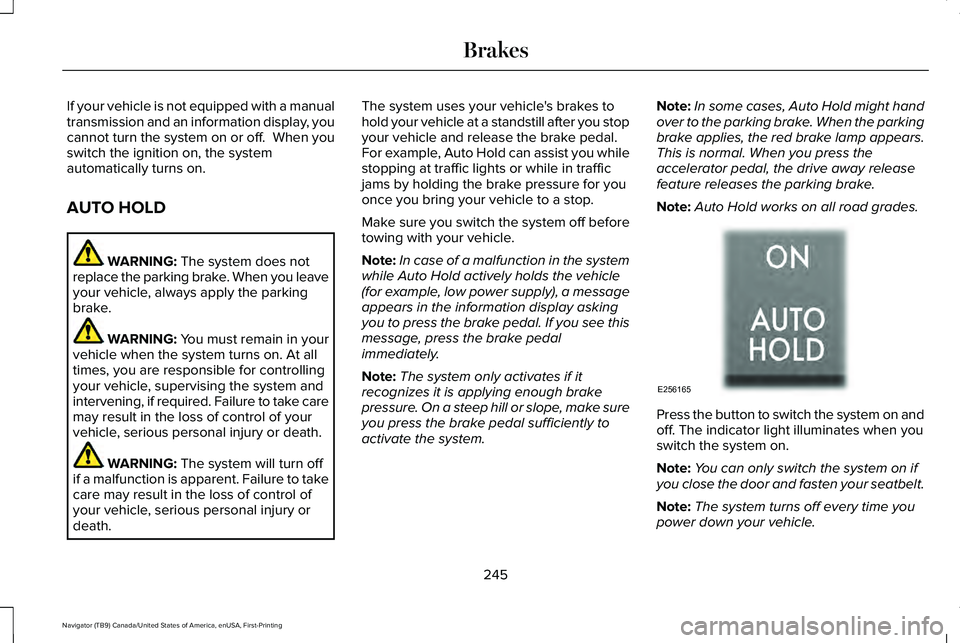
Note: Auto Hold works on all road grades. Press the button to switch the system on and
off. The indicator light illuminates when you
switch the system on.
Note:
You can only switch the system on if
you close the door and fasten your seatbelt.
Note: The system turns off every time you
power down your vehicle.
245
Navigator (TB9) Canada/United States of America, enUSA, First-Printing BrakesE256165
Page 249 of 639
Note:
The system remembers the last setting
when you start your vehicle.
Note: When in reverse (R), Auto Hold does
not function.
When the system is off, your vehicle behaves
the same as a vehicle without Auto Hold.
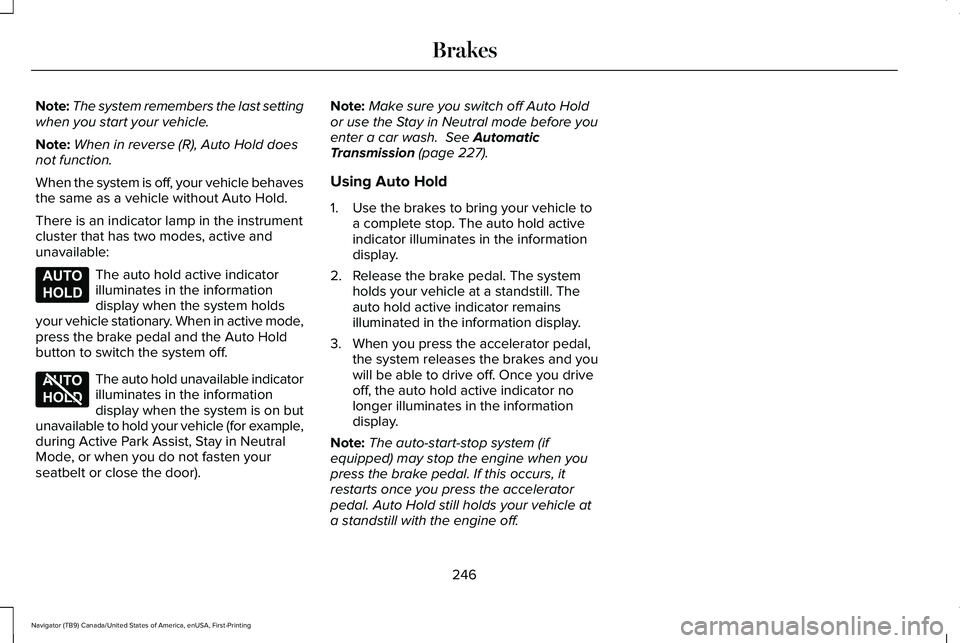
There is an indicator lamp in the instrument
cluster that has two modes, active and
unavailable: The auto hold active indicator
illuminates in the information
display when the system holds
your vehicle stationary. When in active mode,
press the brake pedal and the Auto Hold
button to switch the system off. The auto hold unavailable indicator
illuminates in the information
display when the system is on but
unavailable to hold your vehicle (for example,
during Active Park Assist, Stay in Neutral
Mode, or when you do not fasten your
seatbelt or close the door). Note:
Make sure you switch off Auto Hold
or use the Stay in Neutral mode before you
enter a car wash. See Automatic
Transmission (page 227).
Using Auto Hold
1. Use the brakes to bring your vehicle to a complete stop. The auto hold active
indicator illuminates in the information
display.
2. Release the brake pedal. The system holds your vehicle at a standstill. The
auto hold active indicator remains
illuminated in the information display.
3. When you press the accelerator pedal, the system releases the brakes and you
will be able to drive off. Once you drive
off, the auto hold active indicator no
longer illuminates in the information
display.
Note: The auto-start-stop system (if
equipped) may stop the engine when you
press the brake pedal. If this occurs, it
restarts once you press the accelerator
pedal. Auto Hold still holds your vehicle at
a standstill with the engine off.
246
Navigator (TB9) Canada/United States of America, enUSA, First-Printing BrakesE197933 E197934
Page 280 of 639
The system may apply the brakes to slow
the vehicle to the new set speed. The set
speed displays continuously in the
information display when the system is
active.
Canceling the Set Speed
Press and release the button or tap
the brake pedal.
The set speed does not erase.
Resuming the Set Speed Press and release the button.
Your vehicle speed returns to the previously
set speed and gap setting. The set speed
displays continuously in the information
display when the system is active.
Note: Only use resume if you are aware of
the set speed and intend to return to it.
Automatic Cancellation
Automatic cancellation can also occur when: •
The tires lose traction.
• You apply the parking brake.
Park Brake Application
Automatic parking brake application and
cancellation occurs if:
• You unbuckle the seatbelt and open the
door after you stop the vehicle.
• You hold the vehicle at a stop
continuously for more than three minutes.
Hilly Condition Usage
You should select a lower gear when the
system is active in situations such as
prolonged downhill driving on steep grades,
for example in mountainous areas. The
system needs additional engine braking in
these situations to reduce the load on the
vehicle ’s regular brake system to prevent it
from overheating.
Note: An audible alarm sounds and the
system shuts down if it applies brakes for an
extended period of time. This allows the
brakes to cool. The system functions
normally again after the brakes cool. Switching Adaptive Cruise Control Off Press and release the button when
the system is in standby mode, or
switch the ignition off.
Note: You erase the set speed and gap
setting when you switch the system off.
Detection Issues WARNING: On rare occasions,
detection issues can occur due to the road
infrastructures, for example bridges,
tunnels and safety barriers. In these cases,
the system may brake late or
unexpectedly. At all times, you are
responsible for controlling your vehicle,
supervising the system and intervening, if
required. WARNING:
If the system
malfunctions, have your vehicle checked
as soon as possible.
277
Navigator (TB9) Canada/United States of America, enUSA, First-Printing Cruise Control E265299 E265297
Page 351 of 639
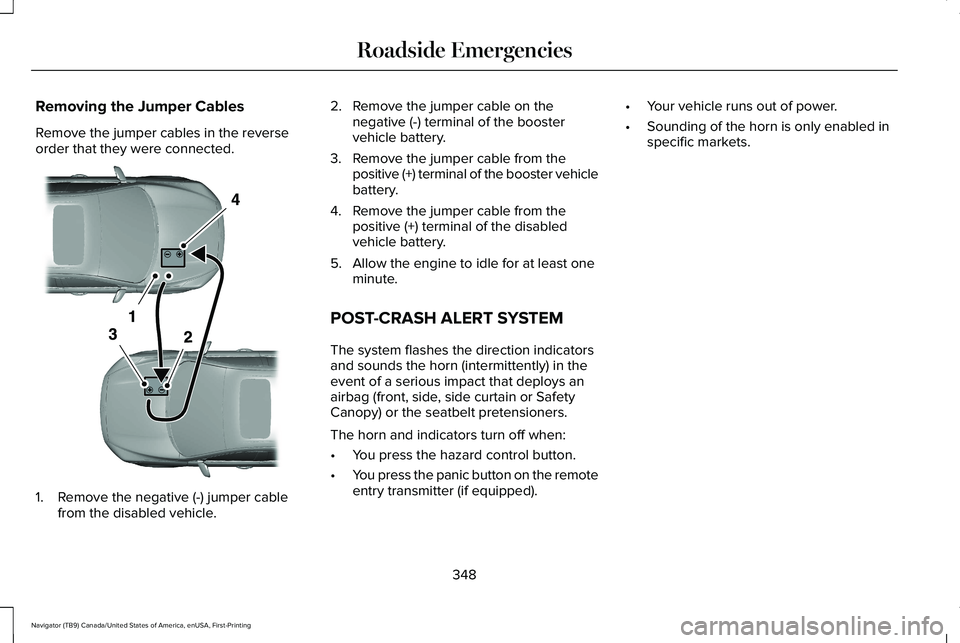
Removing the Jumper Cables
Remove the jumper cables in the reverse
order that they were connected.
1. Remove the negative (-) jumper cable
from the disabled vehicle. 2. Remove the jumper cable on the
negative (-) terminal of the booster
vehicle battery.
3. Remove the jumper cable from the positive (+) terminal of the booster vehicle
battery.
4. Remove the jumper cable from the positive (+) terminal of the disabled
vehicle battery.
5. Allow the engine to idle for at least one minute.
POST-CRASH ALERT SYSTEM
The system flashes the direction indicators
and sounds the horn (intermittently) in the
event of a serious impact that deploys an
airbag (front, side, side curtain or Safety
Canopy) or the seatbelt pretensioners.
The horn and indicators turn off when:
• You press the hazard control button.
• You press the panic button on the remote
entry transmitter (if equipped). •
Your vehicle runs out of power.
• Sounding of the horn is only enabled in
specific markets.
348
Navigator (TB9) Canada/United States of America, enUSA, First-Printing Roadside EmergenciesE320800
Page 352 of 639
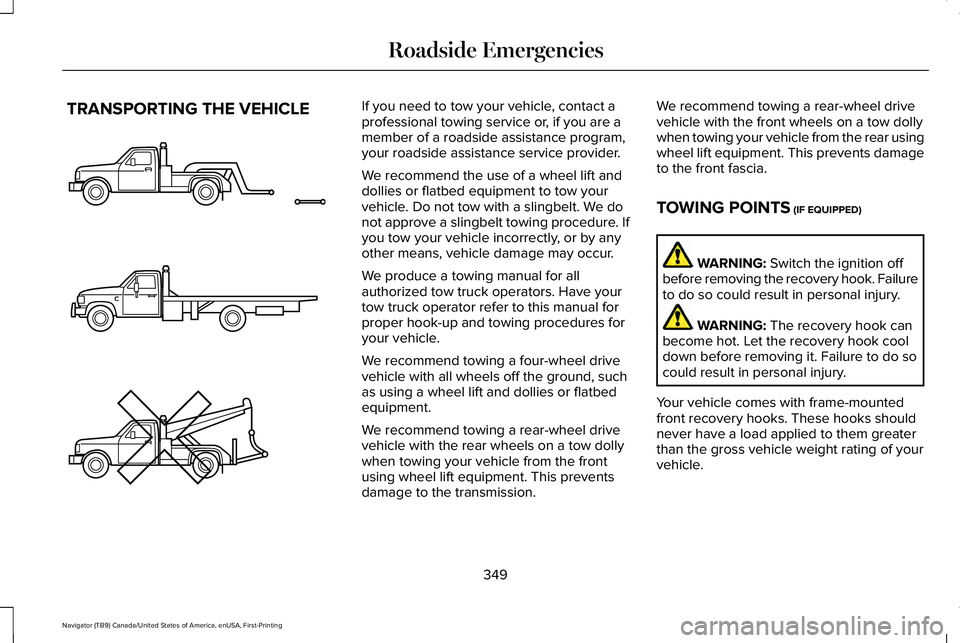
TRANSPORTING THE VEHICLE If you need to tow your vehicle, contact a
professional towing service or, if you are a
member of a roadside assistance program,
your roadside assistance service provider.
We recommend the use of a wheel lift and
dollies or flatbed equipment to tow your
vehicle. Do not tow with a slingbelt. We do
not approve a slingbelt towing procedure. If
you tow your vehicle incorrectly, or by any
other means, vehicle damage may occur.
We produce a towing manual for all
authorized tow truck operators. Have your
tow truck operator refer to this manual for
proper hook-up and towing procedures for
your vehicle.
We recommend towing a four-wheel drive
vehicle with all wheels off the ground, such
as using a wheel lift and dollies or flatbed
equipment.
We recommend towing a rear-wheel drive
vehicle with the rear wheels on a tow dolly
when towing your vehicle from the front
using wheel lift equipment. This prevents
damage to the transmission.
We recommend towing a rear-wheel drive
vehicle with the front wheels on a tow dolly
when towing your vehicle from the rear using
wheel lift equipment. This prevents damage
to the front fascia.
TOWING POINTS (IF EQUIPPED)
WARNING:
Switch the ignition off
before removing the recovery hook. Failure
to do so could result in personal injury. WARNING:
The recovery hook can
become hot. Let the recovery hook cool
down before removing it. Failure to do so
could result in personal injury.
Your vehicle comes with frame-mounted
front recovery hooks. These hooks should
never have a load applied to them greater
than the gross vehicle weight rating of your
vehicle.
349
Navigator (TB9) Canada/United States of America, enUSA, First-Printing Roadside EmergenciesE143886
Page 368 of 639
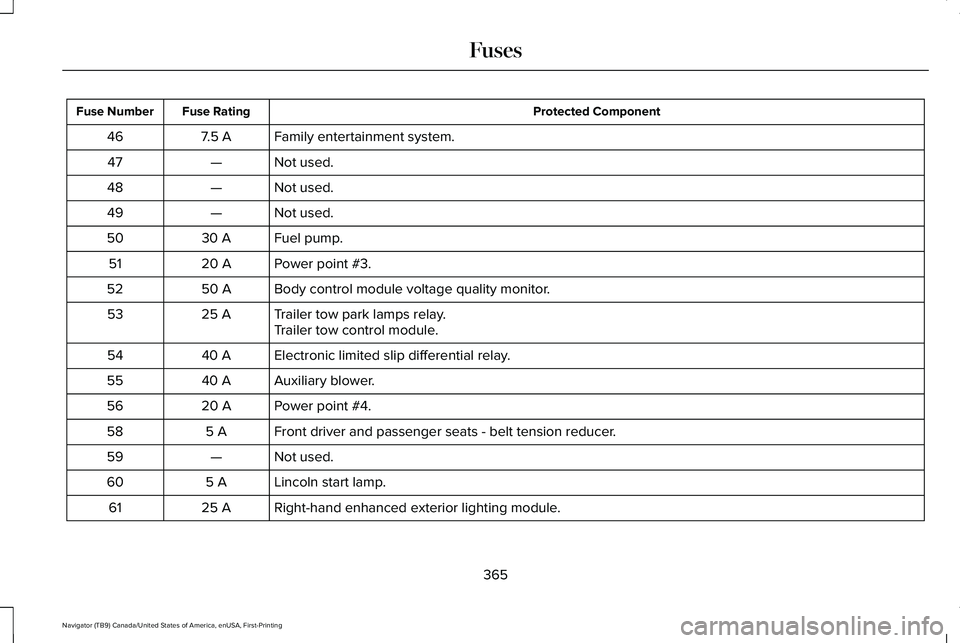
Protected Component
Fuse Rating
Fuse Number
Family entertainment system.
7.5 A
46
Not used.
—
47
Not used.
—
48
Not used.
—
49
Fuel pump.
30 A
50
Power point #3.
20 A
51
Body control module voltage quality monitor.
50 A
52
Trailer tow park lamps relay.
25 A
53
Trailer tow control module.
Electronic limited slip differential relay.
40 A
54
Auxiliary blower.
40 A
55
Power point #4.
20 A
56
Front driver and passenger seats - belt tension reducer.
5 A
58
Not used.
—
59
Lincoln start lamp.
5 A
60
Right-hand enhanced exterior lighting module.
25 A
61
365
Navigator (TB9) Canada/United States of America, enUSA, First-Printing Fuses
Page 403 of 639
Note:
Do not use razor blades or other
sharp objects to clean or remove decals from
the inside of the heated rear window. The
vehicle warranty does not cover damage
caused to the heated rear window grid lines.
CLEANING THE INTERIOR WARNING: Do not use cleaning
solvents, bleach or dye on the vehicle's
seatbelts, as these actions may weaken
the belt webbing. WARNING:
On vehicles equipped
with seat-mounted airbags, do not use
chemical solvents or strong detergents.
Such products could contaminate the side
airbag system and affect performance of
the side airbag in a crash. Note:
Follow the same procedure for
cleaning leather seats when cleaning leather
interior.
See Cleaning Leather Seats (page
403).
Note: Do not use household cleaning
products or glass cleaners, which can stain
and discolor the fabric and affect the flame
retardant abilities of the seat materials.
For fabric, carpets, cloth seats, safety belts
and seats equipped with side airbags:
• Remove dust and loose dirt with a
vacuum cleaner.
• Remove light stains and soil with
Motorcraft® Professional Strength Carpet
& Upholstery Cleaner.
For grease or tar stains:
• Spot clean the area with Motorcraft® Spot
and Stain Remover. In Canada, use
Motorcraft® Multi-Purpose Cleaner.
• If a ring forms on the fabric after spot
cleaning, clean the entire area
immediately, but do not oversaturate or
the ring will set. Cleaning Black Label or Presidential
Interior
(If Equipped)
Note: Alcantara microfiber cloth fabric is
made of polyester microfiber with
micro-porous polyurethane. Using
commercially available fabric cleaners can
cause permanent damage.
Note: Do not use commercially available
leather and vinyl cleaning products on
Alcantara microfiber cloth fabric.
Note: Lincoln Black Label or Presidential
vehicles may have Alcantara microfiber cloth
fabric on the seats, headliner, floor mats and
door panels.
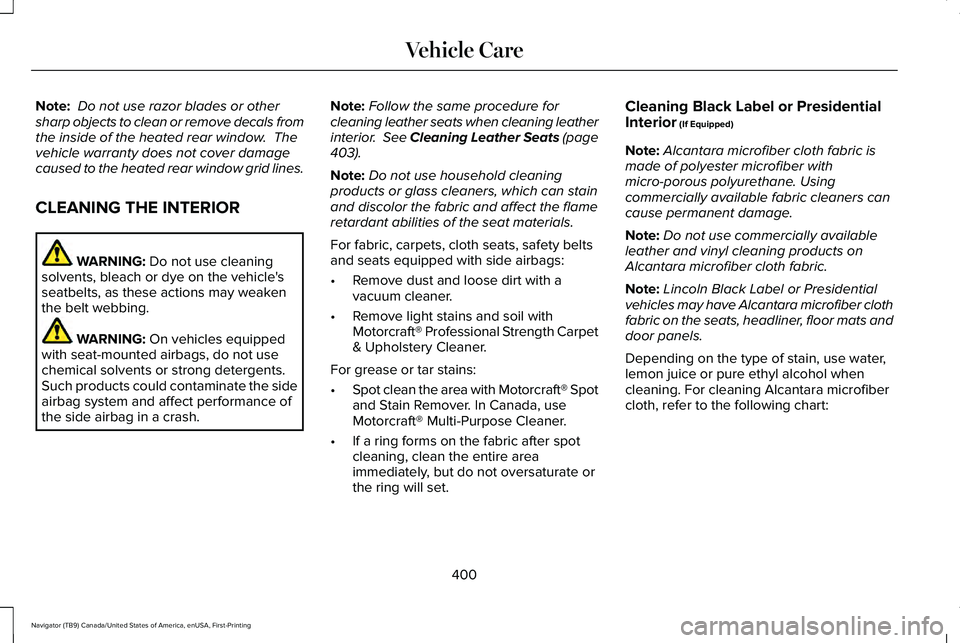
Depending on the type of stain, use water,
lemon juice or pure ethyl alcohol when
cleaning. For cleaning Alcantara microfiber
cloth, refer to the following chart:
400
Navigator (TB9) Canada/United States of America, enUSA, First-Printing Vehicle Care
Page 410 of 639
GENERAL INFORMATION
Use only approved wheel and tire sizes,
using other sizes could damage your vehicle.
If you change the diameter of the tires from
that fitted at the factory, the speedometer
may not display the correct speed. If you
intend to change the size of the wheels from
that fitted by the manufacturer, you can
check the suitability with an authorized
dealer.
Additional information related to the
functionality and maintenance of your tires
can be found later in this chapter. See Tire
Care (page 409).
You can find the recommended tire inflation
pressures can on the Tire Label, which is on
the B-pillar or the edge of the driver door.
You can also find this information on the
Safety Compliance Certification Label, affixed
to either the door hinge pillar, door-latch
post, or the door edge that meets the door
latch post; next to the driver seating position. We strongly recommend maintaining these
tire pressures at all times. Failure to follow
the tire pressure recommendations can
cause uneven treadwear patterns, reduced
fuel economy, and adversely affect the way
your vehicle handles.
Note:
Check and set the tire pressure at the
ambient temperature in which you are
intending to drive your vehicle and when the
tires are cold.
Note: Check your tire pressures at least once
per month.
If your vehicle has a spare tire, set the
pressure to the highest value given for your
vehicle and tire size combination.
Notice to utility vehicle and truck
owners WARNING:
Utility vehicles have a
significantly higher rollover rate than other
types of vehicles. WARNING:
Vehicles with a higher
center of gravity (utility and four-wheel
drive vehicles) handle differently than
vehicles with a lower center of gravity
(passenger cars). Avoid sharp turns,
excessive speed and abrupt steering in
these vehicles. Failure to drive cautiously
increases the risk of losing control of your
vehicle, vehicle rollover, personal injury
and death. WARNING:
In a rollover crash, an
unbelted person is significantly more likely
to die than a person wearing a seatbelt. WARNING:
Do not become
overconfident in the ability of four-wheel
drive vehicles. Although a four-wheel drive
vehicle may accelerate better than a
two-wheel drive vehicle in low traction
situations, it won't stop any faster than
two-wheel drive vehicles. Always drive at
a safe speed.
407
Navigator (TB9) Canada/United States of America, enUSA, First-Printing Wheels and Tires
Page 441 of 639
ENGINE SPECIFICATIONS
Specification
Measurement
213 in³ (3,497 cm³)
Engine displacement.
1-4-2-5-3-6
Firing order.
Coil on plug
Ignition system.
10.0:1
Compression ratio.
0.028 in (0.7 mm) - 0.031 in (0.8 mm)
Spark plug gap.
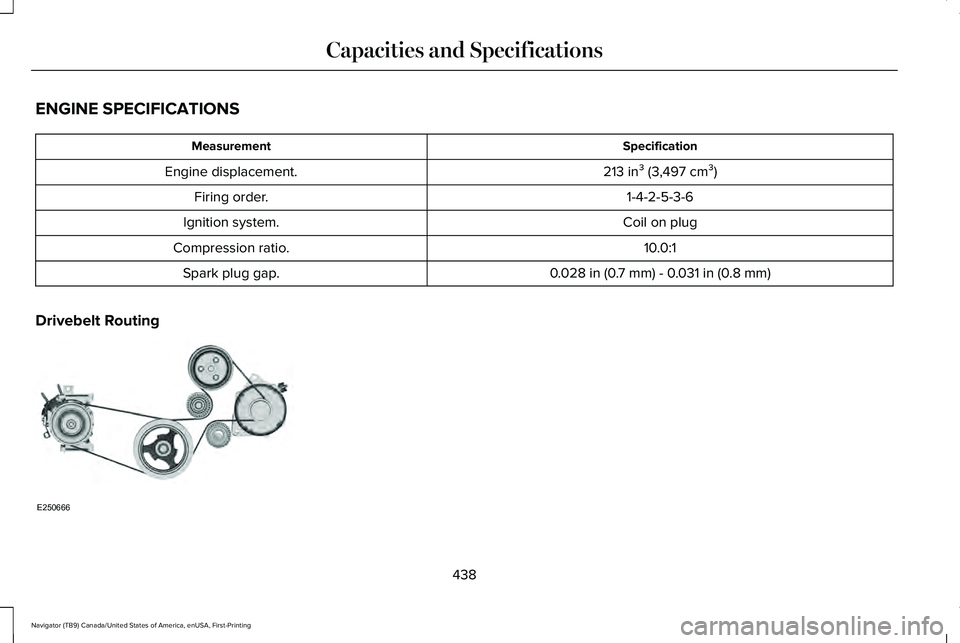
Drivebelt Routing 438
Navigator (TB9) Canada/United States of America, enUSA, First-Printing Capacities and SpecificationsE250666