light LINCOLN NAVIGATOR 2021 Manual Online
[x] Cancel search | Manufacturer: LINCOLN, Model Year: 2021, Model line: NAVIGATOR, Model: LINCOLN NAVIGATOR 2021Pages: 639, PDF Size: 6.09 MB
Page 339 of 639
Points to Remember
Note:
Do not attempt removal of the trailer
brake controller without consulting the
Workshop Manual. Damage to the unit may
result.
• Adjust gain setting before using the
trailer brake controller for the first time.
• Adjust gain setting, using the procedure
above, whenever road, weather and
trailer or vehicle loading conditions
change from when the gain was initially
set.
• Only use the manual control lever for
proper adjustment of the gain during
trailer setup. Misuse, such as application
during trailer sway, could cause instability
of trailer or tow vehicle.
• Avoid towing in adverse weather
conditions. The trailer brake controller
does not provide anti-lock control of the
trailer wheels. Trailer wheels can lock up
on slippery surfaces, resulting in reduced
stability of trailer and tow vehicle. •
The trailer brake controller is equipped
with a feature that reduces output at
vehicle speeds below 11 mph (18 km/h)
so trailer and vehicle braking is not jerky
or harsh. This feature is only available
when applying the brakes using your
vehicle's brake pedal, not the controller.
• The controller interacts with the brake
control system and powertrain control
system of your vehicle to provide the
best performance on different road
conditions.
• Your vehicle's brake system and the
trailer brake system work independently
of each other. Changing the gain setting
on the controller does not affect the
operation of your vehicle's brakes
whether you attach a trailer or not. •
When you switch the engine off, the
controller output is disabled and the
display and module shut down. The
controller module and display turn on
when you switch the ignition on.
• The trailer brake controller is only a
factory-installed or dealer-installed item.
Lincoln is not responsible for warranty or
performance of the controller due to
misuse or customer installation.
Trailer Lamps WARNING: Never connect any trailer
lamp wiring to the vehicle's tail lamp wiring;
this may damage the electrical system
resulting in fire. Contact your authorized
dealer as soon as possible for assistance
in proper trailer tow wiring installation.
Additional electrical equipment may be
required.
Trailer lamps are required on most towed
vehicles. Make sure all running lights, brake
lights, turn signals and hazard lights are
working.
336
Navigator (TB9) Canada/United States of America, enUSA, First-Printing Towing
Page 343 of 639
WARNING: Shifting the transfer case
to its neutral position for recreational
towing may cause the vehicle to roll, even
if the transmission is in park (P). It may
injure the driver and others. Make sure you
press the foot brake and the vehicle is in
a secure, safe position when you shift to
neutral (N).
Note: Failing to put the transfer case in its
neutral position can damage vehicle
components.
Note: You can check four-wheel-down
towing status at any time by opening the
driver's door or turning the ignition to the
accessory or on position. A message
appears in the information display confirming
your vehicle is in neutral tow.
To exit four-wheel-down towing and return
the transfer case to its
2H position:
1. With your vehicle still properly secured to the tow vehicle, press the brake pedal
and start the engine.
2. Switch your vehicle off by pressing the engine
START/STOP button once. 3.
Place your vehicle in accessory mode by
pressing the start button once without
pressing the brake pedal.
4. Press the brake pedal.
5. Place the transmission back into park (P).
6. Release the brake pedal.
Note: If completed successfully, the
information display shows
2H and Neutral
Tow Disabled.
Note: If the indicator light and message do
not display, you must perform the procedure
again from the beginning.
Note: You may hear an audible noise as the
transfer case shifts out of its neutral position,
this is normal.
Note: If Shift Delayed Pull Forward displays
in the instrument cluster, transfer case gear
tooth blockage is present. See the
instructions following this section.
7. Apply the parking brake, then disconnect
your vehicle from the tow vehicle. 8. Release the parking brake, start the
engine, and shift the transmission into
drive (D) to make sure the transfer case
is out of the neutral tow position.
9. If the transfer case does not successfully
shift out of neutral (N), set the parking
brake until you can have your vehicle
serviced.
Resolving the Shift Delayed Pull Forward
or To Exit 4x4 LOW Shift to N Message
If the instrument cluster displays these
messages, perform the following:
1. Press and hold the brake pedal.
2. Put the transmission into neutral (N), then
start the engine.
3. With the engine running, shift the transmission into drive (D) and let the
vehicle roll forward, up to
3 ft (1 m). You
may hear an audible noise as the transfer
case shifts out of its neutral position. This
is normal.
4. Make sure the instrument cluster displays
Neutral Tow Disabled
.
340
Navigator (TB9) Canada/United States of America, enUSA, First-Printing Towing
Page 345 of 639
•
Do not rest your foot on the brake pedal
while driving.
• Avoid carrying unnecessary weight.
• Avoid adding particular accessories to
your vehicle (e.g. bug deflectors,
rollbars/light bars, running boards, ski
racks).
• Avoid driving with the wheels out of
alignment.
BREAKING-IN
You need to break in new tires for
approximately 300 mi (480 km). During this
time, your vehicle may exhibit some unusual
driving characteristics.
DRIVING THROUGH WATER WARNING:
Do not drive through
flowing or deep water as you may lose
control of your vehicle. Note:
Driving through standing water can
cause vehicle damage.
Note: Engine damage can occur if water
enters the air filter.
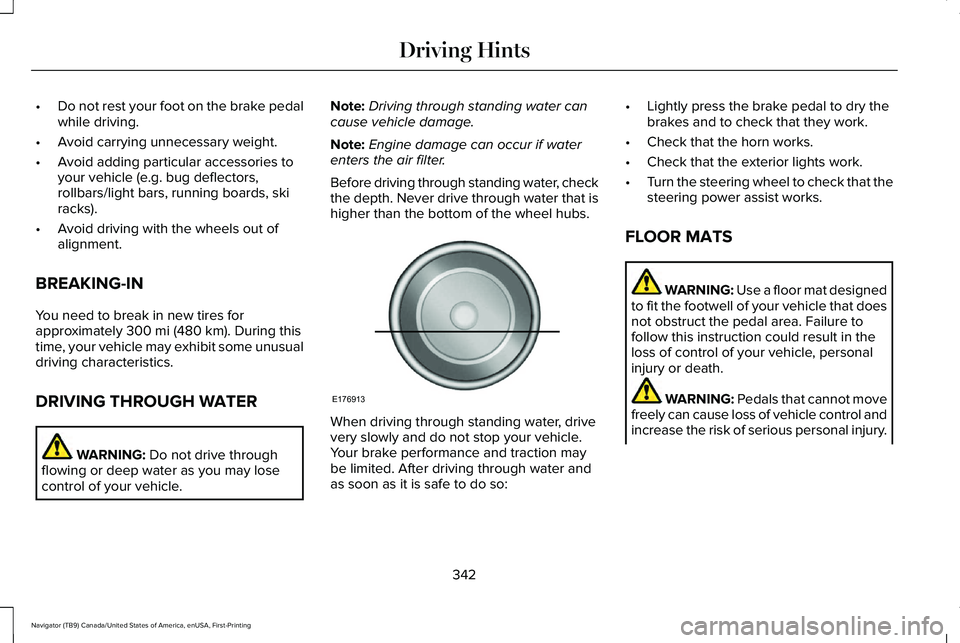
Before driving through standing water, check
the depth. Never drive through water that is
higher than the bottom of the wheel hubs. When driving through standing water, drive
very slowly and do not stop your vehicle.
Your brake performance and traction may
be limited. After driving through water and
as soon as it is safe to do so:•
Lightly press the brake pedal to dry the
brakes and to check that they work.
• Check that the horn works.
• Check that the exterior lights work.
• Turn the steering wheel to check that the
steering power assist works.
FLOOR MATS WARNING:
Use a floor mat designed
to fit the footwell of your vehicle that does
not obstruct the pedal area. Failure to
follow this instruction could result in the
loss of control of your vehicle, personal
injury or death. WARNING:
Pedals that cannot move
freely can cause loss of vehicle control and
increase the risk of serious personal injury.
342
Navigator (TB9) Canada/United States of America, enUSA, First-Printing Driving HintsE176913
Page 349 of 639
The fuel pump shutoff stops the flow of fuel
to the engine in the event of a moderate to
severe crash. Not every impact causes a
shutoff.
Should your vehicle shut off after a crash,
you may restart your vehicle.
1. Press START/STOP to switch off your
vehicle.
2. Press the brake pedal and
START/STOP
to switch on your vehicle.
3. Remove your foot from the brake pedal and press
START/STOP to switch off
your vehicle.
4. You can attempt to start the vehicle by pressing the brake pedal and
START/STOP
, or press START/STOP
without pressing the brake pedal.
5. If the vehicle does not start, repeat steps
1 through 4. JUMP STARTING THE VEHICLE WARNING:
Batteries normally
produce explosive gases which can cause
personal injury. Therefore, do not allow
flames, sparks or lighted substances to
come near the battery. When working near
the battery, always shield your face and
protect your eyes. Always provide correct
ventilation. WARNING:
Keep batteries out of
reach of children. Batteries contain sulfuric
acid. Avoid contact with skin, eyes or
clothing. Shield your eyes when working
near the battery to protect against possible
splashing of acid solution. In case of acid
contact with skin or eyes, flush immediately
with water for a minimum of 15 minutes and
get prompt medical attention. If acid is
swallowed, call a physician immediately. WARNING:
Use only adequately
sized cables with insulated clamps. Note:
To avoid reverse polarity connections,
make sure that you correctly identify the
positive (+) and negative (-) terminals on both
the disabled and booster vehicles before
connecting the cables. Stay clear of moving
parts.
Preparing Your Vehicle
Do not attempt to push-start your automatic
transmission vehicle.
Note: Attempting to push-start a vehicle with
an automatic transmission may cause
transmission damage.
Note: Use only a 12-volt supply to start your
vehicle.
Note: Do not disconnect the battery of the
disabled vehicle as this could damage the
vehicle electrical system.
Park the booster vehicle close to the hood
of the disabled vehicle, making sure the two
vehicles do not touch.
346
Navigator (TB9) Canada/United States of America, enUSA, First-Printing Roadside Emergencies
Page 365 of 639
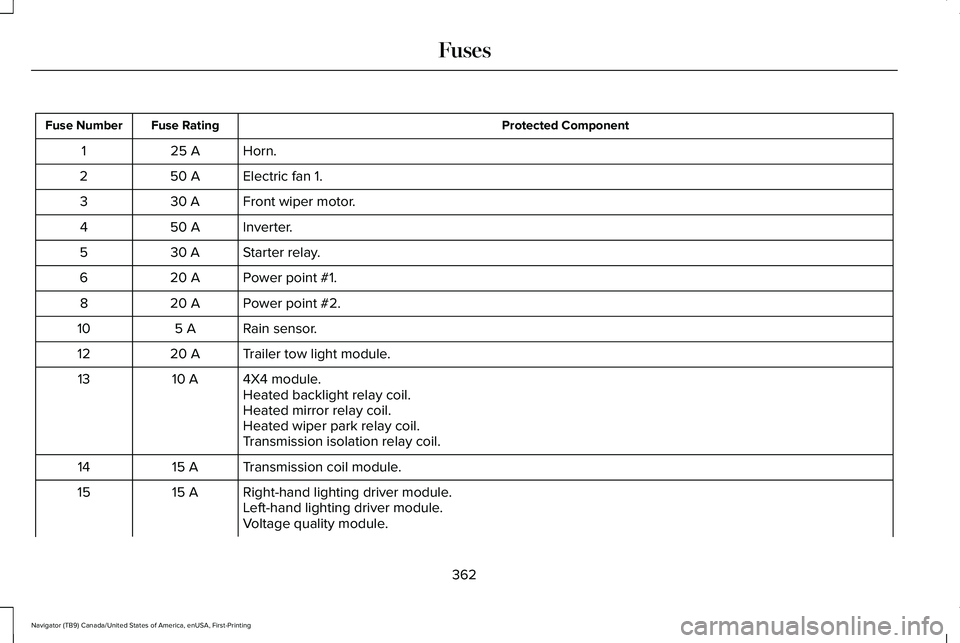
Protected Component
Fuse Rating
Fuse Number
Horn.
25 A
1
Electric fan 1.
50 A
2
Front wiper motor.
30 A
3
Inverter.
50 A
4
Starter relay.
30 A
5
Power point #1.
20 A
6
Power point #2.
20 A
8
Rain sensor.
5 A
10
Trailer tow light module.
20 A
12
4X4 module.
10 A
13
Heated backlight relay coil.
Heated mirror relay coil.
Heated wiper park relay coil.
Transmission isolation relay coil.
Transmission coil module.
15 A
14
Right-hand lighting driver module.
15 A
15
Left-hand lighting driver module.
Voltage quality module.
362
Navigator (TB9) Canada/United States of America, enUSA, First-Printing Fuses
Page 368 of 639
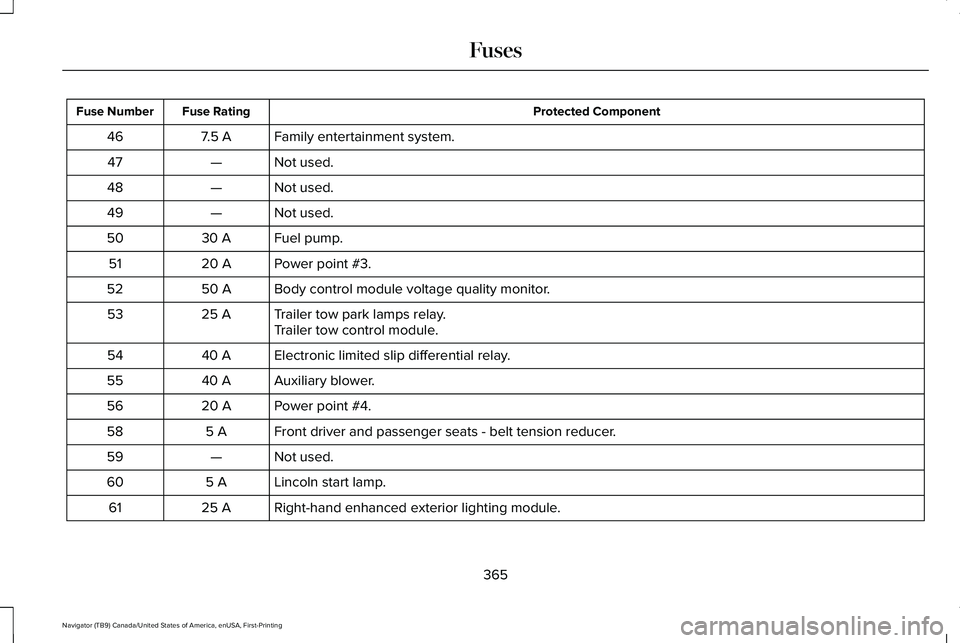
Protected Component
Fuse Rating
Fuse Number
Family entertainment system.
7.5 A
46
Not used.
—
47
Not used.
—
48
Not used.
—
49
Fuel pump.
30 A
50
Power point #3.
20 A
51
Body control module voltage quality monitor.
50 A
52
Trailer tow park lamps relay.
25 A
53
Trailer tow control module.
Electronic limited slip differential relay.
40 A
54
Auxiliary blower.
40 A
55
Power point #4.
20 A
56
Front driver and passenger seats - belt tension reducer.
5 A
58
Not used.
—
59
Lincoln start lamp.
5 A
60
Right-hand enhanced exterior lighting module.
25 A
61
365
Navigator (TB9) Canada/United States of America, enUSA, First-Printing Fuses
Page 369 of 639
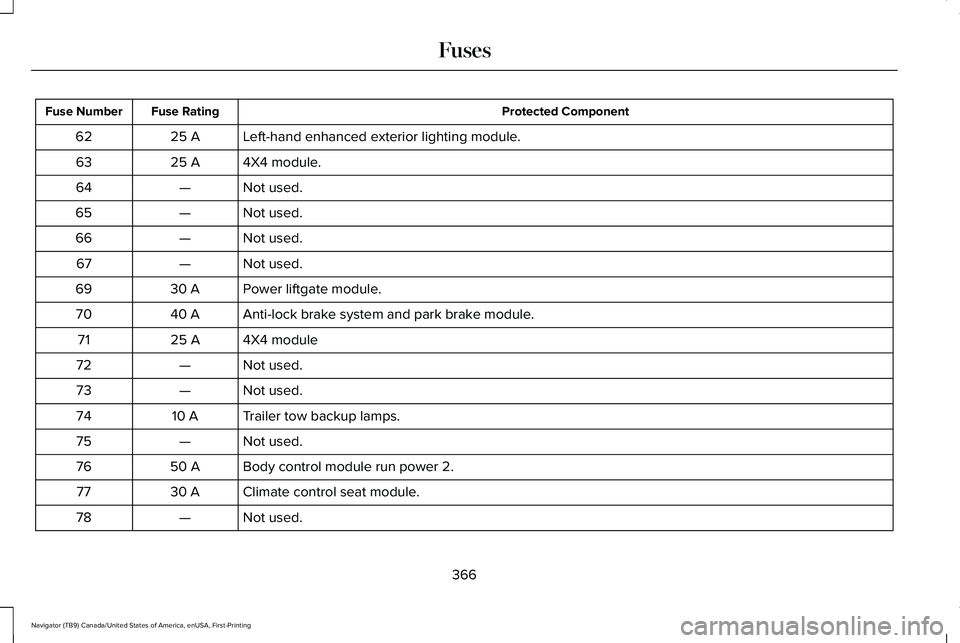
Protected Component
Fuse Rating
Fuse Number
Left-hand enhanced exterior lighting module.
25 A
62
4X4 module.
25 A
63
Not used.
—
64
Not used.
—
65
Not used.
—
66
Not used.
—
67
Power liftgate module.
30 A
69
Anti-lock brake system and park brake module.
40 A
70
4X4 module
25 A
71
Not used.
—
72
Not used.
—
73
Trailer tow backup lamps.
10 A
74
Not used.
—
75
Body control module run power 2.
50 A
76
Climate control seat module.
30 A
77
Not used.
—
78
366
Navigator (TB9) Canada/United States of America, enUSA, First-Printing Fuses
Page 371 of 639
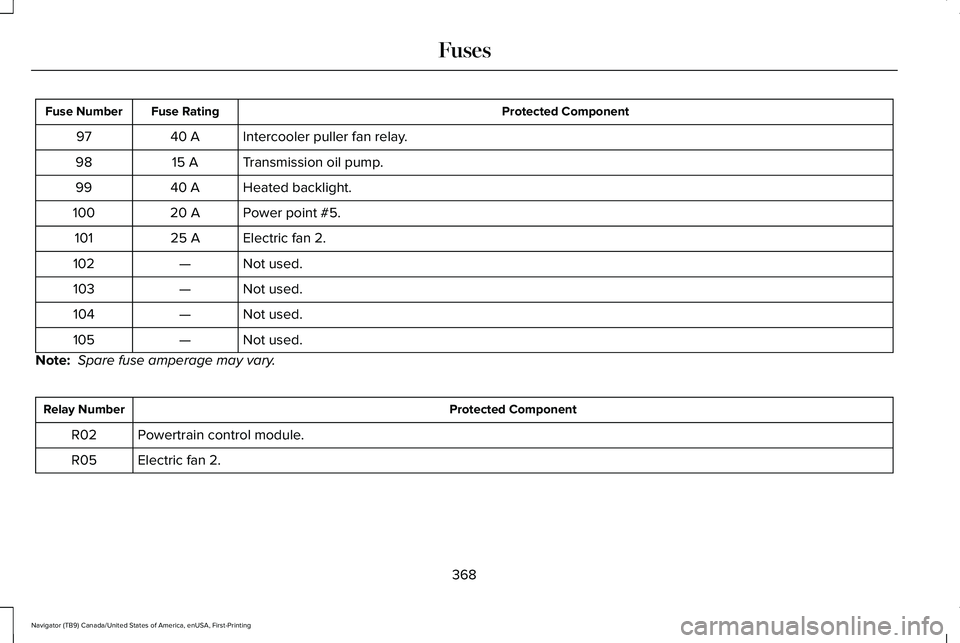
Protected Component
Fuse Rating
Fuse Number
Intercooler puller fan relay.
40 A
97
Transmission oil pump.
15 A
98
Heated backlight.
40 A
99
Power point #5.
20 A
100
Electric fan 2.
25 A
101
Not used.
—
102
Not used.
—
103
Not used.
—
104
Not used.
—
105
Note: Spare fuse amperage may vary. Protected Component
Relay Number
Powertrain control module.
R02
Electric fan 2.
R05
368
Navigator (TB9) Canada/United States of America, enUSA, First-Printing Fuses
Page 385 of 639
From the main menu scroll to:
Action and description
Message
Press the right arrow button,
then from this menu scroll to
the following message.
Settings
Press the right arrow button,
then from this menu scroll to
the following message.
Vehicle
Press the right arrow button,
then from this menu scroll to
the following message.
Oil Life
Press and hold the OK button
until the instrument cluster
displays the following
message.
Hold OK to
Reset
Reset Successful
When the oil change indicator
resets the instrument cluster
displays 100%.
Remaining Life
{00}% Action and description
Message
If the instrument cluster
displays one of the following
messages, repeat the
process.
Not Reset
Reset Cancelled
CHANGING THE ENGINE AIR
FILTER WARNING: To reduce the risk of
vehicle damage and personal burn injuries,
do not start your engine with the air
cleaner removed and do not remove it
while the engine is running.
Note: Failure to use the correct air filter
element may result in severe engine
damage. Resulting component damage may
not be covered by the vehicle Warranty. When changing the air filter element, use
only the air filter element listed.
See
Motorcraft Parts (page 439).
Change the air filter element at the correct
interval. See Scheduled Maintenance (page
543
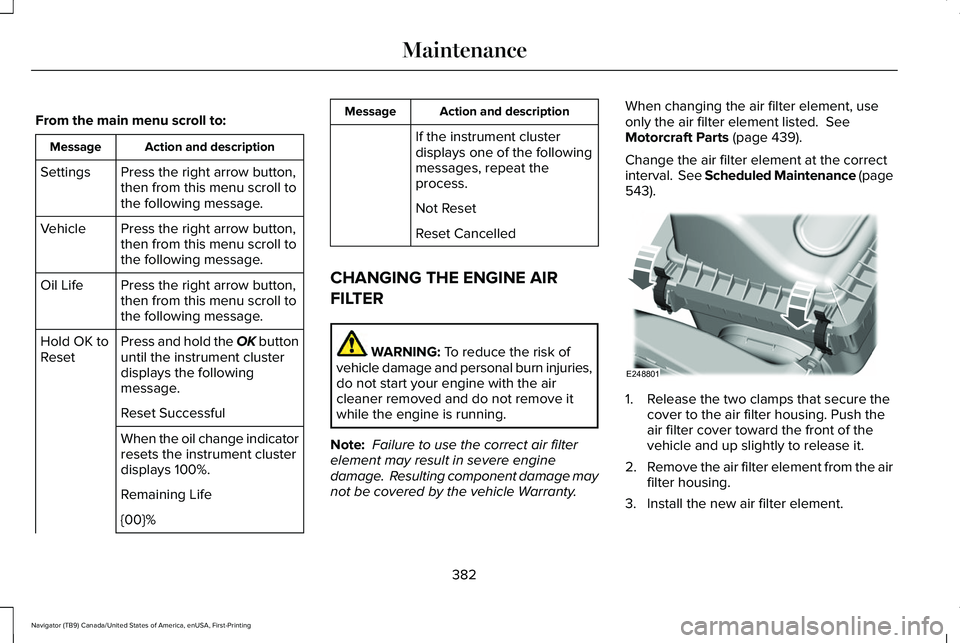
). 1. Release the two clamps that secure the
cover to the air filter housing. Push the
air filter cover toward the front of the
vehicle and up slightly to release it.
2. Remove the air filter element from the air
filter housing.
3. Install the new air filter element.
382
Navigator (TB9) Canada/United States of America, enUSA, First-Printing MaintenanceE248801
Page 386 of 639
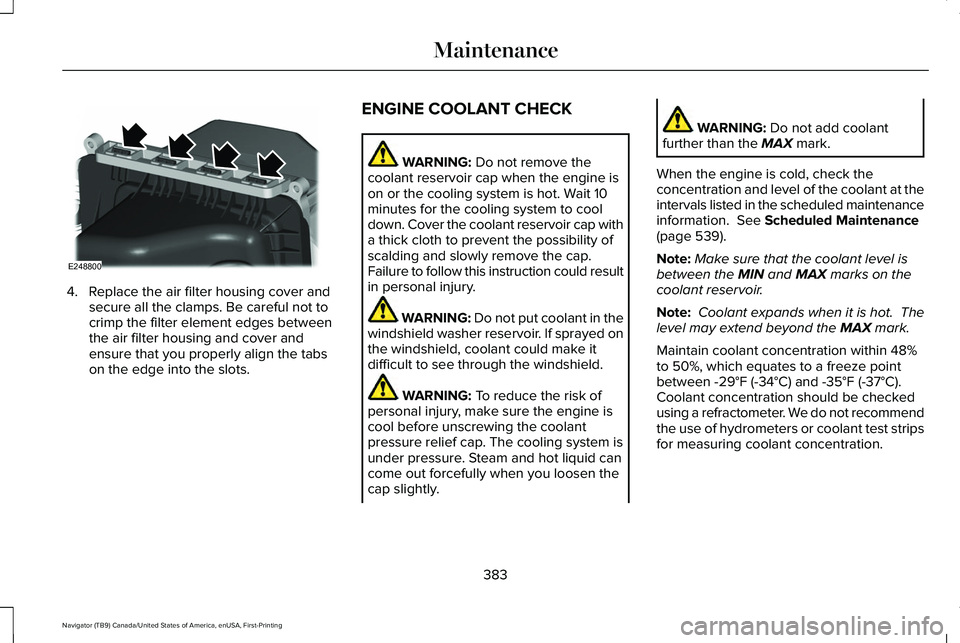
4. Replace the air filter housing cover and
secure all the clamps. Be careful not to
crimp the filter element edges between
the air filter housing and cover and
ensure that you properly align the tabs
on the edge into the slots. ENGINE COOLANT CHECK WARNING: Do not remove the
coolant reservoir cap when the engine is
on or the cooling system is hot. Wait 10
minutes for the cooling system to cool
down. Cover the coolant reservoir cap with
a thick cloth to prevent the possibility of
scalding and slowly remove the cap.
Failure to follow this instruction could result
in personal injury. WARNING: Do not put coolant in the
windshield washer reservoir. If sprayed on
the windshield, coolant could make it
difficult to see through the windshield. WARNING:
To reduce the risk of
personal injury, make sure the engine is
cool before unscrewing the coolant
pressure relief cap. The cooling system is
under pressure. Steam and hot liquid can
come out forcefully when you loosen the
cap slightly. WARNING:
Do not add coolant
further than the MAX mark.
When the engine is cold, check the
concentration and level of the coolant at the
intervals listed in the scheduled maintenance
information.
See Scheduled Maintenance
(page 539).
Note: Make sure that the coolant level is
between the
MIN and MAX marks on the
coolant reservoir.
Note: Coolant expands when it is hot. The
level may extend beyond the
MAX mark.
Maintain coolant concentration within 48%
to 50%, which equates to a freeze point
between
-29°F (-34°C) and -35°F (-37°C).
Coolant concentration should be checked
using a refractometer. We do not recommend
the use of hydrometers or coolant test strips
for measuring coolant concentration.
383
Navigator (TB9) Canada/United States of America, enUSA, First-Printing MaintenanceE248800