brake LINCOLN NAVIGATOR 2022 Owners Manual
[x] Cancel search | Manufacturer: LINCOLN, Model Year: 2022, Model line: NAVIGATOR, Model: LINCOLN NAVIGATOR 2022Pages: 646, PDF Size: 7.29 MB
Page 468 of 646
WARNING: Park your vehicle so that
you do not obstruct the flow of traffic or
place yourself in any danger and set up a
warning triangle.
1. Park the vehicle on firm, level ground and
activate the hazard flashers.
2. Apply the parking brake, place the transmission in park (P) and switch the
ignition off.
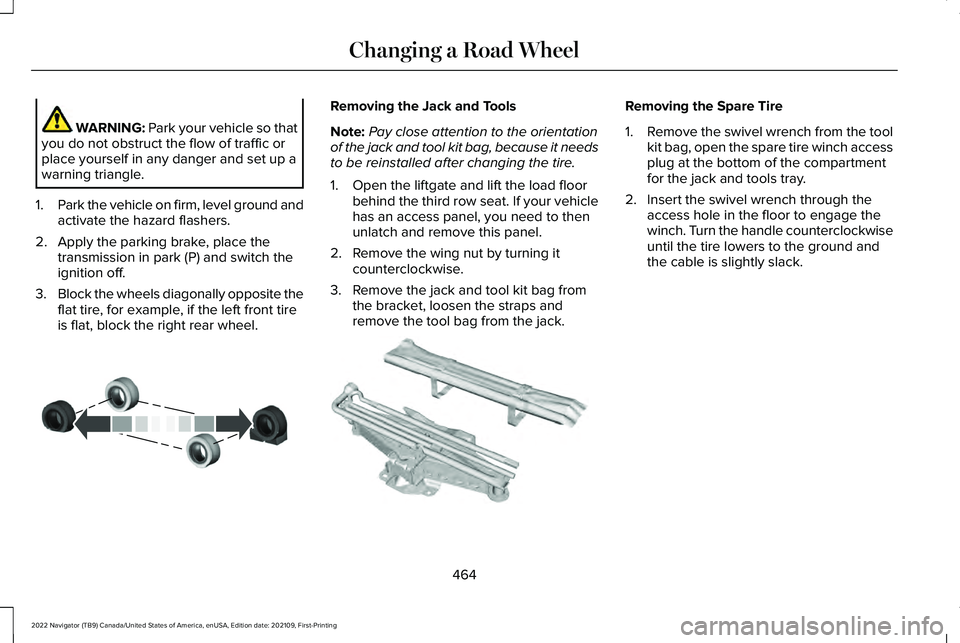
3. Block the wheels diagonally opposite the
flat tire, for example, if the left front tire
is flat, block the right rear wheel. Removing the Jack and Tools
Note:
Pay close attention to the orientation
of the jack and tool kit bag, because it needs
to be reinstalled after changing the tire.
1. Open the liftgate and lift the load floor behind the third row seat. If your vehicle
has an access panel, you need to then
unlatch and remove this panel.
2. Remove the wing nut by turning it counterclockwise.
3. Remove the jack and tool kit bag from the bracket, loosen the straps and
remove the tool bag from the jack. Removing the Spare Tire
1.
Remove the swivel wrench from the tool
kit bag, open the spare tire winch access
plug at the bottom of the compartment
for the jack and tools tray.
2. Insert the swivel wrench through the access hole in the floor to engage the
winch. Turn the handle counterclockwise
until the tire lowers to the ground and
the cable is slightly slack.
464
2022 Navigator (TB9) Canada/United States of America, enUSA, Edition date: 202109, First-Printing Changing a Road WheelE175447 E252435
Page 472 of 646
3.
Using the swivel wrench, insert it through
the access hole behind the third row seat
and engage the winch.
4. Turn the swivel wrench clockwise until the tire is raised to its stowed position
underneath the vehicle. The wrench
becomes harder to turn and the spare
tire winch ratchets or slips when the tire
is raised to maximum tightness. A clicking
sound can be heard from the winch
indicating that the tire is properly stowed.
5. Carefully place all tools back into the tool
kit bag.
6. Reinstall the tool kit bag on the jack and
tighten the straps.
7. Reinstall the jack properly on the bracket
and secure with the wing nut.
8. Close the access hole with the rubber plug.
9. If the vehicle has an access panel, reinstall.
10. Unblock the wheel. WHEEL NUTS WARNING: When you install a wheel,
always remove any corrosion, dirt or
foreign materials present on the mounting
surfaces of the wheel or the surface of the
wheel hub, brake drum or brake disc that
contacts the wheel. Make sure to secure
any fasteners that attach the rotor to the
hub so they do not interfere with the
mounting surfaces of the wheel. Installing
wheels without correct metal-to-metal
contact at the wheel mounting surfaces
can cause the wheel nuts to loosen and
the wheel to come off while your vehicle
is in motion, resulting in loss of vehicle
control, personal injury or death. lb.ft (Nm)
1
Bolt Size
150 lb.ft (204 Nm)
M14 x 1.5
1 Torque specifications are for nut and bolt
threads free of dirt and rust. Use only our
recommended replacement wheel nuts and
or wheel bolts. Retighten the wheel nuts to the specified
torque within 100 mi (160 km) after any wheel
disturbance, such as tire rotation, changing
a flat tire or wheel removal.
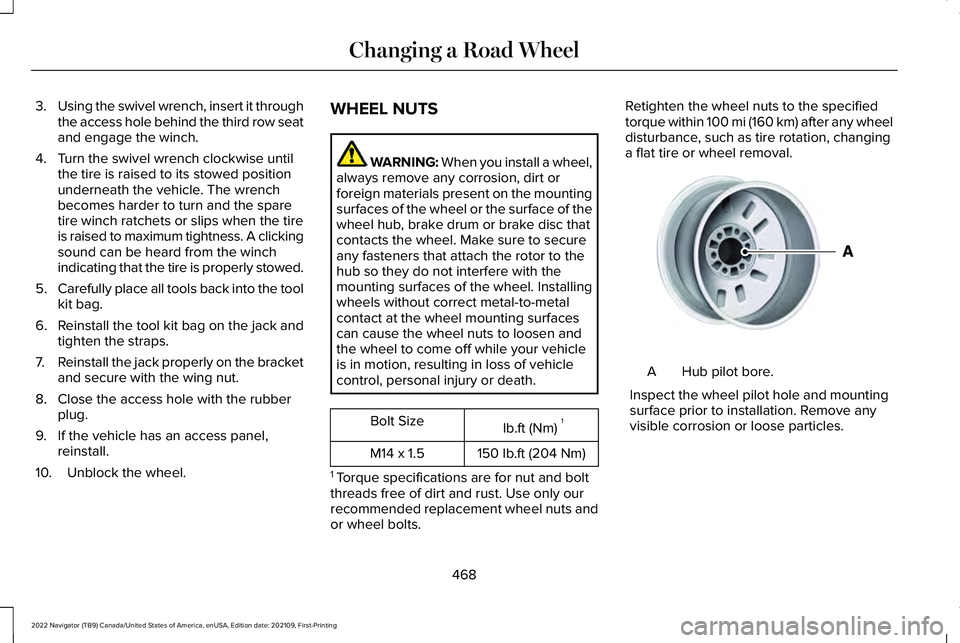
Hub pilot bore.
A
Inspect the wheel pilot hole and mounting
surface prior to installation. Remove any
visible corrosion or loose particles.
468
2022 Navigator (TB9) Canada/United States of America, enUSA, Edition date: 202109, First-Printing Changing a Road WheelE145950
Page 480 of 646
WASHER FLUID SPECIFICATION
Capacities
Quantity
Variant
Fill as required.
All.
Materials Specification
Name
WSS-M14P19-A
Motorcraft® Premium Windshield Wash Concentrate with Bitterant(U.S.)
Motorcraft® Premium Quality Windshield Washer Fluid / Liquide lave-glace de haute
qualité Motorcraft®(Canada)
ZC-32-B2(U.S.)
CXC-37-F/M(Canada)
BRAKE FLUID SPECIFICATION
Use fluid that meets the defined specification
and viscosity grade. If you do not use fluid that meets the defined
specification and viscosity grade, it could
result in:
•
Component damage that your vehicle
warranty does not cover.
• Reduced brake performance.
476
2022 Navigator (TB9) Canada/United States of America, enUSA, Edition date: 202109, First-Printing Capacities and Specifications
Page 481 of 646
Note:
We recommend you use Dot 4 Low
Viscosity (LV) High Performance Brake Fluid
meeting WSS-M6C65-A2 specifications or
ISO 4925 Class 6 standards. If you use any
fluid other than the recommended fluid, it
could cause reduced brake performance
and not meet our performance standards.
Keep brake fluid clean and dry.
Contamination with dirt, water, petroleum
products or other materials could result in
brake system damage and possible failure.
Capacities Quantity
Variant
Fill as required.
All.
Materials Specification
Name
WSS-M6C65-A2
Motorcraft® DOT 4 LV High Performance Motor Vehicle Brake Fluid(U.S.)
Motorcraft® DOT 4 LV High Performance Motor Vehicle Brake Fluid / Liquide de
frein automobile haute performance DOT 4 LV Motorcraft®(Canada)
PM-20(U.S. & Canada)
477
2022 Navigator (TB9) Canada/United States of America, enUSA, Edition date: 202109, First-Printing Capacities and Specifications
Page 485 of 646
VEHICLE IDENTIFICATION NUMBER
LOCATING THE VEHICLE
IDENTIFICATION NUMBER
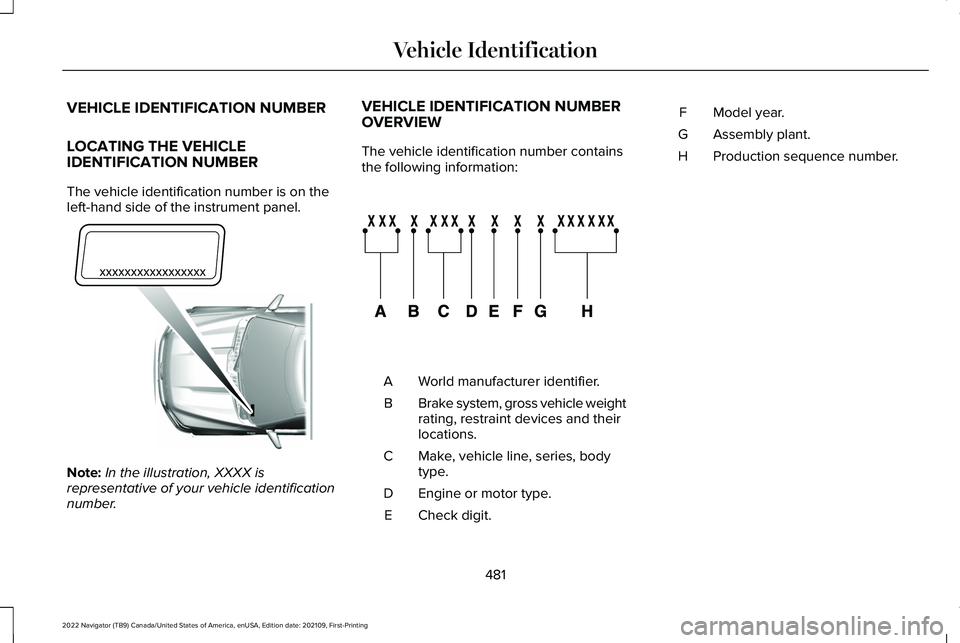
The vehicle identification number is on the
left-hand side of the instrument panel.
Note:
In the illustration, XXXX is
representative of your vehicle identification
number. VEHICLE IDENTIFICATION NUMBER
OVERVIEW
The vehicle identification number contains
the following information:
World manufacturer identifier.
A
Brake system, gross vehicle weight
rating, restraint devices and their
locations.
B
Make, vehicle line, series, body
type.
C
Engine or motor type.
D
Check digit.
E Model year.
F
Assembly plant.
G
Production sequence number.
H
481
2022 Navigator (TB9) Canada/United States of America, enUSA, Edition date: 202109, First-Printing Vehicle IdentificationE311767 E142477
Page 525 of 646
UPDATING THE VEHICLE SYSTEMS
WIRELESSLY
Over the air system updates allow
you to update your vehicle system
software wirelessly. To make sure
you receive all updates, set a recurring
schedule and connect to Wi-Fi. Updates may
take longer if not connected to Wi-Fi, or may
not download at all. See Connected Vehicle
(page 482).
Over the Air System Update
Requirements
Before updating, reference this list to make
sure your vehicle is ready be updated. If
these requirements are not met during a
scheduled update, the update will be
canceled and you can reschedule.
• Your vehicle is not running.
• Your vehicle is stopped.
• Your vehicle is parked.
• The hazard indicators are switched off.
• The alarm is not sounding. •
The doors are closed.
• The parking lights are switched off.
• You are not pressing the brake pedal.
• An emergency call is not in progress.
• Your vehicle is not in limp mode.
Enabling Over the Air Updates
1. Press
Settings on the touchscreen.
2. Press
Software Update.
3. Switch
Automatic Updates on or off.
Note: Over the air updates are enabled by
default.
Note: If you do not want to receive over the
air updates you can turn them off. You will
not be notified of new updates. Scheduling an Update
Scheduling an update allows you to set a
convenient time for the update to complete.
We recommend updating overnight when
your vehicle is not in use. Ensure Vehicle
Connectivity and Automatic Updates are
enabled. Once you complete these steps,
your schedule will be saved for future
updates. As long as an update is not in
process you can adjust your schedule.
Note:
Some updates may be applied outside
of your set schedule. Information about the
unscheduled update appears on the
touchscreen after it is applied.
Using the Settings Menu
1. Press
Settings on the touchscreen.
2. Press
Software Update.
3. Press
Schedule Updates.
4. Use the controls to set the time and day
of the update.
5. Save the schedule.
Note: You can set the updates to occur at
any time.
521
2022 Navigator (TB9) Canada/United States of America, enUSA, Edition date: 202109, First-Printing Vehicle System UpdatesE327789
Page 530 of 646
Transferable Coverage
If you sell your vehicle before your Lincoln
Protect extended service plan coverage
expires, you can transfer any remaining
coverage to the new owner. This should give
you and your potential buyer a little more
peace of mind.
Less Cost to Properly Maintain Your Vehicle
The Lincoln Protect extended service plan
also offers a Premium Maintenance Plan that
covers all scheduled maintenance, and
selected wear items. The coverage is
prepaid, so you never have to worry about
the cost of your vehicle
’s maintenance.
Covered maintenance includes:
• Windshield wiper blades.
• Spark plugs.
• The clutch disc - if equipped.
• Brake pads and linings.
• Shock absorbers and struts.
• Engine cooling hoses, clamps and
o-rings. •
Engine belts.
• Diesel exhaust fluid replenishment - if
equipped.
Interest Free Finance Options
Just a 5% down payment will provide you
with an affordable, no interest, no fee
payment program allowing you all the
security and benefits Lincoln Protect
extended service plan has to offer while
paying over time. You are pre-approved with
no credit check or hassles. To learn more,
call our Lincoln Protect extended service
plan specialists at 800-367-3377.
Complete the information below and mail to:
Lincoln Protect Extended Service Plan
P.O. Box 321067
Detroit, MI 48232 Lincoln Protect (Canada Only)
You can get more protection for your vehicle
by purchasing a Lincoln Protect extended
service plan. The Lincoln Protect extended
service plan is the only service contract
backed by Lincoln, Limited. Depending on
the plan you purchase, the Lincoln Protect
extended service plan provides benefits such
as:
•
Rental reimbursement.
• Coverage for certain maintenance and
wear items.
• Protection against repair costs after your
New Vehicle Limited Warranty Coverage
expires.
• Roadside Assistance benefits.
526
2022 Navigator (TB9) Canada/United States of America, enUSA, Edition date: 202109, First-Printing Lincoln Protect
Page 534 of 646
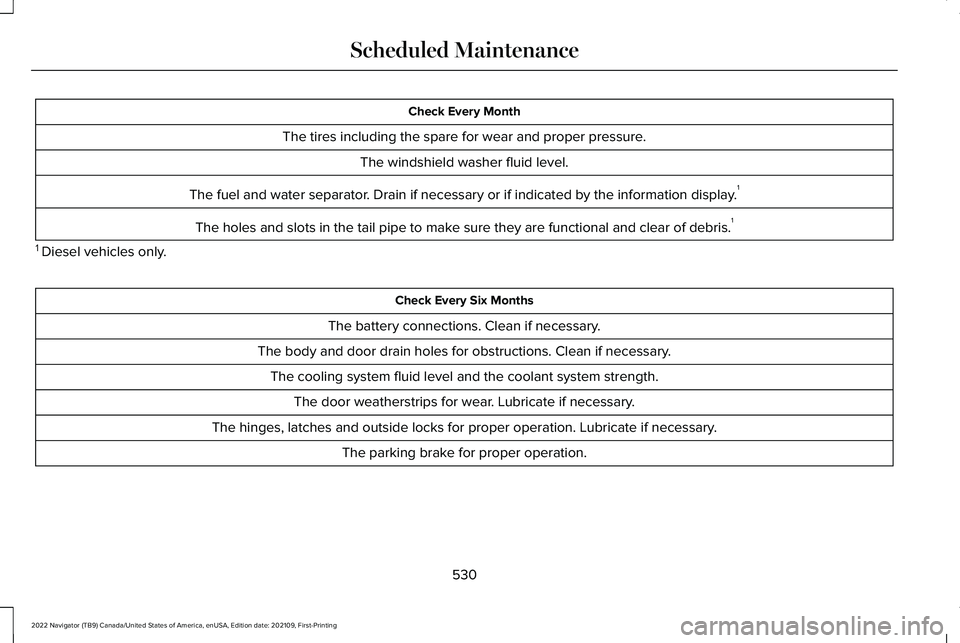
Check Every Month
The tires including the spare for wear and proper pressure. The windshield washer fluid level.
The fuel and water separator. Drain if necessary or if indicated by the information display. 1
The holes and slots in the tail pipe to make sure they are functional and clear of debris. 1
1 Diesel vehicles only. Check Every Six Months
The battery connections. Clean if necessary.
The body and door drain holes for obstructions. Clean if necessary. The cooling system fluid level and the coolant system strength. The door weatherstrips for wear. Lubricate if necessary.
The hinges, latches and outside locks for proper operation. Lubricate if necessary. The parking brake for proper operation.
530
2022 Navigator (TB9) Canada/United States of America, enUSA, Edition date: 202109, First-Printing Scheduled Maintenance
Page 535 of 646
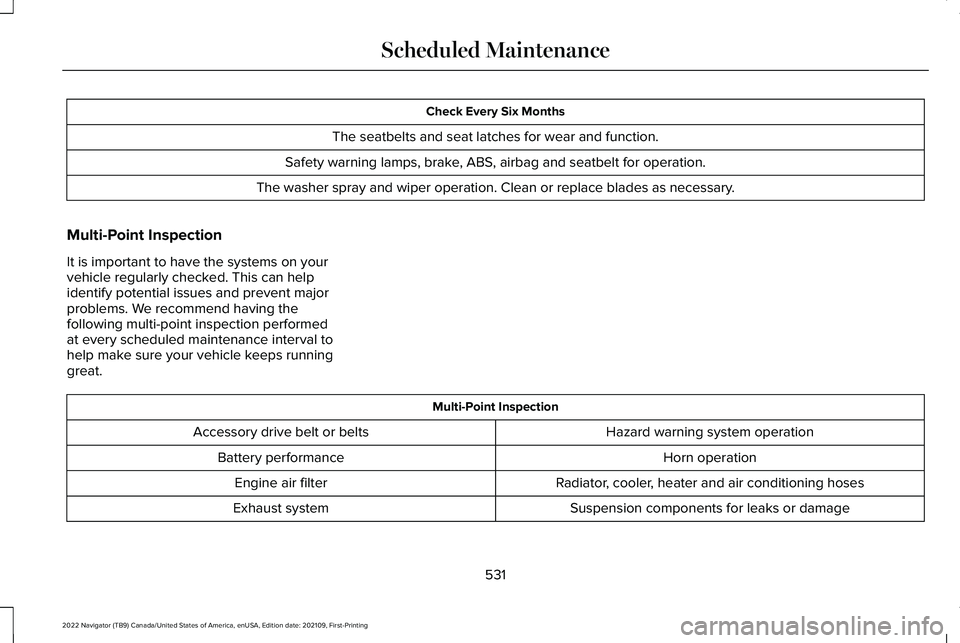
Check Every Six Months
The seatbelts and seat latches for wear and function.
Safety warning lamps, brake, ABS, airbag and seatbelt for operation.
The washer spray and wiper operation. Clean or replace blades as necessa\
ry.
Multi-Point Inspection
It is important to have the systems on your
vehicle regularly checked. This can help
identify potential issues and prevent major
problems. We recommend having the
following multi-point inspection performed
at every scheduled maintenance interval to
help make sure your vehicle keeps running
great. Multi-Point Inspection
Hazard warning system operation
Accessory drive belt or belts
Horn operation
Battery performance
Radiator, cooler, heater and air conditioning hoses
Engine air filter
Suspension components for leaks or damage
Exhaust system
531
2022 Navigator (TB9) Canada/United States of America, enUSA, Edition date: 202109, First-Printing Scheduled Maintenance
Page 536 of 646
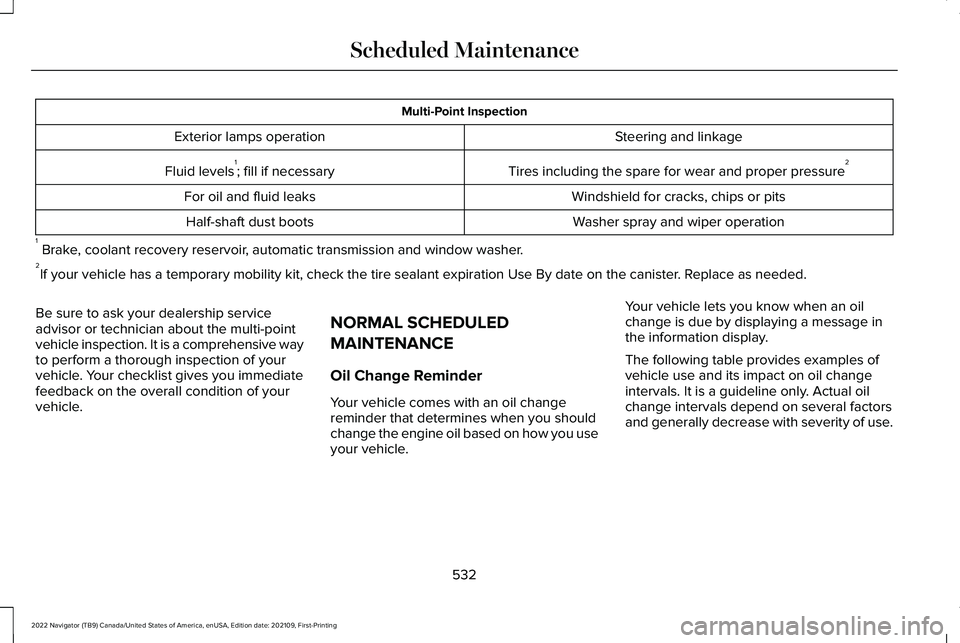
Multi-Point Inspection
Steering and linkage
Exterior lamps operation
Tires including the spare for wear and proper pressure 2
Fluid levels 1
; fill if necessary
Windshield for cracks, chips or pits
For oil and fluid leaks
Washer spray and wiper operation
Half-shaft dust boots
1 Brake, coolant recovery reservoir, automatic transmission and window washer.
2 If your vehicle has a temporary mobility kit, check the tire sealant exp\
iration Use By date on the canister. Replace as needed.
Be sure to ask your dealership service
advisor or technician about the multi-point
vehicle inspection. It is a comprehensive way
to perform a thorough inspection of your
vehicle. Your checklist gives you immediate
feedback on the overall condition of your
vehicle. NORMAL SCHEDULED
MAINTENANCE
Oil Change Reminder
Your vehicle comes with an oil change
reminder that determines when you should
change the engine oil based on how you use
your vehicle.Your vehicle lets you know when an oil
change is due by displaying a message in
the information display.
The following table provides examples of
vehicle use and its impact on oil change
intervals. It is a guideline only. Actual oil
change intervals depend on several factors
and generally decrease with severity of use.
532
2022 Navigator (TB9) Canada/United States of America, enUSA, Edition date: 202109, First-Printing Scheduled Maintenance