brake LINCOLN NAVIGATOR 2022 Manual Online
[x] Cancel search | Manufacturer: LINCOLN, Model Year: 2022, Model line: NAVIGATOR, Model: LINCOLN NAVIGATOR 2022Pages: 646, PDF Size: 7.29 MB
Page 361 of 646
3.
When you plug in a trailer with electric or
electric-over-hydraulic brakes, a message
confirming connection appears in the
information display.
4. Use the gain adjustment to find the desired starting point. A gain setting of
6.0 is a good starting point for heavier
loads.
Note: Use the following steps to adjust the
gain setting whenever road, weather and
trailer, or vehicle loading conditions, change
from when you initially set the gain.
5. In a traffic-free environment, tow the trailer on a dry, level surface and squeeze
the manual control lever completely.
6. If the trailer wheels lock up, indicated by
squealing tires, reduce the gain setting.
If the trailer wheels turn freely, increase
the gain setting. Repeat Steps 5 and 6
until the gain setting is at a point just
below trailer wheel lock-up. If towing a
heavier trailer, trailer wheel lock-up may
not be attainable even with the maximum
gain setting of 10.
Note: Only perform this procedure at speeds
of approximately 20–25 mph (30–40 km/h). Note:
The trailer brake controller reduces
output at vehicle speeds below 11 mph
(18 km/h) so that trailer and vehicle braking
is not jerky or harsh. This feature is only
available when applying the brakes using
your vehicle's brake pedal, not the controller.
Note: Your vehicle's brake system and the
trailer brake system work independently of
each other. Changing the gain setting on the
controller does not affect the operation of
your vehicle's brakes whether you attach a
trailer or not.
Note: With the proper electrical connection,
pressing your vehicle brake pedal or using
the manual control lever illuminates both
trailer and vehicle brake lamps.
Note: When you switch the engine off, the
controller output is disabled and the display
and module shut down. The controller
module and display turn on when you switch
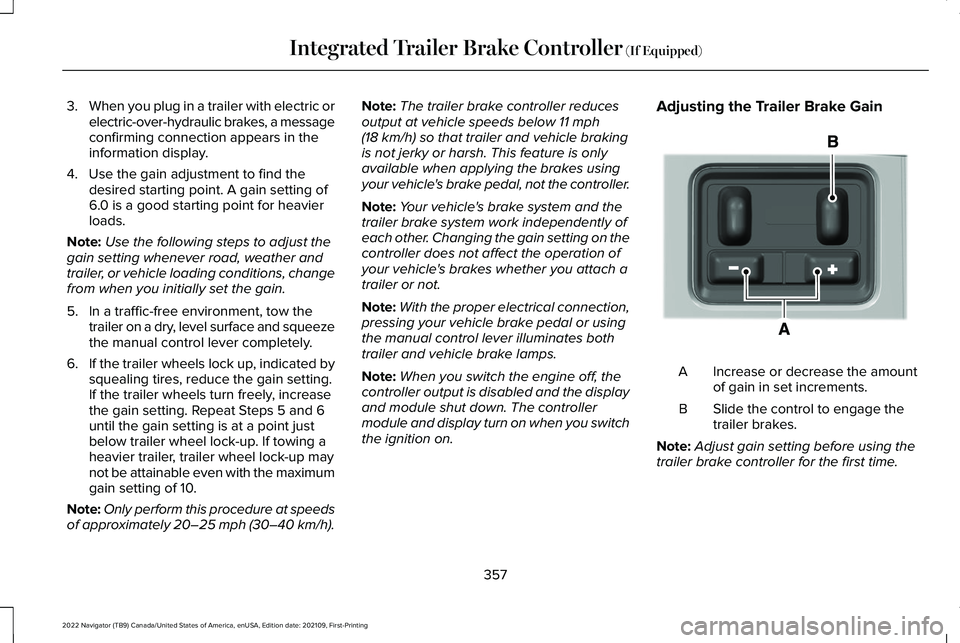
the ignition on. Adjusting the Trailer Brake Gain
Increase or decrease the amount
of gain in set increments.
A
Slide the control to engage the
trailer brakes.
B
Note: Adjust gain setting before using the
trailer brake controller for the first time.
357
2022 Navigator (TB9) Canada/United States of America, enUSA, Edition date: 202109, First-Printing Integrated Trailer Brake Controller
(If Equipped)E333154
Page 362 of 646
Note:
The gain should be set to provide the
maximum trailer braking assistance while
making sure the trailer wheels do not lock
when using the brakes. Locked trailer wheels
may lead to trailer instability.
Note: Setting adjustments are saved when
a trailer profile is selected.
ADJUSTING THE INTEGRATED
TRAILER BRAKE CONTROLLER
MODE
Select the correct integrated trailer brake
controller mode option using the
touchscreen. Note:
Trailer brake gain settings are saved
to the active trailer profile.
Selecting the Trailer Brake Type
1. Press Default for trailers with
electromagnetic drum brake systems or
press Electric over Hydraulic for trailers
with electrically actuated hydraulic brake
systems.
2. Press
Save.
Selecting the Trailer Brake Effort
1. Select a setting for your trailer. Note:
The default value is
Low and is the
recommended setting for most trailers.
Select a different setting if your trailer's
brakes require more initial voltage, or you
prefer more aggressive trailer braking.
2. Press
Save.
358
2022 Navigator (TB9) Canada/United States of America, enUSA, Edition date: 202109, First-Printing Integrated Trailer Brake Controller
(If Equipped)
Page 363 of 646
INTEGRATED TRAILER BRAKE CONTROLLER – TROUBLESHOOTING
INTEGRATED TRAILER BRAKE CONTROLLER – INFORMATION MESSAGES
Action
Message
The system detects a correct trailer connection during a given ignitioncycle.
Trailer Connected
The system detects the trailer wiring connection is disconnected,during a given ignition cycle.
Trailer Disconnected
The system detects an electrical fault in the trailer brake circuit. If thismessage appears without a trailer attached, see your authorized
dealer. If a trailer is attached, inspect and repair the trailer wiring.
Trailer Wiring Fault
Displays the current gain setting for the trailer brake.
Trailer Brake Gain: {trailer gain value:#0.0}
Displays the current gain setting for the trailer brake when you do nothave a trailer connected.
Trailer Brake Gain: {trailer gain value:#0.0} No Trailer
359
2022 Navigator (TB9) Canada/United States of America, enUSA, Edition date: 202109, First-Printing Integrated Trailer Brake Controller (If Equipped)
Page 364 of 646
INTEGRATED TRAILER BRAKE
CONTROLLER – FREQUENTLY ASKED
QUESTIONS
How do I determine if there is an issue with
the wiring on my vehicle?
A message displays accompanied by a
single tone, when no trailer is
connected. This indicates that the issue
is between the trailer brake controller
and the 7-pin connector at the bumper.
How do I determine if there is an issue with
the wiring on my trailer? A message only displays with a trailer
connected. Consult your trailer dealer
for assistance.
360
2022 Navigator (TB9) Canada/United States of America, enUSA, Edition date: 202109, First-Printing Integrated Trailer Brake Controller (If Equipped)
Page 365 of 646
HOW DOES TRAILER SWAY
CONTROL WORK
The system applies the brakes to the
individual wheels and reduces engine torque
to aid vehicle stability.
If the trailer begins to sway, the stability
control lamp flashes and the message Trailer
Sway Reduce Speed appears in the
information display.
Stop your vehicle as soon as it is safe to do
so. Check the vertical weight on the tow ball
and trailer load distribution. TRAILER SWAY CONTROL
PRECAUTIONS WARNING:
Turning off trailer sway
control increases the risk of loss of vehicle
control, serious injury or death. Ford does
not recommend disabling this feature
except in situations where speed reduction
may be detrimental (such as hill climbing),
the driver has significant trailer towing
experience, and can control trailer sway
and maintain safe operation.
Note: This feature only activates when
significant trailer sway occurs.
Note: This feature does not prevent trailer
sway, but reduces it once it begins.
Note: This feature cannot stop all trailers
from swaying.
Note: In some cases, if vehicle speed is too
high, the system may activate multiple times,
gradually reducing vehicle speed. SWITCHING TRAILER SWAY
CONTROL ON AND OFF
1. Press
Features on the touchscreen.
2. Press
Towing.
3. Switch
Trailer Sway Control on or off.
The system turns on each time you start your
vehicle.
361
2022 Navigator (TB9) Canada/United States of America, enUSA, Edition date: 202109, First-Printing Trailer Sway Control
Page 366 of 646
WHAT IS TRAILER BACKUP
ASSISTANCE
Trailer backup assistance utilizes the control
knob on the instrument panel to help you
steer a trailer. Turn the control knob in the
direction you want the trailer to go and the
system steers the vehicle.
HOW DOES TRAILER BACKUP
ASSISTANCE WORK
Trailer backup assistance uses a sticker to
detect the trailer angle relative to the towing
vehicle and provides instructions, graphics
and camera views on the touchscreen.
TRAILER BACKUP ASSISTANCE
PRECAUTIONS WARNING: Driving while distracted
can result in loss of vehicle control, crash
and injury. We strongly recommend that
you use extreme caution when using any
device that may take your focus off the
road. Your primary responsibility is the safe
operation of your vehicle. We recommend
against the use of any hand-held device
while driving and encourage the use of
voice-operated systems when possible.
Make sure you are aware of all applicable
local laws that may affect the use of
electronic devices while driving. WARNING:
This system is an extra
driving aid. It does not replace your
attention and judgment, or the need to
apply the brakes. This system does NOT
automatically brake your vehicle. If you fail
to press the brake pedal when necessary,
you may collide with another vehicle. Note:
The system is not a substitute for safe
driving practices. Always be aware of your
vehicle and trailer combination, and the
surrounding environment.
Note: The system does not detect or prevent
your vehicle or trailer from making contact
with obstacles in the surrounding
environment.
Note: The front end of your vehicle swings
out when changing the direction of the
trailer.
Note: In certain conditions, the trailer could
turn faster or the trailer angle could increase
more than anticipated. Always monitor the
clearance between the trailer and vehicle
and the surroundings.
362
2022 Navigator (TB9) Canada/United States of America, enUSA, Edition date: 202109, First-Printing Trailer Backup Assistance
(If Equipped)
Page 379 of 646
WHAT IS TRAILER REVERSE
GUIDANCE
Trailer reverse guidance provides views and
graphics on the touchscreen to help you
steer your vehicle when you backup a trailer.
HOW DOES TRAILER REVERSE
GUIDANCE WORK
Trailer reverse guidance uses a sticker to
detect the trailer angle relative to the towing
vehicle and provides instructions, graphics
and camera views on the touchscreen.
TRAILER REVERSE GUIDANCE
PRECAUTIONS
WARNING: Driving while distracted
can result in loss of vehicle control, crash
and injury. We strongly recommend that
you use extreme caution when using any
device that may take your focus off the
road. Your primary responsibility is the safe operation of your vehicle. We recommend
against the use of any hand-held device
while driving and encourage the use of
voice-operated systems when possible.
Make sure you are aware of all applicable
local laws that may affect the use of
electronic devices while driving.
WARNING:
This system is an extra
driving aid. It does not replace your
attention and judgment, or the need to
apply the brakes. This system does NOT
automatically brake your vehicle. If you fail
to press the brake pedal when necessary,
you may collide with another vehicle.
Note: The system is not a substitute for safe
driving practices. Always be aware of your
vehicle and trailer combination, and the
surrounding environment.
Note: The system does not detect or prevent
your vehicle or trailer from making contact
with obstacles in the surrounding
environment.
Note: The front end of your vehicle swings
out when changing the direction of the
trailer. Note:
In certain conditions, the trailer could
turn faster or the trailer angle could increase
more than anticipated. Always monitor the
clearance between the trailer and vehicle
and the surroundings.
SETTING UP TRAILER REVERSE
GUIDANCE FOR A CONVENTIONAL
TRAILER
CONFIGURING THE TRAILER
You must configure a trailer in the system to
use trailer reverse guidance. This is a
one-time setup process and the trailer
information is saved in the system for the
next time you use that trailer.
The system only works with conventional
trailers. It does not work with other types
including fifth-wheel and gooseneck trailers.
The following illustration shows examples of
conventional trailers on the left-hand side.
375
2022 Navigator (TB9) Canada/United States of America, enUSA, Edition date: 202109, First-Printing Trailer Reverse Guidance
(If Equipped)
Page 388 of 646
REDUCED ENGINE PERFORMANCE
WARNING: If you continue to drive
your vehicle when the engine is
overheating, the engine could stop without
warning. Failure to follow this instruction
could result in the loss of control of your
vehicle.
If the engine coolant temperature gauge
needle moves to the upper limit position, the
engine is overheating.
See Instrument
Cluster Overview (page 141).
You must only drive your vehicle for a short
distance if the engine overheats. The
distance you can travel depends on ambient
temperature, vehicle load and terrain. The
engine continues to operate with limited
power for a short period of time.
If the engine temperature continues to rise,
the fuel supply to the engine reduces. The
air conditioning switches off and the engine
cooling fan operates continually. 1. Gradually reduce your speed and stop
your vehicle as soon as it is safe to do
so.
2. Immediately switch the engine off to prevent severe engine damage.
3. Wait for the engine to cool down.
4. Check the coolant level.
See Cooling
System Capacity and Specification
(page
473).
5. Have your vehicle checked as soon as possible.
COLD WEATHER PRECAUTIONS
The functional operation of some
components and systems can be affected at
temperatures below approximately
-13°F
(-25°C). DRIVING ON SNOW AND ICE WARNING:
If you are driving in
slippery conditions that require tire chains
or cables, then it is critical that you drive
cautiously. Keep speeds down, allow for
longer stopping distances and avoid
aggressive steering to reduce the chances
of a loss of vehicle control which can lead
to serious injury or death. If the rear end
of your vehicle slides while cornering, steer
in the direction of the slide until you regain
control of your vehicle.
On ice and snow, you should drive more
slowly than usual. Your vehicle has a four
wheel anti-lock brake system, do not pump
the brake pedal.
See Anti-Lock Braking
System Limitations (page 233).
384
2022 Navigator (TB9) Canada/United States of America, enUSA, Edition date: 202109, First-Printing Driving Hints
Page 389 of 646
BREAKING-IN
Your vehicle requires a break-in period. For
the first 1,000 mi (1,600 km), avoid driving at
high speeds, heavy braking, aggressive
shifting or using your vehicle to tow. During
this time, your vehicle may exhibit some
unusual driving characteristics.
DRIVING ECONOMICALLY
The following helps to improve fuel
consumption:
•
Drive smoothly, accelerate gently and
anticipate the road ahead to avoid heavy
braking.
• Regularly check your tire pressures and
make sure that they are inflated to the
correct pressure.
• Follow the recommended maintenance
schedule and carry out the
recommended checks.
• Plan your journey and check the traffic
before you set off. It is more efficient to
combine errands into a single trip
whenever possible. •
Avoid idling the engine in cold weather
or for extended periods. Start the engine
only when you are ready to set off.
• Do not carry unnecessary weight in your
vehicle as extra weight wastes fuel.
• Do not add unnecessary accessories to
the exterior of your vehicle, for example
running boards. If you use a roof rack,
remember to fold it down or remove it
when not in use.
• Do not shift into neutral when you are
braking or when your vehicle is slowing
down.
• Shut all windows when driving at high
speeds.
• Switch off all electric systems when not
in use, for example air conditioning. Make
sure that you unplug any accessories
from the auxiliary power points when not
in use. DRIVING IN SPECIAL CONDITIONS
EMERGENCY MANEUVERS
In an unavoidable emergency where you
must make a sudden sharp maneuver, turn
the steering wheel only as rapidly and as far
as required to avoid the emergency. Apply
smooth pressure to the accelerator pedal or
brake pedal as needed. Avoid abrupt
steering, acceleration and braking changes.
Abrupt changes could increase the risk of
vehicle roll over, loss of vehicle control and
personal injury. If possible, use any available
road surfaces to bring your vehicle under
control.
385
2022 Navigator (TB9) Canada/United States of America, enUSA, Edition date: 202109, First-Printing Driving Hints
Page 390 of 646
DRIVING THROUGH MUD AND WATER
Mud
Be cautious of sudden changes in vehicle
speed or direction when you are driving in
mud. Even all-wheel drive and four-wheel
drive vehicles can lose traction in mud. If
your vehicle slides, steer in the direction of
the slide until you regain control of your
vehicle. After driving through mud, clean off
residue stuck to rotating driveshafts and tires.
Excess residue can cause an imbalance that
could damage drive components.
Note:
If your vehicle gets stuck in mud, it
could be rocked out by shifting between
forward and reverse gears, stopping
between shifts in a steady pattern. Press
lightly on the accelerator in each gear.
Note: Do not rock your vehicle if the engine
is not at normal operating temperature, as
damage to the transmission could occur.
Note: Do not rock your vehicle for more than
a minute, as damage to the transmission
and tires could occur or the engine could
overheat. Water
If you must drive though deep water, drive
slowly. The water could limit traction or brake
capability. See Driving Through Shallow
Water (page 387).
When driving though water, determine the
depth and avoid water higher than the center
of the wheel.
Once through water, always try the brakes.
Wet brakes do not stop your vehicle as
quickly as dry brakes. Apply light pressure
to the brake pedal while slowly moving the
vehicle to dry the brakes.
Note: Driving through deep water could
cause damage to the transmission. If the
front or rear axle is submerged in water,
have the axle lubricant and power transfer
unit lubricant checked and changed if
necessary. DRIVING ON HILLY OR SLOPING
TERRAIN WARNING: Extreme care should be
used when steering the vehicle in reverse
down a slope so as not to cause the
vehicle to swerve out of control.
Although natural obstacles could make it
necessary to travel diagonally up or down a
hill or steep incline, you should try to drive
straight up or straight down.
Note: Avoid turning on steep slopes or hills.
A danger lies in losing traction, slipping
sideways and possible vehicle roll over.
Whenever driving on a hill, determine
beforehand the route you can use. Do not
drive over the crest of a hill without seeing
what conditions are on the other side. Do
not drive in reverse over a hill without the
aid of an observer.
386
2022 Navigator (TB9) Canada/United States of America, enUSA, Edition date: 202109, First-Printing Driving Hints