phone LINCOLN NAVIGATOR 2022 User Guide
[x] Cancel search | Manufacturer: LINCOLN, Model Year: 2022, Model line: NAVIGATOR, Model: LINCOLN NAVIGATOR 2022Pages: 646, PDF Size: 7.29 MB
Page 83 of 646
4. Press Lincoln Way Connect Reset.
5. Press
Reset All.
6. Confirm you would like to continue with erasing all Phone as a Key, Backup Start
Passcodes.
7. Press
Continue.
8. Confirm you are aware you are de-authorizing all authorized users and
Lincoln Way Connect settings.
9. Press
Continue.
Note: Please wait while the vehicle resets
all the Phone as a Key, Backup Start
Passcodes, Lincoln Way Connect Settings
and de-authorize previously authorized
users.
USING THE VALET MODE
1. Press Settings on the touchscreen.
2. Press Valet Mode.
Note: Have your Backup Start Passcode
completely setup before using Valet Mode. Note:
Once the system detects a valid Phone
as a Key, the temporary passcode displays
in both the touchscreen and mobile app. If
the system does not detect a valid Phone as
a Key, it prompts you to enter your Backup
Start Passcode. Once validated, the
temporary passcode displays on the
touchscreen.
3. Enter the first five digits of the passcode
on the keyless entry keypad to unlock
your vehicle.
4. Enter the eight-digit passcode on the touchscreen to start and drive your
vehicle.
To disable Valet Mode, press Exit Valet Mode
on the touchscreen. Once the system detects
an authorized Phone as a Key, it disables. If
the system does not detect a valid Phone as
a Key, it prompts you to enter your Backup
Start Passcode. Once validated, Valet Mode
disables. USING THE BACKUP START
PASSCODE
If you are unable to start your vehicle with
Phone as a Key, follow the steps below:
1. Press the brake pedal and the ignition
button. If the system does not detect a
valid Phone as a Key, a message appears
and the system prompts you for your
Backup Start Passcode.
Note: Make sure you have Phone as a Key
active on at least one phone to use the
previously created Backup Start Passcode.
Note: If the Backup Start Passcode screen
does not appear, it is necessary to press the
ignition button again.
2. Use the touchscreen to enter your Backup Start Passcode.
3. After entering your Backup Start Passcode, you must press Enter within
30 seconds.
4. Once the system validates the Backup Start Passcode, a message alerts you to
start your vehicle.
79
2022 Navigator (TB9) Canada/United States of America, enUSA, Edition date: 202109, First-Printing Phone as a Key
Page 84 of 646
5. Press the brake pedal and the ignition
button within 20 seconds to start the
vehicle.
6. If your vehicle does not start, repeat steps 1-5.
System Lockout
The system locks after five attempts of trying
to enter a Backup Start Passcode, resetting
a current passcode or entering an incorrect
Valet Mode passcode.
Note: The system remains locked for five
minutes. After five minutes the system allows
codes to be entered again. PHONE AS A KEY –
TROUBLESHOOTING
PHONE AS A KEY – FREQUENTLY
ASKED QUESTIONS
How can I tell if my vehicle has Phone as a
Key?
The touchscreen shows the Phone as a
Key reset option if your vehicle has
Phone as a Key. If you have registered
your vehicle through the Lincoln Way
app, a control button appears on the
home screen of the Lincoln Way app. What happens if I cannot unlock the vehicle
with Phone as a Key?
Attempt to move your phone closer to
the vehicle. Check that the Lincoln Way
app is still running and that the Phone
as a Key control screen shows
connected. If the phone is connected,
attempt to press the remote unlock
button in the Lincoln Way app. If the
phone is not connected or the remote
unlock button does not work in the
Lincoln Way app, attempt to force close
and restart the app.
Why do I get a No Key Detected message
in the instrument cluster display when I am
using Phone as a Key and my phone is in
the car? Your phone ’s Bluetooth connection has
been disrupted or is not connected. Try
reconnecting your phone's Bluetooth
connection. Move the phone closer to
the center of the vehicle near the cup
holder or center console. Verify your
Phone as a Key is still active, enabled
and has not been revoked.
80
2022 Navigator (TB9) Canada/United States of America, enUSA, Edition date: 202109, First-Printing Phone as a Key
Page 85 of 646
What do I do if my phone is lost, damaged,
or the battery has depleted?
Use the Backup Start Passcode that you
created to protect you in the event that
you lose your phone, damage it, or the
battery depletes. See Using the
Backup Start Passcode (page 79).
How many phones can I use for Phone as
a Key? You can program and activate up to four
phones with Phone as a Key to your
vehicle.
How does a valet drive my car if I only use
my Phone as a Key? Have the valet use the temporary valet
passcode that you created when using
valet mode. See Using the Valet Mode
(page
79). I uninstalled my Lincoln Way app and
reinstalled it. Why am I not able to get a
new Phone as a Key?
Remove the Phone as a Key that was
previously associated with your phone
or reset Phone as a Key from your
vehicle, and then request a new Phone
as a Key.
See Programming Your
Phone (page 78).
Why can I not remotely start the vehicle
with my Phone as a Key? Using the Lincoln Way app, verify your
Phone as a Key setup is complete and
enabled via Bluetooth connection on at
least one phone. If Bluetooth has
connected but Phone as a Key setup is
not complete, complete the setup of
your Phone as a Key, as prompted from
the Lincoln Way app.
See Programming
Your Phone (page 78).
81
2022 Navigator (TB9) Canada/United States of America, enUSA, Edition date: 202109, First-Printing Phone as a Key
Page 87 of 646
Speed Minder
You can set a speed reminder for your
vehicle. Warning messages appear in the
information display and a tone sounds if your
vehicle exceeds the set speed.
Audio System Volume Limit
The audio system maximum volume reduces.
A message appears in the information
display if you attempt to exceed the volume
limit. Automatic volume control turns off.
Emergency Assistance
If you set emergency assistance to always
on, you cannot switch it off with a MyKey.
Do Not Disturb
If you set do not disturb to always on, you
cannot switch it off with a MyKey.
Note:
If a phone is connected using Apple
CarPlay or Android Auto while driving with
a MyKey, the driver can receive phone calls
and text messages even if the do not disturb
restriction is on, and if the vehicle comes
with satellite radio, there is no restriction on
the adult content.
Traction and Stability Control
If you set traction control or stability control
to always on, you cannot switch it off with a
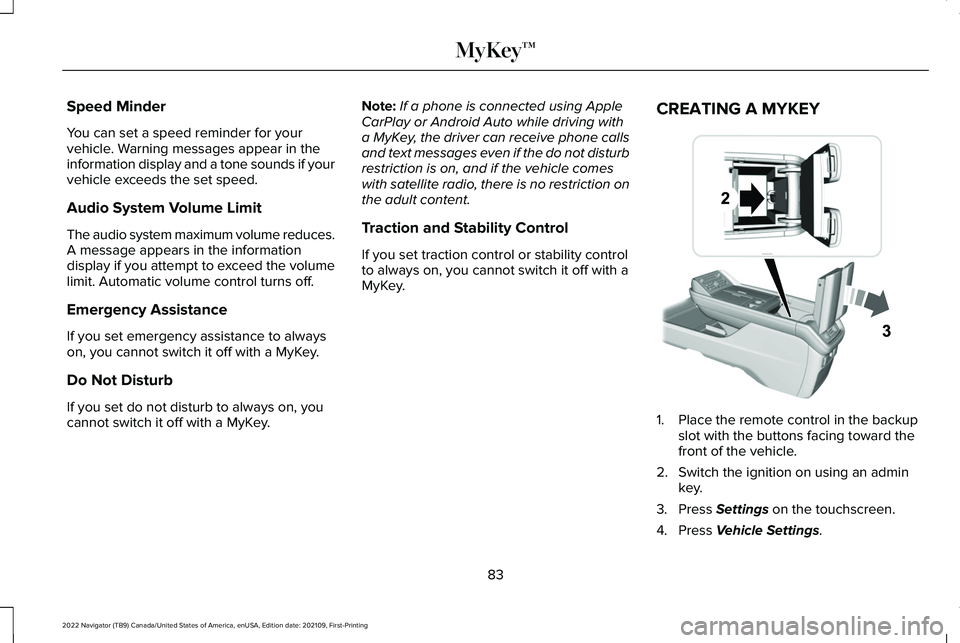
MyKey. CREATING A MYKEY 1. Place the remote control in the backup
slot with the buttons facing toward the
front of the vehicle.
2. Switch the ignition on using an admin key.
3. Press Settings on the touchscreen.
4. Press
Vehicle Settings.
83
2022 Navigator (TB9) Canada/United States of America, enUSA, Edition date: 202109, First-Printing MyKey™E247437
Page 95 of 646
KEYLESS ENTRY LIMITATIONS
Make sure your remote control is within 3 ft
(1 m) from the front door handles and the
tailgate.
The system could not function if:
• The remote control remains stationary
for about a minute.
• The vehicle battery has no charge.
• The remote control battery has no
charge.
• There is interference causing issues with
the remote control frequencies.
• The remote control is too close to metal
objects or electronic devices, for example
keys or a cell phone.
KEYLESS ENTRY SETTINGS
Switching Keyless Entry On and Off
1. Switch the ignition on using an original key that has not been created as a
MyKey.
2. Press
Settings on the touchscreen. 3. Press
Vehicle Settings.
4. Press
Locks.
Reprogramming the Unlocking
Function
You can enable two-stage unlocking function
allowing you to unlock only the driver door
when you touch the unlock sensor.
Press and hold both the lock and unlock
buttons on the remote control for four
seconds to disable or enable two-stage
unlocking.
If you program the unlocking function so that
only the driver door unlocks, you can unlock
all of the other doors from inside your vehicle
using the power door lock control. You can
unlock individual doors by pulling the interior
door handles on those doors. USING KEYLESS ENTRY
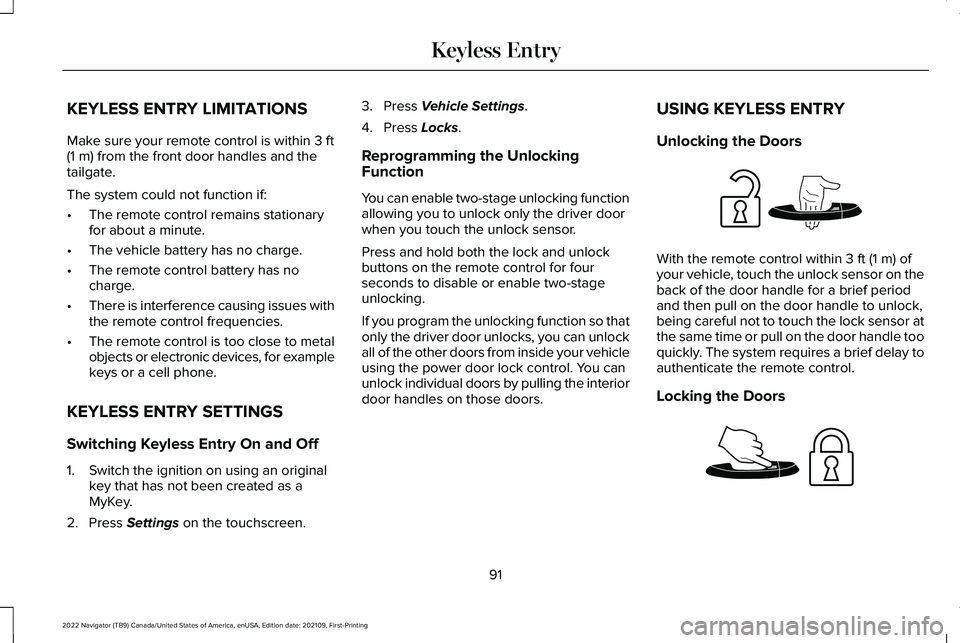
Unlocking the Doors With the remote control within
3 ft (1 m) of
your vehicle, touch the unlock sensor on the
back of the door handle for a brief period
and then pull on the door handle to unlock,
being careful not to touch the lock sensor at
the same time or pull on the door handle too
quickly. The system requires a brief delay to
authenticate the remote control.
Locking the Doors 91
2022 Navigator (TB9) Canada/United States of America, enUSA, Edition date: 202109, First-Printing Keyless EntryE248553 E248554
Page 152 of 646
HUD
SETTINGS
DISPLAY SETUP AUDIO
PHONE
NAVIGATION
TRIP COMPUTER
ACCESSING THE TRIP COMPUTER
Using the instrument cluster controls, select
the following to access the trip computer: Action
Menu Item
Press and hold the OK button until the system reset confirmationappears.
TRIP 1
Press and hold the
OK button until the system reset confirmationappears.
TRIP 2
148
2022 Navigator (TB9) Canada/United States of America, enUSA, Edition date: 202109, First-Printing Instrument Cluster Display
Page 159 of 646
WHAT IS REMOTE START
The system allows you to remotely start your
vehicle and to adjust the interior temperature
according to the settings that you chose.
REMOTE START PRECAUTIONS
WARNING: Do not start the engine
in a closed garage or in other enclosed
areas. Exhaust fumes are toxic. Always
open the garage door before you start the
engine. Failure to follow this instruction
could result in personal injury or death.
REMOTE START LIMITATIONS
Remote start does not work under the
following conditions:
• The alarm horn is sounding.
• The hood is open.
• The transmission is not in park (P). •
The ignition is on.
• The battery voltage is below the
minimum operating voltage.
Note: Do not use remote start if your fuel
level is low.
Note: To use remote start with Lincoln Way
or Phone as a Key, enable the modem.
See
Connecting the Vehicle to a Wi-Fi Network
(page
482).
ENABLING REMOTE START
1. Using the instrument cluster display controls on the steering wheel, select
Settings
.
2. Select
Vehicle.
3. Select
Remote Start.
4. Switch
System on.
Note: To use remote start, make sure that
the modem is enabled.
See Enabling and
Disabling the Modem (page 482). REMOTELY STARTING AND
STOPPING THE VEHICLE
Remotely Starting the Vehicle Press the button on the remote
control.
Within three seconds, press the
button on the remote control.
Within three seconds, press the
button again.
Note: You can also use the Lincoln Way App
to start the vehicle.
Note: The direction indicators flash twice.
Note: The parking lamps turn on when the
vehicle is running.
Note: The horn sounds if the system fails to
start.
Note: All other vehicle systems remain off
when you have remotely started the vehicle.
Note: The vehicle remains secured when
you have remotely started the vehicle. A
valid key must be inside your vehicle to
switch the ignition on and drive your vehicle.
155
2022 Navigator (TB9) Canada/United States of America, enUSA, Edition date: 202109, First-Printing Remote StartE138623 E138625
Page 205 of 646
Note:
Your vehicle has a battery saver
feature that shuts your vehicle off when it
detects a certain amount of battery drain, or
after approximately 30 minutes of inactivity
in accessory mode.
Starting the Engine
With the transmission in park (P), press the
brake pedal and press the push button
ignition switch. An indicator light on the
button illuminates when the ignition is on
and when the engine starts.
Note: The system may not function if the
passive key is close to metal objects or
electronic devices, for example keys or a
cell phone.
Note: A valid key must be inside your vehicle
to switch the ignition on and start the engine. STARTING THE ENGINE
STARTING A GASOLINE ENGINE
Before starting your vehicle, check the
following:
•
Make sure that the headlamps and
electrical accessories are off.
• Make sure that the parking brake is on.
• Make sure that the transmission is in park
(P).
1. Fully press the brake pedal.
Note: Do not touch the accelerator pedal. 2. Press the push button ignition switch.
Note:
The engine may continue cranking for
up to 15 seconds or until it starts.
Note: The engine takes longer to start at
lower temperatures. It may crank for several
seconds when very cold. RESTARTING THE ENGINE AFTER
STOPPING IT
The system allows you to start the engine
within 10 seconds of switching it off, even if
it does not detect a valid passive key.
Within 10 seconds of switching the engine
off, fully press the brake pedal and press the
push button ignition switch. After 10 seconds,
you can no longer start the engine if the
system does not detect a valid passive key.
When you start the engine, it remains running
until you press the push button ignition
switch, even if your vehicle does not detect
a valid passive key. If you open and close a
door when the engine is running, the system
searches for a valid passive key.
201
2022 Navigator (TB9) Canada/United States of America, enUSA, Edition date: 202109, First-Printing Starting and Stopping the EngineE321258
Page 214 of 646
FUEL AND REFUELING
PRECAUTIONS
WARNING: Do not overfill the fuel
tank. The pressure in an overfilled tank
may cause leakage and lead to fuel spray
and fire. WARNING:
The fuel system may be
under pressure. If you hear a hissing sound
near the fuel filler inlet, do not refuel until
the sound stops. Otherwise, fuel may spray
out, which could cause serious personal
injury. WARNING:
Fuels can cause serious
injury or death if misused or mishandled. WARNING:
Fuel may contain
benzene, which is a cancer-causing agent. WARNING:
When refueling always
shut the engine off and never allow sparks
or open flames near the fuel tank filler
valve. Never smoke or use a cell phone
while refueling. Fuel vapor is extremely
hazardous under certain conditions. Avoid
inhaling excess fumes. WARNING:
Read and follow all the
instructions on the pump island.
Follow these guidelines when refueling:
• Extinguish all smoking materials and any
open flames before refueling your
vehicle.
• Switch the engine off before refueling.
• Automotive fuels can be harmful or fatal
if swallowed. Fuel is highly toxic and if
swallowed can cause death or permanent
injury. If fuel is swallowed immediately
call a physician, even if no symptoms are
immediately apparent. The toxic effects
of fuel may not be apparent for hours. •
Avoid inhaling fuel vapors. Inhaling fuel
vapor can lead to eye and respiratory
tract irritation. In severe cases, excessive
or prolonged breathing of fuel vapor can
cause serious illness and permanent
injury.
• Avoid getting fuel in your eyes. If you
splash fuel in your eyes, immediately
remove contact lenses, if worn, flush with
water for 15 minutes and seek medical
attention. Failure to seek proper medical
attention could lead to permanent injury.
• Fuels can be harmful if absorbed through
the skin. If you splash fuel on your skin,
clothing or both, promptly remove
contaminated clothing and thoroughly
wash your skin with soap and water.
Repeated or prolonged skin contact
causes skin irritation.
• Be particularly careful if you are taking
Antabuse or other forms of Disulfiram for
the treatment of alcoholism. Breathing
fuel vapors could cause an adverse
reaction, serious personal injury or
sickness. Immediately call a physician if
you experience any adverse reactions.
210
2022 Navigator (TB9) Canada/United States of America, enUSA, Edition date: 202109, First-Printing Fuel and Refueling
Page 217 of 646
6. Clean the fuel filler funnel and place it
back in your vehicle or correctly dispose
of it.
Note: If your vehicle runs out of fuel add a
minimum of 1.3 gal (5 L) of fuel to restart the
engine.
Note: You may need to switch the ignition
from off to on several times after refueling
to allow the fuel system to pump the fuel
from the tank to the engine. When restarting,
cranking time takes a few seconds longer
than normal.
Note: Extra funnels can be purchased from
an authorized dealer if you choose to
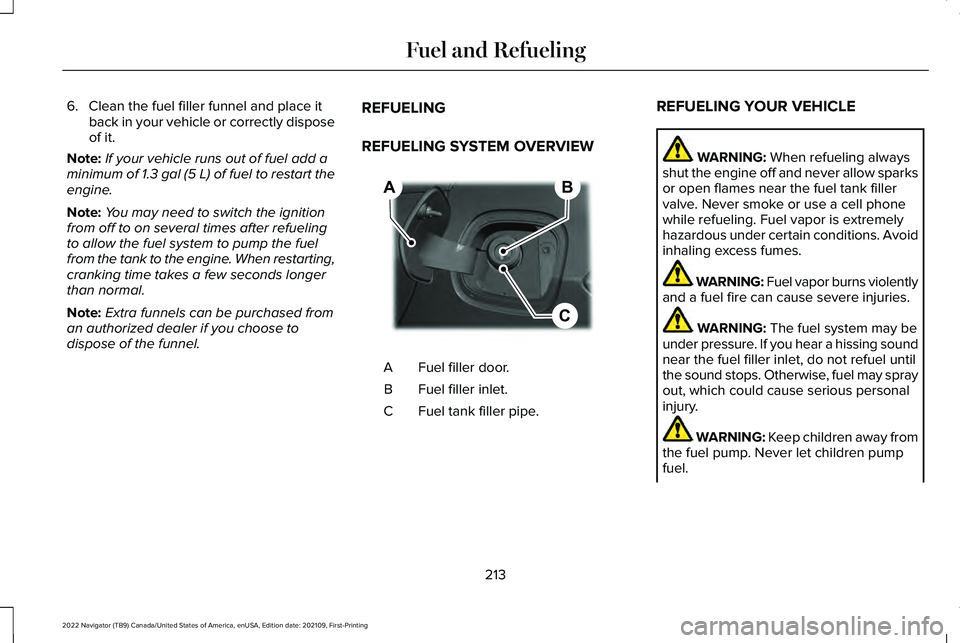
dispose of the funnel. REFUELING
REFUELING SYSTEM OVERVIEW Fuel filler door.
A
Fuel filler inlet.
B
Fuel tank filler pipe.
C REFUELING YOUR VEHICLE WARNING: When refueling always
shut the engine off and never allow sparks
or open flames near the fuel tank filler
valve. Never smoke or use a cell phone
while refueling. Fuel vapor is extremely
hazardous under certain conditions. Avoid
inhaling excess fumes. WARNING: Fuel vapor burns violently
and a fuel fire can cause severe injuries. WARNING:
The fuel system may be
under pressure. If you hear a hissing sound
near the fuel filler inlet, do not refuel until
the sound stops. Otherwise, fuel may spray
out, which could cause serious personal
injury. WARNING: Keep children away from
the fuel pump. Never let children pump
fuel.
213
2022 Navigator (TB9) Canada/United States of America, enUSA, Edition date: 202109, First-Printing Fuel and RefuelingB
C
A E267248