seats LINCOLN NAVIGATOR 2022 User Guide
[x] Cancel search | Manufacturer: LINCOLN, Model Year: 2022, Model line: NAVIGATOR, Model: LINCOLN NAVIGATOR 2022Pages: 646, PDF Size: 7.29 MB
Page 58 of 646
The retractor for the third row center seatbelt
is in the roof.
To fasten the seatbelt:
1. Pull the belt out steadily. It may lock if
you pull it sharply or if the vehicle is on
a slope.
2. Insert the smaller tongue into the smaller
buckle to the left of the center seat.
3. Pull the larger tongue across the lap and
insert it into the buckle to the right of the
center seat.
Note: If in constant use, you can leave the
belt buckled in the smaller buckle. When it
is not in use, or when you fold or move the
rear seats, you should release the belt from
the smaller buckle. Using the tongue of the
adjacent seatbelt, press the red button on
the smaller buckle. SENSITIVE LOCKING MODE
WHAT IS SENSITIVE LOCKING MODE
Sensitive locking mode is a seatbelt retractor
feature that allows shoulder belt length
adjustment according to your movements
and locking in response to vehicle
movement.
HOW DOES SENSITIVE LOCKING
MODE WORK
If the driver suddenly brakes, turns a corner
sharply, or the vehicle receives an impact of
about 5 mph (8 km/h) or more, the seatbelts
lock to help reduce forward movement of
the driver and passengers.
In addition, the seatbelt retractor locks if you
pull the seatbelt webbing out too quickly. If
the retractor locks, slowly lower the height
adjuster to allow the seatbelt to retract.
If the retractor does not unlock, pull the
seatbelt out slowly then feed a small length
of webbing back toward the stowed position. For rear seatbelts, recline the rear seat
backrest or push the seat backrest cushion
away from the seatbelt. Feed a small length
of webbing back toward the stowed position.
AUTOMATIC LOCKING MODE
WHAT IS AUTOMATIC LOCKING
MODE
This feature keeps the seatbelts pre-locked.
The belt still retracts to remove any slack in
the shoulder belt.
WHEN TO USE AUTOMATIC LOCKING
MODE
Use this mode any time you install a child
restraint in the front passenger seating
position or any rear seating position. Properly
restrain children 12 years old and under in a
rear seat whenever possible.
Note:
Automatic locking mode is not
available on the driver seatbelt.
54
2022 Navigator (TB9) Canada/United States of America, enUSA, Edition date: 202109, First-Printing Seatbelts
Page 66 of 646
WARNING: Accessory seat covers
not released by Ford Motor Company
could prevent the deployment of the
airbags and increase the risk of injuries in
a crash. WARNING:
Do not lean your head
on the door. The side airbag could injure
you as it deploys from the side of the
seatback.
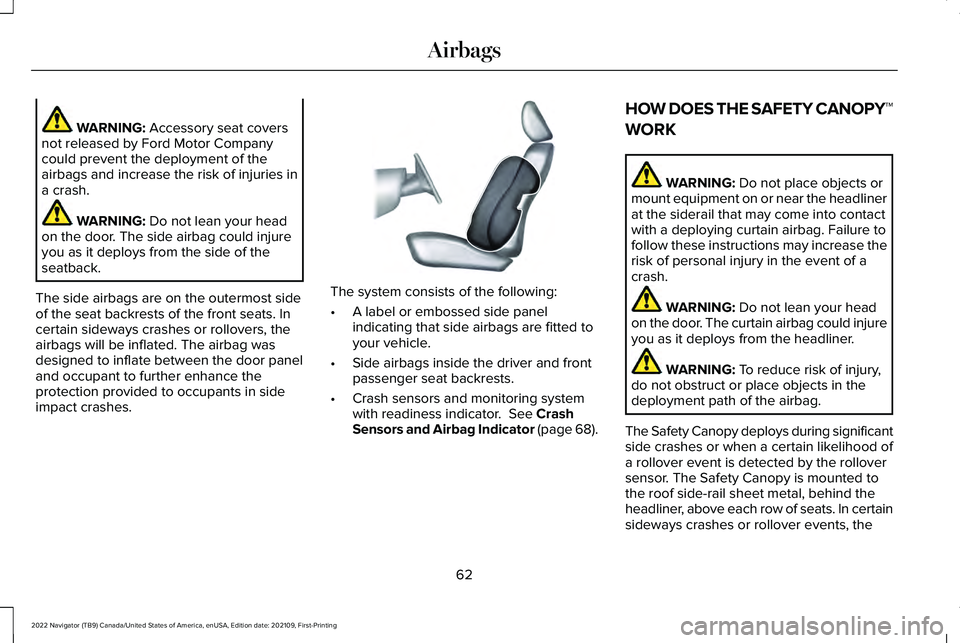
The side airbags are on the outermost side
of the seat backrests of the front seats. In
certain sideways crashes or rollovers, the
airbags will be inflated. The airbag was
designed to inflate between the door panel
and occupant to further enhance the
protection provided to occupants in side
impact crashes. The system consists of the following:
•
A label or embossed side panel
indicating that side airbags are fitted to
your vehicle.
• Side airbags inside the driver and front
passenger seat backrests.
• Crash sensors and monitoring system
with readiness indicator.
See Crash
Sensors and Airbag Indicator (page 68). HOW DOES THE SAFETY CANOPY™
WORK WARNING:
Do not place objects or
mount equipment on or near the headliner
at the siderail that may come into contact
with a deploying curtain airbag. Failure to
follow these instructions may increase the
risk of personal injury in the event of a
crash. WARNING:
Do not lean your head
on the door. The curtain airbag could injure
you as it deploys from the headliner. WARNING:
To reduce risk of injury,
do not obstruct or place objects in the
deployment path of the airbag.
The Safety Canopy deploys during significant
side crashes or when a certain likelihood of
a rollover event is detected by the rollover
sensor. The Safety Canopy is mounted to
the roof side-rail sheet metal, behind the
headliner, above each row of seats. In certain
sideways crashes or rollover events, the
62
2022 Navigator (TB9) Canada/United States of America, enUSA, Edition date: 202109, First-Printing AirbagsE152533
Page 67 of 646
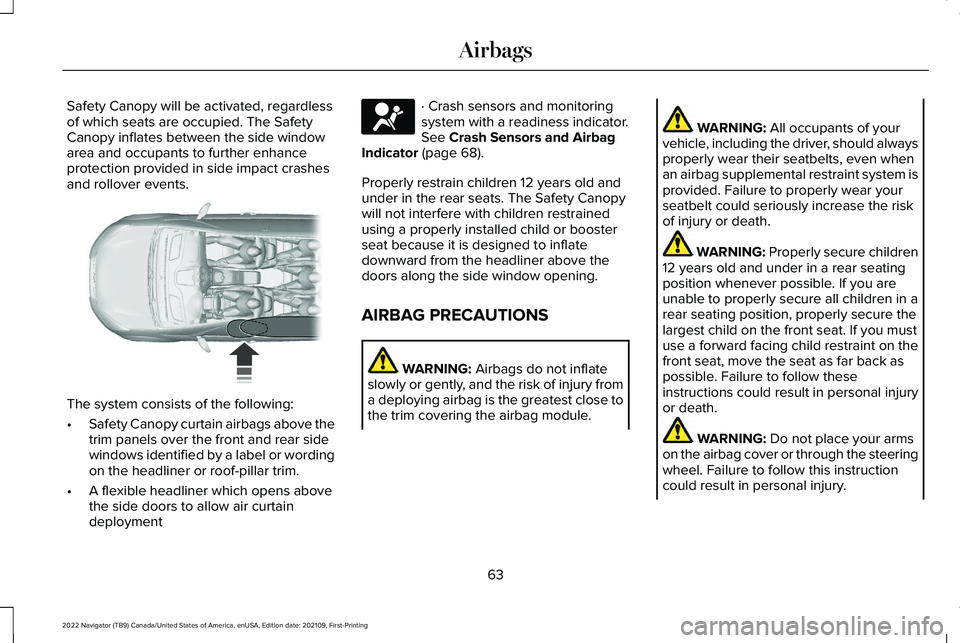
Safety Canopy will be activated, regardless
of which seats are occupied. The Safety
Canopy inflates between the side window
area and occupants to further enhance
protection provided in side impact crashes
and rollover events.
The system consists of the following:
•
Safety Canopy curtain airbags above the
trim panels over the front and rear side
windows identified by a label or wording
on the headliner or roof-pillar trim.
• A flexible headliner which opens above
the side doors to allow air curtain
deployment · Crash sensors and monitoring
system with a readiness indicator.
See Crash Sensors and Airbag
Indicator (page 68).
Properly restrain children 12 years old and
under in the rear seats. The Safety Canopy
will not interfere with children restrained
using a properly installed child or booster
seat because it is designed to inflate
downward from the headliner above the
doors along the side window opening.
AIRBAG PRECAUTIONS WARNING:
Airbags do not inflate
slowly or gently, and the risk of injury from
a deploying airbag is the greatest close to
the trim covering the airbag module. WARNING:
All occupants of your
vehicle, including the driver, should always
properly wear their seatbelts, even when
an airbag supplemental restraint system is
provided. Failure to properly wear your
seatbelt could seriously increase the risk
of injury or death. WARNING:
Properly secure children
12 years old and under in a rear seating
position whenever possible. If you are
unable to properly secure all children in a
rear seating position, properly secure the
largest child on the front seat. If you must
use a forward facing child restraint on the
front seat, move the seat as far back as
possible. Failure to follow these
instructions could result in personal injury
or death. WARNING:
Do not place your arms
on the airbag cover or through the steering
wheel. Failure to follow this instruction
could result in personal injury.
63
2022 Navigator (TB9) Canada/United States of America, enUSA, Edition date: 202109, First-Printing Airbags E75004 E67017
Page 68 of 646
WARNING: Keep the areas in front
of the airbags free from obstruction. Do
not affix anything to or over the airbag
covers. Objects could become projectiles
during airbag deployment. Failure to follow
this instruction could result in personal
injury or death. WARNING:
To reduce risk of injury,
do not obstruct or place objects in the
deployment path of the airbag. WARNING:
Do not place a rearward
facing child restraint in front of an active
airbag. Failure to follow this instruction
could result in personal injury or death. WARNING: Do not attempt to service,
repair, or modify the supplementary
restraint system or associated components.
Failure to follow this instruction could result
in personal injury or death. WARNING:
Several airbag system
components get hot after inflation. To
reduce the risk of injury, do not touch them
after inflation. WARNING:
If a supplementary
restraint system component has deployed,
it will not function again. Have the system
and associated components inspected as
soon as possible. Failure to follow this
instruction could result in personal injury
or death.
PROPERLY ADJUSTING THE
DRIVER AND FRONT PASSENGER
SEATS WARNING:
National Highway Traffic
Safety Administration (NHTSA)
recommends a minimum distance of at
least
10 in (25 cm) between an occupant's
chest and the driver airbag module. To properly position yourself away from the
airbag:
•
Move your seat to the rear as far as you
can while still reaching the pedals
comfortably.
• Recline the seat slightly one or two
degrees from the upright position.
After all occupants have adjusted their seats
and put on seatbelts, it is very important that
they continue to sit properly. Properly seated
occupants sit upright, lean against the seat
backrest, and center themselves on the seat
cushion, with their feet comfortably extended
on the floor. Sitting improperly can increase
the chance of injury in a crash event. For
example, if an occupant slouches, lies down,
turns sideways, sits forward, leans forward
or sideways, or puts one or both feet up, the
chance of injury during a crash greatly
increases.
64
2022 Navigator (TB9) Canada/United States of America, enUSA, Edition date: 202109, First-Printing Airbags
Page 69 of 646
CHILDREN AND AIRBAGS
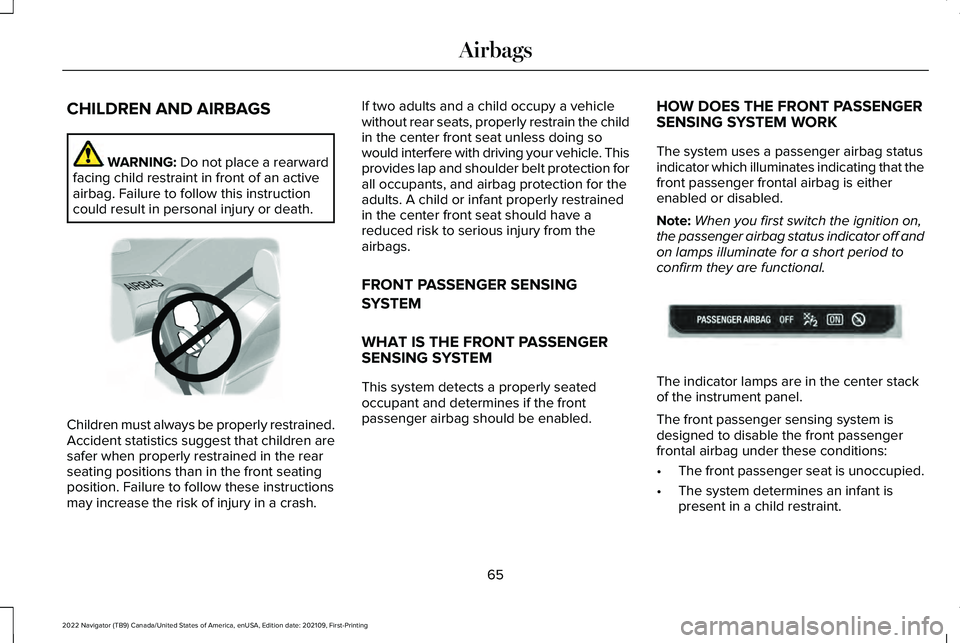
WARNING: Do not place a rearward
facing child restraint in front of an active
airbag. Failure to follow this instruction
could result in personal injury or death. Children must always be properly restrained.
Accident statistics suggest that children are
safer when properly restrained in the rear
seating positions than in the front seating
position. Failure to follow these instructions
may increase the risk of injury in a crash. If two adults and a child occupy a vehicle
without rear seats, properly restrain the child
in the center front seat unless doing so
would interfere with driving your vehicle. This
provides lap and shoulder belt protection for
all occupants, and airbag protection for the
adults. A child or infant properly restrained
in the center front seat should have a
reduced risk to serious injury from the
airbags.
FRONT PASSENGER SENSING
SYSTEM
WHAT IS THE FRONT PASSENGER
SENSING SYSTEM
This system detects a properly seated
occupant and determines if the front
passenger airbag should be enabled.
HOW DOES THE FRONT PASSENGER
SENSING SYSTEM WORK
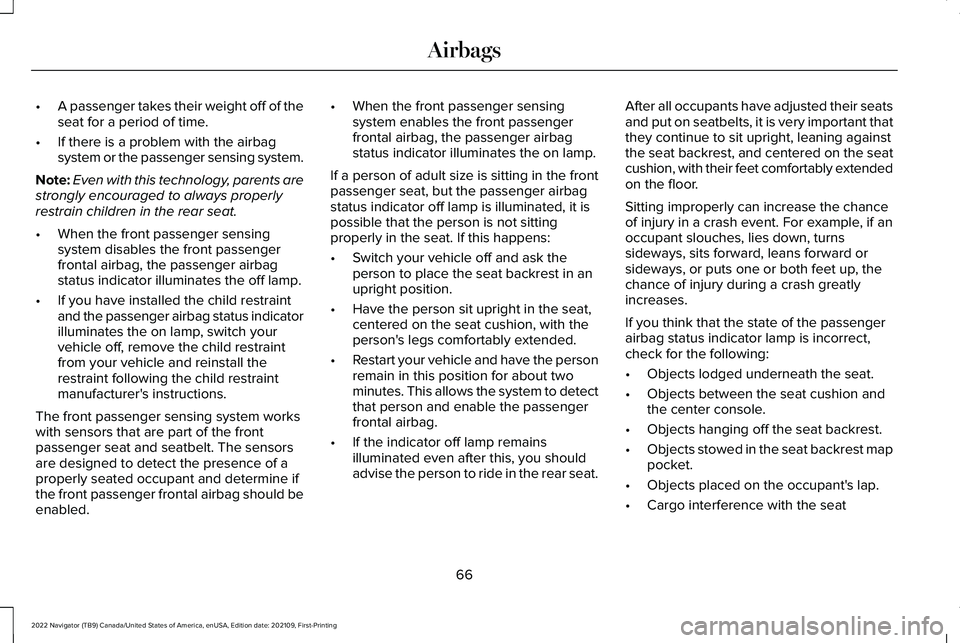
The system uses a passenger airbag status
indicator which illuminates indicating that the
front passenger frontal airbag is either
enabled or disabled.
Note:
When you first switch the ignition on,
the passenger airbag status indicator off and
on lamps illuminate for a short period to
confirm they are functional. The indicator lamps are in the center stack
of the instrument panel.
The front passenger sensing system is
designed to disable the front passenger
frontal airbag under these conditions:
•
The front passenger seat is unoccupied.
• The system determines an infant is
present in a child restraint.
65
2022 Navigator (TB9) Canada/United States of America, enUSA, Edition date: 202109, First-Printing AirbagsE142846 E181984
Page 70 of 646
•
A passenger takes their weight off of the
seat for a period of time.
• If there is a problem with the airbag
system or the passenger sensing system.
Note: Even with this technology, parents are
strongly encouraged to always properly
restrain children in the rear seat.
• When the front passenger sensing
system disables the front passenger
frontal airbag, the passenger airbag
status indicator illuminates the off lamp.
• If you have installed the child restraint
and the passenger airbag status indicator
illuminates the on lamp, switch your
vehicle off, remove the child restraint
from your vehicle and reinstall the
restraint following the child restraint
manufacturer's instructions.
The front passenger sensing system works
with sensors that are part of the front
passenger seat and seatbelt. The sensors
are designed to detect the presence of a
properly seated occupant and determine if
the front passenger frontal airbag should be
enabled. •
When the front passenger sensing
system enables the front passenger
frontal airbag, the passenger airbag
status indicator illuminates the on lamp.
If a person of adult size is sitting in the front
passenger seat, but the passenger airbag
status indicator off lamp is illuminated, it is
possible that the person is not sitting
properly in the seat. If this happens:
• Switch your vehicle off and ask the
person to place the seat backrest in an
upright position.
• Have the person sit upright in the seat,
centered on the seat cushion, with the
person's legs comfortably extended.
• Restart your vehicle and have the person
remain in this position for about two
minutes. This allows the system to detect
that person and enable the passenger
frontal airbag.
• If the indicator off lamp remains
illuminated even after this, you should
advise the person to ride in the rear seat. After all occupants have adjusted their seats
and put on seatbelts, it is very important that
they continue to sit upright, leaning against
the seat backrest, and centered on the seat
cushion, with their feet comfortably extended
on the floor.
Sitting improperly can increase the chance
of injury in a crash event. For example, if an
occupant slouches, lies down, turns
sideways, sits forward, leans forward or
sideways, or puts one or both feet up, the
chance of injury during a crash greatly
increases.
If you think that the state of the passenger
airbag status indicator lamp is incorrect,
check for the following:
•
Objects lodged underneath the seat.
• Objects between the seat cushion and
the center console.
• Objects hanging off the seat backrest.
• Objects stowed in the seat backrest map
pocket.
• Objects placed on the occupant's lap.
• Cargo interference with the seat
66
2022 Navigator (TB9) Canada/United States of America, enUSA, Edition date: 202109, First-Printing Airbags
Page 102 of 646
LIFTGATE PRECAUTIONS
WARNING: It is extremely dangerous
to ride in a cargo area, inside or outside of
a vehicle. In a crash, people riding in these
areas are more likely to be seriously
injured or killed. Do not allow people to
ride in any area of your vehicle that is not
equipped with seats and seatbelts. Make
sure everyone in your vehicle is in a seat
and properly using a seatbelt. Failure to
follow this warning could result in serious
personal injury or death. WARNING: Make sure that you fully
close the liftgate to prevent exhaust fumes
from entering your vehicle. If you are
unable to fully close the liftgate, open the
air vents or the windows to allow fresh air
to enter your vehicle. Failure to follow this
instruction could result in personal injury
or death. WARNING:
Keep keys out of reach
of children. Do not allow children to
operate or play near an open or moving
power liftgate. You should supervise the
operation of the power liftgate at all times.
OPENING THE LIFTGATE
OPENING THE LIFTGATE FROM INSIDE
YOUR VEHICLE With the transmission in park (P),
press the button on the instrument
panel.
Note: Be careful when opening or closing
the liftgate in a garage or other enclosed
area to avoid damaging the liftgate.
Note: Do not hang anything, for example a
bike rack, from the glass or liftgate. This
could damage the liftgate and its
components.
Note: Do not leave the liftgate open while
driving. This could damage the liftgate and
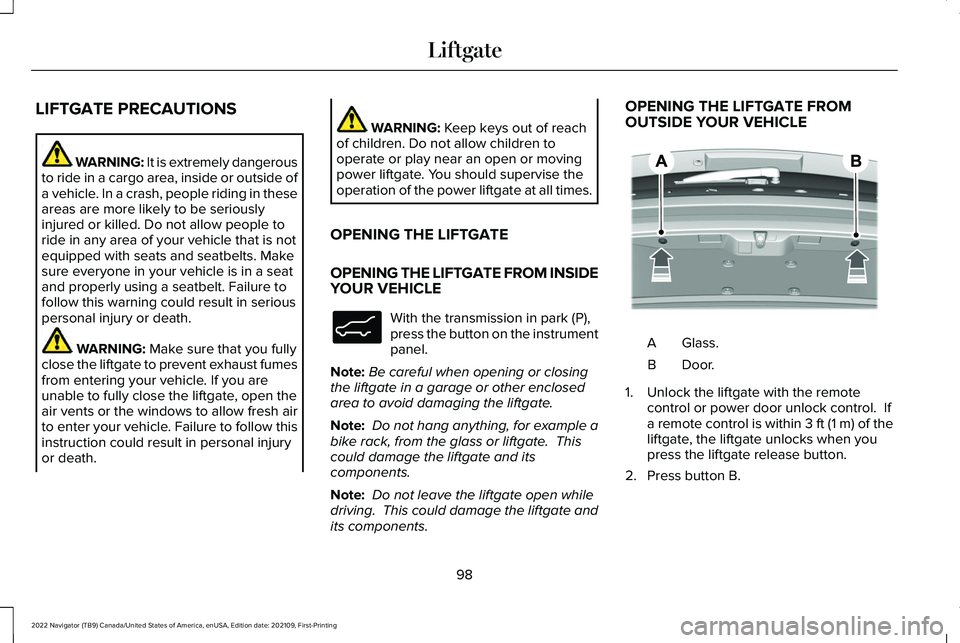
its components. OPENING THE LIFTGATE FROM
OUTSIDE YOUR VEHICLE
Glass.
A
Door.B
1. Unlock the liftgate with the remote control or power door unlock control. If
a remote control is within 3 ft (1 m) of the
liftgate, the liftgate unlocks when you
press the liftgate release button.
2. Press button B.
98
2022 Navigator (TB9) Canada/United States of America, enUSA, Edition date: 202109, First-Printing LiftgateE138633 E349965
Page 160 of 646
Remotely Stopping the Vehicle
Within three seconds, press the
button on the remote control.
Within three seconds, press the
button again.
EXTENDING THE REMOTE START
DURATION
To extend the remote start duration during
remote start, do the following: Press the button on the remote
control.
Within three seconds, press the
button on the remote control.
Within three seconds, press the
button again.
If the duration is set to 15 minutes, the
duration extends by another 15 minutes. This
provides a total of 30 minutes.
Note: Remote start can only be extended
once. Note:
A maximum of two remote starts, or
one remote start with an extension, are
allowed. To reset the restart procedure
switch the vehicle to on, then to off.
REMOTE START REMOTE
CONTROL INDICATORS
Remote Control Feedback
An LED on the remote control provides status
feedback of remote start or stop commands. Status
LED
Remote startsuccessful.
Solid green.
Remote stopsuccessful.
Solid red.
Request failed or
status not received.
Blinking red.
Status incomplete.
Blinking green. REMOTE START SETTINGS
SWITCHING CLIMATE CONTROL LAST
SETTINGS ON AND OFF
1. Using the instrument cluster display
controls on the steering wheel, select
Settings.
2. Select
Vehicle.
3. Select
Remote Start Setup.
4. Select
Climate Control.
5. Select
Auto or Last settings.
Note: If you switch the last settings on, the
system remembers the last used settings.
SWITCHING THE HEATED SEAT
SETTINGS ON AND OFF
1. Using the instrument cluster display controls on the steering wheel, select
Settings
.
2. Select
Vehicle.
3. Select
Remote Start.
4. Select
Seats.
156
2022 Navigator (TB9) Canada/United States of America, enUSA, Edition date: 202109, First-Printing Remote StartE138625 E138623 E138625
Page 161 of 646
5. Select Auto or Off.
Note: If you switch the heated seat settings
on, the heated seats turn on during cold
weather.
Note: You cannot adjust the heated seat
settings when you have remotely started the
engine.
SWITCHING THE HEATED STEERING
WHEEL SETTINGS ON AND OFF
1. Using the instrument cluster display controls on the steering wheel, select
Settings
.
2. Select
Vehicle.
3. Select
Remote Start.
4. Select
Seats and Wheel.
5. Select
Auto or Off.
Note: If you switch the heated steering wheel
settings on, the heated steering wheel turns
on during cold weather.
Note: You cannot adjust the heated steering
wheel settings when you have remotely
started the engine. SETTING THE REMOTE START
DURATION
You can set a duration for the engine to run.
Note:
Wait a few seconds before remotely
starting the engine after the engine stops
running.
1. Using the instrument cluster display controls on the steering wheel, select
Settings
.
2. Select
Vehicle.
3. Select
Remote Start.
4. Select
Duration.
157
2022 Navigator (TB9) Canada/United States of America, enUSA, Edition date: 202109, First-Printing Remote Start
Page 165 of 646
SWITCHING DUAL MODE ON AND OFF
Press the button.
CLIMATE CONTROL HINTS
General Hints
• Prolonged use of recirculated air may
cause the windows to fog up.
• You may feel a small amount of air from
the footwell air vents regardless of the
air distribution setting.
• To reduce humidity build-up inside your
vehicle, do not drive with the system
switched off or with recirculated air
always switched on.
• Do not place objects under the front
seats as this may interfere with the
airflow to the rear seats. •
Remove any snow, ice or leaves from the
air intake area at the base of the
windshield.
• To improve the time to reach a
comfortable temperature in hot weather,
drive with the windows open until you
feel cold air through the air vents.
Automatic Climate Control
• Adjusting the settings when your vehicle
interior is extremely hot or cold is not
necessary. Automatic mode is best
recommended to maintain set
temperature.
• The system adjusts to heat or cool the
interior to the temperature you select as
quickly as possible.
• For the system to function efficiently, the
instrument panel and side air vents
should be fully open. •
If you press AUTO during cold outside
temperatures, the system directs air flow
to the windshield and side window air
vents.In addition, the blower motor may
run at a slower speed until the engine
warms up.
• If you press
AUTO during hot
temperatures and the inside of the
vehicle is hot, the system uses
recirculated air to maximize interior
cooling. Blower motor speed may also
reduce until the air cools.
Quickly Heating the Interior
1. Press
AUTO.
2. Adjust the temperature function to the setting you prefer.
Recommended Settings for Heating
1. Press
AUTO.
2. Adjust the temperature function to the setting you prefer. Use
72°F (22°C) as a
starting point, then adjust the setting as
necessary.
161
2022 Navigator (TB9) Canada/United States of America, enUSA, Edition date: 202109, First-Printing Climate ControlE265280