steering LINCOLN NAVIGATOR 2022 User Guide
[x] Cancel search | Manufacturer: LINCOLN, Model Year: 2022, Model line: NAVIGATOR, Model: LINCOLN NAVIGATOR 2022Pages: 646, PDF Size: 7.29 MB
Page 67 of 646
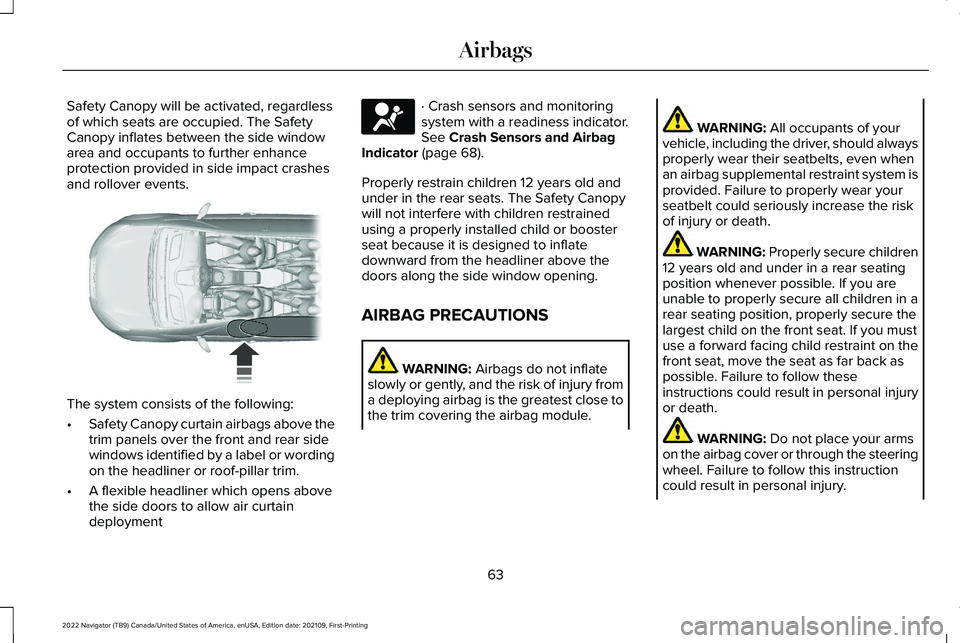
Safety Canopy will be activated, regardless
of which seats are occupied. The Safety
Canopy inflates between the side window
area and occupants to further enhance
protection provided in side impact crashes
and rollover events.
The system consists of the following:
•
Safety Canopy curtain airbags above the
trim panels over the front and rear side
windows identified by a label or wording
on the headliner or roof-pillar trim.
• A flexible headliner which opens above
the side doors to allow air curtain
deployment · Crash sensors and monitoring
system with a readiness indicator.
See Crash Sensors and Airbag
Indicator (page 68).
Properly restrain children 12 years old and
under in the rear seats. The Safety Canopy
will not interfere with children restrained
using a properly installed child or booster
seat because it is designed to inflate
downward from the headliner above the
doors along the side window opening.
AIRBAG PRECAUTIONS WARNING:
Airbags do not inflate
slowly or gently, and the risk of injury from
a deploying airbag is the greatest close to
the trim covering the airbag module. WARNING:
All occupants of your
vehicle, including the driver, should always
properly wear their seatbelts, even when
an airbag supplemental restraint system is
provided. Failure to properly wear your
seatbelt could seriously increase the risk
of injury or death. WARNING:
Properly secure children
12 years old and under in a rear seating
position whenever possible. If you are
unable to properly secure all children in a
rear seating position, properly secure the
largest child on the front seat. If you must
use a forward facing child restraint on the
front seat, move the seat as far back as
possible. Failure to follow these
instructions could result in personal injury
or death. WARNING:
Do not place your arms
on the airbag cover or through the steering
wheel. Failure to follow this instruction
could result in personal injury.
63
2022 Navigator (TB9) Canada/United States of America, enUSA, Edition date: 202109, First-Printing Airbags E75004 E67017
Page 72 of 646
FRONT PASSENGER SENSING SYSTEM INDICATORS
Passenger Airbag
Passenger Airbag Status Indicator
Occupant
Disabled
OFF: Illuminated
Empty
ON: Not Illuminated Disabled
OFF: Illuminated
Child
ON: Not Illuminated Enabled
OFF: Not Illuminated
Adult
ON: Illuminated
CRASH SENSORS AND AIRBAG
INDICATOR WARNING: Modifying or adding
equipment to the front of your vehicle
could affect the performance of the airbag
system, increasing the risk of injury. This
includes the hood, bumper system, frame,
front body structure, tow hooks, hood pins,
push bar and snowplows. Your vehicle has a collection of crash and
occupant sensors. These sensors provide
information to the restraints control module
which activates the following:
•
Front seatbelt pretensioners.
• Adaptive steering column.
• Driver airbag.
• Passenger airbag.
• Seat mounted side airbags.
• Safety Canopy. Based on the type of crash, the restraints
control module deploys the appropriate
safety devices.
The restraints control module also monitors
the readiness of the above safety devices
plus the crash and occupant sensors. The
readiness of the safety system is indicated
by a warning indicator light in the instrument
cluster or by a backup tone if the warning
light is not working. Routine maintenance of
the airbag is not required.
A difficulty with the system is indicated by
one or more of the following:
68
2022 Navigator (TB9) Canada/United States of America, enUSA, Edition date: 202109, First-Printing Airbags
Page 74 of 646
WHAT IS 911 ASSIST
911 Assist is a SYNC system feature that can
call for help.
For more information, visit
www
. owner . ford. com .
HOW DOES 911 ASSIST WORK
If a crash deploys an airbag, excluding knee
airbags and rear inflatable seatbelts, or
activates the fuel pump shut-off, your vehicle
may be able to contact emergency services
by dialing 911 through a paired and
connected Bluetooth®-enabled phone.
Not all crashes will deploy an airbag or
activate the fuel pump shut-off. If a
connected cell phone sustains damage or
loses its connection to SYNC during a crash,
SYNC will search for and try to connect to a
previously paired cell phone. SYNC will then
attempt to call the emergency services. Before making the call:
•
SYNC provides about 10 seconds to
cancel the call. If you fail to cancel the
call, SYNC attempts to dial 911.
• SYNC says the following, or a similar
message: "SYNC will attempt to call 911,
to cancel the call, press Cancel on your
screen or press and hold the phone
button on your steering wheel."
If you do not cancel the call and SYNC makes
a successful call a pre-recorded message
plays for the 911 operator. The occupants in
your vehicle are able to talk with the
operator. Be prepared to provide your name,
phone number and location immediately
because not all 911 systems are capable of
receiving this information electronically.
During an emergency call the system
transmits vehicle data to the emergency
service. EMERGENCY CALL
REQUIREMENTS WARNING: Do not wait for 911 Assist
to make an emergency call if you can do
it yourself. Dial emergency services
immediately to avoid delayed response
time which could increase the risk of
serious injury or death after a crash. If you
do not hear 911 Assist within five seconds
of the crash, the system or phone may be
damaged or non-functional. WARNING: Always place your phone
in a secure location in your vehicle so it
does not become a projectile or get
damaged in a crash. Failure to do so may
cause serious injury to someone or
damage the phone which could prevent
911 Assist from working properly. WARNING:
Unless the 911 Assist
setting is set on before a crash, the system
will not dial for help which could delay
response time, potentially increasing the
risk of serious injury or death after a crash.
70
2022 Navigator (TB9) Canada/United States of America, enUSA, Edition date: 202109, First-Printing 911 Assist
Page 101 of 646
HOW DOES EASY ENTRY AND
EXIT WORK
Easy entry and exit moves the driver seat
rearward up to 2 in (5 cm) and the steering
column up when you switch the ignition off.
The driver seat and steering column return
to their previous positions when you switch
the ignition on.
Note: Depending on your vehicle, the column
may move up and in.
SWITCHING EASY ENTRY AND
EXIT ON AND OFF
1. Press
Settings on the touchscreen.
2. Press
Vehicle.
3. Select
Easy Entry/Exit.
If you press any adjustment or memory
button when in easy exit mode, the system
cancels the operation.
97
2022 Navigator (TB9) Canada/United States of America, enUSA, Edition date: 202109, First-Printing Easy Entry and Exit
Page 116 of 646
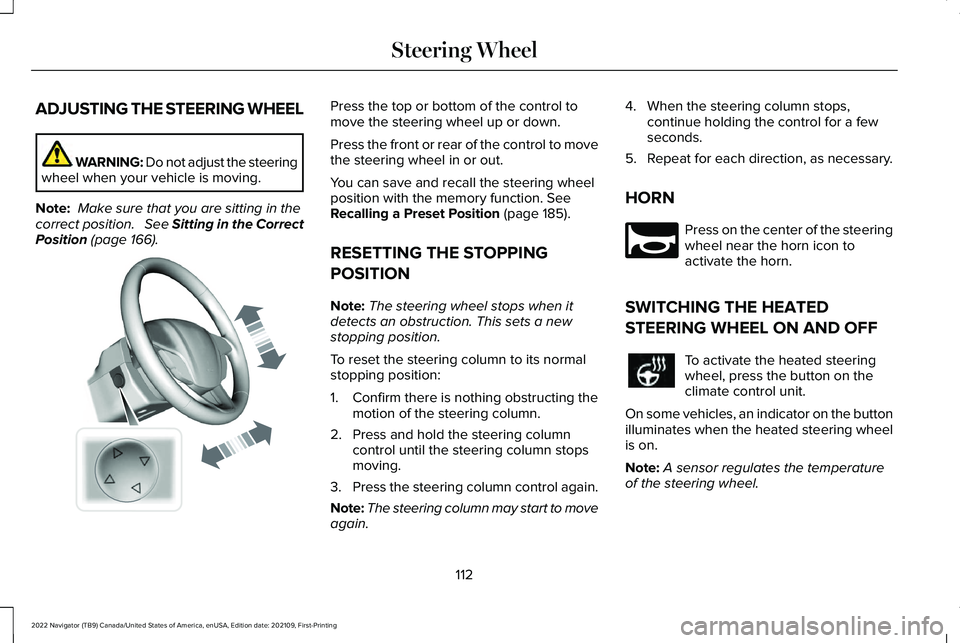
ADJUSTING THE STEERING WHEEL
WARNING: Do not adjust the steering
wheel when your vehicle is moving.
Note: Make sure that you are sitting in the
correct position. See Sitting in the Correct
Position (page 166). Press the top or bottom of the control to
move the steering wheel up or down.
Press the front or rear of the control to move
the steering wheel in or out.
You can save and recall the steering wheel
position with the memory function.
See
Recalling a Preset Position (page 185).
RESETTING THE STOPPING
POSITION
Note: The steering wheel stops when it
detects an obstruction. This sets a new
stopping position.
To reset the steering column to its normal
stopping position:
1. Confirm there is nothing obstructing the motion of the steering column.
2. Press and hold the steering column control until the steering column stops
moving.
3. Press the steering column control again.
Note: The steering column may start to move
again. 4. When the steering column stops,
continue holding the control for a few
seconds.
5. Repeat for each direction, as necessary.
HORN Press on the center of the steering
wheel near the horn icon to
activate the horn.
SWITCHING THE HEATED
STEERING WHEEL ON AND OFF To activate the heated steering
wheel, press the button on the
climate control unit.
On some vehicles, an indicator on the button
illuminates when the heated steering wheel
is on.
Note: A sensor regulates the temperature
of the steering wheel.
112
2022 Navigator (TB9) Canada/United States of America, enUSA, Edition date: 202109, First-Printing Steering WheelE261582 E270945
Page 117 of 646
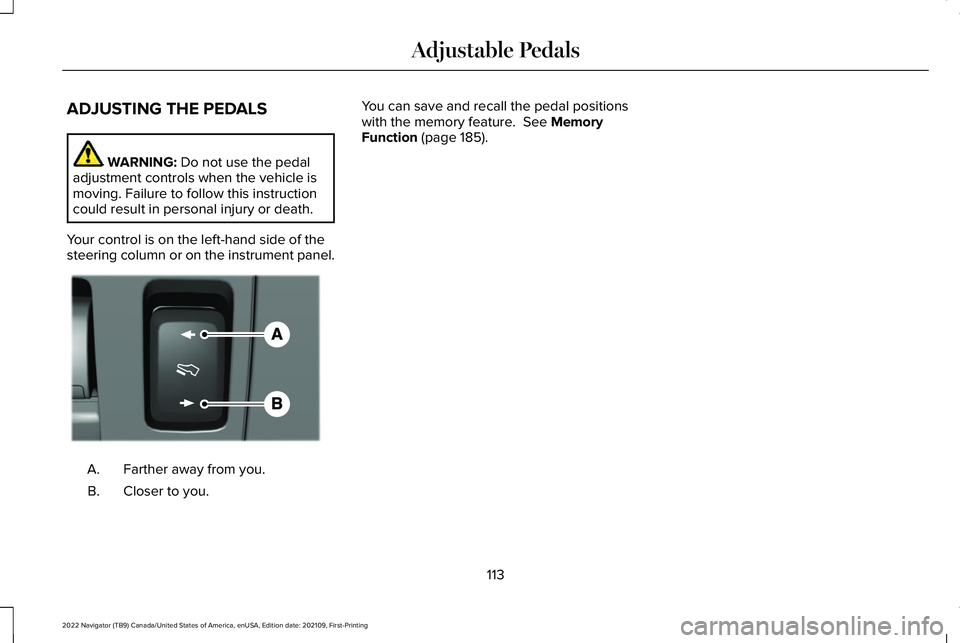
ADJUSTING THE PEDALS
WARNING: Do not use the pedal
adjustment controls when the vehicle is
moving. Failure to follow this instruction
could result in personal injury or death.
Your control is on the left-hand side of the
steering column or on the instrument panel. Farther away from you.
A.
Closer to you.
B. You can save and recall the pedal positions
with the memory feature.
See Memory
Function (page 185).
113
2022 Navigator (TB9) Canada/United States of America, enUSA, Edition date: 202109, First-Printing Adjustable PedalsE176213
Page 133 of 646
GLARE FREE LIGHTING – TROUBLESHOOTING (IF EQUIPPED)
GLARE FREE LIGHTING – INFORMATION MESSAGES Description
Message
The camera has reduced visibility. Clean the windshield. If the message continues to appear,
have your vehicle checked as soon as possible.
Front Camera Low Visibility Clean Screen
The camera has malfunctioned. Wait a short period of time for the camera to cool down. If the
message continues to appear, have your vehicle checked as soon as possible.
Front Camera Temporarily Not Available
The camera has malfunctioned. Have your vehicle checked as soon as possible.
Front Camera Malfunction Service
Required
ADAPTIVE FRONT LIGHTING
HOW DOES ADAPTIVE FRONT
LIGHTING WORK
Dynamic Bending Lamps
Adaptive front lighting moves the light into
the curve when you are steering around a
curve or if the camera detects lane markings
indicating a curve. 129
2022 Navigator (TB9) Canada/United States of America, enUSA, Edition date: 202109, First-Printing Exterior Lighting
Page 134 of 646
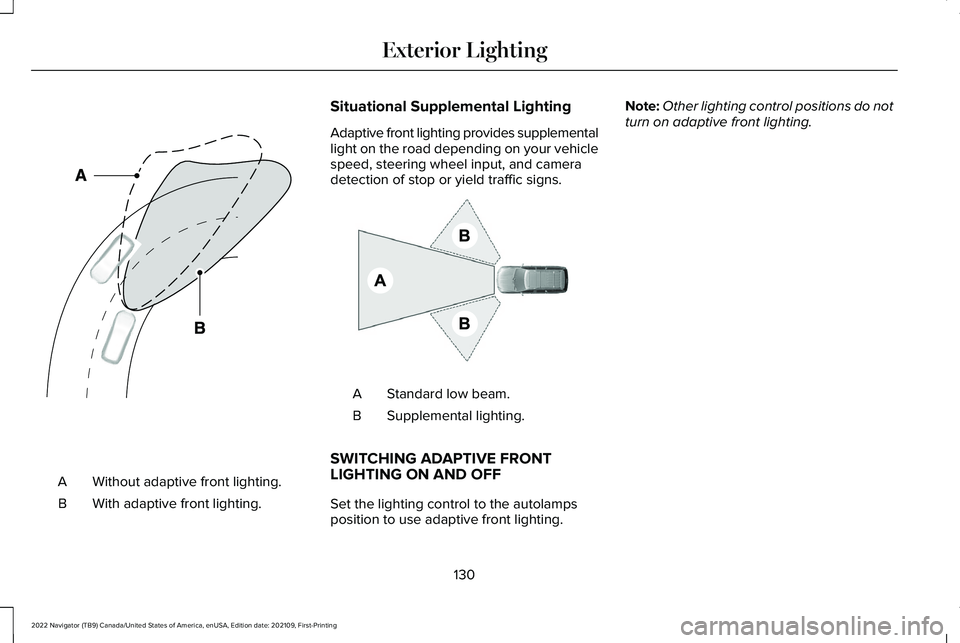
Without adaptive front lighting.
A
With adaptive front lighting.
B Situational Supplemental Lighting
Adaptive front lighting provides supplemental
light on the road depending on your vehicle
speed, steering wheel input, and camera
detection of stop or yield traffic signs.
Standard low beam.
A
Supplemental lighting.
B
SWITCHING ADAPTIVE FRONT
LIGHTING ON AND OFF
Set the lighting control to the autolamps
position to use adaptive front lighting. Note:
Other lighting control positions do not
turn on adaptive front lighting.
130
2022 Navigator (TB9) Canada/United States of America, enUSA, Edition date: 202109, First-Printing Exterior LightingE161714 E275680
Page 138 of 646
USING GLOBAL OPENING
1. Press and release the unlock button on
the remote control.
2. Within one second, press and hold the unlock button on the remote control.
3. Release the button when the windows start to open.
Press the lock or the unlock button on the
remote control to stop global opening.
Note: Global opening will only respond to a
press and hold of the unlock button for a
short period of time after the unlock button
is pressed on the remote control.
SWITCHING GLOBAL OPENING ON
AND OFF
1. Press the menu button on the steering wheel to enter the information display
main menu.
2. Select Settings.
3. Select
Vehicle.
4. Select
Windows.
5. Switch
Remote Open on or off. USING GLOBAL CLOSING WARNING:
When closing the power
windows, verify they are free of obstruction
and make sure that children and pets are
not in the proximity of the window
openings.
1. Press and hold the lock button on the remote control.
2. Release the button when the windows start to close.
Press the lock or the unlock button on the
remote control to stop global closing.
Note: Bounce-back is on during global
closing. See What Is Window Bounce-Back
(page
134).
SWITCHING GLOBAL CLOSING ON
AND OFF
1. Press the menu button on the steering wheel to enter the information display
main menu.
2. Select
Settings. 3. Select
Vehicle.
4. Select
Windows.
5. Switch
Remote Close on or off.
WINDOW BOUNCE-BACK
WHAT IS WINDOW BOUNCE-BACK
The window stops and reverses if it detects
an obstruction when closing.
OVERRIDING WINDOW BOUNCE-
BACK WARNING:
If you override
bounce-back, the window does not reverse
if it detects an obstacle. Take care when
closing the windows to avoid personal
injury or damage to your vehicle.
1. Close the window until it reaches the point of resistance and let it reverse.
134
2022 Navigator (TB9) Canada/United States of America, enUSA, Edition date: 202109, First-Printing Windows
Page 151 of 646
USING THE INSTRUMENT
CLUSTER DISPLAY CONTROLS
WARNING: Driving while distracted
can result in loss of vehicle control, crash
and injury. We strongly recommend that
you use extreme caution when using any
device that may take your focus off the
road. Your primary responsibility is the safe
operation of your vehicle. We recommend
against the use of any hand-held device
while driving and encourage the use of
voice-operated systems when possible.
Make sure you are aware of all applicable
local laws that may affect the use of
electronic devices while driving. Note:
Some options could appear slightly
different or not at all if the items are optional.
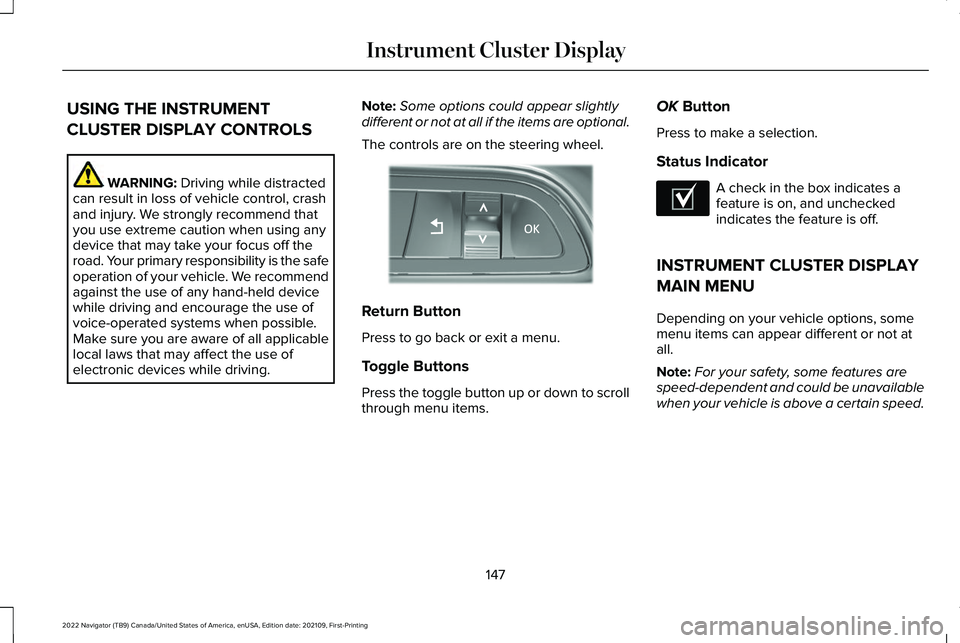
The controls are on the steering wheel. Return Button
Press to go back or exit a menu.
Toggle Buttons
Press the toggle button up or down to scroll
through menu items.OK
Button
Press to make a selection.
Status Indicator A check in the box indicates a
feature is on, and unchecked
indicates the feature is off.
INSTRUMENT CLUSTER DISPLAY
MAIN MENU
Depending on your vehicle options, some
menu items can appear different or not at
all.
Note: For your safety, some features are
speed-dependent and could be unavailable
when your vehicle is above a certain speed.
147
2022 Navigator (TB9) Canada/United States of America, enUSA, Edition date: 202109, First-Printing Instrument Cluster DisplayE357886 E204495