air condition LINCOLN NAVIGATOR 2022 Owner's Manual
[x] Cancel search | Manufacturer: LINCOLN, Model Year: 2022, Model line: NAVIGATOR, Model: LINCOLN NAVIGATOR 2022Pages: 646, PDF Size: 7.29 MB
Page 322 of 646
Note:
Do not cover the sensors with bumper
stickers, repair compound or other objects.
Note: Blocked sensors may affect system
accuracy.
If something is blocking the sensors, a
message may appear in the information
display when you shift into reverse (R).
Note: Bike and cargo racks could cause
false alerts due to obstruction of the sensor.
We recommend switching the feature off
when using a bike or cargo rack. CROSS TRAFFIC ALERT
INDICATORS When the cross traffic alert detects
an approaching vehicle, a tone
sounds, a warning lamp illuminates
in the relevant exterior mirror and arrows
appear in the information display to show
which side the vehicle is approaching from. If the system malfunctions, a warning lamp
illuminates in the instrument cluster and a
message appears in the information display.
Have your vehicle checked as soon as
possible.
Note:
If arrows do not display, a message
appears in the information display.
Note: In some conditions, the system could
alert you, even when there is nothing in the
detection zone, for example a vehicle
passing further away from your vehicle.
318
2022 Navigator (TB9) Canada/United States of America, enUSA, Edition date: 202109, First-Printing Cross Traffic AlertE268294
Page 327 of 646
LOCATING THE PRE-COLLISION
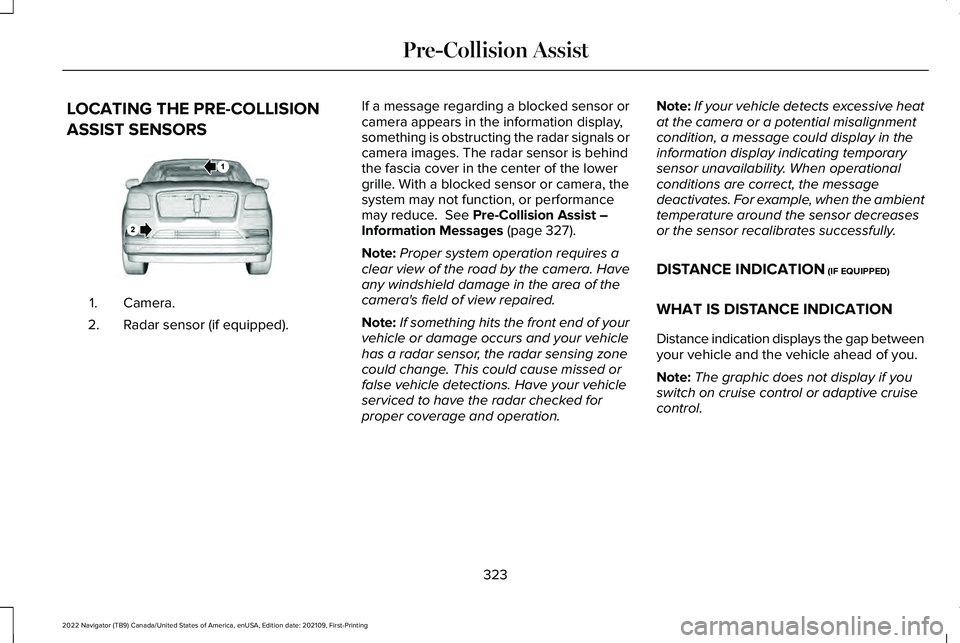
ASSIST SENSORS
Camera.
1.
Radar sensor (if equipped).
2. If a message regarding a blocked sensor or
camera appears in the information display,
something is obstructing the radar signals or
camera images. The radar sensor is behind
the fascia cover in the center of the lower
grille. With a blocked sensor or camera, the
system may not function, or performance
may reduce. See Pre-Collision Assist –
Information Messages (page 327).
Note: Proper system operation requires a
clear view of the road by the camera. Have
any windshield damage in the area of the
camera's field of view repaired.
Note: If something hits the front end of your
vehicle or damage occurs and your vehicle
has a radar sensor, the radar sensing zone
could change. This could cause missed or
false vehicle detections. Have your vehicle
serviced to have the radar checked for
proper coverage and operation. Note:
If your vehicle detects excessive heat
at the camera or a potential misalignment
condition, a message could display in the
information display indicating temporary
sensor unavailability. When operational
conditions are correct, the message
deactivates. For example, when the ambient
temperature around the sensor decreases
or the sensor recalibrates successfully.
DISTANCE INDICATION
(IF EQUIPPED)
WHAT IS DISTANCE INDICATION
Distance indication displays the gap between
your vehicle and the vehicle ahead of you.
Note: The graphic does not display if you
switch on cruise control or adaptive cruise
control.
323
2022 Navigator (TB9) Canada/United States of America, enUSA, Edition date: 202109, First-Printing Pre-Collision AssistE253503
Page 336 of 646
WHAT IS SPEED SIGN
RECOGNITION
Speed sign recognition detects speed limit
signs to inform you of the current speed limit.
Detected speed signs appear in the
information display.
HOW DOES SPEED SIGN
RECOGNITION WORK
Speed sign recognition uses a sensor behind
the interior mirror to detect speed signs.
If your vehicle has speed sign recognition
with navigation, stored speed sign data may
influence the indicated speed limit value.
SPEED SIGN RECOGNITION
PRECAUTIONS WARNING: You are responsible for
controlling your vehicle at all times. The
system is designed to be an aid and does
not relieve you of your responsibility to
drive with due care and attention. Failure
to follow this instruction could result in the
loss of control of your vehicle, personal
injury or death. WARNING:
In cold and severe
weather conditions the system may not
function. Rain, snow and spray can all limit
sensor performance. WARNING:
The system may not
operate properly if the sensor is blocked.
Keep the windshield free from obstruction.
Note: Do not carry out windshield repairs in
the immediate area surrounding the sensor.
Note: If your vehicle has a suspension kit
not approved by us, the system may not
correctly function. Note:
The system may not detect all speed
signs and may incorrectly read signs.
Note: Always fit our original parts when
replacing headlamp bulbs. Other bulbs may
reduce system performance.
SPEED SIGN RECOGNITION
LIMITATIONS
Speed sign recognition may not operate
correctly due to:
• Outdated map data.
• Incorrect recognition of speed limits by
the sensor of signs on parallel roads or
exit ramps.
• Missed recognition of faded, dirty, or
distorted signs.
332
2022 Navigator (TB9) Canada/United States of America, enUSA, Edition date: 202109, First-Printing Speed Sign Recognition
Page 388 of 646
REDUCED ENGINE PERFORMANCE
WARNING: If you continue to drive
your vehicle when the engine is
overheating, the engine could stop without
warning. Failure to follow this instruction
could result in the loss of control of your
vehicle.
If the engine coolant temperature gauge
needle moves to the upper limit position, the
engine is overheating.
See Instrument
Cluster Overview (page 141).
You must only drive your vehicle for a short
distance if the engine overheats. The
distance you can travel depends on ambient
temperature, vehicle load and terrain. The
engine continues to operate with limited
power for a short period of time.
If the engine temperature continues to rise,
the fuel supply to the engine reduces. The
air conditioning switches off and the engine
cooling fan operates continually. 1. Gradually reduce your speed and stop
your vehicle as soon as it is safe to do
so.
2. Immediately switch the engine off to prevent severe engine damage.
3. Wait for the engine to cool down.
4. Check the coolant level.
See Cooling
System Capacity and Specification
(page
473).
5. Have your vehicle checked as soon as possible.
COLD WEATHER PRECAUTIONS
The functional operation of some
components and systems can be affected at
temperatures below approximately
-13°F
(-25°C). DRIVING ON SNOW AND ICE WARNING:
If you are driving in
slippery conditions that require tire chains
or cables, then it is critical that you drive
cautiously. Keep speeds down, allow for
longer stopping distances and avoid
aggressive steering to reduce the chances
of a loss of vehicle control which can lead
to serious injury or death. If the rear end
of your vehicle slides while cornering, steer
in the direction of the slide until you regain
control of your vehicle.
On ice and snow, you should drive more
slowly than usual. Your vehicle has a four
wheel anti-lock brake system, do not pump
the brake pedal.
See Anti-Lock Braking
System Limitations (page 233).
384
2022 Navigator (TB9) Canada/United States of America, enUSA, Edition date: 202109, First-Printing Driving Hints
Page 389 of 646
BREAKING-IN
Your vehicle requires a break-in period. For
the first 1,000 mi (1,600 km), avoid driving at
high speeds, heavy braking, aggressive
shifting or using your vehicle to tow. During
this time, your vehicle may exhibit some
unusual driving characteristics.
DRIVING ECONOMICALLY
The following helps to improve fuel
consumption:
•
Drive smoothly, accelerate gently and
anticipate the road ahead to avoid heavy
braking.
• Regularly check your tire pressures and
make sure that they are inflated to the
correct pressure.
• Follow the recommended maintenance
schedule and carry out the
recommended checks.
• Plan your journey and check the traffic
before you set off. It is more efficient to
combine errands into a single trip
whenever possible. •
Avoid idling the engine in cold weather
or for extended periods. Start the engine
only when you are ready to set off.
• Do not carry unnecessary weight in your
vehicle as extra weight wastes fuel.
• Do not add unnecessary accessories to
the exterior of your vehicle, for example
running boards. If you use a roof rack,
remember to fold it down or remove it
when not in use.
• Do not shift into neutral when you are
braking or when your vehicle is slowing
down.
• Shut all windows when driving at high
speeds.
• Switch off all electric systems when not
in use, for example air conditioning. Make
sure that you unplug any accessories
from the auxiliary power points when not
in use. DRIVING IN SPECIAL CONDITIONS
EMERGENCY MANEUVERS
In an unavoidable emergency where you
must make a sudden sharp maneuver, turn
the steering wheel only as rapidly and as far
as required to avoid the emergency. Apply
smooth pressure to the accelerator pedal or
brake pedal as needed. Avoid abrupt
steering, acceleration and braking changes.
Abrupt changes could increase the risk of
vehicle roll over, loss of vehicle control and
personal injury. If possible, use any available
road surfaces to bring your vehicle under
control.
385
2022 Navigator (TB9) Canada/United States of America, enUSA, Edition date: 202109, First-Printing Driving Hints
Page 425 of 646
How Fail-Safe Cooling Works
If the engine begins to overheat,
the coolant temperature gauge
moves toward the red zone:
A warning lamp illuminates and a
message may appear in the
information display.
If the engine reaches a preset
over-temperature condition, the engine
automatically switches to alternating cylinder
operation. Each disabled cylinder acts as an
air pump and cools the engine.
When this occurs, your vehicle still operates,
however:
• Engine power is limited.
• The air conditioning system turns off.
Continued operation increases the engine
temperature, causing the engine to
completely shut down. Your steering and
braking effort increases in this situation.
When the engine temperature cools, you can
re-start the engine. Have your vehicle
checked as soon as possible to minimize
engine damage. When Fail-Safe Mode Is Activated WARNING: Fail-safe mode is for use
during emergencies only. Operate your
vehicle in fail-safe mode only as long as
necessary to bring your vehicle to rest in
a safe location and seek immediate repairs.
When in fail-safe mode, your vehicle will
have limited power, will not be able to
maintain high-speed operation, and may
completely shut down without warning,
potentially losing engine power, power
steering assist, and power brake assist,
which may increase the possibility of a
crash resulting in serious injury. WARNING: Do not remove the
coolant reservoir cap when the engine is
on or the cooling system is hot. Wait 10
minutes for the cooling system to cool
down. Cover the coolant reservoir cap with
a thick cloth to prevent the possibility of
scalding and slowly remove the cap.
Failure to follow this instruction could result
in personal injury. Your vehicle has limited engine power when
in the fail-safe mode, drive your vehicle with
caution. Your vehicle does not maintain
high-speed operation and the engine could
operate poorly.
Remember that the engine is capable of
automatically shutting down to prevent
engine damage. In this situation:
1. Pull off the road as soon as safely
possible and switch the engine off.
2. If you are a member of a roadside assistance program, we recommend that
you contact your roadside assistance
service provider.
3. If this is not possible, wait for a short period of time for the engine to cool.
4. Check the coolant level. If the coolant level is at or below the minimum mark,
add prediluted coolant immediately.
5. When the engine temperature cools, you
can re-start the engine. Have your vehicle
checked as soon as possible to minimize
engine damage.
Note: Driving your vehicle without repair
increases the chance of engine damage.
421
2022 Navigator (TB9) Canada/United States of America, enUSA, Edition date: 202109, First-Printing Maintenance
Page 426 of 646
Engine Coolant Temperature
Management (If Equipped)
WARNING:
To reduce the risk of
crash and injury, be prepared that the
vehicle speed may reduce and the vehicle
may not be able to accelerate with full
power until the coolant temperature
reduces.
If you tow a trailer with your vehicle, the
engine may temporarily reach a higher
temperature during severe operating
conditions, for example ascending a long or
steep grade in high ambient temperatures.
At this time, you may notice the coolant
temperature gauge moves toward the red
zone and a message may appear in the
information display. You may notice a reduction in vehicle speed
caused by reduced engine power in order
to manage the engine coolant temperature.
Your vehicle may enter this mode if certain
high-temperature and high-load conditions
take place. The amount of speed reduction
depends on vehicle loading, grade and
ambient temperature. If this occurs, there is
no need to stop your vehicle. You can
continue to drive.
The air conditioning may automatically turn
on and off during severe operating
conditions to protect the engine from
overheating. When the coolant temperature
decreases to the normal operating
temperature, the air conditioning turns on.
If the coolant temperature gauge moves fully
into the red zone, or if the coolant
temperature warning or service engine soon
messages appear in your information display,
do the following:
1.
Stop your vehicle as soon as it is safe to
do so. Fully apply the parking brake, shift
into park (P) or neutral (N). 2. Leave the engine running until the
coolant temperature gauge needle
returns to the normal position. If the
temperature does not drop after several
minutes, follow the remaining steps.
3. Switch the engine off and wait for it to cool. Check the coolant level.
4. If the coolant level is at or below the minimum mark, add prediluted coolant
immediately.
5. If the coolant level is normal, restart the engine and continue.
ENGINE AIR FILTER
CHANGING THE ENGINE AIR FILTER WARNING:
To reduce the risk of
vehicle damage and personal burn injuries,
do not start your engine with the air
cleaner removed and do not remove it
while the engine is running.
422
2022 Navigator (TB9) Canada/United States of America, enUSA, Edition date: 202109, First-Printing Maintenance
Page 435 of 646
CLEANING CHROME, ALUMINIUM OR
STAINLESS STEEL
We recommend that you only use a car
shampoo, a soft cloth and water on bumpers
and other chrome, aluminium or stainless
steel parts.
Note:
For additional information and
assistance, we recommend that you contact
an authorized dealer.
Note: Rinse the area well after cleaning.
Note: Do not use abrasive materials, for
example steel wool or plastic pads, as they
can scratch these surfaces.
Note: Do not use chrome cleaner, metal
cleaner or polish on wheels or wheel covers.
CLEANING WHEELS
Only use a recommended wheel and tire
cleaner to clean the wheels weekly. For
additional information and assistance, we
recommend that you contact an authorized
dealer. 1.
Use a sponge to remove heavy deposits
of dirt and brake dust.
2. Rinse well after cleaning.
Note: Do not apply a cleaning chemical to
warm or hot wheel rims and covers.
If you intend on parking your vehicle for an
extended period after cleaning the wheels
with a wheel cleaner, drive your vehicle for
a few minutes before parking your vehicle.
This reduces the risk of corrosion of the
brake discs, brake pads and linings.
Do not clean the wheels when they are hot.
Note: Some car washes could damage
wheel rims and covers.
Note: Using non-recommended cleaners,
harsh cleaning products, chrome wheel
cleaners or abrasive materials could
damage wheel rims and covers.
CLEANING THE ENGINE
COMPARTMENT
Use a vacuum cleaner to remove debris from
the screen area below windshield. Note:
If you are not familiar with the parts
around the engine do not wash the engine
compartment. Avoid frequent engine
washes.
When washing the engine compartment:
• Never wash or rinse the engine while it
is hot or running.
• Never wash or rinse any ignition coil,
spark plug wire or spark plug well.
• Cover the battery, power distribution box,
and air filter assembly to prevent water
damage.
Note: If your vehicle has an engine cover
remove the cover before application of
shampoo and degreaser.
• Spray an approved engine shampoo and
degreaser on all parts that require
cleaning and rinse with water.
CLEANING STRIPES OR GRAPHICS
It is recommended to wash your vehicle by
hand however, pressure washing may be
used under the following conditions:
431
2022 Navigator (TB9) Canada/United States of America, enUSA, Edition date: 202109, First-Printing Vehicle Care
Page 437 of 646
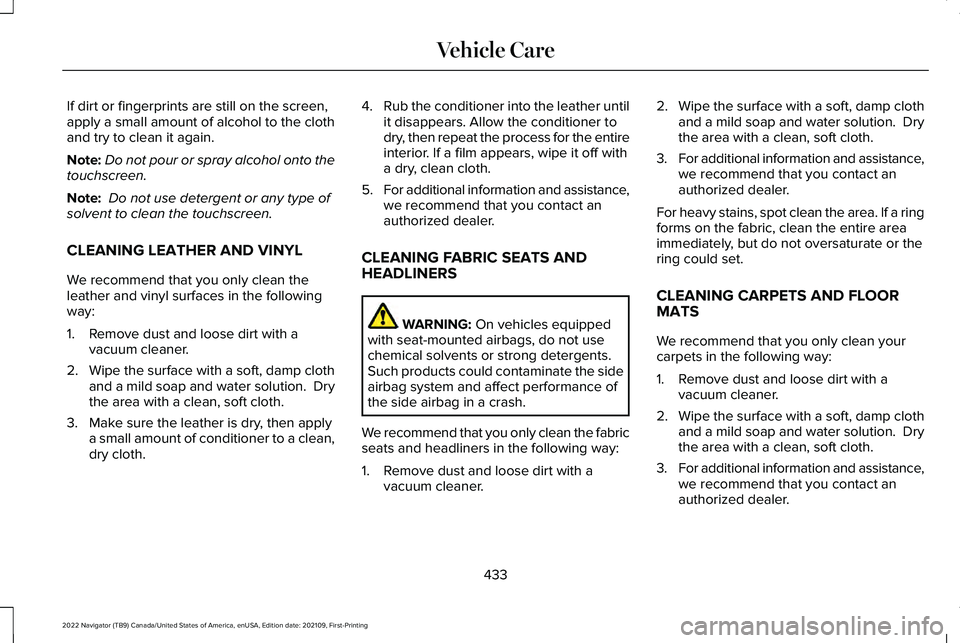
If dirt or fingerprints are still on the screen,
apply a small amount of alcohol to the cloth
and try to clean it again.
Note:
Do not pour or spray alcohol onto the
touchscreen.
Note: Do not use detergent or any type of
solvent to clean the touchscreen.
CLEANING LEATHER AND VINYL
We recommend that you only clean the
leather and vinyl surfaces in the following
way:
1. Remove dust and loose dirt with a vacuum cleaner.
2. Wipe the surface with a soft, damp cloth
and a mild soap and water solution. Dry
the area with a clean, soft cloth.
3. Make sure the leather is dry, then apply a small amount of conditioner to a clean,
dry cloth. 4.
Rub the conditioner into the leather until
it disappears. Allow the conditioner to
dry, then repeat the process for the entire
interior. If a film appears, wipe it off with
a dry, clean cloth.
5. For additional information and assistance,
we recommend that you contact an
authorized dealer.
CLEANING FABRIC SEATS AND
HEADLINERS WARNING: On vehicles equipped
with seat-mounted airbags, do not use
chemical solvents or strong detergents.
Such products could contaminate the side
airbag system and affect performance of
the side airbag in a crash.
We recommend that you only clean the fabric
seats and headliners in the following way:
1. Remove dust and loose dirt with a vacuum cleaner. 2.
Wipe the surface with a soft, damp cloth
and a mild soap and water solution. Dry
the area with a clean, soft cloth.
3. For additional information and assistance,
we recommend that you contact an
authorized dealer.
For heavy stains, spot clean the area. If a ring
forms on the fabric, clean the entire area
immediately, but do not oversaturate or the
ring could set.
CLEANING CARPETS AND FLOOR
MATS
We recommend that you only clean your
carpets in the following way:
1. Remove dust and loose dirt with a vacuum cleaner.
2. Wipe the surface with a soft, damp cloth
and a mild soap and water solution. Dry
the area with a clean, soft cloth.
3. For additional information and assistance,
we recommend that you contact an
authorized dealer.
433
2022 Navigator (TB9) Canada/United States of America, enUSA, Edition date: 202109, First-Printing Vehicle Care
Page 479 of 646
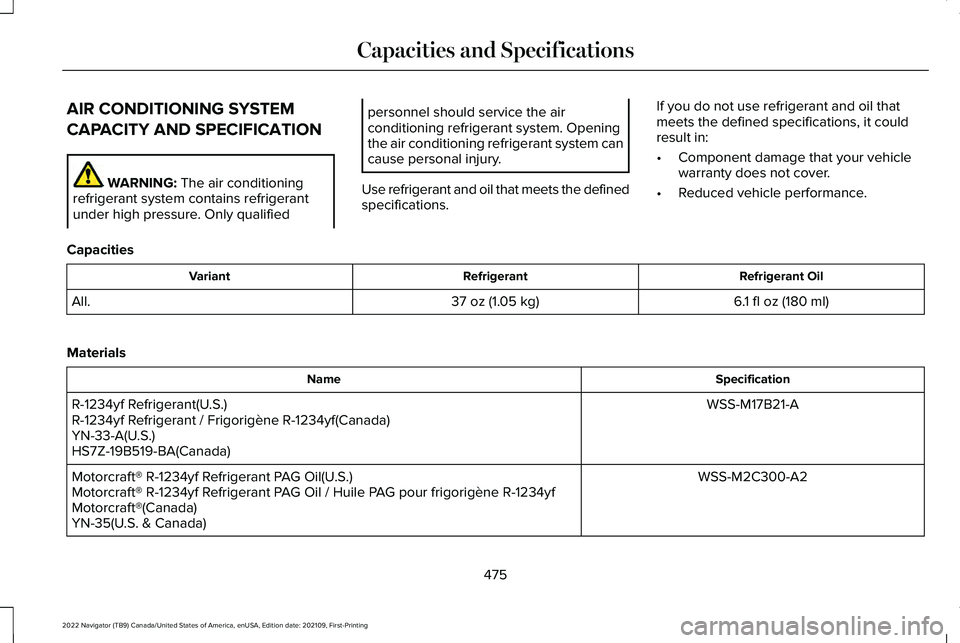
AIR CONDITIONING SYSTEM
CAPACITY AND SPECIFICATION
WARNING: The air conditioning
refrigerant system contains refrigerant
under high pressure. Only qualified personnel should service the air
conditioning refrigerant system. Opening
the air conditioning refrigerant system can
cause personal injury.
Use refrigerant and oil that meets the defined
specifications. If you do not use refrigerant and oil that
meets the defined specifications, it could
result in:
•
Component damage that your vehicle
warranty does not cover.
• Reduced vehicle performance.
Capacities Refrigerant Oil
Refrigerant
Variant
6.1 fl oz (180 ml)
37 oz (1.05 kg)
All.
Materials Specification
Name
WSS-M17B21-A
R-1234yf Refrigerant(U.S.)
R-1234yf Refrigerant / Frigorigène R-1234yf(Canada)
YN-33-A(U.S.)
HS7Z-19B519-BA(Canada)
WSS-M2C300-A2
Motorcraft® R-1234yf Refrigerant PAG Oil(U.S.)
Motorcraft® R-1234yf Refrigerant PAG Oil / Huile PAG pour frigorigène R-1234yf
Motorcraft®(Canada)
YN-35(U.S. & Canada)
475
2022 Navigator (TB9) Canada/United States of America, enUSA, Edition date: 202109, First-Printing Capacities and Specifications