brake light LINCOLN NAVIGATOR 2022 Owner's Manual
[x] Cancel search | Manufacturer: LINCOLN, Model Year: 2022, Model line: NAVIGATOR, Model: LINCOLN NAVIGATOR 2022Pages: 646, PDF Size: 7.29 MB
Page 390 of 646
DRIVING THROUGH MUD AND WATER
Mud
Be cautious of sudden changes in vehicle
speed or direction when you are driving in
mud. Even all-wheel drive and four-wheel
drive vehicles can lose traction in mud. If
your vehicle slides, steer in the direction of
the slide until you regain control of your
vehicle. After driving through mud, clean off
residue stuck to rotating driveshafts and tires.
Excess residue can cause an imbalance that
could damage drive components.
Note:
If your vehicle gets stuck in mud, it
could be rocked out by shifting between
forward and reverse gears, stopping
between shifts in a steady pattern. Press
lightly on the accelerator in each gear.
Note: Do not rock your vehicle if the engine
is not at normal operating temperature, as
damage to the transmission could occur.
Note: Do not rock your vehicle for more than
a minute, as damage to the transmission
and tires could occur or the engine could
overheat. Water
If you must drive though deep water, drive
slowly. The water could limit traction or brake
capability. See Driving Through Shallow
Water (page 387).
When driving though water, determine the
depth and avoid water higher than the center
of the wheel.
Once through water, always try the brakes.
Wet brakes do not stop your vehicle as
quickly as dry brakes. Apply light pressure
to the brake pedal while slowly moving the
vehicle to dry the brakes.
Note: Driving through deep water could
cause damage to the transmission. If the
front or rear axle is submerged in water,
have the axle lubricant and power transfer
unit lubricant checked and changed if
necessary. DRIVING ON HILLY OR SLOPING
TERRAIN WARNING: Extreme care should be
used when steering the vehicle in reverse
down a slope so as not to cause the
vehicle to swerve out of control.
Although natural obstacles could make it
necessary to travel diagonally up or down a
hill or steep incline, you should try to drive
straight up or straight down.
Note: Avoid turning on steep slopes or hills.
A danger lies in losing traction, slipping
sideways and possible vehicle roll over.
Whenever driving on a hill, determine
beforehand the route you can use. Do not
drive over the crest of a hill without seeing
what conditions are on the other side. Do
not drive in reverse over a hill without the
aid of an observer.
386
2022 Navigator (TB9) Canada/United States of America, enUSA, Edition date: 202109, First-Printing Driving Hints
Page 391 of 646
Apply just enough power to the wheels to
climb the hill. Too much power causes the
tires to slip, spin or lose traction, and you
could lose control of your vehicle. When
descending a steep hill, do not descend the
hill in neutral. Avoid sudden hard braking to
keep the front wheels rolling and to maintain
your vehicle's steering.
Note:
Your vehicle has anti-lock brakes,
apply the brakes steadily. Do not pump the
brakes.
Note: If your vehicle gets stuck driving on
hilly or sloping terrain, it could be rocked out
by shifting between forward and reverse
gears, stopping between shifts in a steady
pattern. Press lightly on the accelerator in
each gear.
Note: Do not rock your vehicle if the engine
is not at normal operating temperature, as
damage to the transmission could occur.
Note: Do not rock your vehicle for more than
a minute, as damage to the transmission
and tires could occur or the engine could
overheat. DRIVING IN SAND
When driving over sand, try to keep all four
wheels on the most solid area of the trail.
Steadily drive through the terrain. Apply the
accelerator slowly and avoid excessive
wheel slip. Do not drive your vehicle in deep
sand for an extended period of time. This
could overheat the system. A message
appears in the instrument cluster display.
Note:
If your vehicle gets stuck driving on
hilly or sloping terrain, it could be rocked out
by shifting between forward and reverse
gears, stopping between shifts in a steady
pattern. Press lightly on the accelerator in
each gear.
Note: Do not rock your vehicle if the engine
is not at normal operating temperature, as
damage to the transmission could occur.
Note: Do not rock your vehicle for more than
a minute, as damage to the transmission
and tires could occur or the engine could
overheat DRIVING THROUGH SHALLOW
WATER WARNING: Do not attempt to cross
a deep or flowing body of water. Failure to
follow this instruction could result in the
loss of control of your vehicle, personal
injury or death.
Note: Driving through standing water can
cause vehicle damage.
Note: Engine damage can occur if water
enters the air filter.
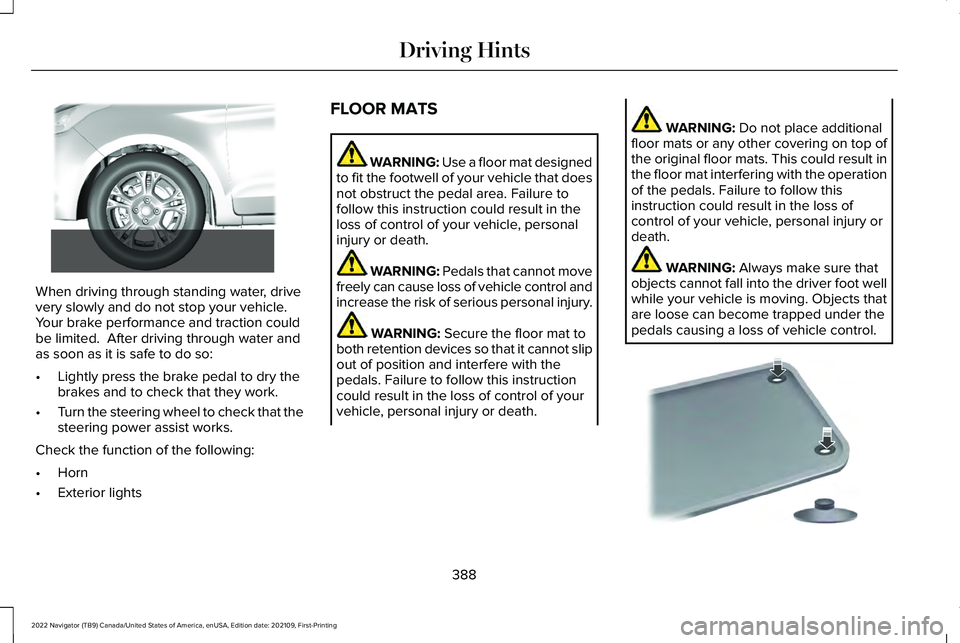
Before driving through standing water, check
the depth. Never drive through water that is
higher than the bottom of the front rocker
area of your vehicle.
387
2022 Navigator (TB9) Canada/United States of America, enUSA, Edition date: 202109, First-Printing Driving Hints
Page 392 of 646
When driving through standing water, drive
very slowly and do not stop your vehicle.
Your brake performance and traction could
be limited. After driving through water and
as soon as it is safe to do so:
•
Lightly press the brake pedal to dry the
brakes and to check that they work.
• Turn the steering wheel to check that the
steering power assist works.
Check the function of the following:
• Horn
• Exterior lights FLOOR MATS WARNING: Use a floor mat designed
to fit the footwell of your vehicle that does
not obstruct the pedal area. Failure to
follow this instruction could result in the
loss of control of your vehicle, personal
injury or death. WARNING:
Pedals that cannot move
freely can cause loss of vehicle control and
increase the risk of serious personal injury. WARNING:
Secure the floor mat to
both retention devices so that it cannot slip
out of position and interfere with the
pedals. Failure to follow this instruction
could result in the loss of control of your
vehicle, personal injury or death. WARNING:
Do not place additional
floor mats or any other covering on top of
the original floor mats. This could result in
the floor mat interfering with the operation
of the pedals. Failure to follow this
instruction could result in the loss of
control of your vehicle, personal injury or
death. WARNING:
Always make sure that
objects cannot fall into the driver foot well
while your vehicle is moving. Objects that
are loose can become trapped under the
pedals causing a loss of vehicle control. 388
2022 Navigator (TB9) Canada/United States of America, enUSA, Edition date: 202109, First-Printing Driving Hints E266447 E142666
Page 402 of 646
4. Switch your vehicle off by pressing the
push button ignition switch once. A
message appears in the instrument
cluster display.
5. Switch your vehicle to accessory mode by pressing the push button ignition
switch once without pressing the brake
pedal.
6. Press and hold the brake pedal.
7. Using the instrument cluster controls on the steering wheel, select Settings.
8. Select
Neutral Tow.
9. Press and hold the
OK button until a
confirmation message appears in the
information display.
Note: If completed successfully, the
information display shows
Neutral Tow
Enabled Leave Transmission in Neutral.
This indicates that your vehicle is safe to tow
with all wheels on the ground.
Note: If you do not see a confirmation
message in the instrument cluster display,
you must perform the procedure again from
the beginning. Note:
You may hear noise as the transfer
case shifts into its neutral position. This is
normal.
10. Release the brake pedal.
11. Leave the transmission in neutral (N) and switch your vehicle off by pressing
the push button ignition switch once
without pressing the brake pedal.
Switching
Neutral Tow Off
1. With your vehicle properly secured to the
tow vehicle, press and hold the brake
pedal and start the engine.
2. Switch your vehicle off by pressing the push button ignition switch once and
release the brake pedal.
3. Place your vehicle in accessory mode by
pressing the push button ignition switch
once without pressing the brake pedal.
4. Press and hold the brake pedal.
5. Shift into park (P).
6. Release the brake pedal. Note:
If completed successfully, the
instrument cluster displays
2H and Neutral
Tow Disabled.
Note: You must perform the switching
neutral tow on and switching neutral tow off
procedures again from the beginning if the
indicator light and message do not display.
Note: You may hear a noise as the transfer
case shifts out of its neutral position. This is
normal.
7. Apply the parking brake, then disconnect
your vehicle from the tow vehicle.
8. Release the parking brake, start the engine, and shift into drive (D) to make
sure the transfer case is out of the neutral
tow position.
9. If the transfer case does not successfully
shift out of its neutral position, set the
parking brake. Have your vehicle
checked as soon as possible.
Resolving the Shift Delayed Drive Forward
Message
1. Press and hold the brake pedal.
2. Start your vehicle.
398
2022 Navigator (TB9) Canada/United States of America, enUSA, Edition date: 202109, First-Printing Towing Your Vehicle
Page 430 of 646
Remove and Reinstall the Battery
Install a battery approved for use by our
specifications. See Capacities and
Specifications (page 469).
To disconnect or remove the battery, do the
following:
1. Apply the parking brake and switch the ignition off.
2. Switch all electrical equipment off, for example lights and radio.
3. Wait a minimum of two minutes before disconnecting the battery.
Note: The engine management system has
a power hold function and remains powered
for a period of time after you switch the
ignition off. This is to allow the system to
store diagnostic and adaptive tables.
Disconnecting the battery without waiting
can cause damage not covered by the
vehicle warranty.
4. Disconnect the negative battery cable terminal.
5. Disconnect the positive battery cable terminal. 6. Remove the battery securing clamp.
7. Remove the battery.
8.
To install, reverse the removal procedure.
Note: Before reconnecting the battery, make
sure the ignition remains switched off.
Note: Make sure to fully tighten the battery
cables.
If you disconnect or replace the vehicle
battery, you must reset the following
features:
• Window bounce-back.
See Opening and
Closing the Windows (page 133).
• Clock Settings.
• Pre-set radio stations.
Battery Disposal Make sure that you dispose of old
batteries in an environmentally
friendly way. Seek advice from
your local authority about recycling old
batteries. ADJUSTING THE HEADLAMPS
Vertical Aim Adjustment
The headlamps on your vehicle are properly
aimed at the assembly plant. If your vehicle
has been in an accident, contact an
authorized dealer to check and realign your
headlamps.
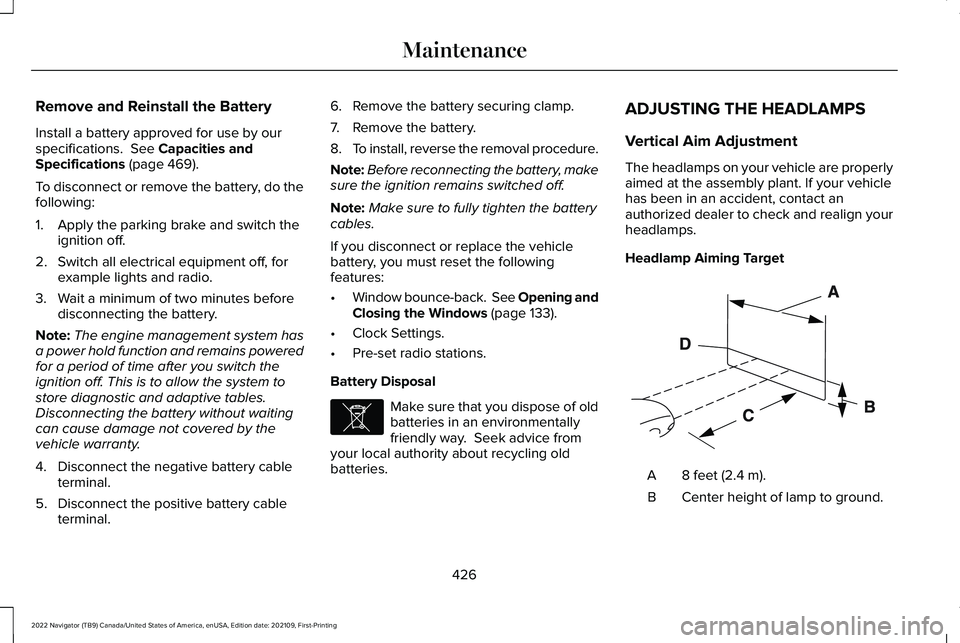
Headlamp Aiming Target
8 feet (2.4 m).
A
Center height of lamp to ground.
B
426
2022 Navigator (TB9) Canada/United States of America, enUSA, Edition date: 202109, First-Printing MaintenanceE107998 E142592
Page 439 of 646
PREPARING YOUR VEHICLE FOR
STORAGE
If you plan on storing your vehicle for 30
days or more, the following maintenance
recommendations ensures your vehicle stays
in good operating condition.
Under various conditions, long-term storage
may lead to degraded engine performance
or failure unless you use specific precautions
to preserve your vehicle.
General
•
Store all vehicles in a dry, ventilated
place.
• If vehicles are stored outside, they
require regular maintenance to protect
against rust and weather damage.
• Make sure all linkages, cables, levers and
pins under your vehicle are covered with
grease to prevent rust. •
Move vehicles at least 25 ft (7.5 m) every
15 days to lubricate working parts and
prevent corrosion.
• Fill the fuel tank with high-quality fuel
until the first automatic shutoff of the fuel
pump nozzle.
Engine
• Change the engine oil and filter prior to
storage because used engine oil contains
contaminants which may cause engine
damage.
• Start the engine every 15 days for a
minimum of 15 minutes. Run at fast idle
with the climate controls set to defrost
until the engine reaches normal
operating temperature.
• With your foot on the brake, shift through
all the gears while the engine is running. Body
•
Wash your vehicle thoroughly to remove
dirt, grease, oil, tar or mud from exterior
surfaces, rear-wheel housings and the
underside of front fenders.
• Periodically wash your vehicle if it is
stored in exposed locations.
• Touch-up exposed or primed metal to
prevent rust.
• Cover chrome and stainless steel parts
with a thick coat of auto wax to prevent
discoloration. Re-wax as necessary when
you wash your vehicle.
• Lubricate all hood, door and luggage
compartment hinges and latches with a
light grade oil.
• Cover interior trim to prevent fading.
• Keep all rubber parts free from oil and
solvents.
435
2022 Navigator (TB9) Canada/United States of America, enUSA, Edition date: 202109, First-Printing Storing Your Vehicle
Page 465 of 646
CHANGING A FLAT TIRE
WARNING: If the tire pressure
monitor sensor becomes damaged it may
not function.
Note: Only use tire sealants in roadside
emergencies as they may cause damage to
the tire pressure monitoring system sensor.
Note: The tire pressure monitoring system
indicator light illuminates when the spare
tire is in use. To restore the full function of
the monitoring system, all road wheels with
tire pressure monitoring sensors must be
mounted on this vehicle.
If you get a flat tire when driving, do not
apply the brake heavily. Instead, gradually
decrease your speed. Hold the steering
wheel firmly and slowly move to a safe place
on the side of the road. Have a flat serviced by an authorized dealer
in order to prevent damage to the system
sensors.
See Tire Pressure Monitoring
System (page 453). Replace the spare tire
with a road tire as soon as possible. During
repairing or replacing of the flat tire, have
the authorized dealer inspect the system
sensor for damage.
Dissimilar Spare Wheel and Tire
Assembly Information WARNING:
Failure to follow these
guidelines could result in an increased risk
of loss of vehicle control, injury or death.
If you have a dissimilar spare wheel and tire,
then it is intended for temporary use only.
This means that if you need to use it, you
should replace it as soon as possible with a
road wheel and tire assembly that is the
same size and type as the road tires and
wheels that were originally provided. If the
dissimilar spare tire or wheel is damaged, it
should be replaced rather than repaired. A dissimilar spare wheel and tire assembly
is defined as a spare wheel and tire assembly
that is different in brand, size or appearance
from the other road tires and wheels on your
vehicle.
Full-size dissimilar spare
When driving with the full-size dissimilar
spare wheel and tire assembly, do not:
•
Exceed
70 mph (113 km/h).
• Use more than one dissimilar spare
wheel and tire assembly at a time.
• Use snow chains on the end of the
vehicle with the dissimilar spare wheel
and tire assembly.
When driving with the full-size dissimilar
spare wheel and tire assembly, it is
recommended that you do not:
• Exceed
50 mph (80 km/h) in 4WD.
• Engage 4WD unless the vehicle is
stationary.
• Use 4WD on dry pavement.
461
2022 Navigator (TB9) Canada/United States of America, enUSA, Edition date: 202109, First-Printing Changing a Road Wheel
Page 468 of 646
WARNING: Park your vehicle so that
you do not obstruct the flow of traffic or
place yourself in any danger and set up a
warning triangle.
1. Park the vehicle on firm, level ground and
activate the hazard flashers.
2. Apply the parking brake, place the transmission in park (P) and switch the
ignition off.
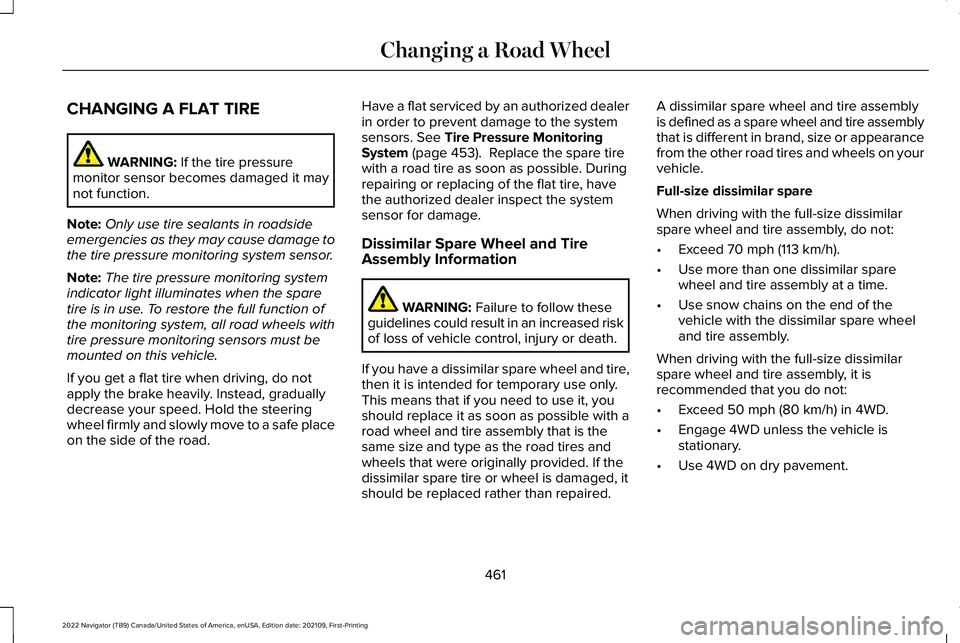
3. Block the wheels diagonally opposite the
flat tire, for example, if the left front tire
is flat, block the right rear wheel. Removing the Jack and Tools
Note:
Pay close attention to the orientation
of the jack and tool kit bag, because it needs
to be reinstalled after changing the tire.
1. Open the liftgate and lift the load floor behind the third row seat. If your vehicle
has an access panel, you need to then
unlatch and remove this panel.
2. Remove the wing nut by turning it counterclockwise.
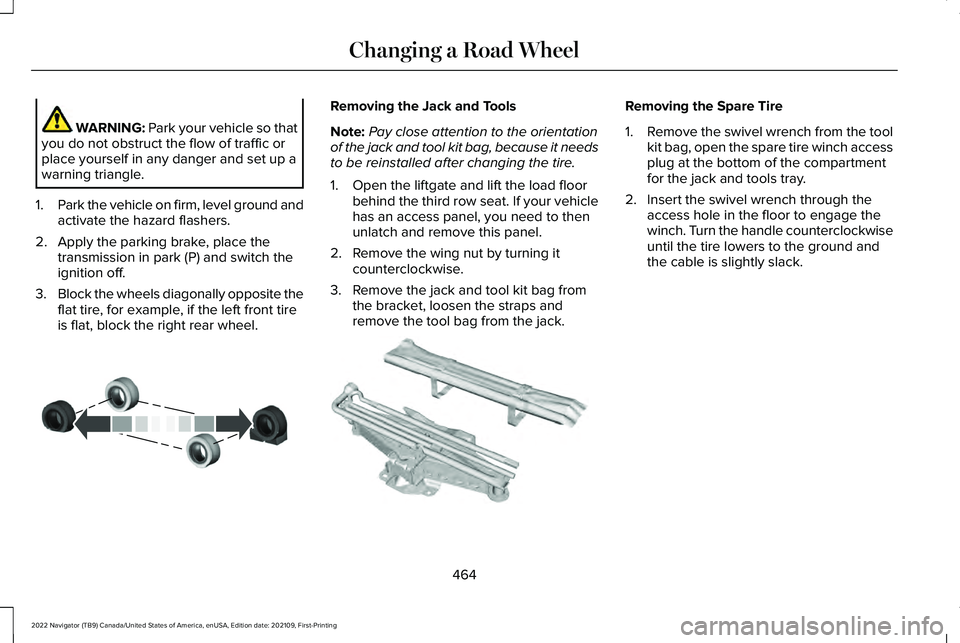
3. Remove the jack and tool kit bag from the bracket, loosen the straps and
remove the tool bag from the jack. Removing the Spare Tire
1.
Remove the swivel wrench from the tool
kit bag, open the spare tire winch access
plug at the bottom of the compartment
for the jack and tools tray.
2. Insert the swivel wrench through the access hole in the floor to engage the
winch. Turn the handle counterclockwise
until the tire lowers to the ground and
the cable is slightly slack.
464
2022 Navigator (TB9) Canada/United States of America, enUSA, Edition date: 202109, First-Printing Changing a Road WheelE175447 E252435
Page 525 of 646
UPDATING THE VEHICLE SYSTEMS
WIRELESSLY
Over the air system updates allow
you to update your vehicle system
software wirelessly. To make sure
you receive all updates, set a recurring
schedule and connect to Wi-Fi. Updates may
take longer if not connected to Wi-Fi, or may
not download at all. See Connected Vehicle
(page 482).
Over the Air System Update
Requirements
Before updating, reference this list to make
sure your vehicle is ready be updated. If
these requirements are not met during a
scheduled update, the update will be
canceled and you can reschedule.
• Your vehicle is not running.
• Your vehicle is stopped.
• Your vehicle is parked.
• The hazard indicators are switched off.
• The alarm is not sounding. •
The doors are closed.
• The parking lights are switched off.
• You are not pressing the brake pedal.
• An emergency call is not in progress.
• Your vehicle is not in limp mode.
Enabling Over the Air Updates
1. Press
Settings on the touchscreen.
2. Press
Software Update.
3. Switch
Automatic Updates on or off.
Note: Over the air updates are enabled by
default.
Note: If you do not want to receive over the
air updates you can turn them off. You will
not be notified of new updates. Scheduling an Update
Scheduling an update allows you to set a
convenient time for the update to complete.
We recommend updating overnight when
your vehicle is not in use. Ensure Vehicle
Connectivity and Automatic Updates are
enabled. Once you complete these steps,
your schedule will be saved for future
updates. As long as an update is not in
process you can adjust your schedule.
Note:
Some updates may be applied outside
of your set schedule. Information about the
unscheduled update appears on the
touchscreen after it is applied.
Using the Settings Menu
1. Press
Settings on the touchscreen.
2. Press
Software Update.
3. Press
Schedule Updates.
4. Use the controls to set the time and day
of the update.
5. Save the schedule.
Note: You can set the updates to occur at
any time.
521
2022 Navigator (TB9) Canada/United States of America, enUSA, Edition date: 202109, First-Printing Vehicle System UpdatesE327789
Page 621 of 646
3
360 Degree Camera....................................261
360 Degree Camera Settings.........................263
360 Degree Camera Guide Lines...........262
360 Degree Camera Limitations..............262
360 Degree Camera Precautions.............261
360 Degree Camera Settings...................263 Switching the 360 Degree Camera On and
Off......................................................................263
Switching the 360 Degree Camera View..................................................................264
4
4WD See: Four-Wheel Drive......................................223
9
911 Assist...........................................................70
A
A/C See: Climate Control..........................................158
About This Publication...................................19 ABS
See: Brakes..........................................................233
Accessing Apps.............................................513
Accessing Navigation..................................518
Accessing the Passive Key Backup Position........................................................204
Accessories...................................................523
ActiveGlide ™
..................................................286
ActiveGlide ™ – Troubleshooting......................291
ActiveGlide ™ Alerts
......................................289
ActiveGlide ™ Automatic
Cancellation
................................................289
ActiveGlide ™ Indicators...............................290
ActiveGlide ™ Limitations.............................288
ActiveGlide ™ Precautions...........................286
ActiveGlide ™ Requirements.......................287
ActiveGlide ™ Settings..................................288
ActiveGlide ™ – Troubleshooting................291
ActiveGlide ™ – Information Messages...........291
Active Park Assist
.........................................265
Active Park Assist – Troubleshooting...........267
Active Park Assist Precautions.................265
Active Park Assist – Troubleshooting.........................................267
Active Park Assist – Frequently Asked Questions.........................................................267
Active Park Assist – Information Messages.........................................................267 Adaptive Cruise Control
.............................270
Adaptive Cruise Control –
Troubleshooting.............................................283
Intelligent Adaptive Cruise Control................281
Lane Centering...................................................279
Adaptive Cruise Control Automatic Cancellation................................................274
Adaptive Cruise Control Indicators.........278
Adaptive Cruise Control Limitations.........271
Adaptive Cruise Control Precautions.................................................270
Adaptive Cruise Control – Troubleshooting.........................................283
Adaptive Cruise Control – Information Messages.........................................................283
Adaptive Front Lighting...............................129 How Does Adaptive Front Lighting
Work...................................................................129
Switching Adaptive Front Lighting On and Off.......................................................................130
Adjustable Pedals
..........................................113
Adjusting the Exterior Mirrors....................137
Adjusting the Headlamps..........................426
Adjusting the Instrument Panel Lighting Brightness.....................................................132
Adjusting the Integrated Trailer Brake Controller Mode
.........................................358
617
2022 Navigator (TB9) Canada/United States of America, enUSA, Edition date: 202109, First-Printing Index