instrument panel LINCOLN NAVIGATOR 2022 Owner's Manual
[x] Cancel search | Manufacturer: LINCOLN, Model Year: 2022, Model line: NAVIGATOR, Model: LINCOLN NAVIGATOR 2022Pages: 646, PDF Size: 7.29 MB
Page 395 of 646
If you need to arrange roadside assistance
for yourself, Lincoln reimburses a reasonable
amount for towing to the nearest Lincoln
dealership within 100 mi (160 km). To obtain
reimbursement information, United States
clients, call 1-800-521-4140. Clients need to
submit their original receipts.
Vehicles Sold in Canada: Getting
Roadside Assistance
To fully assist you should you have a vehicle
concern, Lincoln offers a complimentary
roadside assistance program. This program
is eligible within Canada or the continental
United States.
The service is available 24 hours a day,
seven days a week.
This program is separate from the New
Vehicle Limited Warranty, beginning from
the original warranty start date and lasts the
life of the vehicle for the original owner.
Subsequent owners receive coverage that
is concurrent with the 6 years or
70,000 mi
(110,000 km), whichever occurs first,
powertrain warranty coverage period. Note:
Canadian roadside coverage and
benefits may differ from the U.S. coverage.
For complete program coverage details,
review your warranty guide, contact your
dealer, call us in Canada at 1-844-665-2007,
or visit our website at
www.lincolncanada.com.
If you purchased your vehicle in Canada and
require roadside assistance, please call
1-844-665-2007 or contact Roadside
Assistance using the Lincoln Way mobile
app.
Note: For quick reference, complete the
roadside assistance identification card found
in the glove compartment of your vehicle
and place it in your wallet.
SWITCHING THE HAZARD
FLASHERS ON AND OFF The hazard flasher button is on the
instrument panel. Press the button
to switch the hazard flashers on if
your vehicle is creating a safety hazard for
other road users. When you switch the hazard flashers on, all
front and rear direction indicators flash.
Note:
The hazard flashers operate when the
ignition is in any position, or if the key is not
in the ignition. The battery loses charge and
could have insufficient power to restart your
vehicle.
Press the button again to switch them off.
JUMP STARTING THE VEHICLE
JUMP STARTING PRECAUTIONS WARNING:
Batteries normally
produce explosive gases which can cause
personal injury. Therefore, do not allow
flames, sparks or lighted substances to
come near the battery. When working near
the battery, always shield your face and
protect your eyes. Always provide correct
ventilation.
391
2022 Navigator (TB9) Canada/United States of America, enUSA, Edition date: 202109, First-Printing Crash and Breakdown Information
Page 418 of 646
MAINTENANCE PRECAUTIONS
Service your vehicle regularly to help
maintain its roadworthiness and resale value.
There is a large network of authorized
dealers that are there to help you with their
professional servicing expertise. We believe
that their specially trained technicians are
best qualified to service your vehicle properly
and expertly. They are supported by a wide
range of highly specialized tools developed
specifically for servicing your vehicle.
If your vehicle requires professional service,
an authorized dealer can provide the
necessary parts and service. Check your
warranty information to find out which parts
and services are covered.
Use only recommended fuels, lubricants,
fluids and service parts conforming to
specifications. See Capacities and
Specifications (page 469).
• Do not work on a hot engine.
• Make sure that nothing gets caught in
moving parts. •
Do not work on a vehicle with the engine
running in an enclosed space, unless you
are sure you have enough ventilation.
• Keep all open flames and other burning
material, such as cigarettes, away from
the battery and all fuel related parts.
• Set the parking brake, shift the
transmission to park (P) and block the
wheels.
OPENING AND CLOSING THE
HOOD WARNING:
Make sure that you fully
latch the hood before driving. Failure to
follow this instruction could result in
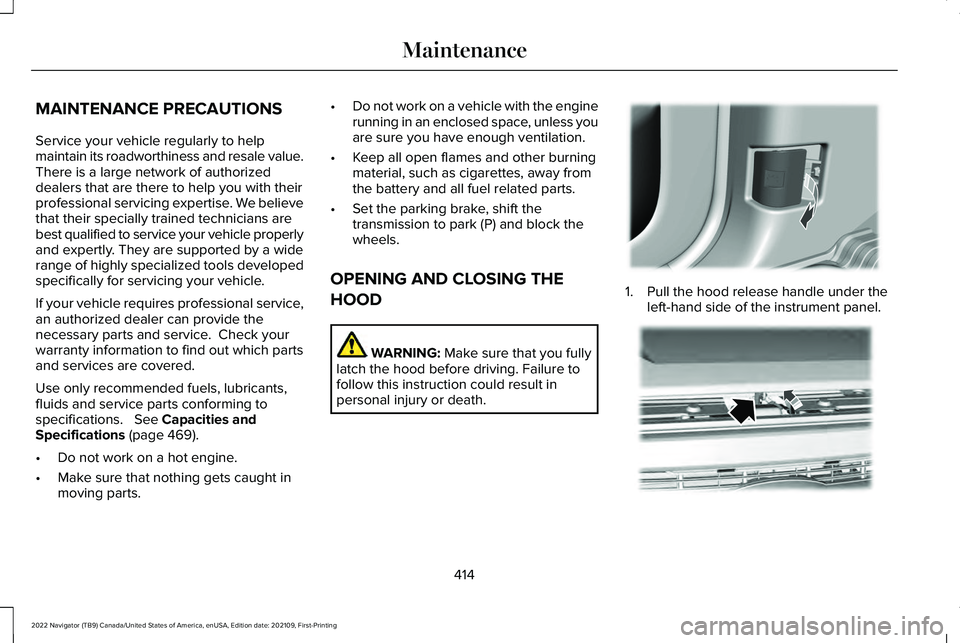
personal injury or death. 1. Pull the hood release handle under the
left-hand side of the instrument panel. 414
2022 Navigator (TB9) Canada/United States of America, enUSA, Edition date: 202109, First-Printing MaintenanceE337831 E190266
Page 434 of 646
Specification
Name
Motorcraft® Spot and Stain Remover, ZC-14 (U.S.) ESR-M14P5-A
Motorcraft® Ultra-Clear Spray Glass Cleaner, ZC-23 (U.S.)
Motorcraft® Wheel and Tire Cleaner, ZC-37-A (U.S. & Canada)
CLEANING THE EXTERIOR
CLEANING THE EXTERIOR
PRECAUTIONS
Immediately remove fuel spillages, additive
residuals, bird droppings, insect deposits
and road tar. These may cause damage to
your vehicle ’s paintwork or trim over time.
Remove any exterior accessories, for
example antennas, before entering a car
wash. CLEANING HEADLAMPS AND REAR
LAMPS
We recommend that you only use cold or
lukewarm water containing car shampoo to
clean the headlamps and the rear lamps.
Do not scrape the lamps.
Do not wipe lamps when they are dry.
CLEANING WINDOWS AND WIPER
BLADES
To clean the windshield and wiper blades:
•
Clean the windshield with a non-abrasive
glass cleaner. Note:
When cleaning the interior of the
windshield, avoid getting any glass cleaner
on the instrument panel or door panels. Wipe
any glass cleaner off these surfaces
immediately.
• Clean the wiper blades with washer fluid
or water applied with a soft sponge or
cloth.
Note: Do not use razor blades or other
sharp objects to clean or remove decals from
the inside of the heated rear window. This
can cause damage not covered by the
vehicle Warranty.
430
2022 Navigator (TB9) Canada/United States of America, enUSA, Edition date: 202109, First-Printing Vehicle Care
Page 436 of 646
•
Use a spray with a 40° wide spray angle
pattern.
• Keep the nozzle at a 12 in (305 mm)
distance and 90° angle to your vehicle's
surface.
• Do not use water pressure higher than
2,000 psi (14,000 kPa)
.
• Do not use water hotter than 179°F (82°C).
Note: Holding the pressure washer nozzle
at an angle to the vehicle's surface may
damage graphics and cause the edges to
peel away from the vehicle's surface.
CLEANING CAMERA LENSES AND
SENSORS
We recommend that you only use lukewarm
or cold water and a soft cloth to clean the
camera lens and sensors.
Note: Do not pressure wash camera lens
and sensors. CLEANING THE UNDERBODY
Flush the complete underside of your vehicle
frequently. Keep body and door drain holes
free from packed dirt.
Rear suspension components may require
regular cleaning with a power washer or a
thorough rinse with a strong stream of water
if the vehicle is operated in dusty or muddy
environments. Rear leaf springs or other
suspension components may emit squeaking
or popping noises while operating the
vehicle if particles, such as dirt, rocks, or
other debris, are present in the components.
CLEANING THE INTERIOR
CLEANING THE INSTRUMENT PANEL
WARNING:
Do not use chemical
solvents or strong detergents when
cleaning the steering wheel or instrument
panel to avoid contamination of the airbag
system. We recommend that you only clean the
instrument panel and cluster lens with a
damp soft cloth. Dry the area with a clean,
soft cloth.
For additional information and assistance,
we recommend that you contact an
authorized dealer.
Note:
Avoid cleaners or polishes that
increase the gloss of the upper portion of
the instrument panel. The dull finish in this
area helps protect you from undesirable
windshield reflection.
CLEANING PLASTIC
We recommend that you only use a mild
soap and water solution on a soft cloth. Dry
the area with a clean, soft cloth.
CLEANING DISPLAYS AND SCREENS
We recommend that you only use a
microfiber cloth in a circular motion to clean
off the fingerprint or dust.
432
2022 Navigator (TB9) Canada/United States of America, enUSA, Edition date: 202109, First-Printing Vehicle Care
Page 485 of 646
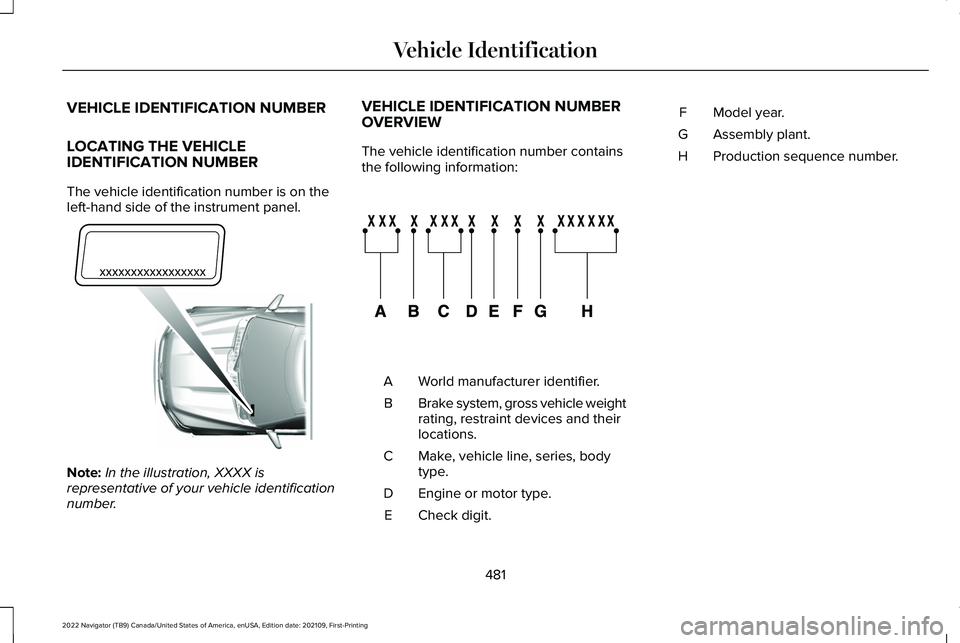
VEHICLE IDENTIFICATION NUMBER
LOCATING THE VEHICLE
IDENTIFICATION NUMBER
The vehicle identification number is on the
left-hand side of the instrument panel.
Note:
In the illustration, XXXX is
representative of your vehicle identification
number. VEHICLE IDENTIFICATION NUMBER
OVERVIEW
The vehicle identification number contains
the following information:
World manufacturer identifier.
A
Brake system, gross vehicle weight
rating, restraint devices and their
locations.
B
Make, vehicle line, series, body
type.
C
Engine or motor type.
D
Check digit.
E Model year.
F
Assembly plant.
G
Production sequence number.
H
481
2022 Navigator (TB9) Canada/United States of America, enUSA, Edition date: 202109, First-Printing Vehicle IdentificationE311767 E142477
Page 621 of 646
3
360 Degree Camera....................................261
360 Degree Camera Settings.........................263
360 Degree Camera Guide Lines...........262
360 Degree Camera Limitations..............262
360 Degree Camera Precautions.............261
360 Degree Camera Settings...................263 Switching the 360 Degree Camera On and
Off......................................................................263
Switching the 360 Degree Camera View..................................................................264
4
4WD See: Four-Wheel Drive......................................223
9
911 Assist...........................................................70
A
A/C See: Climate Control..........................................158
About This Publication...................................19 ABS
See: Brakes..........................................................233
Accessing Apps.............................................513
Accessing Navigation..................................518
Accessing the Passive Key Backup Position........................................................204
Accessories...................................................523
ActiveGlide ™
..................................................286
ActiveGlide ™ – Troubleshooting......................291
ActiveGlide ™ Alerts
......................................289
ActiveGlide ™ Automatic
Cancellation
................................................289
ActiveGlide ™ Indicators...............................290
ActiveGlide ™ Limitations.............................288
ActiveGlide ™ Precautions...........................286
ActiveGlide ™ Requirements.......................287
ActiveGlide ™ Settings..................................288
ActiveGlide ™ – Troubleshooting................291
ActiveGlide ™ – Information Messages...........291
Active Park Assist
.........................................265
Active Park Assist – Troubleshooting...........267
Active Park Assist Precautions.................265
Active Park Assist – Troubleshooting.........................................267
Active Park Assist – Frequently Asked Questions.........................................................267
Active Park Assist – Information Messages.........................................................267 Adaptive Cruise Control
.............................270
Adaptive Cruise Control –
Troubleshooting.............................................283
Intelligent Adaptive Cruise Control................281
Lane Centering...................................................279
Adaptive Cruise Control Automatic Cancellation................................................274
Adaptive Cruise Control Indicators.........278
Adaptive Cruise Control Limitations.........271
Adaptive Cruise Control Precautions.................................................270
Adaptive Cruise Control – Troubleshooting.........................................283
Adaptive Cruise Control – Information Messages.........................................................283
Adaptive Front Lighting...............................129 How Does Adaptive Front Lighting
Work...................................................................129
Switching Adaptive Front Lighting On and Off.......................................................................130
Adjustable Pedals
..........................................113
Adjusting the Exterior Mirrors....................137
Adjusting the Headlamps..........................426
Adjusting the Instrument Panel Lighting Brightness.....................................................132
Adjusting the Integrated Trailer Brake Controller Mode
.........................................358
617
2022 Navigator (TB9) Canada/United States of America, enUSA, Edition date: 202109, First-Printing Index
Page 625 of 646
Catalytic Converter.......................................217
Catalytic Converter – Troubleshooting.........218
Catalytic Converter Precautions................217
Catalytic Converter – Troubleshooting..........................................218
Catalytic Converter – Warning Lamps...........
218
Center Console
.............................................199
Opening the Center Console...........................199
Center Display Limitations..........................501
Center Display Overview
............................501
Center Display Precautions........................501
Changing a Flat Tire.....................................461
Changing a Road Wheel.............................461
Changing the 12V Battery
..........................423
Changing the Fuel Filter.............................423
Changing the Language.............................150
Changing the Measurement Unit.............150
Changing the Radio Station......................500
Changing the Remote Control Battery......73
Changing the Temperature Unit...............150
Changing the Tire Pressure Unit..............150
Changing the Vehicle Wi-Fi Hotspot Name or Password
................................................486
Charging a Device........................................192
Charging a Wireless Device.......................197
Checking MyKey System Status.................84
Checking the Brake Fluid...........................233
Checking the Coolant..................................418 Checking the Seatbelts
.................................58
Checking the Tire Pressures.....................449
Checking the Wiper Blades.........................116
Children and Airbags.....................................65
Child Restraint Anchor Points
......................40
Locating the Child Restraint Lower Anchor
Points...................................................................40
Locating the Child Restraint Top Tether Anchor Points.....................................................41
What Are the Child Restraint Anchor Points...................................................................40
Child Restraints
................................................41
Child Restraint Position Information..................41
Child Restraints Recommendation...................43
Child Safety
......................................................39
Child Restraint Anchor Points............................40
Child Restraints.......................................................41
Installing Child Restraints....................................44
Child Safety Locks...........................................51
Child Safety Precautions
...............................39
Cleaning Products.......................................429
Cleaning the Exterior..................................430
Cleaning Camera Lenses and Sensors........432
Cleaning Chrome, Aluminium or Stainless
Steel....................................................................431
Cleaning Headlamps and Rear Lamps.........430
Cleaning Stripes or Graphics............................431
Cleaning the Engine Compartment................431 Cleaning the Exterior Precautions.................
430
Cleaning the Underbody..................................432
Cleaning Wheels..................................................431
Cleaning Windows and Wiper Blades..........
430
Cleaning the Interior....................................432 Cleaning Carpets and Floor Mats..................433
Cleaning Displays and Screens......................432
Cleaning Fabric Seats and Headliners.........433
Cleaning Leather and Vinyl..............................433
Cleaning Moonroof Tracks...............................434
Cleaning Plastic..................................................432
Cleaning Seatbelts.............................................434
Cleaning the Instrument Panel.......................
432
Clearing All MyKeys.......................................84
Clearing the Garage Door Opener
...........190
Climate Control..............................................158 Auto Mode............................................................160
Climate Control Hints
....................................161
Closing the Liftgate......................................100 Closing the Hands-Free Liftgate.....................102
Closing the Liftgate From Inside Your
Vehicle...............................................................100
Closing the Liftgate From Outside Your Vehicle................................................................101
Closing the Liftgate Using the Remote Control................................................................101
Cold Weather Precautions.........................384
621
2022 Navigator (TB9) Canada/United States of America, enUSA, Edition date: 202109, First-Printing Index
Page 631 of 646
How Does Reverse Braking Assist
Work..............................................................239
How Does Speed Sign Recognition Work..............................................................332
How Does Stability Control Work............248
How Does the 360 Degree Camera Work...............................................................261
How Does the Garage Door Opener Work...............................................................187
How Does the Lane Keeping System Work..............................................................299
How Does the Personal Safety System Work................................................................60
How Does the Rear Occupant Alert System Work
...............................................................183
How Does the Safety Canopy™ Work........62
How Does Traction Control Work............246
How Does Trailer Backup Assistance Work..............................................................362
How Does Trailer Reverse Guidance Work..............................................................375
How Does Trailer Sway Control Work...............................................................361
How Do Personal Profiles Work................516
How Do the Front Airbags Work.................61
How Do the Side Airbags Work...................61 I
Identifying Fuse Types.................................413
Identifying the Audio Unit..........................488
Identifying the Climate Control Unit.........158
Identifying the Rear Passenger Audio
Controls.......................................................500
Identifying the Rear Passenger Climate Control Unit
..................................................163
Inflating the Tires..........................................449
Information On Demand Screen..............503
Information on the Tire Sidewall..............438
Inspecting the Tire for Damage
...............450
Inspecting the Tire for Wear......................449
Inspecting the Wheel Valve Stems...........451
Installing and Removing the Luggage Compartment Cargo Net
..........................341
Installing Child Restraints..............................44 Combining the Seatbelt and Lower Anchors
for Attaching Child Restraints........................
47
Installing a Child Restraint in a Center Seat......................................................................47
Using Lower Anchors and Tethers for Children..............................................................46
Using Seatbelts.....................................................44
Using Tether Straps..............................................47
Instrument Cluster Display
..........................147
Trip Computer......................................................148 Instrument Cluster Display Main
Menu..............................................................147
Instrument Cluster Indicators.....................145
Instrument Cluster..........................................141 Fuel Gauge............................................................142
Instrument Cluster Overview
.......................141
Instrument Cluster Warning Lamps..........143
Instrument Panel..............................................31
Integrated Trailer Brake Controller
..........356
Integrated Trailer Brake Controller –
Troubleshooting.............................................359
Integrated Trailer Brake Controller Precautions.................................................356
Integrated Trailer Brake Controller – Troubleshooting.........................................359
Integrated Trailer Brake Controller – Frequently Asked Questions......................360
Integrated Trailer Brake Controller – Information Messages..................................
359
Intelligent Adaptive Cruise Control..........281 Adjusting the Set Speed Tolerance...............282
How Does Intelligent Adaptive Cruise Control
Work...................................................................281
Intelligent Adaptive Cruise Control Alerts.................................................................283
Intelligent Adaptive Cruise Control Indicators.........................................................283
627
2022 Navigator (TB9) Canada/United States of America, enUSA, Edition date: 202109, First-Printing Index