instrument panel LINCOLN NAVIGATOR 2022 User Guide
[x] Cancel search | Manufacturer: LINCOLN, Model Year: 2022, Model line: NAVIGATOR, Model: LINCOLN NAVIGATOR 2022Pages: 646, PDF Size: 7.29 MB
Page 183 of 646
Press the button on the head restraint or the
button on the instrument panel to the left of
the steering wheel to fold the third row
outermost head restraints. Pull the head
restraint up to place it in the upright position.
Note:
These head restraints fold when you
press the fold flat button.
ADJUSTING THE SEAT BACKREST WARNING: Do not recline a rear seat
on which a child restraint is installed.
Failure to follow this instruction could
reduce the effectiveness of the child
restraint.
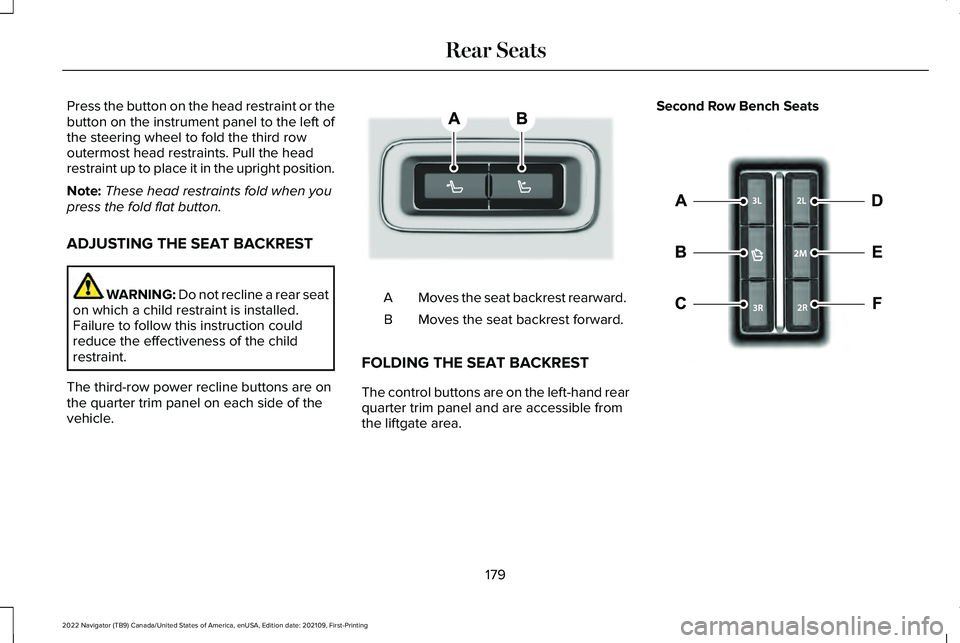
The third-row power recline buttons are on
the quarter trim panel on each side of the
vehicle. Moves the seat backrest rearward.
A
Moves the seat backrest forward.
B
FOLDING THE SEAT BACKREST
The control buttons are on the left-hand rear
quarter trim panel and are accessible from
the liftgate area. Second Row Bench Seats
179
2022 Navigator (TB9) Canada/United States of America, enUSA, Edition date: 202109, First-Printing Rear SeatsE246706 E257920
Page 196 of 646
LOCATING THE USB PORTS
Data Transfer USB Ports
The USB ports could be in the following
locations:
•
On the lower instrument panel below the
climate control.
• Inside the center console.
Note: These USB ports can also charge
devices.
Note: Not all USB ports in your vehicle have
data transfer capabilities.
Note: We recommend using only USB-IF
certified cables and adapters. Non-certified
cables and adapters may not work.
Charge Only USB Ports The USB ports could be in the following
locations: •
On the lower instrument panel.
• On the upper instrument panel.
• Inside the media bin.
• Inside the center console.
• On the rear of the center console.
• In the cargo area.
PLAYING MEDIA USING THE USB
PORT WARNING: Driving while distracted
can result in loss of vehicle control, crash
and injury. We strongly recommend that
you use extreme caution when using any
device that may take your focus off the
road. Your primary responsibility is the safe
operation of your vehicle. We recommend
against the use of any hand-held device
while driving and encourage the use of
voice-operated systems when possible.
Make sure you are aware of all applicable
local laws that may affect the use of
electronic devices while driving. Connect your device to the USB port. Press the audio button on the
feature bar.
Select
Sources. Select the USB option.
Press the button to play a track.
Press the button again to pause
the track.
Press the button to skip to the next
track.
Press and hold the button to fast
forward through the track. Press the button once to return to
the beginning of a track.
Repeatedly press the button to
return to previous tracks.
Press and hold the button to fast rewind.
CHARGING A DEVICE
Connect your device to the USB port.
192
2022 Navigator (TB9) Canada/United States of America, enUSA, Edition date: 202109, First-Printing USB Ports E100027
Page 198 of 646
WHAT IS THE POWER OUTLET
The power outlet can power devices using
a 12 V outlet adapter.
POWER OUTLET PRECAUTIONS WARNING:
Do not plug optional
electrical accessories into the cigar lighter
socket. Incorrect use of the cigar lighter
can cause damage not covered by the
vehicle warranty, and can result in fire or
serious injury.
When you switch the vehicle on, you can use
the socket to power
12 V appliances with a
maximum current rating of 20 A. Do not use
the power point over the vehicle capacity of
12 V
DC 240 W or a fuse could blow. Do not
plug in any device that supplies power to the
vehicle through the power points. This could
result in damage to vehicle systems. Do not
hang any accessory from the accessory plug.
Always keep the power point caps closed
when not in use. Do not insert objects other
than an accessory plug into the power point. To prevent the battery from running out of
charge:
•
Do not use the power point longer than
necessary when the vehicle is off.
• Do not leave devices plugged in
overnight or when you park your vehicle
for extended periods.
LOCATING THE POWER OUTLETS
Power outlets may be in the following
locations:
• On the lower instrument panel.
• Inside the center console.
• On the front of the center console.
• On the rear of the center console.
• In the cargo area.
• On the passenger side floor panel.
• 3rd row on the quarter trim panels.
194
2022 Navigator (TB9) Canada/United States of America, enUSA, Edition date: 202109, First-Printing Power Outlet - Vehicles With: 12V Power Outlet
Page 199 of 646
WHAT IS THE POWER OUTLET
The power outlet is a socket that connects
an electrical device to your vehicle's power
supply.
POWER OUTLET PRECAUTIONS
WARNING: Do not keep electrical
devices plugged into the power outlet
whenever the device is not in use. The
outlet provides power when the vehicle is
on. Failure to follow this instruction could
result in personal injury. WARNING:
Do not use an extension
cord or connect multiple devices to the
power outlet. Doing so could result in
overloading the power outlet. Failure to
follow this instruction could result in fire,
personal injury or property damage. POWER OUTLET LIMITATIONS
You should not use the power outlet for
these types of electric devices:
•
Cathode ray tube type televisions.
• Motor loads, such as vacuum cleaners,
electric saws or other electric power tools
and compressor-driven refrigerators.
• Measuring devices which process precise
data, such as medical equipment or
measuring equipment.
• Other appliances requiring an extremely
stable power supply, such as
microcomputer-controlled electric
blankets or touch sensor lamps.
Note: Some devices may exceed the power
rating on the device label when they are
initially plugged-in and may require you to
press the device power button more than
one time in order to allow a soft start. After
multiple attempts, if the device remains off,
please consider that your device may require
more than the available power. Note:
The power outlet provides full
available power when the vehicle is in park
(P). Power availability may be reduced when
the vehicle is in drive (D). If more than one
outlet is available in the vehicle, power is
divided between the outlets that are in use
at the same time.
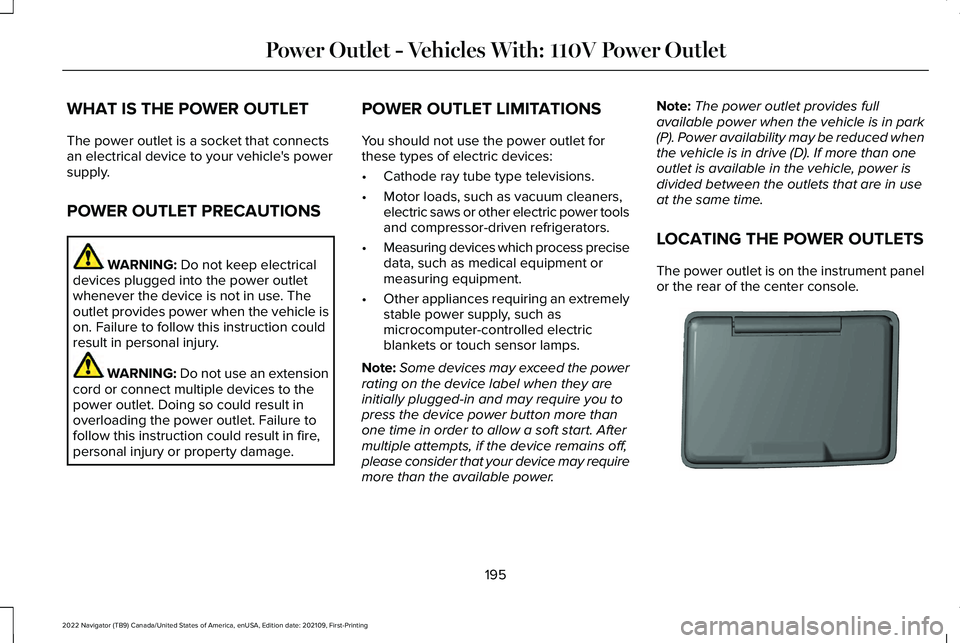
LOCATING THE POWER OUTLETS
The power outlet is on the instrument panel
or the rear of the center console. 195
2022 Navigator (TB9) Canada/United States of America, enUSA, Edition date: 202109, First-Printing Power Outlet - Vehicles With: 110V Power OutletE353449
Page 201 of 646
WHAT IS THE WIRELESS
ACCESSORY CHARGER
The wireless accessory charger allows you
to charge one compatible Qi wireless
charging device on the charging area.
WIRELESS ACCESSORY CHARGER
PRECAUTIONS
WARNING: Wireless charging
devices can affect the operation of
implanted medical devices, including
cardiac pacemakers. If you have any
implanted medical devices, we recommend
that you consult with your physician.
Keep the charging area clean and remove
foreign objects prior to charging a device. Do not place items with a magnetic strip or
radio-frequency identification chip, for
example passports, parking tickets,
transportation passes or credit cards, near
the charging area when charging a device.
Damage could occur to the magnetic strip
or radio-frequency identification chip.
Do not place metal objects, for example
remote controls, coins and candy wrappers,
on or near the charging area when charging
a device. Metal objects may heat up and
degrade the charging performance, in
addition to causing interruptions in charging.
Charging could be interrupted, degraded, or
could stop if any of the following occur:
•
The system detects a foreign object.
• The device is misaligned on the charging
area.
• The device moves on the active charging
area when the vehicle is in motion.
• The vehicle ambient temperature is too
high.
• You attempt to charge a non-Qi
compatible device on the wireless
charger. Note:
During charging, the device and the
charger could heat up, this is normal. If the
battery gets hotter than usual, the device
may stop charging.
LOCATING THE WIRELESS
ACCESSORY CHARGER The charging area is on the center
console or in the media bin below
the instrument panel.
CHARGING A WIRELESS DEVICE
Place the device on the center of the
charging surface with the charging side
down. The charging stops after your device
reaches a full charge.
You can use the charger when the vehicle
is in accessory mode, when the vehicle is
running, or when SYNC is on. Displays on the status bar when
wireless charging is in progress.
197
2022 Navigator (TB9) Canada/United States of America, enUSA, Edition date: 202109, First-Printing Wireless Accessory ChargerE297549
Page 240 of 646
WHAT IS THE ELECTRIC PARKING
BRAKE
The electric parking brake is used to hold
your vehicle on slopes and flat roads.
APPLYING THE ELECTRIC
PARKING BRAKE
WARNING: Always fully apply the
parking brake and make sure you shift into
park (P). Failure to follow this instruction
could result in personal injury or death. WARNING:
If you drive extended
distances with the parking brake applied,
you could cause damage to the brake
system. The switch is on the lower part of
the instrument panel.
1. Pull the switch up. The red warning lamp flashes during
operation and illuminates when the parking
brake is applied.
Note:
You can apply the electric parking
brake when the ignition is off.
Note: The electric parking brake could apply
when the transmission selector is in park (P).
See
Park (P) (page 219).
APPLYING THE ELECTRIC
PARKING BRAKE IN AN
EMERGENCY
You can use the electric parking brake to
slow or stop your vehicle in an emergency.
1. Pull the switch up and hold it.
The electric parking brake continues to slow
your vehicle down unless you release the
switch.
The red warning lamp illuminates, a tone
sounds and the stoplamps turn on when you
use the electric parking brake in an
emergency. Note:
Do not apply the electric parking brake
when your vehicle is moving, except in an
emergency. If you repeatedly use the electric
parking brake to slow or stop your vehicle,
you could cause damage to the brake
system.
MANUALLY RELEASING THE
ELECTRIC PARKING BRAKE
1. Switch the ignition on.
2. Press and hold the brake pedal.
3. Push the switch down.
The red warning lamp turns off.
Pulling Away on a Hill When Towing a
Trailer
1. Press and hold the brake pedal.
2. Pull the switch upward and hold it.
3. Shift into gear.
4. Press the accelerator pedal until engine has developed sufficient torque to
prevent your vehicle from rolling down
the hill.
236
2022 Navigator (TB9) Canada/United States of America, enUSA, Edition date: 202109, First-Printing Electric Parking BrakeE267156
Page 250 of 646
WHAT IS TRACTION CONTROL
The traction control system helps to avoid
drive wheel spin and loss of traction.
HOW DOES TRACTION CONTROL
WORK
If your wheels begin to spin, the loss of
traction can compromise steering control
and stability of the vehicle. The traction
control system applies the brakes to
individual wheels and when needed, reduces
engine power at the same time to increase
traction.
SWITCHING TRACTION CONTROL
ON AND OFF WARNING: Operating your vehicle
with the traction control disabled could
lead to an increased risk of loss of vehicle
control, vehicle rollover, personal injury
and death. The traction control system turns on each
time you switch the ignition on.
The button for the stability and traction
control system is on the instrument panel.
Press and release the button to switch
traction control off. The stability control
system remains fully active, to switch it off,
press and hold the button for a few seconds,
then release.
When you switch traction control off, a
message and an illuminated icon appear on
the instrument cluster.Press the switch again to turn the traction
control system back on to normal operation.
If your vehicle is stuck in mud or snow,
switching traction control off may be
beneficial as this allows the wheels to spin.
Your vehicle may have MyKey restrictions
regarding this feature.
See What Is MyKey
(page 82).
TRACTION CONTROL INDICATOR
Stability and Traction Control Indicator If the indicator does not illuminate
when you switch the ignition on,
or remains on when the engine is
running, this indicates a malfunction. Have
your vehicle checked by an authorized
dealer as soon as possible. The traction control off indicator
illuminates when you switch the
traction control system off, or when
an alternative stability control mode is
selected that requires the traction control off
depending on the drive mode selected.
246
2022 Navigator (TB9) Canada/United States of America, enUSA, Edition date: 202109, First-Printing Traction ControlE327252 E138639 E130458
Page 255 of 646
WHAT IS HILL DESCENT CONTROL
Hill descent control allows the driver to set
and maintain vehicle speed while
descending steep slopes in various surface
conditions.
HOW DOES HILL DESCENT
CONTROL WORK
Hill descent control can maintain vehicle
speeds on downhill slopes between
2–20 mph (3–32 km/h). Above 20 mph
(32 km/h), the system remains on but the
descent speed cannot be set or maintained.
Note: The system does not function below
2 mph (3 km/h)
.
The system requires a cool down interval
after a period of sustained use. Hill descent
control provides a warning in the message
center and a tone sounds when the system
is about to disengage for cooling. At this
time, manually apply the brakes as needed
to maintain descent speed. Note:
The amount of time that the system
can remain active before cooling varies with
conditions.
HILL DESCENT CONTROL
PRECAUTIONS WARNING:
The system does not
control speed in low traction conditions or
extremely steep slopes. The system is
designed to be an aid and does not relieve
you of your responsibility to drive with due
care and attention. Failure to follow this
instruction could result in personal injury. WARNING:
Hill descent control
cannot control descent in all surface
conditions and circumstances, such as ice
or extremely steep grades. Hill descent
control is a driver assist system and cannot
substitute for good judgment by the driver.
Failure to do so may result in loss of
vehicle control, crash or serious injury. WARNING:
The system does not
replace the parking brake. When you leave
your vehicle, always apply the parking
brake and shift the transmission into park
(P) for automatic transmission or first gear
for manual transmission.
SWITCHING HILL DESCENT
CONTROL ON AND OFF Press the button on the instrument
panel. A light illuminates and a
tone sounds when the system is
active.
SETTING THE HILL DESCENT
SPEED
To increase or decrease the descent speed,
press the accelerator or brake pedal, or use
the SET + and SET - buttons on the steering
wheel. Once you reach the preferred speed
remove your feet from the pedals.
251
2022 Navigator (TB9) Canada/United States of America, enUSA, Edition date: 202109, First-Printing Hill Descent Control
(If Equipped)E163171
Page 267 of 646
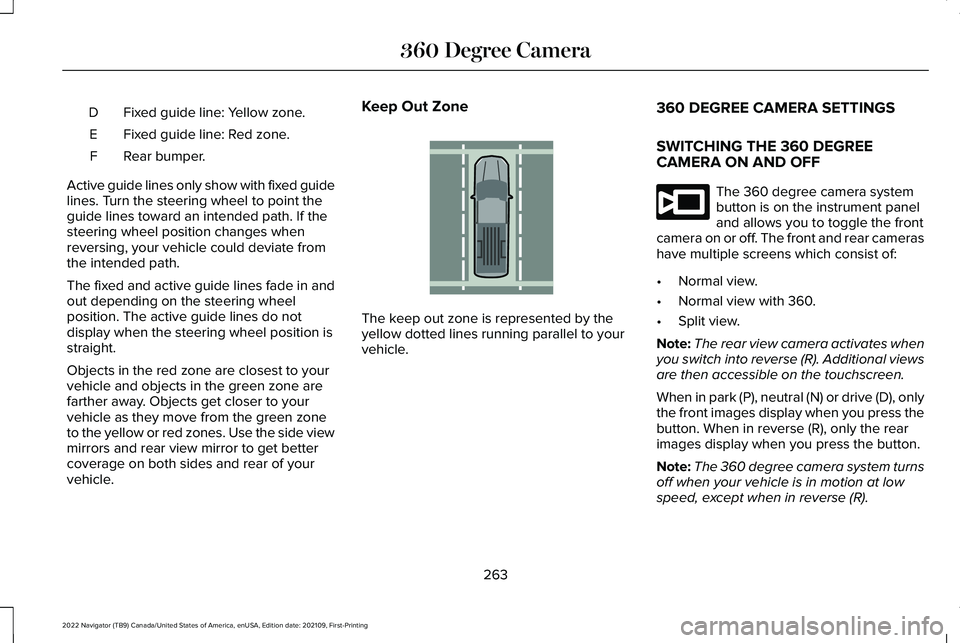
Fixed guide line: Yellow zone.
D
Fixed guide line: Red zone.
E
Rear bumper.
F
Active guide lines only show with fixed guide
lines. Turn the steering wheel to point the
guide lines toward an intended path. If the
steering wheel position changes when
reversing, your vehicle could deviate from
the intended path.
The fixed and active guide lines fade in and
out depending on the steering wheel
position. The active guide lines do not
display when the steering wheel position is
straight.
Objects in the red zone are closest to your
vehicle and objects in the green zone are
farther away. Objects get closer to your
vehicle as they move from the green zone
to the yellow or red zones. Use the side view
mirrors and rear view mirror to get better
coverage on both sides and rear of your
vehicle. Keep Out Zone
The keep out zone is represented by the
yellow dotted lines running parallel to your
vehicle.
360 DEGREE CAMERA SETTINGS
SWITCHING THE 360 DEGREE
CAMERA ON AND OFF The 360 degree camera system
button is on the instrument panel
and allows you to toggle the front
camera on or off. The front and rear cameras
have multiple screens which consist of:
• Normal view.
• Normal view with 360.
• Split view.
Note: The rear view camera activates when
you switch into reverse (R). Additional views
are then accessible on the touchscreen.
When in park (P), neutral (N) or drive (D), only
the front images display when you press the
button. When in reverse (R), only the rear
images display when you press the button.
Note: The 360 degree camera system turns
off when your vehicle is in motion at low
speed, except when in reverse (R).
263
2022 Navigator (TB9) Canada/United States of America, enUSA, Edition date: 202109, First-Printing 360 Degree CameraE310341 E332186
Page 366 of 646
WHAT IS TRAILER BACKUP
ASSISTANCE
Trailer backup assistance utilizes the control
knob on the instrument panel to help you
steer a trailer. Turn the control knob in the
direction you want the trailer to go and the
system steers the vehicle.
HOW DOES TRAILER BACKUP
ASSISTANCE WORK
Trailer backup assistance uses a sticker to
detect the trailer angle relative to the towing
vehicle and provides instructions, graphics
and camera views on the touchscreen.
TRAILER BACKUP ASSISTANCE
PRECAUTIONS WARNING: Driving while distracted
can result in loss of vehicle control, crash
and injury. We strongly recommend that
you use extreme caution when using any
device that may take your focus off the
road. Your primary responsibility is the safe
operation of your vehicle. We recommend
against the use of any hand-held device
while driving and encourage the use of
voice-operated systems when possible.
Make sure you are aware of all applicable
local laws that may affect the use of
electronic devices while driving. WARNING:
This system is an extra
driving aid. It does not replace your
attention and judgment, or the need to
apply the brakes. This system does NOT
automatically brake your vehicle. If you fail
to press the brake pedal when necessary,
you may collide with another vehicle. Note:
The system is not a substitute for safe
driving practices. Always be aware of your
vehicle and trailer combination, and the
surrounding environment.
Note: The system does not detect or prevent
your vehicle or trailer from making contact
with obstacles in the surrounding
environment.
Note: The front end of your vehicle swings
out when changing the direction of the
trailer.
Note: In certain conditions, the trailer could
turn faster or the trailer angle could increase
more than anticipated. Always monitor the
clearance between the trailer and vehicle
and the surroundings.
362
2022 Navigator (TB9) Canada/United States of America, enUSA, Edition date: 202109, First-Printing Trailer Backup Assistance
(If Equipped)