steering LINCOLN NAVIGATOR 2022 Manual PDF
[x] Cancel search | Manufacturer: LINCOLN, Model Year: 2022, Model line: NAVIGATOR, Model: LINCOLN NAVIGATOR 2022Pages: 646, PDF Size: 7.29 MB
Page 330 of 646
DISTANCE ALERT
WHAT IS DISTANCE ALERT
The system alerts you with a warning lamp
if the distance to the vehicle ahead is small.
Note:
The warning lamp does not illuminate
if cruise control or adaptive cruise control is
active.
ADJUSTING THE SENSITIVITY OF
DISTANCE ALERT
To adjust the sensitivity of the system, use
the touchscreen:
1. Press Features on the touchscreen.
2. Press
Driver Assistance.
3. Press
Pre-Collision Assist.
4. Press
Alert Sensitivity.
5. Select a setting. AUTOMATIC EMERGENCY BRAKING
WHAT IS AUTOMATIC EMERGENCY
BRAKING
Automatic emergency braking may activate
if the system determines that a collision is
imminent. The system may help reduce
impact damage to avoid the crash
completely.
Automatic emergency braking is only
available up to certain speeds.
See
Pre-Collision Assist Limitations (page 321).
SWITCHING AUTOMATIC EMERGENCY
BRAKING ON AND OFF
To switch the system on or off, use the
touchscreen:
1. Press
Features on the touchscreen.
2. Press
Driver Assistance.
3. Press
Pre-Collision Assist.
4. Press
Auto Emergency Braking.
5. Switch the feature on or off. EVASIVE STEERING ASSIST
WHAT IS EVASIVE STEERING ASSIST
If your vehicle is rapidly approaching a road
user, evasive steering assist helps you steer
around the road user.
After you turn the steering wheel in an
attempt to avoid a crash with the road user,
the system applies additional steering torque
to help you steer around the road user. After
you pass the road user, the system applies
steering torque when you turn the steering
wheel to steer back into the lane. The system
deactivates after you fully pass the road user.
Note:
Road users are defined as pedestrians
or bicyclists in your vehicle's path or another
stationary vehicle in the same lane or a
vehicle traveling in the same lane in the
same direction as you.
See Pre-Collision
Assist Precautions (page 320).
326
2022 Navigator (TB9) Canada/United States of America, enUSA, Edition date: 202109, First-Printing Pre-Collision Assist
Page 331 of 646
EVASIVE STEERING ASSIST
LIMITATIONS
Evasive steering assist only activates when
all the following occur:
•
Automatic emergency braking and
evasive steering assist are on.
• The system detects a road user ahead
and starts to apply the brakes.
• You significantly turn the steering wheel
to steer around a road user.
Note: Evasive steering assist does not
automatically steer around a road user. If
you do not turn the steering wheel, evasive
steering assist does not activate. Note:
Evasive steering assist does not
activate if the distance to the road user
ahead is too small and the system cannot
avoid a crash.
SWITCHING EVASIVE STEERING
ASSIST ON AND OFF
To switch the system on or off, use the
touchscreen:
1. Press Features on the touchscreen.
2. Press
Driver Assistance.
3. Press
Pre-Collision Assist.
4. Switch
Evasive Steering on or off. Note:
If you switch automatic emergency
braking off, evasive steering assist turns off.
Note: Automatic emergency braking and
evasive steering assist turn on every time
you switch the ignition on.
PRE-COLLISION ASSIST –
TROUBLESHOOTING
PRE-COLLISION ASSIST – WARNING
LAMPS A telltale illuminates in the cluster
to indicate if the system is disabled
or unavailable.
PRE-COLLISION ASSIST – INFORMATION MESSAGES Action
Message
You have a blocked sensor due to bad weather, ice, mud or water in
front of the radar sensor. You can typically clean the sensor to resolve.
Pre-Collision Assist Not Available Sensor Blocked
A fault with the system has occurred. Have your vehicle checked assoon as possible.
Pre-Collision Assist Not Available
327
2022 Navigator (TB9) Canada/United States of America, enUSA, Edition date: 202109, First-Printing Pre-Collision AssistE335612
Page 355 of 646
Your vehicle may have a temporary or
conventional spare tire. A temporary spare
tire is different in diameter or width,
tread-type, or is from a different manufacturer
than the road tires on your vehicle. Consult
information on the tire label or Safety
Compliance label for limitations when using.
When towing a trailer:
•
Obey country specific regulations for
towing a trailer.
• Do not drive faster than 70 mph
(113 km/h) during the first 500 mi
(800 km).
• Do not make full-throttle starts.
• Check your hitch, electrical connections
and trailer wheel lug nuts thoroughly after
you have traveled
50 mi (80 km).
• When stopped in congested or heavy
traffic during hot weather, place the
transmission in park (P) to aid engine and
transmission cooling and to help A/C
performance.
• Turn off the speed control with heavy
loads or in hilly terrain. The speed control
may turn off when you are towing on
long, steep slopes. •
Shift to a lower gear when driving down
a long or steep hill. Do not continuously
apply the brakes, as they may overheat
and become less effective.
• If your transmission has Grade Assist or
Tow/Haul, use this feature when towing.
This provides engine braking and helps
eliminate excessive transmission shifting
for optimum fuel economy and
transmission cooling.
• Your vehicle has AdvanceTrac with roll
stability control. When towing a trailer,
additional loads could cause the
AdvanceTrac system to engage during
cornering maneuvers. Reduce cornering
speeds to make sure that you can
maintain control of the vehicle and trailer
if the AdvanceTrac system engages. •
Allow more distance for stopping with a
trailer attached. Anticipate stops and
gradually brake.
• Avoid parking on a slope. However, if
you must park on a slope, turn the
steering wheel to point your vehicle tires
away from traffic flow, set the parking
brake, place the transmission in park (P)
and place wheel chocks in front and back
of the trailer wheels.
Note: Chocks are not included with your
vehicle.
LAUNCHING OR RETRIEVING A
BOAT OR PERSONAL
WATERCRAFT
When backing down a ramp during boat
launching or retrieval:
• Do not allow the static water level to rise
above the bottom edge of the rear
bumper.
• Do not allow waves to break higher than
6 in (15 cm)
above the bottom edge of
the rear bumper.
351
2022 Navigator (TB9) Canada/United States of America, enUSA, Edition date: 202109, First-Printing Towing a Trailer
Page 369 of 646
CALIBRATING THE SYSTEM
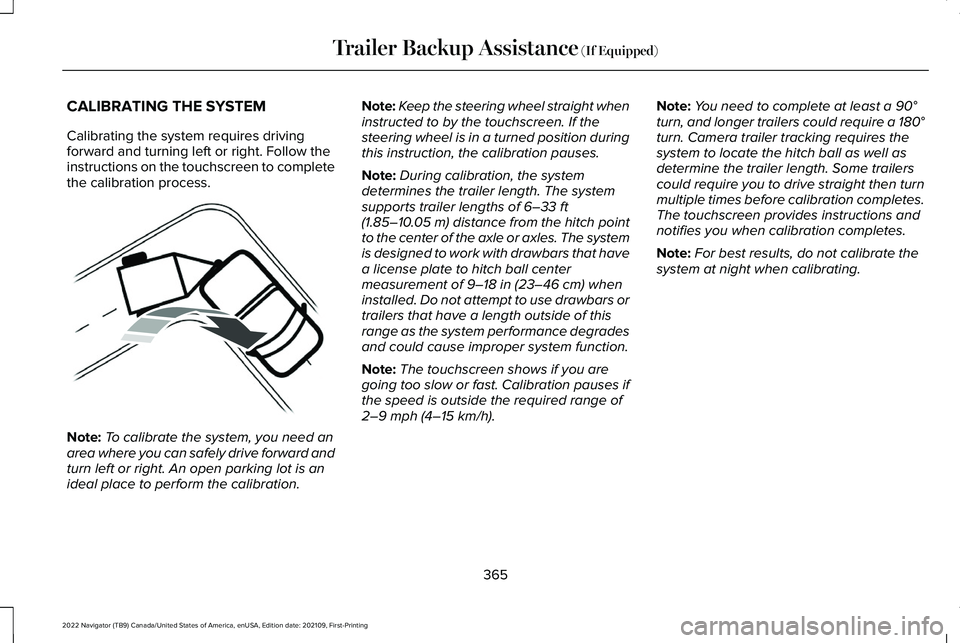
Calibrating the system requires driving
forward and turning left or right. Follow the
instructions on the touchscreen to complete
the calibration process.
Note:
To calibrate the system, you need an
area where you can safely drive forward and
turn left or right. An open parking lot is an
ideal place to perform the calibration. Note:
Keep the steering wheel straight when
instructed to by the touchscreen. If the
steering wheel is in a turned position during
this instruction, the calibration pauses.
Note: During calibration, the system
determines the trailer length. The system
supports trailer lengths of 6–33 ft
(1.85–10.05 m) distance from the hitch point
to the center of the axle or axles. The system
is designed to work with drawbars that have
a license plate to hitch ball center
measurement of
9–18 in (23–46 cm) when
installed. Do not attempt to use drawbars or
trailers that have a length outside of this
range as the system performance degrades
and could cause improper system function.
Note: The touchscreen shows if you are
going too slow or fast. Calibration pauses if
the speed is outside the required range of
2–9 mph (4–15 km/h)
. Note:
You need to complete at least a
90°
turn, and longer trailers could require a 180°
turn. Camera trailer tracking requires the
system to locate the hitch ball as well as
determine the trailer length. Some trailers
could require you to drive straight then turn
multiple times before calibration completes.
The touchscreen provides instructions and
notifies you when calibration completes.
Note: For best results, do not calibrate the
system at night when calibrating.
365
2022 Navigator (TB9) Canada/United States of America, enUSA, Edition date: 202109, First-Printing Trailer Backup Assistance
(If Equipped)E352329
Page 370 of 646
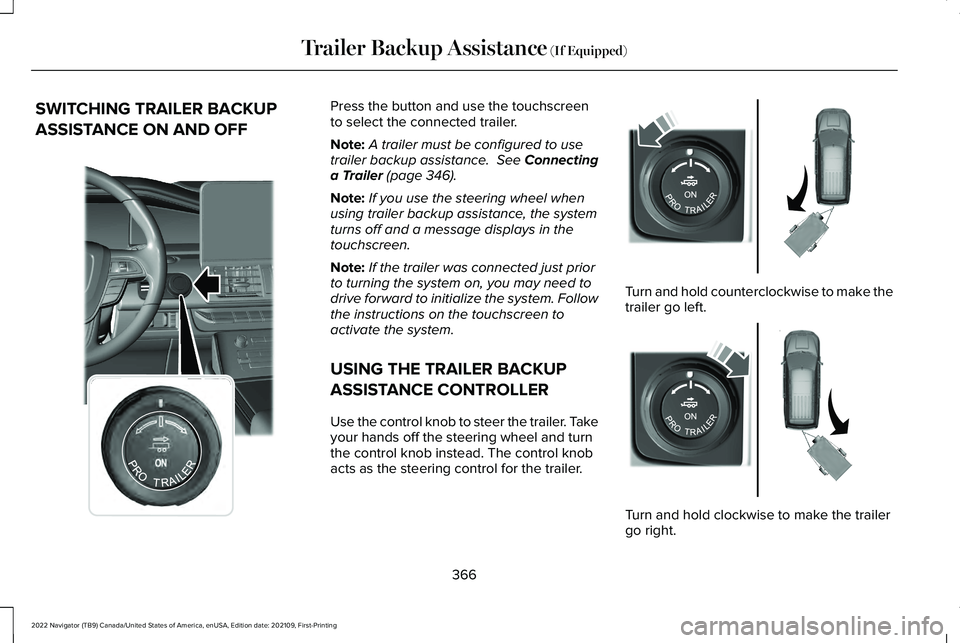
SWITCHING TRAILER BACKUP
ASSISTANCE ON AND OFF Press the button and use the touchscreen
to select the connected trailer.
Note:
A trailer must be configured to use
trailer backup assistance. See Connecting
a Trailer (page 346).
Note: If you use the steering wheel when
using trailer backup assistance, the system
turns off and a message displays in the
touchscreen.
Note: If the trailer was connected just prior
to turning the system on, you may need to
drive forward to initialize the system. Follow
the instructions on the touchscreen to
activate the system.
USING THE TRAILER BACKUP
ASSISTANCE CONTROLLER
Use the control knob to steer the trailer. Take
your hands off the steering wheel and turn
the control knob instead. The control knob
acts as the steering control for the trailer. Turn and hold counterclockwise to make the
trailer go left.
Turn and hold clockwise to make the trailer
go right.
366
2022 Navigator (TB9) Canada/United States of America, enUSA, Edition date: 202109, First-Printing Trailer Backup Assistance
(If Equipped)E356842 E349262 E349263
Page 373 of 646
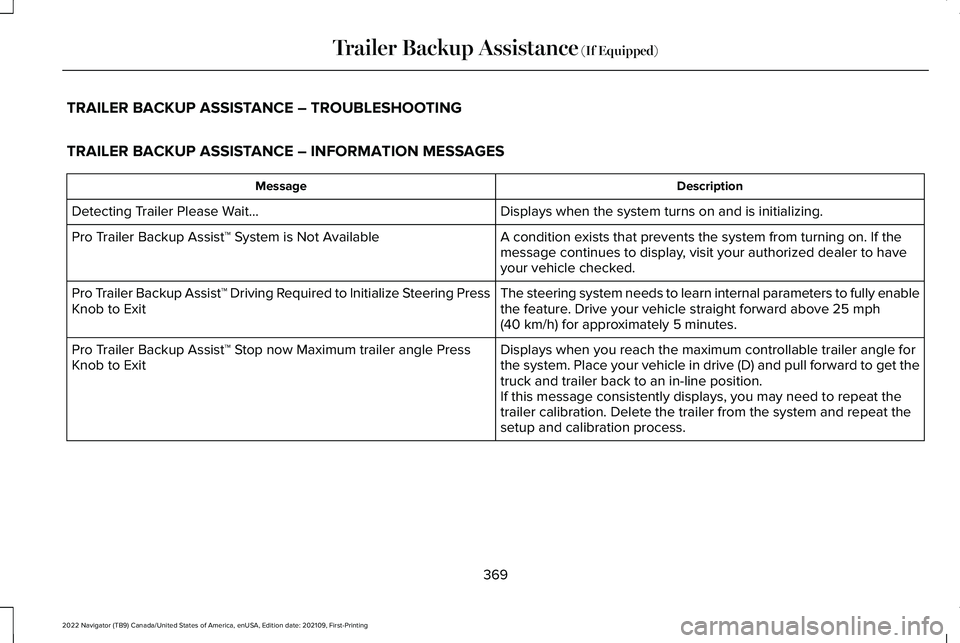
TRAILER BACKUP ASSISTANCE – TROUBLESHOOTING
TRAILER BACKUP ASSISTANCE – INFORMATION MESSAGES
Description
Message
Displays when the system turns on and is initializing.
Detecting Trailer Please Wait…
A condition exists that prevents the system from turning on. If the
message continues to display, visit your authorized dealer to have
your vehicle checked.
Pro Trailer Backup Assist™ System is Not Available
The steering system needs to learn internal parameters to fully enable
the feature. Drive your vehicle straight forward above 25 mph
(40 km/h) for approximately 5 minutes.
Pro Trailer Backup Assist™ Driving Required to Initialize Steering Press
Knob to Exit
Displays when you reach the maximum controllable trailer angle for
the system. Place your vehicle in drive (D) and pull forward to get th\
e
truck and trailer back to an in-line position.
Pro Trailer Backup Assist™ Stop now Maximum trailer angle Press
Knob to Exit
If this message consistently displays, you may need to repeat the
trailer calibration. Delete the trailer from the system and repeat the
setup and calibration process.
369
2022 Navigator (TB9) Canada/United States of America, enUSA, Edition date: 202109, First-Printing Trailer Backup Assistance
(If Equipped)
Page 374 of 646
 and pull forward to get yo\
ur
vehicle and trailer back to an in-lin")
Description
Message
Displays when you exceed the maximum controllable trailer angle for
the system. Place your vehicle in drive (D) and pull forward to get yo\
ur
vehicle and trailer back to an in-line position, then activate the syste\
m
by selecting the connected trailer and following the instructions on
the touchscreen.
If this message consistently displays, you may need to repeat the
trailer setup and calibration. Delete the trailer from the system and
repeat the setup and calibration process.
Stop now. Deactivated by trailer angle.
Displays when the system can no longer steer the vehicle and you
must take over steering.
Pro Trailer Backup Assist™ Stop Now Take Control of Steering Wheel
These messages display when the system does not detect the trailer.
Make sure the rear camera is clean, and the sticker is clearly visible
in the camera image. You can also move the trailer forward or back-
ward to change the trailer position and lighting conditions
If these messages continue to display, visit your authorized dealer to
have your vehicle checked.
Pro Trailer Backup Assist™ Trailer Not Detected. Shift to Park Press
Knob to Exit
Pro Trailer Backup Assist™ Trailer Not Detected. Refer to Owner's
Manual. Press Knob to Exit
370
2022 Navigator (TB9) Canada/United States of America, enUSA, Edition date: 202109, First-Printing Trailer Backup Assistance (If Equipped)
Page 376 of 646
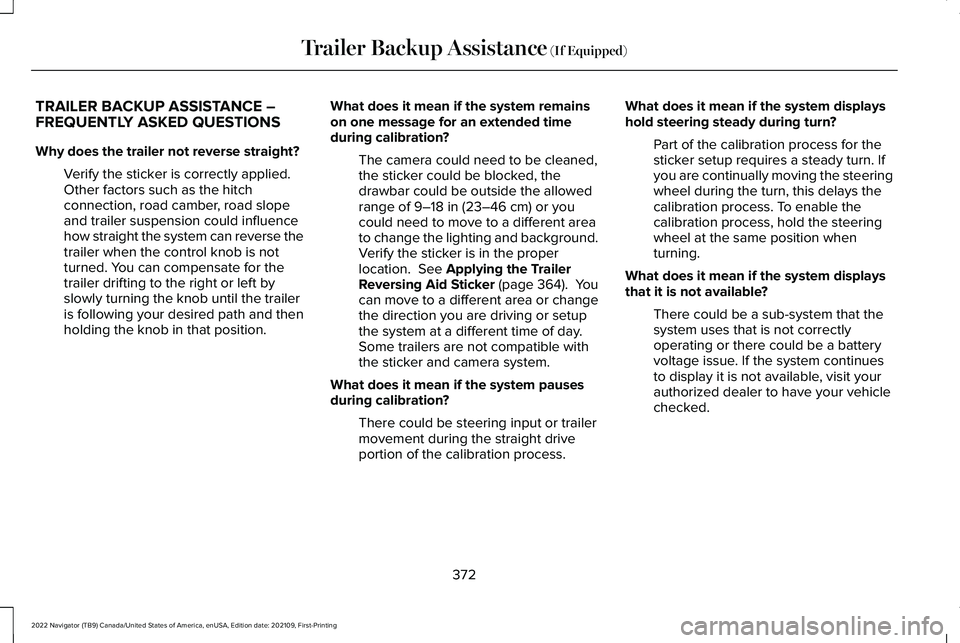
TRAILER BACKUP ASSISTANCE –
FREQUENTLY ASKED QUESTIONS
Why does the trailer not reverse straight?
Verify the sticker is correctly applied.
Other factors such as the hitch
connection, road camber, road slope
and trailer suspension could influence
how straight the system can reverse the
trailer when the control knob is not
turned. You can compensate for the
trailer drifting to the right or left by
slowly turning the knob until the trailer
is following your desired path and then
holding the knob in that position. What does it mean if the system remains
on one message for an extended time
during calibration?
The camera could need to be cleaned,
the sticker could be blocked, the
drawbar could be outside the allowed
range of 9–18 in (23–46 cm) or you
could need to move to a different area
to change the lighting and background.
Verify the sticker is in the proper
location.
See Applying the Trailer
Reversing Aid Sticker (page 364). You
can move to a different area or change
the direction you are driving or setup
the system at a different time of day.
Some trailers are not compatible with
the sticker and camera system.
What does it mean if the system pauses
during calibration? There could be steering input or trailer
movement during the straight drive
portion of the calibration process. What does it mean if the system displays
hold steering steady during turn?
Part of the calibration process for the
sticker setup requires a steady turn. If
you are continually moving the steering
wheel during the turn, this delays the
calibration process. To enable the
calibration process, hold the steering
wheel at the same position when
turning.
What does it mean if the system displays
that it is not available? There could be a sub-system that the
system uses that is not correctly
operating or there could be a battery
voltage issue. If the system continues
to display it is not available, visit your
authorized dealer to have your vehicle
checked.
372
2022 Navigator (TB9) Canada/United States of America, enUSA, Edition date: 202109, First-Printing Trailer Backup Assistance
(If Equipped)
Page 377 of 646
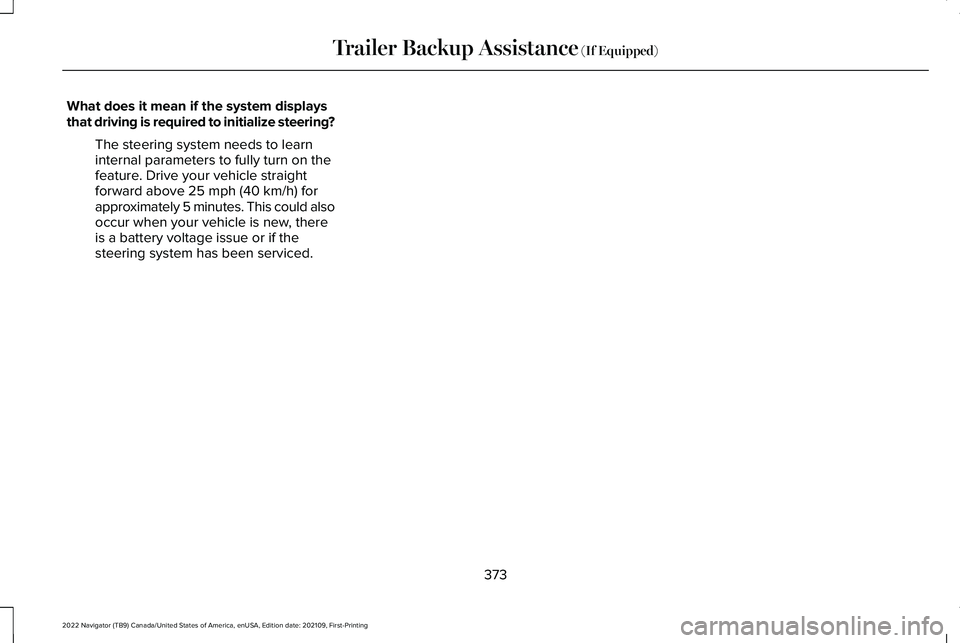
What does it mean if the system displays
that driving is required to initialize steering?
The steering system needs to learn
internal parameters to fully turn on the
feature. Drive your vehicle straight
forward above 25 mph (40 km/h) for
approximately 5 minutes. This could also
occur when your vehicle is new, there
is a battery voltage issue or if the
steering system has been serviced.
373
2022 Navigator (TB9) Canada/United States of America, enUSA, Edition date: 202109, First-Printing Trailer Backup Assistance
(If Equipped)
Page 378 of 646
What does it mean if the trailer is at its
maximum angle or the system deactivated
by trailer angle?
You are at the maximum controllable
trailer angle for the system. Place your
vehicle in drive (D) and pull forward to
get the truck and trailer back to an
in-line position. If this message
consistently displays, this could indicate
the sticker is incorrectly applied, the
trailer needs to be recalibrated or the
drawbar or the trailer dimensions are
outside of the supported range. The
system is designed to work with
drawbars that have a license plate to
hitch ball center measurement of 9–18 in
(23–46 cm) when installed. The system
is designed to work with trailers that
have a hitch point to center of the axle
or axles measurement of
6–33 ft
(1.85–10.05 m). Do not attempt to use
drawbars or trailers that have a length
outside of this range as the system
performance degrades and could cause
improper system function. Check that
the correct trailer is selected in the touchscreen. Verify the sticker is
correctly applied and check that the
drawbar and the trailer dimensions are
within the allowed range. Then, delete
the trailer from the system and repeat
the setup process to calibrate the trailer.
What does it mean when the system tells
you to take control of the steering wheel? The system is no longer steering the
vehicle and you must take over steering.
There are four reasons the system could
display this message. The first reason
the system could display this message
is that you have touched the steering
wheel when the system is steering. The
second reason the system could display
this message is that you have exceeded
the maximum speed for the feature. The
third reason the system could display
this message is that the trailer is not
detected. The final reason the system
could display this message is that an
internal condition for system operation
is not met that requires your vehicle to
return to manual control of the steering. What does it mean if the system does not
detect a trailer?
The system requires a clear view of the
sticker placed on the trailer. You must
keep the camera lens and sticker clean
for the system to correctly operate. If
the system cannot initially detect the
trailer, it could be necessary for you to
change the lighting conditions by
moving your vehicle and trailer or
waiting until the conditions change. See
Applying the Trailer Reversing Aid
Sticker (page 364). Some trailers are not
compatible with the sticker and camera
system.
Note: The system is designed to be used
with the same trailer connection every time
you choose the trailer from the touchscreen.
When using a different drawbar or a different
pin hole on drawbars with more than one,
connecting the drawbar to your vehicle
affects the trailer position and you may need
to repeat the trailer setup and calibration
process.
374
2022 Navigator (TB9) Canada/United States of America, enUSA, Edition date: 202109, First-Printing Trailer Backup Assistance
(If Equipped)