air filter LINCOLN NAVIGATOR 2022 Owners Manual
[x] Cancel search | Manufacturer: LINCOLN, Model Year: 2022, Model line: NAVIGATOR, Model: LINCOLN NAVIGATOR 2022Pages: 646, PDF Size: 7.29 MB
Page 9 of 646
Enabling Remote Start
................................155
Remotely Starting and Stopping the Vehicle ........................................................
155
Extending the Remote Start Duration .......................................................................
156
Remote Start Remote Control Indicators .......................................................................
156
Remote Start Settings .................................
156
Climate Control
Identifying the Climate Control Unit ........
158
Switching Climate Control On and Off .......................................................................
158
Switching Recirculated Air On and Off .......................................................................
158
Switching Air Conditioning On and Off .......................................................................
158
Switching Defrost On and Off ...................
158
Switching Maximum Defrost On and Off .......................................................................
158
Switching Maximum Cooling On and Off .......................................................................
159
Switching the Heated Rear Window On and Off ........................................................
159
Setting the Blower Motor Speed .............
159Setting the Temperature
............................
159
Directing the Flow of Air ............................
159
Auto Mode .....................................................
160
Climate Control Hints ...................................
161
Rear Passenger Climate Control
Identifying the Rear Passenger Climate Control Unit ...............................................
163
Switching the Rear Passenger Climate Controls On and Off ................................
163
Setting the Blower Motor Speed .............
163
Setting the Temperature ............................
164
Directing the Flow of Air ............................
164
Rear Auto Mode ...........................................
164
Rear Passenger Climate Control Indicators .......................................................................
164
Interior Air Quality
What Is the Cabin Air Filter ........................
165
Replacing the Cabin Air Filter ...................
165
Front Seats
Front Seat Precautions ...............................
166Sitting in the Correct Position
...................
166
Power Seats ...................................................
167
Massage Seats ...............................................
171
Heated Seats .................................................
172
Ventilated Seats ............................................
173
Rear Seats
Manual Seats .................................................
174
Power Seats ...................................................
178
Massage Seats ...............................................
181
Heated Seats ..................................................
181
Ventilated Seats ...........................................
182
Rear Occupant Alert System
What is the Rear Occupant Alert System .......................................................................
183
How Does the Rear Occupant Alert System Work ............................................................
183
Rear Occupant Alert System Precautions .......................................................................
183
Rear Occupant Alert System Limitations .......................................................................
183
Switching Rear Occupant Alert System On and Off ........................................................
184
5
2022 Navigator (TB9) Canada/United States of America, enUSA, Edition date: 202109, First-Printing Table of Contents
Page 17 of 646
Towing Your Vehicle – Troubleshooting
......................................................................400
Fuses
Fuse Precautions .........................................
401
Under Hood Fuse Box ................................
401
Body Control Module Fuse Box ..............
408
Identifying Fuse Types ................................
413
Fuses – Troubleshooting ...........................
413
Maintenance
Maintenance Precautions ..........................
414
Opening and Closing the Hood ...............
414
Under Hood Overview ................................
415
Engine Oil .......................................................
417
Checking the Coolant .................................
418
Engine Air Filter ...........................................
422
Changing the Fuel Filter ............................
423
Changing the 12V Battery .........................
423
Adjusting the Headlamps .........................
426
Exterior Bulbs ...............................................
428
Interior Bulbs ................................................
428
Drive Belt Routing .......................................
428Vehicle Care
Cleaning Products
......................................
429
Cleaning the Exterior .................................
430
Cleaning the Interior ...................................
432
Repairing Minor Paint Damage ................
434
Waxing Your Vehicle ...................................
434
Storing Your Vehicle
Preparing Your Vehicle for Storage ........
435
Removing Your Vehicle From Storage ......................................................................
436
Wheel and Tire Information
Locating the Tire label ...............................
437
Department of Transportation Uniform Tire Quality Grades .........................................
437
Information on the Tire Sidewall .............
438
Glossary of Tire Terminology ...................
443
Tire Replacement Requirements .............
444
Using Snow Chains .....................................
446
Tire Care
Checking the Tire Pressures ....................
449Inflating the Tires
.........................................
449
Inspecting the Tire for Wear .....................
449
Inspecting the Tire for Damage ..............
450
Inspecting the Wheel Valve Stems ..........
451
Tire Rotation ..................................................
451
Tire Pressure Monitoring System
What Is the Tire Pressure Monitoring System .......................................................
453
Tire Pressure Monitoring System Overview ......................................................................
453
Tire Pressure Monitoring System Precautions ...............................................
454
Tire Pressure Monitoring System Limitations ................................................
455
Viewing the Tire Pressures ......................
455
Resetting Tire Pressure Monitoring System ......................................................................
455
Tire Pressure Monitoring System – Troubleshooting ......................................
458
Changing a Road Wheel
Changing a Flat Tire ....................................
461
13
2022 Navigator (TB9) Canada/United States of America, enUSA, Edition date: 202109, First-Printing Table of Contents
Page 25 of 646
SYMBOLS USED ON YOUR
VEHICLE
These are some of the symbols you may see
on your vehicle.
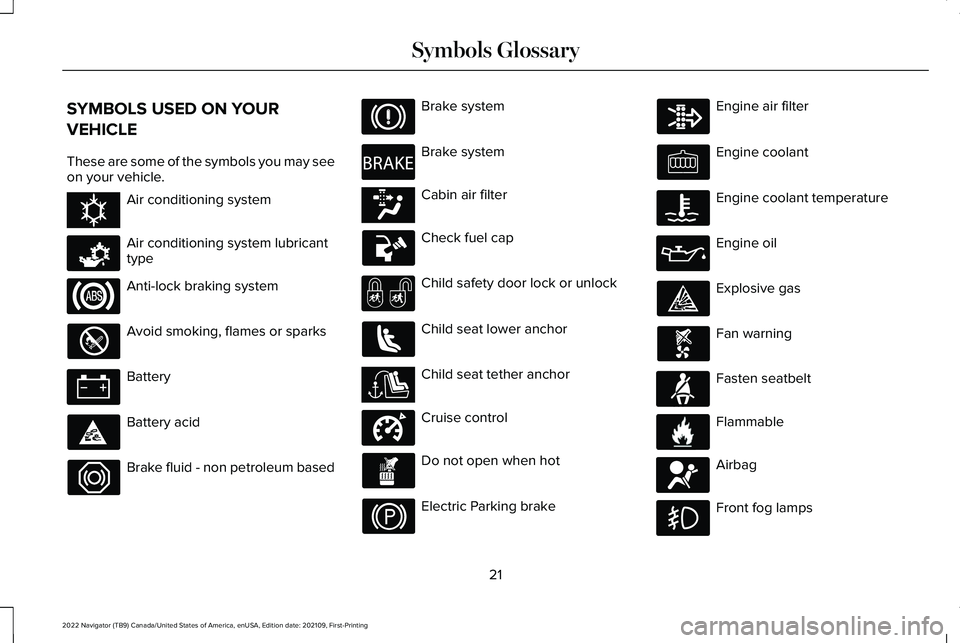
Air conditioning system
Air conditioning system lubricant
type
Anti-lock braking system
Avoid smoking, flames or sparks
Battery
Battery acid
Brake fluid - non petroleum based Brake system
Brake system
Cabin air filter
Check fuel cap
Child safety door lock or unlock
Child seat lower anchor
Child seat tether anchor
Cruise control
Do not open when hot
Electric Parking brake Engine air filter
Engine coolant
Engine coolant temperature
Engine oil
Explosive gas
Fan warning
Fasten seatbelt
Flammable
Airbag
Front fog lamps
21
2022 Navigator (TB9) Canada/United States of America, enUSA, Edition date: 202109, First-Printing Symbols GlossaryE162384 E231157 E270480 E139223 E141128 E332905 E71880 E231160 E67017
Page 169 of 646
WHAT IS THE CABIN AIR FILTER
The cabin air filter improves the quality of air
in your vehicle by trapping dust, pollen and
other particles.
REPLACING THE CABIN AIR FILTER
Replace the filter at regular intervals. See
Scheduled Maintenance (page 528).
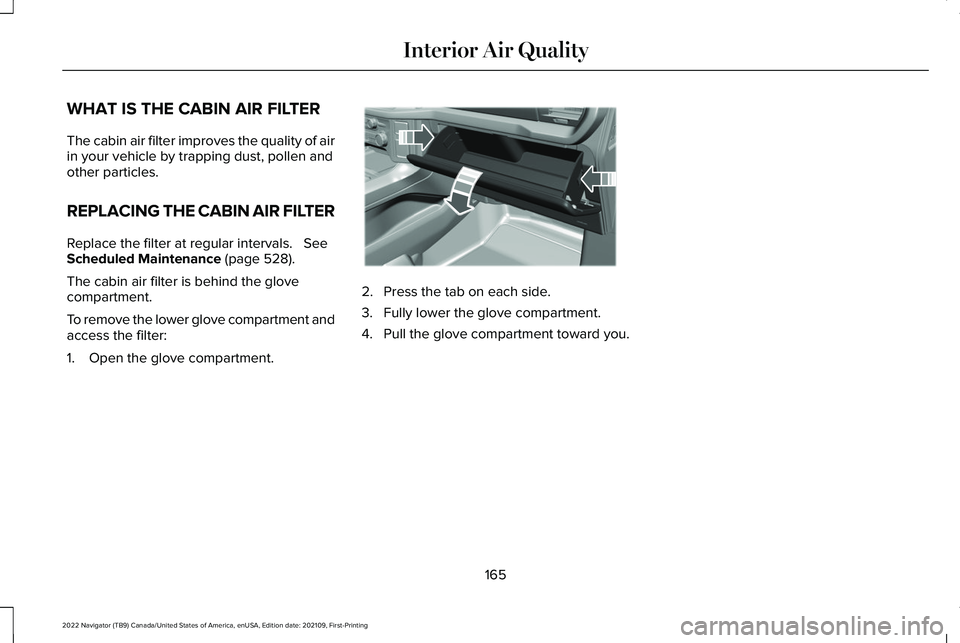
The cabin air filter is behind the glove
compartment.
To remove the lower glove compartment and
access the filter:
1. Open the glove compartment. 2. Press the tab on each side.
3. Fully lower the glove compartment.
4. Pull the glove compartment toward you.
165
2022 Navigator (TB9) Canada/United States of America, enUSA, Edition date: 202109, First-Printing Interior Air QualityE311296
Page 221 of 646
WHAT IS THE CATALYTIC
CONVERTER
The catalytic converter is part of your
vehicle's emissions system and filters harmful
pollutants from the exhaust gas.
CATALYTIC CONVERTER
PRECAUTIONS
WARNING: Do not park, idle or drive
your vehicle on dry grass or other dry
ground cover. The emission system heats
up the engine compartment and exhaust
system, creating the risk of fire. WARNING:
The normal operating
temperature of the exhaust system is very
high. Never work around or attempt to
repair any part of the exhaust system until
it has cooled. Use special care when
working around the catalytic converter.
The catalytic converter heats up to a very
high temperature after only a short period
of engine operation and stays hot after the
engine is switched off. WARNING: Exhaust leaks may result
in entry of harmful and potentially lethal
fumes into the passenger compartment. If
you smell exhaust fumes inside your
vehicle, have your vehicle inspected
immediately. Do not drive if you smell
exhaust fumes.
To avoid damaging the catalytic converter:
• Do not crank the engine for more than
10 seconds at a time.
• Do not run the engine with a spark plug
lead disconnected. •
Do not push-start or tow-start your
vehicle. Use booster cables. See Jump
Starting the Vehicle (page 392).
• Use the correct fuel.
See Fuel and
Refueling (page 210).
• Do not switch the ignition off when your
vehicle is moving.
• Avoid running out of fuel.
• Have the items listed in scheduled
maintenance information performed
according to the specified schedule.
Note: Do not make any unauthorized
changes to your vehicle or engine. By law,
vehicle owners and anyone who
manufactures, repairs, or services a fleet of
vehicles are not permitted to intentionally
remove an emission control device or
prevent it from working.
217
2022 Navigator (TB9) Canada/United States of America, enUSA, Edition date: 202109, First-Printing Catalytic Converter
Page 391 of 646
Apply just enough power to the wheels to
climb the hill. Too much power causes the
tires to slip, spin or lose traction, and you
could lose control of your vehicle. When
descending a steep hill, do not descend the
hill in neutral. Avoid sudden hard braking to
keep the front wheels rolling and to maintain
your vehicle's steering.
Note:
Your vehicle has anti-lock brakes,
apply the brakes steadily. Do not pump the
brakes.
Note: If your vehicle gets stuck driving on
hilly or sloping terrain, it could be rocked out
by shifting between forward and reverse
gears, stopping between shifts in a steady
pattern. Press lightly on the accelerator in
each gear.
Note: Do not rock your vehicle if the engine
is not at normal operating temperature, as
damage to the transmission could occur.
Note: Do not rock your vehicle for more than
a minute, as damage to the transmission
and tires could occur or the engine could
overheat. DRIVING IN SAND
When driving over sand, try to keep all four
wheels on the most solid area of the trail.
Steadily drive through the terrain. Apply the
accelerator slowly and avoid excessive
wheel slip. Do not drive your vehicle in deep
sand for an extended period of time. This
could overheat the system. A message
appears in the instrument cluster display.
Note:
If your vehicle gets stuck driving on
hilly or sloping terrain, it could be rocked out
by shifting between forward and reverse
gears, stopping between shifts in a steady
pattern. Press lightly on the accelerator in
each gear.
Note: Do not rock your vehicle if the engine
is not at normal operating temperature, as
damage to the transmission could occur.
Note: Do not rock your vehicle for more than
a minute, as damage to the transmission
and tires could occur or the engine could
overheat DRIVING THROUGH SHALLOW
WATER WARNING: Do not attempt to cross
a deep or flowing body of water. Failure to
follow this instruction could result in the
loss of control of your vehicle, personal
injury or death.
Note: Driving through standing water can
cause vehicle damage.
Note: Engine damage can occur if water
enters the air filter.
Before driving through standing water, check
the depth. Never drive through water that is
higher than the bottom of the front rocker
area of your vehicle.
387
2022 Navigator (TB9) Canada/United States of America, enUSA, Edition date: 202109, First-Printing Driving Hints
Page 420 of 646
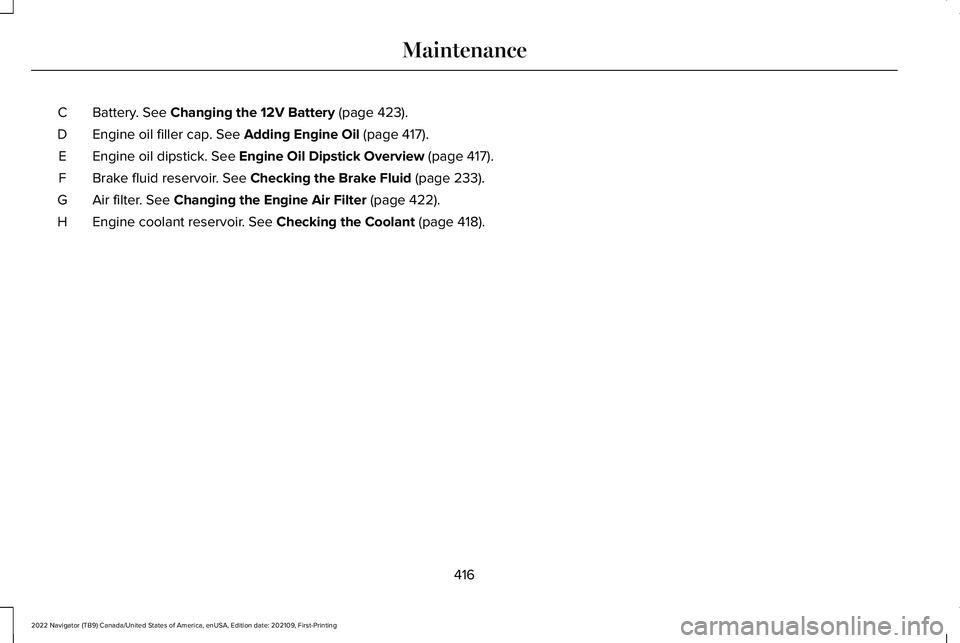
Battery. See Changing the 12V Battery (page 423).
C
Engine oil filler cap.
See Adding Engine Oil (page 417).
D
Engine oil dipstick.
See Engine Oil Dipstick Overview (page 417).
E
Brake fluid reservoir.
See Checking the Brake Fluid (page 233).
F
Air filter.
See Changing the Engine Air Filter (page 422).
G
Engine coolant reservoir.
See Checking the Coolant (page 418).
H
416
2022 Navigator (TB9) Canada/United States of America, enUSA, Edition date: 202109, First-Printing Maintenance
Page 426 of 646
Engine Coolant Temperature
Management (If Equipped)
WARNING:
To reduce the risk of
crash and injury, be prepared that the
vehicle speed may reduce and the vehicle
may not be able to accelerate with full
power until the coolant temperature
reduces.
If you tow a trailer with your vehicle, the
engine may temporarily reach a higher
temperature during severe operating
conditions, for example ascending a long or
steep grade in high ambient temperatures.
At this time, you may notice the coolant
temperature gauge moves toward the red
zone and a message may appear in the
information display. You may notice a reduction in vehicle speed
caused by reduced engine power in order
to manage the engine coolant temperature.
Your vehicle may enter this mode if certain
high-temperature and high-load conditions
take place. The amount of speed reduction
depends on vehicle loading, grade and
ambient temperature. If this occurs, there is
no need to stop your vehicle. You can
continue to drive.
The air conditioning may automatically turn
on and off during severe operating
conditions to protect the engine from
overheating. When the coolant temperature
decreases to the normal operating
temperature, the air conditioning turns on.
If the coolant temperature gauge moves fully
into the red zone, or if the coolant
temperature warning or service engine soon
messages appear in your information display,
do the following:
1.
Stop your vehicle as soon as it is safe to
do so. Fully apply the parking brake, shift
into park (P) or neutral (N). 2. Leave the engine running until the
coolant temperature gauge needle
returns to the normal position. If the
temperature does not drop after several
minutes, follow the remaining steps.
3. Switch the engine off and wait for it to cool. Check the coolant level.
4. If the coolant level is at or below the minimum mark, add prediluted coolant
immediately.
5. If the coolant level is normal, restart the engine and continue.
ENGINE AIR FILTER
CHANGING THE ENGINE AIR FILTER WARNING:
To reduce the risk of
vehicle damage and personal burn injuries,
do not start your engine with the air
cleaner removed and do not remove it
while the engine is running.
422
2022 Navigator (TB9) Canada/United States of America, enUSA, Edition date: 202109, First-Printing Maintenance
Page 427 of 646
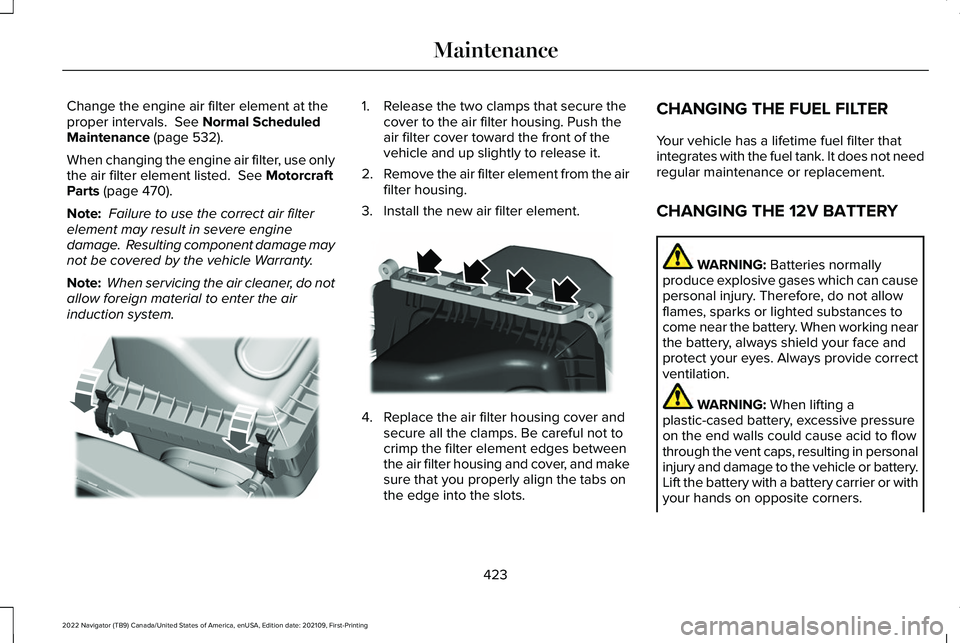
Change the engine air filter element at the
proper intervals. See Normal Scheduled
Maintenance (page 532).
When changing the engine air filter, use only
the air filter element listed.
See Motorcraft
Parts (page 470).
Note: Failure to use the correct air filter
element may result in severe engine
damage. Resulting component damage may
not be covered by the vehicle Warranty.
Note: When servicing the air cleaner, do not
allow foreign material to enter the air
induction system. 1. Release the two clamps that secure the
cover to the air filter housing. Push the
air filter cover toward the front of the
vehicle and up slightly to release it.
2. Remove the air filter element from the air
filter housing.
3. Install the new air filter element. 4. Replace the air filter housing cover and
secure all the clamps. Be careful not to
crimp the filter element edges between
the air filter housing and cover, and make
sure that you properly align the tabs on
the edge into the slots. CHANGING THE FUEL FILTER
Your vehicle has a lifetime fuel filter that
integrates with the fuel tank. It does not need
regular maintenance or replacement.
CHANGING THE 12V BATTERY
WARNING:
Batteries normally
produce explosive gases which can cause
personal injury. Therefore, do not allow
flames, sparks or lighted substances to
come near the battery. When working near
the battery, always shield your face and
protect your eyes. Always provide correct
ventilation. WARNING:
When lifting a
plastic-cased battery, excessive pressure
on the end walls could cause acid to flow
through the vent caps, resulting in personal
injury and damage to the vehicle or battery.
Lift the battery with a battery carrier or with
your hands on opposite corners.
423
2022 Navigator (TB9) Canada/United States of America, enUSA, Edition date: 202109, First-Printing MaintenanceE248801 E248800
Page 435 of 646
CLEANING CHROME, ALUMINIUM OR
STAINLESS STEEL
We recommend that you only use a car
shampoo, a soft cloth and water on bumpers
and other chrome, aluminium or stainless
steel parts.
Note:
For additional information and
assistance, we recommend that you contact
an authorized dealer.
Note: Rinse the area well after cleaning.
Note: Do not use abrasive materials, for
example steel wool or plastic pads, as they
can scratch these surfaces.
Note: Do not use chrome cleaner, metal
cleaner or polish on wheels or wheel covers.
CLEANING WHEELS
Only use a recommended wheel and tire
cleaner to clean the wheels weekly. For
additional information and assistance, we
recommend that you contact an authorized
dealer. 1.
Use a sponge to remove heavy deposits
of dirt and brake dust.
2. Rinse well after cleaning.
Note: Do not apply a cleaning chemical to
warm or hot wheel rims and covers.
If you intend on parking your vehicle for an
extended period after cleaning the wheels
with a wheel cleaner, drive your vehicle for
a few minutes before parking your vehicle.
This reduces the risk of corrosion of the
brake discs, brake pads and linings.
Do not clean the wheels when they are hot.
Note: Some car washes could damage
wheel rims and covers.
Note: Using non-recommended cleaners,
harsh cleaning products, chrome wheel
cleaners or abrasive materials could
damage wheel rims and covers.
CLEANING THE ENGINE
COMPARTMENT
Use a vacuum cleaner to remove debris from
the screen area below windshield. Note:
If you are not familiar with the parts
around the engine do not wash the engine
compartment. Avoid frequent engine
washes.
When washing the engine compartment:
• Never wash or rinse the engine while it
is hot or running.
• Never wash or rinse any ignition coil,
spark plug wire or spark plug well.
• Cover the battery, power distribution box,
and air filter assembly to prevent water
damage.
Note: If your vehicle has an engine cover
remove the cover before application of
shampoo and degreaser.
• Spray an approved engine shampoo and
degreaser on all parts that require
cleaning and rinse with water.
CLEANING STRIPES OR GRAPHICS
It is recommended to wash your vehicle by
hand however, pressure washing may be
used under the following conditions:
431
2022 Navigator (TB9) Canada/United States of America, enUSA, Edition date: 202109, First-Printing Vehicle Care